All Activity
- Today
-

how to install armbian on mx10 f3 (tv stick)?
Nick A replied to Maxim Shell's topic in Allwinner CPU Boxes
Maybe this will work https://xdaforums.com/t/how-to-use-otg-in-twrp.3097688/ -

Expected default graphics acceleration for RK3588?
usual user replied to gpupoor's topic in Orange Pi 5 Plus
I don't really do anything special. Since the architecture of the devices I use is quite up-to-date, development for their support is also at the bleeding edge. It is therefore also of essential importance to use the latest software releases. My chosen distribution provides me with this quite promptly. But that's where it ends. I receive no support at all for using my devices there. She doesn't even provide me with firmware for my devices to start the system. The kernel provided by my distribution is only the one based on the currently released mainline source code. So if I want to use functionalities whose development is still in progress, I have to build the kernel myself with the appropriate patches, which I do regularly (E.g., I'm just building one so I can play around with RGA3). I haven't done much work in user space for a long time, but recently I've been building the FFmpeg package myself again since the availability of RKVDEC2. v4l-request works out-of-the-box with the GStreamer framework, but for FFmpeg, it will probably take some time until support is available in a release version. OK, the kernel is done. Now I have to deal with another video device: lrwxrwxrwx 1 root root 12 Dec 7 22:44 platform-fdb50000.video-codec-video-index0 -> ../../video3 lrwxrwxrwx 1 root root 12 Dec 7 22:44 platform-fdb60000.rga-video-index0 -> ../../video2 lrwxrwxrwx 1 root root 12 Dec 7 22:44 platform-fdb80000.rga-video-index0 -> ../../video0 lrwxrwxrwx 1 root root 12 Dec 7 22:44 platform-fdba0000.video-codec-video-index0 -> ../../video4 lrwxrwxrwx 1 root root 12 Dec 7 22:44 platform-fdc38100.video-codec-video-index0 -> ../../video1 lrwxrwxrwx 1 root root 12 Dec 7 22:44 platform-fdc70000.video-codec-video-index0 -> ../../video5 v4l2-compliance-odroid-m2.log -

Expected default graphics acceleration for RK3588?
gpupoor replied to gpupoor's topic in Orange Pi 5 Plus
@usual user I've got a good handle on your setup through random posts, but I haven't been able to figure out how you got there. Is there something Armbian available that I'm missing, or are you following the Fedora docs, or your own process? Hoping there's something published that I haven't yet found. -
https://users.armbian.com/users.armbian.com/jock/web/rk3318/ It seems like old firmware is stored here.
-

OrangePi Zero LTS ili9341 TFT LCD (and later OrangePi Zero 3)
Jeffrey replied to robertoj's topic in Allwinner sunxi
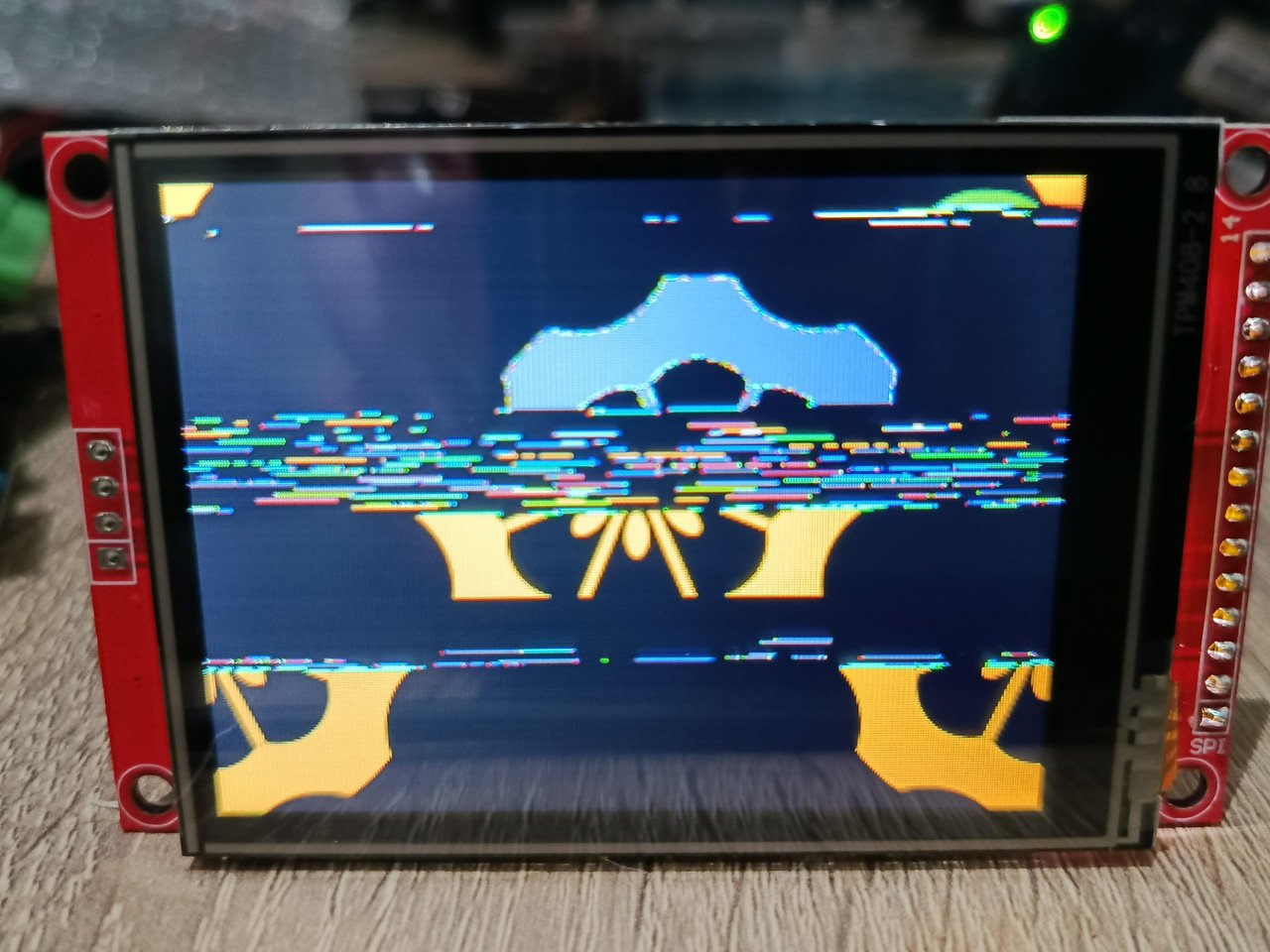
Well I got it to display something, it isn't exactly what I want but I am just happy I got it to do something. I decided to try with the orangepi image from their website "Orangepizero3_1.0.2_ubuntu_jammy_desktop_xfce_linux6.1.31.img". I was going to share image from what it's displaying but for some reason I keep getting an error trying to upload. Basically it's showing the orangepi boot logo but then all messed up, it's all over the place. ------ edit got image to upload. ------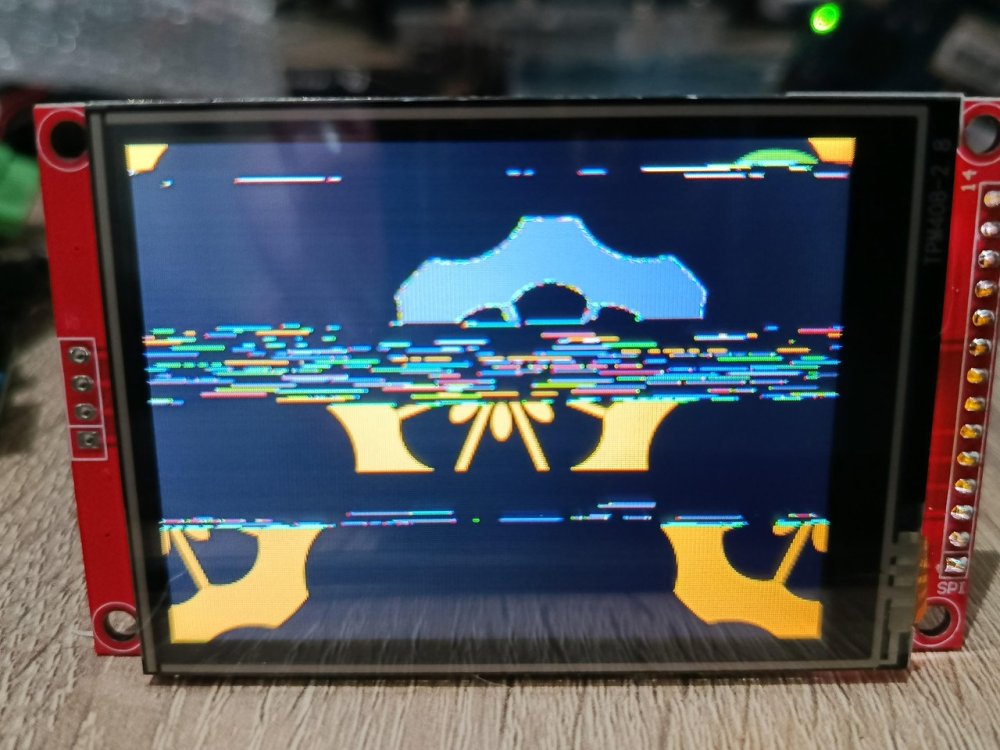
-
 But if that were the case, simply leaving it powered off for a while and then turning it back on should fix it, but it doesn't. As I mentioned, I have to re-flash them from scratch with Android before I can reinstall Armbian. Additionally, the boards are completely exposed (out of the casing), with a heatsink on the SoC and proper ventilation. The power supply shouldn't be the issue either, as it is also fully ventilated.
 -
posting output of : armbianmonitor -u Helps with support.
-
 check you power supply and soc temps
 -
Hello storz, I wonder if you ever managed to get this to work. I used to have this working, but not anymore, and I wonder if I can make it work again. I have an Anker A8312 USB-C to HDMI adapter (which, like all similar adapters, really does DisplayPort in Alt mode over USB-C, and from there converts to HDMI). I previously used this on my PBP with Armbian Focal, and it worked fine just so long as I ran GNOME on X.org, as opposed to Wayland. I was able to connect an external monitor via an HDMI cable, it showed up in the GNOME display settings, and I was able to use it as one would expect. I unfortunately have a hard time finding out the exact kernel version I used at the time, but I believe it was a 4.9 rockchip kernel. I recently reinstalled my PBP using Armbian Noble and apparently there's a kernel regression that causes the adapter to not be recognised anymore. On a 6.1 kernel (which is what shipped with Armbian Noble as it came out), the device is not recognised at all. On a 6.12 kernel (currently available via updates, at the time of writing), the device does show up in lsusb, but only as a "billboard device" which means that the device wasn't correctly switched into DP Alt mode and is thus unusable for connecting a screen. I am still on GNOME on X.org, I still use the same adapter, and I still connect to the same monitor with the same cable as before. So with all other variables being identical, I do strongly suspect this to be a kernel or perhaps a firmware issue. Perhaps you (or someone else) have any pointers that might help me move towards getting this working again. I'd be most grateful for those. Thanks! Cheers, Florian
-
While doing various tests, also other bootloader than EDK2-UEFI v1.1 that I had in eMMC, I discovered that with 2026.01-rc2_armbian-2026.01-rc2-S365a-Pa203-He3cc-V062a-Bbf55-R448a kernel 6.18.0-rc7-edge-rockchip64 did not find/enable audio via HDMI. I moved the computer to other room where I rely on the speakers in the monitor, else I would not have discovered it as I also use networked pulseaudio. What works is 2025.01-armbian-2025.01-S6d41-Pdb4b-H2194-V062a-Bb703-R448a, so sort of last-known-good, got that via: sudo apt install linux-u-boot-nanopi-r6c-current=25.8.1 and wrote the binary with dd to eMMC Another issue is that the monitor does get out of sleep too late, so the loglevel=7 effect can only be seen on extra serial console, whereas with the UEFI bootloader, the HDMI gets always initalized properly, so before kernel is loaded. Note that this is with booting via grub. So with EDK2-UEFI v1.1 bootloader, I get a normal Debian graphical kernel selection menu, like on x86-64. With Opensuse Tumbleweed it is slightly different, as that also automatically duplicates on serial console (if 't' is pressed , from 'text'). So this is actually quite ideal. The only disadvantage is that it does not want to store boot entries (but works on ROCK5B in SPI-flash). I probably need an own build on SD-card first to see how 2026.01 (or later) can do the same as EDK2-UEFI v1.1 more or less. I should note that with EDK2-UEFI v1.1 bootloader, I do not load the DTB that comes with the kernel version. I used the setting 'vendor' or 'mainline' in the UEFI settings, that gets stored well actually. Now with the 25.8.1 U-Boot, I manually added a devitree loader line in grub.cfg, but that will be overwritten, so need to see what makes sense.
-
Device: A95X F1 TV Box SoC: Amlogic S905W OS: Armbian Linux Server (v6.12 and v6.18) & Desktop versions. Installation: To NAND/eMMC. The Issue: I am deploying about 10 units. The installation to NAND goes smoothly, and the system boots correctly. However, after running perfectly for a few hours, the devices crash: Video output goes to a black screen. Network is dead (No SSH, No PING). Power cycling the device does not recover the system; it remains in this "bricked" state. Recovery Method: Once the device crashes, I cannot simply reinstall Armbian. I am forced to: Flash the stock Android firmware using the USB Burning Tool. Reinstall Armbian from scratch. Troubleshooting done: Tested on multiple units (10 different boxes). Tested over a period of one month with various incremental updates. Tested both Server and Desktop images. Result remains the same: corruption/crash after a few hours of uptime. ¿Some help?
-

how to install armbian on mx10 f3 (tv stick)?
Maxim Shell replied to Maxim Shell's topic in Allwinner CPU Boxes
@Nick Aforgot to add, it has allwinner h313, also how do you backup or dump stock? I need it so I will be able to return if something won't work. Also thanks for help. -
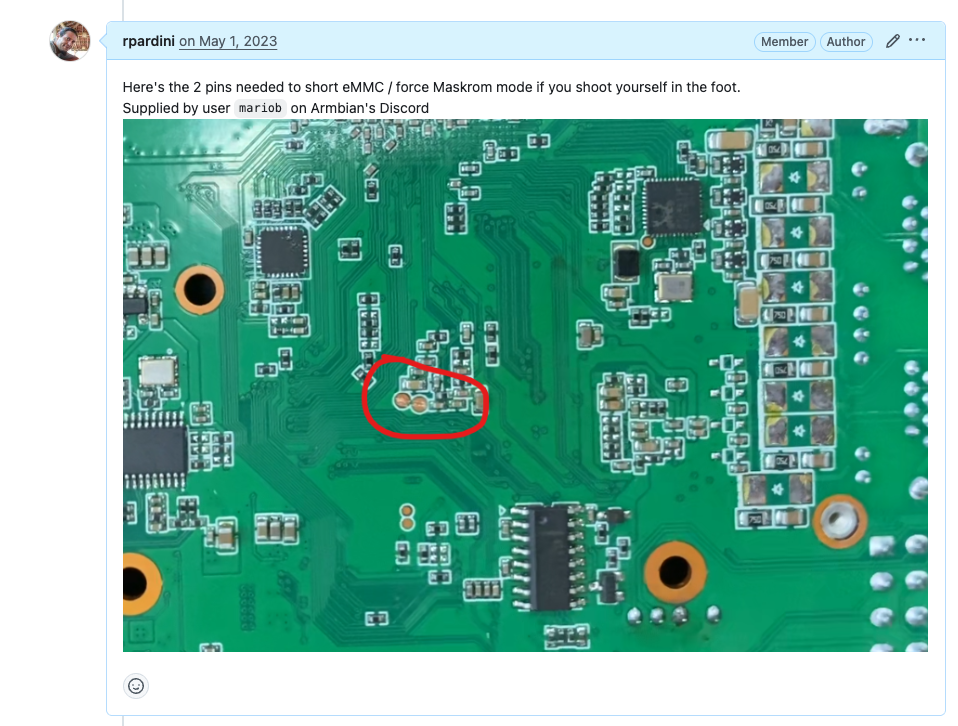
From https://github.com/armbian/build/pull/5056#issuecomment-1529793978
-
 I fixed my i2c gpio ldo regulator issue by disabling the axp_gpio in the device tree. &axp_gpio { status = "disabled"; }; The separate driver must have been rewriting the registers configured by the regulators driver. Now back to the LCD
 -

Help wanted to test a new OpenVFD alternative
snowbody replied to Jean-Francois Lessard's topic in Amlogic meson
display-service -c [INFO] all digits and leds on /usr/sbin/display-service: 116: cannot create /sys/class/leds/display/message: Permission denied == could it be the the tm16xx module does not create "message", I have seen (Hqnicolas) succes, but guess the "message" got created compiling tm16xx and(!) patching with https://lwn.net/Articles/1027664/ . did not solve this (got errors). Maybe related to kernel version? : 6.12.58-current-rockchip64. -
More info, but not yet the video that shows what pins.
-
No. That's how to do it when the bootloader works. My memory is slowly coming back, there's 2 pins on the back you need to short. But what pins I don't know. Let me open one and see if I remember more...
-
I send them a mail to ask. Will let you know when I hear something, also asked someone who also got the video. This happened a lot to me when testing tons of images for these boards. But haven't been doing that lately, time to start again.
-
Perhaps this one? https://www.youtube.com/watch?v=yhZahmbb03Q
-
Hi. Forgive me for my memory is very bad. There is a video somewhere on how to unbrick mekotronics Rockchip devices. I've been searching for it the last half hour but can't find it. I know I've got it on my pc somewhere. Email mekotronics and they'll give you a link to it. If I find it I'll share it.
-
Forgot user/password of S9xx tv box with armbian
Michael Robinson replied to Thais Brollo's topic in Amlogic CPU Boxes
First thing backup all the configs with another linux computer. Then you can try to chroot the sd card on the other linux computer and run passwd as root. -
Expected default graphics acceleration for RK3588?
gpupoor replied to gpupoor's topic in Orange Pi 5 Plus
Still working through things, but FYI I was able to get 6.18 going on Ubuntu with some small effort. GPU needs work but still beats CPU, NPU looks great. -
I installed ambian in this tv box to run klipper for my 3d printer, but its been a years since I last used it and I totally forgot what was the user I created. I really didn't want to wipe the SD card because of my 3d printer's config files etc. Is there anything I can do to retrieve the user and password? Thanks.
- Yesterday
-
Help wanted to test a new OpenVFD alternative
snowbody replied to Jean-Francois Lessard's topic in Amlogic meson
Always read everything ... (sorry) : make service-install (instead of make) will solve error and compile display-service (what I wanted) -
Help wanted to test a new OpenVFD alternative
snowbody replied to Jean-Francois Lessard's topic in Amlogic meson
root@homeassistant:/usr/src/tm16xx-display# make make EXTRA_CFLAGS="-DCONFIG_TM16XX -DCONFIG_TM16XX_KEYPAD -DCONFIG_TM16XX_I2C -DCONFIG_TM16XX_SPI -include /usr/src/tm16xx-display/drivers/auxdisplay/tm16xx_compat.h -I/usr/src/tm16xx-display/include/" -C /lib/modules/6.12.58-current-rockchip64/build M=/usr/src/tm16xx-display/drivers/auxdisplay CONFIG_TM16XX=m CONFIG_TM16XX_KEYPAD=y CONFIG_TM16XX_I2C=m CONFIG_TM16XX_SPI=m CONFIG_LINEDISP=m modules make[1]: Entering directory '/usr/src/linux-headers-6.12.58-current-rockchip64' CC [M] /usr/src/tm16xx-display/drivers/auxdisplay/line-display.o CC [M] /usr/src/tm16xx-display/drivers/auxdisplay/tm16xx_core.o CC [M] /usr/src/tm16xx-display/drivers/auxdisplay/tm16xx_keypad.o LD [M] /usr/src/tm16xx-display/drivers/auxdisplay/tm16xx.o CC [M] /usr/src/tm16xx-display/drivers/auxdisplay/tm16xx_i2c.o CC [M] /usr/src/tm16xx-display/drivers/auxdisplay/tm16xx_spi.o MODPOST /usr/src/tm16xx-display/drivers/auxdisplay/Module.symvers CC [M] /usr/src/tm16xx-display/drivers/auxdisplay/line-display.mod.o In file included from /usr/src/tm16xx-display/drivers/auxdisplay/line-display.mod.c:2: /usr/src/tm16xx-display/drivers/auxdisplay/line-display.mod.c:13:41: error: expected ‘)’ before ‘LINEDISP’ 13 | KSYMTAB_FUNC(linedisp_attach, "_gpl", ""LINEDISP"");