Meestor_X
-
Posts
128 -
Joined
-
Last visited
Content Type
Forums
Store
Crowdfunding
Applications
Events
Raffles
Community Map
Everything posted by Meestor_X
-
Dec 25th image for Cubie a5e is not a bootable image
Meestor_X replied to Meestor_X's topic in Allwinner sunxi
This is way too much work. Basically I just came here to say that prebuilt images of trunk 100 work, 130 and 150 don't. So... Just a PSA to let people know that they likely won't be able to use those prebuilt images. It's probably moot anyway as I expect there aren't any changes that fix the main issues. -
Dec 25th image for Cubie a5e is not a bootable image
Meestor_X replied to Meestor_X's topic in Allwinner sunxi
Found the method. A program called anylinuxfs will mount the EXT4 sd card on a Mac. However, even on the Trunk 100, I don't see armbianEnv.txt in /boot. Where do I find it?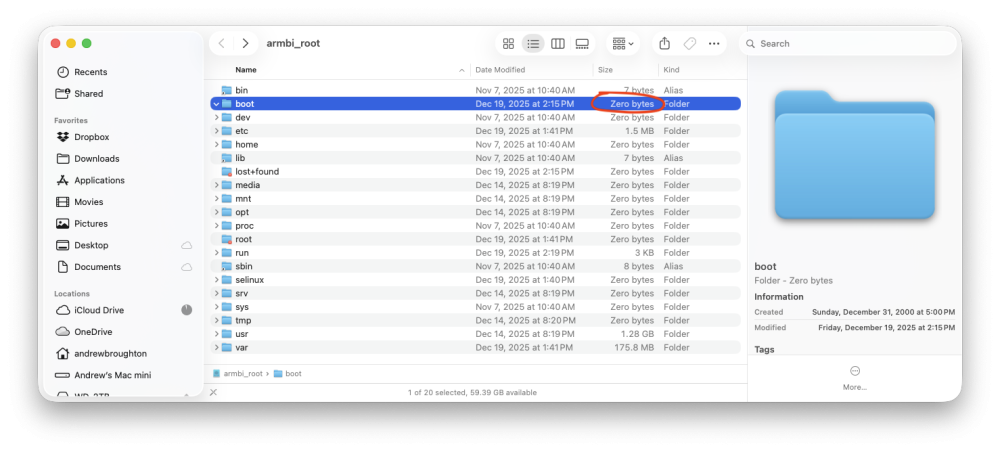
-
Dec 25th image for Cubie a5e is not a bootable image
Meestor_X replied to Meestor_X's topic in Allwinner sunxi
I didn't know it was possible to edit a file within a boot image... I'm using MacOS, how would I do that? -
Dec 25th image for Cubie a5e is not a bootable image
Meestor_X replied to Meestor_X's topic in Allwinner sunxi
Fair enough. "WRITE the image" would probably be clearer. The image file is from the repository, I'm using Balena to WRITE the image (rather than MAKE) to the SD card. I'm sure you knew what I meant, but I agree that clarity is important. BTW - Where would I find the changelogs for these trunks? -
Dec 25th image for Cubie a5e is not a bootable image
Meestor_X replied to Meestor_X's topic in Allwinner sunxi
---- Opened the serial port /dev/tty.PL2303G-USBtoUART8430 ---- U-Boot SPL 2026.01-rc4_armbian-2026.01-rc4-S0e0a-Peafc-H5aa4-Vd0f6-B4d1d-R448a (Dec 29 2025 - 03:26:30 +0000) DRAM: 2048 MiB Trying to boot from MMC1 NOTICE: BL31: v2.12.0(debug):armbian NOTICE: BL31: Built : 03:26:10, Dec 29 2025 NOTICE: BL31: Detected Allwinner A523 SoC (1890) NOTICE: BL31: Found U-Boot DTB at 0xa0ab9f8, model: Radxa Cubie A5E INFO: GICv3 without legacy support detected. INFO: ARM GICv3 driver initialized in EL3 INFO: Maximum SPI INTID supported: 287 INFO: Configuring SPC Controller INFO: BL31: Platform setup done INFO: BL31: Initializing runtime services INFO: BL31: cortex_a55: CPU workaround for erratum 1530923 was applied INFO: PSCI: Suspend is unavailable INFO: BL31: Preparing for EL3 exit to normal world INFO: Entry point address = 0x4a000000 INFO: SPSR = 0x3c9 ns16550_serial serial@2500000: pinctrl_select_state_full: uclass_get_device_by_phandle_id: err=-19 U-Boot 2026.01-rc4_armbian-2026.01-rc4-S0e0a-Peafc-H5aa4-Vd0f6-B4d1d-R448a (Dec 29 2025 - 03:26:30 +0000) Allwinner Technology CPU: Allwinner A523 (SUN55I) Model: Radxa Cubie A5E DRAM: 2 GiB sunxi_set_gate: (CLK#35) unhandled Core: 77 devices, 22 uclasses, devicetree: separate WDT: Not starting watchdog@2050000 MMC: mmc@4020000: 0 Loading Environment from FAT... Unable to read "uboot.env" from mmc0:1... In: serial@2500000 Out: serial@2500000 Err: serial@2500000 Net: eth0: ethernet@4500000 starting USB... sun4i_usb_phy phy@4100400: External vbus detected, not enabling our own vbus USB EHCI 1.00 USB OHCI 1.0 USB EHCI 1.00 USB OHCI 1.0 Bus usb@4101000: 1 USB Device(s) found Bus usb@4101400: 1 USB Device(s) found Bus usb@4200000: 1 USB Device(s) found Bus usb@4200400: 1 USB Device(s) found scanning usb for storage devices... 0 Storage Device(s) found Hit any key to stop autoboot: 0 switch to partitions #0, OK mmc0 is current device Scanning mmc 0:1... Found U-Boot script /boot.scr 4641 bytes read in 3 ms (1.5 MiB/s) ## Executing script at 4fc00000 U-boot loaded from SD Boot script loaded from mmc 190 bytes read in 2 ms (92.8 KiB/s) The file sun55i-a527-radxa-a5e.dtb was not found in the path /dtb/allwinner Load fdt: /dtb/allwinner/sun55i-a527-cubie-a5e.dtb 33947 bytes read in 6 ms (5.4 MiB/s) Working FDT set to 4fa00000 Failed to load '/dtb/overlay/sun55i-a527-fixup.scr' 15452067 bytes read in 642 ms (23 MiB/s) 31721984 bytes read in 1315 ms (23 MiB/s) Moving Image from 0x40080000 to 0x40200000, end=0x42130000 ## Loading init Ramdisk from Legacy Image at 4ff00000 ... Image Name: uInitrd Image Type: AArch64 Linux RAMDisk Image (gzip compressed) Data Size: 15452003 Bytes = 14.7 MiB Load Address: 00000000 Entry Point: 00000000 Verifying Checksum ... OK ## Flattened Device Tree blob at 4fa00000 Booting using the fdt blob at 0x4fa00000 Working FDT set to 4fa00000 Loading Ramdisk to 49143000, end 49fff763 ... OK Loading Device Tree to 00000000490d2000, end 0000000049142fff ... OK Working FDT set to 490d2000 Starting kernel ... Never goes any further. It doesn't get an IP so I can't SSH into it. The "heatbeat" LED does keep flashing, though... Comparing a the trunk 100 which DOES go on to the login prompt and finishes normally: ---- Opened the serial port /dev/tty.PL2303G-USBtoUART8430 ---- U-Boot SPL 2026.01-rc4_armbian-2026.01-rc4-Sd24f-P0000-He0b4-V52aa-Bbf55-R448a (Dec 19 2025 - 03:11:57 +0000) DRAM: 2048 MiB Trying to boot from MMC1 NOTICE: BL31: v2.12.0(debug):armbian NOTICE: BL31: Built : 03:11:45, Dec 19 2025 NOTICE: BL31: Detected Allwinner A523 SoC (1890) NOTICE: BL31: Found U-Boot DTB at 0xa0ab9f8, model: Radxa Cubie A5E INFO: GICv3 without legacy support detected. INFO: ARM GICv3 driver initialized in EL3 INFO: Maximum SPI INTID supported: 287 INFO: Configuring SPC Controller INFO: BL31: Platform setup done INFO: BL31: Initializing runtime services INFO: BL31: cortex_a55: CPU workaround for erratum 1530923 was applied INFO: PSCI: Suspend is unavailable INFO: BL31: Preparing for EL3 exit to normal world INFO: Entry point address = 0x4a000000 INFO: SPSR = 0x3c9 ns16550_serial serial@2500000: pinctrl_select_state_full: uclass_get_device_by_phandle_id: err=-19 U-Boot 2026.01-rc4_armbian-2026.01-rc4-Sd24f-P0000-He0b4-V52aa-Bbf55-R448a (Dec 19 2025 - 03:11:57 +0000) Allwinner Technology CPU: Allwinner A523 (SUN55I) Model: Radxa Cubie A5E DRAM: 2 GiB sunxi_set_gate: (CLK#35) unhandled Core: 77 devices, 22 uclasses, devicetree: separate WDT: Not starting watchdog@2050000 MMC: mmc@4020000: 0 Loading Environment from FAT... Unable to read "uboot.env" from mmc0:1... In: serial@2500000 Out: serial@2500000 Err: serial@2500000 Net: eth0: ethernet@4500000 starting USB... sun4i_usb_phy phy@4100400: External vbus detected, not enabling our own vbus USB EHCI 1.00 USB OHCI 1.0 USB EHCI 1.00 USB OHCI 1.0 Bus usb@4101000: 1 USB Device(s) found Bus usb@4101400: 1 USB Device(s) found Bus usb@4200000: 1 USB Device(s) found Bus usb@4200400: 1 USB Device(s) found scanning usb for storage devices... 0 Storage Device(s) found Hit any key to stop autoboot: 0 switch to partitions #0, OK mmc0 is current device Scanning mmc 0:1... Found U-Boot script /boot.scr 4641 bytes read in 2 ms (2.2 MiB/s) ## Executing script at 4fc00000 U-boot loaded from SD Boot script loaded from mmc 190 bytes read in 1 ms (185.5 KiB/s) The file sun55i-a527-radxa-a5e.dtb was not found in the path /dtb/allwinner Load fdt: /dtb/allwinner/sun55i-a527-cubie-a5e.dtb 17944 bytes read in 4 ms (4.3 MiB/s) Working FDT set to 4fa00000 Failed to load '/dtb/overlay/sun55i-a527-fixup.scr' 14716909 bytes read in 834 ms (16.8 MiB/s) 31918592 bytes read in 1323 ms (23 MiB/s) Moving Image from 0x40080000 to 0x40200000, end=0x42150000 ## Loading init Ramdisk from Legacy Image at 4ff00000 ... Image Name: uInitrd Image Type: AArch64 Linux RAMDisk Image (gzip compressed) Data Size: 14716845 Bytes = 14 MiB Load Address: 00000000 Entry Point: 00000000 Verifying Checksum ... OK ## Flattened Device Tree blob at 4fa00000 Booting using the fdt blob at 0x4fa00000 Working FDT set to 4fa00000 Loading Ramdisk to 491f7000, end 49ffffad ... OK Loading Device Tree to 000000004918a000, end 00000000491f6fff ... OK Working FDT set to 4918a000 Starting kernel ... Very little is different, except that the ftd is about twice the size... -
Dec 25th image for Cubie a5e is not a bootable image
Meestor_X replied to Meestor_X's topic in Allwinner sunxi
Huh? How can you create logs when you can't make an image? -
Dec 25th image for Cubie a5e is not a bootable image
Meestor_X replied to Meestor_X's topic in Allwinner sunxi
Trunk 151 has the same problem. -
Note that if you enable USB3, it disables PCIe. That's a hardware limitation of the a5e, I'm told...
-
Dec 25th image for Cubie a5e is not a bootable image
Meestor_X replied to Meestor_X's topic in Allwinner sunxi
But... every other image I've ever created with Balena has been fine? Dozens of armbian images including trunk 100... Trunk 130 image is working fine for you on the a5e? -
Dec 25th image for Cubie a5e is not a bootable image
Meestor_X replied to Meestor_X's topic in Allwinner sunxi
-
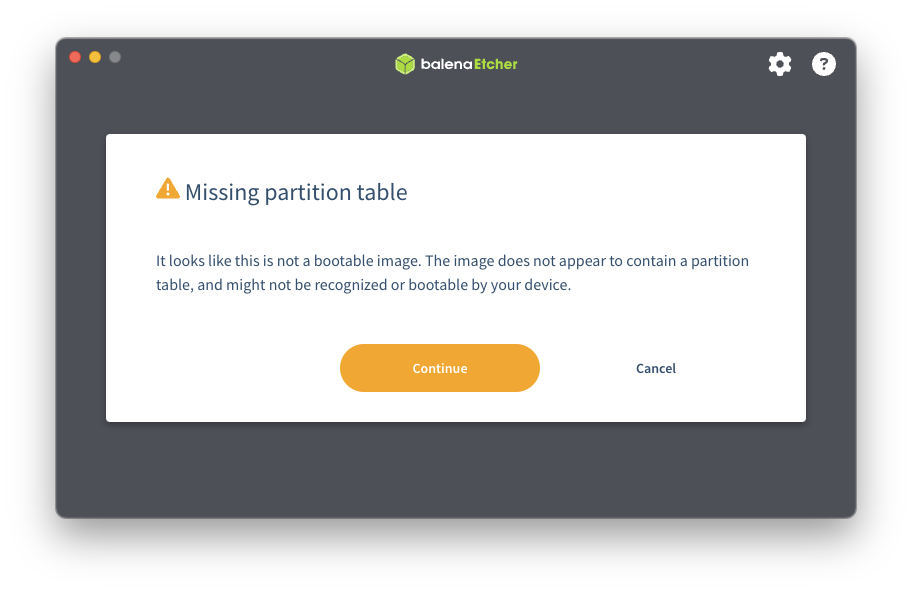
PSA - trunk 130 is not a bootable image. trunk 100 works fine.
-
Maybe not? root@rp-satellite-01:~# for X in 0 1;do echo "mmcblk${X}: $(cat /sys/block/mmcblk${X}/device/type)";done mmcblk0: SD mmcblk1: SD root@rp-satellite-01:~# lsblk NAME MAJ:MIN RM SIZE RO TYPE MOUNTPOINTS sdb 8:16 1 238.3G 0 disk └─sdb1 8:17 1 238.3G 0 part /media/usb mmcblk1 179:0 0 59.6G 0 disk └─mmcblk1p1 179:1 0 59G 0 part /var/log.hdd / mmcblk0 179:32 0 3.6G 0 disk └─mmcblk0p1 179:33 0 3.5G 0 part zram0 252:0 0 233.1M 0 disk [SWAP] zram1 252:1 0 50M 0 disk /var/log zram2 252:2 0 0B 0 disk root@rp-satellite-01:~#
-
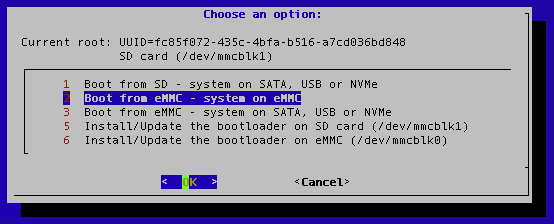
Ok, I only use this utility on Radxa products ATM, and AFAIK they can't boot from USB without a bootloader on the eMMC or SD card. If I had an image on a USB flash drive attached to the SBC, where would armbian-install expect to find it mounted? And then, would choice #1 or #3 use the SD card or the USB image? Also, should option #2 not show? I don't know how it would copy from the eMMC to the eMMC... The operation of the script works well, but the menu could be much clearer for the Radxa products.
-
That seems to work! Let me ask you this, though. Can you clarify what selection #2 means? Selection #1 will copy the eMMC image to the SD card. Selection #3 will copy the SD card to the eMMC (shouldn't the text read "Boot from eMMC - system on SD Card, SATA, USB or NVMe") What is selection #2 for?
-
Screenshot is in the original post, it still looks the same now.
-
Thank you. What do you suggest I do? I'm not sure that the "update bootloader" choices are showing the correct devices either.
-
If I understood a bit better what the script is doing, i.e. this part: Then maybe I could help with updating it to work with the Radxa products.
-
Correct. Many Radxa SBC’s work this way. RockPi-S, RockPi-S0, RockPi-E, E20c, e25c, e52c, rock-pi-zero, etc.
-
df -h Filesystem Size Used Avail Use% Mounted on udev 159M 0 159M 0% /dev tmpfs 47M 4.8M 42M 11% /run /dev/mmcblk1p1 58G 3.4G 53G 7% / tmpfs 234M 76K 233M 1% /dev/shm tmpfs 5.0M 0 5.0M 0% /run/lock tmpfs 234M 4.0K 234M 1% /tmp /dev/zram1 47M 2.4M 42M 6% /var/log /dev/mmcblk0p1 3.4G 2.0G 1.3G 62% /media/emmc tmpfs 47M 0 47M 0% /run/user/0 lsblk NAME MAJ:MIN RM SIZE RO TYPE MOUNTPOINTS mmcblk1 179:0 0 59.6G 0 disk └─mmcblk1p1 179:1 0 59G 0 part /var/log.hdd / mmcblk0 179:32 0 3.6G 0 disk └─mmcblk0p1 179:33 0 3.5G 0 part /media/emmc zram0 252:0 0 233.1M 0 disk [SWAP] zram1 252:1 0 50M 0 disk /var/log zram2 252:2 0 0B 0 disk lsb_release -a No LSB modules are available. Distributor ID: Debian Description: Armbian 25.8.1 bookworm Release: 12 Codename: bookworm uname -r 6.12.44-current-rockchip64 I don't have an easy way to do the serial terminal thing to check U-Boot. I have updated it to the "latest" using armbian-install, however...
-
Oh! I guess I reported this same issue a while ago - never got an answer. Is there a github repo to report issues with this program?
-
Can someone explain these lines? # find real mmcblk device numbered 0, 1, 2 for eMMC, SD for ret in $(find /dev -name 'mmcblk[0-2]' -and -type b) do if [ -b ${ret}boot0 ];then emmc_dev=$ret else sd_dev=$ret fi done On the RockPi-S, $ret would equal mmcblk0 and mmcblk1 which are the eMMC and SD card, respectively. There's no device called "mmcblk0boot0" or "mmcblk1boot0".
-
Is there a github repo for armbian-install? On the RockPi-S with both eMMC and SD cards installed, it's showing the devices backwards or un-named in the menu. I'd like to open an issue report to see if it can be fixed.
-
Coming back to this... I'm not having any luck getting overlays to work, but I'll need to get out my serial logger to see what's wrong I guess. I'm trying to get the USB-C into host mode on my RockPi-S. I can do it by editing the rk3308-rock-pi-s.dtb file directly, but not using an overlay file. Here's the overlay file I've tried (usbc-host.dts): /dts-v1/; / { fragment@0 { target-path = "/usb@ff400000"; __overlay__ { dr_mode = "host"; }; }; }; and /dts-v1/; /plugin/; / { fragment@0 { target-path = "/usb@ff400000"; __overlay__ { dr_mode = "host"; }; }; }; Tried using: armbian-add-overlay usbc-host.dts as well as compiling the overlay to a .dtbo and adding the line directly into armbianEnv.txt No joy either way... Also, does anyone know why some .dtbo files also have the line /plugin/; below /dts-v1/; ?
-
Audio no longer works after updating to Armbian 24.8.2
Meestor_X replied to PHLAK's topic in Radxa Rock Pi S
Ok, this is weird (or maybe expected, I'm a newbie to all of this)... I installed fresh 25.2.3/6.12.22, and audio didn't work. Came here and posted. Then I used armbian-config to roll back the kernel to 24.11.3/6.12.11. After that, audio worked again. Then, I ran apt update && apt upgrade and still audio kept working. I'm right back to 25.2.3/6.12.22 it seems? cat /run/motd.dynamic _ _ _ /_\ _ _ _ __ | |__(_)__ _ _ _ / _ \| '_| ' \| '_ \ / _` | ' \ /_/ \_\_| |_|_|_|_.__/_\__,_|_||_| v25.2.3 for Rockpi S running Armbian Linux 6.12.22-current-rockchip64 Packages: Debian stable (bookworm) IP addresses: (LAN) IPv4: 192.168.1.35, 10.42.0.1 IPv6: 2001:56a:7490:ce00:8dd8:6d59:ca7a:fe87 (WAN) xxx.xxx.xxx.xxx Performance: Load: 47% Up time: 0 min Memory usage: 31% of 466M CPU temp: 46°C Usage of /: 10% of 59G Commands: Configuration : armbian-config Monitoring : htop uname -a shows: uname -a Linux rp-satellite-xx 6.12.22-current-rockchip64 #1 SMP PREEMPT Mon Apr 7 08:08:37 UTC 2025 aarch64 GNU/Linux aplay -l shows: aplay -l **** List of PLAYBACK Hardware Devices **** card 0: pcm5102a [pcm5102a], device 0: ff300000.i2s-pcm5102a-hifi pcm5102a-hifi-0 [ff300000.i2s-pcm5102a-hifi pcm5102a-hifi-0] Subdevices: 1/1 Subdevice #0: subdevice #0 card 1: analog [analog], device 0: ff320000.i2s-rk3308-hifi ff560000.codec-0 [ff320000.i2s-rk3308-hifi ff560000.codec-0] Subdevices: 1/1 Subdevice #0: subdevice #0 So, I'm running 6.12.22, and audio is working, but had to do it via apt-upgrade. Any idea why that worked? -
No Audio on Kernel: 6.12.15 and Armbian 25.2.2 Bookworm Minimal
Meestor_X replied to Truenox's topic in Radxa Rock Pi S
Does 25.2.1/6.12.12 work?