


sven-ola
-
Posts
84 -
Joined
-
Last visited
-
Found an error in the "use proprietary GPU driver for Spacemit K1" script. Because I cannot edit here is the corrected install script. spacemit-gpu-addon.sh
-
Hello @lewa_j! Thanks for the explanation. As long as https://docs.mesa3d.org/drivers/powervr.html lists BXE-2-32 as unsupported we stick to the blobs. Of course, you are free to check this for youself, see compiling "getting started" above. HTH // Sven-Ola
-
@Łukasz Żywczyk Currently no prebuild nightly images. You are on your own. Grab a Debian Trixie on 64 bit PC (8G RAM, 16G Disk), then sudo apt-get install docker.io qemu-user git # add yourself to group docker, logout && login git clone https://github.com/armbian/build.git cd build && ./compile.sh BOARD=orangepirv2 BRANCH=current RELEASE=trixie \ BUILD_MINIMAL=yes KERNEL_CONFIGURE=no KERNEL_BTF=no KERNEL_GIT=shallow should build your image in output/images/*.img ready to be used...
-
Hello @lewa_j, there already is a CONFIG_POWERVR_ROGUE=y in the 6.18 kernel. This was required for Wayland and subsequently for Spacemit-GPU-Binary-Support (see https://github.com/armbian/build/pull/9515). What exactly will work additionally with this option (I am not a GPU expert)? Hello @1111Windows, doing "apt-get upgrade" on my GPU demo image this will downgrade the kernel from 6.18.18 to 6.6.99. Probably b/c recently the 6.6.99 was changed "current->legacy" and the 6.18 changed "edge->current". Also, OpiRV2 is not a really / full official Armbian image right now. So we probably need to wait until build pipelines catch up. I'll place a "apt-mark hold linux-image*" on my todo for those images. @maxsub The R2S does not have a NOR flash (or "MTD") that it boots from in the first place? That little project of yours does not look like an Armbian fork ready to be merged in. I may need some time to dig in and understand how it works. Have you considered changing the u-boot enviroment (...that can be save with "env save")?
-
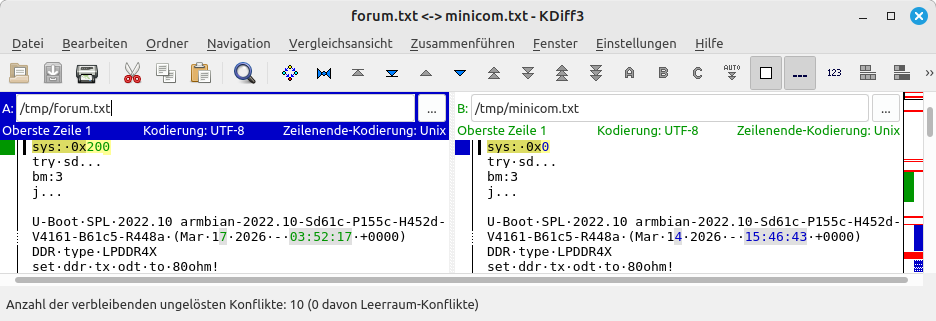
Hello @1111Windows, you are booting an unknown u-boot from NVME that does not find any meaningful data stored on the NVME. You may need to re-insert the SD card or swap to a working SD card or so. I attach the (timestamp stripped for better diff) version from you (forum.txt) and the expected UART output on my RV2 (minicom.txt). The latter I have captured after re-downloading and SD-flashing the mentioned trixie-gnome img which has a root file system with UUID=8f6e5f9c-3108-4e4d-8fbd-10a8295d396e. HTH // Sven-Ola forum.txt minicom.txt
-
Download the RV2 image. It's basically the same plus DKMS (including headers) for building the bcmdhd wifi driver. You need to change the "fdt" line in /boot/extlinux/extlinux.conf for rv2->r2s (DTB file is there), e.g before uploading with mount -o offset=$(( 512 * 8192 )) Armbian-....img /mnt/
-
PCIe is a rabbit hole for it's own. I have a Wifi card that cannot issue in-line-interrupts ("MSI") for some reason so the firmware upload fails, while working fine with same driver in my PC. I simply don't use it. ASPM quirks also seems not to be too uncommon, a simple grep quirk_disable_aspm drivers/pci/quirks.c|wc -l shows 21...
-
@maxsub with a recent kernel, temp and load should be fine. The exiting question is: all 4 Ethernet ports are working?
-
Schematics-wise no - at leasts I don't see a diff in the RV2_SCH.pdf. Electrical-wise probably - other traces, so maybe more or less crosstalk, better or worse gnd and such. From a software perspective: this is PCIE-B and C (while A is unused). That PCIe active state power management seems to be a source of endless pleasure, maybe the NVME vendors all have digested the wrong specs or so. Anyhow: if it works now, it's fine probably.
-
@Curvy Android I don't see meaningful differences in the kernels init msgs for top and bottom PCIe slots - besides that "Buffer I/O error" that leads to the non-working NVME. Besides that, the "faulty power saving mode" line looks familar. I have trouble with my Samsung NVME with that power saving blurb as well. Can you retry with NVME in the top slot and an additional pcie_aspm=off added to your booting SD card in the /boot/extlinux/extlinux.conf file behind append kernel params?
-
@4A studio You can run the spacemit-gpu-addon.sh on forky. This should install the trixie binaries. If there is something that does not work or wants an unavailable depend, you may try recompiling, the source should be with you: apt-get build-dep somepack and apt-get source -b somepack will get you going. If that works, you can tell me and I'll integrate. @Uhtred2 No 1080p youtube for you? Maybe not every codec works. I have tried with German TV, such as Anyhow, the IMG BXE 2-32 GPU is not very fast, only 500 fish with https://webglsamples.org/aquarium/aquarium.html Hopefully, the K3 successor uses something better. @maxsub You sure use our kernels? Can you post "uname -a" output? I tried the R2S image on my RV2 which shows a zero load with "uptime". Also, why do you need to manually boot USB from uboot? That "kydevtool" together with boot switch does not work either?
-
Wrote a script to change an Armbian desktop system for Spacemit GPU drivers and Chromium (attached). Tested with the two pre-installed Gnome images on my site (see https://privat-in.de/ goto Downloads). Some testing results: Spacemit offers Ubuntu noble and Debian trixie *.deb from their Bianbu site http://archive.spacemit.com/ For us, main diff here is Noble=chromium (Spacemit customized version) and Trixie=chromium-browser-stable (older and not customized). We need Wayland for the GPU, X11 does not work. With lightdm, each Wayland login freezes. Thus use gdm3. With gdm3, Xfce4 exits immediately, Kde-plasma shows drawing errors, Cinnamon works to some extend, e.g has video placing and window sizing problems. So the only useable GUI is Gnome. With Chromium under Gnome we can watch Youtube with 1080p (video / audio sync should stablize after some seconds). When doing this, CPU temperature is up to 75°C from the ususal 65°C, power is 4 Watts from the ususal 3 Watts. Script should work on other Spacemit K1 boards as well. If you miss some package from Bianbu, write a wishlist or make an PR on https://codeberg.org/sven-ola/spacemit-mirror spacemit-gpu-addon.sh
-
Addon for @maxsub and the bricked R2S: I tested USB boot from u-boot cmdline on my RV2, and it works. Here's how: usb start setenv devtype usb setenv devnum 0:1 setenv prefix boot/ #setenv fdtfile spacemit/x1_orangepi-r2s.dtb setenv fdtfile spacemit/k1-orangepi-rv2.dtb setenv bootargs "console=ttyS0,115200 root=/dev/sda1" ls ${devtype} ${devnum} ${prefix} load ${devtype} ${devnum} ${ramdisk_addr_r} ${prefix}uInitrd load ${devtype} ${devnum} ${kernel_addr_r} ${prefix}Image load ${devtype} ${devnum} ${fdt_addr_r} ${prefix}dtb/${fdtfile} booti ${kernel_addr_r} ${ramdisk_addr_r} ${fdt_addr_r} In case you have a blank u-boot-env, here's mine attached // HTH printenv.cap
-
@maxsub You mean the boot.cmd (source for boot.scr) from the Xunlong Ubuntu image for R2S? I'll attach it below // HTH boot.cmd
-
@maxsub I was not even aware, that boot from USB is a thing. The RV2 boots from SD via extlinux, here is the relevant uboot output. HTH [ 3.458] Retrieving file: /boot/extlinux/extlinux.conf [ 3.490] 1: Armbian-unofficial [ 3.490] Retrieving file: /boot/uInitrd [ 4.772] Retrieving file: /boot/Image [ 5.767] append: root=UUID=c79489b6-9fea-4a53-a334-d91a0f30843a earlycon=sbi console=tty1 console=ttyS0,115200 logleve l=1 rw no_console_suspend consoleblank=0 fsck.fix=yes fsck.repair=yes net.ifnames=0 splash plymouth.ignore-serial-consol es [ 5.785] Retrieving file: /boot/dtb/spacemit/k1-orangepi-rv2.dtb [ 5.838] Uncompressing Kernel Image [ 6.218] Moving Image from 0x10000000 to 0x200000, end=2c90000 [ 6.245] ## Loading init Ramdisk from Legacy Image at 21000000 ... [ 6.248] Image Name: uInitrd [ 6.251] Image Type: RISC-V Linux RAMDisk Image (gzip compressed) [ 6.258] Data Size: 20347839 Bytes = 19.4 MiB [ 6.263] Load Address: 00000000 [ 6.266] Entry Point: 00000000 Verifying Checksum ... OK [ 6.363] ## Flattened Device Tree blob at 31000000 [ 6.365] Booting using the fdt blob at 0x31000000 [ 6.370] Loading Ramdisk to 7ca0b000, end 7dd72bbf ... OK [ 6.391] Loading Device Tree to 000000007c9eb000, end 000000007ca0a097 ... OK Starting kernel ...
