


sven-ola
-
Posts
68 -
Joined
-
Last visited
Content Type
Forums
Store
Crowdfunding
Applications
Events
Raffles
Community Map
Everything posted by sven-ola
-
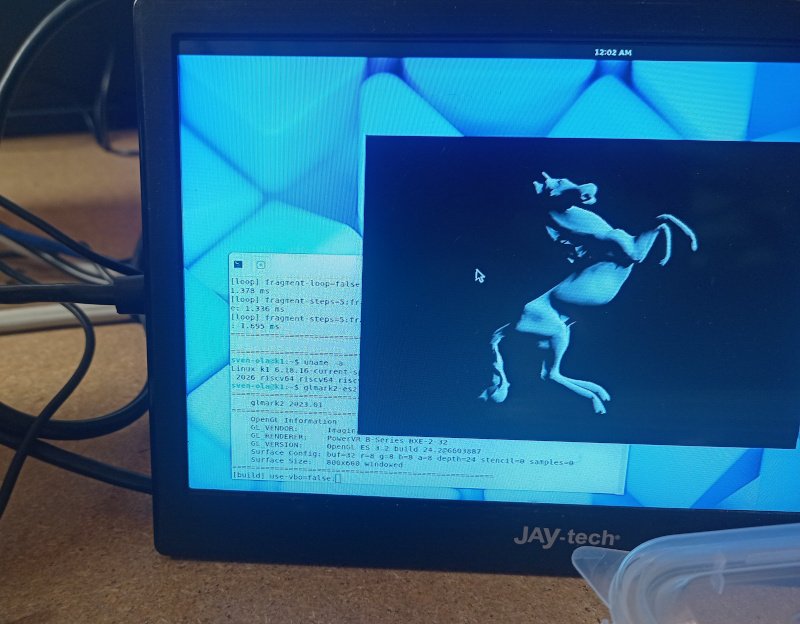
Found the "no Wayland on current kernel" (see new PR https://github.com/armbian/build/pull/9515). glmark2-es2-wayland still reports a 462 score on 800x600. Thus I updated and renamed the image mentioned in previous post with a current 6.18 kernel. You need to switch from 6.6 with /boot/switch-6.18.16-current script, anything else described in the post still is valid. @maxsub Alternatively install a M2(m)-to-M2(e) adapter in the larger bottom M.2 slot and use a NGFF Wifi card, for example RTL8822CE should run
-
@c0rnelius: Thanks for the info, I'll fiddle with the GPU in the meantime. @Cristian Apas: that hack above is necessary if you use the Xunlong Ubuntu userspace. They have replaced every hint on the OEM, which includes the GPU driver name. Hack not necessary if we simply use the Spacemit Bianbu Ubuntu userspace. I hacked an image together with this (see my site https://privat-in.de goto Downloads). It has a glmark2 score of 424 (not very fast). This is not for everybody. I compiled a standard OrangepiRv2 Armbian image with a legacy kernel and put in a Bianbu 3.01 minimal userspace as root. Details from my notes: # Image creation starts with Armbian-Orangepirv2_trixie_legacy_6.6.99_minimal.img Root from https://archive.spacemit.com/image/k1/version/bianbu/v3.0.1/ -> minimal.img -- Default LANG=zh_CN.UTF-8, change: dpkg-reconfigure locales -> en_US.UTF-8 Copy from Armbian: /etc/netplan/10-dhcp-all-interfaces.yaml, /etc/fstab, /boot/*, /lib/modules/*, /etc/modprobe.d/orangepirv2.conf /etc/modules-load.d/orangepirv2.conf Purge spacemit-flash-dtbs (and thereby remove linux-image-6.6.63*) Uploaded this image to https://privat-in.de/ (Downloads) First steps after flashing UART login as root / bianbu apt-get install parted parted /dev/mmcblk0 (or /dev/nvme0n1): resizepart 1 100% resize2fs /dev/mmcblk0p1 (or /dev/nvme0n1p1) apt-get install gnome-core glmark2-es2-wayland adduser a-new-user adduser a-new-user sudo Reboot and login Click on Terminal, run glmark2-es2-wayland Notes: other Spacemit K1 boards can run Bianbu without any changes, this is exclusively for OpiRV2. Expect oopses at every corner... You can install cinnamon-core and use that. Make sure to run cinnamon under gdm3 b/c starting via lightdm does not work well (e.g. menu open freezes). Also, KDE plasma only with screen artifacts and xfce4-wayland simply exits immediately. No other wayland DE tested...
-
Hi @maxsub, two annotations. Firstly, it's not the Wifi driver but the firmware. Thus echo "options bcmdhd firmware_path=brcm/ nvram_path=brcm/" > /etc/modprobe.d/orangepirv2.conf will get you going. And secondly no, there is no GPU change currently. GPU not working in "current" but may work with dirty tricks using "legacy". That's why it may pay to do some maintenance on the ancient 6.6 kernel.
-
Status Update: There is already a suitable FW file for Wifi AP mode. It's located in the /lib/firmware/brcm subdir: the newer fw_bcm43456c5_ag.bin can be used by adding firmware_path=brcm/ nvram_path=brcm/ when loading the bcmdhd.ko kernel module. The necessary change is now in Armbian::main. Also, the RV2 legacy 6.6.99 kernel has an advantage: with the Xunlong Ubuntu userspace (from Xunlong image downloads) it supports Wayland and thus GPU when applying the following hack: diff --git a/drivers/gpu/drm/spacemit/spacemit_drm.c b/drivers/gpu/drm/spacemit/spacemit_drm.c index da25ec8b3f..073de3c7ca 100644 --- a/drivers/gpu/drm/spacemit/spacemit_drm.c +++ b/drivers/gpu/drm/spacemit/spacemit_drm.c @@ -23,7 +23,7 @@ #include "spacemit_dmmu.h" #include "spacemit_gem.h" -#define DRIVER_NAME "spacemit" +#define DRIVER_NAME "rvdisplay" #define DRIVER_DESC "Spacemit SoCs' DRM Driver" #define DRIVER_DATE "20231115" #define DRIVER_MAJOR 1 For that reason, we added the LOAD fix also to the legacy/6.6 kernel (thus the uptime output shows a reassuring 0.00). Wayland support for current/6.18 kernel is still under investigation. Also, the edge/7.0 kernel does not boot on the RV2 currently.
-
Added the respective PR: https://github.com/armbian/build/pull/9496
-
@maxsub: the sad truth is: nearly any non-primitive hardware component needs some sort of firmware these days, you should live with that... Anyhow, as I told earlier, just replace the FW for the bcmdhd. Here's how (make sure do disabled any /etc/netplan/wifi-this-and-that.yaml, my device has inet via eth) apt-get install hostapd cat > /etc/hostapd.conf << EOF interface=wlan0 driver=nl80211 ssid=test channel=1 EOF wget -O /lib/firmware/fw_bcm43456c5_ag.bin https://github.com/orangepi-xunlong/firmware/raw/refs/heads/master/fw_bcm43456c5_ag.bin hostapd -d /etc/hostapd.conf This works, tested on the Forky-minimal linked above. HTH // Sven-Ola
-
Hello @maxsub! The RV2 is a bit overpowered CPU-wise for an access point while underpowered Wifi-wise. I am pretty sure, that AP mode works with 6.6 if you overwrite fw_bcm43456c5_ag.bin from https://github.com/orangepi-xunlong/firmware As a note: to build a Wifi-Router/AP, you can use OpenWrt which is available for the RV2 and may be better up to the task... HTH // Sven-Ola
-
Thank you: I've downloaded both images. Both images boot, work, and seems to grab the correct updates.
-
Good news: this is merged in Armbian main now, many thanks to @c0rnelius and @Igor for reviewing this. So no more need to grab my fork, just clone Armbian/build:main. I was able to build and quick-test orangepirv2/edge-kernel and this looks fine including Wifi. There are of course unsolved quirks currently. With edge-kernel, Wayland does not work, we need to use Xorg. And with the current bcmdhd Wifi driver, AP mode is not possible. This is caused by outdated file in armbian-firmware for bcmdhd and may be the same on OrangePi5. There is a mechanism to load a different fw_bcm43456c5_ag.bin (the one downloadable from github/xunlong seems to work). LG // Sven-Ola
-
@brunorro What a read! That's cool stuff - hopefully those guys'n'gals visit the next station on their journey soon: from TH1520, via JH7110, then (hopefully) X1. At least that mailbox communication sounds similar with the SpacemiT SoC: power management via extra rCPU is also a thing here. Thank you for the link // Sven-Ola
-
@cal5582 Hav you plugged in your Oculink/Intel Arc combination to a standard PC's M.2 slot? Just to make sure, it's not the power supply for our power hungry graphical friends. If it is not the power supply (5V, 12V) then there is one difference from PC to OpiRV2: the OpiRV2's M.2 slot has only 2 PCIe lanes connected, while a standard PC has M.2/M-key connectors with 4 lanes normally. A graphics card may be used to a high number of lanes, so not only hungry for power but also for lanes. Also: there seems to exist Oculink adapters with an optical link between PC/board and card. In that case, I would expect an extra PCIe bridge to be shown with lspci.
-
@maxsub no, its hacked. At least from my side. For us, that GPU stuff is closed, patented, tighly licensed and so on. LG // Sven-Ola
-
That "rvdisplay" string is found in the following files: libVK_IMG.so, libsutu_display.so, and libpvr_dri_support.so. When comparing the OpiRV2 versions of these files with https://gitee.com/spacemit-buildroot/img-gpu-powervr I got 9a640=spacemit vs 9a2d0=rvdisplay. Thus, Xunlong has source code for these (different offsets, rvdisplay is one char longer). So no need to hack Armbian kernel, I presume GPU works if we use *.so from gitee repo. HTH // Sven-Ola
-
@c0rnelius then the GPU probably works, since without GPU e.g the Bianbu first time wizard (language, kbd, timezone, user) needs 20 minutes while uptime reports load=10. I'm damn sure you have noticed an extraslow GUI
-
Hi @maxsub, no, thats a normal image. Hacking is the looong filename: Armbian-unofficial_26.02.0-trunk_Orangepirv2_trixie_edge_6.18.8_minimal+Orangepirv2_1.0.0_ubuntu_noble_desktop_gnome_linux6.6.63.img.xz
-
Continued GPU hacks. I uploaded a medley from Armbian (uboot,kernel) plus OrangePi-Ubuntu-Noble (userspace) from downloaded Xunlong image to my https://privat-in.de site (-> Downloads, grab Armbian+OrangePi.img.xz). Root PW is "orangepi" and it has 3 scripts /boot/boot-6.x.x to switch kernels between 6.6.36-ky, 6.6.99 and 6.18.x (both from Armbian). While the original "ky" kernel has GPU support (instantly visible with the Gnome GUI reacting < 2 seconds), the Armbian kernels have no GPU. Turns out: the kernel DRM driver name needs to be "rvdisplay" instead of "spacemit". This works at least with Armbian-Stable-6.6.99, while Armbian-Edge-6.18.x probably needs further kicking. The Armbian kernels have the following (prelim) change: --- a/drivers/gpu/drm/spacemit/spacemit_drm.c +++ b/drivers/gpu/drm/spacemit/spacemit_drm.c @@ -24,7 +24,7 @@ #include "spacemit_dmmu.h" #include "spacemit_gem.h" -#define DRIVER_NAME "spacemit" +#define DRIVER_NAME "rvdisplay" #define DRIVER_DESC "Spacemit SoCs' DRM Driver" #define DRIVER_MAJOR 1 #define DRIVER_MINOR 0 Note, that Xorg has no GPU, the GPU stuff only works with Wayland (gnome-shell + mutter). Also: no luck with that Bianbu-Linux. It's damn slow Gnome (slower that OrangePi with Software rendering) and none of the kernels brings the GPU to live (even the original Bianbu kernel with a orangepirv2 DTB does not work). @c0rnelius Bananapi R3 and Musepi Pro have working GPU? HTH // Sven-Ola
-
@maxsub: There are some LLVM changes that are fixed with later Mesa, just cherry pick the top 3 commits from https://codeberg.org/sven-ola/mesa-spacemit-k1/commits/branch/spacemit-k1 HTH // Sven-Ola
-
@c0rnelius I uploaded /etc/apt and /usr/share/keyrings for you on my Opi3z Nextcloud for you, go to https://opi3-3.privat-in.de/index.php/s/by9XnGDbntaDz35, sha256sum is is 9d2a2380f7791630d1303c07e889b77d1acf0789b180f2a6b9157fa3fdf20685
-
You can change the kernel config for your needs with "kernel-config" argument, or for example ./compile.sh CPUTHREADS=$(nproc) BOARD=orangepirv2 BRANCH=edge RELEASE=trixie KERNEL_CONFIGURE=yes KERNEL_GIT=shallow BUILD_MINIMAL=yes will start a menuconfig before compiling an image.
-
Yes, I more or less thought about that orangepi.org Ubuntu from their downloads. At least this Ubuntu image shows some OpenGL capabilities with the preinstalled glmark2. I also tried that "Bianbu" image from Spacemit with my kernel, but that Gnome3/Wayland is slower than a slug probably because in case you want to play with that: I've uploaded that image to https://privat-in.de as a playground, root password is "bianbu" and you may need to resize the root partition to your SD card or so. Also I've overlooked that there is a "bianbu 3.0.1" so this is 3.0
-
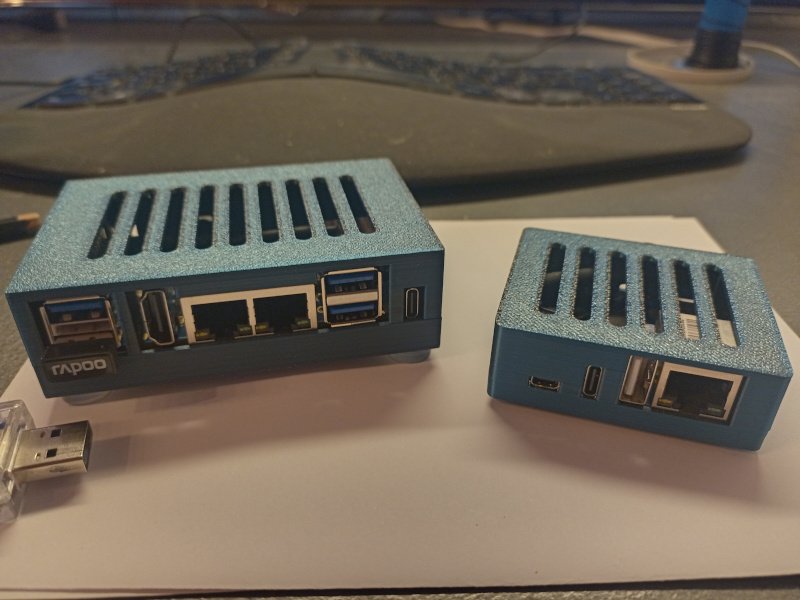
Hello @Malay, et.al, the motivation behind my attempt to include Armbian support for OpiRV2 is to have a better device for my Nextcloud-for-private-persons project. For this, I need a device that can be run at home with a current kernel and headless, but with decent storage. I already have a device (Orange Pi Zero 3, right on the photo), but Orange Pi RV2 (to the left) offers two(!) m.2 slots for NVMEs, some Wifi and Eth as well as decent computing power. Also, both have some extra NOR flash to store LUKS keys and decent pricing. Also that RiscV64 has some appeal, admitted 😉 Without GPU support, you can run Mate, LXDE, and XFCE for a GUI, which should be OK for some management tasks. I doubt that RV2 will ever make a good Youtube player, however that may be archived by replacing the Armbian userspace with that Ubuntu-Noble userspace that you can download from Xunlong. This Ubunut also comes with a RiscV64 port of Chromium which is also needed for Youtube and not avail from Debian, but source code *.dsc seems to be offered in the Bianbu pool so that may work out. Anyhow - that GPU porting attempt was based on the PowerVR addons offered as code drop on git@gitee.com:spacemit-buildroot/mesa3d.git. Our Chinese friends grabbed mesa 22.3.5, added their IMG BXE-2-32 this+that to the sources, cherry-picked their way up to mesa 24.0.1 and throw the result over the fence. At least without inking the code via Windows notepad, so no white-space chaos this time. Now, porting this with the closed binary *.so as heavy baggage is all about stable API. Large internal API change -> end of party. I am no graphics specialist, so take this with a pinch of salt. Debian offers mesa since 24.3 with an additional package: mesa-libgallium, you need this for the GPU desktops (Cinnamon, and probably Gnome / KDE). OK - someone or something needs the API from the Mesa internal Gallium driver suite, this needs to be compiled (a *.a is there). So I started to bring that code drop from 24.0 to 24.3, only to stumble over internal API changes. Concrete: we previously have some numeric constants __DRI_IMAGE_COMPONENTS_this+that 0xabcde in Mesa describing image formats (RGB32, BGRA24, 656-16, and so on). The code drop adds a couple of formats probably specific for PowerVR, but the Mesa project completely removed those constants ("nobody uses this"). At that point I thought: this is pointless, I'll pass... HTH // Sven-Ola
-
Two addons: I compiled on another notebook and stumbled over a RAM error message from Armbian compile.sh. Notebook has 8GB, so I added the recommended KERNEL_BTF=no to the ./compile.sh args. A dkms status says, the bcmdhd is built and active.
-
@maxsub: I have not really analyzed Armbian build caching until now. Maybe a previous build for another spacemit board prevents the DKMS from being included? Anyhow, re-installing / updating a kernel image should trigger any active DKMS modules to rebuild for the new kernel on the board, so this looks correct. LG // Sven-Ola
-
Compiled, flashed, uploaded. I got a running XFCE desktop and a working wifi applet. If you still have different results, I may provide a VPN endpoint and an SSH pubkey to log in to your machine. Here's my upload dir: HTH // Sven-Ola
-
Hello @Malay! Same for you: cannot reproduce. Can you rebuild with SKIP_ARMBIAN_REPO=yes? This builds a little longer but skips cached stuff. Alternatively, rm -r ./cache from the build dir. To help with this, I will start the following commands on my PC and upload the results later to https://privat-in.de/ (Download section). LG // Sven-Ola
