gnutux landia
-
Posts
15 -
Joined
-
Last visited
-

Super console cube X3 seems can't boot.
gnutux landia replied to gnutux landia's topic in Amlogic CPU Boxes
Can't figure how to copy putty terminal output messages, the terminal sent more messages but I can't find how to copy to a text file. -
Super console cube X3 seems can't boot.
gnutux landia replied to gnutux landia's topic in Amlogic CPU Boxes
Now seems that boots, I just need to touch the metal part of power button when click to give power and then starts to message events. [ 27.438701@2] dhd_dbg_set_event_log_tag set log tag iovar failed -23 [ 27.442840@2] dhd_dbg_set_event_log_tag set log tag iovar failed -23 [ 27.449129@1] dhd_dbg_set_event_log_tag set log tag iovar failed -23 [ 27.455380@2] dhd_dbg_set_event_log_tag set log tag iovar failed -23 [ 27.461729@2] dhd_dbg_set_event_log_tag set log tag iovar failed -23 [ 27.467993@3] dhd_dbg_set_event_log_tag set log tag iovar failed -23 [ 27.474575@3] dhd_dbg_set_event_log_tag set log tag iovar failed -23 [ 27.480723@3] dhd_dbg_set_event_log_tag set log tag iovar failed -23 [ 27.487114@3] dhd_dbg_set_event_log_tag set log tag iovar failed -23 [ 27.493447@3] dhd_dbg_set_event_log_tag set log tag iovar failed -23 [ 27.499798@1] dhd_dbg_set_event_log_tag set log tag iovar failed -23 [ 27.506161@1] dhd_dbg_set_event_log_tag set log tag iovar failed -23 [ 27.512469@1] dhd_dbg_set_event_log_tag set log tag iovar failed -23 [ 27.521394@3] dhd_dbg_attach_pkt_monitor, 1501 [ 27.526673@3] net_os_enable_packet_filter: val = 0 [ 27.530649@2] net_os_rxfilter_add_remove: add_remove = 0, num = 2 [ 27.536809@3] net_os_enable_packet_filter: val = 1 [ 27.541011@3] net_os_enable_packet_filter: val = 0 [ 27.544909@3] net_os_rxfilter_add_remove: add_remove = 0, num = 3 [ 27.551271@0] net_os_enable_packet_filter: val = 1 [ 27.555831@1] dhd_set_suspend: Remove extra suspend setting [ 27.560882@1] dhd_enable_packet_filter: enter, value = 0 [ 27.622938@2] init: [libfs_mgr]Unable to open zram conf comp device /sys/block/zram0/max_comp_streams [ 30.111457@3] [dhd-wlan0] wl_run_escan : LEGACY_SCAN sync ID: 0, bssidx: 0 [ 34.581269@1] [dhd-wlan0] wl_cfg80211_connect : Connecting with 3c:47:11:4d:2a:ff ssid "WiFi_2AFF", len (9), sec=wpa2psk/tkipaes, channel=1 [ 34.581269@1] [ 34.612484@0] dhd_dbg_start_pkt_monitor, 1621 [ 34.612522@0] __dhd_dbg_free_tx_pkts, 1412 [ 34.615294@0] __dhd_dbg_free_rx_pkts, 1431 [ 34.638471@3] [dhd-wlan0] wl_iw_event : Link UP with 3c:47:11:4d:2a:ff [ 34.639572@3] [dhd-wlan0] wl_ext_iapsta_event : [S] Link UP with 3c:47:11:4d:2a:ff [ 34.649918@2] [dhd-wlan0] wl_bss_connect_done : Report connect result - connection succeeded [ 34.685204@1] [dhd-wlan0] wl_add_keyext : key index (0) [ 34.743323@2] dhd_dev_apf_get_version: firmware doesn't support APF [ 34.743986@2] dhd_dev_apf_get_max_len: firmware doesn't support APF [ 34.816935@0] dhd_ndo_remove_ip_by_type: failed, retcode = -14 [ 34.817143@0] dhd_dev_ndo_cfg: failed to update host ip addr: -14 [ 34.856175@0] net_os_enable_packet_filter: val = 0 [ 34.858467@0] net_os_rxfilter_add_remove: add_remove = 1, num = 2 [ 34.871997@0] net_os_enable_packet_filter: val = 1 [ 34.973661@2] dhd_set_suspend: Remove extra suspend setting [ 34.976808@2] dhd_enable_packet_filter: enter, value = 0 [ 35.068208@0] dhd_arp_get_arp_hostip_table: ioctl WLC_GET_VAR error -23 [ 35.070340@1] dhd_aoe_hostip_clr failed code -23 [ 35.076591@1] aoe_update_host_ipv4_table failed [ 50.164518@1] [dhd-wlan0] wl_run_escan : LEGACY_SCAN sync ID: 1, bssidx: 0 [ 50.945561@3] audit: audit_lost=13 audit_rate_limit=5 audit_backlog_limit=64 [ 50.946974@3] audit: rate limit exceeded [ 53.223909@1] audit: audit_lost=15 audit_rate_limit=5 audit_backlog_limit=64 [ 53.225408@1] audit: rate limit exceeded [ 54.252938@1] audit: audit_lost=28 audit_rate_limit=5 audit_backlog_limit=64 [ 54.254399@1] audit: rate limit exceeded [ 82.286034@3] [dhd-wlan0] wl_run_escan : LEGACY_SCAN sync ID: 2, bssidx: 0 [ 94.451441@3] dhd_dbg_monitor_get_tx_pkts, 1913 [ 94.451532@3] dhd_dbg_monitor_get_tx_pkts(): no tx_status in tx completion messages, make sure that 'd11status' is enabled in firmware, status_pos=0 [ 94.466807@2] dhd_dbg_monitor_get_rx_pkts, 2010 [ 122.294218@3] [dhd-wlan0] wl_run_escan : LEGACY_SCAN sync ID: 3, bssidx: 0 -
Super console cube X3 seems can't boot.
gnutux landia replied to gnutux landia's topic in Amlogic CPU Boxes
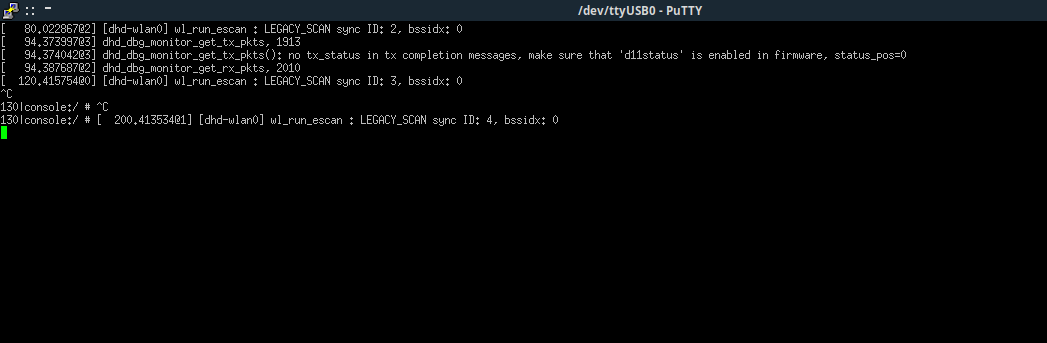
Now appear this on terminal.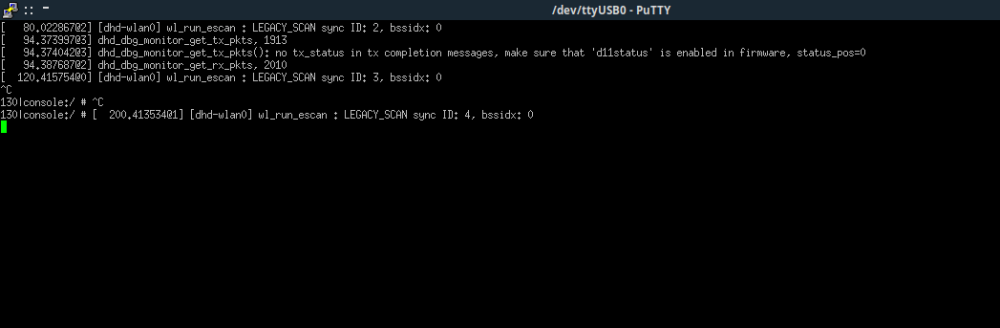
-
Super console cube X3 seems can't boot.
gnutux landia replied to gnutux landia's topic in Amlogic CPU Boxes
I improvise a solder points and connect cables to tx, rx, ground, where tx goes to rx and rx goes to tx, but the result is the same, putty terminal only has a blinking cursor. -
Super console cube X3 seems can't boot.
gnutux landia replied to gnutux landia's topic in Amlogic CPU Boxes
Here you have a video of connection. I already rewrite the sd-card image Armbian_community_26.2.0-trunk.357_Aml-s9xx-box_noble_current_6.18.7_xfce_desktop.img , try putty ssh but I have only a black screen when connect to ttyusb0 Test value speed 9600, 115200, 230400. S905X3 -
Super console cube X3 seems can't boot.
gnutux landia replied to gnutux landia's topic in Amlogic CPU Boxes
Change the dp dm and gave this. sudo dmesg | grep tty [ 0.471034] console [tty0] enabled [ 633.797008] usb 1-1.4.1.3: cp210x converter now attached to ttyUSB0 [ 1159.103497] cp210x ttyUSB0: cp210x converter now disconnected from ttyUSB0 [ 2713.702725] usb 1-1.4.1.2: cp210x converter now attached to ttyUSB0 [ 3812.350749] cp210x ttyUSB0: usb_serial_generic_read_bulk_callback - urb stopped: -32 [ 3812.351220] cp210x ttyUSB0: usb_serial_generic_read_bulk_callback - urb stopped: -32 [ 3812.447580] cp210x ttyUSB0: failed set request 0x12 status: -19 [ 3812.447593] cp210x ttyUSB0: failed set request 0x0 status: -19 [ 3812.447923] cp210x ttyUSB0: cp210x converter now disconnected from ttyUSB0 [ 4077.235990] usb 1-1.4.1.2: cp210x converter now attached to ttyUSB0 [ 4098.361943] cp210x ttyUSB0: cp210x converter now disconnected from ttyUSB0 [ 5224.734896] usb 1-1.4.1.3: cp210x converter now attached to ttyUSB0 [ 5248.927091] cp210x ttyUSB0: cp210x converter now disconnected from ttyUSB0 [ 5250.665687] usb 1-1.4.1.3: cp210x converter now attached to ttyUSB0 [ 5600.550201] cp210x ttyUSB0: usb_serial_generic_read_bulk_callback - urb stopped: -32 [ 5600.550539] cp210x ttyUSB0: usb_serial_generic_read_bulk_callback - urb stopped: -32 [ 5601.154463] cp210x ttyUSB0: failed set request 0x12 status: -19 [ 5601.154476] cp210x ttyUSB0: failed set request 0x0 status: -19 [ 5601.154818] cp210x ttyUSB0: cp210x converter now disconnected from ttyUSB0 [ 5725.698091] usb 1-1.4.1.3: cp210x converter now attached to ttyUSB0 GNU/Linux When pass → sudo screen /dev/ttyUSB0 115200 Only has cursor blinking. -
Super console cube X3 seems can't boot.
gnutux landia replied to gnutux landia's topic in Amlogic CPU Boxes
Any idea about this → sudo dmesg | grep tty [ 0.471034] console [tty0] enabled [ 633.797008] usb 1-1.4.1.3: cp210x converter now attached to ttyUSB0 [ 1159.103497] cp210x ttyUSB0: cp210x converter now disconnected from ttyUSB0 [ 2713.702725] usb 1-1.4.1.2: cp210x converter now attached to ttyUSB0 [ 3812.350749] cp210x ttyUSB0: usb_serial_generic_read_bulk_callback - urb stopped: -32 [ 3812.351220] cp210x ttyUSB0: usb_serial_generic_read_bulk_callback - urb stopped: -32 [ 3812.447580] cp210x ttyUSB0: failed set request 0x12 status: -19 [ 3812.447593] cp210x ttyUSB0: failed set request 0x0 status: -19 [ 3812.447923] cp210x ttyUSB0: cp210x converter now disconnected from ttyUSB0 [ 4077.235990] usb 1-1.4.1.2: cp210x converter now attached to ttyUSB0 [ 4098.361943] cp210x ttyUSB0: cp210x converter now disconnected from ttyUSB0 GNU/Linux sudo screen /dev/ttyUSB0 115200. [screen is terminating] -
Super console cube X3 seems can't boot.
gnutux landia replied to gnutux landia's topic in Amlogic CPU Boxes
I buy a different USB uart Usbuart Maybe I can do what you suggest. I need to wait to the item arrives at my home. When It arrives I post here to the device read uart method. -
Super console cube X3 seems can't boot.
gnutux landia replied to gnutux landia's topic in Amlogic CPU Boxes
I record a video of the board to see if with this info I don't need to read the outputs via uart. Can't find how to up images. What uart cable I need ? Can you post one from aliexpress. Thanks. -
Super console cube X3 seems can't boot.
gnutux landia replied to gnutux landia's topic in Amlogic CPU Boxes
I don't have the usb that you mention. I open the console to clean the fan and I did photos of board but I don' t remember where I place the photos. Give me five minutes to put here photos I need to unmount the box. -
Super console cube X3 seems can't boot.
gnutux landia replied to gnutux landia's topic in Amlogic CPU Boxes
I follow this instructions The reset button in the case of my box is inside Av connection, I already boot the images with press the button and maintain IT. The result is a screen with HKSERIES screen, I can wait one hour nothing happens only the image. A video to you see that I press the reset multiboot button. Thanks. -
Super console cube X3 seems can't boot.
gnutux landia replied to gnutux landia's topic in Amlogic CPU Boxes
I don't use multiboot. I test also to put the sd-card on the SD-Card of box and with armbian images (both - xfce bookworm or the last version Xfce of the armbian site) don't work. I test images separately, I erase the SD-Card and then try the other version image, One by One. With the steps that I already mention above. I think that I can write documents on the device and system if that boot apps like Office should work I think but I only can test it if the system armbian boot. Thanks. -
Super console cube X3 seems can't boot.
gnutux landia replied to gnutux landia's topic in Amlogic CPU Boxes
I decompile the dtb [meson-sm1-sei610.dtb] to dts any idea if I can edit some option on it ? meson-sm1-sei610.txt -
Super console cube X3 seems can't boot.
gnutux landia replied to gnutux landia's topic in Amlogic CPU Boxes
I put extra dtb files that I download on /boot/amlogic . For example I find that devmfc uses meson-sm1-ac2xx-generic.dtb on /boot/dtb/amlogic. So I copy it to Armbian boot partition on dtb/amlogic/meson-sm1-ac2xx-generic.dtb Then I edit extlinux/extlinux.conf label Armbian_community kernel /Image initrd /uInitrd fdt /dtb/amlogic/meson-sm1-ac2xx-generic.dtb append root=UUID=7dc5c0a3-acfc-4d51-a066-6c14d983a9de rootflags=data=writeback console=ttyAML0,115200n8 console=tty0 rw no_console_suspend consoleblank=0 fsck.fix=yes fsck.repair=yes net.ifnames=0 splash plymouth.ignore-serial-consoles I also test with other dtb files ad of course with the stock (default) image of Armbian just when donwload it, I use balenaetcher to write image on sd-card put it on a usb with sd-card reader and boot the tvbox, but doesn't work at all. The u-boot that I use is the u-boot-s905x3 that I copy to a directory and rename as u-boot.ext and then copy It to /boot. I oly try to run Armbian Systems from here → https://www.armbian.com/amlogic-s9xx-tv-box/ And I find devmfc when I search on google for " Debain s905x tv boxes" → thiss ystem works perfect, I only need to put on sd-card and put the sd-card on the usb with the sd-card reader and Tv Box shows HKSERIES and then go enter on the system devmfc. But I want some graphical friendly image to test the performance of tvbox as mini pc and because this I try to install xfce version of armbian. Thanks. -
I'm been trying to install Armbian on this TV.BOX console. I already test bookworm xfce image of Armbian as like the last XFCE image → Armbian_community_26.2.0-trunk.357_Aml-s9xx-box_noble_current_6.18.7_xfce_desktop I als test minimal images ad they don't work. The spces of console are : Processor (CPU)Amlogic S905X3 Quad-core ARM Cortex-A55, up to 1.91GHz Graphics (GPU)Mali-G31 MP2 RAM4GB DDR3 Storage (ROM)32GB eMMC Video OutputHDMI, supports up to 8K@24fps (Android system) and 1080p (EmuELEC system) Connectivity2.4G/5G Dual-band Wi-Fi, 10/1000M Ethernet LAN, Bluetooth 4.0 Ports1x USB 3.0, 4x USB 2.0, HDMI, Ethernet, DCIN (Power), TF card slot, AV output I test to boot the stock images just after download them and the boot shows the HK1Series and then goes to internal android system (tvbox) so failed. When I do the steps to put dtb file, edit extlinux.conf and rename properly u-bott to u-boot.ext (I search and test test many dtb files as like meson-sm1-hk1box-vontar-x3.dtb, meson-sm1-h96max-x3.dtb, sm1_s905x3_4g_1gbit.dtb, sm1_s905x3_4g.dtb as like others that I download on web when I search info about install armbian on s905x tv boxes). I also try to see if I can edit a .dts file and then convert to .dtb qhen I did It doesn't work. So none of steps above works. But I find one image system that works called devmfc that has only a minimal image similar to a server image only with tty text. https://github.com/devmfc/debian-on-amlogic/releases I inspect the .image of this system, and I find that if I copy the boot.scr, boot.script and cfgload to the /boot partiton of the armbian systems and boot the Sper Console it goes to a pink screen and then after a minute just reboot or goes to hkseries system. So I think if I can edit boot.scr, bootscript and cfgload maybe I can put the right data to force boot the real kernel of armbian. Maybe then armbian works. I use Linux and try to open those files with text editor but doesn't work. Anyone knows How I can edit this files ? Any user can boot armbian on this console TvBox ? Thanks.