


jock
-
Posts
2156 -
Joined
-
Last visited
Content Type
Forums
Store
Crowdfunding
Applications
Events
Raffles
Community Map
Everything posted by jock
-
 No hardware issue, the problem is rather finding the material time to do the task!
 -
Orange PI 4 lts default thermal trip point issues
jock replied to slimcomp's topic in Orange Pi 4 LTS
Mmmh 82°C seems rather low threshold to me. If you repeat the compilation and it hangs at the same temperature? Lowering the threshold to 82°C means that it should start throttling big cores around 75°C, throttle the rest at 78°C and reboot at 80/81°C -
I need to reset password but can't get to grub in armbian
jock replied to Alex989's topic in Rockchip CPU Boxes
There is no grub in armbian. Try multitool or reinstall armbian. -
I really don't understand where is the problem. You claim you cannot login, but root and 1234 are the default username and password, and those have always been for ages. You claim you cannot enter maskrom, but you should be perfectly able to boot from sdcard/USB either another armbian image or multitool to do maintenance or erase the eMMC and get back maskrom mode
-
It could also be some broken welding among the small SMD components. You may try with a hot air gun.
-
@pakos96 sorry 😔 , can't say exactly what version the server has built and when it did so... the patch is in mainline kernel armbian for more than one month now, 6.6.41 seems a bit old.
-
I'm not used to rkdevtool for windows, but indeed if the board does not get past the ddrbin, any tool won't work. The first thing the utilities do is upload a small binary (which contains the ddrbin as well) to initialize the board. The binary/executable then has the service functions that are invoked by the GUI utility when you click the button. You should be able to read the serial log while rkdevtool uploads the binary and tries to initialize the board, but this will probably give you the same errors you already know. The problem is that if you don't have the original firmware and nothing changes switching from 2T to 1T, there is nothing more you can do other than randomly trying firmwares, with the doubt your eMCP chip is even broken.
-
@Nixie do you have some logging on the serial? BTW, once you're in maskrom mode, you can wipe the internal flash with rkdeveloptool and do test and tricks on a sdcard with armbian/multitool on it, without the hassle of triggering the maskrom mode each time
-
@pakos96 apparently, the kernel bug has been fixed and it should work
-
@hfrts hello! First of all: no documentation from the manufacturs of any kind. Cheap tv boxes come without any kind of documentation: they are dirty cheap hardware with barely working software. The board footprint/silkscreen is indeed the first thing to look for to find the matching led-config: all known boards are listed within the rk322x-config script. If your board is not listed, then the stock firmware (or its device tree) and photos of the board most of the time are enough to properly match an existing led-config with the board or create a new led-config for a new board.
-
@bellad unsupported chip, there is nothing to do 🤷♂️
-
@wilsonh hmmm, that commit I think it was an attempt to bring the libreelec patches into rockchip64 family. Those attempts generated a lot of discussions, where many were happy and some concerned. Concerns won the battle, and the branch was never merge into mainline, despite it was tested a lot by libreelec folks and gave an all-around improvement in the video/display front. The patch in the main armbian branch instead is a knitwork I did around the libreelec patches to figure out what could fix the HDMI issues on rockchip64 in the latest kernels without including the whole libreelec patchset. Unfortunately (or fortunately) I have no issues with any monitor/TV I have here around, so I could not test directly the outcome of the knitwork. I got some positive feedback from the community, so the smaller patch went in main armbian, but some useful things that fixed issues may have been left out in the process. Anyway I read that, with kernel 6.12, a number of patches that are in the kernel mailing lists (that also are in the libreelec patchset) will be finally mainlined. Hopefully, that would be a step forware the right direction (or wreck everything...)
-
@wilsonh hello! There are no particular compilation steps, once you put the patch in the right place (patch/kernel/archive/rockchip64-6.6), the armbian build system should automatically apply it. Anyway, the patch is already in the main branch of armbian for quite a lot of time; perhaps the patch does not solve the issue with your monitor - for example, I have been unable to run my AOC 3440x1440 monitor on any SBC I have here around, Opi4 included 😕
-
Which ram speeds? are you aware that ddr scaling does not work on these tv boxes?
-
That will take some time to set the whole setup; unfortunately it is not easy task to bring up a system which could be used easily to rebuild the packages, but will do in the future. Can't say when though.
-
@raven123 yes, I moved rockchip64 edge kernel to 6.10 and brought in the patch to fix the gpio2 bank that was causing the whole eMMC issue. BTW, packages should be available in the near future when the armbian server will rebuild the things (hopefully, next sunday)
-
No, because it is old and buggy. It would perhaps let some boards work but it will break many others. The best option is to use the opensource trust os, but it lacks some features (DDR frequency scaling, virtual poweroff most of all).
-
@Netraam31 First fact: the problem is in a mainline upstream kernel driver; there is no device tree magic sauce that will fix until the driver is fixed. The patch to fix the issue is already around in the kernel mailing lists (https://patchwork.kernel.org/project/linux-rockchip/patch/20240709105428.1176375-1-i@eh5.me/), if it will take more than another week to be merge, I will import into armbian patches set. Second fact: the big fat disclaimer when you run community armbian images tells you that they are not stated to run in production. If you do so, you have no guarantees of any kind. Community supported boards (CSC, as all tvboxes are), can only have community images. Supported boards (proper SBCs) have supported images.
-
@Mikee Mike the difference is that the "old tee" is a very old TrustOS proprietary and closed source binary from rockchip that does not put the board in standby after one minute. On the other side it has several compatibility issues among various boards. The "regular" multitool has a newer TrustOS that works fine for the majority of the boards around, but on some very rare boards will put them in standby after one minute. As long as they are closed source binaries, we don't know why that happens.
-
Does h96max have analog input for microphone?
jock replied to williamfj's topic in Rockchip CPU Boxes
Suggesting a tv box is the best way to waste money in something probably unsupported. -
This definitely requires more attention. Each uboot revision seem to change something and every time is a lucky shot.
-
About the eMMC issue, this is the patch series that breaks eMMC and also GPIO pins (leds does not work either): https://patchwork.kernel.org/project/linux-rockchip/cover/20240606125755.53778-1-i@eh5.me/ It has been mainlined in kernel 6.6.37 and probably will break more rk3328 boards as well. Reverting the patch series from the 6.6.37 kernel, it works again
-
ADVICE @tERBO discovered, at his expense, that upgrading the kernel to v6.6.38 breaks the eMMC support (see his thread), so please do not upgrade the kernel until the issue is solved! The issue seems related to some patches that have been mainlined in the kernel, but further inspection is needed to be sure what is causing the problem.
-
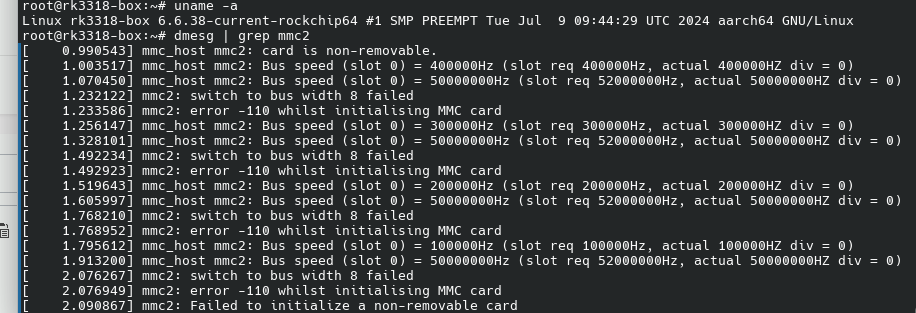
@tERBO Here it is, kernel 6.6.38 and emmc broke on my system too: I will try to revert some patches mainlined patches in the next days to see if it fixes something. The rk3308 should be quite different than rk3318/rk3328 and the commit was limited to rk3308-rock-pi-s, so I don't think that's the issue.
-
@tERBO ok thanks, that's an useful information! So it is not uboot but the kernel itself that breaks something. I checked the armbian commits in the rockchip64-6.6 patch archive and nothing relevant changed lately, but I see from the dmesg you posted that the working kernel is 6.6.36, instead the broken one is 6.6.38 There are some changes in the mmc subsystem for kernel 6.6.37, I wonder if something there may have broken the thing https://cdn.kernel.org/pub/linux/kernel/v6.x/ChangeLog-6.6.37