




dev001
Members
-
Joined
-
Last visited
-
-
-
Cannot login to wifi router. $ lsb_release -a No LSB modules are available. Distributor ID: Debian Description: Armbian 26.8.3 trixie Release: 13 Codename: trixie $ dmesg [ 18.683974] r8152 6-1:1.0 enx001e063222ad: carrier on [ 27.803475] wlxe0e1a93880f7: authenticate with xx:xx:xx:xx:xx:xx [ 29.112665] wlxe0e1a93880f7: send auth to xx:xx:xx:xx:xx:xx (try 1/3) [ 29.115405] wlxe0e1a93880f7: authenticated [ 29.126606] wlxe0e1a93880f7: associating to AP xx:xx:xx:xx:xx:xx with corrupt beacon and probe response [ 29.134087] wlxe0e1a93880f7: associate with xx:xx:xx:xx:xx:xx (try 1/3) [ 29.253998] wlxe0e1a93880f7: associate with xx:xx:xx:xx:xx:xx (try 2/3) [ 29.374009] wlxe0e1a93880f7: associate with xx:xx:xx:xx:xx:xx (try 3/3) [ 29.494035] wlxe0e1a93880f7: association with xx:xx:xx:xx:xx:xx timed out [ 35.700754] wlxe0e1a93880f7: authenticate with xx:xx:xx:xx:xx:xx [ 36.945503] wlxe0e1a93880f7: send auth to xx:xx:xx:xx:xx:xx (try 1/3) [ 36.950699] wlxe0e1a93880f7: authenticated [ 36.950924] wlxe0e1a93880f7: associating to AP xx:xx:xx:xx:xx:xx with corrupt beacon and probe response [ 36.955088] wlxe0e1a93880f7: associate with xx:xx:xx:xx:xx:xx (try 1/3) [ 37.065067] wlxe0e1a93880f7: associate with xx:xx:xx:xx:xx:xx (try 2/3) [ 37.175046] wlxe0e1a93880f7: associate with xx:xx:xx:xx:xx:xx (try 3/3) [ 37.285432] wlxe0e1a93880f7: association with xx:xx:xx:xx:xx:xx timed out [ 43.743849] wlxe0e1a93880f7: authenticate with xx:xx:xx:xx:xx:xx [ 44.995503] wlxe0e1a93880f7: send auth to xx:xx:xx:xx:xx:xx (try 1/3) [ 44.998111] wlxe0e1a93880f7: authenticated [ 45.005706] wlxe0e1a93880f7: associating to AP xx:xx:xx:xx:xx:xx with corrupt probe response [ 45.025088] wlxe0e1a93880f7: associate with xx:xx:xx:xx:xx:xx (try 1/3) [ 45.135078] wlxe0e1a93880f7: associate with xx:xx:xx:xx:xx:xx (try 2/3) [ 45.255109] wlxe0e1a93880f7: associate with xx:xx:xx:xx:xx:xx (try 3/3) [ 45.375222] wlxe0e1a93880f7: association with xx:xx:xx:xx:xx:xx timed out [ 52.237430] wlxe0e1a93880f7: authenticate with xx:xx:xx:xx:xx:xx [ 53.485642] wlxe0e1a93880f7: send auth to xx:xx:xx:xx:xx:xx (try 1/3) [ 53.486297] wlxe0e1a93880f7: aborting authentication with xx:xx:xx:xx:xx:xx by local choice (Reason: 3=DEAUTH_LEAVING) [ 70.197420] wlxe0e1a93880f7: authenticate with xx:xx:xx:xx:xx:xx [ 71.445752] wlxe0e1a93880f7: send auth to xx:xx:xx:xx:xx:xx (try 1/3) [ 71.449174] wlxe0e1a93880f7: authenticated [ 71.454615] wlxe0e1a93880f7: associating to AP xx:xx:xx:xx:xx:xx with corrupt beacon and probe response [ 71.455350] wlxe0e1a93880f7: associate with xx:xx:xx:xx:xx:xx (try 1/3) [ 71.565277] wlxe0e1a93880f7: associate with xx:xx:xx:xx:xx:xx (try 2/3) [ 71.685295] wlxe0e1a93880f7: associate with xx:xx:xx:xx:xx:xx (try 3/3) [ 71.815254] wlxe0e1a93880f7: association with xx:xx:xx:xx:xx:xx timed out [ 82.570077] wlxe0e1a93880f7: authenticate with xx:xx:xx:xx:xx:xx [ 83.795886] wlxe0e1a93880f7: send auth to xx:xx:xx:xx:xx:xx (try 1/3) [ 83.798750] wlxe0e1a93880f7: authenticated [ 83.799500] wlxe0e1a93880f7: associating to AP xx:xx:xx:xx:xx:xx with corrupt beacon and probe response [ 83.805438] wlxe0e1a93880f7: associate with xx:xx:xx:xx:xx:xx (try 1/3) [ 83.935371] wlxe0e1a93880f7: associate with xx:xx:xx:xx:xx:xx (try 2/3) [ 84.055403] wlxe0e1a93880f7: associate with xx:xx:xx:xx:xx:xx (try 3/3) [ 84.165387] wlxe0e1a93880f7: association with xx:xx:xx:xx:xx:xx timed out -plug and unplug usb wifi dongle $ dmesg [ 1124.053961] usb 3-1.2: new high-speed USB device number 5 using xhci-hcd [ 1124.184704] usb 3-1.2: New USB device found, idVendor=0bda, idProduct=c820, bcdDevice= 2.00 [ 1124.184755] usb 3-1.2: New USB device strings: Mfr=1, Product=2, SerialNumber=3 [ 1124.184782] usb 3-1.2: Product: 802.11ac NIC [ 1124.184802] usb 3-1.2: Manufacturer: Realtek [ 1124.184822] usb 3-1.2: SerialNumber: 123456 [ 1124.277700] Bluetooth: hci0: RTL: examining hci_ver=08 hci_rev=000c lmp_ver=08 lmp_subver=8821 [ 1124.278629] Bluetooth: hci0: RTL: rom_version status=0 version=1 [ 1124.279640] Bluetooth: hci0: RTL: btrtl_initialize: key id 0 [ 1124.279664] Bluetooth: hci0: RTL: loading rtl_bt/rtl8821c_fw.bin [ 1124.282156] Bluetooth: hci0: RTL: loading rtl_bt/rtl8821c_config.bin [ 1124.282839] Bluetooth: hci0: RTL: cfg_sz 10, total sz 21678 [ 1124.299444] rtw_8821cu 3-1.2:1.2: Firmware version 24.11.0, H2C version 12 [ 1124.693624] Bluetooth: hci0: RTL: fw version 0x826ca99e [ 1124.729501] rtw_8821cu 3-1.2:1.2 wlxe0e1a93880f7: renamed from wlan0 $ ip link 3: wlxe0e1a93880f7: <NO-CARRIER,BROADCAST,MULTICAST,UP> mtu 1500 qdisc noqueue state DOWN mode DORMANT group default qlen 1000 link/ether xx:xx:xx:xx:xx:xx brd ff:ff:ff:ff:ff:ff $ sudo nmcli device wifi list IN-USE BSSID SSID MODE CHAN RATE SIGNAL BARS SECURITY xx:xx:xx:xx:xx:xx mywifi Infra 5 405 Mbit/s 87 ▂▄▆█ WPA1 WPA2 $ sudo nmcli device status DEVICE TYPE STATE CONNECTION wlxe0e1a93880f7 wifi disconnected -- $ sudo nmcli device show wlxe0e1a93880f7 GENERAL.DEVICE: wlxe0e1a93880f7 GENERAL.TYPE: wifi GENERAL.HWADDR: xx:xx:xx:xx:xx:xx GENERAL.MTU: 1500 GENERAL.STATE: 30 (disconnected) GENERAL.CONNECTION: -- GENERAL.CON-PATH: -- IP4.GATEWAY: -- IP6.GATEWAY: -- $ nmcli connection show NAME UUID TYPE DEVICE mywifi 9bf79c36-d724-470f-bd62-f461a44290b2 wifi --
-
i use a usb to 3.5mm headphone adapter.
-
taskset is not found in the repository. I have resolved the issue by install xubuntu-desktop package rather than installing xfce4 and xfce4-goodies. Thanks for the help. ref:
-
Thanks. I got pulseaudio working
-
Made some progress. after installing Armbian_25.8.1_Odroidxu4_noble_current_6.6.102 to eMMC ran armbian-upgrade Installed xubuntu-desktop or xubuntu-desktop-minimal package reboot now i'm getting the greeter screen. after login, I entered xfce desktop. functions ok could only install firefox via snap. installed firefox via snap ran firefox to view a video on youtube. audio is not working. install pulseaudio reboot system audio still not working when viewing a youtube video any suggestions?
-
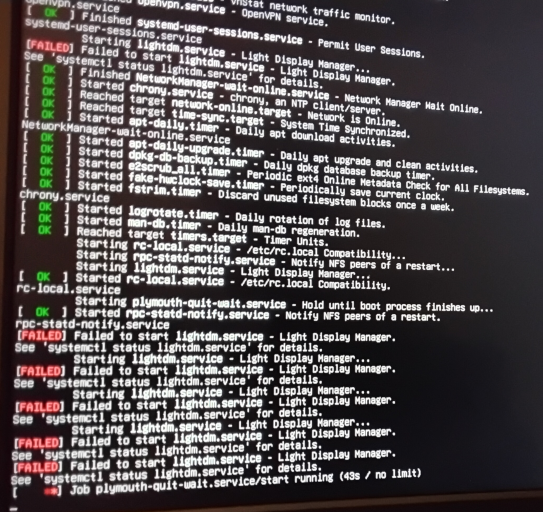
Using odroidxu4. flashed Armbian_25.8.1_Odroidxu4_noble_current_6.6.102 to eMMC After odroidxu4 started, followed instruction to create accounts etc. Installed xfce4 package reboot. odroidxu4 booted to console prompt Installed xfce4-goodies package reboot. odroidxu4 booted to console prompt Installed lightdm reboot. The system becomes stuck at plymouth-quit-wait.service/start Not much I could do after this as I could not look at log messages or use $ sudo systemctl status lightdm.service Any insight greatly appreciated Thanks
-
Thanks for the reply. My question was worded improperly. It should have been "Latest compile for odroid xu4 doesn't have a desktop. Any reason why?" Sorry
-
Latest compile for odroid xu4 does have a desktop. Any reason why?
-
I'm using odroidc2 installed with Armbian 24.11.1 Noble Gnome to an eMMC card After the OS installation, power cycled and it went through the process of configuring the root password and initial user account. All was successful. However, once the system shows the greeter screen, the system is frozen. It does not respond to keystrokes nor mouse movement. The blue light on the odroidc2 continues to flash. I also used the USB/UART module to see the start up messages and to login. When the boot process is complete it prompts for user login but it does not accept any keystrokes. The serial port output is attached wtminicom.log