


dev001
-
Posts
21 -
Joined
-
Last visited
Content Type
Forums
Store
Crowdfunding
Applications
Events
Raffles
Community Map
Everything posted by dev001
-
fail install of xfce desktop on odroidxu4
dev001 replied to dev001's topic in Software, Applications, Userspace
i use a usb to 3.5mm headphone adapter. -
taskset is not found in the repository. I have resolved the issue by install xubuntu-desktop package rather than installing xfce4 and xfce4-goodies. Thanks for the help. ref:
-
fail install of xfce desktop on odroidxu4
dev001 replied to dev001's topic in Software, Applications, Userspace
Thanks. I got pulseaudio working -
fail install of xfce desktop on odroidxu4
dev001 replied to dev001's topic in Software, Applications, Userspace
Made some progress. after installing Armbian_25.8.1_Odroidxu4_noble_current_6.6.102 to eMMC ran armbian-upgrade Installed xubuntu-desktop or xubuntu-desktop-minimal package reboot now i'm getting the greeter screen. after login, I entered xfce desktop. functions ok could only install firefox via snap. installed firefox via snap ran firefox to view a video on youtube. audio is not working. install pulseaudio reboot system audio still not working when viewing a youtube video any suggestions? -
fail install of xfce desktop on odroidxu4
dev001 posted a topic in Software, Applications, Userspace
Using odroidxu4. flashed Armbian_25.8.1_Odroidxu4_noble_current_6.6.102 to eMMC After odroidxu4 started, followed instruction to create accounts etc. Installed xfce4 package reboot. odroidxu4 booted to console prompt Installed xfce4-goodies package reboot. odroidxu4 booted to console prompt Installed lightdm reboot. The system becomes stuck at plymouth-quit-wait.service/start Not much I could do after this as I could not look at log messages or use $ sudo systemctl status lightdm.service Any insight greatly appreciated Thanks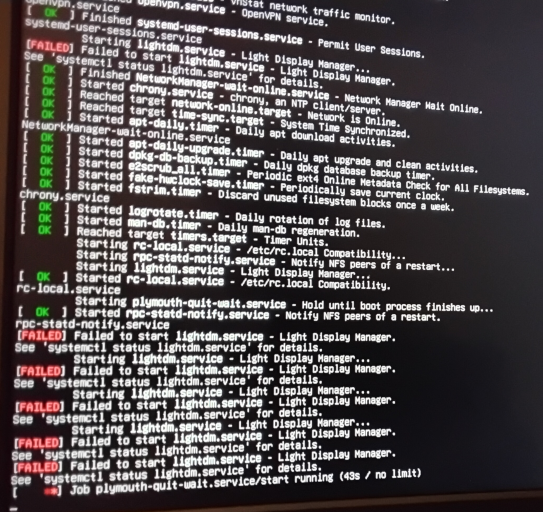
-
Thanks for the reply. My question was worded improperly. It should have been "Latest compile for odroid xu4 doesn't have a desktop. Any reason why?" Sorry
-
Latest compile for odroid xu4 does have a desktop. Any reason why?
-
I'm using odroidc2 installed with Armbian 24.11.1 Noble Gnome to an eMMC card After the OS installation, power cycled and it went through the process of configuring the root password and initial user account. All was successful. However, once the system shows the greeter screen, the system is frozen. It does not respond to keystrokes nor mouse movement. The blue light on the odroidc2 continues to flash. I also used the USB/UART module to see the start up messages and to login. When the boot process is complete it prompts for user login but it does not accept any keystrokes. The serial port output is attached wtminicom.log
-
As mentioned previously, make sure your SDHC card is specified as UHS-I You do not need to format your SDHC card. You need to flash the card with the Armbian image for the odroidc2.
-
I was stating my observation about my odroidc2. If you only have SDHC installed then have you verified that your SDHC is specified as UHS-I? Read this https://forum.odroid.com/viewtopic.php?t=37363
-
My observation is that you should have either an eMMC or SDHC card installed but not both. Installing both would cause a boot issue.
-
Odroidn2+ with eMMC card flashed with latest Armbian 23.5 Jammy XFCE (Armbian_23.5.1_Odroidn2_jammy_current_6.1.30_xfce_desktop) Having issue installing firefox. Chromium was already installed properly. During the installation of firefox, the system remains waiting for something. When eMMC flashed with Armbian_23.5.1_Odroidn2_jammy_current_6.1.30_xfce_desktop testhost@odroidn2:~$ uname -a Linux odroidn2 6.1.30-meson64 #8 SMP PREEMPT Wed May 24 16:32:53 UTC 2023 aarch64 aarch64 aarch64 GNU/Linux testhost@odroidn2:~$ lsb_release -a No LSB modules are available. Distributor ID: Ubuntu Description: Ubuntu 22.04.2 LTS Release: 22.04 Codename: jammy after upgrade $ uname -a Linux odroidn2 6.1.30-meson64 #8 SMP PREEMPT Wed May 24 16:32:53 UTC 2023 aarch64 aarch64 aarch64 GNU/Linux $ lsb_release -a No LSB modules are available. Distributor ID: Ubuntu Description: Ubuntu 22.04.2 LTS Release: 22.04 Codename: jammy installing firefox $ sudo apt install firefox [sudo] password for testhost: Reading package lists... Done Building dependency tree... Done Reading state information... Done The following additional packages will be installed: apparmor snapd squashfs-tools Suggested packages: apparmor-profiles-extra apparmor-utils zenity | kdialog The following NEW packages will be installed: apparmor firefox snapd squashfs-tools 0 upgraded, 4 newly installed, 0 to remove and 0 not upgraded. Need to get 22.5 MB of archives. After this operation, 100 MB of additional disk space will be used. Do you want to continue? [Y/n] Get:1 http://ports.ubuntu.com jammy-updates/main arm64 apparmor arm64 3.0.4-2ubuntu2.2 [573 kB] Get:2 http://ports.ubuntu.com jammy/main arm64 squashfs-tools arm64 1:4.5-3build1 [156 kB] Get:3 http://ports.ubuntu.com jammy-security/main arm64 snapd arm64 2.58+22.04.1 [21.7 MB] Get:4 http://ports.ubuntu.com jammy/main arm64 firefox arm64 1:1snap1-0ubuntu2 [72.3 kB] Fetched 22.5 MB in 33s (675 kB/s) Preconfiguring packages ... Selecting previously unselected package apparmor. (Reading database ... 177783 files and directories currently installed.) Preparing to unpack .../apparmor_3.0.4-2ubuntu2.2_arm64.deb ... Unpacking apparmor (3.0.4-2ubuntu2.2) ... Selecting previously unselected package squashfs-tools. Preparing to unpack .../squashfs-tools_1%3a4.5-3build1_arm64.deb ... Unpacking squashfs-tools (1:4.5-3build1) ... Selecting previously unselected package snapd. Preparing to unpack .../snapd_2.58+22.04.1_arm64.deb ... Unpacking snapd (2.58+22.04.1) ... Setting up apparmor (3.0.4-2ubuntu2.2) ... Created symlink /etc/systemd/system/sysinit.target.wants/apparmor.service → /lib/systemd/system/apparmor.service. Reloading AppArmor profiles Skipping profile in /etc/apparmor.d/disable: usr.sbin.rsyslogd Setting up squashfs-tools (1:4.5-3build1) ... Setting up snapd (2.58+22.04.1) ... Created symlink /etc/systemd/system/multi-user.target.wants/snapd.aa-prompt-listener.service → /lib/systemd/system/snapd.aa-prompt-listener.service. Created symlink /etc/systemd/system/multi-user.target.wants/snapd.apparmor.service → /lib/systemd/system/snapd.apparmor.service. Created symlink /etc/systemd/system/multi-user.target.wants/snapd.autoimport.service → /lib/systemd/system/snapd.autoimport.service. Created symlink /etc/systemd/system/multi-user.target.wants/snapd.core-fixup.service → /lib/systemd/system/snapd.core-fixup.service. Created symlink /etc/systemd/system/multi-user.target.wants/snapd.recovery-chooser-trigger.service → /lib/systemd/system/snapd.recovery-chooser-trigger.se rvice. Created symlink /etc/systemd/system/multi-user.target.wants/snapd.seeded.service → /lib/systemd/system/snapd.seeded.service. Created symlink /etc/systemd/system/cloud-final.service.wants/snapd.seeded.service → /lib/systemd/system/snapd.seeded.service. Unit /lib/systemd/system/snapd.seeded.service is added as a dependency to a non-existent unit cloud-final.service. Created symlink /etc/systemd/system/multi-user.target.wants/snapd.service → /lib/systemd/system/snapd.service. Created symlink /etc/systemd/system/timers.target.wants/snapd.snap-repair.timer → /lib/systemd/system/snapd.snap-repair.timer. Created symlink /etc/systemd/system/sockets.target.wants/snapd.socket → /lib/systemd/system/snapd.socket. Created symlink /etc/systemd/system/final.target.wants/snapd.system-shutdown.service → /lib/systemd/system/snapd.system-shutdown.service. snapd.failure.service is a disabled or a static unit, not starting it. snapd.mounts-pre.target is a disabled or a static unit, not starting it. snapd.mounts.target is a disabled or a static unit, not starting it. snapd.snap-repair.service is a disabled or a static unit, not starting it. Selecting previously unselected package firefox. (Reading database ... 178083 files and directories currently installed.) Preparing to unpack .../firefox_1%3a1snap1-0ubuntu2_arm64.deb ... => Installing the firefox snap ==> Checking connectivity with the snap store ==> Installing the firefox snap 2023-06-07T15:34:45-04:00 INFO Waiting for automatic snapd restart... Progress: [ 76%] [####################################################################################################................................]