


calusbr
-
Posts
13 -
Joined
-
Last visited
Content Type
Forums
Store
Crowdfunding
Applications
Events
Raffles
Community Map
Everything posted by calusbr
-
@Amalia Could you share your image? To test on the batch of TV Boxes that I have, I would like to test these Boxes in graphic mode. I appreciate any help in advance!
-
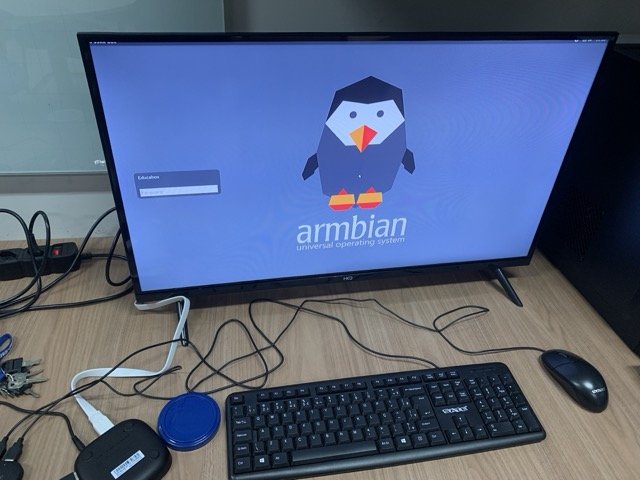
I’m using the DEVMFC version [https://github.com/devmfc/debian-on-amlogic]. Additionally, I took the `/boot` partition and copied all the files from the Devmfc_Ubuntu-Oracular_6.12.11-meson64_Minimal-25.01.24.img.xz image. Then, I downloaded the same version available from the Armbian community, but with a graphical interface: Armbian_community_25.5.0-trunk.4_Aml-s9xx-box_noble_current_6.12.12_xfce_desktop.img.xz. I first flashed the Armbian image onto a USB drive. Then, in the `/boot` partition, I moved all existing root files into a `/backup` folder. After that, I copied the files from the DEVMFC version into the root of the `/boot` partition on the USB drive. Surprisingly, when I tried to boot this setup on a TV Box similar to the Vontar X4, which has an S905X4 processor, it actually booted! It prompted me to create a root password, a regular user, set the language, and select a time zone. Then, it successfully launched into X for the graphical interface. However, it seems that USB ports were either disabled, or the system froze—the login screen was visible, and the keyboard cursor was blinking, but no input was possible. I believe this is a solid starting point for getting Armbian images with a graphical interface running on S905X4 (Meson SC2), S905W2 (Meson S4), and S905Y4 (Meson S4) processors. Even without hardware-accelerated graphics, it should still be usable for basic applications like Notepad, text editors, spreadsheets, calculators, terminal access, and other simple tasks. Has anyone else made progress running Armbian on the S905X4?
-
@Devmfc Did you manage to run an Armbian system for the S905W2 processor with a graphical interface? I have a TV Box S905W2 with SV6256P and I would like to convert it to Armbian.
-
Can't boot with 23.05 or later builds on s905x2 (g12a) or s905x3 (sm1)
calusbr replied to well83's topic in Amlogic CPU Boxes
@Abd Choucair Follow this tutorial in Portuguese to be successful on your TV Box: Link: https://github.com/educabox/educabox/blob/main/boxes/btv11.md -
Installing Armbian on Tigre 2 TV Box with Amlogic S905X (NAND)
calusbr replied to calusbr's topic in Amlogic CPU Boxes
Problem solved in the post: https://forum.armbian.com/topic/30928-need-help-with-tigre-2-tv-box-amlogic-s905x-bricked-after-installing-armbian/?do=findComment&comment=176666 -
Hello @Jens J. I found a solution to be able to run Armbian on this device. At my institution we are converting these TV Boxes into computers to make available in public schools. So I have 40 units from this same box and this unit was the only one with NAND memory. So I managed to install Armbian on the other units and after carrying out all the customization I created a DD image of the EMMC unit /dev/mmcblk1. (Note: check if your partition is /dev/mmcblk1 or /dev/mmcblk2) Create a compressed disk image: dd if=/dev/mmcblk1 status=progress | gzip -9 /mnt/external/filename.img.gz Then I cloned the NAND unit and, oddly enough, it was uploaded to the Armbian system. zcat /mnt/external/filename.img.gz | dd of=/dev/mmcblk1 It appears that when cloning information from an EMMC partition to NAND the u-boot process occurs normally without analyzing the hardware context. So if anyone has the same problem, if you can get another unit with EMMC memory, it may be possible to convert it to a NAND unit.
-
Can't boot with 23.05 or later builds on s905x2 (g12a) or s905x3 (sm1)
calusbr replied to well83's topic in Amlogic CPU Boxes
Hey @Devmfc, I followed the steps outlined in your GitHub repository (https://github.com/devmfc/amlogic-bootscripts-Armbian) to install [Armbian] on my TV Box. Here's a quick rundown of the steps I took: 1) Installed the system following the recommendations on the GitHub page. 2) Initiated Armbian via USB and proceeded with the installation using the "/root/install-aml.sh" command. 3) Upon completion of the installation, I replaced the "emmc_autoscript" file with "s905_autoscript" (and renamed it to "emmc_autoscript"). 4) Used the command "$ sudo blkid" to identify the UUID of my EMMC partition. 5) Opened the "armbianEnv.txt" file and updated the UUID with that of my EMMC partition, then saved the file. 6) Removed the USB device and restarted my Box. The substitution of "emmc_autoscript" with "s905_autoscript" proved to be the key, and everything is running smoothly now. Thanks once again for your invaluable assistance! Best regards! -
Can't boot with 23.05 or later builds on s905x2 (g12a) or s905x3 (sm1)
calusbr replied to well83's topic in Amlogic CPU Boxes
Hey @Devmfc, I hope this message finds you well. I wanted to express my gratitude for your tutorial on installing [Armbian] via USB on TV Boxes with S905X3 and S905X2 processors. The tutorial worked flawlessly during the USB boot process. However, I've encountered a challenge when attempting to install the system on the Box using the command "/root/install-aml.sh". After completing the installation, upon rebooting the device, the Box starts but remains stuck on a black screen. To troubleshoot, I initiated a USB boot and accessed the /boot partition on EMMC. I noticed that during the installation process, the script copies /boot from the USB, but it doesn't add the files "aml_autoscript" and "s905_autoscript" as outlined in your tutorial. In an attempt to resolve this, I manually copied these files to the /boot partition on EMMC. Unfortunately, this didn't resolve the issue, and the Box still fails to start after installation. I'm using a BTV B11 TV Box with S905X3 and another with BTV Express S905X2. Both boxes boot successfully via USB, but post-installation on EMMC, they seem unresponsive. Is there any specific configuration or step I might be missing to ensure the installation on the TV Box works seamlessly? -
@Jens J. Thanks for your feedback! I installed it using the armbian-install command and unfortunately I ended up bricking the device. After a lot of research I discovered how to unbrick the device, connect the T9 point to the device's GND for a few seconds and it will return to MASKROM mode. After that, I installed the Android Stock version again and booted the pendrive with the Armbian installation, this time I used the command /root/aml-install.sh, but it did not recognize my NAND storage unit. I would like to know if there is any way to install Armbian on a board with NAND? After reading some forum posts, I was informed that Armbian no longer supports NAND, only the lag version with Kernel 3.4.x Every help is welcome! Thanks
.thumb.jpeg.dbde2f701424b65b02a35c19e21b8ed4-Copia.jpeg.00b27d8072f3bb17a47f8d5ba1759f96.jpeg)
-
Hello everyone, I have a Tigre 2 TV BOX with Amlogic S905X, 1GB DDR3, and 16GB NAND storage. I'm interested in installing Armbian on this device, but there doesn't seem to be native support for the latest Armbian versions for NAND storage. I'm wondering if there is any way to install Armbian on this box, and if so, where I can find an Armbian version with a graphical interface and a Legacy Kernel 3.4.x that is compatible with Amlogic processors. I appreciate any help in this regard. Thank you in advance.
-
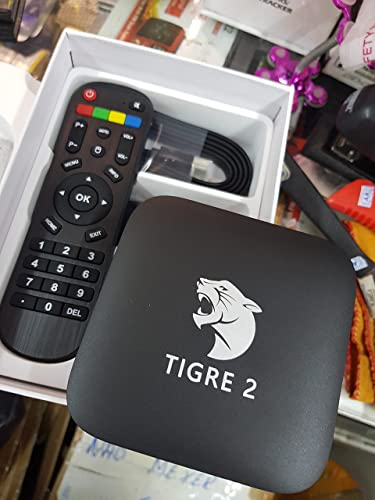
Hello everyone, I recently acquired a Tigre 2 TV Box with the following hardware specifications: Amlogic S905X processor, 2GB of RAM, and 16GB NAND storage (SkHynix). I attempted to install the Armbian operating system, and the installation process started from a USB drive. Unfortunately, after the installation, the device seems to be bricked as it doesn't boot up (led red). I've read that it might be possible to recover a bricked device by putting it into MaskROM mode through a process involving a short circuit. However, I'm not entirely sure how to do this, and I'm hoping someone here can provide guidance or steps on how to put my Tigre 2 TV Box into MaskROM mode. Any help or advice would be greatly appreciated. Thank you in advance!
.thumb.jpeg.2f691d44cc27b513c3453ae5abe49e8d.jpeg)
.thumb.jpeg.dbde2f701424b65b02a35c19e21b8ed4.jpeg)
.jpeg.89c533b1c7fdec0292b55068166207e7.jpeg)
.jpeg.c8a08981ef5fc92948df253814067c19.jpeg)