
D roZDi
-
Posts
17 -
Joined
-
Last visited
-
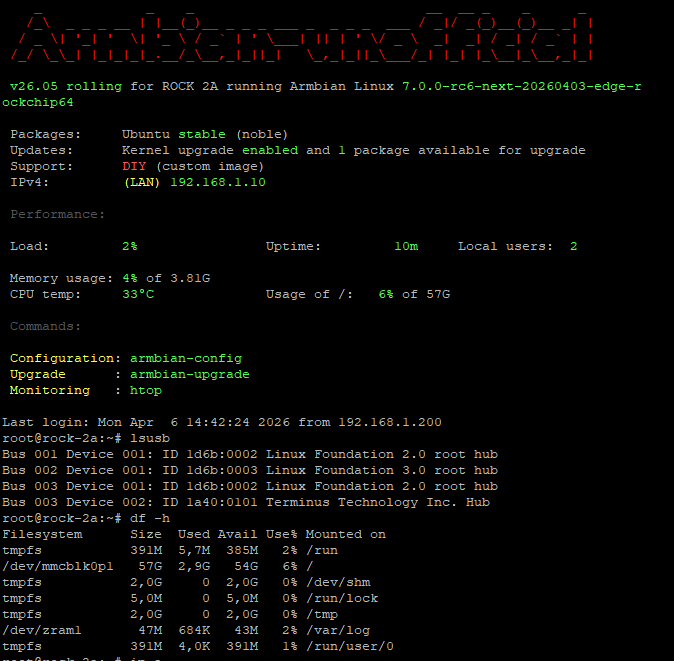
lsusb? Aic8800 is on USB or PCI in radxa 2f? uname -a, uname -r I have impression you made some tests? Please refer to my post from June 19th and take an image/wifi fix from there and from a post from 23 June take only new modules...
-
Try those modules for WIFI driver 7.1-rc-4. Now it should work as I have tested on my rock-2a. For HDMI Samsung QP driver... This is a huge work... but who knows it might happen soon
-
I have checked .... true.... my fix 7.1 was creted for 7.1-rc1 here we have got 7.1-rc4 so not working... Problably it needs to fix dirver aic8800 as still not supported plus compilation... usb2/usb3/ethernet are working?
-
As I have no board 2f to test it I made the image and dts blindly a bit... Image Fix to wifi card (I guess it should work)
-
I put image 7.1 for humanus here but now it has been removed due to running of space on my drive
-
I dont need details just lsusb and lspci without switches to see what my image 7.1 discovers on your board Of course you can pług on USB stick to see if it works also make steps like mentioned above to fix wifi aic driver
-
There is nothing to see with you project. I wish only to know the output from lsusb and lspci. For wifi you probably have to apply Fix 7.1 as above. Driver for aic8800 is not yet supported
-
please just share output from lsusb and lspci commands from your board here
-
Here you are as you wished but check out or download individually due to "Possible missing firmware /lib/firmware/amdgpu/"
-
which modules?
-
To be honnest, try my image above... including fix for aic8800 Or try this one compiled for Radxa Rock 2F - only uboot changed but not tested as I have no board...
-
Radxa Rock 2A Kernel version 7.1: link Radxa Rock 2A AIC_FIX_7.1: link Still no HDMI QP support Please also remember as it is experimental and all you do it is on your own risk
-
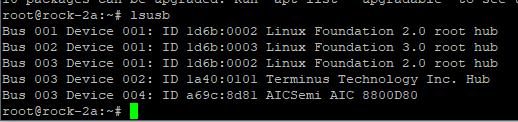
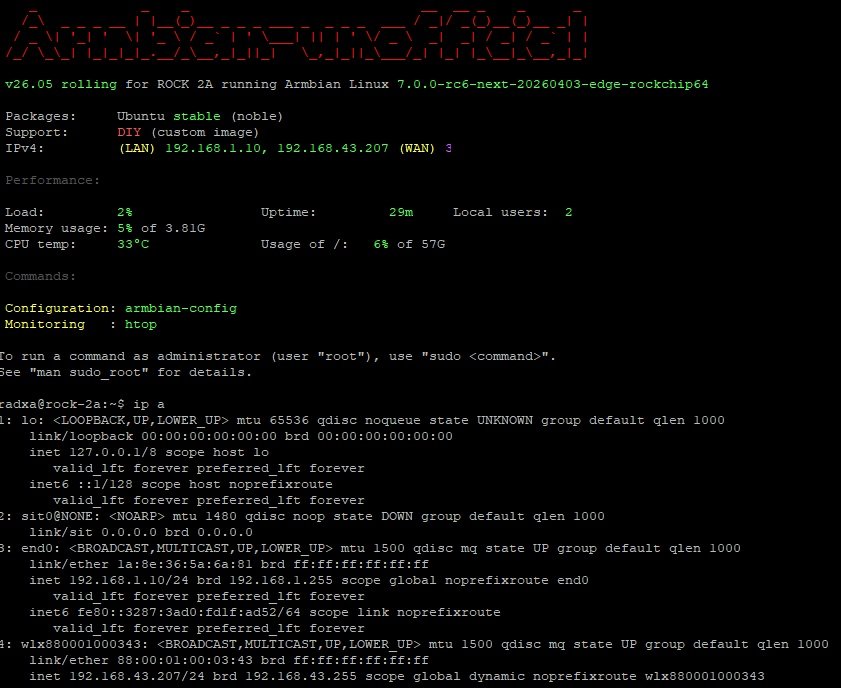
It is not working with this patch because offcially AIC8800 is not supported in kernel > 7.0-rc6 plus in my image Wifi was initially disabled With new image it is better: I made a small fix to make it running with some commands as root: ``` # unzip AIC_FIX.zip # mkdir -p /lib/modules/$(uname -r)/kernel/drivers/net/wireless/aic8800 # cp aic_btusb.ko aic_load_fw.ko aic8800_fdrv.ko /lib/modules/$(uname -r)/kernel/drivers/net/wireless/aic8800/ # depmod -a # cat /etc/modules-load.d/aic8800.conf aic_load_fw aic8800_fdrv aic_btusb # cp -r aic8800_fw /lib/firmware/ # cp -pr aic8800_fw/USB/aic8800D80/ /lib/firmware/ # modprobe aic_load_fw # modprobe aic8800_fdrv # modprobe aic_btusb # lsmod |grep -i aic aic_btusb 57344 0 aic8800_fdrv 626688 0 cfg80211 1200128 1 aic8800_fdrv aic_load_fw 86016 1 aic8800_fdrv ``` Please also remember as it is experimental and all you do it is on your own risk HDMI is not working and we need some code first, I guess for this part: CONFIG_PHY_ROCKCHIP_INNO_HDMI_QP
-
just go threre: https://forum.friendlyelec.com/viewtopic.php?f=93&t=4691
-
Armbian image placed on internal soldered eMMC 64GB - only one issue now aic8800 not supported yet by kernel 7.0-rc6 so no wifi 😕 No PCI as no PCI slots... also no HDMI... Experimental image based on Kwiboo repo dispo here.