tutralex
-
Posts
15 -
Joined
-
Last visited
-

OZPI v1 new image with Armbian v26.2 Debian stable (trixie)
tutralex replied to TRay's topic in Allwinner sunxi
I have no complaints about the developers, it’s enough for me to just know that this is not a client-side problem and that someone is working on a solution. -
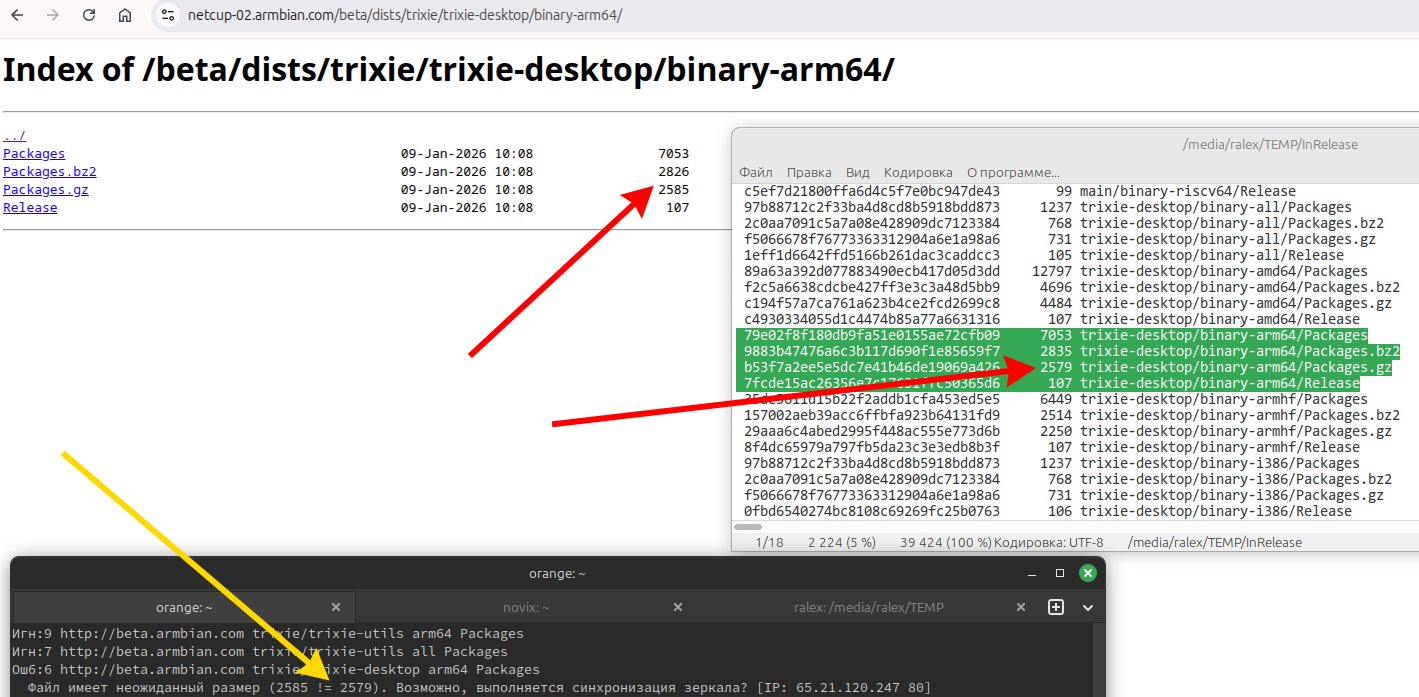
The update from the "armbian.com/beta" repository has not been working for quite some time now. Repositories are broken, sizes in InRelease do not match sizes in subbranches. Mirror synchronization has been going on for about a week now?!
-
OZPI v1 new image with Armbian v26.2 Debian stable (trixie)
tutralex replied to TRay's topic in Allwinner sunxi
I confirm that the update has not been working for several days. Your repositories are broken, sizes in InRelease do not match sizes in subbranches. The file has an unexpected size (10351 != 8303). Perhaps the mirror is synchronizing? [IP: 65.21.120.247 80] Mirror synchronization has been going on for about a week now!?
-
Hi, sudo systemctl stop media-nano-Z.mount it really works, but if you forget to do it manually, then when you try to reboot or turn off the single-board computer, it will freeze, because it tries to unmount the disk itself, apparently using umount. Okay, I did all this after upgrading to Armbian 26.2.0-trunk.86 trixie armv7l, and when I tried to unmount the drive the old way with umount, I found that everything worked. It looks like the problem is already fixed.
-
I tried various parameters when mounting and unmounting, such as: sudo umount -f /media/..., but the system still hangs. You can't connect to the device via SSH in a new session. If you force a reboot (or sudo systemctl poweroff ) without unmounting it, it won't happen, and you won't be able to connect via SSH. Physically disconnecting the cable also doesn't help.
-
After upgrading to Armbian 26.2, I noticed that if I mounted a network drive (samba, cifs) and even accessed it, and then tried to unmount it (sudo umount -t cifs ...), the system would freeze. Upgrading from Debian 12 (bookworm) to Debian 13 (trixie) didn't help. I did a rollback to Armbian 25.x via backup, and this problem doesn't exist there.
-
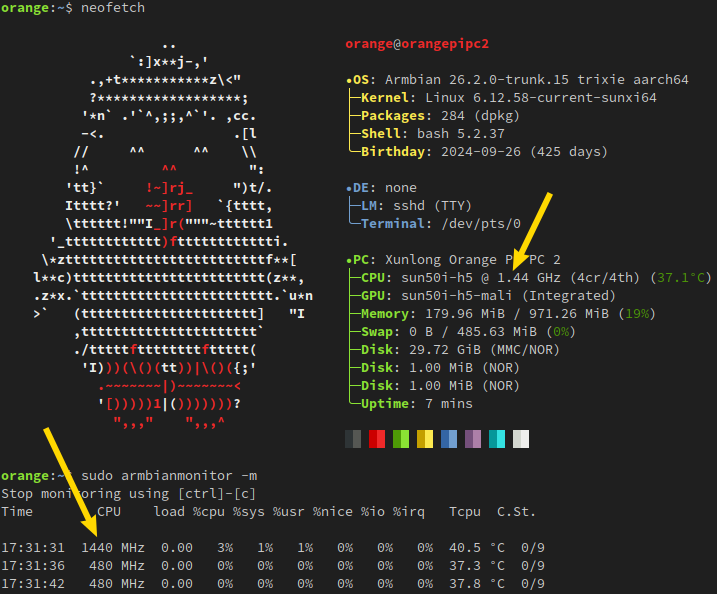
I recently updated my Orange-Pi-PC2 to Debian 13 (trixie). Image: "Armbian_community_26.2.0-trunk.7_Orangepipc2_trixie_current_6.12.58_minimal.img.xz". Everything works now, and the issue mentioned above no longer exists! Maybe it will be useful to someone... However, I still had to make some adjustments to "/boot/dtb/allwinner/sun50i-h5-orangepi-pc2.dtb" sun50i-h5-orangepi-pc2.dtb: Overclocked the processor to 1.44 GHz (new board revision 1.368 GHz CPU!); Similar to the other firmware versions, I configured the red LED as a power indicator (constantly lit) and the green LED as a heartbeat indicator. For everything to work, you also need to correct the parameter MAX_SPEED=1440000 in the file "/etc/default/cpufrequtils" cpufrequtils.

-
http://armbian.lv.auroradev.org/beta bookworm/main armhf armbian-bsp-cli-bananapim2ultra-current armhf 25.11.0-trunk.302 [434 kB] http://armbian.lv.auroradev.org/beta bookworm/main armhf armbian-firmware all 25.11.0-trunk.302 [100 MB] http://armbian.lv.auroradev.org/beta bookworm/main armhf linux-dtb-current-sunxi armhf 25.11.0-trunk.302 [211 kB] http://armbian.lv.auroradev.org/beta bookworm/main armhf linux-image-current-sunxi armhf 25.11.0-trunk.302 [41.8 MB] http://armbian.lv.auroradev.org/beta bookworm/main armhf linux-u-boot-bananapim2ultra-current armhf 25.11.0-trunk.302 [271 kB] after update fastfetch: Armbian 25.11.0-trunk.297 bookworm armv7l
-
Recently, first when updating the OrangePi 3B, and now the BananaPi M2 Ultra, the /ect/os-release file, *PRETTY_NAME=*trunk.XXX*, has stopped updating correctly. XXX doesn't change and doesn't match the current value. (rolling release)
-
@Magnets Remove the SD card from the board, insert it into the card reader, find and replace the file "/boot/dtb/allwinner/sun50i-h5-orangepi-pc2.dtb" with the one in my attachments or extract it from your old image.
-
I'm afraid I don't have enough experience for this.
-
@rmoriz The problem exists in the official "current" image. @going Oh, forgot to say that this is the latest revision of the board with a 1.368 GHz processor. These settings will not break older devices and can be easily rolled back.
-
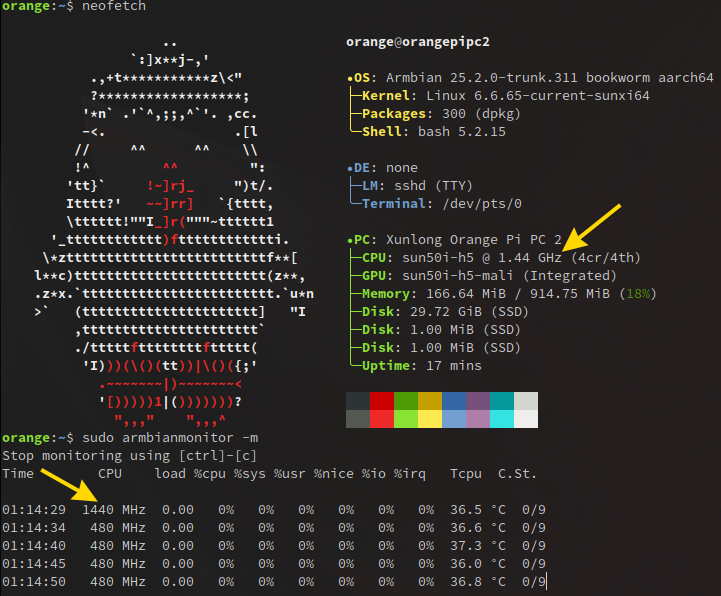
Maybe it will be useful for someone. Working file "sun50i-h5-orangepi-pc2.dtb" with processor overclocking to 1.44 GHz. For everything to work, you also need to correct the parameter MAX_SPEED=1440000 in the file "/etc/default/cpufrequtils". As for the boot issue, it's still not solved. I just wrote a script that after the next update replaces the non-working "/boot/dtb/allwinner/sun50i-h5-orangepi-pc2.dtb" with the one attached in this post (this needs to be done before rebooting). cpufrequtils sun50i-h5-orangepi-pc2.dtb
-
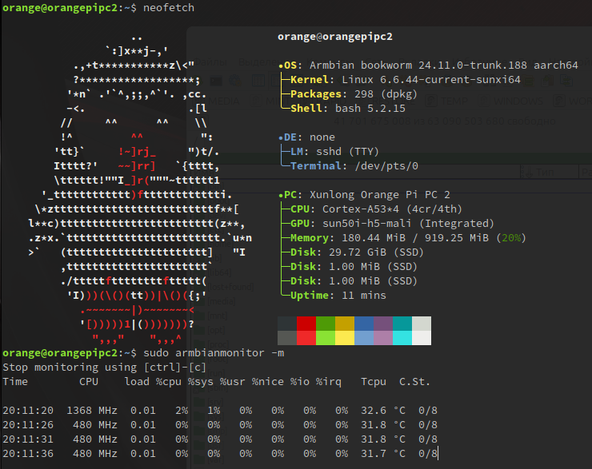
Another working file: "sun50i-h5-orangepi-pc2.dtb", size: 35143 bytes, reported by user with nickname "modbus". Taken from the archive armbian.com/archive: Armbian_23.8.1_Orangepipc2_bookworm_current_6.1.47.img.xz sun50i-h5-orangepi-pc2.dtb
-
The working file sun50i-h5-orangepi-pc2.dtb, taken from Armbian_24.8.1_Uefi-arm64_bookworm_current_6.6.47_minimal.img , works in Armbian_community_24.11.0-trunk.167_Orangepipc2_bookworm_current_6.6.44_minimal.img Better to use the file in the post below! There are more devices described and the CPU temperature sensors work.