


John Taylor
-
Posts
16 -
Joined
-
Last visited
-
If you can get termux app to run in android, you may be able to dump the dtb, which may give you clues as to the compatability of the chip. I have issues with some tv boxes with termux versions, but there are older versions available if the current one in playstore won't load or just doesn't work. su -c 'dd if=/sys/firmware/fdt of=<USB_PATH>/device.dtb' or simply su -c 'cp /sys/firmware/fdt <USB_PATH>/device.dtb' [Change USB_PATH as required, of course] The path /sys/firmware/fdt is correct for accessing the in-memory DTB on most running Linux/Android systems. The link http://nskhuman.ru/allwinner/krugh618.php?np=3 refers to what looks like your box or similar: "The board contains a microcircuit with the designation HK5236F - this is a hybrid microcircuit, its possible analogue is AW869A manufactured by Allwinner. AW869A is a dual-band WiFi6, BT5.2 highly integrated module, supporting WLAN 1*1 IEEE 802.11a/b/g/n/ac/ax and BT 5.2 standard, can realize WLAN/BT, has low power consumption" The links after that text give more info....
-

Installation Instructions for TV Boxes with Amlogic CPUs
John Taylor replied to SteeMan's topic in FAQ
Thanks to Nick Alilovic for the solution to this issue. You need to add "BOOTFS_TYPE=fat to the board config. If you are on Windows and using an image created by someone else, it's possible you may need to install a utility to show .ext partitions. The you can edit /boot/armbianEnv.txt or extlinux to config to point to a different dtb etc. -
Tried this with a Ubuntu PC today, and have the same result. lsblk shows one partition.
-
Installation Instructions for TV Boxes with Amlogic CPUs
John Taylor replied to SteeMan's topic in FAQ
Furthermore, today I built an Ubuntu desktop PC, and flashed a build onto an SD Card. The resultant installation has only ONE partition. No Windows involvement whatsoever Same with a USB flash drive (to eliminate the SD card adapter). So where do we go from here? -
Installation Instructions for TV Boxes with Amlogic CPUs
John Taylor replied to SteeMan's topic in FAQ
Disk genius in my case reveals there is NO FAT32 boot partition, hidden or otherwise, only a root partition.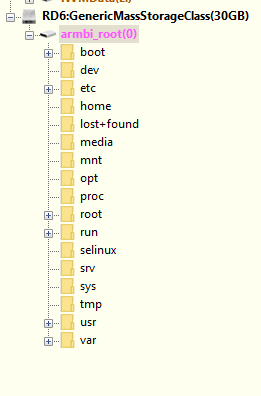
-
(I prepared this spiel before I found this thread, but it still holds) /// Spent the last 2 days on this issue with an ALLWINNER image, not an AMLOGIC image. Back in October I had NO issue configuring this same image (downloaded to my nVME drive) on W11, with the same image, same copy of Balena etcher. PC 1 I flashed an Armbian community image onto an SD card (in a USB SD Card adapter), but was unable to see the FAT32 partition in Windows. I mounted the same USB in a VMware VM, and could only see one partition(!) I reflashed the image using dd (in VMware) and again only one partition was written. The flashed SD card (unconfigured for DTB etc) ran fine on my TV box. The default DTB setup clearly works. I loaded Linux Reader for Windows (LRFW) but had the same result, could not see a FAT32 boot partition. PC 2 I flashed the same image using etcher on a different Windows 11 PC. Same result on that PC, unable to see a FAT32 partition. (Back to) PC1 I Inserted the SD card adapter back into the first computer, and was able to see the root partition, mounted as armbi_root(F:) and also as armbi_root(i), but still no BOOT partition (maybe the LRFW software took a few minutes to start working). It seems to me the only variable is Windows 11 having some driver issue, since that's the only remaining variable I can think of. //// Does any knowledgeable contributor know of any POSSIBLE reason why etcher would now only write ONE partition, whereas previously it would write 2 partitions from the same image? Is anyone having this issue using only Linux as the dev environment? best John
-
Installation Instructions for TV Boxes with Amlogic CPUs
John Taylor replied to SteeMan's topic in FAQ
Hi Luis, seems the main difference in the x4 is hardware AVI Video decoding, may I suggest you try the latest S905x Armbian release (main forum page) and find a suitable DTB (trial and error, start with meson-gxl-s905x-p212.dtb. If it boots on your machine, you may have everything you need. Good luck. -
Installation Instructions for TV Boxes with Amlogic CPUs
John Taylor replied to SteeMan's topic in FAQ
Hi Maurizio, do you mean that you can normally see the FAT32 BOOT partition after flashing (and then resinserting the USB adapter) with Balena Etcher in Windows, and you can no longer do that? I have that particular issue though I'm using Windows 11. The image boots fine on my server, using lsblk I see one partition, and what was the boot partition is now a folder. I can see the DTB folder on the running image, but am now only able to make changes to a running image. I'll try to flash using dd and let you know. -
I have a unit that I am unable to boot from SD card as it has no such physical device. Using a terminal emulator in Android I can see partitions being loaded, and have managed to get several "partitions" (mmcblk01p01 to p20) copied off to a flash drive. These turn out to be data files, so I can't load/modify them on a VM. I had hoped to find the boot.scr/boot.cmd file and modify it to force it to mount from USB in the first instance. The unit has 2 USB ports. There is a push switch that I had to unglue. It runs Android when pushed in, and I get a black screen when it is in the OUT position, so I'm assuming that the OUT position puts the unit into USB burning mode, or whatever. I have ordered UART header pins and adapter so will be able to do more research once those are in place. From your analysis above, can you recommend a way of forcing a boot from USB using the UART serial interface (I don't see a recover-from-usb U-Boot command)? I have an armbian s905x image all ready to go. Ideal situation would be that I get the Armbian running from USB then flash the eMMC. Any help gratefully received, Best, John
-
@robertoj I use Nick's exact build (specify the branch) with bookworm. My tanix68 unit has a custom Hal and supplicant firmware, which I'm trying to integrate correctly, but LAN works just fine.
-
@nick a Thanks will check it out, Did you post it anywhere or do I need to ask them directly?
-
Seeking SKW (SWT6621 / EA6521) SDIO Wi-Fi driver source or Linux 6.x port Hi all, I’m running Nick's Armbian-unofficial_25.05.0-trunk_Tanix-tx6s-axp313_bookworm_edge_6.12.11_server.img.xz on a TV box that originally shipped with Android using kernel 5.15 AIDA64 run on Android gives: System Device Type: TV Manufacturer: Oranth Model: TX68 Brand: ADT-3 Board: exdroid Device: adt3 Hardware: sun50iw9p1 Platform: apollo Product: adt3 Installed RAM: 4 GB Total Memory: 3891 MB Available Memory: 2512 MB Internal Storage Total Space: 54.22 GB Internal Storage Free Space: 52.57 GB Bluetooth Version: 4+ Wi-Fi works perfectly under Android, but not under Armbian — the onboard Wi-Fi chip (connected over SDIO) is a SeekWave SWT6621, also known as SKW or EA6521. From the Android side, I can see the driver is provided in binary form via: /vendor/bin/hw/android.hardware.wifi-service-lazy /vendor/etc/init/init.wlan.common.rc /vendor/etc/firmware/SWT6621*_SDIO.bin and the kernel logs show active skw_scan and skw_dump_survey messages when Android is running. However, when booting Armbian, wlan0 never appears — only eth0 and virtual interfaces. This strongly suggests that the SKW SDIO driver needs to be rebuilt or ported for kernel 6.x. What I’m looking for: Has anyone already ported or rebuilt the SKW (SWT6621 / EA6521) SDIO driver for Linux 6.x / Armbian? If so, could you please share your source, patches, or build instructions? If the work is in progress, I’d be very happy to help or test — I have the Android image and full /vendor contents available for reference. Any leads on SeekWave source releases, OEM SDKs, or community ports would be greatly appreciated. Thanks in advance for any guidance — I’d rather reuse or help finish existing work than start from scratch if someone has already begun tackling this. Best Regards John
-
Kali Linux as supported distro
John Taylor replied to Alessandro Lannocca's topic in Framework and userspace feature requests
Orange pi 5 wifi now supports injection mode using nexmon. Kali distro available from setup menu. -
Orange Pi H3 soc images doesn't have lpae enabled in kernel
John Taylor replied to sea's topic in Allwinner sunxi
Apologies for being late to the party, and please excuse me for commenting on something which may already have been fixed. What is the difference between enabling the flag, and allowing whatever apps to work if they can, and disabling it so they certainly can't work? Seems to me that enabling it would make most sense, since H3 SOCs support it. -
Rupa X88 Pro 13 - RK3528 board with images
John Taylor replied to fedes_gl's topic in Rockchip CPU Boxes
Guys, please do keep us all updated on the rk3528. I was just about to buy a job lot of boards for a grid computing project when I found it's not supported yet. I found that my old TV rk32xx box was well supported, so am prepared to wait.