Sergioclr
-
Posts
32 -
Joined
-
Last visited
Content Type
Forums
Store
Crowdfunding
Applications
Events
Raffles
Community Map
Everything posted by Sergioclr
-
Hi, my knowledge about Armbian is limited. For such a specific configuration/compilation I suggest that you open a new topic under "Allwinner sunxi". Best regards.
-
Nick's instructions: You need to add this line to the bottom. "+CONFIG_SPL_IMAGE_TYPE_SUNXI_TOC0=y" and change "@@ -0,0 +1,31 @@" to @@ -0,0 +1,32 @@. ./compile.sh choose "Do not change kernel configuration" choose "Show CSC/WIP/EOS/TVB" choose "I understand and agree" choose "X98H" choose "edge" rest is up to you. Your image should be in output/images directory.
-
Hi, I can suggest a general procedure but it is not guaranteed to work for every TV-Box. 1) Be sure of what TV-box you have (Allwinner, Ambian or Rockship); 2) download git clone --depth=1 --branch=main https://github.com/armbian/build 3) open downloaded git and search for /build/patch/u-boot 4) select the directory that corresponds to your TV-box. For example: /build/patch/u-boot/u-boot-sunxi 5) edit arm64-sun50i-H313-add-lpddr3-deconfig.patch, if you have a secure image: add +CONFIG_SPL_IMAGE_TYPE_SUNXI_TOC0=y and increment the counter to 32 (@@ -0,0 +1,32 @@) and "secure-boot.patch" to /build/patch/u-boot/u-boot-sunxi. See procedure here https://forum.armbian.com/profile/210518-nick-a/ 6) ./compile.sh observing Nick's instructions.
-
For those who want to compile from source: a) locate file ~ /armbian-build-mxpro/patch/kernel/archive/sunxi-6.12/series.conf b) delete the following lines before issuing ./compile.sh: spi-rockchip-Fix-runtime-PM-and-other-issues and spi-fixes c) save the file and proceed to compilation (./compile.sh) Note: if you want to upgrade the Armbian firmware be aware that: linux-dtb-current-sunxi64/trixie 26.5.1 arm64 [upgradable from: 26.02.0-trunk] linux-image-current-sunxi64/trixie 26.5.1 arm64 [upgradable from: 26.02.0-trunk] will render the ethernet interface inoperable. You can prevent this by issuing sudo apt-mark hold armbian-firmware before sudo apt upgrade -y
-
https://github.com/sicXnull/armbian-build/releases MXQ-PRO H313 https://github.com/sicXnull/armbian-build/archive/refs/tags/mxqpro.zip Summary: compile from source halts with error. Traceback (most recent call last): [🔨] File "/home/e***o/Downloads/armbian-build-mxqpro/lib/tools/patching.py", line 491, in <module> [🔨] raise exit_with_exception [🔨] Exception: Failed to apply 2 patches. Log uploaded and available at https://paste.armbian.com/dimokofipe Thanks in advance
-
Suggestions will be very appreciated.
-
Hi, I am assuming that you have a standard Q1 TV Box (Allwinner H313 based). 1) Download Armbian Imager here; 2) Install the version for your operating system; 3) After installing, choose "Manufacturer=ALLWINNER", Board="X96Q TV BOX", Operating system="minimal Trixie current" and Storage ( I suggest a good quality Class 10 SD card); 4) After writing the image, insert the SD card into the available SD slot; 5) Insert a wooden toothpick or a Q-tip into AV/Reset input; 6) Click (kindly) and hold the toothpick and connect the TV Box power supply to the power entry; 7) Release the toothpick after 8-10 seconds. if the HDMI connector is plugged you should see the Armbian initial boot process Note: some TV Boxes don't need items 5, 6 and 7. I hope it helps.
-
Update: sicXnull/armbian-build (H96q) + "+CONFIG_SPL_IMAGE_TYPE_SUNXI_TOC0=y" and "secure-boot.patch" solved the problem. Now, the ethernet interface is fully functional. Thank you Nick & sicXnull.
-
What kind of device (hardware) are you using?
-
Back to the "drawing board" in the search for a solution. 🤔
-
Good morning. git clone https://github.com/NickAlilovic/build.git --branch v20251014 ~/build/patch-u-boot/u-boot-aw/150-1dd-x96q-lpddr3-defconfig.patch "+CONFIG_SPL_IMAGE_TYPE_SUNXI_TOC0=y" ~/build/patch-u-boot/u-boot-aw/secure-boot.patch ./compile.sh choice = x96q-lpddr3 2026-04-26_0851h.txt boot sequence, shutdown -r and dmesg Thanks in advance. 2026-04-26_0851h.txt
-
No, unfortunately, I don't have. I will run your build and, possibly, have all required data by tomorrow morning. Thanks for your prompt answer,
-
Good evening. Armbian for H313 X96-Q LPDDR3 TV-Box sicXnull/armbian-build) git clone --depth=1 --branch=main https://github.com/armbian/build "+CONFIG_SPL_IMAGE_TYPE_SUNXI_TOC0=y" in ~/build/patch/u-boot/u-boot-sunxi/board_x96q/arm64-sun1-h313-addr-x96q-lpddr3-defconfig.patch , adding secure-boot.patch and ~/build/patch/u-boot/u-boot-sunxi/board_x96q/sunsi-add-h616-internal-eth-phy-support.patch left untouched Android-boot.txt (normal boot sequence / eth & wlan=OK) Armbian_image_reboot_dmesg.txt Image reboot (sudo shutdown -r now) + dmesg log (wlan=OK, eth=not OK) Thanks in advance. Android-boot.txt Armbian_image_reboot_dmesg.txt
-
Newbie question: how can I do that (boot logs)? 🤔
-
Help needed (previous update): What should be edited is this file? sudo pico arch/arm64/boot/dts/allwinner/sun50i-h313-x96q-lpddr3.dts Thanks in advance.
-
Activity: 1) 159-add-x96-q-lpddr3-v1.3-defconfig.patch has been tested both ways: with original parameters and with suggested (above) parameters; 2) The box boots but I am unable to set IP addresses, even in wlan0, via Armbian-config (errors reported); 3) So far the best result is from ~/build/patch/u-boot/u-boot-sunxi/board_x96q/arm64-sun50i-h313-add-x96q-lpddr3-defconfig.patch with the appropriate +CONFIG_SPL_IMAGE_TYPE_SUNXI_TOC0=y and secure-boot.patch. Armbian-config works as designed and IP addresses can be set. Ideas: describes a similar problem (eth0) Suggested action plan: https://github.com/armbian/build/pull/6617/files [Fix issue #6528 opi-zero2w, ethernet PHY not powered #6617] Problem: I don't know how to implement it and/or if that proposed corrections will tamper with ~/build/patch/u-boot/u-boot-sunxi/board_x96q/sunsi-add-h616-internal-eth-phy-support.patch As usual, suggestions will be welcome 🙂
-
Good afternoon. I extracted the DTS. What is the next step? Thanks in advance extracted_dt.dts
-
Good morning. I will learn how to extract Device Tree (DTS) and then I will update the thread.
-
No, just plain 100MBps eth.
-
Good morning. Results (link above): 1) Image built upon the above link=fail 2) Placing "+CONFIG_SPL_IMAGE_TYPE_SUNXI_TOC0=y" in ~/build/patch/u-boot/u-boot-sunxi/board_x96q/arm64-sun1-h313-addr-x96q-lpddr3-defconfig.patch , adding secure-boot.patch and ~/build/patch/u-boot/u-boot-sunxi/board_x96q/sunsi-add-h616-internal-eth-phy-support.patch left untouched equals successful boot but, still, no ethernet Thanks in advance.
-
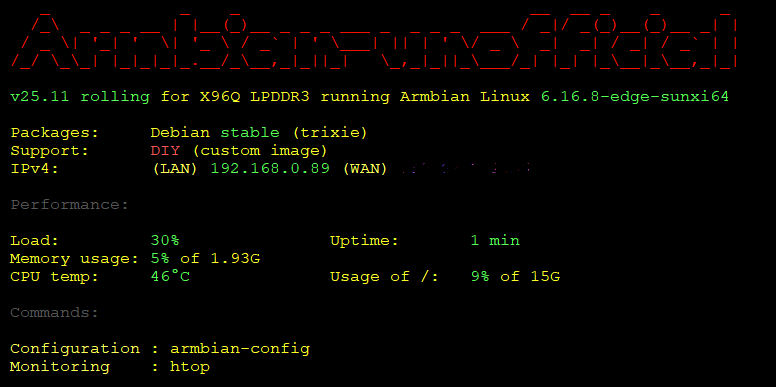
Good afternoon. image X96Q LPDDR3 (w/ secure-boot patch) sucessfully compiled (Min22 XFCE, Trixie packages); UART installed, image boots OK, wlan0 IP address defined. Problems: apt update fails (error) to install armbian-firmware_26.2.1_all.deb box ethernet port is not recognized The following is a screen capture of Putty (serial via UART) of the system: Any suggestions? Thanks in advance.
-
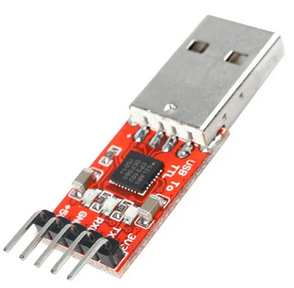
Waiting for the delivery of the USB-to-TTL converter. My old USB-serial adapter didn' t work.
-
Good morning. root_key.pem (after compilation) is located in not in u-boot* (root directory). Is that right? Thanks in advance.

-
Question regarding to a post of yours: "Your root_key.pem needs to be in the u-boot root directory" As per instructions, I created the secure-boot.patch in ~/build/patch/u-boot/u-boot-aw but there is no root_key.pem in the u-boot root directory.
-
Yes, the pads are marked GND, TX and RX (underside)! I have an old USB-to-serial (DB9) cable adapter (PL2303HXA), will it work or I have to buy one like this?