KSJ
Members
-
Joined
-
Last visited
Everything posted by KSJ
-
yes, it seems packages are updated and server is rebooted. So solution was fixing the bugs. Thanks a lot.
-
Thanks, gui seems ok. I'm little bit confised regarding the configs. There are these configs now: /etc/apt/apt.conf.d# ls -1 01autoremove 02-armbian-compress-indexes 02-armbian-periodic 02-armbian-postupdate 20auto-upgrades 50unattended-upgrades 70debconf 71-armbian-no-recommends 81-armbian-no-languages In 02-armbian-periodic it looks the same (I tried to disable autoupdate via armbian-config, enable it again and then change configuration) // Enable the update/upgrade script (0=disable) APT::Periodic::Enable "0"; // Do "apt-get update" automatically every n-days (0=disable) APT::Periodic::Update-Package-Lists "21"; // Do "apt-get upgrade --download-only" every n-days (0=disable) APT::Periodic::Download-Upgradeable-Packages "0"; // Run the "unattended-upgrade" security upgrade script // every n-days (0=disabled) // Requires the package "unattended-upgrades" and will write // a log in /var/log/unattended-upgrades APT::Periodic::Unattended-Upgrade "7"; // Do "apt-get autoclean" every n-days (0=disable) APT::Periodic::AutocleanInterval "120"; // Define basic patterns Unattended-Upgrade::Origins-Pattern { "origin=${distro_id},codename=${distro_codename}"; "origin=Armbian"; }; So it is probably not used anymore all settings seems to be now in 20auto-upgrades APT::Periodic::Enable "1"; APT::Periodic::Update-Package-Lists "1"; APT::Periodic::Download-Upgradeable-Packages "0"; APT::Periodic::AutocleanInterval "0"; APT::Periodic::Unattended-Upgrade "1"; I'm thinking, if I should remove some of these configs.
-
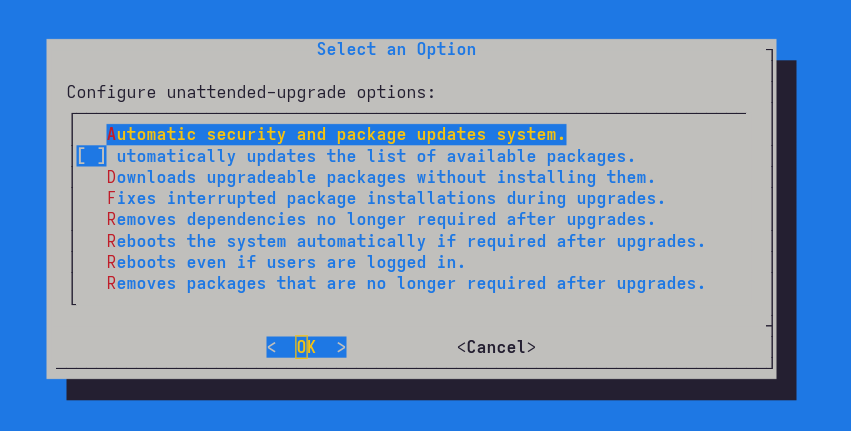
Thanks. And what about the GUI I sent in picture. There are no checkboxes seen, until I press space to switch changes and also the checkbox is then visible on other line, then it should be. Should i set some variables before I start armbian-config? Or this will be fixed with that changes you posted too?
-
Hi, I have issue on armbian regarding unattended upgrades. At first, I tried to set it via armbian-config, but nothing happened. The gui seems to be wrong: then I checked /etc/apt/apt.conf.d/02-armbian-periodic // Enable the update/upgrade script (0=disable) APT::Periodic::Enable "0"; // Do "apt-get update" automatically every n-days (0=disable) APT::Periodic::Update-Package-Lists "21"; // Do "apt-get upgrade --download-only" every n-days (0=disable) APT::Periodic::Download-Upgradeable-Packages "0"; // Run the "unattended-upgrade" security upgrade script // every n-days (0=disabled) // Requires the package "unattended-upgrades" and will write // a log in /var/log/unattended-upgrades APT::Periodic::Unattended-Upgrade "7"; // Do "apt-get autoclean" every n-days (0=disable) APT::Periodic::AutocleanInterval "120"; // Define basic patterns Unattended-Upgrade::Origins-Pattern { "origin=${distro_id},codename=${distro_codename}"; "origin=Armbian"; }; And manually set APT::Periodic::Enable "1"; But after mornings reboot, I see the configuration is back to 0. Few info from /etc/armbian-release (I'm running OPI 5 Ultra, but I don't feel this is something hw specific): # PLEASE DO NOT EDIT THIS FILE BOARD=orangepi5-ultra BOARD_NAME="Orange Pi 5 Ultra" BOARDFAMILY=rockchip-rk3588 BUILD_REPOSITORY_URL=http://172.17.0.1:8000/armbian/build BUILD_REPOSITORY_COMMIT=ddae28804 LINUXFAMILY=rk35xx ARCH=arm64 BOOT_SOC=rk3588 IMAGE_TYPE=nightly BOARD_TYPE=csc INITRD_ARCH=arm64 KERNEL_IMAGE_TYPE=Image KERNEL_TARGET=vendor,current,edge KERNEL_TEST_TARGET=vendor,current,edge FORCE_BOOTSCRIPT_UPDATE= FORCE_UBOOT_UPDATE= OVERLAY_DIR="/boot/dtb/rockchip/overlay" VENDOR="Armbian" VENDORCOLOR="247;16;0" VENDORDOCS="https://docs.armbian.com" VENDORURL="https://www.armbian.com/" VENDORSUPPORT="https://forum.armbian.com" VENDORBUGS="https://www.armbian.com/bugs" BOOTSCRIPT_FORCE_UPDATE="no" BOOTSCRIPT_DST="boot.cmd" VERSION=26.11.0-trunk.90 REVISION=26.11.0-trunk.90 BRANCH=vendor My question is, how to enable it correctly on armbian? Thanks in advance