Crossplatform Vlad
Members
-
Joined
-
Last visited
-
-
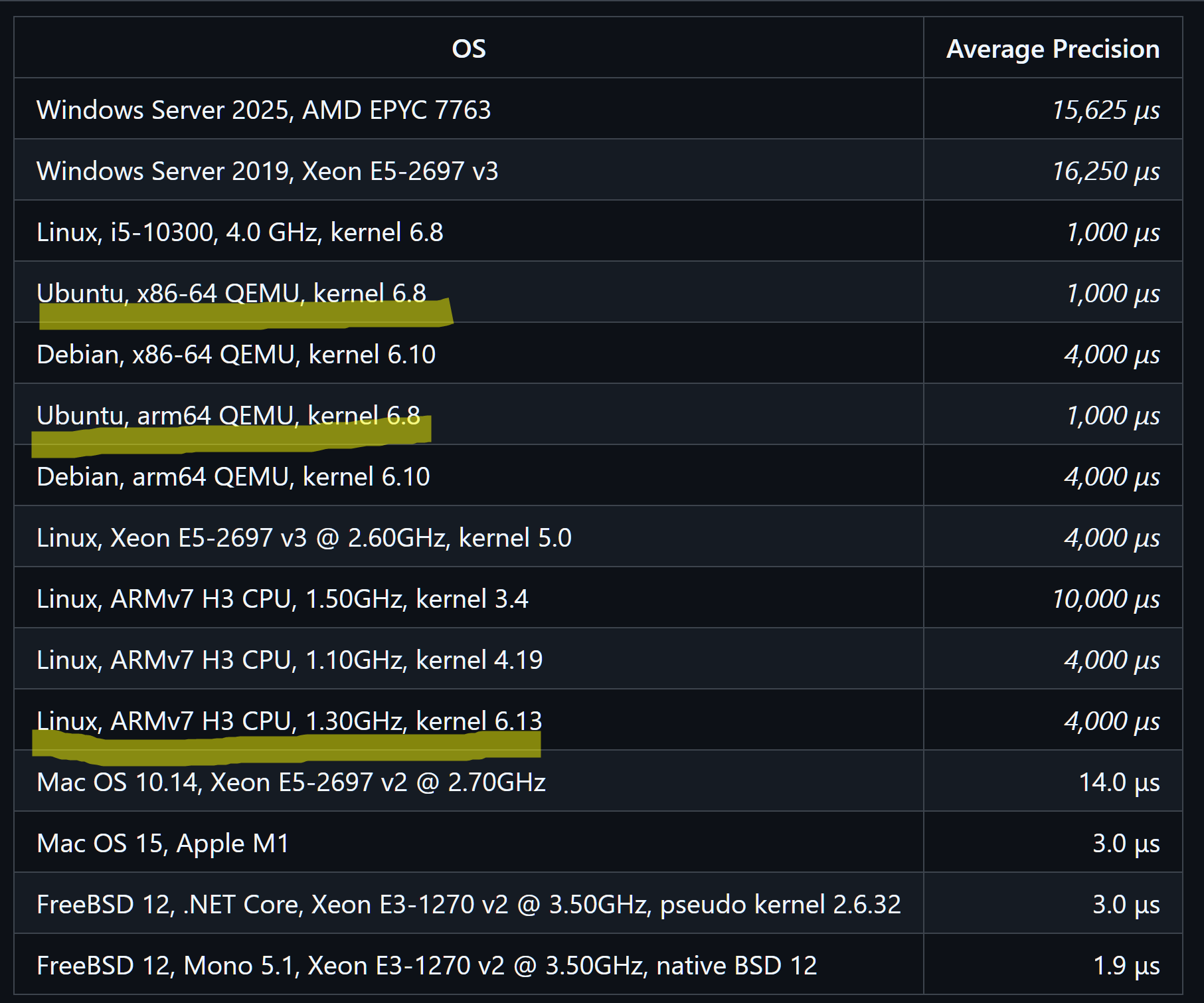
Good question. I did compared predefined default kernels from canonical (6.8) and debian (6.10) on the same hardware twice: 1) qemu arm64 emulator on x86_64 host with the same parameters. lines 6 and 7 on the screenshot 2) qemu x86_64 emulator on x86_64 host with the same parameters. lines 4 and 5 on the screenshot
-
-
-
My setup is SD boot and rootfs on ssd on USB 2.0 smartctl on laptop reports TIRM is enabled, but it is missing on orange pi PC. using the same SSD in the same USB box. Do I need another ssd, USB box, or armbian upgrade for TRIM support? root@focal-armv7l ~ $ fstrim -v / fstrim: /: the discard operation is not supported root@focal-armv7l ~ $ mount | grep " / " /dev/sda1 on / type ext4 (rw,noatime,nodiratime,discard,errors=remount-ro,commit=600) root@focal-armv7l ~ $ smartctl -i -d sat /dev/sda smartctl 7.1 2019-12-30 r5022 [armv7l-linux-5.9.14-sunxi] (local build) Copyright (C) 2002-19, Bruce Allen, Christian Franke, www.smartmontools.org === START OF INFORMATION SECTION === Device Model: SSD 128GB Serial Number: GS20231128661058 LU WWN Device Id: 0 000000 000000000 Firmware Version: HT3618C8 User Capacity: 128,035,676,160 bytes [128 GB] Sector Size: 512 bytes logical/physical Rotation Rate: Solid State Device Form Factor: 2.5 inches Device is: Not in smartctl database [for details use: -P showall] ATA Version is: ACS-4 T13/BSR INCITS 529 revision 5 SATA Version is: SATA 3.2, 6.0 Gb/s (current: 1.5 Gb/s) Local Time is: Wed Feb 7 06:02:15 2024 EET SMART support is: Available - device has SMART capability. SMART support is: Enabled # Missing TRIM support lsblk -D also reports zeros for discard root@focal-armv7l ~ $ lsblk -D NAME DISC-ALN DISC-GRAN DISC-MAX DISC-ZERO sda 0 0B 0B 0 ├─sda1 0 0B 0B 0 └─sda2 0 0B 0B 0 mmcblk0 0 4M 3.5G 0 ├─mmcblk0p1 0 4M 3.5G 0 └─mmcblk0p2 0 4M 3.5G 0 zram0 0 4K 2T 0 zram1 0 4K 2T 0 I'm using previous armbian ver. Can an upgrade help to solve the missing trim issue? root@focal-armv7l ~ $ cat /etc/*release # PLEASE DO NOT EDIT THIS FILE BOARD=orangepipc BOARD_NAME="Orange Pi PC" BOARDFAMILY=sun8i BUILD_REPOSITORY_URL=https://github.com/armbian/build BUILD_REPOSITORY_COMMIT=b9814056 DISTRIBUTION_CODENAME=focal DISTRIBUTION_STATUS=supported VERSION=20.11.3 LINUXFAMILY=sunxi BRANCH=current ARCH=arm IMAGE_TYPE=stable BOARD_TYPE=conf INITRD_ARCH=arm KERNEL_IMAGE_TYPE=Image IMAGE_UUID=3d974917-e04a-4ec3-bc8a-cc3d2427eb76 # PLEASE DO NOT EDIT THIS FILE BOARD=orangepipc BOARD_NAME="Orange Pi PC" BOARDFAMILY=sun8i BUILD_REPOSITORY_URL=git@github.com:armbian/build.git BUILD_REPOSITORY_COMMIT=e846ef656-dirty DISTRIBUTION_CODENAME=focal DISTRIBUTION_STATUS=supported VERSION=21.02.3 LINUXFAMILY=sunxi BRANCH=current ARCH=arm IMAGE_TYPE=stable BOARD_TYPE=conf INITRD_ARCH=arm KERNEL_IMAGE_TYPE=Image DISTRIB_ID=Ubuntu DISTRIB_RELEASE=20.04 DISTRIB_CODENAME=focal DISTRIB_DESCRIPTION="Ubuntu 20.04.6 LTS" NAME="Ubuntu" VERSION="20.04.6 LTS (Focal Fossa)" ID=ubuntu ID_LIKE=debian PRETTY_NAME="Ubuntu 20.04.6 LTS" VERSION_ID="20.04" HOME_URL="https://www.ubuntu.com/" SUPPORT_URL="https://help.ubuntu.com/" BUG_REPORT_URL="https://bugs.launchpad.net/ubuntu/" PRIVACY_POLICY_URL="https://www.ubuntu.com/legal/terms-and-policies/privacy-policy" VERSION_CODENAME=focal UBUNTU_CODENAME=focal P.S. ix.io is taking a break