Search the Community
Showing results for tags 'orangepi2'.
Found 2 results
-
 My initial testing at the Orange Pi RV2 board detected a list of errors, missing features, driver issues and instabilities: . Not able to run Py5 3D geometry on basis of Jogl, JavaFx3D and Py5 API and packages. The error relates due to missing RISC64 architecture support in the Java APIs and will require platform adjustments for additional drivers. There is yet no GPU acceleration available for this board. Issues: . Missing Wacom tablet driver support at opening of the Ubuntu GNOME environment, the Stylus pen was not detected as pointer device. . Instability at the Firefox Web browser when opening of the start screen. . Chrome browser also shows issues with Google page display. My bypass solution is to use the startpage.com as default entry portal. . Slowness and strange blockings when switching the login to GNOME on Xorg. Xorg mode on Ubuntu. It could give support to the xinput setup commands. I appreciate some guidance how to activate those missing features at the Orange Pi RV2 board. Further test reports are welcome.
 -
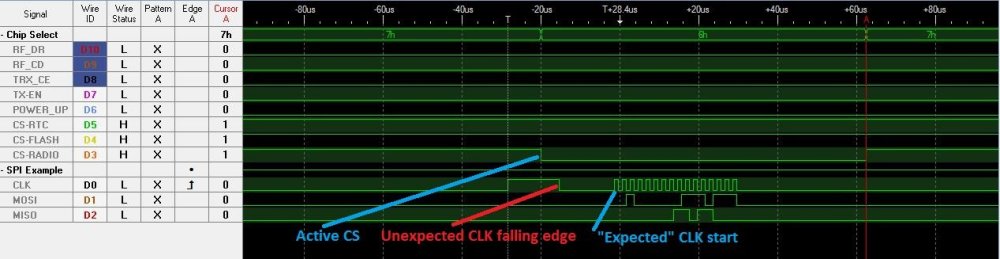
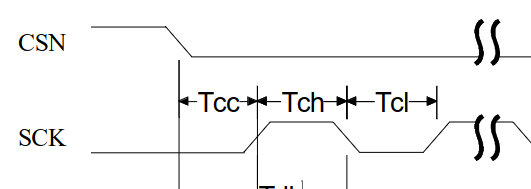
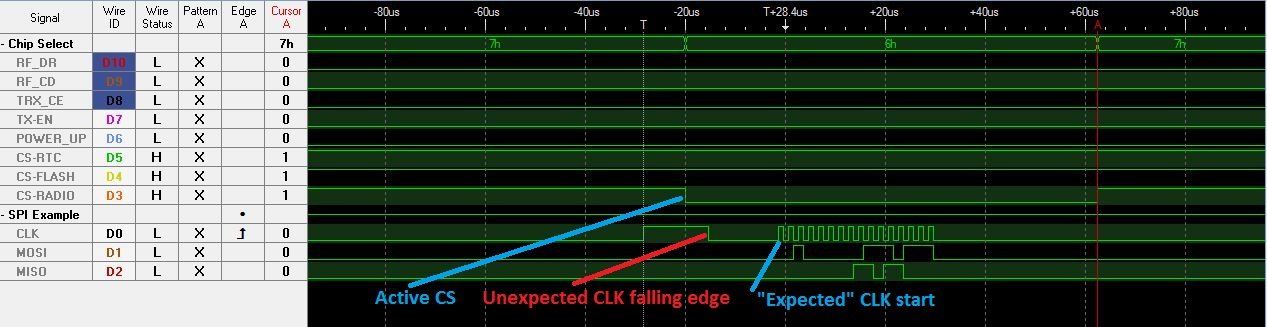
 Hello, I work on a gateway built around an orange PI 2. The orange PI has to manage 3 spi devices (an RTC, a flash and a radio). So I have enabled the spidev module on the orange PI and I use two overlay to get 3 /dev/spidev1.x (x=/dev/spidev1.,1 and2) devices with 3 distinct CS. See my the armbianEnv.txt file: # cat /boot/armbianEnv.txt verbosity=1 logo=disabled console=both disp_mode=1920x1080p60 overlay_prefix=sun8i-h3 overlays=i2c0 pwm spi-spidev usbhost2 usbhost3 rootdev=UUID=64a7c5d3-32a7-4eaf-9e69-a0dd046580ae rootfstype=ext4 param_spidev_spi_bus=1 param_spidev_max_freq=100000000 user_overlays= spi1-triple-spidev-cs sun8i-h3-spi1-add-cs1-cs2 usbstoragequirks=0x2537:0x1066:u,0x2537:0x1068:u See dts file to get 3 spi devices: # cat spi1-triple-spidev-cs.dts /dts-v1/; /plugin/; / { compatible = "allwinner,sun4i-a10", "allwinner,sun7i-a20", "allwinner,sun8i-h3", "allwinner,sun50i-a64", "allwinner,sun50i-h5"; fragment@0 { target = <&spi1>; __overlay__ { #address-cells = <1>; #size-cells = <0>; status = "okay"; spidev@0 { reg = <0>; /* Chip Select 0 */ compatible = "spidev"; spi-max-frequency = <1000000>; status = "okay"; }; spidev@1 { reg = <1>; /* Chip Select 1 */ compatible = "spidev"; spi-max-frequency = <1000000>; status = "okay"; }; spidev@2 { reg = <2>; /* Chip Select 2 */ compatible = "spidev"; spi-max-frequency = <1000000>; status = "okay"; }; }; }; }; See dts file to configure CS for spidev1.1 and spidev1.2 (spidev1.0 has the native CS) # cat sun8i-h3-spi1-add-cs1-cs2.dts /dts-v1/; /plugin/; / { compatible = "allwinner,sun8i-h3"; fragment@0 { target = <&pio>; __overlay__ { spi1_cs1: spi1_cs1 { pins = "PG6"; function = "gpio_out"; output-high; }; }; }; fragment@1 { target = <&pio>; __overlay__ { spi1_cs2: spi1_cs2 { pins = "PA19"; function = "gpio_out"; output-high; }; }; }; fragment@2 { target = <&spi1>; __overlay__ { pinctrl-names = "default", "default", "default"; pinctrl-1 = <&spi1_cs1>; pinctrl-2 = <&spi1_cs2>; cs-gpios = <0>, <&pio 6 6 0>, <&pio 0 19 1>; }; }; }; So the spi driver (in mode 0) works fine for the flash and the RTC, but there is an issue with the radio (on /dev/spidev1.1 with the CS on pin PG6 and active low) because there is a falling edge active before the first rising edge of the clock (see following picture): See what is expected by the spec of the radio: Now I have to find a solution to fix this issue but I not sure to get it rapidly ... But may be some people have ever faced this issue as the radio Nordic 905 is probably not the only one chip touchy to this kind of timings between the CS and the CLK. So any help is welcome ! Best Regards, Damien