


naseeb
-
Posts
19 -
Joined
-
Last visited
Content Type
Forums
Store
Crowdfunding
Applications
Events
Raffles
Community Map
Posts posted by naseeb
-
-
Hi All,
Below command works well on my other boards(Intel with Fedora and Ubuntu)
$ compton -b --backend xrender
This command make windows background transparent so it doesn't hide lower window completely.
But same command doesn't work on RK3288/RK3399 board.
Any idea what should be done to achieve same. Does anyone have idea if anything customized in x-server related to this?
-
5 minutes ago, JMCC said:
uname -r
4.4.55+
-
18 hours ago, JMCC said:
I meant "armbianmonitor -u"
-
For Comm Object failure..below command does the trick.
Quoteecho 'SUBSYSTEM=="usb", ATTR{idVendor}=="2207", MODE="0666", GROUP="plugdev"' | sudo tee /etc/udev/rules.d/51-android.rules
and reboot.
Now i am stuck in updating the image on board.
This tool doesn't show any progress...i am waiting on below screen for 50 minutes. Does it take so long?
Quote[naseeb@localhost rockdev]$ ../../Linux_Upgrade_Tool/Linux_Upgrade_Tool/upgrade_tool
List of rockusb connected
DevNo=1 Vid=0x2207,Pid=0x320a,LocationID=30b Loader
Found 1 rockusb,Select input DevNo,Rescan press <R>,Quit press <Q>:1---------------------Tool Usage ---------------------
Help: H
Quit: Q
Version: V
Clear Screen: CS
------------------Upgrade Command ------------------
ChooseDevice: CD
SwitchDevice: SD
UpgradeFirmware: UF <Firmware> [-noreset]
UpgradeLoader: UL <Loader> [-noreset]
DownloadImage: DI <-p|-b|-k|-s|-r|-m|-u|-t|-re image>
DownloadBoot: DB <Loader>
EraseFlash: EF <Loader|firmware> [DirectLBA]
PartitionList: PL
----------------Professional Command -----------------
TestDevice: TD
ResetDevice: RD [subcode]
ResetPipe: RP [pipe]
ReadCapability: RCB
ReadFlashID: RID
ReadFlashInfo: RFI
ReadChipInfo: RCI
ReadSector: RS <BeginSec> <SectorLen> [-decode] [File]
WriteSector: WS <BeginSec> <File>
ReadLBA: RL <BeginSec> <SectorLen> [File]
WriteLBA: WL <BeginSec> <File>
EraseBlock: EB <CS> <BeginBlock> <BlokcLen> [--Force]
-------------------------------------------------------Rockusb>ef update.img
Loading loader...
Test Device Start -
Getting below error:
Quote[naseeb@localhost rockdev]$ ../../Linux_Upgrade_Tool/Linux_Upgrade_Tool/upgrade_tool UF update.img
Loading firmware...
Support Type:RK320A FW Ver:8.1.276 FW Time:2018-10-02 12:43:28
Loader ver:2.36 Loader Time:2018-10-01 18:15:44
Creating Comm Object failed!
[naseeb@localhost rockdev]$whereas board is shown connected
Quote[naseeb@localhost rockdev]$ ../../Linux_Upgrade_Tool/Linux_Upgrade_Tool/upgrade_tool
List of rockusb connected
DevNo=1 Vid=0x2207,Pid=0x320a,LocationID=30b Loader
Found 1 rockusb,Select input DevNo,Rescan press <R>,Quit press <Q>: -
1 hour ago, JMCC said:
Please post the output of "armbianmonitor -m"
Quoteubuntu@localhost:~/build-master/packages/bsp/common/usr/bin$ sudo ./armbianmonitor -m
[sudo] password for ubuntu:
Stop monitoring using [ctrl]-[c]
Time CPU load %cpu %sys %usr %nice %io %irq C.St.17:33:58: 816MHz 0.15 16% 2% 8% 1% 2% 0% 0/10
17:34:03: 216MHz 0.14 2% 1% 1% 0% 0% 0% 0/10
17:34:08: 408MHz 0.13 1% 0% 0% 0% 0% 0% 0/10
17:34:14: 408MHz 0.12 1% 0% 0% 0% 0% 0% 0/10
17:34:19: 216MHz 0.11 1% 0% 0% 0% 0% 0% 0/10
17:34:24: 216MHz 0.10 1% 0% 0% 0% 0% 0% 0/10
17:34:29: 216MHz 0.09 1% 0% 0% 0% 0% 0% 0/10
17:34:34: 1608MHz 0.08 2% 0% 1% 0% 0% 0% 0/10
17:34:39: 408MHz 0.16 2% 0% 1% 0% 0% 0% 0/10
17:34:44: 216MHz 0.14 5% 1% 3% 0% 0% 0% 0/10
17:34:49: 216MHz 0.13 2% 1% 1% 0% 0% 0% 0/10@JMCC Here you go
-
13 hours ago, JMCC said:
In the meantime, for Xenial, just select the 1.18 ("Old") version of the X server, when the script asks you. That should take care of the problem, since the script won't try to install the hwe backport.
@JMCC I tried 1.18 version but still get the below error when run command LD_LIBRARY_PATH=/opt/libmali-gbm/ ./glmark2-es2-drm
Quoteubuntu@localhost:~/glmark2/build/src$ LD_LIBRARY_PATH=/opt/libmali-gbm/ ./glmark2-es2-drm
file /dev/mali0 is not of a compatible version (user 10.6, kernel 10.4)
ERROR: The DDK is not compatible with any of the Mali GPUs on the system.
The DDK was built for 0x750 r0p0 status range [1..1], but none of the GPUs matched:
file /dev/mali0 is not of a compatible version (user 10.6, kernel 10.4)
Error: eglInitialize() failed with error: 0x3001
file /dev/mali0 is not of a compatible version (user 10.6, kernel 10.4)
ERROR: The DDK is not compatible with any of the Mali GPUs on the system.
The DDK was built for 0x750 r0p0 status range [1..1], but none of the GPUs matched:
file /dev/mali0 is not of a compatible version (user 10.6, kernel 10.4)
Error: eglInitialize() failed with error: 0x3001
Error: main: Could not initialize canvas
ubuntu@localhost:~/glmark2/build/src$Attaching install.log file as well for your reference.
-
On 9/27/2018 at 8:57 PM, JMCC said:
If you notice, your install.log shows that the mali package has a conflict with libgles2-mesa-dev. Try uninstalling that package.
@JMCC I tried your script on fresh manufacturer's provided image. Please find attached the install.log
It shows error:
Quotedpkg: error processing package flash-kernel
Board is not upgraded to new kernel.
I also tried manually to upgrade the new kernel as per the link: http://opensource.rock-chips.com/wiki_Linux_user_guide. Please let me know if i should create another thread for upgrading image using the linux SDK??
-
Referring the MPP samples, i have got an application which can give me NV12 data.
4 instance(or threads) of this application will give me raw data, i need to scale all of them in a single screen. Is it achievable through Mali GPU with current development of userland/kernel driver?
Also i need to perform composition. On that tiled screen, i need to show other semi-opaque(transparent) window. Which library can help me to do the same?
-
When i run script "media-rk3288.sh", it says "Ctrl C to abort and Enter to continue". I attached "install.log" file for your reference
i checked the install.log, it tries to upgrade system to 4.15.0 but failed.
I have got an image from Manufacturer which doesn't have any userland Mali. I am trying to install the same. For that, I am advised to upgrade the kernel as well.
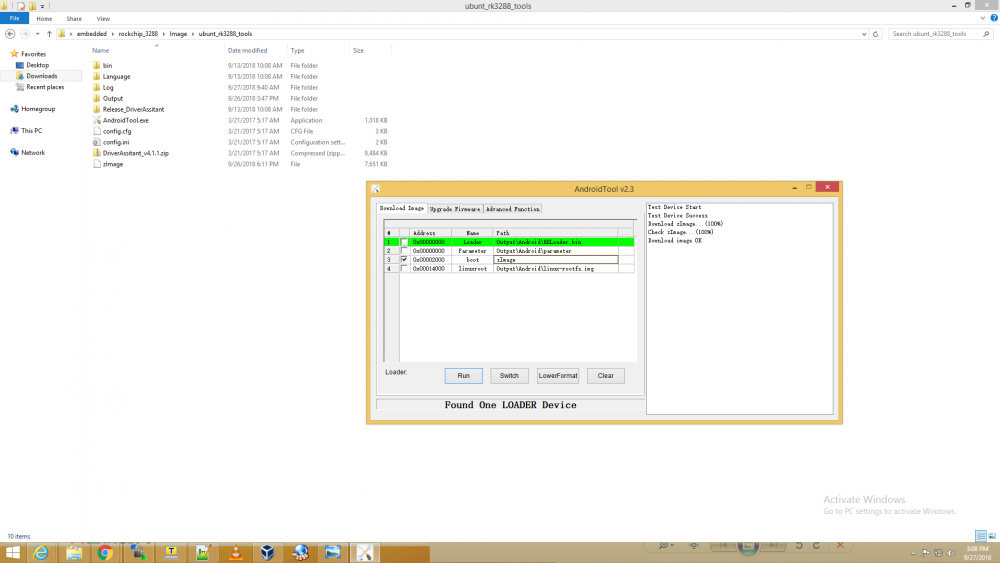
Using RKDevTool(AndroidTool.exe), i checked Device Partition of my board and got below table:
No LBA Size Name
01 0x00002000 0x00010000 boot
02 0x00012000 0x00002000 backup
03 0x00014000 0xffffffff linuxroot
I built Latest kernel as per link: http://rockchip.wikidot.com/linux-user-guide
Out of the three approached, i followed the Debian.
Fetched code on ubuntu VM and install all the dependency mentioned in above link. then compile the kernel as per command below(taken from above mentioned link)
Quotemake ARCH=arm CROSS_COMPILE=arm-linux-gnueabihf- rockchip_linux_defconfig
make ARCH=arm CROSS_COMPILE=arm-linux-gnueabihf- -j4
All went good and i got compressed zImage.
I uploaded this new kernel with the help of RKDevTool. see attahced png file "only_kernel_update.png". It shows OK but board doesn't bootup.
I upload manufacturer image using 'Upgrade Firmware' tab. I think manufacture image contains "uboot + kernel.img + rootfs.img" in order.
How to bring the board up from scratch?
Meantime i am learning to use mk-image.sh tool from repository: https://github.com/rockchip-linux/build to create single image which is compatible to LBA on my board.
I have one doubt here, if i get successful in creating a single image, Is there any chance that image may corrupt my board device partition. If yes, in that in that case i am afraid i will not able to upload even manufacturer image??
Thanks for sharing the steps. i compiled glmark2 as you mentioned in the above steps.
1. If i run ./glmark2-es2-drm from shell, by default it uses llvmpipe as GL_RENDERER
2. if i run ./glmark2-es2-drm with LD_LIBRARY_PATH=/opt/libmali-gbm/
a. it shows compatiblity errors. See attached error.txt
b. i also ran the application with strace. See attached glmark2-es2-drm-strace.txt
Please share some steps to upgarde the board to latest releases{uboot(if required) + Kernel + rootfs} where i can use GPU using userland Mali rather than direct DRM.
-
On 6/30/2018 at 11:26 PM, Myy said:
Ah, EOVERFLOW... You might need that kind of patch applied to the Mali drivers : https://github.com/Miouyouyou/RockMyy/blob/master/patches/Midgard/r19p0-01rel0/0009-GPU-ARM-Midgard-Adapt-to-the-new-mmap-call-checks.patch
They might have imported Linus Torvalds patch to mmap into the 4.14 series.
I have got the same error but in my case it is not EOVERFLOW...attaching the file "error_strace_glmark2-es2.txt" for your reference.
@Myy Please can you help me in identifying the issue. I have come to this thread from another thread started by me: https://forum.armbian.com/topic/8199-hw-acceleration-through-x-server-not-working/
-
Thanks @jock for sharing the information. I installed packages with the help of testing script shared by @JMCC
I have done all the things as mentioned in the link. I get errors as attached in the file "error_strace_glmark2-es2.txt". In your case you got it working by applying the patch. but for me, it is not EOVERFLOW error.
-
Quote
I think the RK glamour xserver module has lead you down the wrong path. It has nothing to do with 3D acceleration and needs to be used with RKs customised xserver, it won’t work with a standard Ubuntu xserver. I would forget about glamour 2D acceleration, it doesn’t add much functionality and causes a lot of instability problems
Oky. If i leave glamor then what is the other way, where i can open X11 window and render NV12 data over it using GPU. I need to composite display buffer with many multimedia application's offscreen buffers. I think x-server and display manager will handle it at their level. And if i use DRM then i have to perform the composition(and first i need to learn it which i feel time consuming). @botfap. Please suggest some solution here.
QuoteCan you do an “armbianmonitor -u” and paste the output url?
Meantime i am checking old commit from RK Mali repo.
-
One more thing i found in dmesg:
Quote[ 6.477477] I : [File] : drivers/gpu/arm/mali400/mali/linux/mali_kernel_linux.c; [Line] : 414; [Func] : mali_module_init(); svn_rev_string_from_arm of this mali_ko is '-c2c22e1', rk_ko_ver is '5', built at '17:51:36', on 'Sep 9 2017'.
[ 6.477763] Mali: Mali device driver loadedHow to find libmali.so compatible to rk_ko_ver '5'.
I have searched a lot and have big hope from Rockchip forum and open community.
-
I have also tried to install libmali-rk-midgard-t76x-r14p0-r0p0.deb package from repository https://github.com/rockchip-linux/rk-rootfs-build/tree/master/packages/armhf/libmali
When reboot the board, display manager doesn't start.
GPU Info:
Quoteubuntu@localhost:~$ cd /sys/devices/platform/*.gpu
ubuntu@localhost:/sys/devices/platform/ffa30000.gpu$ cat gpuinfo
Mali-T76x MP4 r0p0 0x0750for the same reason i am chosing r0p0 packages or .so file but NO luck.
-
I softlinked libmali-midgard-t76x-r14p0-r1p0-x11-fbdev.so to libGLESv2.so.2 and when ran es2gears found below error
Quotefile /dev/mali0 is not of a compatible version (user 10.6, kernel 10.4)
ERROR: The DDK is not compatible with any of the Mali GPUs on the system.
The DDK was built for 0x750 r1p0 status range [0..15], but none of the GPUs matched:
file /dev/mali0 is not of a compatible version (user 10.6, kernel 10.4)
EGLUT: failed to initialize EGL displaywhere to find compatible version of libmali ??
-
Performance is same with es2gears too.
I ran es2_info command, it showed
QuoteGL_RENDERER: llvmpipe (LLVM 6.0, 128 bits)
means Software rasterizer is used. I did some homework and found that i need to replace mesa specific libGL, libEGL with rockchip specific version. Further i searched and found that GL and EGL are implemented in userspace library libMali.so
I downloaded libmali(libmali-midgard-t76x-r14p0-r1p0-x11-fbdev.so) from github: https://github.com/rockchip-linux/libmali/tree/29mirror/lib/arm-linux-gnueabihf
Which all library should i softlink to this library? and I am not sure if Mali kernel driver is present in my image(i guess it is present as DRM is able to use GPU). I found that image i have is not module supported. All drivers are part of kernel itself.
I hope kernel has mali driver and if i get userspace layer ready, i will be able to use GPU.
If i miss any information which can help solving my issue, please let me know.
-
I have Rockchip 3288 board.
As per the link: http://opensource.rock-chips.com/wiki_Graphics
QuoteRockchip have a custom Xserver which have enable glamor 2D acceleration
I checked the log at /var/log/Xorg.0.log and found glamor initialization failed. There is also log which says EGL_MESA_drm_image required, i checked x-server code and found this message lead to glamor initialization failed.
Apart from these when i run glxinfo, it shows
Quotename of display: :0.0
display: :0 screen: 0
direct rendering: Yes
server glx vendor string: SGI
server glx version string: 1.4
server glx extensions:
GLX_ARB_create_context, GLX_ARB_create_context_profile,
GLX_ARB_fbconfig_float, GLX_ARB_framebuffer_sRGB, GLX_ARB_multisample,
GLX_EXT_create_context_es2_profile, GLX_EXT_create_context_es_profile,
GLX_EXT_fbconfig_packed_float, GLX_EXT_framebuffer_sRGB,
GLX_EXT_import_context, GLX_EXT_texture_from_pixmap, GLX_EXT_visual_info,
GLX_EXT_visual_rating, GLX_MESA_copy_sub_buffer, GLX_OML_swap_method,
GLX_SGIS_multisample, GLX_SGIX_fbconfig, GLX_SGIX_pbuffer,
GLX_SGIX_visual_select_group, GLX_SGI_make_current_read
client glx vendor string: Mesa Project and SGI
client glx version string: 1.4
client glx extensions:It means direct rendering is enabled. But when i run glxgears it consumed almost 18% CPU( So i think glxgear is not able to use GPU and performing all tasks at CPU).
What i am to do:
I have created a application which can decode H264 video using MPP and give me NV12 data, now i need to render this using hw( using opengl and xlib but not drm).
Problem with DRM is that it render data on full screen and hide everything. I want to render through X-window and using GPU.
I have done lot of R&D and strongly feel there must be rockchip specific driver(may be EGL layer) missing due to which opengl is not able to use DRI. I have searched rockchip-linux repository on github but nothing found there.
Kindly suggest how to use GPU for rendering NV12 data.
Tearing effect in fullscreen video when other X-window comes over
in Rockchip
Posted
Board: NanoPC-T4(rk3399)
OS: Welcome to ARMBIAN 5.69 stable Ubuntu 18.04.1 LTS 4.4.167-rk3399
In VLC preferences, i have set video output to OPENGL ES(and here OPENGL ES is soft link to libMali.so). In short hardware accelerated Rendering.
Problem Statement: When a video file is played in fullscreen mode it works perfect. But as soon as other x-window(for eg: small sized terminal window) comes in front of this fullscreen window, tearing effect starts.
Now i don't understand why this happen. Whether it happens due to libMali and X-server Glamor compositing or something else. i don't have full understanding of linux graphics stack.
As per rockchip link: http://opensource.rock-chips.com/wiki_File:Xserver_gpu.png
X application and GL application feed data to Kernel with different path(ie. one is libDRM and other is libMali). Where this data is merged before rendering the front buffer?
Is it compositor who introduce the tearing effect? If yes, this compositor is at DRM level(kernel space) or userspace(Although i have checked through Window Manager Tweaked, compositing is disabled)?
Note: i checked X-server conf file(/etc/X11/xorg.conf.d/01-armbian-defaults.conf) and find -> Option "Dri2Vsync" "true".
Please shed some light how this tearing effect can be eliminated. As per my use case i need to render data through GLES and as well need to render some X11 window.
I tried to elaborate the problem but still anything missing, please let me know.