




Skip to content
View in the app

A better way to browse. Learn more.

Armbian Community Forums

A full-screen app on your home screen with push notifications, badges and more.

To install this app on iOS and iPadOS
  1. Tap the Share icon in Safari
  2. Scroll the menu and tap Add to Home Screen.
  3. Tap Add in the top-right corner.
To install this app on Android
  1. Tap the 3-dot menu (⋮) in the top-right corner of the browser.
  2. Tap Add to Home screen or Install app.
  3. Confirm by tapping Install.

jtreg

Members
  • Joined

  • Last visited

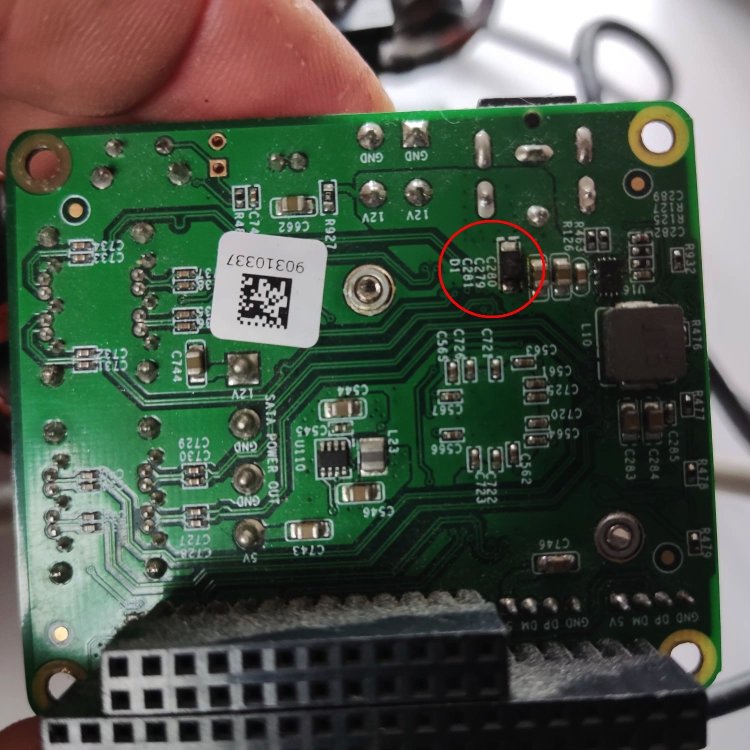
  1. Oops, I connected a 24V power supply to the SATA Hat and I think I blew the diode on the hat. (see photo) Not sure if it is a diode, which way should it be orientated. Stupid idiot for creating the magic smoke, I hope I can repair it. I tried booting the Orange Pi I had already connected to it (because the original NanoPi M4 is missing... Fortunately the OrangePi is OK. Any advice on where to look if the diode in question does not fix it. Cheers, James
Account

Navigation

Search

Search

Configure browser push notifications

Chrome (Android)
  1. Tap the lock icon next to the address bar.
  2. Tap Permissions → Notifications.
  3. Adjust your preference.
Chrome (Desktop)
  1. Click the padlock icon in the address bar.
  2. Select Site settings.
  3. Find Notifications and adjust your preference.