jumbo125
Members
-
Joined
-
Last visited
Everything posted by jumbo125
-
@Igor Thank you for your help! Since a few weeks i tried to run it with dietpi.... because i found a lot of pposts, that it woul be work... Fail.... dietpi use kernel 6.6.37 current meson64 same problem. i don't found any solution, after a lot of searching in the web and some other posts in other forums. But i didn't give up. Today i tried it again. Always the same problem: during booting, after loading kernel, the odroid lost all usb device an wrote a fail about the onboard usb. (it doesn't matter if something is connected or all ports are disconnected). My solution: wrote a script to restart the usb detecting, after loading kernel, but before mount root. it took a long time, because i'm not so good about linux programming, and initframes not allow installed tools like usbreset. But at the end i did it. 🙂 I think the problem is on all os with this (or newer) kernel the same. so i think it should be work which the most of os. Here are my steps: it starts at STEP 8 i need to edit and update the initframes to bridge the "kernel losing usb" https://forum.odroid.com/viewtopic.php?p=390023&sid=29998009e29d3b1cd7dca29038534f15#p390023 best regards jumbo
-
-
-
-
-
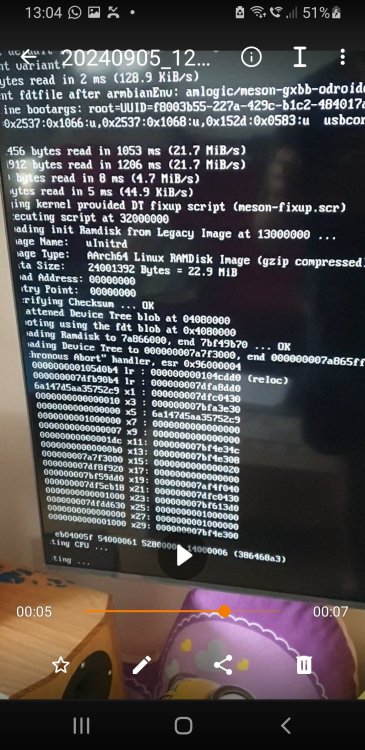
Hello when i try to boot my odroid from SD-card ( root system is on ssd), it will always restart. i set: setenv rootdev UUID=f8003b55-227a-429c-b1c2-484017a3a916 (uuid from ssd) extraargs=usbcore.autosuspend=-1 usbcore.old_scheme_first=Y usbcore.use_both_schemes=Y to disable usb shutdown this is my armbianEnv: verbosity=1 console=both overlay_prefix=meson rootdev=UUID=f8003b55-227a-429c-b1c2-484017a3a916 rootfstype=ext4 usbstoragequirks=0x2537:0x1066:u,0x2537:0x1068:u,0x152d:0x0583:u extraargs=usbcore.autosuspend=-1 usbcore.old_scheme_first=Y usbcore.use_both_schemes=Y my boot.cmd # DO NOT EDIT THIS FILE # # Please edit /boot/armbianEnv.txt to set supported parameters # setenv scriptaddr "0x32000000" setenv kernel_addr_r "0x34000000" setenv fdt_addr_r "0x4080000" setenv overlay_error "false" # default values setenv rootdev UUID=f8003b55-227a-429c-b1c2-484017a3a916 setenv verbosity "1" setenv console "both" setenv bootlogo "false" setenv rootfstype "ext4" setenv docker_optimizations "on" setenv boot_targets "mmc0 usb0 pxe dhcp" saveenv # Set devtype and devnum for SD card (boot device) setenv devtype "mmc" setenv devnum "0" # odroid c4 legacy kernel values from boot.ini setenv dtb_loadaddr "0x1000000" setenv k_addr "0x1100000" setenv loadaddr "0x1B00000" setenv initrd_loadaddr "0x4080000" setenv display_autodetect "true" # HDMI Mode # Resolution Configuration # Symbol | Resolution # ----------------------+------------- # "480x272p60hz" | 480x272 Progressive 60Hz # "480x320p60hz" | 480x320 Progressive 60Hz # "480p60hz" | 720x480 Progressive 60Hz # "576p50hz" | 720x576 Progressive 50Hz # "720p60hz" | 1280x720 Progressive 60Hz # "720p50hz" | 1280x720 Progressive 50Hz # "1080p60hz" | 1920x1080 Progressive 60Hz # "1080p50hz" | 1920x1080 Progressive 50Hz # "1080p30hz" | 1920x1080 Progressive 30Hz # "1080p24hz" | 1920x1080 Progressive 24Hz # "1080i60hz" | 1920x1080 Interlaced 60Hz # "1080i50hz" | 1920x1080 Interlaced 50Hz # "2160p60hz" | 3840x2160 Progressive 60Hz # "2160p50hz" | 3840x2160 Progressive 50Hz # "2160p30hz" | 3840x2160 Progressive 30Hz # "2160p25hz" | 3840x2160 Progressive 25Hz # "2160p24hz" | 3840x2160 Progressive 24Hz # "smpte24hz" | 3840x2160 Progressive 24Hz SMPTE # "2160p60hz420" | 3840x2160 Progressive 60Hz YCbCr 4:2:0 # "2160p50hz420" | 3840x2160 Progressive 50Hz YCbCr 4:2:0 # "640x480p60hz" | 640x480 Progressive 60Hz # "800x480p60hz" | 800x480 Progressive 60Hz # "800x600p60hz" | 800x600 Progressive 60Hz # "1024x600p60hz" | 1024x600 Progressive 60Hz # "1024x768p60hz" | 1024x768 Progressive 60Hz # "1280x800p60hz" | 1280x800 Progressive 60Hz # "1280x1024p60hz" | 1280x1024 Progressive 60Hz # "1360x768p60hz" | 1360x768 Progressive 60Hz # "1440x900p60hz" | 1440x900 Progressive 60Hz # "1600x900p60hz" | 1600x900 Progressive 60Hz # "1600x1200p60hz" | 1600x1200 Progressive 60Hz # "1680x1050p60hz" | 1680x1050 Progressive 60Hz # "1920x1200p60hz" | 1920x1200 Progressive 60Hz # "2560x1080p60hz" | 2560x1080 Progressive 60Hz # "2560x1440p60hz" | 2560x1440 Progressive 60Hz # "2560x1600p60hz" | 2560x1600 Progressive 60Hz # "3440x1440p60hz" | 3440x1440 Progressive 60Hz setenv hdmimode "1080p60hz" setenv monitor_onoff "false" setenv overscan "100" setenv sdrmode "auto" setenv voutmode "hdmi" setenv disablehpd "false" setenv cec "false" setenv disable_vu7 "true" setenv max_freq_a55 "1908" #setenv max_freq_a55 "2100" setenv maxcpus "4" # Show what uboot default fdtfile is echo "U-boot default fdtfile: ${fdtfile}" echo "Current variant: ${variant}" # there is a mismatch between u-boot and kernel in the n2-plus/n2_plus DTB filename. # Also u-boot can't seem to decide between having, or not, 'amlogic/' in there. if test "${variant}" = "n2_plus"; then setenv fdtfile "amlogic/meson-g12b-odroid-n2-plus.dtb" echo "For variant ${variant}, set default fdtfile: ${fdtfile}" fi if test "${variant}" = "n2-plus"; then setenv fdtfile "amlogic/meson-g12b-odroid-n2-plus.dtb" echo "For variant ${variant} (dash version, 2021.07 or up), set default fdtfile: ${fdtfile}" fi # legacy kernel values from boot.ini if test -e ${devtype} ${devnum} ${prefix}armbianEnv.txt; then load ${devtype} ${devnum} ${scriptaddr} ${prefix}armbianEnv.txt env import -t ${scriptaddr} ${filesize} fi # get PARTUUID of first partition on SD/eMMC it was loaded from # mmc 0 is always mapped to device u-boot (2016.09+) was loaded from if test "${devtype}" = "mmc"; then part uuid mmc ${devnum}:1 partuuid; fi if test "${console}" = "display"; then setenv consoleargs "console=tty1"; fi echo "Current fdtfile after armbianEnv: ${fdtfile}" if test -e ${devtype} ${devnum} ${prefix}zImage; then # legacy kernel boot if test "${console}" = "serial"; then setenv consoleargs "console=ttyS0,115200"; fi if test "${console}" = "display" || test "${console}" = "both"; then setenv consoleargs "console=ttyS0,115200 console=tty1"; fi if test "${console}" = "serial"; then setenv consoleargs "console=ttyS0,115200"; fi if test "${bootlogo}" = "true"; then setenv consoleargs "splash plymouth.ignore-serial-consoles ${consoleargs}" else setenv consoleargs "splash=verbose ${consoleargs}" fi setenv bootargs "root=${rootdev} rootwait rootfstype=${rootfstype} ${consoleargs} consoleblank=0 coherent_pool=2M loglevel=${verbosity} ${amlogic} no_console_suspend fsck.repair=yes net.ifnames=0 elevator=noop hdmimode=${hdmimode} cvbsmode=576cvbs max_freq_a55=${max_freq_a55} maxcpus=${maxcpus} voutmode=${voutmode} ${cmode} disablehpd=${disablehpd} cvbscable=${cvbscable} overscan=${overscan} ${hid_quirks} monitor_onoff=${monitor_onoff} ${cec_enable} sdrmode=${sdrmode} usbcore.autosuspend=-1 usbcore.old_scheme_first=Y usbcore.use_both_schemes=Y usbcore.autosuspend_delay_ms=0" echo "Legacy bootargs: ${bootargs}" load ${devtype} ${devnum} ${k_addr} boot/zImage load ${devtype} ${devnum} ${dtb_loadaddr} boot/dtb/${fdtfile} load ${devtype} ${devnum} ${initrd_loadaddr} boot/uInitrd fdt addr ${dtb_loadaddr} unzip ${k_addr} ${loadaddr} booti ${loadaddr} ${initrd_loadaddr} ${dtb_loadaddr} else # modern kernel boot if test "${console}" = "serial"; then setenv consoleargs "console=ttyAML0,115200"; fi if test "${console}" = "display" || test "${console}" = "both"; then setenv consoleargs "console=ttyAML0,115200 console=tty1"; fi if test "${console}" = "serial"; then setenv consoleargs "console=ttyAML0,115200"; fi if test "${bootlogo}" = "true"; then setenv consoleargs "splash plymouth.ignore-serial-consoles ${consoleargs}" else setenv consoleargs "splash=verbose ${consoleargs}" fi if test "${disable_vu7}" = "false"; then setenv usbhidquirks "usbhid.quirks=0x0eef:0x0005:0x0004"; fi setenv bootargs "root=${rootdev} rootwait rootfstype=${rootfstype} ${consoleargs} consoleblank=0 coherent_pool=2M loglevel=${verbosity} ubootpart=${partuuid} libata.force=noncq usb-storage.quirks=${usbstoragequirks} ${usbhidquirks} ${extraargs} usbcore.autosuspend=-1 usbcore.old_scheme_first=Y usbcore.use_both_schemes=Y usbcore.autosuspend_delay_ms=0 ${extraboardargs}" if test "${docker_optimizations}" = "on"; then setenv bootargs "${bootargs} cgroup_enable=memory swapaccount=1"; fi echo "Mainline bootargs: ${bootargs}" load ${devtype} ${devnum} ${ramdisk_addr_r} ${prefix}uInitrd load ${devtype} ${devnum} ${kernel_addr_r} ${prefix}Image load ${devtype} ${devnum} ${fdt_addr_r} ${prefix}dtb/${fdtfile} fdt addr ${fdt_addr_r} fdt resize 65536 for overlay_file in ${overlays}; do if load ${devtype} ${devnum} ${scriptaddr} ${prefix}dtb/amlogic/overlay/${overlay_prefix}-${overlay_file}.dtbo; then echo "Applying kernel provided DT overlay ${overlay_prefix}-${overlay_file}.dtbo" fdt apply ${scriptaddr} || setenv overlay_error "true" fi done for overlay_file in ${user_overlays}; do if load ${devtype} ${devnum} ${scriptaddr} ${prefix}overlay-user/${overlay_file}.dtbo; then echo "Applying user provided DT overlay ${overlay_file}.dtbo" fdt apply ${scriptaddr} || setenv overlay_error "true" fi done if test "${overlay_error}" = "true"; then echo "Error applying DT overlays, restoring original DT" load ${devtype} ${devnum} ${fdt_addr_r} ${prefix}dtb/${fdtfile} else if load ${devtype} ${devnum} ${scriptaddr} ${prefix}dtb/amlogic/overlay/${overlay_prefix}-fixup.scr; then echo "Applying kernel provided DT fixup script (${overlay_prefix}-fixup.scr)" source ${scriptaddr} fi if test -e ${devtype} ${devnum} ${prefix}fixup.scr; then load ${devtype} ${devnum} ${scriptaddr} ${prefix}fixup.scr echo "Applying user provided fixup script (fixup.scr)" source ${scriptaddr} fi fi booti ${kernel_addr_r} ${ramdisk_addr_r} ${fdt_addr_r} fi # Recompile with: # mkimage -C none -A arm -T script -d /boot/boot.cmd /boot/boot.scr
-
-
Hello, I have the problem that every few years my SD card fails due to frequent read and write operations. Therefore, I wanted to use an SSD as the system root and use the SD card just for booting. Step 1: Backup the SD card. Step 2: Perform update and upgrade. Step 3: Connect the SSD. At this point, I noticed that the USB fan was no longer working. After searching for a while, I found this: Quote: "Adding the 'extraboardargs' option to /boot/armbianEnv.txt as described above solved the problem for me." So I added it with -1. Now the SSD and the fan were working again. Step 4: Run nand-sata-install. Step 5: Select the SSD. Step 6: Format the SSD. Step 7: Done. Reboot -Y Now it attempts to boot 3 times but always fails. At least the fan, which is powered by USB 5V, restarts 3 times. After that, it shows: "... is now current device" 5 minutes later, it changes to: "scanning for BTRFS" "initramfs" Does anyone have an idea? Thanks.
-
-
The data sheet says that it has an architecture x86, and data witdh 64bit The pc requirements are not so high. I need it for 1 program.... Would you prefer windows 10 or armbian with wine?
-
Hello Can I use armbian on the hp t620? The windows os needs so much resources Thank for your help
-
thank you it works
-
Hy i use octoprint on my orange pi. Now i need to resart and shutdown the system by octoprint. So i try shutdown -h 0 or systemctl poweroff nothing will work, cause i need to authenti. the user by password. so i tried to add the user to the sudoers... not work this is my line. i added the code at the end of the file myuser ALL=(ALL) NOPASSWD: /sbin/shutdown
-
-
Hy guys i want to use a push button on my orange pi. if i press the button, the orange pi should run a script. i only use esp8266 with arduino tu create some interactive tools. does anybody know, how it works on the orange pi and which cheapy button you would prefer? i only want to run sh script, when the button will be press. thank you a lot!
-
Hello i use armbian on my orange pi and have a problem about the wifi connection. I have my orange pi near my 3D printer. When i plug it in, to boot the armbian it works great. But the orange pi will (SOMETIMES) not connect to my wlan. When i change the room and put it nearly my pc, it will connect without any problems... So i check the wifi quality: - near my pc i have a link quality 70/70 - near my 3d printer i have a link quality 64/70 and signal level: 46dBm is this to low for a easy connection?? thank you
-
Hello i use octoprint on my orange pi with armbian. Now i want to get multiple octoprint instances. so i use docker. i found many tutorials in the web The problem: i need to set udev rules for my usb connection of each 3d printer. I found many tutorials too. But my quesstion: can i detect the usb infos from the usb connection, when i use a usb port and connect the printer? Does udev_rules works with passive and active usb hub? Cause i would prefer to use a passive usb hub thank you
-
Hello I use armbian on my odroidc2 on the devic is lamp, for a mysql and php server. Now i tried to install composer. The installation works great, but i can't use any scripts from vendor folder. The directory of my php file: /var/www/html/terminal/includes/helpers/my_php_file.php the code in my php file require_once(__DIR__ . '/vendor/autoload.php'); The code means the vendor directory has this path: /var/www/html/terminal/includes/helpers/vendor/autoload.php But thats not correct. I searched and found the correct path of composer it's: /home/user/vendor/ So i tried to make a folder-shortcut in my www/html/ folder, but i can't use it because permission denied. Next idea: i fix the code in my php file include '../../../../../../home/odroid/vendor/autoload.php'; now it would be found, but i get the same error: Warning: include(../../../../../../home/odroid/vendor/autoload.php): Failed to open stream: Permission denied in /var/www/html/terminal/includes/helpers/backup_DB.php on line 26 what's the correct way to youe composer with autoload.php and something more?
-
Hello I tried to retasrt my system, but it doesn't work. Before i post my question i found this thread: i can't find a solution in the thread. Does anybody knows, how he fixed it? I need to restart the system. Can i disable the user login to the beginn? i need to start without a login choice. Thank you