


Superuser
-
Posts
5 -
Joined
-
Last visited
Content Type
Forums
Store
Crowdfunding
Applications
Events
Raffles
Community Map
Posts posted by Superuser
-
-
I would like to create Lab with PiRogue and add suricata custom rules for Pegasus attack preventions: https://pts-project.org/guides/g7/
I would like to use internal PiRogue_VPN_server and add additional 3x-ui or S-ui server with xray-vless-realty as second layer because mobile operators or internet providers from specific country like RU or CN may block simple wireguard proto, this will be looks like:
NanoPI_R4S with [ PiRogue(internal_wireuard) -> XRAY_server(xray-vless-realty) ] -> Android Phone with XRAY client(xray-vless-realty) and host level firewall that will be forward all mobile trafic to the VPN clientNanoPI + Arambian lasted with all updates
For PiRogue installation I use the instruction: https://pts-project.org/docs/pirogue/installation/
Step #1
sudo apt-get update
sudo apt-get dist-upgrade
Step #2
sudo apt-get install wget
sudo wget -O /etc/apt/sources.list.d/pirogue.list https://pts-project.org/debian-12/pirogue.list
sudo wget -O /etc/apt/trusted.gpg.d/pirogue.gpg https://pts-project.org/debian-12/pirogue.gpg
sudo apt-get update
sudo apt-get install pirogue-baseI have PiRogue's after installation message:
QuoteJob for dnsmasq.service failed because the control process exited with error code.
See "systemctl status dnsmasq.service" and "journalctl -xeu dnsmasq.service" for details.
My currient problem is starting process of a dnsmasq.service on my NanoPI_R4S
Dears @Igor @Werner could you pls help me or forward to nanopi r4s maintainer that may fix the prob
I alredy describe similar problems with "systemd-networkd-wait-online.service" in my previos my topic, see link:or
-
Hi Everybody,
I'm trying to set up Nextcloud with Collabora Office on NanoPi R4S running Armbian, but I'm having trouble configuring the reverse proxy (nginx/Caddy) for HTTPS with local domains.
Current Setup:Running via docker-compose.yml (shown below)
Without HTTPS, everything works: Collabora can open documents in Nextcloud's web UI
With HTTPS enabled, Collabora integration breaks
Added to /etc/hosts:
127.0.0.1 nextcloud.lan collabora.nextcloud.lan
What I Need:
HTTPS configuration for both services
Reverse proxy to local domains:
Nextcloud: https://nextcloud.lan
Collabora: https://collabora.nextcloud.lan
My docker-compose.yml (HTTP-only version):
networks:
network:
driver: bridge
volumes:
mariadb_config:
mariadb_data:
nextcloud_config:
nextcloud_data:
services:
collabora:
image: collabora/code
restart: unless-stopped
container_name: collabora
hostname: collabora
domainname: collabora.nextcloud.lan
networks:
- network
ports:
- "9980:9980"
cap_add:
- MKNODnextcloud_db:
image: linuxserver/mariadb
restart: unless-stopped
container_name: nextcloud_db
hostname: nextcloud_db
networks:
- network
volumes:
- mariadb_config:/config
- mariadb_data:/data
environment:
- PUID=1000
- PGID=1000
- TZ=UTC
- MYSQL_ROOT_PASSWORD=nextcloud
- MYSQL_DATABASE=nextcloud_db
- MYSQL_USER=nextcloud
- MYSQL_PASSWORD=nextcloud
nextcloud:
image: linuxserver/nextcloud
restart: unless-stopped
depends_on:
- nextcloud_db
- collabora
container_name: nextcloud
hostname: nextcloud
domainname: nextcloud.lan
networks:
- network
ports:
- "8080:80"
volumes:
- nextcloud_config:/config
- nextcloud_data:/data
environment:
- PUID=1000
- PGID=1000
- TZ=UTC
- NEXTCLOUD_UPLOAD_LIMIT=16G
- NEXTCLOUD_MAX_TIME=3600
- NEXTCLOUD_MEMORY_LIMIT=3G
- SKIP_DOMAIN_VALIDATION=true
- NEXTCLOUD_TRUSTED_DOMAINS=nextcloud.lan
Key Questions:How should I modify the docker-compose.yml to:
Enable HTTPS for both services?
Properly configure the reverse proxy for the local domains?
Set up valid SSL certificates for *.lan domains?
For Collabora:
What extra_params or environment variables are needed for HTTPS?
How to configure Nextcloud's config.php for the Collabora HTTPS endpoint?
I'd prefer a solution using Caddy if possible, as it's simpler for automatic HTTPS. Any working configuration examples would be greatly appreciated!
Thanks in advance for your help!
Viktor Malygin
WordPress Developer -
Is it normal ?
Because i have a some problems with custom local domain configurations...
root@nanopi-r4s:~# sudo systemctl status systemd-networkd-wait-online.service
× systemd-networkd-wait-online.service - Wait for Network to be Configured
Loaded: loaded (/lib/systemd/system/systemd-networkd-wait-online.service; enabled; preset: enabled)
Active: failed (Result: exit-code) since Sat 2025-03-01 23:45:33 MSK; 2min 25s ago
Docs: man:systemd-networkd-wait-online.service(8)
Process: 1176 ExecStart=/lib/systemd/systemd-networkd-wait-online (code=exited, status=1/FAILURE)
Main PID: 1176 (code=exited, status=1/FAILURE)
CPU: 30msмар 01 23:43:33 nanopi-r4s systemd[1]: Starting systemd-networkd-wait-online.service - Wait for Network to be Configured...
мар 01 23:45:33 nanopi-r4s systemd-networkd-wait-online[1176]: Timeout occurred while waiting for network connectivity.
мар 01 23:45:33 nanopi-r4s systemd[1]: systemd-networkd-wait-online.service: Main process exited, code=exited, status=1/FAILURE
мар 01 23:45:33 nanopi-r4s systemd[1]: systemd-networkd-wait-online.service: Failed with result 'exit-code'.
мар 01 23:45:33 nanopi-r4s systemd[1]: Failed to start systemd-networkd-wait-online.service - Wait for Network to be Configured.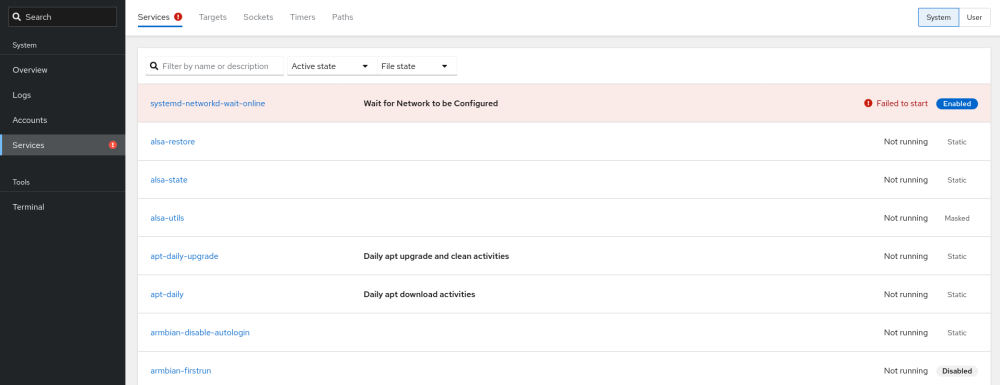
-
Hi Arambian support team,
I have a problem with "sudo apt update && apt upgrade -y" of my Nano Pi R4S
1) if i use ru_RU.UTF-8 and RU timezone than i have:
W: Не удалось получить http://apt.armbian.com/dists/bookworm/InRelease 502 Bad Gateway [my_ru_ip_addres]:[Port_80]
W: Некоторые индексные файлы скачать не удалось. Они были проигнорированы, или вместо них были использованы старые версии.Translations:
W: Failed to get http://apt.armbian.com/dists/bookworm/InRelease 502 Bad Gateway [my_ru_ip_addres]:[Port_80]
W: Some index files could not be downloaded. They were ignored or old versions were used instead.2) if i use US locations and RU timezone than i have:
Err:7 http://fastmirror.pp.ua/armbian bookworm/main arm64 armbian-bsp-cli-nanopi-r4s-current arm64 24.11.1
Cannot initiate the connection to fastmirror.pp.ua:80 (2a01:d0:fa02:5555:6829:17ff:fe25:da0c). - connect (101: Network is unreachable) Could not connect to fastmirror.pp.ua:80 (93.126.105.202), connection timed out
Err:9 http://fastmirror.pp.ua/armbian bookworm/main arm64 linux-dtb-current-rockchip64 arm64 25.2.1
Cannot initiate the connection to fastmirror.pp.ua:80 (2a01:d0:fa02:5555:6829:17ff:fe25:da0c). - connect (101: Network is unreachable)
Fetched 159 MB in 1min 58s (1,341 kB/s)
E: Failed to fetch http://fastmirror.pp.ua/armbian/pool/main/a/armbian-bsp-cli-nanopi-r4s-current/armbian-bsp-cli-nanopi-r4s-current_24.11.1_arm64__1-PC980a-V0406-H3400-B6e44-R7697.deb Cannot initiate the connection to fastmirror.pp.ua:80 (2a01:d0:fa02:5555:6829:17ff:fe25:da0c). - connect (101: Network is unreachable) Could not connect to fastmirror.pp.ua:80 (93.126.105.202), connection timed out
E: Failed to fetch http://fastmirror.pp.ua/armbian/pool/main/l/linux-dtb-current-rockchip64/linux-dtb-current-rockchip64_25.2.1_arm64__6.12.12-Sd914-D7b0b-P083d-C67e9Heb51-HK01ba-Vc222-B8de6-R448a.deb Cannot initiate the connection to fastmirror.pp.ua:80 (2a01:d0:fa02:5555:6829:17ff:fe25:da0c). - connect (101: Network is unreachable)
E: Unable to fetch some archives, maybe run apt-get update or try with --fix-missing?I mean connection failed
As for accessibility you can use free hosting for the Arambian repository for users located in Russia.
@Igor @Werner could you pls to change for RU users arambian repo, for example, it may be https://sourceforge.net/ servers by default update and upgrade, and problem with Arambian update and upgrade will be sloved for RU users
I mean https://sourceforge.net/
Because they provide free hosting and free repository hosting for OpenSource projects
For example, if you know VPN PassWall/PassWall2 uses https://sourceforge.net/ for repository hosting.Connection to http://apt.armbian.com/ servers is not available in Russia right now or it may be my provider problems.
Connection to http://fastmirror.pp.ua/ servers is not available in Russia right now or it may be my provider problems.
Connection to https://sourceforge.net/ servers is available in Russia right now. <-
Or could you pls advise how i can fix the problem ?

PiRogue installation for NanoPI_R4S problems
in Software, Applications, Userspace
Posted · Edited by Superuser
Everything is good, thanks for the help and sorry for confusion, I only should to change PiRogue default interface after installation, this is PiRogue interface detection problem...