sr4armbian
-
Posts
18 -
Joined
-
Last visited
Content Type
Forums
Store
Crowdfunding
Applications
Events
Raffles
Community Map
Everything posted by sr4armbian
-
@Nick AIs it possible to configure the front display using the Linux header you provided and the pin details I shared above? I know this is a big request, but if it's possible, it would make this setup complete. Since I am not a programmer, I tried using Google's AI, but it just took me in circles and landed me nowhere. If you require any additional log or configuration details please let me know.
-
Thanks for sharing the header file. I have downloaded that and deployed using dpkg -i <packge name> In order to deploy the VFD, the steps I have followed are given here. I have enclosed the attachment that contains commands and their outcome to keep this post shorter. Below given error message while trying to start the openvfd.service root@x98h:~/linux_openvfd#systemctl daemon-reload root@x98h:~/linux_openvfd# systemctl start openvfd.service Job for openvfd.service failed because the control process exited with error code. See "systemctl status openvfd.service" and "journalctl -xeu openvfd.service" for details. root@x98h:~/linux_openvfd# systemctl status openvfd.service × openvfd.service - openvfd Loaded: loaded (/etc/systemd/system/openvfd.service; disabled; preset: ena> Active: failed (Result: exit-code) since Tue 2026-06-02 00:07:40 IST; 4min> Process: 2297 ExecStartPre=/usr/bin/sh -c . /etc/openvfd.conf; /usr/sbin/mo> Process: 2299 ExecStopPost=/usr/sbin/rmmod openvfd (code=exited, status=1/F> CPU: 47ms Jun 02 00:07:40 x98h systemd[1]: Starting openvfd.service - openvfd... Jun 02 00:07:40 x98h sh[2298]: modprobe: ERROR: could not insert 'openvfd': Exe> Jun 02 00:07:40 x98h systemd[1]: openvfd.service: Control process exited, code=> Jun 02 00:07:40 x98h rmmod[2299]: rmmod: ERROR: Module openvfd is not currently> Jun 02 00:07:40 x98h systemd[1]: openvfd.service: Failed with result 'exit-code> Jun 02 00:07:40 x98h systemd[1]: Failed to start openvfd.service - openvfd. Jun 02 00:07:40 x98h systemd[1]: Failed to start openvfd.service - openvfd. ░░ Subject: A start job for unit openvfd.service has failed ░░ Defined-By: systemd ░░ Support: https://www.debian.org/support ░░ ░░ A start job for unit openvfd.service has finished with a failure. ░░ ░░ The job identifier is 782 and the job result is failed. Jun 02 00:15:18 x98h systemd[1]: Starting openvfd.service - openvfd... ░░ Subject: A start job for unit openvfd.service has begun execution ░░ Defined-By: systemd ░░ Support: https://www.debian.org/support ░░ ░░ A start job for unit openvfd.service has begun execution. ░░ ░░ The job identifier is 855. Jun 02 00:15:18 x98h sh[2317]: modprobe: ERROR: could not insert 'openvfd': Exec format error Jun 02 00:15:18 x98h systemd[1]: openvfd.service: Control process exited, code=exited, status=1/FAILURE ░░ Subject: Unit process exited ░░ Defined-By: systemd ░░ Support: https://www.debian.org/support ░░ ░░ An ExecStartPre= process belonging to unit openvfd.service has exited. ░░ ░░ The process' exit code is 'exited' and its exit status is 1. Jun 02 00:15:18 x98h rmmod[2318]: rmmod: ERROR: Module openvfd is not currently loaded Jun 02 00:15:18 x98h systemd[1]: openvfd.service: Failed with result 'exit-code'. ░░ Subject: Unit failed ░░ Defined-By: systemd ░░ Support: https://www.debian.org/support ░░ ░░ The unit openvfd.service has entered the 'failed' state with result 'exit-code'. Jun 02 00:15:18 x98h systemd[1]: Failed to start openvfd.service - openvfd. ░░ Subject: A start job for unit openvfd.service has failed ░░ Defined-By: systemd ░░ Support: https://www.debian.org/support ░░ ░░ A start job for unit openvfd.service has finished with a failure. ░░ ░░ The job identifier is 855 and the job result is failed. VFD_Service_Logs.txt
-
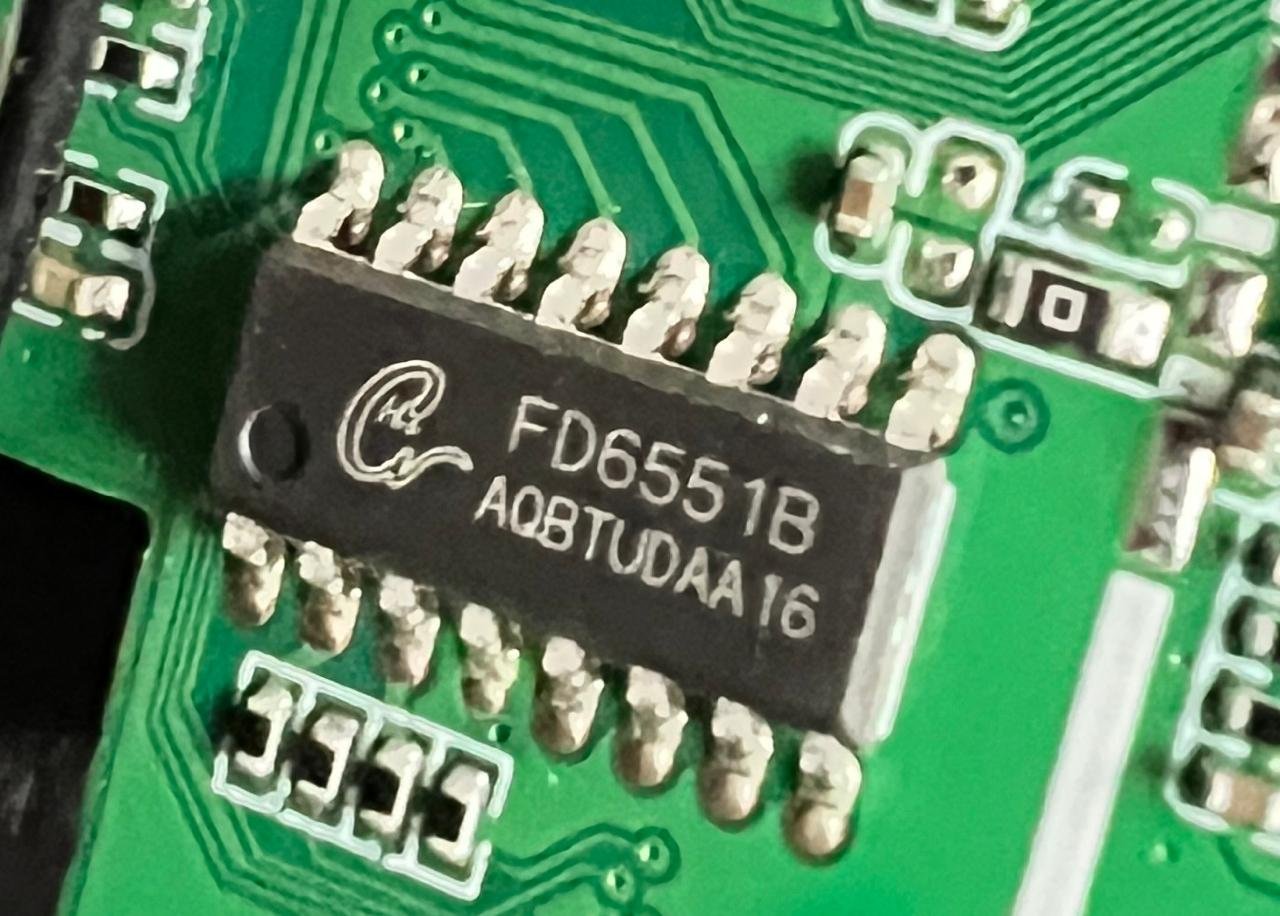
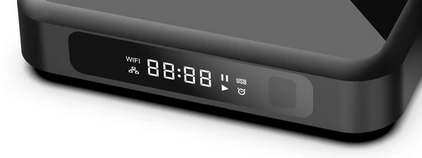
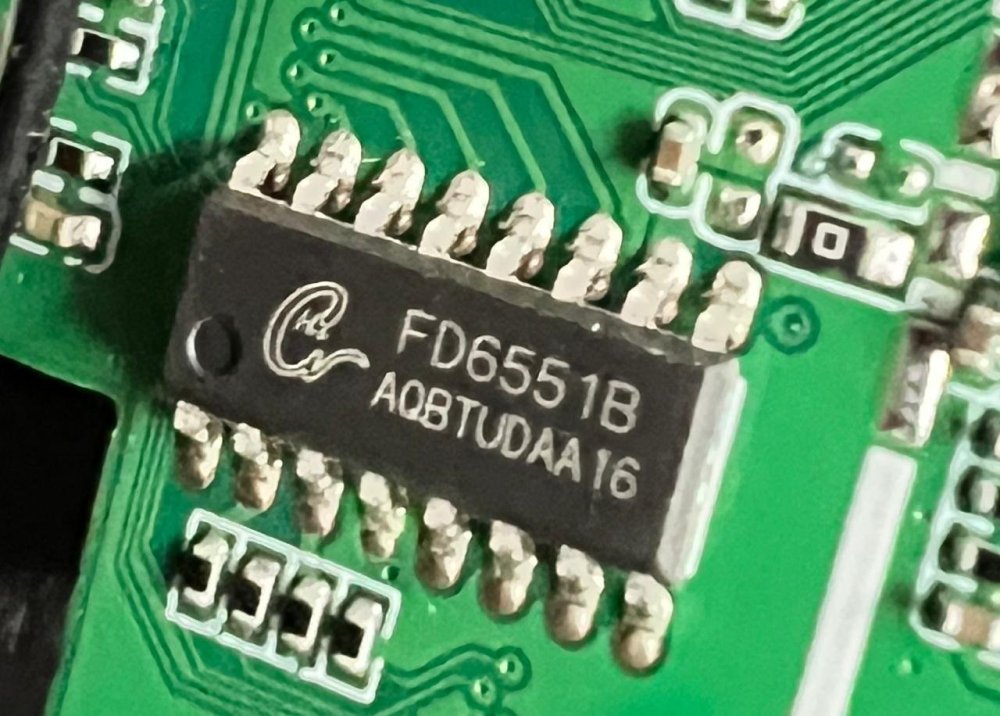
@Nick A Thanks for your reply. This box got FD6551 chip set that is handling the Front Side Display. I have opened the box and double checked this. I also checked the status of the VFD when the box booted from Android image it came with. The VFD looks similar to the one found in the picture given here. Below given is the section from stock android dts file. I can share the entire dts if you are looking for any other specific details. fd655_para { device_type = "fd655_para"; compatible = "Ik,fd655_dev"; fd655_clk_io = <0x23 0x07 0x06 0x01>; fd655_dat_io = <0x23 0x07 0x07 0x01>; status = "okay"; }; Since the alternate VFD configuration requires latest Linux headers, I am getting errors and I have posted about that in the respective thread in this forum. Trying to deploy the OpenVFD which could be possible. I will share the boot logs at the earliest.
-
@Nick A Apologies for overlooking the model number. As you suggested, I tried the x98h image from here, and the image worked fine. With this image, both USB ports, Ethernet, and WiFi work without any modification or tweak. Thanks a lot for directing me towards the right image. 🙏 Now, I am trying to get the VFD working. So far, I have tried OpenVFD and the alternative method mentioned here without success. Do you have any suggestions for getting it to work?
-
Sorry I forgot to mention, I have used dts from Armbian-unofficial_25.05.0-trunk_Transpeed-8k618-t_bookworm_edge_6.12.11_server.img.xz version to make the 2nd USB working.
-
Thanks for replying. I have tried the images that you have suggested. Below given is the status. Armbian-unofficial_25.05.0-trunk_X96q-lpddr3-v1-3_bookworm_edge_6.12.11_server.img.xz - Not booting Armbian-unofficial_25.05.0-trunk_X96q-ddr3_bookworm_edge_6.12.11_server.img.xz - Not Booting Armbian-unofficial_25.05.0-trunk_X96q-ddr3-v5-1_bookworm_edge_6.12.11_server.img.xz - Boots but hangs at Btrfs step in the beginning itself Armbian-unofficial_25.05.0-trunk_Vontar-h618_bookworm_edge_6.12.11_server.img.xz - Boots but hangs at Btrfs step in the beginning itself Meanwhile I have tried to edit the dts file and modified the usb related entries from "disabled" to "okay" which made the 2nd USB working. Since the Ethernet is working fine the WiFI is less priority as of now. However if I can make the VFD working will help me to understand whether the device is up and running or powered off. At present the VFD is black so unable to check the status. Also it will be good to display the current time if possible.
-
Help wanted to test a new OpenVFD alternative
sr4armbian replied to Jean-Francois Lessard's topic in Amlogic meson
Hi @Jean-Francois Lessard Thanks for sharing the new openvfd option for Armbian. I am using a Allwinner H618 Android 12 TV box that got FD6551 controller. I have verified the chip model by opening the box. The headers of respective version is also installed and I have double checked that. apt install -y linux-headers-edge-sunxi64 Reading package lists... Done Building dependency tree... Done Reading state information... Done linux-headers-edge-sunxi64 is already the newest version (25.11.2). From the Android dts file I can find the following. I have tried the configuration mentioned here as well but there is no VFD output. Is there any other configuration I have to check or modify for the VFD to work? leds { leds_clk = <0x23 0x08 0x0b 0x00>; leds_dat = <0x23 0x08 0x0c 0x00>; status = "okay"; }; fd655_para { device_type = "fd655_para"; compatible = "Ik,fd655_dev"; fd655_clk_io = <0x23 0x07 0x06 0x01>; fd655_dat_io = <0x23 0x07 0x07 0x01>; status = "okay"; }; ald-colorleds { compatible = "elebao,colorleds"; dev_name = "ald-colorleds"; pinctrl-0 = <0x70>; colorleds_data_gpio = <0x23 0x07 0x02 0x01>; status = "okay"; }; I tried to make the module as you have instructed, however I am getting the below given error messages. /tm16xx-display# make module make EXTRA_CFLAGS="-DCONFIG_TM16XX -DCONFIG_TM16XX_KEYPAD -DCONFIG_TM16XX_I2C -DCONFIG_TM16XX_SPI -include /root/tm16xx-display/drivers/auxdisplay/tm16xx_compat.h -I/root/tm16xx-display/include/" -C /lib/modules/6.12.11-edge-sunxi64/build M=/root/tm16xx-display/drivers/auxdisplay CONFIG_TM16XX=m CONFIG_TM16XX_KEYPAD=y CONFIG_TM16XX_I2C=m CONFIG_TM16XX_SPI=m CONFIG_LINEDISP=m modules make[1]: Entering directory '/usr/src/linux-headers-6.12.11-edge-sunxi64' CC [M] /root/tm16xx-display/drivers/auxdisplay/line-display.o CC [M] /root/tm16xx-display/drivers/auxdisplay/tm16xx_core.o CC [M] /root/tm16xx-display/drivers/auxdisplay/tm16xx_keypad.o LD [M] /root/tm16xx-display/drivers/auxdisplay/tm16xx.o CC [M] /root/tm16xx-display/drivers/auxdisplay/tm16xx_i2c.o CC [M] /root/tm16xx-display/drivers/auxdisplay/tm16xx_spi.o MODPOST /root/tm16xx-display/drivers/auxdisplay/Module.symvers CC [M] /root/tm16xx-display/drivers/auxdisplay/line-display.mod.o In file included from /root/tm16xx-display/drivers/auxdisplay/line-display.mod.c:2: /root/tm16xx-display/drivers/auxdisplay/line-display.mod.c:13:41: error: expected ‘)’ before ‘LINEDISP’ 13 | KSYMTAB_FUNC(linedisp_attach, "_gpl", ""LINEDISP""); | ^~~~~~~~ ./include/linux/export-internal.h:45:28: note: in definition of macro ‘__KSYMTAB’ 45 | " .asciz \"" ns "\"" "\n" \ | ^~ /root/tm16xx-display/drivers/auxdisplay/line-display.mod.c:13:1: note: in expansion of macro ‘KSYMTAB_FUNC’ 13 | KSYMTAB_FUNC(linedisp_attach, "_gpl", ""LINEDISP""); | ^~~~~~~~~~~~ ./include/linux/export-internal.h:41:12: note: to match this ‘(’ 41 | asm(" .section \"__ksymtab_strings\",\"aMS\",%progbits,1" "\n" \ | ^ ./include/linux/export-internal.h:62:41: note: in expansion of macro ‘__KSYMTAB’ 62 | #define KSYMTAB_FUNC(name, sec, ns) __KSYMTAB(name, KSYM_FUNC(name), sec, ns) | ^~~~~~~~~ /root/tm16xx-display/drivers/auxdisplay/line-display.mod.c:13:1: note: in expansion of macro ‘KSYMTAB_FUNC’ 13 | KSYMTAB_FUNC(linedisp_attach, "_gpl", ""LINEDISP""); | ^~~~~~~~~~~~ /root/tm16xx-display/drivers/auxdisplay/line-display.mod.c:14:41: error: expected ‘)’ before ‘LINEDISP’ 14 | KSYMTAB_FUNC(linedisp_detach, "_gpl", ""LINEDISP""); | ^~~~~~~~ ./include/linux/export-internal.h:45:28: note: in definition of macro ‘__KSYMTAB’ 45 | " .asciz \"" ns "\"" "\n" \ | ^~ /root/tm16xx-display/drivers/auxdisplay/line-display.mod.c:14:1: note: in expansion of macro ‘KSYMTAB_FUNC’ 14 | KSYMTAB_FUNC(linedisp_detach, "_gpl", ""LINEDISP""); | ^~~~~~~~~~~~ ./include/linux/export-internal.h:41:12: note: to match this ‘(’ 41 | asm(" .section \"__ksymtab_strings\",\"aMS\",%progbits,1" "\n" \ | ^ ./include/linux/export-internal.h:62:41: note: in expansion of macro ‘__KSYMTAB’ 62 | #define KSYMTAB_FUNC(name, sec, ns) __KSYMTAB(name, KSYM_FUNC(name), sec, ns) | ^~~~~~~~~ /root/tm16xx-display/drivers/auxdisplay/line-display.mod.c:14:1: note: in expansion of macro ‘KSYMTAB_FUNC’ 14 | KSYMTAB_FUNC(linedisp_detach, "_gpl", ""LINEDISP""); | ^~~~~~~~~~~~ /root/tm16xx-display/drivers/auxdisplay/line-display.mod.c:15:43: error: expected ‘)’ before ‘LINEDISP’ 15 | KSYMTAB_FUNC(linedisp_register, "_gpl", ""LINEDISP""); | ^~~~~~~~ ./include/linux/export-internal.h:45:28: note: in definition of macro ‘__KSYMTAB’ 45 | " .asciz \"" ns "\"" "\n" \ | ^~ /root/tm16xx-display/drivers/auxdisplay/line-display.mod.c:15:1: note: in expansion of macro ‘KSYMTAB_FUNC’ 15 | KSYMTAB_FUNC(linedisp_register, "_gpl", ""LINEDISP""); | ^~~~~~~~~~~~ ./include/linux/export-internal.h:41:12: note: to match this ‘(’ 41 | asm(" .section \"__ksymtab_strings\",\"aMS\",%progbits,1" "\n" \ | ^ ./include/linux/export-internal.h:62:41: note: in expansion of macro ‘__KSYMTAB’ 62 | #define KSYMTAB_FUNC(name, sec, ns) __KSYMTAB(name, KSYM_FUNC(name), sec, ns) | ^~~~~~~~~ /root/tm16xx-display/drivers/auxdisplay/line-display.mod.c:15:1: note: in expansion of macro ‘KSYMTAB_FUNC’ 15 | KSYMTAB_FUNC(linedisp_register, "_gpl", ""LINEDISP""); | ^~~~~~~~~~~~ /root/tm16xx-display/drivers/auxdisplay/line-display.mod.c:16:45: error: expected ‘)’ before ‘LINEDISP’ 16 | KSYMTAB_FUNC(linedisp_unregister, "_gpl", ""LINEDISP""); | ^~~~~~~~ ./include/linux/export-internal.h:45:28: note: in definition of macro ‘__KSYMTAB’ 45 | " .asciz \"" ns "\"" "\n" \ | ^~ /root/tm16xx-display/drivers/auxdisplay/line-display.mod.c:16:1: note: in expansion of macro ‘KSYMTAB_FUNC’ 16 | KSYMTAB_FUNC(linedisp_unregister, "_gpl", ""LINEDISP""); | ^~~~~~~~~~~~ ./include/linux/export-internal.h:41:12: note: to match this ‘(’ 41 | asm(" .section \"__ksymtab_strings\",\"aMS\",%progbits,1" "\n" \ | ^ ./include/linux/export-internal.h:62:41: note: in expansion of macro ‘__KSYMTAB’ 62 | #define KSYMTAB_FUNC(name, sec, ns) __KSYMTAB(name, KSYM_FUNC(name), sec, ns) | ^~~~~~~~~ /root/tm16xx-display/drivers/auxdisplay/line-display.mod.c:16:1: note: in expansion of macro ‘KSYMTAB_FUNC’ 16 | KSYMTAB_FUNC(linedisp_unregister, "_gpl", ""LINEDISP""); | ^~~~~~~~~~~~ make[3]: *** [scripts/Makefile.modfinal:31: /root/tm16xx-display/drivers/auxdisplay/line-display.mod.o] Error 1 make[2]: *** [/usr/src/linux-headers-6.12.11-edge-sunxi64/Makefile:1870: modules] Error 2 make[1]: *** [Makefile:224: __sub-make] Error 2 make[1]: Leaving directory '/usr/src/linux-headers-6.12.11-edge-sunxi64' make: *** [Makefile:50: module] Error 2 root@homeassistant2:~/tm16xx-display# make-module install make-module: command not found root@homeassistant2:~/tm16xx-display# make module-install make -C /lib/modules/6.12.11-edge-sunxi64/build M=/root/tm16xx-display/drivers/auxdisplay CONFIG_TM16XX=m CONFIG_TM16XX_KEYPAD=y CONFIG_TM16XX_I2C=m CONFIG_TM16XX_SPI=m CONFIG_LINEDISP=m modules_install INSTALL_MOD_PATH= make[1]: Entering directory '/usr/src/linux-headers-6.12.11-edge-sunxi64' DEPMOD /lib/modules/6.12.11-edge-sunxi64 Warning: modules_install: missing 'System.map' file. Skipping depmod. make[1]: Leaving directory '/usr/src/linux-headers-6.12.11-edge-sunxi64' root@homeassistant2:~/tm16xx-display# make service-install modprobe tm16xx modprobe: ERROR: could not insert 'tm16xx': Exec format error make: *** [Makefile:60: service-install] Error 1 -
@Nick A Thanks for releasing the wonderful Armbian image for the Allwinner H618 and for supporting the community with your valuable suggestions. I recently purchased a TV box with 4GB of RAM and 64GB of storage running Android 12. I downloaded Armbian-unofficial_25.05.0-trunk_Transpeed-8k618-t_bookworm_edge_6.12.11_server.img.xz from here and flashed it to an SD card using BalenaEtcher. The box boots successfully, and I can configure it via the CLI. However, this motherboard is different from the ones previously posted here. The silkscreen on the board reads "X3Plus_H618_4bit_V3.0". Based on the naming convention and the appearance of the device, it seems to be the model available here. This board uses an FD6551 chip for the front VFD display. I have managed to extract .img file from the stock android. Are there any modifications I need to make to get the Wi-Fi, USB ports, and front VFD working? Could you please suggest? Things that are working: HDMI Display LAN Controller 1 out of the 2 USB ports. The port near to SD Card slot more precisely Things that are not working: WiFi - The chip got a metal shield. On top of the shield it is written with W804S1, inside the shield I could find AIC8800D40 chip. 1 x USB Port - Near the top left hand corner Front VFD display.
-
Rupa X88 Pro 13 - RK3528 board with images
sr4armbian replied to fedes_gl's topic in Rockchip CPU Boxes
@Joao Cordeiro Thanks for your reply. You are right, Amlogic S905X3 seems to be a good hardware without much issue for running Linux servers. -
Glad that you got it fixed and figured out a way to set this up. 🙌. I went with similar method, used USB Male to Male cable, Factory Flash Tool and maskrom pins to load the image that I have mentioned in above post, However I am still stuck with no HDMI and LED Display is not showing the clock, but a script which shows the IP address. This was part of the image created by the one who complied it. If you could share steps to get the one that is working (HDMI, Clock, Etc.,) for you would be helpful.
-
@Fit Girl The image available here works from emmc. I could not test this with SD card. Please be informed that there is no HDMI display post boot. You have to find out the IP address from your DHCP Server/Router once the box got booted. Post boot you are working on a blind box with command lines. It is working for me though without much issues so far.
-
I am trying to enable the VFD display to show the current time. This board came with AiP1628 chip, will be going the posts to make it working. If you got it already working then kindly share the info. 🙂
-
@davem, I have similar X88 Pro TV box clone which got "X88PRO-RK3566-4D32-V2.1" written on the PCB. I was struggling to boot the system using SD card since the Android image that came with the box was not allowing. Thanks for sharing about the upgrade tool and modified x96x6.dtb. Without your posts I could not made it to work. I got "Armbian_community_26.2.0-trunk.792_Rk3566-box-demo_trixie_current_6.18.24_minimal.img.xz" successfully writte and booted. Later I have installed KDE based Desktop as well on 64GB Micro SD card. My USB 3.0 (the blue one) is somehow not working, Since I have a USB hub its not a deal breaker. Following are working properly as of now. Summary: Bluetooth - Working On Board LAN - 1000Mbps - Working. WiFI - connected to 2.4 Ghz network - Working. HDMI Display - Working. I have not test HDMI audio though. Sound - No 3.5mm Analog jack in this model. However the sound is working via Bluetooth head phone and Speaker with USB input/power. USB 2.0 - Connected Keyboard, mouse and speaker via USB 2.0 Hub - Working. USB 3.0 - This works fine when we boot in Android - Not working. Toss Link - Though the box got a port in the back, I don't have any device that can be connected - Not Tested. Note: I have windows 11 system as my desktop PC. I could not edit the Micro SD card created using BalenaEtcher. I had to use Ubuntu system in order to prepare the SD card and to edit the boot/armbianEnv.txt with fdtfile=rockchip/rk3566-box-X88PRO20.dtb
-
20USD 4GRAM RK3528 host (cheap dq08 tvbox)
sr4armbian replied to fensoft's topic in Rockchip CPU Boxes
@fensoft I am using your current image 3.0.0_r2 in H96 Max M1 with USB Hub + USB to Ethernet adapter successfully. Its really energy efficient solution which can run 24 x 7 without costing much. However I am trying to set this up on a dq08 box with 4 GB/64 GB Model. I am able to install dq08_ha_supervised_3.0.0_r2.zip without any issue. However due to recent support changes from the application, I am unable to continue further with the setup. I tried to install docker version to set this up but getting error "invalid argument: in-kernel BTF is malformed (1 line(s) omitted)". Not seeing much on this error in the interwebs but there are suggestions that this could be due to old kernels/. Is there a way we can update this kernel and OS to Armbian Trixie or will it brick the dq08? Have you got a chance to look at the updated installer image? -
Rupa X88 Pro 13 - RK3528 board with images
sr4armbian replied to fedes_gl's topic in Rockchip CPU Boxes
@DaBo Thanks for sharing this. Are you able to run Armbian on this? Is LAN, HDMI, etc working fine on this? -
Hi, Thanks for sharing details about the Armbian on x88 Pro and your DIY Cooling Solution. Really useful. May I know what is the name of the image that you have used for this setup from https://www.armbian.com/station-m2/. I tried the recent and archived images. Post burning to SD card, the box is not booting with any of the image.
-
CSC Armbian for RK3318/RK3328 TV box boards
sr4armbian replied to jock's topic in Rockchip CPU Boxes
Armbian Version: 6.12.56-current-rockchip64 TV Box: I have same board that is mentioned at this post. Issue: using the .dts mentioned in the above link I am able to see the clock with blinking separator. However I am not seeing the disk activity or LAN connections icon. If I am using devicetree changed to rk1188-box-led-conf-5, I can see the disk blinking icon and LAN connection, however the clock is not visible. Is there anyway I can get the clock as well the icons? Can you share the steps or the post that has the solution to this? -
@Amaliacan you please share the devfmc and armbian image version names/link that you have used to make the box booting? Is sound, wired and wireless networks working for you in this approach? I have a x96 x4 box with S905x4 chipset 4/64 GB model. I am trying to load Armbian. So far Devfmc version boots, network is also working. I am unable to boot into Armbian of any version.