
sven-ola
-
Posts
118 -
Joined
-
Last visited
Content Type
Forums
Store
Crowdfunding
Applications
Events
Raffles
Community Map
Everything posted by sven-ola
-
I operate an Odroid HC4, that has 4 x A55@1.8 and the board discussed here has 8 x X60@1.?. A fast sysbench says: single thread on OpiRv2 is slower (792 vs 1034) , multithreaded is faster (6342 vs 4151). Compiling a current kernel on RV2 needs 3 hours, nothing one would do do regularly. If you really need speed buy a Radxa Rock 5 (see platinum support devices on this site). Edit1: NPU -> Opi Wiki, USB and SPI yes, for MIPI DSI/CSI you need to test yourself. Edit2: Just remembered that I have a H618 (Opiz3). Single=708, Multi=2828 with the same Trixie sysbench. HTH + LG // Sven-Ola
-
If inserted, SD is booted first. If not inserted or SD read err, NOR flash is booted. NOR flash in turn boots from lower 2280 NVME. I have added boot-from-upper 2230 NVME to uboot. To install Boot via SD. Log in as root. Start armbian-install Select 7 Install to MTD Put fresh image to NVME via dd of=/dev/nvme... Eject SD, press [reset] If anything is wrong, start over with 1. Boot via SD. I am not sure wich NVME (upper or lower?) is used first. Note: If you put the same image to both NVMEs and insert SD, you may have up to three ext4 partitions with the same UUID in the box. So on reboot it is very unclear which of the three ext4 is used as root. Check with df -h /. If necessary, you can use uuidgen from uuid-runtime package and tune2fs -U as well as nano to change extlinux.conf for a different ID. HTH // Sven-Ola
-
Hello @brunorro. That "current.txt" from above: the UART output shows you are booting an older KY-Uboot from NOR flash. Probably SD card not fully inserted. "edge.txt" shows a correct SD card boot sequence. Best // Sven-Ola
-
In the meantime I fiddled with HW crypto and PCIe sleep states. While the former is working on edge and current, the latter may be an individual error with my Samsung PM9b1 128Gb NVME SSD not working in the upper 2230 M.2 on edge. While the current 6.6 kernel does not use ASPM eventually, the edge 6.18 kernel has it and it leads to read errors. Adding pcie_aspm=off to /boot/extlinux/extlinux.conf::append helped, but I think adding a "No ASPM" to pci-quirks for this device is a better solution b/c the PCIe wifi is working (has L1 and L0s sleep). So if you like then test your NVME SSDs with the edge kernel. I'am especially interested in NVMEs reporting Capabilities L1 PM Substates with lspci -v LG // Sven-Ola
-
Hello @brunorro, I have uploaded two images to https://privat-in.de/ (navigate to downloads, grab Armbian*.img). Simply post findings here. The "edge" image is rather unstable, e.g. my NVME gives a read-error while working fine with "current", while a Mediatek Wifi card seems to work. Probably no easy task, could be anywhere in the IOMMU - DMA - PCIe triangle. The images are compiled from https://github.com/sven-ola/armbian-build/tree/orangepi-rv2 kernel with defaults plus switched on every Mediatek Wifi driver module. Here's my Todo for ref (+ marks ok): To be merged + Boot from SSD (upper+lower) + SPI NOR flash boot / install + SD/TF speed too slow (15mb/s) - Check SD UHS in uboot speed limit + Brcm SDIO wifi not working - Armbian edge: Brcm SDIO Wifi - Armbian edge: PCIe NVME IOErr + Bluetooth not working - RTL ethernet (2.5gbit R2V board?) - Ky overlay dtbo's missing - Focaltech touch driver from Ky? - Ky MIPI/CSI cam modules - What is that realtime r_uart? - GPU? USB2-OTG? USB3? Sound? Personal wishlist: - Device-mapper / dm_era missing + Mediatek PCIe wifi modules - PCIe adapter: Radeon GPU test Ah, yes. OpenWrt is on the Ky list of supported systems. I have a personal history on that too. While getting rid of systemd may be not that difficult (see Devuan) exchanging libc is another beast probably. LG // Sven-Ola
-
Hello @brunorro. Yes, sometimes people are hacking badly. I have it working again after restarting with Armbian/Spacemit: u-boot starts, onboard BT and Wifi works, SD card is again reading with 80mb/s, transfer u-boot and SBI to MTD via armbian-install works (MTD boot is required for starting from SSD), both M.2 slots can boot from NVME. Sadly, the Broadcom SDIO wifi driver is a smoking mess. This driver needs heavy porting so its not available with linux-6.18 / edge currently. Are you willing to test anyhow? I can provide a 6.6.99 Trixie image for download if you ACK. There are always things that I may have overlooked such as USB, HDMI. All those little things I have not tested, I' on UART currently. LG // Sven-Ola
-
 @Werner Thank you for handling this. As a quick fix for developers making new images: use ./compile.sh SKIP_ARMBIAN_REPO=yes
 -
All clear for the PCIe MSI: it is something with that Intel 7260 card. Today, I got two other M.2 Wifis: MT7922 and RTL8822ce, both seem to work on current and also on edge. Thus, I consider this as a success. Here's some screen blurb. // Sven-Ola
-
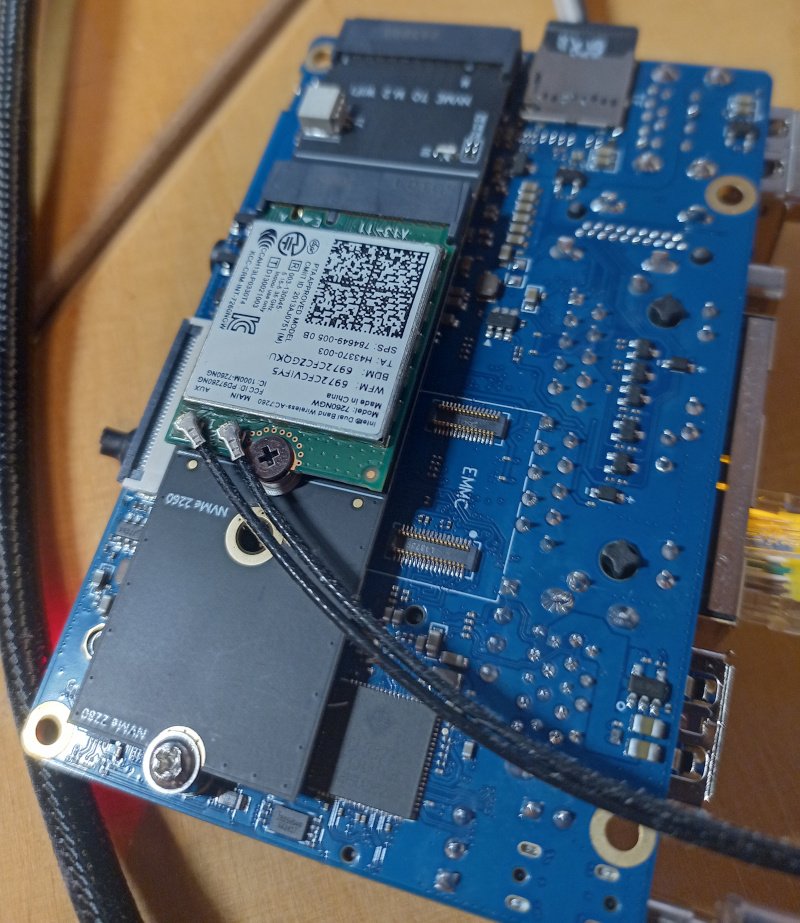
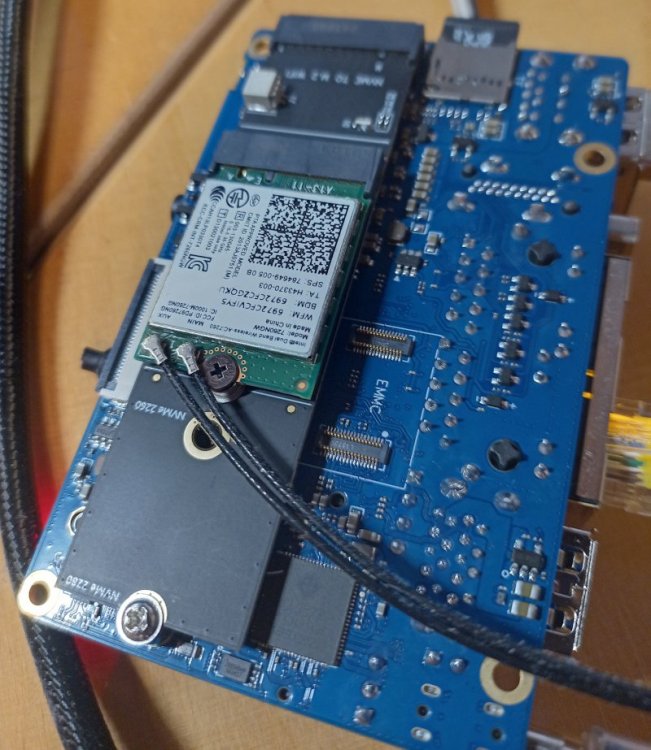
PCIe MSI is not working. At least with an Intel iwlwifi M.2 card. For that reason, I investigated the differences between the Xunlong KY tree and the Armbian Spacemit Tree. B/c loading the "official" 552kb esos.elf seems to work (even if the Ky version is only 104kb) on the OrangePi RV2, I started to backport Xunlong changes to Armbian/Spacemit family. Newer kernel, but no luck with that MSI. There should be a DMA-transfer-complete interrupt at the end of the firmware upload. Card is working in my PC. MSI is working on OpiRV2 with NVME. Current status: board runs with spacemit-family kernel, but some minor Does-Not-Work yet: LED, onboard Wifi+BT and I need to check that special RTL eth... LG // Sven-Ola Edit: Pic it or it didn't happen. RV2 underside with WIfi card.
-
As a followup: hardware crypto is damn slow on the Ky / SpacemIt platform, at least for default LUKS block encryption with AES. This probably also affects the Banana Pi F3 image. With default sector-size of 512 byte, HW-AES is 5 times slower than SW-AES, while cryptsetup benchmark reports 5 times faster. Main reason: block size. With sector-size of 4096 LUKS is reasonable fast. Also there is leftover debug (cannot be switched off) and a small bugs in the driver that triggers SW crypto fallback after HW crypto succeeds. Patches: https://github.com/sven-ola/armbian-build/tree/orangepi-rv2/patch/kernel/ky-current Best // Sven-Ola
-
Today investigated, why BCM Bluetooth was not working with my image. What a rabbit hole 🙄 Also added OrangePi R2S board. Smaller brother of RV2 (I have no board but it's probably working). For the Bluetooth: everyone is obviously happy to hack the BCM firmware file instead of implementing bcm init into hciattach. The brcm_patchram_plus firmware hacking tool was added for this arch and that arch as a binary under BSP for different boards. Not very Debian-style. I grabbed the working source, compared to the one avail in Android AOSP and added it to my branch, added lib6-dev-riscv64-cross to the Docker image and now have a working image with BT. LG && HTH // Sven-Ola
-
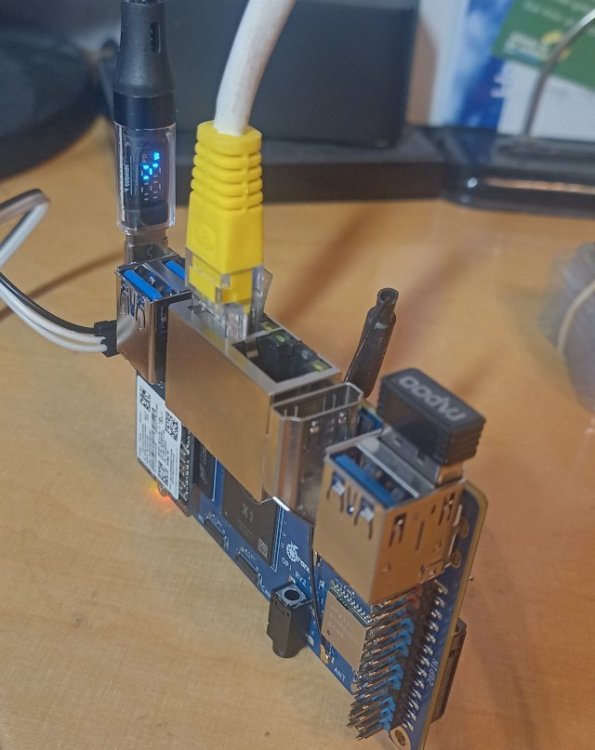
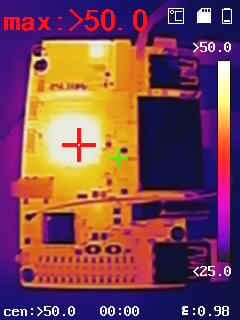
In the meantime, I spotted the pending MR from https://github.com/tmshlvck for this in the Pull Request Backlog. There are a number of issues with that, besides that it's very similar. Adding *.deb from xunlong without review is (mmm), better stay away from this. I'm not sure if the camera *.json is required. Not anything from the xunlong tree needs to be copied probably. I cleaned out my version (see https://github.com/sven-ola/armbian-build/tree/orangepi-rv2), but while this is open since October, I postpone to trigger another MR on that issue. My goal is: boot from upper 2230 SSD and use lower M.2 for Wifi (there are cheap Mediatek 3-band Wifi cards with 2280 adapter). If anyone wants similar setup, just checkout my branch from the link above and: ./compile.sh BOARD=orangepirv2 BRANCH=current RELEASE=trixie KERNEL_CONFIGURE=no BUILD_MINIMAL=yes KERNEL_GIT=shallow Write output/images/*.img to SD and boot with that. Use armbian-install to copy boot cfg on MTD. Again copy that *.img to /dev/nvme0n1. Remove SD card, reboot board. While investigating, there are a number of hints that the Ky X1 is in fact a SpacemiT K1 variant. Maybe stripped down, since the RCPU firmware (esos.elf) is much smaller. I have noticed, that Xunlong is not exactly welcome here. Chinese difficulties with the words upstream and donation probably. I think the hard work is to maintain / port the kernel and u-boot code drops with future versions. On the other hand: this board is cheap, offers a way to practice with a new CPU arch, and has the expected minimum number of M.2 slots. I'm currently compiling a kernel on that board. ETA 3 hours or so, board is not very fast. Anyhow, temp stays below 80°C if operated upright (above foto). No unusual hotspots, board and RAM seems stable, wifi and ethernet works. HTH and LG // Sven-Ola
-
Hey! Got it up and running - I have an Armbian SD card image based on the source trees found on https://github.com/orangepi-xunlong. Since I am a newbie to Armbian, please accept my apologies for beginner errors. Here's what I currently got on my UART: root@orangepirv2:~# uname -a Linux orangepirv2 6.6.63-current-ky #1 SMP PREEMPT Tue Mar 18 02:29:27 UTC 2025 riscv64 GNU/Linux root@orangepirv2:~# cat /etc/os-release PRETTY_NAME="Armbian-unofficial 26.02.0-trunk trixie" NAME="Debian GNU/Linux" VERSION_ID="13" VERSION="13 (trixie)" VERSION_CODENAME=trixie DEBIAN_VERSION_FULL=13.2 ID=debian HOME_URL="https://www.armbian.com/" SUPPORT_URL="https://forum.armbian.com" BUG_REPORT_URL="https://www.armbian.com/bugs" ARMBIAN_PRETTY_NAME="Armbian-unofficial 26.02.0-trunk trixie" This is not ready for prime time now. Needs a bit cleanup b/c I pulled in binaries and private project stuff not meant for armbian-build. Currently resides in this fork https://github.com/sven-ola/armbian-build/tree/orangepi-rv2. If you want to give it a try: it's compile.sh opirv2 after checkout. I've also managed to boot from the top 2230 M.2 SSD but this is also handmade (I'm pretty sure there is a script in here that copies the SD card boot blobs to SPI flash, will try before doing the MR). Best // Sven-Ola
-
Thanks. Found a post from @igor basically stating the same. I'll continue to work on the RV2 here for that reason.
-
Grmbl. As it turns out after some reversing and building uboot for the RV2, there seems to be a toolchain by xunlong with much similarities to armbian-build on https://github.com/orangepi-xunlong/orangepi-build.git There is an Ubuntu image for the RV2 one can download from gdrive and install to SD. This image has a package linux-u-boot-orangepirv2-current.deb installed. With very much the same postinst script than the similar package from Armbian / Banana Pi F3. Hence the RV2 package obviously was build from their build tree, family file is external/config/sources/families/ky.conf which looks familiar. Also their project has some non-documentation, meaning there is a "build.sh" and a very small README.md. I'm unsure if I should continue this...
-
Need to post some corrections. The board loads and starts uboot directly from an inserted SD, so no need to be extra careful. Also: the upper M.2 is not recognized by stock uboot, so may next step is to compile u-boot to investigate.
-
As a follow up: got my board yesterday. 2GB RAM as announced, no obvious bringup probs. The Ubuntu image runs from SD, UART ok, got 80mb/s from SD and around ~300mb/s from an 128GB 2230 NVME. No boot from upper m.2, only lower m.2 boots (works as announced). The SBC starts via uboot stored on the 16mbyte SPI flash, so I think it should be possible to also boot from upper m.2 since the uboot recognizes media both m.2 slots. Currently unclear how to recover from damaged SPI flash, so I need to proceed carefully. Uboot env is closed (bootdelay=0), so first task is to open up uboot cmd line. Theres a boot switch that seems to trigger some USB boot from ROM but thats undocumented AFAICT. Plenty to investigate for my 50 bucks 😉
-
@Igor wrote about upcoming Muse Pi Pro (a SpacemiT K1 board). Orange Pi RV2 features a "Ky X1" SoC which may be a variant of the SpacemiT SoC and at least similar to the already compile-able Banana Pi F3 board. However, Xunlong seems to be serious about the differences, since the published patch sets on github.com/orangepi-xunlong to kernel and u-boot have a GPL-2 copyright notice, stating I expect my RV2 arriving tomorrow. Thus, it would be very appreciated if support for this board pops up in time 😉 Otherwise I may try my luck with adding Armbian support on my own (without expecting success soon). For clarification, I compiled a list of RISC-V64 boards currently available: Banana Pi F3, runs on SpacemiT K1 8-core X60 RISV-V@1.5? (2 TOPS NPU, 2x1 Gbit, M.2@m, mPCIe, eMMC@soldered, SD/TF) Orange Pi RV, runs on StarFive JH 7110 4-core RISC-V@1.5 (1x1 Gbit, M.2@m, SD/TF, SPI-flash) Orange Pi RV2, runs on Ky X1, 8-core RISC-V@1.5, variant of SpacemiT K1? (2 TOPS NPU, 2x1 Gbit, M.2@m2280, M.2@m2230, SD/TF, eMMC@socket, SPI-flash) Muse Pi Pro runs on overclocked SpacemiT K1 8-core X60 RISC-V@1.8 (2 TOPS NPU, 1x1 Gbit, M.2@m, mPCIe, eMMC@soldered, SPI-flash) Best // Sven-Ola