Guilherme
-
Posts
17 -
Joined
-
Last visited
Content Type
Forums
Store
Crowdfunding
Applications
Events
Raffles
Community Map
Everything posted by Guilherme
-
Estou tentando gerar uma imagem Qemu-uefi-x86 usando a seguinte linha: ./compile.sh BOARD=qemu-uefi-x86 BRANCH=current KERNEL_CONFIGURE=no ARCH=x86_64 BUILD_MINIMAL=yes BUILD_DESKTOP=no KERNEL_BTF=no RELEASE=jammy Ao final do processo, recebo o seguinte erro. Alguém pode me ajudar? Estava gerando corretamente e, de repente, parou. Ign:6 http://archive.ubuntu.com/ubuntu jammy-backports InRelease [🔨] Erro:1 https://github.armbian.com/configng estável InRelease [🔨Erro do sistema ao resolver 'github.armbian.com:https' - getaddrinfo (16: Dispositivo ou recurso ocupado) [🔨] Erro:2 https://apt.armbian.com jammy InRelease [🔨Erro do sistema ao resolver 'apt.armbian.com:https' - getaddrinfo (16: Dispositivo ou recurso ocupado) [🔨] Err:3 http://archive.ubuntu.com/ubuntu jammy InRelease [🔨Erro de sistema ao resolver 'archive.ubuntu.com:http' - getaddrinfo (16: Dispositivo ou recurso ocupado) [🔨] Erro:4 http://archive.ubuntu.com/ubuntu jammy-security InRelease [🔨Erro de sistema ao resolver 'archive.ubuntu.com:http' - getaddrinfo (16: Dispositivo ou recurso ocupado) [🔨] Erro:5 http://archive.ubuntu.com/ubuntu jammy-updates InRelease [🔨Erro de sistema ao resolver 'archive.ubuntu.com:http' - getaddrinfo (16: Dispositivo ou recurso ocupado) [🔨] Erro:6 http://archive.ubuntu.com/ubuntu jammy-backports InRelease [🔨Erro de sistema ao resolver 'archive.ubuntu.com:http' - getaddrinfo (16: Dispositivo ou recurso ocupado) [🔨Lendo listas de pacotes... [🔨] W: Falha ao buscar https://github.armbian.com/configng/dists/stable/InRelease Erro de sistema ao resolver 'github.armbian.com:https' - getaddrinfo (16: Dispositivo ou recurso ocupado) [🔨] W: Falha ao buscar https://apt.armbian.com/dists/jammy/InRelease Erro de sistema ao resolver 'apt.armbian.com:https' - getaddrinfo (16: Dispositivo ou recurso ocupado) [🔨] W: Falha ao buscar http://archive.ubuntu.com/ubuntu/dists/jammy/InRelease Erro de sistema ao resolver 'archive.ubuntu.com:http' - getaddrinfo (16: Dispositivo ou recurso ocupado) [🔨] W: Falha ao buscar http://archive.ubuntu.com/ubuntu/dists/jammy-security/InRelease Erro de sistema ao resolver 'archive.ubuntu.com:http' - getaddrinfo (16: Dispositivo ou recurso ocupado) [🔨] W: Falha ao buscar http://archive.ubuntu.com/ubuntu/dists/jammy-updates/InRelease Erro de sistema ao resolver 'archive.ubuntu.com:http' - getaddrinfo (16: Dispositivo ou recurso ocupado) [🔨] W: Failed to fetch http://archive.ubuntu.com/ubuntu/dists/jammy-backports/InRelease System error resolving 'archive.ubuntu.com:http' - getaddrinfo (16: Device or resource busy) [🔨] W: Some index files failed to download. They have been ignored, or old ones used instead. [🚸] WARNING: SDCARD /var/lib/apt/lists dir is not empty [ before 'apt-get --no-install-recommends install armbian-config' :: /home/adm64/buldx86-64/.tmp/rootfs-ad6535a3-5649-47eb-bfe2-25cd24623192/var/lib/apt/lists (21 files) ] [🔨] /home/adm64/buldx86-64/.tmp/rootfs-ad6535a3-5649-47eb-bfe2-25cd24623192/var/lib/apt/lists: [🔨] total 182M [🔨] drwxr-xr-x 5 root root 120 Apr 6 15:49 .. [🔨] drwxrwxr-x 4 root root 500 Apr 6 15:25 . [🔨] drwx------ 2 systemd-network root 40 Apr 6 15:25 partial [🔨] -rw-r----- 1 root root 0 Apr 6 15:24 lock [🔨] drwxr-xr-x 2 systemd-network root 40 Apr 6 15:24 auxfiles [🔨] -rw-r--r-- 1 root root 125K Apr 6 12:23 archive.ubuntu.com_ubuntu_dists_jammy-backports_InRelease [🔨] -rw-r--r-- 1 root root 126K Apr 6 12:22 archive.ubuntu.com_ubuntu_dists_jammy-updates_InRelease [🔨] -rw-r--r-- 1 root root 126K Apr 6 12:19 archive.ubuntu.com_ubuntu_dists_jammy-security_InRelease [🔨] -rw-r--r-- 1 root root 19M Apr 3 18:09 archive.ubuntu.com_ubuntu_dists_jammy-updates_main_binary-amd64_Packages [🔨] -rw-r--r-- 1 root root 6.9M Apr 3 18:09 archive.ubuntu.com_ubuntu_dists_jammy-updates_universe_binary-amd64_Packages [🔨] -rw-r--r-- 1 root root 17M Apr 2 19:01 archive.ubuntu.com_ubuntu_dists_jammy-security_main_binary-amd64_Packages [🔨] -rw-r--r-- 1 root root 5.9M Apr 2 19:01 archive.ubuntu.com_ubuntu_dists_jammy-security_universe_binary-amd64_Packages [🔨] -rw-r--r-- 1 root root 33M Apr 1 00:36 archive.ubuntu.com_ubuntu_dists_jammy-updates_restricted_binary-amd64_Packages [🔨] -rw-r--r-- 1 root root 5.4K Mar 30 03:55 github.armbian.com_configng_dists_stable_InRelease [🔨] -rw-r--r-- 1 root root 623 Mar 30 03:55 github.armbian.com_configng_dists_stable_main_binary-amd64_Packages [🔨] -rw-r--r-- 1 root root 31M Mar 25 09:42 archive.ubuntu.com_ubuntu_dists_jammy-security_restricted_binary-amd64_Packages [🔨] -rw-r--r-- 1 root root 440K Mar 15 04:56 archive.ubuntu.com_ubuntu_dists_jammy-backports_main_binary-amd64_Packages [🔨] -rw-r--r-- 1 root root 143K Mar 15 04:56 archive.ubuntu.com_ubuntu_dists_jammy-backports_universe_binary-amd64_Packages [🔨] -rw-r--r-- 1 root root 277K Jan 28 17:31 archive.ubuntu.com_ubuntu_dists_jammy-security_multiverse_binary-amd64_Packages [🔨] -rw-r--r-- 1 root root 308K Jan 26 14:47 archive.ubuntu.com_ubuntu_dists_jammy-updates_multiverse_binary-amd64_Packages [🔨] -rw-r--r-- 1 root root 264K Apr 21 2022 archive.ubuntu.com_ubuntu_dists_jammy_InRelease [🔨] -rw-r--r-- 1 root root 62M Apr 21 2022 archive.ubuntu.com_ubuntu_dists_jammy_universe_binary-amd64_Packages [🔨] -rw-r--r-- 1 root root 897K Apr 20 2022 archive.ubuntu.com_ubuntu_dists_jammy_multiverse_binary-amd64_Packages [🔨] -rw-r--r-- 1 root root 6.5M Apr 18 2022 archive.ubuntu.com_ubuntu_dists_jammy_main_binary-amd64_Packages [🔨] -rw-r--r-- 1 root root 895K Apr 13 2022 archive.ubuntu.com_ubuntu_dists_jammy_restricted_binary-amd64_Packages [🔨] [🔨] /home/adm64/buldx86-64/.tmp/rootfs-ad6535a3-5649-47eb-bfe2-25cd24623192/var/lib/apt/lists/partial: [🔨] total 0 [🔨] drwx------ 2 systemd-network root 40 Apr 6 15:25 . [🔨] drwxrwxr-x 4 root root 500 Apr 6 15:25 .. [🔨] [🔨] /home/adm64/buldx86-64/.tmp/rootfs-ad6535a3-5649-47eb-bfe2-25cd24623192/var/lib/apt/lists/auxfiles: [🔨] total 0 [🔨] drwxrwxr-x 4 root root 500 Apr 6 15:25 .. [🔨] drwxr-xr-x 2 systemd-network root 40 Apr 6 15:24 . [🔨] E: Failed to fetch http://archive.ubuntu.com/ubuntu/pool/main/n/newt/libnewt0.52_0.52.21-5ubuntu2_amd64.deb System error resolving 'archive.ubuntu.com:http' - getaddrinfo (16: Device or resource busy) [🔨] E: Failed to fetch http://archive.ubuntu.com/ubuntu/pool/main/n/newt/whiptail_0.52.21-5ubuntu2_amd64.deb System error resolving 'archive.ubuntu.com:http' - getaddrinfo (16: Device or resource busy) [🔨] E: Failed to fetch http://archive.ubuntu.com/ubuntu/pool/main/p/pv/pv_1.6.6-1build2_amd64.deb System error resolving 'archive.ubuntu.com:http' - getaddrinfo (16: Device or resource busy) [🔨] E: Failed to fetch https://github.armbian.com/configng/pool/main/a/armbian-config/armbian-config_26.2.0-trunk.655.0330.065342_all.deb System error resolving 'github.armbian.com:https' - getaddrinfo (16: Device or resource busy) [🔨] E: Unable to fetch some archives, maybe run apt-get update or try with --fix-missing? [💥] Error 1 occurred in main shell [ at /home/adm64/buldx86-64/lib/functions/logging/runners.sh:15 chroot_sdcard_apt_get_install() --> lib/functions/logging/runners.sh:15 post_armbian_repo_customize_image__install_armbian-config() --> extensions/armbian-config.sh:17 post_armbian_repo_customize_image() --> <extension_magic>:167 call_extension_method() --> lib/functions/general/extensions.sh:57 run_hooks_post_armbian_repo_customize_image() --> lib/functions/rootfs/customize.sh:60 do_with_logging() --> lib/functions/logging/section-logging.sh:81 build_rootfs_and_image() --> lib/functions/main/rootfs-image.sh:59 full_build_packages_rootfs_and_image() --> lib/functions/main/default-build.sh:36 do_with_default_build() --> lib/functions/main/default-build.sh:42 cli_standard_build_run() --> lib/functions/cli/cli-build.sh:25 armbian_cli_run_command() --> lib/functions/cli/utils-cli.sh:136 cli_entrypoint() --> lib/functions/cli/entrypoint.sh:176 main() --> compile.sh:50 ] [💥] Limpeza [aguarde a conclusão da limpeza] [🌿] Desmontando recursivamente [ SDCARD - aguarde ] [🌿] Desmontando recursivamente [ MOUNT - aguarde ] [🌿] Arquivo de log ANSI criado; inspecione-o executando: [ less -RS output/logs/log-build-ad6535a3-5649-47eb-bfe2-25cd24623192.log.ans ] [🌱Compartilhar o log manualmente: [use um dos comandos abaixo (ou adicione SHARE_LOG=yes na próxima vez!)] [🌿] Compartilhe o log manualmente: [ curl --data-binary @output/logs/log-build-ad6535a3-5649-47eb-bfe2-25cd24623192.log.ans https://paste.armbian.com/log ] [🌿] Compartilhe o log manualmente: [ curl --data-binary @output/logs/log-build-ad6535a3-5649-47eb-bfe2-25cd24623192.log.ans https://paste.armbian.de/log ] [🌿] Compartilhe o log manualmente: [ curl --data-binary @output/logs/log-build-ad6535a3-5649-47eb-bfe2-25cd24623192.log.ans https://paste.next.armbian.com/log ] [🌿] Compartilhe o log manualmente: [ curl --data-binary @output/logs/log-build-ad6535a3-5649-47eb-bfe2-25cd24623192.log.ans https://pa
-
I'm having a problem with my Raspberry Pi 5, which I describe below. I have a DVR connected to it via Ethernet. If I connect both at the same time, dmesg reports a failure and I can't ping the DVR to establish a connection; I have to run `ifconfig eth0 down` and `ifconfig eth0 up`. Can anyone help or know if there's a bug in the kernel version? I'm using Ubuntu 22.04. jammy root:~# dmesg | grep eth0 [ 1.312167] macb 1f00100000.ethernet eth0: Cadence GEM rev 0x00070109 at 0x1f00100000 irq 108 (2c:cf:67:81:d6:2a) [ 3.237493] systemd[1]: Found device /sys/subsystem/net/devices/eth0. [ 3.453483] systemd[1]: Started ifup for eth0. [ 3.573655] macb 1f00100000.ethernet eth0: PHY [1f00100000.ethernet-ffffffff:01] driver [Broadcom BCM54213PE] (irq=POLL) [ 3.573668] macb 1f00100000.ethernet eth0: configuring for phy/rgmii-id link mode [ 6.441950] macb 1f00100000.ethernet eth0: Link is Up - 100Mbps/Full - flow control off [ 11.560707] macb 1f00100000.ethernet eth0: Link is Down [ 13.605678] macb 1f00100000.ethernet eth0: Link is Up - 100Mbps/Full - flow control off root:~# ping 192.168.200.201 PING 192.168.200.201 (192.168.200.201) 56(84) bytes of data. ^C --- 192.168.200.201 ping statistics --- 6 packets transmitted, 0 received, 100% packet loss, time 13305ms root:~# ifconfig eth0 down root:~# ifconfig eth0 up root:~# dmesg | grep eth0 [ 1.312167] macb 1f00100000.ethernet eth0: Cadence GEM rev 0x00070109 at 0x1f00100000 irq 108 (2c:cf:67:81:d6:2a) [ 3.237493] systemd[1]: Found device /sys/subsystem/net/devices/eth0. [ 3.453483] systemd[1]: Started ifup for eth0. [ 3.573655] macb 1f00100000.ethernet eth0: PHY [1f00100000.ethernet-ffffffff:01] driver [Broadcom BCM54213PE] (irq=POLL) [ 3.573668] macb 1f00100000.ethernet eth0: configuring for phy/rgmii-id link mode [ 6.441950] macb 1f00100000.ethernet eth0: Link is Up - 100Mbps/Full - flow control off [ 11.560707] macb 1f00100000.ethernet eth0: Link is Down [ 13.605678] macb 1f00100000.ethernet eth0: Link is Up - 100Mbps/Full - flow control off [ 147.034711] macb 1f00100000.ethernet eth0: Link is Down [ 151.855860] macb 1f00100000.ethernet eth0: PHY [1f00100000.ethernet-ffffffff:01] driver [Broadcom BCM54213PE] (irq=POLL) [ 151.855871] macb 1f00100000.ethernet eth0: configuring for phy/rgmii-id link mode [ 152.869842] macb 1f00100000.ethernet eth0: Link is Up - 100Mbps/Full - flow control off root:~# ping 192.168.200.201 PING 192.168.200.201 (192.168.200.201) 56(84) bytes of data. 64 bytes from 192.168.200.201: icmp_seq=1 ttl=64 time=1.01 ms 64 bytes from 192.168.200.201: icmp_seq=2 ttl=64 time=1.01 ms ^C --- 192.168.200.201 ping statistics --- 2 packets transmitted, 2 received, 0% packet loss, time 1001ms rtt min/avg/max/mdev = 1.007/1.007/1.007/0.000 ms
-
But I already tried that and it didn't work.
-
I'm using the command ./compile.sh build BOARD=rpi4b BRANCH=current KERNELBRANCH=current SKIP_ARMBIAN_REPO=yes SKIP_ARMBIAN_CONFIG=yes SKIP_EXTERNAL_TOOLCHAINS=yes BUILD_DESKTOP=no BUILD_MINIMAL=yes CLEAN_LEVEL=make-kernel,alldebs,images,cache EXPERT=yes KERNEL_CONFIGURE=no NEWPKG=true OFFLINE_WORK=no KERNEL_BTF=no RELEASE=noble
-
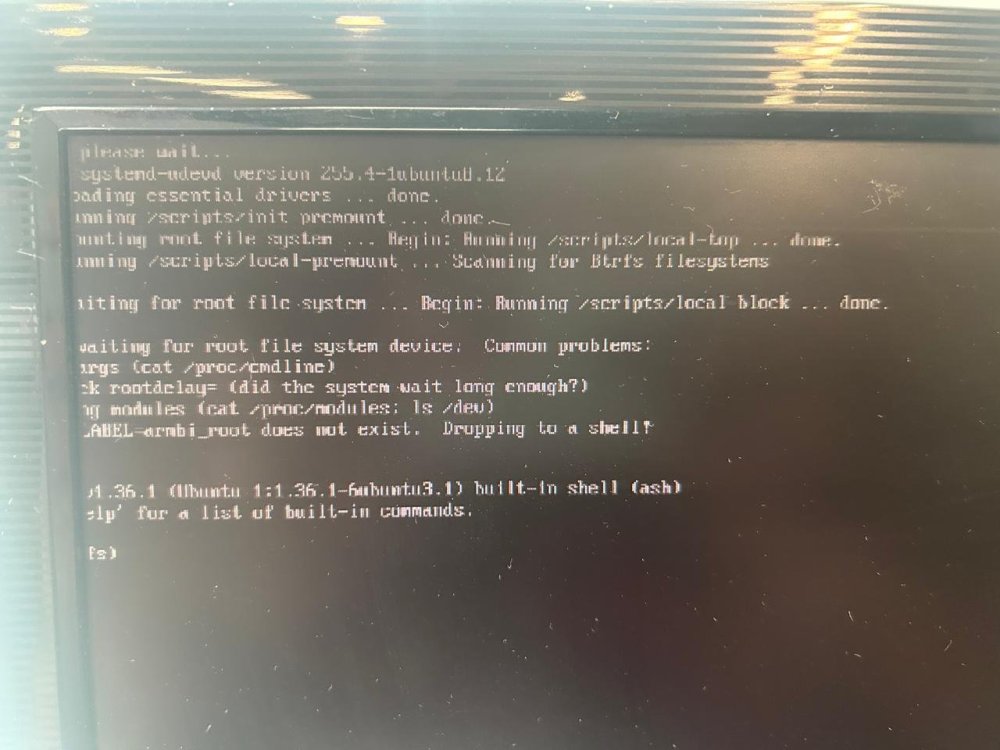
The image is generated, but when I put it in the Raspberry Pi, it displays the screen.
-
I need help. Every version I generate for Raspberry Pi 5 Armbian-unofficial_25.08.0-trunk_Rpi4b_noble_current_6.12.32_minimal shows the error shown in the photo.
-
 Does anyone know if version 22.04 for the raspberry pi4 was disabled by mistake or will no longer have the option to be generated? I'm using git clone --depth=1 --branch=main https://github.com/armbian/build.
-
When you have a solution you can post it here or even if you have a script to fix it I would be grateful.
-
I constantly get this error message when I try to generate the version for rpi4. : Unable to correct problems, you have held broken packages. [💥] Error 1 occurred in main shell [ at /home/raspberry/build/lib/functions/logging/runners.sh:15 chroot_sdcard_apt_get_install() --> lib/functions/logging/runners.sh:15 pre_install_distribution_specific__add_rpi_packages() --> config/sources/families/bcm2711.conf:227 pre_install_distribution_specific() --> <extension_magic>:184 call_extension_method() --> lib/functions/general/extensions.sh:57 build_rootfs_and_image() --> lib/functions/main/rootfs-image.sh:19 full_build_packages_rootfs_and_image() --> lib/functions/main/default-build.sh:36 do_with_default_build() --> lib/functions/main/default-build.sh:42 cli_standard_build_run() --> lib/functions/cli/cli-build.sh:25 armbian_cli_run_command() --> lib/functions/cli/utils-cli.sh:136 cli_entrypoint() --> lib/functions/cli/entrypoint.sh:176 main() --> compile.sh:50 ] [💥] Cleaning up [ please wait for cleanups to finish ] When this happens I have to delete the build folder and redo everything. git clone --depth=1 --branch=main https://github.com/armbian/build cd build ./compile.sh Can someone help me solve this without having to start from scratch?
-
I've tried this one and it didn't work because it returns saying that it's legacy and it didn't work see /home/custela/uv4l2# insmod uv4l2.ko insmod: ERROR: could not insert module uv4l2.ko: Invalid module format /home/custela/uv4l2# dmesg [ 782.935603] uv4l2: disagrees about version of symbol module_layout /home/custela/uv4l2# modinfo uv4l2.ko filename: /home/custela/uv4l2/uv4l2.ko author: Thadeu Lima de Souza Cascardo <cascardo@holoscopio.com> license: GPL srcversion: 8A60DC9287145B2DA7A51CE depends: videobuf2-v4l2,videodev,videobuf2-common,videobuf2-vmalloc name: uv4l2 vermagic: 6.6.78-legacy-bcm2711 SMP preempt mod_unload modversions aarch64 /home/custela/uv4l2# uname -r 6.6.78-current-bcm2711 /home/custela/uv4l2#
-
I need to compile a driver on the raspberry my kernel is 6.6.78-current-bcm2711 I need to download linux-headers-6.6.78 can someone help
-
I managed to solve it by installing the package sudo apt install armbian-firmware. Strange that version prior to Armbian-unofficial_24.11.0-trunk_Rpi4b_jammy_current_6.6.58_minimal did not need to do this installation.
-
igor, is it possible to set the kernel version to 6.6.58 in the image generation line below? I know it's in KERNELBRANCH but I don't know how to set it to 6.6.58. Can you help? ./compile.sh build BOARD="rpi4b" BRANCH="current" KERNELBRANCH="current" BUILD_DESKTOP="no" BUILD_MINIMAL="yes" CLEAN_LEVEL="make-kernel,alldebs,images,cache" EXPERT="yes" KERNEL_CONFIGURE="no" NEWPKG="true" OFFLINE_WORK="no" RELEASE="jammy"
-
I'm running the script like this ./compile.sh build BOARD="rpi4b" BRANCH="current" BUILD_DESKTOP="no" BUILD_MINIMAL="yes" CLEAN_LEVEL="make-kernel,alldebs,images,cache EXPERT="yes" KERNEL_CONFIGURE="no" NEWPKG="yes" OFFLINE_WORK="no" RELEASE="jammy"
-
But in my case, it's the WIFI that stopped in the kernel Armbian-unofficial_24.11.0-trunk_Rpi4b_jammy_current_6.6.58_minimal. I didn't do any of that and it works because I now have to change /boot/firmware/config.txt. Note that the wifi also presents this error [7.388838] brcmfmac: brcmf_sdio_htclk: HT Avail timeout (1000000): clkctl 0x50
-
https://paste.armbian.com/raquhusuma
-
I'm generating an image version and I noticed that WIFI is not being activated. Until the Armbian-unofficial_24.11.0-trunk_Rpi4b_jammy_current_6.6.58_minimal version it worked and after that it stopped. Can someone help?