Search the Community
Showing results for tags 'bananapi'.
-
Machine model: Banana Pi M2 Berry Linux bpi08 6.2.7-sunxi #3 SMP Fri Mar 17 07:58:04 UTC 2023 armv7l GNU/Linux (armbian@next) Mir ist es nicht möglich eine interne Temperatur auszulesen. Brauche dringend Hilfe! Der Link“/etc/armbianmonitor/datasources/soctemp “ exitiert zwar, nur die Datei / das Verzeichnis existiert nicht: nicht vorhanden → /sys/devices/virtual/thermal/thermal_zone0/temp nicht vorhanden → /sys/class/thermal/thermal_zone1/temp Wo soll diese Dateien überhaupt erstellt werden? Anmerkung Es wäre schön, wenn es für den Banana Pi M2 Berry eigene Tags geben würde. Er unterscheidet sich von dem Banana Pi M2+.
-
Hi, I am looking for an OS for the BPi M2 Berry. Has anyone good experiences to share? Thanks a lot in advance, Friedrich I tried several OS, flashed with rufus.io No satisfying attempt yet. Last try is this: https://forum.banana-pi.org/t/bananapi-bpi-m2-berry-new-image-release-armbian-bullseye/14451
-
On my Banana Pi M5 Armbian Jammy has a strange device name assignment. BPi-M5 has internal 16GB eMMC normally named mmcblk0 and microSD named mmcblk1. Normally it boots from SD and if you install an OS like Raspberry OS for BPi into eMMC, you're still able to boot from SD another OS because RaspiOS maps device correctly. But when Armbian (i.e. Jammy) is installed into eMMC it changes eMMC device to mmcblk1 and SD to mmcblk0, and It prevents SD to boot. And if the eMMC OS corrupts and doesn't boot the SBC bricks and TTL connection is needed to erase boot record. To change OS it's necessary a command to delete boot record and SD on mmblk1 will boot again: dd if=/dev/zero of=/dev/mmcblk1 bs=512 count=1 But the OS on eMMC has to boot and be in good working conditions. Also another guy with Orange Pi has noticd this behaviour: https://forum.armbian.com/topic/9987-sd-card-not-booting-but-works-on-another-emmc-boot-up/ It's important to change this behaviour and do it like RaspiOS.
-
I had successfully installed Armbian_2022.08.8_Bananapi_bullseye_CLI_5.15.74 on my M1 and copied the system to an SSD which I had attached to the SATA port. Then I had updated the UUID in armbianEnv.txt and running the system from SSD was working fine. The system was running headless in my closet for about 2 months, and I even had no problems to remotely restart the device until today, when it did not come back up after a reboot. I took it from the closed and hooked it to a monitor just to see the following error messages: ** Bad device specification mmc 0 ** Couldn't find partition mmc 0 I suspected a broken SD card but a check on my Ubuntu desktop showed no errors on the cards file system. Then I prepared 2 other SD cards, one with Armbian_2022.08.8 as above and the other with Armbian_2023.02.2_Bananapi_bullseye_5.15.93_minimal. Both did show the same problem, though. To me, it looks like a hardware problem with the SD card slot. Is there a way to get the M1 back to work again?
-
armbianmonitor output: http://ix.io/4qwA I assume it's crashing as I have no display connected to it. Every few days I just notice I can no longer reach the network folder, but it works after a power off/power on. Not much running on it, samba for file share and deluge for occasional downloads. I also recently run an update, upgrade and dist-upgrade, but it didn't help. I don't really know what should I look for in the log. OS: Armbian buster (21.02.1) armv7l Host: LeMaker Banana Pi Kernel: 5.15.93-sunxiC CPU: Allwinner sun7i (A20) Family (2) @ 960MHz
-
Hello, im trying to map the i2c-2 to some GPIO ports and have to rewrite the device-tree on armbian 22.04. I'm failing miserably and have no idea how-to do it. I managed to compile the i2c-gpio.ko kernel module as it is not part of the armbian 5.15.89-sunxi kernel. However, here i'm stuck and cant manage to make it happen. On RPi it was simple adding an overlay to config.txt: dtoverlay=i2c-gpio,bus=2,i2c_gpio_sda=27,i2c_gpio_scl=17 /boot/overlays/i2c-gpio.dtbo I'm trying to replicate that for Armbian, here is my dts file: // Overlay for i2c_gpio bitbanging host bus. /dts-v1/; /plugin/; / { compatible = "allwinner,sun8i-h3"; fragment@0 { target-path = "/"; __overlay__ { i2c_gpio: i2c@2 { reg = <0>; compatible = "i2c-gpio"; gpios = <&pio 17 0 /* sda */ &pio 27 0 /* scl */ >; i2c-gpio,delay-us = <2>; #address-cells = <1>; #size-cells = <0>; }; }; }; fragment@1 { target-path = "/aliases"; __overlay__ { i2c_gpio = "/i2c@2"; }; }; fragment@2 { target-path = "/__symbols__"; __overlay__ { i2c_gpio = "/i2c@2"; }; }; __overrides__ { i2c_gpio_sda = <&i2c_gpio>,"gpios:4"; i2c_gpio_scl = <&i2c_gpio>,"gpios:16"; i2c_gpio_delay_us = <&i2c_gpio>,"i2c-gpio,delay-us:0"; bus = <&i2c_gpio>, "reg:0"; }; }; What am I doing wrong?
-
I'm using Banana Pi M2 Zero with Armbian Debian GNU/Linux 10 (Buster). Compiled the image myself with the latest source code using the armbin/build repository. I want to be able to do serial communication on pins 8 and 10. I'm looking for something to appear at /dev/ttyAMA0, so I can communicate with it. I saw some other forum posts which mentioned it'll happen on /dev/ttyS0 , however even that is not happening. The serial communication is working via FTDI (using the USB side connected to the Banana Pi), which indicates there is no problem with the other device. This is what the configuration looks like using "sudo minicom -s". +-----------------------------------------------------------------------+ | A - Serial Device : /dev/ttyS0 | | B - Lockfile Location : /var/lock | | C - Callin Program : | | D - Callout Program : | | E - Bps/Par/Bits : 115200 8N1 | | F - Hardware Flow Control : No | | G - Software Flow Control : No | | | | Change which setting? | +-----------------------------------------------------------------------+ | Screen and keyboard | | Save setup as dfl | | Save setup as.. | | Exit | | Exit from Minicom | +--------------------------+ I have enabled "uart1" using "sudo armbian-config -u" -> System -> Hardware. Connecting Rx, Tx on the pins 8 and 10 also does not show up in "dmesg" How do I go about debugging the issue or finding the root cause of the problem? Many thanks!
-
 Thought this might help other people, so I wanted to share: https://github.com/robbieh/Inky7-BananaPi
 -
 Hello I am new to the Pi-computers and was searching in the forum and the internet if i can find a solution to my problem but can't find any. So maybe you can help me. I'm using a BananaPi m1 with a 7" HDMI touch screen running armbian with GUI. Its ruuning fine with one little issue: When the system is temporary unused the screen should turn off/go to standby after a few minutes to save enery. The screensaver setting is working but with my BananaPi the scree just goe black but does not tunr off. If I connect the same screen to a Windows Computer the screenturns of with te screen saver. Any ideas what I can do to get the monitor to turn off the backlight/ go to standby? Thanks C4ve
 -
 Bpi M2 Zero Armbian 23.02.0 sid can't change volume alsamixer said: This sound device does not have any controls. How can I fix this issue ?
 -
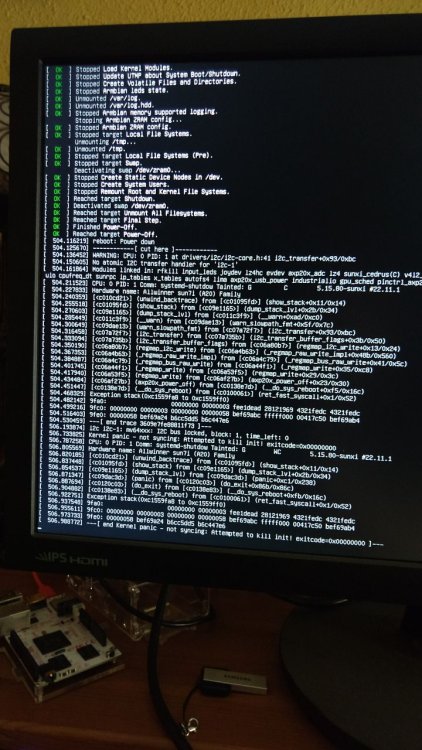
Hello armbianers ! Armbian 22.11.1 Bullseye with Linux 5.15.80-sunxi on a banana pi m1 I've connected a lipo battery to my bpi m1, and now when I try to shutdown -h 0, it ends up in a kernel panic and instead of shutting down it remains powered up. Is there anything I can do to fix that? I'd know how to shut it down talking to the axp209 via i2c, but I'm not sure how/where to put that, or if that would be or not the proper way to go. Thanks, George.
-
Hi Everyone, Is there anything additional required to enable better performance improvements (kernel patch for TXTS and RXTS are set to 3 each see below link) on a Banana PI running Armbian V21 / V22 ? I have updated the bootloader, and OS, and the performance is still abysmally poor. Mechanical or SSD drive connected to on board SATA yields a whopping 2.7-10 MB/sec write speed using dd with a large block size, or with the iozone tool ~5 upto ~45 for larger block sizes. Still a very far cry from the ~120 after the kernel patch applied in ~2019 => https://forum.armbian.com/topic/10352-a20-sata-write-speed-improvement/ I would be happy with a consistent 10-20 MB/sec honestly... From what I've read it was included in the kernel after v5.2 by default? Armbian R22 is presently kernel 5.15 ... So is the manual kernel patch still required, or no? armbianmonitor -u output: https://paste.armbian.com/isagiquleh iozone bkwd record stride kB reclen write rewrite read reread read write read rewrite read fwrite frewrite fread freread 102400 4 1063 1074 4689 4367 4667 10 102400 16 2495 2529 7923 7962 7579 41 102400 512 5257 5278 10506 10484 10587 1297 102400 1024 5695 5259 10992 10997 10928 2236 102400 16384 5826 5441 9706 11679 11671 5689 iozone test complete. root@bananapi:~# thanks, Jonathan
-
Someone has any experience changing the A20 to A20-H, our provider offers to us this new version, but I'm afraid to be software incompatible.
-
Anything involved with screen blanking /MUST/ be removed or disabled, on the bpim5, and it exists in so many places it took me 2 days of poking around to stop the no recovery except reboot if un-used for more than 15 minutes regardless of what it happens to be running at the time. When a blanker kicks in, the monitor powers down and the bpim5 goes inactive with only the red pwr led on steady, and nothing wakes it up except the reset button. These things use so little power that it doesn't bither me a bot to leave them running. I have an rpi4b running a big metal lathe that works as intended, with uptimes in years, this should be the same. It would be nice to have a blanker that actually blanked only the monitor instead of crashing the whole system. Can this be fixed?
-
New bananapi M5, no net. initial boot and config failed, font missing characters would not allow me to edit networking entries. rebooted it with the power cord, started x by hand, Menu's totally different from 2 previous installs on rock64's. Finally found a terminal, and switched fonts in geany so now the keyboard is generally working. in geany, but not in armbian-config. I have edited the /etc/hosts file to setup my static address network, fixed resolv.conf and chattr +i it so nm can't destroy it. I have edited /etc/hostname but can't get it to to "take". ip a returns that eth0 is up but no ipv4 or ipv6 address can be seen ip r return emptyhanded. I can't even ping machines in the next room by address, no route This is ipv4 country here in northern West Virginia, probably a hundred miles from the nearest net connection that groks ipv6. My router does NAT so everything here is in the 192.168.xx.yy block And it has no dhcp server running. I've 7 other machines here that thanks to the NAT in the router, can tour this ball of rock and water with no hicups. resolv.conf is identical to whats on 7 other machines here, and they all work just fine. So how do I go about setting up a hosts file base local network? Thanks much all. Cheers, Gene
-
HI I cannot find anywhere option to run compile.sh without GUI/NCurses. I'd like to just run basic command to build image (have configuration done) Can you point me to place where i can look ?
-
I have a Banana Pi mk1 that I'm trying to add a usb wifi adapter to so it can run klipper wirelessly. I'm still relatively new to linux and I'm having trouble getting it set up. "lsusb" shows that the wifi dongle is connected and is reading, and I copied the appropriate .bin file to /lib/firmware/mediatek. I can't get NetworkManger to show any wireless devices and I'm stuck. I've tried "nmcli device show" and it will only display my ethernet connection.
-
I have a working BPi M1 with [ 0.000000] Linux version 5.15.25-sunxi (root@d72d155687c7) (arm-linux-gnueabihf-gcc (GNU Toolchain for the A-profile Architecture 8.3-2019.03 (arm-rel-8.36)) 8.3.0, GNU ld (GNU Toolchain for the A-profile Architecture 8.3-2019.03 (arm-rel-8.36)) 2.32.0.20190321) #22.02.1 SMP Sun Feb 27 09:23:25 UTC 2022 Due to inconvenient USB placements, I thought using OTG micro USB (the one right next to the SD slot), but it doesn't seem to be operational. I bought a Micro USB Male To Female OTG Adapter Cable, but the attached devices are not detected neither connected to OTG port, nor to the normal power-in micro USB connector (located between SATA and SATA-pwr). I attached the same Micro USB Male To Female OTG Adapter Cable to my Android phone and devices are recognized and activated. For example an external keyboard worked with the phone. What is the current USB OTG support status and what is necessary to debug its functionality? I quick look at kernel configuration: root@bananapi:~# zcat /proc/config | grep OTG CONFIG_USB_OTG=y # CONFIG_USB_OTG_PRODUCTLIST is not set # CONFIG_USB_OTG_DISABLE_EXTERNAL_HUB is not set # CONFIG_USB_OTG_FSM is not set CONFIG_USB_FOTG210_HCD=m # CONFIG_USB_FOTG210_UDC is not set root@bananapi:~# zcat /proc/config | grep CONFIG_USB_DWC CONFIG_USB_DWC3=y # CONFIG_USB_DWC3_HOST is not set # CONFIG_USB_DWC3_GADGET is not set CONFIG_USB_DWC3_DUAL_ROLE=y CONFIG_USB_DWC3_OF_SIMPLE=m CONFIG_USB_DWC2=y # CONFIG_USB_DWC2_HOST is not set # CONFIG_USB_DWC2_PERIPHERAL is not set CONFIG_USB_DWC2_DUAL_ROLE=y # CONFIG_USB_DWC2_DEBUG is not set # CONFIG_USB_DWC2_TRACK_MISSED_SOFS is not set What is necessary to make OTG working?
-
Since 23 hours, 23 views, no reply's. So I have ordered a 4 pack of the latest 4gig bananna pi's, and would like to know: 1. if Armbian will work on them, and 2. If octoprint-1.8.6 can be installed in a python venv so I can get back to work on a room full of 3d FDM printers. off topic, I have been running an apt update at about 8 hour intervals on the rock64's but while error msgs are, or were displayed on the hdmi output, no xserver appears to be start-able, the hdmi display has now gone dark without its declaring a loss of signal so I have to assume it is generating a synch signal of some sort. I can ssh -Y into both from this machine 3 rooms away, but the local displays are blanked. Thank you all, take care & stay well.
-
using latest armbian server Linux bananapim2zero 5.19.15-sunxi #trunk.0071 SMP Sun Oct 16 03:56:45 UTC 2022 armv7l armv7l armv7l GNU/Linux docs from waveshare said to add "dtoverlay=sc16is752-spi1,int_pin=24" to /boot/config.txt for raspbian so i tried adding it to armbianEnv.txt and reboot but on device files or anyrthing, nothing in dmesg and /sys/bus/spi/devices/ is empty what am i doing wrong?
-
 trying to monitor a button press on GPIO19 which has an offset 40, but getting the error in the title. Switched between kernels but made no difference. http://ix.io/4cFr After switching the kernel http://ix.io/4cGd Not sure if this is related, but might help with the troubleshooting https://archlinuxarm.org/forum/viewtopic.php?f=65&t=14423