All Activity
- Today
-
 moved to tvboxes
 -
BalenaEtcher has known issues and therefore not recommended. Use Armbian Imager or USBimager. Also verify that the downloaded image is good by utilizing the checksum. https://docs.armbian.com/User-Guide_Getting-Started/#download-and-verification https://github.com/armbian/imager https://bztsrc.gitlab.io/usbimager/
-
 Hello everyone, I’m trying to flash the following Armbian image, but Balena Etcher throws an error as soon as I load the image: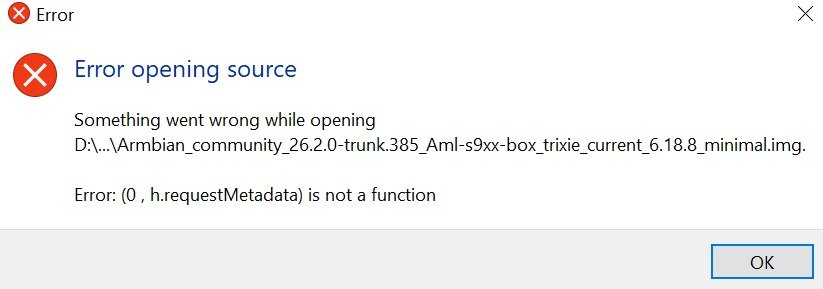
-
Hello everyone, I successfully installed Armbian to eMMC on an Amlogic S805X (gxl_p241 / p241 board). The system boots correctly when I manually start it from U-Boot, but autoboot fails every time. I believe my bootloader / U-Boot environment is not properly configured. During flashing, I only selected the DTB, and I am not sure how the bootloader variables should be set for eMMC boot. if it didnt work ,how to manually install u-boot U-Boot log ----------------------------------------------------------------------------------- USB XHCI 1.00 scanning bus 0 for devices... 2 USB Device(s) found scanning usb for storage devices... init_part() 282: PART_TYPE_DOS 1 Storage Device(s) found fail in cmd [fatsize usb 0 factory_update_param.aml], rcode 1 File factory_update_param.aml not exist in Upan?? get upgrade version failed Hit Enter or space or Ctrl+C key to stop autoboot -- : 0 gxl_p241_v1#
-
Which device? which armbian version? nobody here has a second sight. from the screenshot you aren't even using armbian or at least nothing official.
-
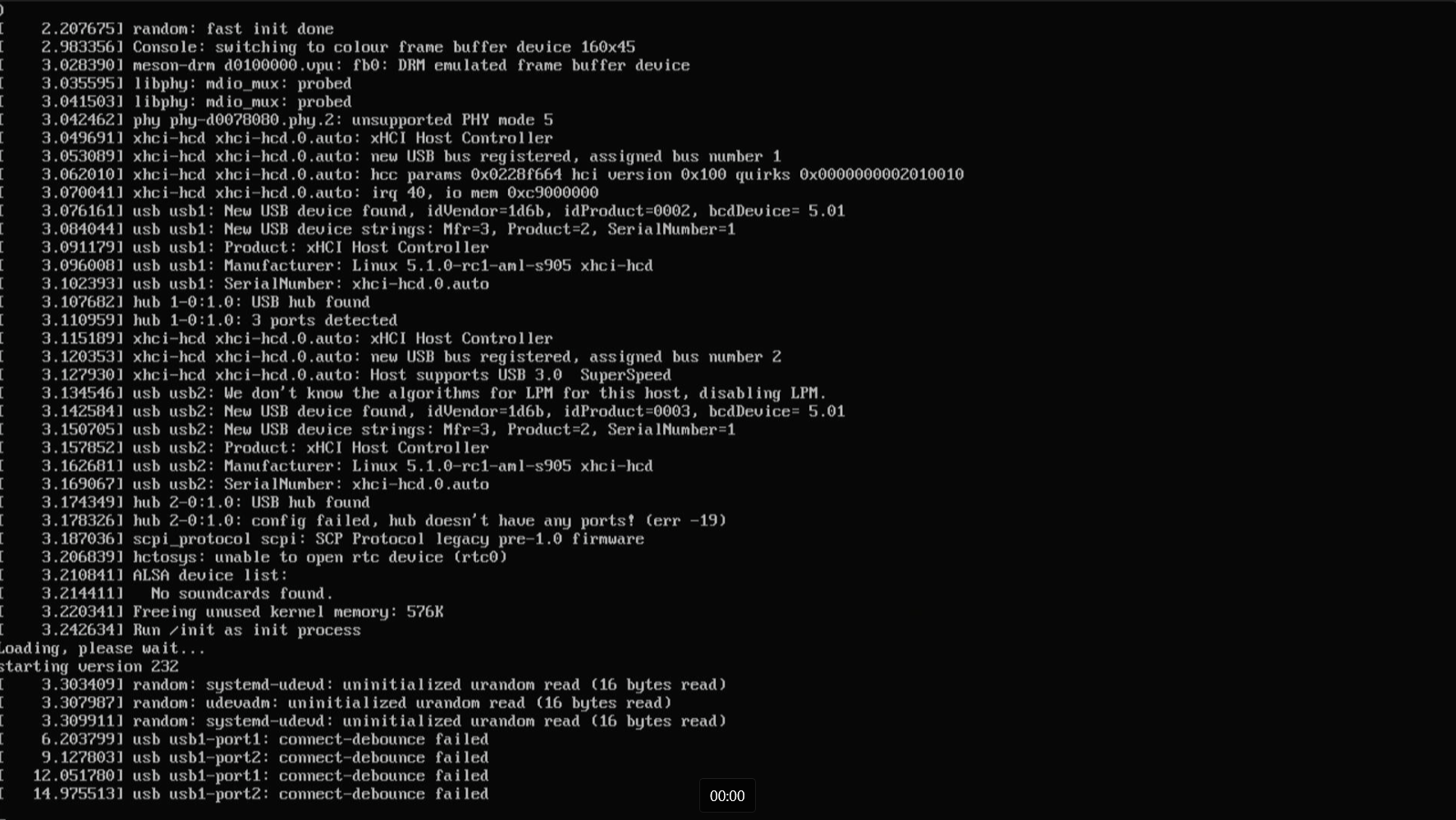
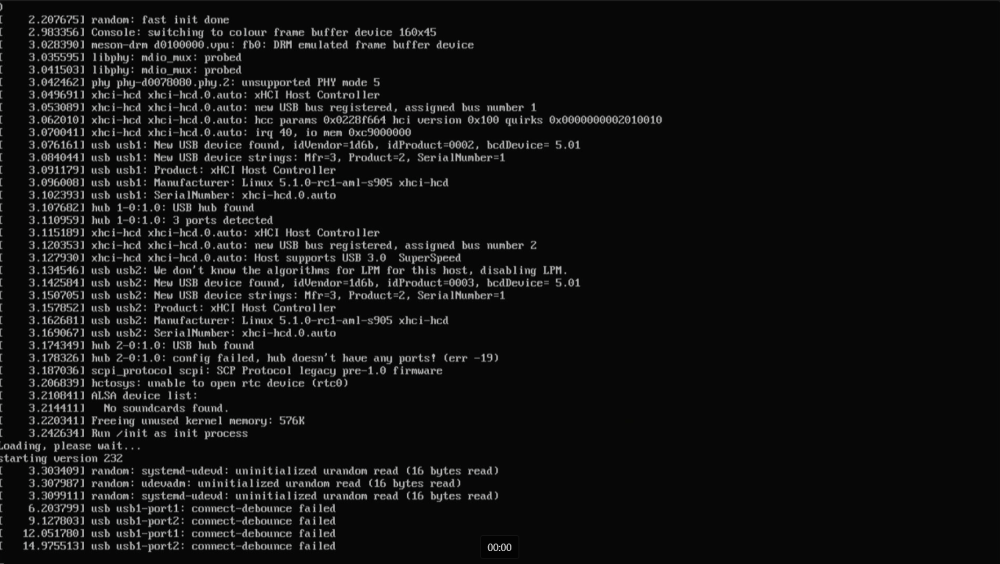
Please help, I can't figure out this error for a month now. I've tried all the .dtb files, but nothing works.
-
Did you try loading the "pinctrl-rk805" module? This was once directly compiled into the kernel and later externalized into a module. And IIRC that happened when switching to 6.12. If loading that module helps, then adding it to the MODULES line of the board's config like this should fix it.
-
moved
-
 I'm experiencing something unusual. A device of mine, running Armbian, cannot communicate with an Android device in my LAN. Otherwise everything else works. My Orange Pi Zero 2w running Armbian can ping all of my LAN IPs (and access theyre net services also) , but fails at pinging an Android device (which is connected through WiFi): "Destination Host Unreachable". Same goes the other way around where Termux runs on the above mentioned Android 15 device but cannot ping ("Destination Host Unreachable") the host running Armbian or access it via ssh (it simply stalls). Everything else works just fine, all of my devices connect with each other without a glitch; they can all access every other running ssh instance inside the lan (which is a mix of Windows, Linux and Android devices). The very same Orange Pi Zero 2w running Armbian is perfectly accessible via ssh from all other hosts and vice versa. The Android device running Termux is capable of pinging and accessing all other ssh hosts. And there's more; I'm running Wireguard on the Orange Pi and it works fine. it works so good that once I access the lan with the Android Device through Wireguard, I can suddenly ping the Armbian host and ssh login into it. Always using the very same IP address (no dns involved). I wonder where I should look. I cannot imagine what's causing it. Any suggestions? Is this a known scenario? ArmBian Community running on Orange Pi Zero 2w v26.2 rolling for Orange Pi Zero2W running Armbian Linux 6.12.71-current-sunxi64 Packages: Debian stable (trixie) Android 15 running Termux Android REL 15 aarch64 Linux 5.10.236-android12-9-00020 Termux googleplay.2026.02.11 There's no WiFi separation on the router side.
 -
Yes, shorting the pins I was switch the device into MaskRom mode and install Android. Now I trying to identify and use the debug console, not much success so far
-
Will check it when i back to PC, will be away from pc for around a week
-
I do get multiple warnings while compiling the DTS file, about 50-100 warnings similar to this: ttt.dts:1752.3-32: Warning (gpios_property): /usb0-vbus:gpio: cell 0 is not a phandle reference ttt.dts:1764.3-32: Warning (gpios_property): /usb1-vbus:gpio: cell 0 is not a phandle reference ttt.dts:1776.3-32: Warning (gpios_property): /usb2-vbus:gpio: cell 0 is not a phandle reference ttt.dts:1823.4-34: Warning (gpios_property): /leds/led-3:gpios: cell 0 is not a phandle reference ttt.dts:1828.4-34: Warning (gpios_property): /leds/led-4:gpios: cell 0 is not a phandle reference The phandles are in this kind of format on the dts file: phandle = <0x20>; phandle = <0xc2>; phandle = <0x1c>; phandle = <0xc3>; phandle = <0xc4>; phandle = <0x16>; phandle = <0xc5>; example: Note: the usb0 vbus was originally disabled but I enabled it as the pcduino3 nano has a single regulator for all ports and it is attached to usb0 apparently. In the closing section of __symbols__, I have redirected all 3 regulators to usb0. I believe that the fact it is disabled is because they don't recommend powering the board through the OTG port as it can cause voltage drops when connecting devices as host. My setup will be a gadget with a wifi dongle in a USB A port, so voltage drops should not be a concern, this is just my assumption... usb0-vbus { compatible = "regulator-fixed"; regulator-name = "usb0-vbus"; regulator-min-microvolt = <0x4c4b40>; regulator-max-microvolt = <0x4c4b40>; enable-active-high; gpio = <0x17 0x01 0x09 0x00>; status = "okay"; phandle = <0xc2>;
-
I'd start by comparing the device tree on a working and non-working image.
-
-
 Ok, in case anyone's got any ideas about how to fix this, I'm happy to help if I can, but kernel repairs are a bit out of my league... It seems to reboot for different reasons - when it doesn't like something connected to the USB port, when doing a lot of disk I/O, etc. Here's a couple of the error logs from the terminal: INFO: task sgdisk:1567 blocked for more than 120 seconds. Tainted: G O 6.18.10-edge-sunxi64 #1 "echo 0 > /proc/sys/kernel/hung_task_timeout_secs" disables this message. task:sgdisk state:D stack:0 pid:1567 tgid:1567 ppid:1566 task_flags:0x400000 flags:0x00000018 Call trace: __switch_to+0xcc/0x180 (T) __schedule+0x348/0xaf8 schedule+0x38/0x110 io_schedule+0x40/0x60 folio_wait_bit_common+0x15c/0x390 folio_wait_bit+0x1c/0x30 folio_wait_writeback+0x4c/0xb8 __filemap_fdatawait_range+0x70/0xb0 filemap_fdatawait_keep_errors+0x24/0x58 sync_bdevs+0xb4/0x1a8 ksys_sync+0x64/0x98 __arm64_sys_sync+0x14/0x28 invoke_syscall.constprop.0+0x54/0xe8 do_el0_svc+0x44/0xc8 el0_svc+0x38/0x140 el0t_64_sync_handler+0x98/0xe0 el0t_64_sync+0x170/0x178 Kernel panic - not syncing: hung_task: blocked tasks CPU: 6 UID: 0 PID: 61 Comm: khungtaskd Tainted: G O 6.18.10-edge-sunxi64 #1 PREEMPT Tainted: [O]=OOT_MODULE Hardware name: Radxa Cubie A5E (DT) Call trace: show_stack+0x1c/0x30 (C) dump_stack_lvl+0x30/0x80 dump_stack+0x14/0x20 vpanic+0x2d4/0x308 panic+0x50/0x58 watchdog+0x278/0x718 kthread+0x134/0x1f8 ret_from_fork+0x10/0x20 SMP: stopping secondary CPUs Kernel Offset: disabled CPU features: 0x080000,00008000,48006281,0400701b Memory Limit: none ---[ end Kernel panic - not syncing: hung_task: blocked tasks ]--- INFO: task systemd-udevd:285 blocked for more than 120 seconds. Tainted: G O 6.18.10-edge-sunxi64 #1 "echo 0 > /proc/sys/kernel/hung_task_timeout_secs" disables this message. task:systemd-udevd state:D stack:0 pid:285 tgid:285 ppid:1 task_flags:0x400100 flags:0x00000809 Call trace: __switch_to+0xcc/0x180 (T) __schedule+0x348/0xaf8 schedule+0x38/0x110 io_schedule+0x40/0x60 folio_wait_bit_common+0x15c/0x390 folio_wait_bit+0x1c/0x30 folio_wait_writeback+0x4c/0xb8 __filemap_fdatawait_range+0x70/0xb0 filemap_write_and_wait_range+0x90/0xc0 sync_blockdev+0x24/0x40 bdev_disk_changed+0x64/0x5c8 blkdev_get_whole+0xa4/0xf8 bdev_open+0x278/0x3b0 bdev_file_open_by_dev+0xdc/0x148 disk_scan_partitions+0x6c/0x150 blkdev_ioctl+0x664/0xfc0 __arm64_sys_ioctl+0x470/0xaa0 invoke_syscall.constprop.0+0x54/0xe8 do_el0_svc+0xa4/0xc8 el0_svc+0x38/0x140 el0t_64_sync_handler+0x98/0xe0 el0t_64_sync+0x170/0x178 INFO: task sgdisk:1465 blocked for more than 120 seconds. Tainted: G O 6.18.10-edge-sunxi64 #1 "echo 0 > /proc/sys/kernel/hung_task_timeout_secs" disables this message. task:sgdisk state:D stack:0 pid:1465 tgid:1465 ppid:1464 task_flags:0x400000 flags:0x00000008 Call trace: __switch_to+0xcc/0x180 (T) __schedule+0x348/0xaf8 schedule+0x38/0x110 io_schedule+0x40/0x60 folio_wait_bit_common+0x15c/0x390 folio_wait_bit+0x1c/0x30 folio_wait_writeback+0x4c/0xb8 __filemap_fdatawait_range+0x70/0xb0 filemap_write_and_wait_range+0x90/0xc0 bdev_release+0x19c/0x1b0 blkdev_release+0x18/0x30 __fput+0xd0/0x2e8 fput_close_sync+0x44/0x108 __arm64_sys_close+0x3c/0x88 invoke_syscall.constprop.0+0x54/0xe8 do_el0_svc+0x44/0xc8 el0_svc+0x38/0x140 el0t_64_sync_handler+0x98/0xe0 el0t_64_sync+0x170/0x178 Kernel panic - not syncing: hung_task: blocked tasks CPU: 1 UID: 0 PID: 61 Comm: khungtaskd Tainted: G O 6.18.10-edge-sunxi64 #1 PREEMPT Tainted: [O]=OOT_MODULE Hardware name: Radxa Cubie A5E (DT) Call trace: show_stack+0x1c/0x30 (C) dump_stack_lvl+0x30/0x80 dump_stack+0x14/0x20 vpanic+0x2d4/0x308 panic+0x50/0x58 watchdog+0x278/0x718 kthread+0x134/0x1f8 ret_from_fork+0x10/0x20 SMP: stopping secondary CPUs Kernel Offset: disabled CPU features: 0x080000,00008000,48006281,0400701b Memory Limit: none ---[ end Kernel panic - not syncing: hung_task: blocked tasks ]---
 -
Dear Ryzer, Alas, the device tree updsate didn't change anything. Here is the process that uses a lot of CPU: 13.0 0.0 0:05.51 kworker/0:14+events_freezable_power_ Google says it is related to power state changes, and from kernel 6, power saving settings have been more aggressive in Linux, so that's why I am trying to set up a Buster-based system.
-
Ryzer, Thank you for your suggestions. I will try the update for the device tree, but with otg as value, the board will be a storage device for my dashcam. I am trying to get a Buster release with kernel 6.6.75 to compile under armbian build, but so far, the compilation fails because there is no availale package for base-files. I did put the file in the cache/sources folder (which worked for a bullseye version), but nothing works for the buster version. So far, the biggest progress was achieved by commenting out or adding the following in armbianEnv.txt (no updates in modules.conf, config.txt or cdmline.txt). With those updates, the drive and folders show up instantly upon activating hte gadget, I can navigate the folders, but writing is a hit and miss (using libcomposite, not g_mass_storage) #overlay_prefix=sun7i-a20 param_usb_device_mode=otg overlays=dwc2 (instead of the usual dtoverlays) With those parameters, Windows file explorer and Windows Explorer no longer crash. The top command shows 13% CPU usage for a kworker process related to power. A google search found that this may be due to a device/driver continuously requesting a power state change (conflict between drivers?). No errors in dmesg regarding dwc2. Here are the final line: [ 75.627225] loop0: detected capacity change from 0 to 83886080 [ 75.628674] loop0: p1 [ 76.067022] loop0: detected capacity change from 0 to 83884032 [ 76.519886] FS-Cache: Loaded [ 76.784125] Key type cifs.spnego registered [ 76.784185] Key type cifs.idmap registered [ 76.787080] CIFS: Attempting to mount //192.168.0.1/Tesladrive [ 76.893017] CIFS: decode_ntlmssp_challenge: authentication has been weakened as server does not support key exchange [ 78.023297] loop0: detected capacity change from 0 to 83886080 [ 78.023757] loop0: p1 [ 78.568262] loop0: detected capacity change from 0 to 83884032 [ 79.642716] Mass Storage Function, version: 2009/09/11 [ 79.642755] LUN: removable file: (no medium) and usb related lines: [ 4.097675] musb-hdrc musb-hdrc.1.auto: MUSB HDRC host driver [ 4.097739] musb-hdrc musb-hdrc.1.auto: new USB bus registered, assigned bus number 5 [ 4.115390] usb usb5: Manufacturer: Linux 6.6.75-legacy-sunxi musb-hcd [ 4.115403] usb usb5: SerialNumber: musb-hdrc.1.auto [ 20.084995] systemd[1]: Reached target usb-gadget.target - Hardware activated USB gadget.
-

Have Armbian for Tanix TX1 QHZIW_H313_TX1_EMCP_V2.0?
Nick A replied to Lesano's topic in Allwinner CPU Boxes
@billymore The "Kernel panic - not syncing: VFS: Unable to mount root fs on unknown-block(0,0)" error indicates that the Linux kernel could not locate or mount the root file system during startup. . This is commonly caused by a missing or corrupted initial RAM filesystem (initramfs), an incorrect root= boot parameter write 0x4ff00000 rootfs.cpio.lzma.uboot -
@Jain Ziad I'm currently working on hardware acceleration, though I can't say yet if it will outperform the official Radxa builds since it uses the same drivers. I'll keep the community updated on the results.
- Yesterday
-
Hello, I'm new to this forum and I hope I'm not mistaken in making this request. I wanted to ask if it would be possible to add support for installing Armbian on the UniFi CloudKey Gen1. It uses an MT7623, very similar to the BPI R2, which appears to already be supported. Below is information about the UC-CK hardware: FCC ID, Datasheet MT7623AI 2GB DDR 16GB internal storage Micro SD slot (1) 10/100/1000 Ethernet Port
-
Hello Armbian-Community! TL;DR I've successfully enabled the Rockchip RK3568 NPU (0.8 TOPS INT8) on the ODROID-M1 with 8GB RAM running Armbian 6.18.9-current-rockchip64. The only thing needed to make this work for everyone is a 1-line kernel patch in Armbian build that I've already submitted: https://github.com/armbian/build/pull/9403 Once this patch is merged into Armbian, the DKMS modules will work out-of-the-box on all RK3568 boards. The Problem 1. Hardkernel and Rockchip provide NPU patches for quite old kernel versions: rockchip <= 6.6 hardkernel <= 5.10 2. IOMMU page table allocation bug — On systems with >4GB RAM, the kernel's IOMMU allocates page tables above 4GB, but the NPU can only access the first 4GB of physical memory, causing DMA mapping failures and inference timeouts The Solution 1. Kernel Patch (1 line!) - .gfp_flags = 0, + .gfp_flags = GFP_DMA32, This forces IOMMU page tables to be allocated below 4GB, fixing NPU operation on 8GB boards. 2. DKMS Driver Package I've created a complete DKMS package that: - Includes DT overlays for NPU, IOMMU, power-domain, and clock configuration - Supports dynamic frequency scaling (100 MHz - 1000 MHz) - Provides `/dev/dri/renderD129` (DRM/GEM interface) for RKNN Runtime - Would compile against Armbian's stock kernel headers with the above patch merged The Questions 1. What would be the best way to provide those modules for installation in the armbian system? 2. Has someone a 4 GB version of the M1 and could test the modules?
-
Hello, 4GB version. - Detecting meteors in GMN network (https://globalmeteornetwork.org/) - monitor other x64 machine and reset by power cycle (via gpio). rock64 is rock stable
-
Hello since kernel 6.12 led (heartbeat and mmc activity) on board rock64 don't work. I've created issue in dietPI github: https://github.com/MichaIng/DietPi/issues/7618 but DietPI is using armbian kernel. Now I'm using recent armbian with kernel 6.11.0-edge-rockchip64. Any idea how to restore led activity on recent kernels?
-

to get 32768 clk from GPIO1 D4 on RK3328
tparys replied to emresensoy's topic in Advanced users - Development
The sysfs GPIO interface does not allow you to create clock outputs as-is. You'd do better seeing if that pin can be exposed through the sysfs PWM interface. I know the NanoPi M4V2's fan controller works this way (RK3399), and you can set the duty cycle. But you'd have to check if PWM is supported on that pin, and can be used in the way you're hoping. Failing that, it is possible to bit-bang the GPIO lines yourself if you're willing to write some C code. You can use Kernel Timers for fairly accurate timing, as long as you set High Scheduler Priority and Real Time Scheduler Class. Note that kernel timers only have a user specified resolution of 1ns, so you might not hit that frequency exactly. -
Is the NanoPC-T6 Plus compatible with the NanoPC T6 LTS image ?
Werner replied to magic_sam's topic in NanoPC T6 LTS
Probably a new product. Images are not compatible unless specifically marked as such.