All Activity
- Today
-
 I tried to build an bridged AP so that I can reach the Internet from a WiFi net spawned from the BananaPiPro. By this I followed the procedure from armbian-config (config.network.sh). After install the AP is shown in the login screen: WiFi AP: SSID: (BPi), channel 7 (2442 MHz), width: 20 MHz, center1: 2442 MHz When I try to connect from my mobile phone it either says "connecting without Internet". The output in syslog is then: 026-07-06T12:35:02.645970+02:00 bananapipro hostapd: wlan0: STA 22:50:7b:ac:e3:2e IEEE 802.11: associated 2026-07-06T12:35:02.690671+02:00 bananapipro hostapd: wlan0: STA 22:50:7b:ac:e3:2e RADIUS: starting accounting session 500A81EDD1715454 2026-07-06T12:35:02.691497+02:00 bananapipro hostapd: wlan0: STA 22:50:7b:ac:e3:2e WPA: pairwise key handshake completed (RSN) Ort otherwise the phone just says "cannot connect". My netplan file is as follows: network: version: 2 renderer: networkd ethernets: end0: dhcp4: false dhcp6: false macaddress: "02:cd:08:83:3c:f3" wlan0: dhcp4: false dhcp6: false bridges: br0: addresses: - "192.168.178.29/24" nameservers: addresses: - 9.9.9.9 - 1.1.1.1 interfaces: - wlan0 - end0 routes: - metric: 200 to: default via: "192.168.178.1" The hostapd.conf is: interface=wlan0 driver=nl80211 ssid=BPi hw_mode=g channel=7 wmm_enabled=0 macaddr_acl=0 auth_algs=1 ignore_broadcast_ssid=0 wpa=2 wpa_passphrase=secret wpa_key_mgmt=WPA-PSK wpa_pairwise=TKIP rsn_pairwise=CCMP ctrl_interface=/var/run/hostapd ctrl_interface_group=0 ieee80211n=1 ht_capab=[DSSS_CK-40][HT20+] preamble=1 bridge=br0 The output of network list is: root@bananapipro:/etc/hostapd# networkctl list IDX LINK TYPE OPERATIONAL SETUP 1 lo loopback carrier unmanaged 2 end0 ether enslaved configured 3 br0 bridge routable configured 4 wlan0 wlan enslaved failed Does anybody have an idea where to look further for a solution? As I have an AP running on my other BananaPiPro (Bookworm CLI / Networkmanager, manual config, not bridged) it cannot be a complete HW limitation, I think.
 -
Hi, I just switched from an ancient ubuntu-rockchip install to armbian ubuntu 26.04 with the mainline kernel. I did a bit of an unorthodox installation, I wanted to install on an nvme drive, and instead of using a microSD and then copying the system with armbian-install, since I didn't have a working microsd available I did a "manual" installation, I flashed rkspi_loader.img into the SPI taken from the armbian image and then flashed the armbian img directly to the nvme drive with an usb adapter from my PC. All is good and working fine, but I'm wondering if I'm missing any settings that gets applied during the armbian-install process (are there any?) that are specific for nvme. And regarding Zram, ram2log and other optimizations that armbian uses for SDs, how should I configure them? My setup is a Radxa Rock 5B with 8GB of RAM with a Samsung 970 evo plus, should I disable zram and create a swapfile? Any other setting to look out for? I think my hdparm -t speed is a bit low, around 1300 MB/s. Thanks in advance
-
I was wrong, the dafault baudrate is 100 kHz - the sensor is not responding at first try, when it is in sleep mode.
-

Teclast T60 AI rooting + armbian possibility Allwinner A733
Taz replied to Taz's topic in Allwinner CPU Boxes
Hi Dodeval, so I am having trouble accessing Gemini 3.1 pro chat about this but this sounds vaguely familiar. Things that could be the cause are the "mkfs.ext4 -b 4096" option and "debootstrap --arch=arm64". Try some of these top tier models https://artificialanalysis.ai/leaderboards/models they should be able to crack the code even though you might have to wrestle a bit to get them to produce the right solution. Most things seem to work like magic I guess it is about the device tree, battery management seems fine etc.. touch needs drivers, no audio from internal speakers which is no big deal anyway as bluetooth audio works everything there works as expected. I did get this aliexpress.com/item/1005009649297050.html at a discount but I not completely get the touchpad to work comfortably with a patched input driver, a lot of miss-clicks goosh nice keyboard but still need bluetooth mouse in reality. Rii i4 Mini Bluetooth would be fine but then again it is not quite the desktop experience I was looking for. - Yesterday
-
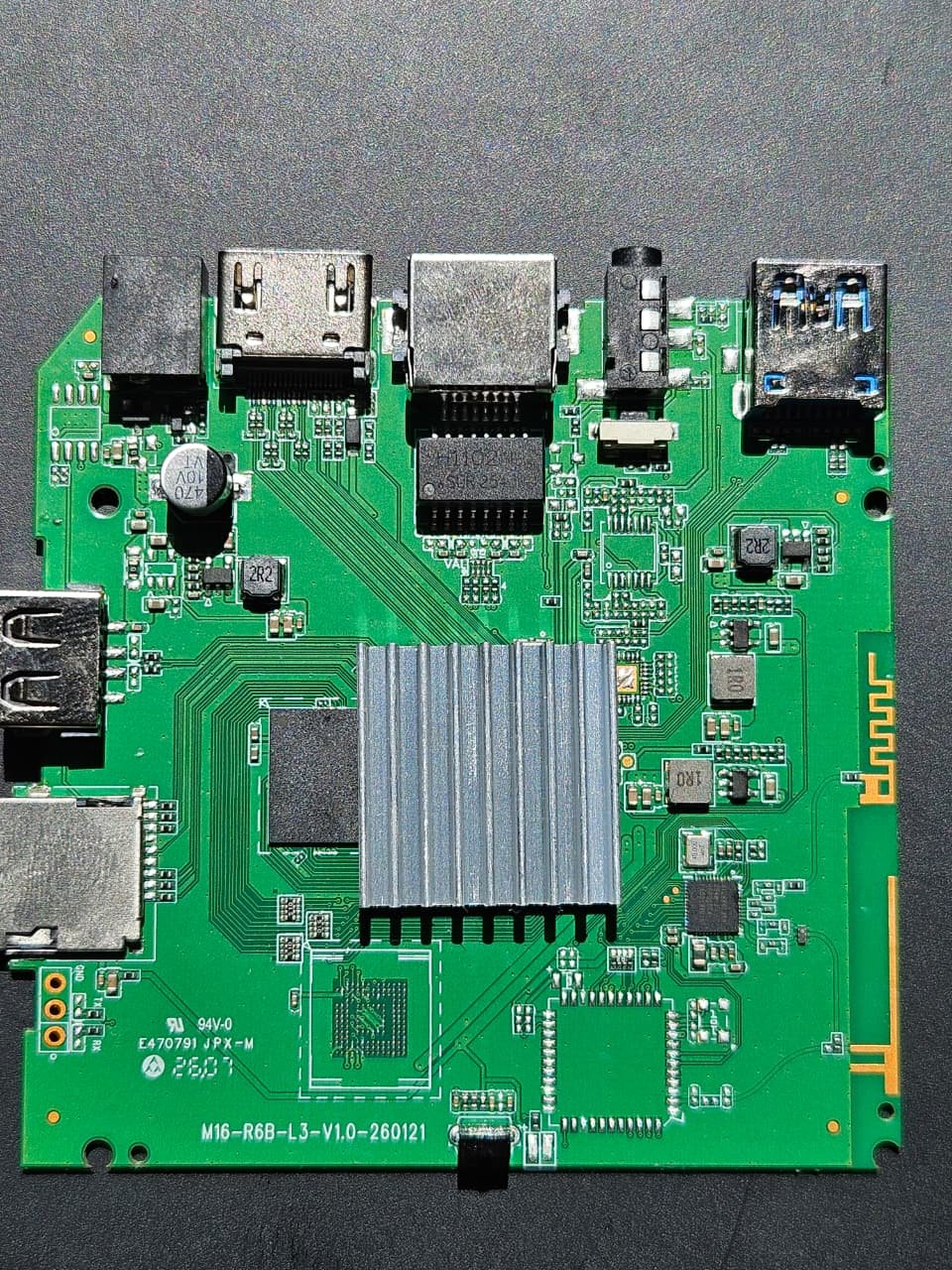
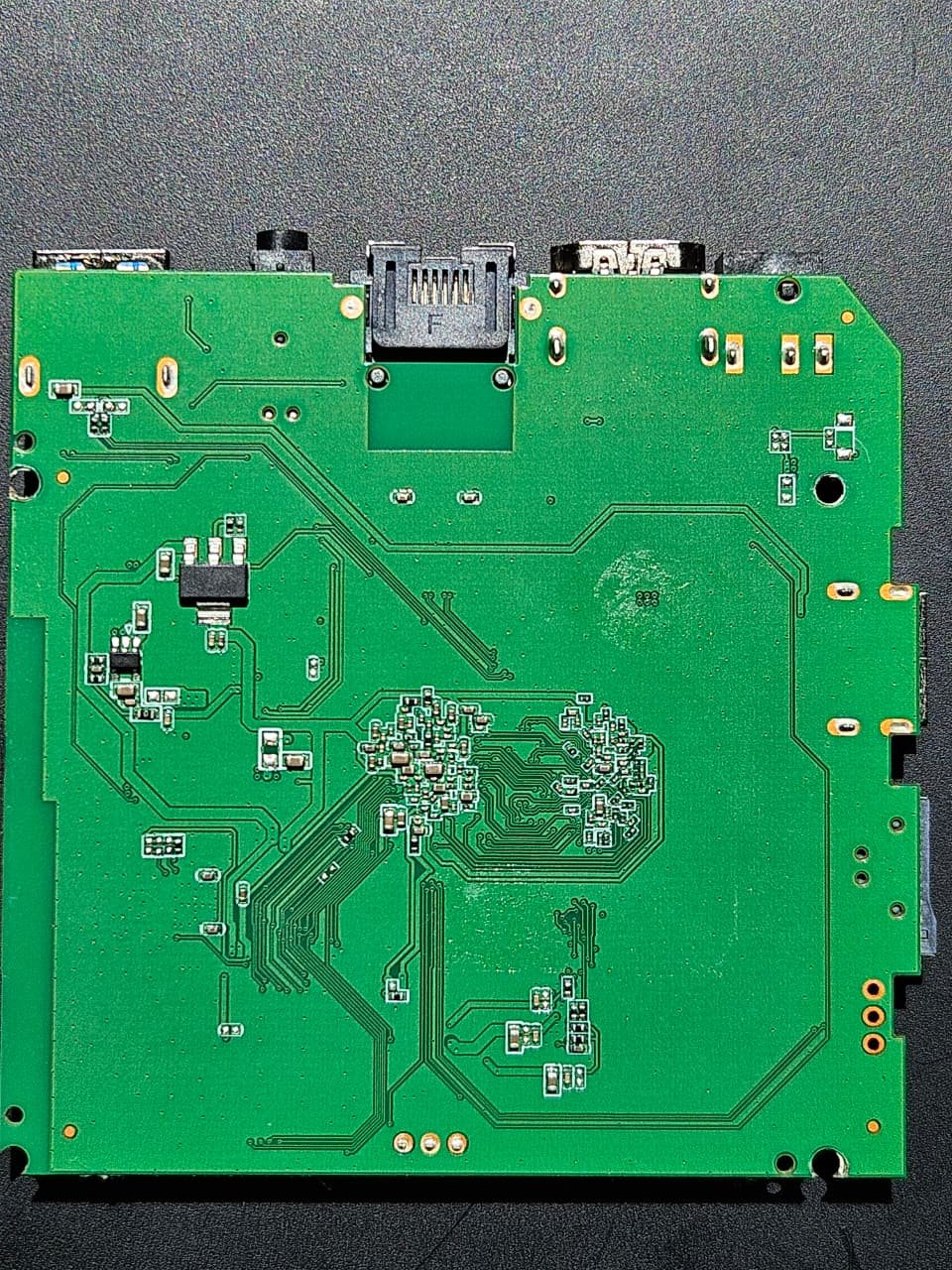
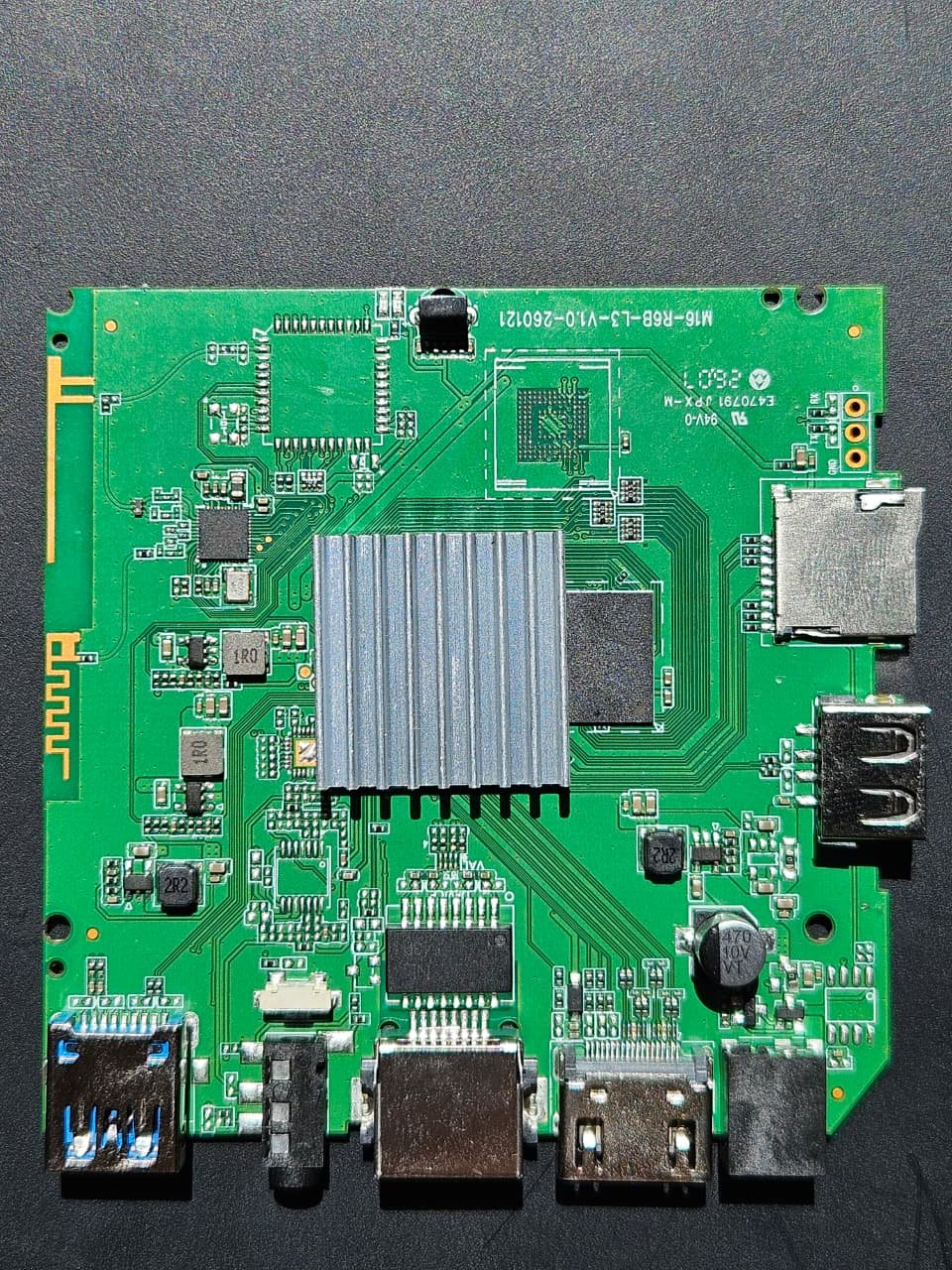
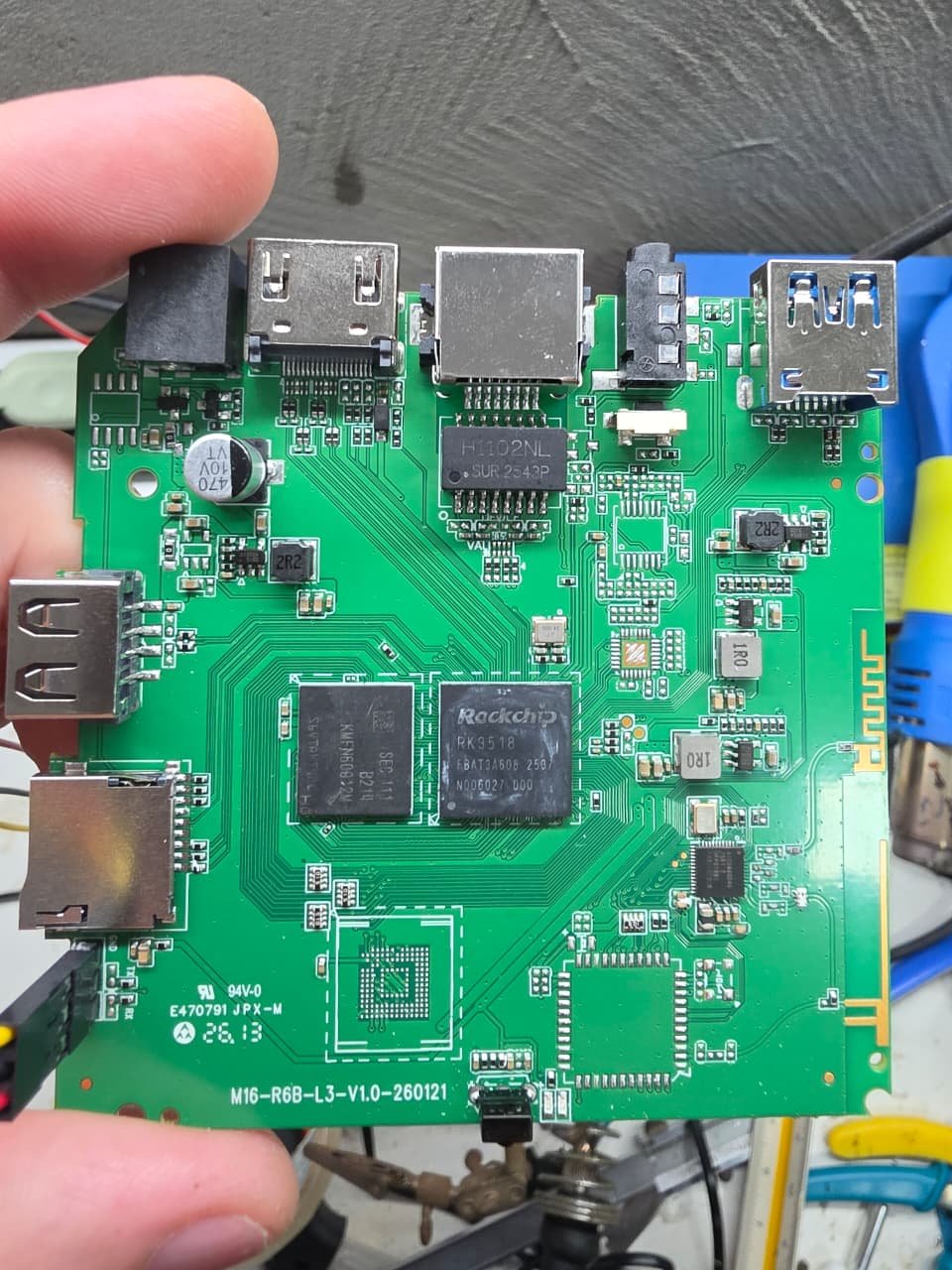
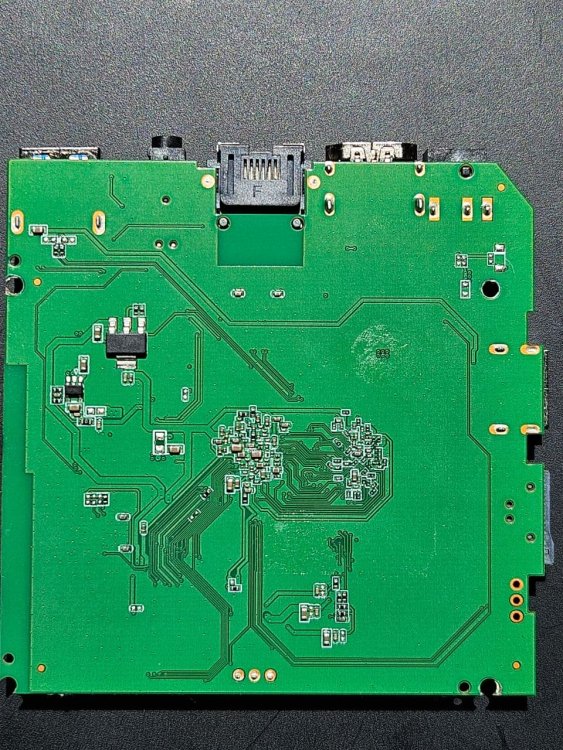
 Hi, I need help identifying the Maskrom/eMMC short points for an RK3528 TV box. Device: - TV box sold as H20 Pro - SoC confirmed as Rockchip RK3528 - Board marking: M16-R6B-L3-V1.0-260121 - RAM detected in Linux: 963 MiB - eMMC detected in Linux: 7.83 GB / 7.30 GiB - eMMC name from Linux: P1J95K - eMMC CID: fe014e50314a39354b12739109744200 What happened: - The box originally booted Android from eMMC. - Armbian booted successfully from SD using a customized joilg/x88pro-based image. - Later I wrote U-Boot/idbloader to eMMC: - idbloader.img at sector 64 - u-boot.itb at sector 16384 - After reboot, the board no longer boots from SD or eMMC. - LED stays red. - No HDMI output. - No Ethernet link/activity. - RKDevTool on Windows shows "No Devices Found". Recovery attempts: - Tried the reset/recovery button behind the AV/P2 jack while connecting power and USB. - Tried both USB ports. - Tried RKDevTool v2.86 with Rockchip drivers installed. - No Loader or Maskrom device appears. - Tried UART pads marked GND/TX/RX using ESP32-C3 as bridge, but output is not readable. Question: Can anyone identify the eMMC Maskrom short point for this board? I need to force RK3528 into Maskrom mode so I can restore the first bootloader area of the eMMC. Attached photos: - Front of board - Back of board - Macro photo of the eMMC/storage chip area - Macro photo of test pads near the storage chip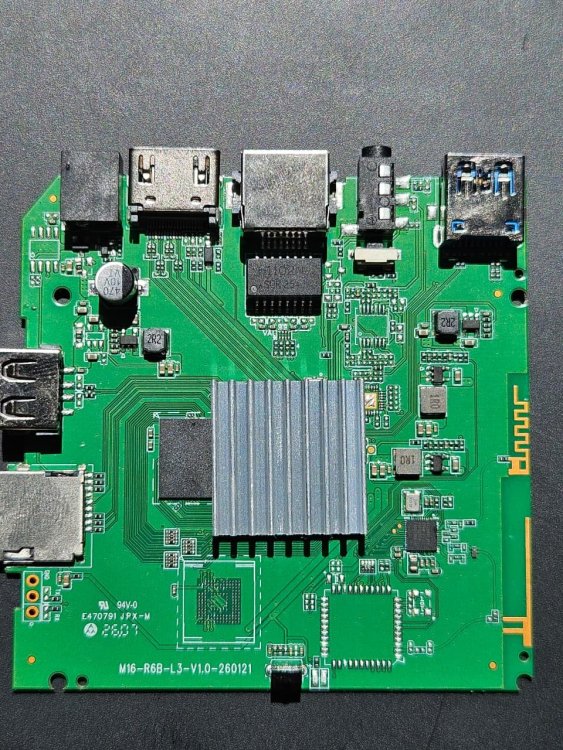
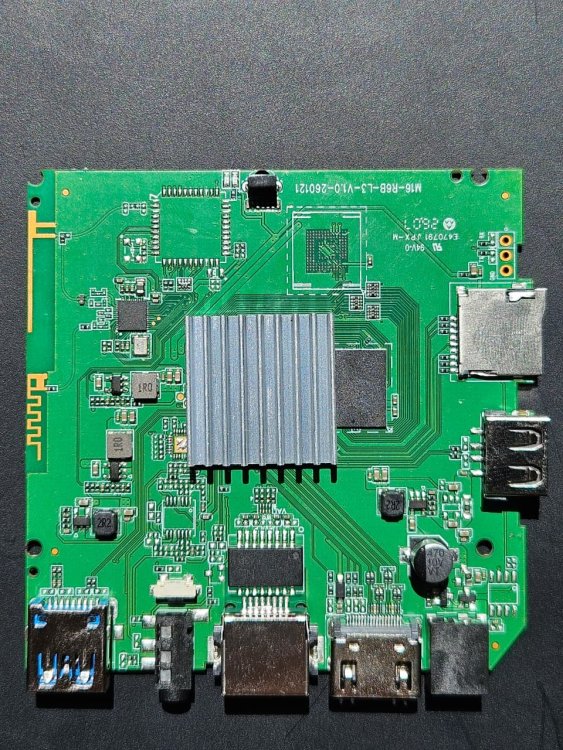
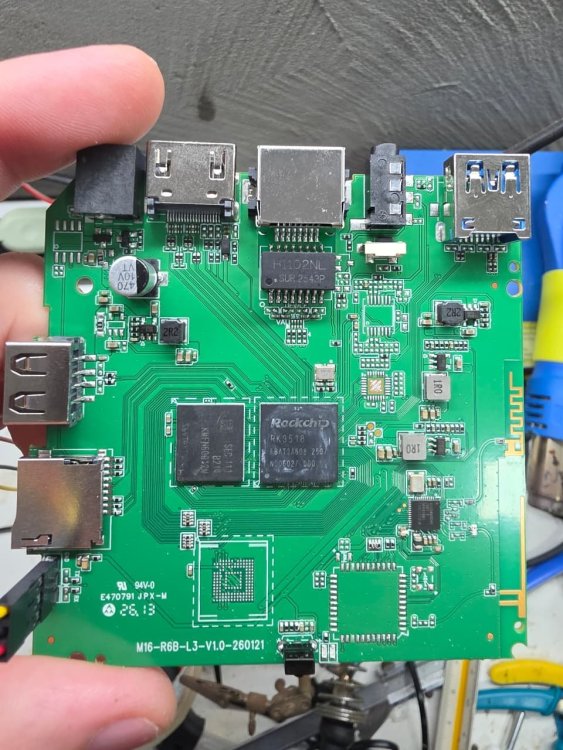
-

Freeze / kernel panic after upgrading to kernel 7.0.12
Johannes replied to Johannes's topic in Allwinner sunxi
I tried to downgrade to 6.18, unfortunately it froze during the process, which left the kernel and boot loader in an incomplete state. I have decided to re-image the whole thing with 6.18.x and for now it appears to be stable again. -
Your previous post reminded me that the board supplier changed the BOM of the ODROID-N2+ by using a different SPI flash vendor. He hacked the support for it into his legacy firmware build without making any further note about it. It took some effort of reverse engineering to figure that out. Mainline hasn't picked up this additional driver activation to this day, but I still keep it in my builds anyway. In my latest build for the ODROID-HC4, I also included this driver to see if they might have gone about it in the same way. But your confirmation shows that this is probably not the case. Since I don't have an ODROId-HC4 with the behavior you described on hand, I can't analyze any further what the cause of it is. These days, I also mostly avoid devices with Amlogic SoCs because of their strict closed-source policy and lack of mainline support. And the board manufacturer isn't much more helpful on this point either. Devices powered by Rockchip are much more appealing objects. So you have to help yourself if you want to find a solution.
-
These most recent edge updates for K1 based boards are really great! With all this mainline additions of kernel 7.2 it's finally becoming a trustworthy clean alternative to outdated vendor images. At least for headless micro server usage everything is now already provided by mainline code (e.g. temperature and CPU frequency control are indispensable for serious work on this board!) Only WiFi and BT still don't work out of the box. I personally would prefer utilizing mainline brcmfmac drivers instead of fighting with all those unmaintainable bmcdhd patches. That's working for other boards with AP6256 modules as well.
-

Freeze / kernel panic after upgrading to kernel 7.0.12
eselarm replied to Johannes's topic in Allwinner sunxi
OK I see: # dmesg | grep watchdog [ 0.462093] sunxi-wdt 1c20c90.watchdog: Watchdog enabled (timeout=16 sec, nowayout=0) That would mean study 'bark' or so, forgot most of it. I guess the board should restart if IPv6 LL connection is not there for more than 1 minute or so, but in relation to NAS makes then only sense if I move from NBD to iSCSI or so. -
Freeze / kernel panic after upgrading to kernel 7.0.12
eselarm replied to Johannes's topic in Allwinner sunxi
The forum returned 'nginx bad gateway' but I see draft of may message is still there. In the meantime, I did a simple 'apt update && apt full-upgrade && reboot' and now I have: U-Boot SPL 2024.01-armbian-2024.01-S866c-P7738-Hb9d3-Vf23c-Bb703-R448a (Jun 21 2025 - 02:53:13 +0000) Kernel: Linux 6.18.35-current-sunxi I might look into HW watchdog things, no clue if it is there and able to work, but used it successfully for Raspberrypi4 to workaround USB3 lockups/crashes. -
Freeze / kernel panic after upgrading to kernel 7.0.12
eselarm replied to Johannes's topic in Allwinner sunxi
Yes, I have similar issues with 7.0.12-edge-sunxi kernel, see serial dump/log below: [ 133.382506] Internal error: Oops - undefined instruction: 0 [#1] SMP THUMB2 [ 133.389572] Modules linked in: rpcsec_gss_krb5 auth_rpcgss nfsv4 nfs lockd grace netfs sunrpc cp210x binfmt_misc usbserial lima gpu_sched nls_iso8859_1 drm_shmem_help er sun4i_gpadc_iio sunxi_cir axp20x_adc sun4i_ts sunxi_cedrus(C) v4l2_mem2mem videobuf2_dma_contig videobuf2_memops videobuf2_v4l2 videobuf2_common videodev mc display_c onnector cpufreq_dt evdev cfg80211 rfkill nfnetlink ip_tables x_tables autofs4 btrfs xor xor_neon libblake2b raid6_pq pinctrl_axp209 axp20x_usb_power industrialio sun4i_ gpadc sunxi phy_generic realtek [ 133.437258] CPU: 1 UID: 0 PID: 184 Comm: kworker/u8:5 Tainted: G C 7.0.12-edge-sunxi #2 VOLUNTARY [ 133.447746] Tainted: [C]=CRAP [ 133.450738] Hardware name: Allwinner sun7i (A20) Family [ 133.455991] Workqueue: pm pm_runtime_work [ 133.460075] PC is at __rpm_callback+0x64/0x10c [ 133.464565] LR is at rpm_callback+0x51/0x58 [ 133.468789] pc : [<c06d2e40>] lr : [<c06d2f39>] psr: 400f00b3 [ 133.475083] sp : f0a5de90 ip : 00000018 fp : c2ef5200 [ 133.480337] r10: c01761ed r9 : 000f4240 r8 : 00000008 [ 133.485590] r7 : 00000000 r6 : 00000000 r5 : c06d0aad r4 : c1e25410 [ 133.492146] r3 : 60000000 r2 : c1e25410 r1 : c1e25410 r0 : c06d0aad [ 133.498704] Flags: nZcv IRQs off FIQs on Mode SVC_32 ISA Thumb Segment none [ 133.506135] Control: 50c5387d Table: 43eb406a DAC: 00000051 [ 133.511902] Register r0 information: non-slab/vmalloc memory [ 133.517616] Register r1 information: slab kmalloc-1k start c1e25400 pointer offset 16 size 1024 [ 133.526415] Register r2 information: slab kmalloc-1k start c1e25400 pointer offset 16 size 1024 [ 133.535209] Register r3 information: non-paged memory [ 133.540302] Register r4 information: slab kmalloc-1k start c1e25400 pointer offset 16 size 1024 [ 133.549095] Register r5 information: non-slab/vmalloc memory [ 133.554795] Register r6 information: NULL pointer [ 133.559537] Register r7 information: NULL pointer [ 133.564279] Register r8 information: non-paged memory [ 133.569367] Register r9 information: non-paged memory [ 133.574455] Register r10 information: non-slab/vmalloc memory [ 133.580241] Register r11 information: slab task_struct start c2ef5200 pointer offset 0 size 2624 [ 133.589123] Register r12 information: non-paged memory [ 133.594301] Process kworker/u8:5 (pid: 184, stack limit = 0xe8b1571c) [ 133.600779] Stack: (0xf0a5de90 to 0xf0a5e000) [ 133.605178] de80: 60000000 c1e25410 c06d0aad 0000000a [ 133.613397] dea0: 00000000 00000008 000f4240 c06d2f39 c1e25410 c06d0aad 0000000a c06d3f23 [ 133.621617] dec0: c0ab03bf 00000402 c15b5180 c9306c24 c3790705 c34c3c70 c1813000 bf8e21ad [ 133.629836] dee0: c2ef5200 c1813000 01000000 569e35c7 c34f0c70 c1e254f8 c1e254f8 c1b9de00 [ 133.638054] df00: c1813000 01000000 c1b9de05 c1b72670 c1813000 c06d45a7 c2fb5900 c0141a87 [ 133.646273] df20: c3790000 569e35c7 00000000 c2ef5200 c1813000 c2fb5930 f0a5df50 c2fb5900 [ 133.654492] df40: c1813000 c2fb5930 c1603d80 c1813020 c2ef5200 c181305c c1813000 c0142345 [ 133.662711] df60: f0a5df78 c1603d80 f0a9deb8 c36b8fc0 c2ef5200 c0142245 c2fb5900 c2d35c80 [ 133.670929] df80: f0a9deb8 00000000 00000000 c0149e29 00000001 c36b8fc0 c0149d59 00000000 [ 133.679145] dfa0: 00000000 00000000 00000000 c0100155 00000000 00000000 00000000 00000000 [ 133.687359] dfc0: 00000000 00000000 00000000 00000000 00000000 00000000 00000000 00000000 [ 133.695575] dfe0: 00000000 00000000 00000000 00000000 00000013 00000000 00000000 00000000 [ 133.703775] Call trace: [ 133.703812] __rpm_callback from rpm_callback+0x51/0x58 [ 133.711641] rpm_callback from rpm_suspend+0xab/0x514 [ 133.716756] rpm_suspend from pm_runtime_work+0x3f/0x70 [ 133.722045] pm_runtime_work from process_one_work+0x12f/0x390 [ 133.727947] process_one_work from worker_thread+0x101/0x254 [ 133.733667] worker_thread from kthread+0xd1/0xec [ 133.738431] kthread from ret_from_fork+0x11/0x1c [ 133.743189] Exception stack(0xf0a5dfb0 to 0xf0a5dff8) [ 133.748280] dfa0: 00000000 00000000 00000000 00000000 [ 133.756494] dfc0: 00000000 00000000 00000000 00000000 00000000 00000000 00000000 00000000 [ 133.764705] dfe0: 00000000 00000000 00000000 00000000 00000013 00000000 [ 133.771365] Code: f7ff ff7c 4640 f7ef (fd27) f104 [ 133.776186] ---[ end trace 0000000000000000 ]--- [ 133.780834] note: kworker/u8:5[184] exited with irqs disabled [ 154.802648] rcu: INFO: rcu_sched detected stalls on CPUs/tasks: [ 154.808663] rcu: 0-...0: (10 ticks this GP) idle=4c4c/1/0x40000000 softirq=7570/7571 fqs=2625 [ 154.817336] rcu: (detected by 1, t=5252 jiffies, g=14613, q=22 ncpus=2) [ 154.824076] Sending NMI from CPU 1 to CPUs 0: It was 3 weeks ago I did see this while doing some maintenance,upgrades,tests,experiments. Mine is a Bananapi M1, I use sun7i-a20-bananapi.dtb as DTB, and should be same for U-Boot, although I would need to check again what version/build I use. A difference is WiFi and some others, but my guess is there is something wrong/ongoing that is getting worse over time, as also with less newer kernels, it locks up after a few days quite often. This has been the case since december 2024 kernel 6.6.x as far as I see that written in my notes. I noticed that because I have used my Bananapi as NAS (blocklevel NBD). But it were paging issues and never really could find a pattern, always random. This error message is different, but might have same root-cause. Kernel 6.16.x I have run, but it lacked AXP PMU driver for the LiPo battery powering/charging which I use every now and then (is a great UPS like that). 6.18.x had it back again, but also lockups (same paging issue, I have already a kernel log dumping 24/7 to try to figure out what is wrong, but actually have no clue). I also used 6.12.90+deb13.1-armmp, so vanilla Debian kernel, but it has no overlays available and also no AXP PMU module, so that make it less useful. I set it back to 6.12.58-current-sunxi so that at least it runs reliably for a few days and I can use it ad-hoc as a serial console terminal for a Raspberrypi4 that also used to crash randomly due to USB3 stack issues and also for debugging and testing rather complex networking issues. I am using custom partition layout, the whole thing also runs as 32-bit UEFI KVM as well as systemd-nspawn container (same cloned MAC address so I un-power the real Bananapi then). The setup uses custom extlinux and standard grub-efi. I could easily test 7.0.x or later in a KVM, but assume it will run fine. It is really something about a combination of A20, platform HW, U-Boot, DeviceTree I think. It is a pity as this SBC is about the most useful I have due to its onboard SATA and LiPo battery management, although not 64-bit. -

How to receive MIDI messages to a cli app
Vivichrist replied to Vivichrist's topic in Software, Applications, Userspace
I don't have a Desktop installed on this device (OrangePi 4LTS). I resorted to using the rtmidi C interface instead, I made a wrapper. The Pipewire documentation is hard to figure out. I guess there should be some sort of session management for Non-Desktop sessions to load stuff? - Last week
-
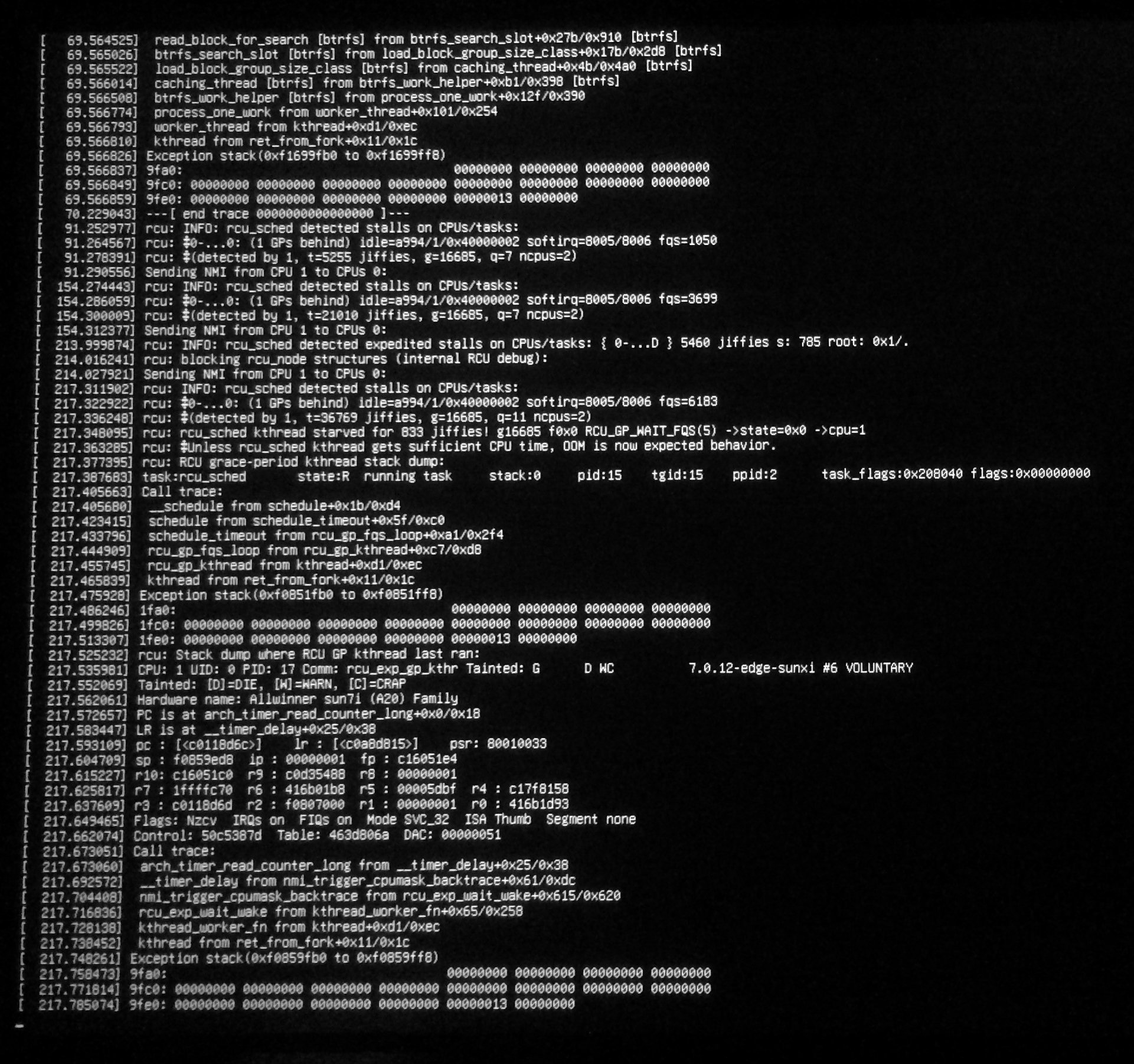
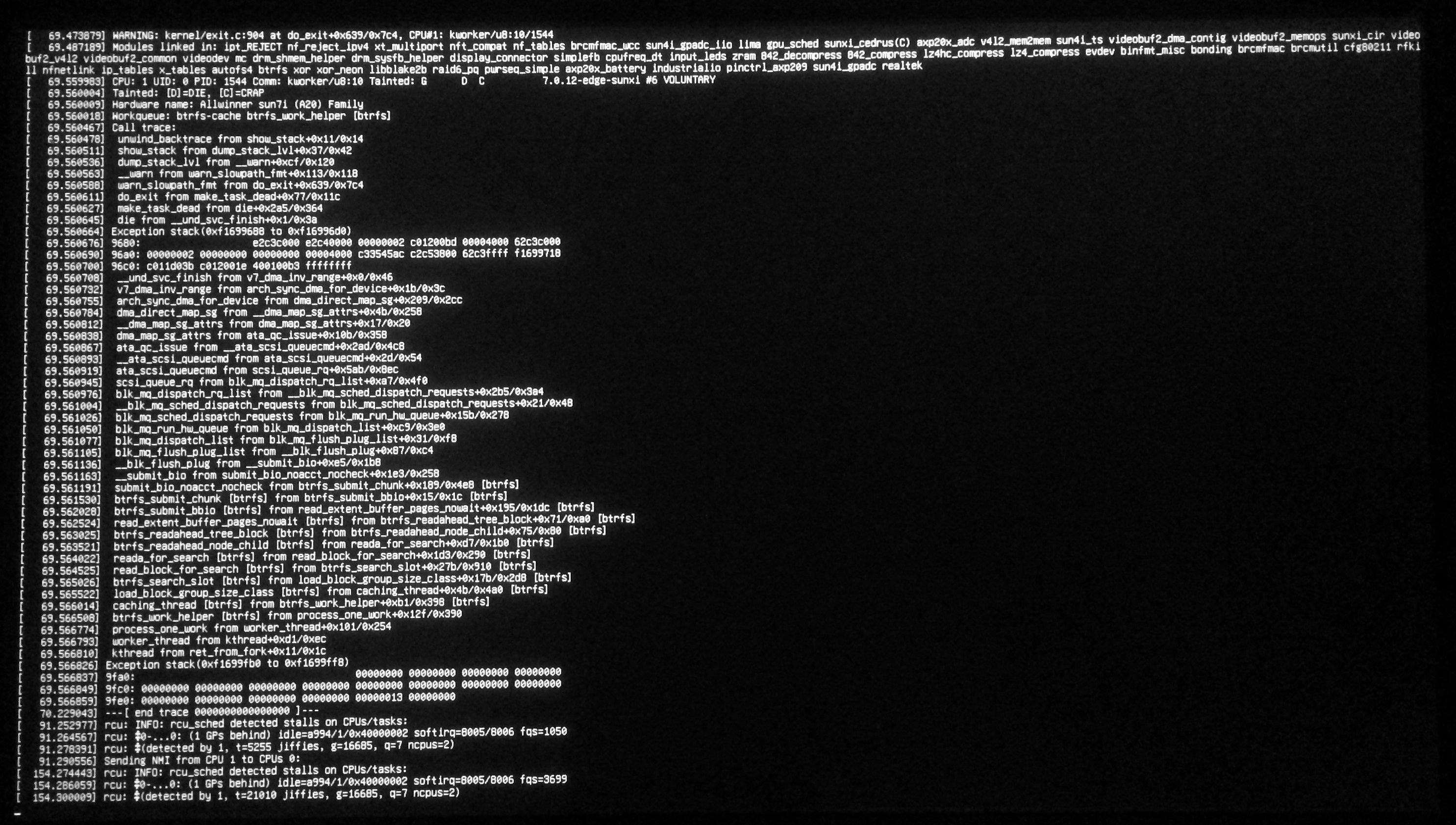
Hi all, recently my Banana Pi Pro running Armbian 26.5.1 with Debian Trixie received a kernel update from 6.16.8 (which it has been running on for quite a while without issues) to 7.0.12. Since then, it randomly freezes shortly after booting, sometimes I also can see a kernel panic (see attached pictures). Has anyone else run into this issue? What can I do to fix this? The old kernel no longer appears to be present in /boot, which makes it difficult to return to another kernel (trying to run something like apt-get typically quickly results in the aforementioned freeze).
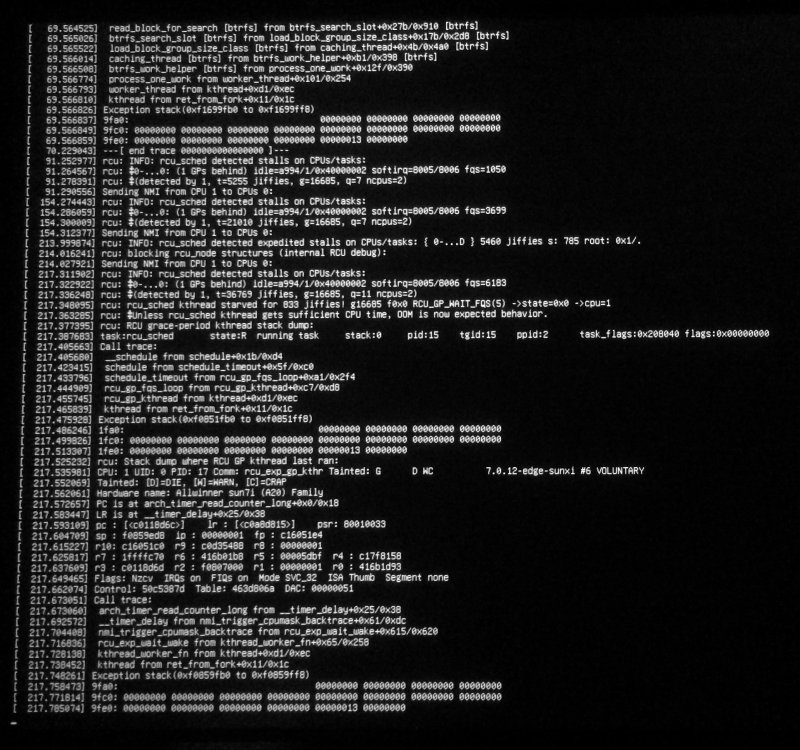
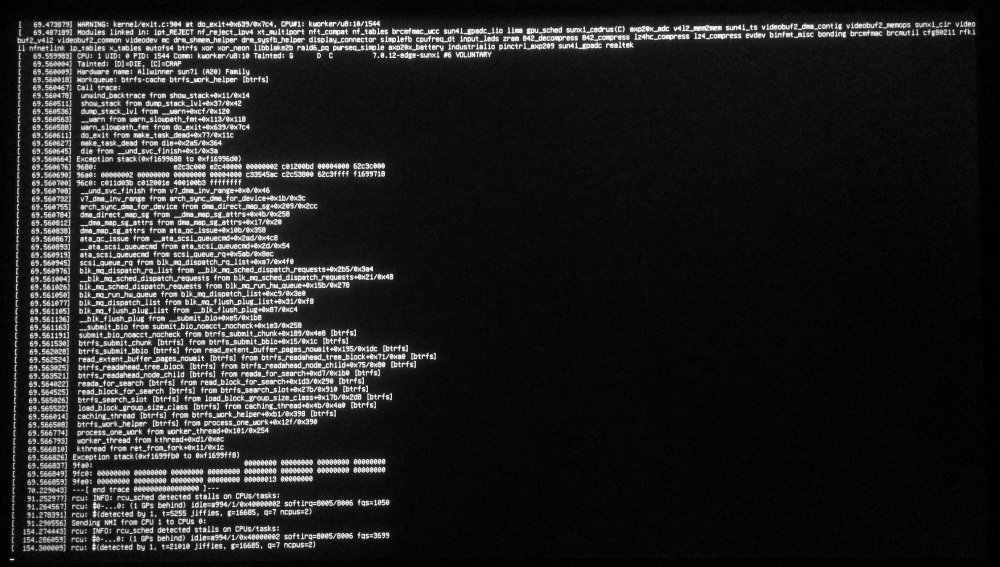
-
No, same error. We prefer to see the replicateable changes instead of running a wild binary. Does it work for you on real Odroid-HC4 hardware? U-Boot prints (use CONFIG_DISPLAY_BOARDINFO_LATE): SoC: Amlogic Meson SM1 (S905X3) Revision 2b:c (10:2)
-
@Morales MoralesThe older build where ethernet is working: https://github.com/sicXnull/armbian-build/releases/download/mxqpro/Armbian-unofficial_26.02.0-trunk_Mxqpro-h313_trixie_current_6.12.74_cinnamon_desktop.img.xz The semi-official one where it's not: https://armbian.com/boards/x96q
-
Just a shot in the dark, does this build work better?
-
 Oh, my GOD ! I used the Android14 OS image from FriendlyElec google drive, and every video format I tried worked perfectly with full hardware acceleration ! Using Kodi player, this NanoPi M5 it is even capable of playing H.265 Full-4K 60fps 10bit HDR, without frame drop ! So the hardware is perfectly functional for 4K movies. The problem is the software component that is present in other OSes besides Android. Guys, I don't understand... Can't we take the drivers that FriendlyElec used in the Android14 OS image and adapt them for Armbian ? It would be brilliant to have an OS as cool as Armbian with full video acceleration capabilities ! Since I have this board, I'll gladly help you with any tests needed to make this Armbian for NanoPi M5 functional ! Just give me some ideas on what I should do... I will be your NanoPi M5 beta-testeer.
 -
 Well I gave up on it. I can't figure out how to boot anything other than armbian on NVMe and I need to boot a USB for starters. I guess I'll have to use for armbian until a cheap board with UEFI arrives. Orange Pi 6 Plus is too expensive for me.
 -
Hi, I think swapon is not visible because you are not root. It should already be there via required package "mount". Try tu "su -" then you will "see" the command.
-
$ swapon -bash: swapon: Unknown command I was about to create a swapfile and then the above command happened. Where can I find swapon?
-
I followed your link and tried your build, nice menu but same error: jedec_spi_nor flash@0: unrecognized JEDEC id bytes: 00, 00, 00 Failed to initialize SPI flash at 0:0 (error -2) This error is from U-Boot and Linux gives the same, my first post shows the error in Linux with debugging turned on and a reduced frequency (and vcc-supply) set in device tree source. It works with Hardkernel's firmware, thus is not a faulty hardware and nothing new.
-

HDMI audio and analog audio do not work on Opi5Plus
ErinBong replied to ずっと一人's topic in Orange Pi 5 Plus
Hey! i had similar issues with the ES8388 analog and HDMI output path alignment on my OPi5 Plus under recent edge/mainline kernels. Sometimes the card states look fine in ALSA/pavucontrol but the streams just don't bridge to the hardware mapping properly, or the default audio levels are hitting gain issues. To test if it’s just a software-side compression or file amplification issue before diving too deep into modifying the device tree (.dts), try running a quick format check with a known sample using explicit routing- aplay -D plughw:1,0 your_audio.wav If your test files are inherently too quiet or failing to hit the threshold cleanly, you can boost them up beforehand via tools like MP3Louder just to make sure you aren't fighting low baseline source levels on top of the kernel driver bugs. If it completely stays dead silent even with clean, forced audio files, then it's definitely the device tree overlay parameters (simple-audio-card) not toggling correctly on your specific build version. Which image build date and kernel version are you currently on? -
The post is from nov 2022, and OP reported it worked 2 weeks later... But good advice non the less... xD
-
I'd start by checking whether the issue showed up right after an apt upgrade or after updating OMV itself. I've had cases where reinstalling the OMV packages and checking the service logs made it much easier to pinpoint what actually broke. Posting the output of the relevant logs would also help others narrow it down instead of guessing.
-
As long as you do not provide proper serial console logs, no one can tell what is going on. I can't help you in this situation any further, and you have to find a solution for yourself.