mvpwar
-
Posts
72 -
Joined
-
Last visited
Content Type
Forums
Store
Crowdfunding
Applications
Events
Raffles
Community Map
Everything posted by mvpwar
-
Efforts to develop firmware for H96 MAX V56 RK3566 8G/64G
mvpwar replied to Hqnicolas's topic in Rockchip CPU Boxes
package-file # NAME Relative path # #HWDEF HWDEF package-file package-file bootloader Image/MiniLoaderAll.bin parameter Image/parameter.txt trust Image/dtbo.img uboot Image/uboot.img security Image/parameter.txt root Image/root.img parameter.txt FIRMWARE_VER: 11.0 MACHINE_MODEL: H96_Max_RK3566 MACHINE_ID: 007 MANUFACTURER: rockchip MAGIC: 0x5041524B ATAG: 0x00200800 MACHINE: rk356x_box CHECK_MASK: 0x80 PWR_HLD: 0,0,A,0,1 TYPE: EXT4 CMDLINE: console=ttyFIQ0 androidboot.console=ttyFIQ0 root=UUID=614e0000-0000-4b53-8000-1d28000054a9 rw rootfstype=ext4 no_console_suspend consoleblank=0 fsck.fix=yes fsck.repair=yes net.ifnames=0 splash plymouth.ignore-serial-consoles mtdparts=rk29xxnand:0x00002000@0x00004000(security),0x00002000@0x00006000(uboot),0x00002000@0x00008000(trust),-@0x0000a000(root:grow) uuid:root=614e0000-0000-4b53-8000-1d28000054a9 the root.img is Debian_23.08.0-H96MAX_RK3566_bookworm_ROOT_edge_6.2.16_xfce_desktop.img, also try the other root.img, the same result ... start to make update.img... Android Firmware Package Tool v1.66 ------ PACKAGE ------ Add file: ./package-file Add file: ./package-file done,offset=0x800,size=0xe1,userspace=0x1 Add file: ./Image/MiniLoaderAll.bin Add file: ./Image/MiniLoaderAll.bin done,offset=0x1000,size=0x6a9c0,userspace=0xd6 Add file: ./Image/parameter.txt Add file: ./Image/parameter.txt done,offset=0x6c000,size=0x269,userspace=0x1 Add file: ./Image/dtbo.img Add file: ./Image/dtbo.img done,offset=0x6c800,size=0x26f,userspace=0x1 Add file: ./Image/uboot.img Add file: ./Image/uboot.img done,offset=0x6d000,size=0x400000,userspace=0x800 Add file: ./Image/parameter.txt Add file: ./Image/parameter.txt done,offset=0x46d000,size=0x25d,userspace=0x1 Add file: ./Image/root.img Add file: ./Image/root.img done,offset=0x46d800,size=0x189ff6600,userspace=0x313fed Add CRC... Make firmware OK! ------ OK ------ ********RKImageMaker ver 1.66******** Generating new image, please wait... Writing head info... Writing boot file... Writing firmware... Generating MD5 data... MD5 data generated successfully! New image generated successfully! Making ./Image/update.img OK. what the hell...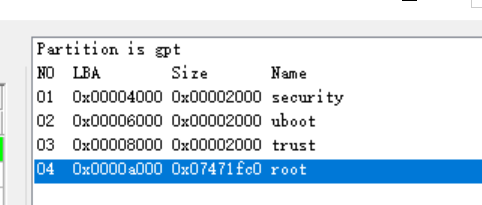
-
Efforts to develop firmware for H96 MAX V56 RK3566 8G/64G
mvpwar replied to Hqnicolas's topic in Rockchip CPU Boxes
the problem is "Failed to mount ext2 filesystem" or Could not find the partition with the kernel and dtb file @hotnikq BTW, your old ubuntu firmware works, and then I flashed the armbian v0.7 root.img to rootfs partition, armbian works but the kernel and dtb can not be change since it use boot.img and empty /boot dir of root.img -
Efforts to develop firmware for H96 MAX V56 RK3566 8G/64G
mvpwar replied to Hqnicolas's topic in Rockchip CPU Boxes
thanks a lot ! @hotnikq Very important infomation for me, I will try your method later is your 4G/32G box only using the emmc without sd card? -
Efforts to develop firmware for H96 MAX V56 RK3566 8G/64G
mvpwar replied to Hqnicolas's topic in Rockchip CPU Boxes
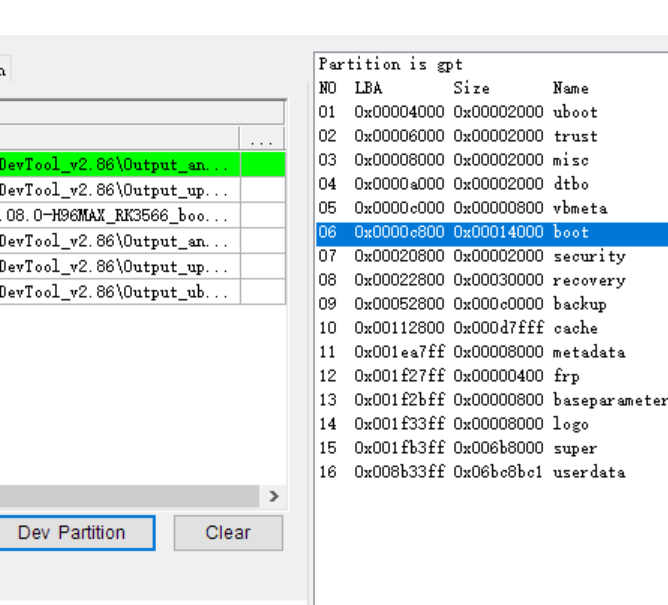
FIRMWARE_VER: 12.0 MACHINE_MODEL: H96_Max_V56 MACHINE_ID: 007 MANUFACTURER: rockchip MAGIC: 0x5041524B ATAG: 0x00200800 MACHINE: rk3566_box CHECK_MASK: 0x80 PWR_HLD: 0,0,A,0,1 TYPE: EXT4 CMDLINE: console=ttyFIQ0 androidboot.console=ttyFIQ0 root=UUID=c79ae8c4-0a9a-479b-b57f-ed7575bf5017 rw rootfstype=ext4 no_console_suspend consoleblank=0 fsck.fix=yes fsck.repair=yes net.ifnames=0 splash plymouth.ignore-serial-consoles mtdparts=rk29xxnand:0x00002000@0x00004000(security),0x00002000@0x00006000(uboot),0x00002000@0x00008000(trust),-@0x0010800(root:grow) uuid:root=c79ae8c4-0a9a-479b-b57f-ed7575bf5017 this parameter.txt is not useful when the TYPE is EXT4, Only parameter.txt with GPT type is available, like the parameter.txt of unpacked Android image FIRMWARE_VER: 11.0 MACHINE_MODEL: H96_Max_RK3566 MACHINE_ID: 007 MANUFACTURER: rockchip MAGIC: 0x5041524B ATAG: 0x00200800 MACHINE: rk356x_box CHECK_MASK: 0x80 PWR_HLD: 0,0,A,0,1 TYPE: GPT CMDLINE:mtdparts=rk29xxnand:0x00002000@0x00004000(uboot),0x00002000@0x00006000(trust),0x00002000@0x00008000(misc),0x00002000@0x0000a000(dtbo),0x00000800@0x0000c000(vbmeta),0x00014000@0x0000c800(boot),0x00002000@0x00020800(security),0x00030000@0x00022800(recovery),0x000c0000@0x00052800(backup),0x000d7fff@0x00112800(cache),0x00008000@0x001ea7ff(metadata),0x00000400@0x001f27ff(frp),0x00000800@0x001f2bff(baseparameter),0x00008000@0x001f33ff(logo),0x006b8000@0x001fb3ff(super),-@0x008b33ff(userdata:grow) I want to know your GPT partition table which outputed by clicking the "Dev Partition" in the RKDevTool If the box inconvenient to shut down, can you execute the “blkid” command in the shell @hotnikq the result of my box by clicking the "Dev Partition" as below