


MacBreaker
-
Posts
83 -
Joined
-
Last visited
Content Type
Forums
Store
Crowdfunding
Applications
Events
Raffles
Community Map
Everything posted by MacBreaker
-
Hello @greg396 What exactly are you trying to achieve? I assume you want to run Home Assistant in a virtual machine on ARM64. That's possible, but you need to install some prerequisites. According to your links, you're using an Orange Pi 5 Plus (RAM unknown). It's powerful enough, but I recommend at least 8GB. 🙂 First, install an ARM64 clone of Proxmox Virtual Environment (PXVirt). https://github.com/jiangcuo/pxvirt Then install HA: https://pimox-scripts.com/scripts?id=pimox-haos-vm `bash -c "$(curl -fsSL https://raw.githubusercontent.com/asylumexp/Proxmox/main/vm/pimox-haos-vm.sh)"` Done. If you run it on a home server it's OK! --- I personally use a Raspberry Pi 4 with 8GB of RAM running Armbian (trixie) since 1,5 year with PXVirt. It's running: Home Assistant (ARM64) Pi-hole OMV VM-Trixie Everything performs very well. 😃 Regards, Markus
-

Home Assistant with full Armbian desktop experience?
MacBreaker replied to Robert Pace's topic in Orange Pi 5 Plus
->a bit off topic<- Okay, if you have enough time, you can play around with PXVIRT (formerly the Proxmox port). 🙂 (https://github.com/jiangcuo/pxvirt) It's like Proxmox for ARM64 devices. I've been playing around with an 8 GB Raspberry Pi 4 with a 256 GB USB SSD lying around. In short: I installed a self-made minimal image (RPi4b). Installed PXVIRT (https://docs.pxvirt.lierfang.com/en/installfromdebian.html) Created some LXC containers (e.g., Lyrion Media Server, Heimdall, Pihole, Portainer, etc.) Created a virtual machine (Bookworm with OMV) Created a virtual machine with HAOS / -> bash -c "$(wget -qLO - https://github.com/community-scripts/ProxmoxVE/raw/main/vm/pimox-haos-vm.sh)" It's been running perfectly stable for 56 days now. 👍 Okay, it wasn't easy to set up and compile all the software components, but it's running perfectly. I plan to buy an Orange Pi 5 Plus with 32 GB RAM for these tasks next time. Regards, Markus -
Hi @Skalistan, see here.. Build your own image with the Build Framework. Markus
-
There were no errors before, but now there are errors when compiling???
MacBreaker replied to lay's topic in Khadas EDGE2
Small hint.. try this: sudo rm -rf build git clone --depth=1 --branch=main https://github.com/armbian/build ..and compile again. In the most cases for me i'ts working again. Markus -
Armbian with preinstalled OpenMediaVault (OMV)
MacBreaker replied to Igor's topic in Software, Applications, Userspace
Hello @AlexVS, you wrote: That is no image with preinstalled OMV but with preinstalled openhab. There is no image for ri4 with OMV preinstalled (as far as i see..). You have to build it by yorself. See DIY on post 1. Markus -
Armbian with preinstalled OpenMediaVault (OMV)
MacBreaker replied to Igor's topic in Software, Applications, Userspace
Ahh, okay, i didn't know Now it's working.. 👍 Thank's Werner -
Armbian with preinstalled OpenMediaVault (OMV)
MacBreaker replied to Igor's topic in Software, Applications, Userspace
Hello Igor, try to build OMV for rpi4. ./compile.sh BOARD="rpi4b" BRANCH=current RELEASE=bookworm ENABLE_EXTENSIONS="omv" KERNEL_CONFIGURE="no" BUILD_MINIMAL="yes" Got these error messages: [🌿] Enabling extension [ omv ] [🔨] ERR: Extension problem -- cant find extension 'omv' anywhere - called by /home/master/build/lib/functions/general/extensions.sh [💥] Exiting with error 17 [ at /home/master/build/lib/functions/general/extensions.sh:1 enable_extension() --> lib/functions/general/extensions.sh:1 initialize_extension_manager() --> lib/functions/general/extensions.sh:135 do_main_configuration() --> lib/functions/configuration/main-config.sh:317 do_with_logging() --> lib/functions/logging/section-logging.sh:81 do_with_conditional_logging() --> lib/functions/logging/section-logging.sh:111 prep_conf_main_build_single() --> lib/functions/main/config-prepare.sh:29 cli_standard_build_run() --> lib/functions/cli/cli-build.sh:22 armbian_cli_run_command() --> lib/functions/cli/utils-cli.sh:136 cli_entrypoint() --> lib/functions/cli/entrypoint.sh:176 main() --> compile.sh:50 ] [💥] Cleaning up [ please wait for cleanups to finish ] What I'm doing wrong? Markus -
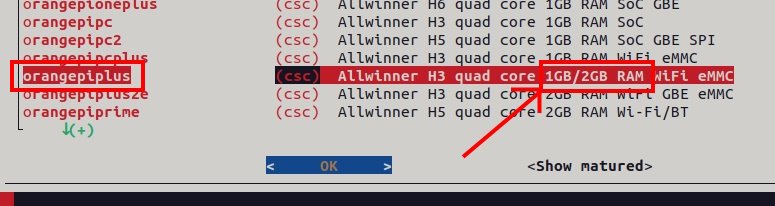
Hello @hyungjuk, try to build a image with this command: ./compile.sh BOARD=orangepiplus BRANCH=current RELEASE=bookworm BUILD_MINIMAL=no BUILD_DESKTOP=no KERNEL_CONFIGURE=no COMPRESS_OUTPUTIMAGE=sha,img As you can see the differend about Plus und Plus 2 is only the size of RAM. E. g. Plus = 1GB, Plus 2 = 2GB See in the build framework: Good luck, it should work.. I run Home Assistant for (small) tasks, without Problems.. Markus
-
As far as i know Plus and Plus 2 share the same image. The Plus2e image didn't work. Maybe about the different USB ports. Last weekend i build a image for my Plus, it works perfect oob. Markus
-
orange pi not booting from emmc when sd card in connected
MacBreaker replied to Mainul Quraishi's topic in Beginners
Had the problem many years ago with my Orange Pi PC Plus (ok, Kernel 3.4.x) The trick was to create 2 partitions on the SD card. E.g. the first with FAT16, only a few MB in size, and the 2nd with EXT4. Then it boots via MMC. Greetings Markus