Search the Community
Showing results for tags 'orangepi4'.
Found 8 results
-
hi there! im a beginner in the linux world, but to try to learn a bit more and to try to make something useful im currently lookin at a orange pi 4 board in hope to somehow turn it in a NAS/Emby server. i played a little with the Opi4 and it looks promising, the only problem is that it doesnt have sata ports. i can get an extension board to plug in a mPCIE device, and i was planning to use it to connect a PCIE-Sata device. since i still have to buy it, do you have any suggestion? i looked at the JMB585 and the ASM1166 expansion boards, they both have plenty of ports for what i need and the speed its more than amazing, but i would like to know if they are supported. how can i check it? Thanks!
-
for the past few days i have been trying to set up a samba server but without any luck. my main problem is that after installing and setting up everything i try to connect to the ip of the server (just by typing \\server-ip\ in the explorer path) using a win 10 machine and it doesnt even prompt me to log in using credentials, it just says that is impossible to connect to the server, even tough im connecting trough ssh. I just wiped the machine and installed everything new again but still no luck, im not prompted to log in. (i assume that even without editing the smb.conf file i should be getting a prompt to log in right?) what should i do? i dont think i have any firewall that blocks the service (i dont remember exacly how but i checked with some command the other day) and in my network im able to connect from my phone to a shared folder on my win 10 pc, so im not really sure what to look for, if its a network problem or a config problem.
-
Hi, I'm trying to fully boot an Orange Pi 4 from a USB flash drive from Uboot's prompt before it actually loads the kernel from the SD card (The SD card already has a working image of Armbian installed, that's where the board pulled Uboot from and is booting from it). The SD card currently has Armbian_23.5.1_Orangepi4_jammy_current_6.1.30_gnome_desktop installed on it. The reason why I'm trying to boot the board from USB is that I want to try an image with Orange Pi 4's legacy kernel to be able to take advantage of its vendor Mali blob for performance comparison against the current open source Panfrost driver in mainline kernel. And that I don't have a separate SD card available now so I figured it'd be a good idea to flash an image onto a USB drive and make the board temporarily boot from USB instead. The drive has Armbian_21.08.1_Orangepi4_buster_legacy_4.4.213_xfce_desktop written onto. I thought it'd be as easy as just flashing an image onto the USB drive, get into Uboot's prompt by interrupting it via serial console and initialize the USB subsystem (usb start) then invoke the usbboot command and let it find the bootable part of the image on the drive then boot from it. Now, I'm not sure if that's a proper way to boot the board from USB, but seeing that Amlogic boards can do such thing (source: Starting Armbian from USB flash drive), I figured I should try it too. (if you have a better idea, I'd happily welcome it!) Uboot's version it's running on: U-Boot 2022.04-armbian (May 19 2024 - 19:21:57 +0000) That's when the problem arises, when I ran the usb start command, I get the following (I already have a keyboard + mouse receiver dongle plugged into the "standing" USB 2 port and a flash drive plugged into the lower port of the USB 3 ports): => usb start starting USB... Bus usb@fe380000: ehci_generic usb@fe380000: failed to get usb phy Port not available. Bus usb@fe3c0000: ehci_generic usb@fe3c0000: failed to get usb phy Port not available. Doesn't seem like it detected any USB devices... Nevertheless, I tried usb tree to see if there's anything, but no: => usb tree USB is stopped. Please issue 'usb start' first. I'm guessing there's something wrong with the device tree embedded in Uboot or am I missing something here that it can't start the USB subsystem to detect any USB devices attached? Do I have to make some modifications to Uboot or the device tree too so the kernel on the drive (in case Uboot successfully found the drive and booted that kernel instead) knows where it's actually booting from? I've attached a boot log up until the point I interrupted it and ran the two commands: uboot_log_usb_stopped.txt Any help would be greatly appreciated!
-
My Orange Pi 4B has gone to community support. After an overheat with a compilation, the ssd dies, and I reflashed to the new community version Armbian_community_24.8.0-trunk.399_Orangepi4_noble_current_6.6.40_gnome-oibaf_desktop Anyway I got no HDMI output so I left it running, and suddenly I got a new device on the network. Since I am going to use it headless it works well for me. Bug 1 No HDMI Expected HDMI output works Actual Result No HDMI output. Bug 2 The second was when I downloaded llvm compiler normal output from clang compiler: (took the whole day yesterday to compile from source without overheating) clang++ -v clang version 19.0.0git (https://github.com/llvm/llvm-project.git 4c73b1a986bb4f3af6c5d5e9e705934dbcc36262) Target: aarch64-unknown-linux-gnu Thread model: posix InstalledDir: /usr/local/bin Found candidate GCC installation: /usr/lib/gcc/aarch64-linux-gnu/13 Selected GCC installation: /usr/lib/gcc/aarch64-linux-gnu/13 Candidate multilib: .;@m64 Selected multilib: .;@m64 but what i got from the clang++ compiler downloaded with apt-get /usr/bin/clang++ -v Ubuntu clang version 18.1.3 (1ubuntu1) Target: aarch64-unknown-linux-gnu Thread model: posix InstalledDir: /usr/bin So some file helping clang finding header files from gcc (the last part "found candidate .... selected multillib") is missing Expected result clang++ finds g++ header files Actual result clang++ don't find g++ header files
-
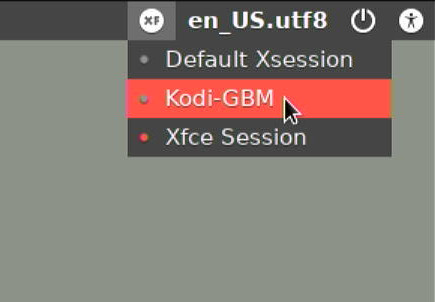
IT'S FINALLY HERE... THE OFFICIAL ROCKCHIP-LEGACY MULTIMEDIA INTEGRATION After two years of using a separate script to enable the multimedia features in RK3399 Legacy Kernel, the whole framework has been incorporated to the official Armbian packaging system. The choice distro for this integration is Debian Buster (see FAQ at the end of this post about the reasons). I. Installation Download a Armbian Buster Legacy Desktop image for your board, and install it with the standard Armbian method. Install the complete multimedia solution with sudo apt update && sudo apt upgrade sudo apt install media-buster-legacy-rk3399 --install-recommends The switch "--install-recommends" will add the whole Kodi binary addons collection (retro-gaming cores, music visualizations, screensavers, additional media decoders/encoders, vfs, etc.), plus the GLES-to-OpenGL wrapper "gl4es". II. Features Accelerated GLES/EGL X desktop: No action needed. Accelerated Chromium, with WebGL and video display acceleration: No action needed Desktop video player capable of smooth 4K HEVC-HDR: Use the "Rockchip Gst Player" from the Multimedia menu, or choose it with right-click on the media file. Command-line 4K playing is also possible with "gst-play-1.0 --videosink=kmssink". RKMPP-accelerated MPV: Use normally for standard operation (windowed with mouse-operated GUI). For fullscreen, keyboard-operated mode, use the command line switch "--gpu-context=drm" (this will allow you to play smooth 4K). - See instructions below, in the next post, for playing YouTube videos up to 4K with this MPV. ISP Camera with real-time h.264/1080p HW encoding: Using the Gstreamer Plugin. Check this wiki for instructions on how to use it. Most of it applies to Armbian, except for the selection of ov5647/imx219 camera, which must be done using DT overlays. OpenCL 1.2 support: It will be fully functional, no further action needed. You can download some tests and examples from this link. Kodi 18.9 Leia with full RKMPP+GBM acceleration, 4K-HDR capable: You can start it from LightDM menu as your user account: Alternatively, you can also run it as a system service with these command lines: sudo systemctl disable lightdm sudo systemctl enable kodi-gbm sudo reboot Full collection of Kodi binary add-ons: Includes retrogaming cores, media encoders and decoders, PVR, screensavers, vfs and audio visualizations. They are all installed with the package "kodi-addons-full", but are disabled by default. They need to be enabled individually within the Kodi GUI. OpenGL 2.1 support through the gl4es wrapper: It is installed with the package "gl4es", with no further action needed. III. Sources This is the list of the sources used for the packages: IV. FAQ ¿Why did you use Debian Buster as a base for this implementation? It was the most appropriate for several reasons. Upstream Rockchip-Linux developers use Debian buster, so the software could be ported with less modifications than if we chose a different distro. Besides, it is a completely stable distro, unlike Bullseye, which is a moving target as of today. It also has Chromium as a package, unlike Focal that uses snap instead. For last, it has a good backports repo, with several libs that would otherwise need to be compiled and maintained if we chose, for example, Focal. ¿Why Legacy instead of Mainline? This is an implementation based on the vendor's BSP kernel. It has been tested and is reliable, which many people will prefer rather than having a bleeding-edge, less stable implementation. In addition to that, Mainline upstream multimedia support is still a WIP, and lacks many features that are only present on Legacy kernels. ¿Will you add new features to this implementation? No, this implementation will only receive bug fixes if necessary. From now on, all multimedia work will be focused on Mainline and recent distros (like Focal or Bullseye). All new features will go there.

-
 Hey everyone, I need some assistance with a problem I'm facing. I recently attempted to attach a 5V cooler to my Orange Pi 4 board, but unfortunately, nothing seems to be happening. I even used a multi-meter to measure the voltage, and it consistently shows 0.0V. To ensure I connected everything correctly, I consulted online diagrams and made sure I was using the appropriate pins. Currently, I am powering my Orange Pi 4 using the USB-C connection. Could this be the cause of the issue? Should I change to use the power jack connection? I would greatly appreciate any help or suggestions you can provide. Thank you in advance.
 -
I am encountering a problem with my Orangepi4 where I am unable to get the Bluetooth connection to work properly with my speaker. Specifically, after connecting the Bluetooth, there is no option in the audio output settings to use the Bluetooth speaker as the output device. I have tried installing Bluetooth support using armbian-config and have also attempted restarting both the Bluetooth service and the system, but none of these solutions have been successful. Here is the system log for reference: (link to the log: https://paste.armbian.com/esohoyezit) I would greatly appreciate any assistance or guidance on resolving this issue. Thank you.
-
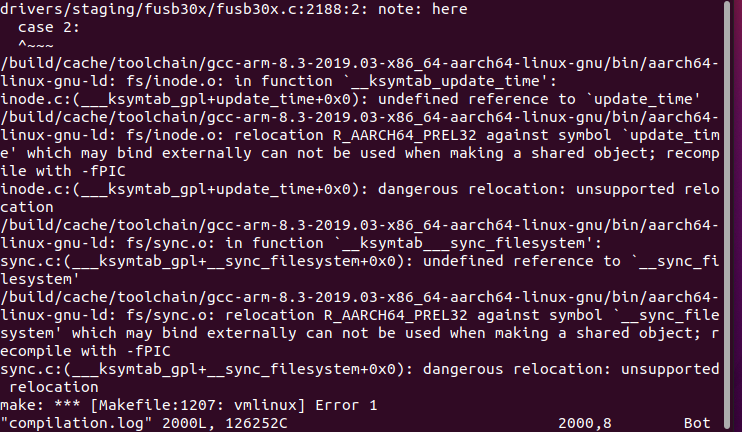
Because I reported an error when compiling Oranpi4b, I want to change the toolchain version, but I don’t know how to change it, so I come here to ask everyone, please help me solve it