All Activity
- Past hour
-
 @Abdullah Al HaDi Talking about custom roms, I did try to install ATV Xperience rom in it but it unfortunately ended up in a bootloop. But I had great success with Armbian (s90xx builds or idk what it was called). Besides armbian I had success with Manjaro too but I decided to stick with Armbian till the end of its lifetime. Yes the sbc is dead now, RIP...
 - Today
-
sudo dpkg --print-architecture sudo dpkg --print-foreign-architectures maybe i have installed wine once, but atm it is not installed; if i go to sources.list can not find it, but now there is sources.list.d/ folder and several different list there, but there is no explicit entriy for "i386" that i could easily delete. EDIT: thanks, removing "wine" from sources brought the "upt-get update" process down to 19sec. now it would be nice to remove the remaining "i386" from the equation.
-

[Latest] Armbian Build HDMI Audio support Fix
Alex Ling replied to just_facking_about's topic in Radxa Dragon Q6A
After I added "snd-soc-wcd938x" to /etc/modules-load.d/modules.conf, the sound card can be detected as expected. -

HDMI audio and analog audio do not work on Opi5Plus
JFL replied to ずっと一人's topic in Orange Pi 5 Plus
I do not meant that the above causes the NO Analog Output issue. I don't think those patches were in the earlier kernekl 6.18.20-current=rockchip64-26.2.0-trunk.640 or the kernel-7.0.0-rc5-edge-rockchip64-26.2.0-trunk.626. These patches are added totay or yesterday. On the contrary, could the https://github.com/armbian/build/pull/9600 resolved the NO Analog Output issue on Opi5-Plus. -
I see wine, so you likely have let some tool mess up your Debian packaging setup. See what the following shows: sudo dpkg --print-architecture sudo dpkg --print-foreign-architectures For the rest , this is standard Debian methods, I forgot it a bit, but I see google AI shows all other commands w.r.t. this issue. But make sure you understand it. I at least don't know how to fix it, unless you just accept to remove all that wine stuff I guess. But see what your goal is or what you want.
-
Hello , noticed that on the sbc "apt-get update" takes a long time, it ignores some sources and sometimes it slow to load. was wondering if could clean up the process, since it seem to look for "i386" but the sbc is on "arm64" sudo apt update [sudo] password for rich: OK:1 http://ports.ubuntu.com noble InRelease Holen:2 http://ports.ubuntu.com noble-security InRelease [126 kB] Holen:4 https://github.armbian.com/configng stable InRelease [5.467 B] Holen:5 https://dl.winehq.org/wine-builds/ubuntu questing InRelease [5.719 B] Holen:6 http://ports.ubuntu.com noble-updates InRelease [126 kB] Holen:7 http://ports.ubuntu.com noble-backports InRelease [126 kB] Holen:3 http://armbian.lv.auroradev.org/apt noble InRelease [39,2 kB] Holen:8 https://github.armbian.com/configng stable/main arm64 Packages [437 B] Holen:9 https://github.armbian.com/configng stable/main i386 Packages [437 B] Holen:10 https://dl.winehq.org/wine-builds/ubuntu questing/main amd64 Packages [60,8 kB] Holen:11 http://ports.ubuntu.com noble/main i386 Packages [1.329 kB] Ign:11 http://ports.ubuntu.com noble/main i386 Packages Ign:13 http://ports.ubuntu.com noble/restricted i386 Packages Ign:14 http://ports.ubuntu.com noble/universe i386 Packages Ign:15 http://ports.ubuntu.com noble/multiverse i386 Packages Ign:16 http://ports.ubuntu.com noble-security/main i386 Packages Holen:17 http://ports.ubuntu.com noble-security/main arm64 Packages [2.092 kB] Holen:18 https://dl.winehq.org/wine-builds/ubuntu questing/main amd64 Contents (deb) [99,8 kB] Holen:19 http://armbian.lv.auroradev.org/apt noble/noble-utils all Packages [3.136 B] Holen:20 http://armbian.lv.auroradev.org/apt noble/noble-utils i386 Packages [3.709 B] Holen:21 http://armbian.lv.auroradev.org/apt noble/noble-utils arm64 Packages [18,3 kB] Holen:22 http://armbian.lv.auroradev.org/apt noble/noble-desktop arm64 Packages [137 kB] Holen:23 http://ports.ubuntu.com noble-security arm64 Contents (deb) [191 MB] Holen:24 http://ports.ubuntu.com noble-security i386 Contents (deb) [61,1 MB] Ign:25 http://ports.ubuntu.com noble-security/restricted i386 Packages Holen:26 http://ports.ubuntu.com noble-security/restricted arm64 Packages [4.844 kB] Ign:27 http://ports.ubuntu.com noble-security/universe i386 Packages Holen:28 http://ports.ubuntu.com noble-security/universe arm64 Packages [1.505 kB] Ign:29 http://ports.ubuntu.com noble-security/multiverse i386 Packages Holen:30 http://ports.ubuntu.com noble-security/multiverse arm64 Packages [44,1 kB] Ign:31 http://ports.ubuntu.com noble-updates/main i386 Packages Holen:32 http://ports.ubuntu.com noble-updates/main arm64 Packages [2.451 kB] Holen:32 http://ports.ubuntu.com noble-updates/main arm64 Packages [2.451 kB] Holen:34 http://ports.ubuntu.com noble-updates arm64 Contents (deb) [199 MB] Holen:34 http://ports.ubuntu.com noble-updates arm64 Contents (deb) [199 MB] Holen:36 http://ports.ubuntu.com noble-updates i386 Contents (deb) [66,0 MB] Holen:37 http://ports.ubuntu.com noble-updates/restricted arm64 Packages [5.019 kB] Ign:38 http://ports.ubuntu.com noble-updates/restricted i386 Packages Holen:39 http://ports.ubuntu.com noble-updates/universe arm64 Packages [2.116 kB] Holen:39 http://ports.ubuntu.com noble-updates/universe arm64 Packages [2.116 kB] Ign:41 http://ports.ubuntu.com noble-updates/universe i386 Packages Holen:42 http://ports.ubuntu.com noble-updates/multiverse arm64 Packages [45,7 kB] Ign:43 http://ports.ubuntu.com noble-updates/multiverse i386 Packages Ign:44 http://ports.ubuntu.com noble-backports/main i386 Packages Holen:45 http://ports.ubuntu.com noble-backports arm64 Contents (deb) [786 kB] Ign:46 http://ports.ubuntu.com noble-backports/universe i386 Packages Holen:47 http://ports.ubuntu.com noble-backports/universe arm64 Packages [36,1 kB] Ign:48 http://ports.ubuntu.com noble-backports/multiverse i386 Packages Ign:11 http://ports.ubuntu.com noble/main i386 Packages Ign:13 http://ports.ubuntu.com noble/restricted i386 Packages Ign:14 http://ports.ubuntu.com noble/universe i386 Packages Ign:15 http://ports.ubuntu.com noble/multiverse i386 Packages Ign:16 http://ports.ubuntu.com noble-security/main i386 Packages Ign:25 http://ports.ubuntu.com noble-security/restricted i386 Packages Ign:27 http://ports.ubuntu.com noble-security/universe i386 Packages Ign:29 http://ports.ubuntu.com noble-security/multiverse i386 Packages Ign:31 http://ports.ubuntu.com noble-updates/main i386 Packages Ign:38 http://ports.ubuntu.com noble-updates/restricted i386 Packages Ign:41 http://ports.ubuntu.com noble-updates/universe i386 Packages Ign:43 http://ports.ubuntu.com noble-updates/multiverse i386 Packages Ign:44 http://ports.ubuntu.com noble-backports/main i386 Packages Ign:46 http://ports.ubuntu.com noble-backports/universe i386 Packages Ign:48 http://ports.ubuntu.com noble-backports/multiverse i386 Packages Ign:11 http://ports.ubuntu.com noble/main i386 Packages Ign:13 http://ports.ubuntu.com noble/restricted i386 Packages Ign:14 http://ports.ubuntu.com noble/universe i386 Packages Ign:15 http://ports.ubuntu.com noble/multiverse i386 Packages Ign:16 http://ports.ubuntu.com noble-security/main i386 Packages Ign:25 http://ports.ubuntu.com noble-security/restricted i386 Packages Ign:27 http://ports.ubuntu.com noble-security/universe i386 Packages Ign:29 http://ports.ubuntu.com noble-security/multiverse i386 Packages Ign:31 http://ports.ubuntu.com noble-updates/main i386 Packages Ign:38 http://ports.ubuntu.com noble-updates/restricted i386 Packages Ign:41 http://ports.ubuntu.com noble-updates/universe i386 Packages Ign:43 http://ports.ubuntu.com noble-updates/multiverse i386 Packages Ign:44 http://ports.ubuntu.com noble-backports/main i386 Packages Ign:46 http://ports.ubuntu.com noble-backports/universe i386 Packages Ign:48 http://ports.ubuntu.com noble-backports/multiverse i386 Packages Ign:11 http://ports.ubuntu.com noble/main i386 Packages Ign:13 http://ports.ubuntu.com noble/restricted i386 Packages Ign:14 http://ports.ubuntu.com noble/universe i386 Packages Ign:15 http://ports.ubuntu.com noble/multiverse i386 Packages Ign:16 http://ports.ubuntu.com noble-security/main i386 Packages Ign:25 http://ports.ubuntu.com noble-security/restricted i386 Packages Ign:27 http://ports.ubuntu.com noble-security/universe i386 Packages Ign:29 http://ports.ubuntu.com noble-security/multiverse i386 Packages Ign:31 http://ports.ubuntu.com noble-updates/main i386 Packages Ign:38 http://ports.ubuntu.com noble-updates/restricted i386 Packages Ign:41 http://ports.ubuntu.com noble-updates/universe i386 Packages Ign:43 http://ports.ubuntu.com noble-updates/multiverse i386 Packages Ign:44 http://ports.ubuntu.com noble-backports/main i386 Packages Ign:46 http://ports.ubuntu.com noble-backports/universe i386 Packages Ign:48 http://ports.ubuntu.com noble-backports/multiverse i386 Packages Ign:11 http://ports.ubuntu.com noble/main i386 Packages Ign:13 http://ports.ubuntu.com noble/restricted i386 Packages Ign:14 http://ports.ubuntu.com noble/universe i386 Packages Ign:15 http://ports.ubuntu.com noble/multiverse i386 Packages Ign:16 http://ports.ubuntu.com noble-security/main i386 Packages Ign:25 http://ports.ubuntu.com noble-security/restricted i386 Packages Ign:27 http://ports.ubuntu.com noble-security/universe i386 Packages Ign:29 http://ports.ubuntu.com noble-security/multiverse i386 Packages Ign:31 http://ports.ubuntu.com noble-updates/main i386 Packages Ign:38 http://ports.ubuntu.com noble-updates/restricted i386 Packages Ign:41 http://ports.ubuntu.com noble-updates/universe i386 Packages Ign:43 http://ports.ubuntu.com noble-updates/multiverse i386 Packages Ign:44 http://ports.ubuntu.com noble-backports/main i386 Packages Ign:46 http://ports.ubuntu.com noble-backports/universe i386 Packages Ign:48 http://ports.ubuntu.com noble-backports/multiverse i386 Packages Fehl:11 http://ports.ubuntu.com noble/main i386 Packages 404 Not Found [IP: 91.189.92.20 80] Ign:13 http://ports.ubuntu.com noble/restricted i386 Packages Ign:14 http://ports.ubuntu.com noble/universe i386 Packages Ign:15 http://ports.ubuntu.com noble/multiverse i386 Packages Fehl:16 http://ports.ubuntu.com noble-security/main i386 Packages 404 Not Found [IP: 91.189.92.20 80] Ign:25 http://ports.ubuntu.com noble-security/restricted i386 Packages Ign:27 http://ports.ubuntu.com noble-security/universe i386 Packages Ign:29 http://ports.ubuntu.com noble-security/multiverse i386 Packages Fehl:31 http://ports.ubuntu.com noble-updates/main i386 Packages 404 Not Found [IP: 91.189.92.20 80] Ign:38 http://ports.ubuntu.com noble-updates/restricted i386 Packages Ign:41 http://ports.ubuntu.com noble-updates/universe i386 Packages Ign:43 http://ports.ubuntu.com noble-updates/multiverse i386 Packages Fehl:44 http://ports.ubuntu.com noble-backports/main i386 Packages 404 Not Found [IP: 91.189.92.20 80] Ign:46 http://ports.ubuntu.com noble-backports/universe i386 Packages Ign:48 http://ports.ubuntu.com noble-backports/multiverse i386 Packages Es wurden 537 MB in 2 min 2 s geholt (4.394 kB/s). Paketlisten werden gelesen… Fertig E: Fehlschlag beim Holen von http://ports.ubuntu.com/dists/noble/main/binary-i386/Packages 404 Not Found [IP: 91.189.92.20 80] E: Fehlschlag beim Holen von http://ports.ubuntu.com/dists/noble-security/main/binary-i386/Packages 404 Not Found [IP: 91.189.92.20 80] E: Fehlschlag beim Holen von http://ports.ubuntu.com/dists/noble-updates/main/binary-i386/Packages 404 Not Found [IP: 91.189.92.20 80] E: Fehlschlag beim Holen von http://ports.ubuntu.com/dists/noble-backports/main/binary-i386/Packages 404 Not Found [IP: 91.189.92.20 80] E: Einige Indexdateien konnten nicht heruntergeladen werden. Sie wurden ignoriert oder alte an ihrer Stelle benutzt. thank you
-

HDMI audio and analog audio do not work on Opi5Plus
Werner replied to ずっと一人's topic in Orange Pi 5 Plus
I think there is an option somewhere in armbian-config to edit the device tree. How to diff: https://www.perplexity.ai/search/create-a-short-and-shareable-e-8cKctYlWQJO8jKY0vDOKgg I don't think so but you can try reverting this pr and do a test build. -
Hi, Werner, thanks for replying. The problem is, when this happened, I cannot get wire or wireless connection. Neither can I login to the system using another pty. Odin2 is a gaming device thus there's no UART available. I tried to pass "console=tty0" to the kernel but I don't see any output on screen when it happened. Any suggestion to get more information? Thanks!
-
[Latest] Armbian Build HDMI Audio support Fix
Alex Ling replied to just_facking_about's topic in Radxa Dragon Q6A
I built a local armbian image from current main branch (26.05.0-trunk) and I found there's no sound card detected after boot. It shows "timer" only under /sys/class/sound/. I got following error in kernel log: [ 17.382126] platform sound: deferred probe pending: snd-sc8280xp: DP0 Playback: error getting cpu dai name [ 17.382140] platform 33c0000.pinctrl: deferred probe pending: qcom-sc7280-lpass-lpi-pinctrl: Failed to get clk 'core' It is using Linux 6.18.2-current-qcs6490. When I switched to the Radxa OS image, the audio output is OK. I attached kernel log, lsmod output and dump of the dtb. armbian_no_sound.log armbian_lsmod.txt dump.dts -
HDMI audio and analog audio do not work on Opi5Plus
JFL replied to ずっと一人's topic in Orange Pi 5 Plus
Wonder the issue I am facing is related to this: https://github.com/armbian/build/pull/9600 -
HDMI audio and analog audio do not work on Opi5Plus
JFL replied to ずっと一人's topic in Orange Pi 5 Plus
The "Analog Audio" shows up on "gnome-control-center" but NO audio/sound output when selected.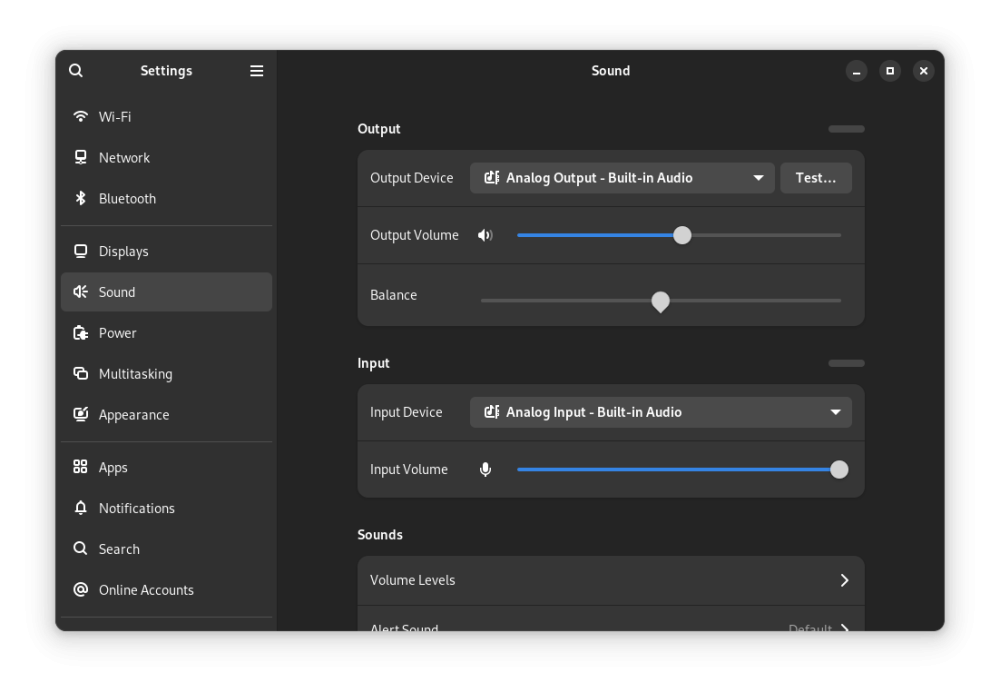
-
HDMI audio and analog audio do not work on Opi5Plus
JFL replied to ずっと一人's topic in Orange Pi 5 Plus
Am a greenhorn in linux so not sure I understand what to do. Do you mean, open a terminal and issue the above command? jfl@orangepi5-plus:~$ daicpu: simple-audio-card,cpu { sound-dai = <&i2s0_8ch>; system-clock-frequency = <12288000>; + system-clock-direction-out; }; bash: daicpu:: command not found bash: syntax error near unexpected token `;' bash: syntax error near unexpected token `12288000' bash: +: command not found bash: syntax error near unexpected token `}' jfl@orangepi5-plus:~$ Below is the armbianmonitor -u output. jfl@orangepi5-plus:~$ sudo armbianmonitor -u [sudo] password for jfl: Collecting info and sending to paste.armbian.com, wait... https://paste.armbian.com/zafupazubu Thanks you. -
The output still seems truncated. Perhaps leave the device running for a while with the broken kernel (I suggest to build your own kernel package for either "current" or "edge" to rule out that this hasn't been solved in the mean time by something else) to catch multiple of these connection drops. Also add verbosity=8 to your /boot/armbianEnv.txt to catch as much data as possible.
-
I been testing new install in pendrive, the os boot in rpi4, but no in rpi5
- Yesterday
-
The multitool running from SD card. It behaves like armbian when an armbian image is flashed to the emmc, freezing just like armbian does. Multitool works stable again when booted from the sd after I erase the emmc thru it. Armbian freezes wherever it boots from, with or without clearing the emmc
-
 Attaching the kernel log see if it helps. kern.log.1
 -
HDMI audio and analog audio do not work on Opi5Plus
Werner replied to ずっと一人's topic in Orange Pi 5 Plus
Hi, could you try the following addition in the device tree? diff --git a/arch/arm64/boot/dts/rockchip/rk3588-orangepi-5.dtsi b/arch/arm64/boot/dts/rockchip/rk3588-orangepi-5.dtsi index 3bceee948458..e58d7e69e8e8 100644 --- a/arch/arm64/boot/dts/rockchip/rk3588-orangepi-5.dtsi +++ b/arch/arm64/boot/dts/rockchip/rk3588-orangepi-5.dtsi @@ -273,9 +273,9 @@ es8388: audio-codec@11 { reg = <0x11>; /* On RK3588 (not RK3588S), MCLK output is gated and must use TO_IO variant */ clocks = <&cru I2S0_8CH_MCLKOUT_TO_IO>; - assigned-clocks = <&cru I2S0_8CH_MCLKOUT>; + assigned-clocks = <&cru I2S0_8CH_MCLKOUT_TO_IO>; assigned-clock-rates = <12288000>; AVDD-supply = <&vcc_3v3_s0>; DVDD-supply = <&vcc_1v8_s0>; If this doesn't work, try the following. daicpu: simple-audio-card,cpu { sound-dai = <&i2s0_8ch>; system-clock-frequency = <12288000>; + system-clock-direction-out; }; There isn't much information so its a bit of poking in the dark -
HDMI audio and analog audio do not work on Opi5Plus
JFL replied to ずっと一人's topic in Orange Pi 5 Plus
Device Opi5-Plus Further info. With Kernel-6.18.20-current-rockchip64-26.2.0-trunk.640 headphone jack (analog) also does not have audio/sound output. With kernel-6.18.10-current-rockchip64-26.2.1 headphone jack (analog) has autio/sound output. -
HDMI audio and analog audio do not work on Opi5Plus
JFL replied to ずっと一人's topic in Orange Pi 5 Plus
Hi, Device: Opi5-Plus Upgrading from kernel-6.19.y-edge-rockchip64 to kernel-7.0.0-rc5-edge-rockchip64 resulted in Headphone Jack (Analog) Output with NO audio/sound output. Downgraded to kernel-6.19.5-edge-rockchip64 Headphone Jack (Analog) have audio/sound output again. Just checking whether another Opi5-Plus or RK3588 users experience the same issue with kernel-7.0.0-rc5-edge-rockchip64? -
BTT since at least Buster provides in their vendor image a script to solve issues with the Wifi. And yes it in some conditions may have some issues with the network coming up, I even run in some issues with ethernet. They are solvable by restarting the networkdevice (either ethernet or wifi) with NetworkManager as well as with systemd-networkd. From history. The CB1 Buster vendor image from BTT as well as the vendor image for Bookworm, which actually you still can download at BTTs website contain a scrit that solves the issue by checking the network state all 5 seconds and in case restart the device. I personally used the vendor Buster image and the vendor Bookworm image on the CB1 to operate Openmediavault on it and believe me reliable Network is essential for a NAS. So yes those scripts work. I finally moved to the Armbian general Trixie image, just I was courious, but I took those scripts from bookworm with me. I even copied them to my "vault" of nice to have things for any device that needs reliable network. So I suggest to get yourself A vendor Bookworm image and loop mount it. No need to flash it. (if you are on Windoof, you need to flash it and have a look at the boot partition . At least I don't know a way to mount a partion inside a dd image of a blockdvice stored with sparse option.) Then have a look at the boot partion. There is a folder scripts. Interesing ther: /scripts/btt_init.sh /script/connect_wifi.sh what they do is, they start btt_init.sh in /etc/rc.local, which means always when the system boots at the very end of the boot process and btt init.sh starts a lot of those scripts in background mode, which meens if they have an endless loop, they never die. Only thing u need is connect_wifi.sh from there, so you can hash out all other or directly start connect_wifi.sh like they do.. #!/bin/bash # original BTT code, where the device name is set to a variable in the system.cfg: # cfg_file=/boot/system.cfg #enter the name of the wlandevice to check here: WLAN=wlan0 log_file=/boot/scripts/wifi.log IFS=\" sta_mount=0 wifi_path="/etc/NetworkManager/system-connections/" function connect_wifi() { # whether there is configured wifi in the history if [[ `sudo nmcli c s | grep wifi | awk '{ for(i=NF-2; i<=NF; i++){ $i="" }; print $0 }'` =~ "${WIFI_SSID}" ]] ; then set_wifi_path="${wifi_path}${WIFI_SSID}.nmconnection" if [[ -e ${set_wifi_path} ]]; then psk=`sudo cat ${set_wifi_path} | grep ^psk | awk -F '=' '{print $2}'` if [[ ${psk} == $WIFI_PASSWD ]]; then # both ssid & passwd matched. sys_now_wifi=`sudo nmcli c s --active | grep wlan0 | awk '{ for(i=NF-2; i<=NF; i++){ $i="" }; print $0 }' | awk '{t=length($0)}END{print substr($0, 0, t-3)}'` if [[ ${sys_now_wifi} != $WIFI_SSID ]]; then sudo nmcli c up ${WIFI_SSID} echo " ===> SSID & PSK is same as history, switch to: $WIFI_SSID " >> $log_file fi echo " ===> Now is: $WIFI_SSID, need not to do anything" >> $log_file return 0 else # psk don't match, remove and reconnect. sudo nmcli c delete ${WIFI_SSID} echo " ===> Remove all: $WIFI_SSID " >> $log_file fi else # remove all WIFI_SSID info (Theoretically, never execute to here). sudo nmcli c delete ${WIFI_SSID} echo " ===> Remove all: $WIFI_SSID " >> $log_file fi fi # connect to the new wifi if [[ `sudo nmcli device wifi list` =~ $WIFI_SSID ]] then if [[ ! `sudo nmcli dev wifi connect $WIFI_SSID password $WIFI_PASSWD ifname $wlan` =~ "successfully" ]] then echo " ===> Specify the WPA encryption method: $WIFI_SSID " >> $log_file sudo nmcli c modify $WIFI_SSID wifi-sec.key-mgmt wpa-psk sudo nmcli dev wifi connect $WIFI_SSID password $WIFI_PASSWD ifname $wlan fi else echo " ===> Hide wifi_ssid: $WIFI_SSID " >> $log_file sudo nmcli c add type wifi con-name $WIFI_SSID ifname $wlan ssid $WIFI_SSID sudo nmcli c modify $WIFI_SSID wifi-sec.key-mgmt wpa-psk wifi-sec.psk $WIFI_PASSWD sudo nmcli c up $WIFI_SSID fi } function Env_init() { exec 1> /dev/null # without check_interval set, we risk a 0 sleep = busy loop if [ ! "$check_interval" ]; then echo $(date)" ===> No check interval set!" >> $log_file exit 1 fi # enable wlan [[ $(ifconfig | grep $wlan) == "" ]] && sudo nmcli radio wifi on connect_wifi sleep 6 } function is_network() { if [ $# -eq 0 ]; then get_ip=`ip route | grep "$eth proto kernel" | awk '{print $9}'` if [ -n "${get_ip}" ]; then Result=yes else get_ip=`ip route | grep "$wlan proto kernel" | awk '{print $9}'` fi else get_ip=`ip route | grep "$1 proto kernel" | awk '{print $9}'` fi if [ -n "${get_ip}" ]; then Result=yes else Result=no fi echo $Result } function startWifi_sta() { sta_mount=`expr $sta_mount + 1` echo $(date)" .... sta connecting...$sta_mount..." >> $log_file sleep 2 } function startWifi() { [[ $(ifconfig | grep $wlan) == "" ]] && nmcli radio wifi on # 确保wlan连接启动了 if [[ $sta_mount -le 2 ]]; then nmcli device connect $wlan # 连接wifi echo $(date)" .... $wlan connecting..." >> $log_file sleep 2 [[ $(is_network $wlan) == no ]] && startWifi_sta [[ $(is_network $wlan) == yes ]] && sta_mount=0 && echo $(date)" [O.K.] $wlan connected!" >> $log_file else echo $(date)" xxxx $wlan connection failure..." >> $log_file fi } source $cfg_file grep -e "^WIFI_SSID" ${cfg_file} > /dev/null STATUS=$? if [ ${STATUS} -eq 0 ]; then Env_init sleep 20 while [ 1 ]; do if [[ $(is_network) == no ]]; then # 没有网络连接 echo -e $(date)" ==== No network connection..." >> $log_file startWifi sleep 6 # 更改间隔时间,因为有些服务启动较慢,试验后,改的间隔长一点有用 fi sleep $check_interval done fi This script assumes you are using NetworkManager to manga the wifi.. if you don't one can modify it for systemd-networkd also.. :-)
-
@andrey.lobov openvfd is a badly written old driver, currently there is already tm16xx driver in the kernel for led front panels. You should configure your board appropriately with rk3318x-config and will enable the front panel. If your board is not in the list, please provide photos of the board (back and front) and the dtb
-
Some sort of logs would be great, otherwise very hard to track down
- Last week
-
I did not look well enough and also at a local PDF copy of the wiki which I see is more than 2 years old. Same text is there, but not in red at that time. I think I noticed it at the I was soldering the wire, but I clearly forgot the typing the message i this topic. Anyway, I have no good idea how to solve your remote power issue. I use a MOSFET that has low Vgs on (works directly on 3.3V , but is not for common GND. Else PoE managed switch where I can toggle power when fatal lockup or so. Or else instruct someone to pull the plug, wait 10 seconds, stick it back in again. If you use CoW filesystems, it is no problem to do this.
-

Remote power button for Banana Pi M1
John Felstead replied to John Felstead's topic in Allwinner sunxi
thanks @eselarm. I think I may not have made myself clear. I want to be able to "Power On" i.e. boot the board using a remote switch and not Power (provide 5v) to the board via the GPIO pins. The Banana Pi docs here (half way down page to GPIO section) actually states that you cannot use the GPIO pins for injecting power only drawing power for ancillary boards etc. When testing the board and setting it up I accidentally touch the SATA case against the GPIO pins and the board started, I'm not sure what pin it was and if it might cause damage long term starting the board this way but I need to know if its possible and which pin(s) i need to short to ground? As regards SATA drive I'm fixing the 2.5" drive to the lid of the box and using one of these SATA right angle adapters and a short100mm very flexible SATA cable to connect to the SATA port on the board and the adapter. when its built I will upload a photo. In the meantime I need to be able to reboot the board externally when the power has been disrupted. I could unsolder the existing switch but the solder pads look tiny. -

CSC Armbian for RK3318/RK3328 TV box boards
andrey.lobov replied to jock's topic in Rockchip CPU Boxes
Hi all, I’m trying to enable the front VFD/LED display on an RK3318 TV box. OS: Armbian 23.11.1 Jammy, kernel 6.18.10-current-rockchip64 DTB: rk3318-box.dtb (fdtfile=rockchip/rk3318-box.dtb) In DTB I found: fd628_dev { compatible = "fd628_dev"; fd628_gpio_clk = <0x7a 0x10 0x00>; // bank2, offset16 fd628_gpio_dat = <0x7a 0x0f 0x00>; // bank2, offset15 }; I built linux_openvfd and added an openvfd node in DTB: openvfd { compatible = "open,vfd"; dev_name = "openvfd"; status = "okay"; }; Module loads, /dev/openvfd appears with: vfd_gpio_clk=2,16,0 vfd_gpio_dat=2,15,0 vfd_gpio_stb=2,19,0 vfd_display_type=0,0,0,0 vfd_chars=0,1,2,3,4,5,6 vfd_dot_bits=0,1,2,3,4,5,6,0 dmesg shows: OpenVFD: Select FD628 controller OpenVFD: SPI 3-wire interface initialized (LSB mode) /sys/class/leds/openvfd exists, but no indicators light up. Tried multiple display_type values and STB pins (bank2 offsets 18–22 + other banks) — still no output. Question: Does anyone know the correct GPIO pins (CLK/DAT/STB) for rk3318-box VFD, or a working driver/service for FD628/FD650 on this board? Any confirmed configs for RK3318 boxes would be greatly appreciated. I’ve been working on this for ~2 weeks and tried multiple configs/drivers without success. Thanks!