All Activity
- Past hour
-
Hi, I've a rock-3a board with an NVMe device and a BTRFS filesystem using the whole disk ( no partitions ) I've seen some devices having BTRFS support in u-boot, so first thing I built the u-boot images using the extension: cat extensions/uboot-btrfs.sh # Enable BTRFS support in u-boot function post_config_uboot_target__enable_uboot_btrfs_support() { display_alert "u-boot for ${BOARD}/${BRANCH}" "u-boot: enable BTRFS filesystem support" "info" run_host_command_logged scripts/config --enable CONFIG_CMD_BTRFS } And patched the configuration of the board: git diff . diff --git a/config/boards/rock-3a.conf b/config/boards/rock-3a.conf index 401894fa5..90f8a8a72 100644 --- a/config/boards/rock-3a.conf +++ b/config/boards/rock-3a.conf @@ -15,12 +15,15 @@ BOOT_SPI_RKSPI_LOADER="yes" IMAGE_PARTITION_TABLE="gpt" BOOTFS_TYPE="fat" +# Enable btrfs support in u-boot +enable_extension "uboot-btrfs" + function post_family_config__rock-3a_use_mainline_uboot_except_vendor_and_add_sata_target() { display_alert "$BOARD" "Configuring ($BOARD) standard and sata uboot target map" "info" UBOOT_TARGET_MAP=" ./compile.sh artifact BOARD=rock-3a BRANCH=current RELEASE=trixie BUILD_MINIMAL=yes BUILD_DESKTOP=no KERNEL_CONFIGURE=no COMPRESS_OUTPUTIMAGE=sha,img ROOTFS_TYPE=btrfs FIXED_IMAGE_SIZE=4096 DISABLE_IPV6=false WHAT=uboot With this I flashed the SPI image: root@rock-3a:~# flashcp u-boot-rockchip-spi.bin /dev/mtd0 root@rock-3a:~# cat /proc/mtd dev: size erasesize name mtd0: 01000000 00001000 "spi4.0" So, then I booted it without the SD card I use for the /boot partition, used the serial port ( as it didn't autoboot ) and I saw: => nvme info Device 0: Vendor: 0x2646 Rev: SBM02103 Prod: 50026B778514A843 e: Hard Disk Capacity: 953869.7 MB = 931.5 GB (1953525168 x 512) => btrsubvol nvme 0:1 ** No partition table - nvme 0 ** Couldn't find partition nvme 0:1 => btrsubvol nvme 0:0 ID 257 gen 153600 path /@rootfs/ ID 257 gen 153600 path /@rootfs/ ID 259 gen 153599 path /@home/ => ls nvme 0:0 /boot/ <DIR> 16 Sat Dec 06 08:32:08 2025 dtb < > 0 Sat Dec 06 08:44:38 2025 .next < > 37679616 Sat Nov 15 03:03:00 2025 Image < > 5560276 Tue Nov 11 22:48:14 202urrent-rockchip64 < > 5560445 Sat Nov 15 03:03:00 2025 System.map-6.12.58-current-rockchip64 < > 236 Sat Dec 06 08:54:54 2025 armbianEnv.txt< > 200 Sat Sep 09 08:armbianEnv.txt.old < > 0 Tue Jun 18 18:05:14 2024 armbianEnv.txt.out < > 1536 Thu Aug 31 17:25:06 2023 armbian_first_run.txt.template < > 38518 Thu Aug 31 17:25:04 2023 boot.bmp < > 3180 Thu Aug 31 17:20:00 2023 boot.cmd < > 3252 Thu Aug 31 17:26:44 20 boot.scr < > 258746 Tue Nov 11 22:48:14 2025 config-6.12.57-current-rockchip64 < > 258803 Sat Nov 15 03:03:00 2025 config-6.12.58-current-ro< > 29107600 Tue Nov 25 21:2 2025 initrd.img-6.12.57-current-rockchip64 < > 29108356 Sat Dec 06 08:44:34 2025 initrd.img-6.12.58-current-rockchip64< > 29108420 Sat Dec 06 08: So it can read BTRFS, but no booting, I tried manually based on some commands I get but no luck: => load nvme 0:0 $loadaddr /boot/boot.scr 3252 bytes read in 27 ms (117.2 KiB/s) => source ## Executing script at 00c00800 Boot script loaded from ** Bad device specification 0x9000000 armbianEnv ** ** Bad device specification 0x9000000 armbianEnv.txt ** Couldn't find partit Can't set block device ** Bad device specification 0x12180000 uInitrd ** ** Bad device specification 0x12180000 uInitrd ** Couldn't find partition 0x1218000ck device ** Bad device specification 0x02000000 Image ** ** Bad device specification 0x020000on 0x02000000 Image Can't set block device ** Bad device specification 0x12000000 dtb/rockchipspecification 0x12000000 dtb/rockchip/rk3568-rock-3a.dtb ** Couldn't find partition 0x12000000 t set block device libfdt fdt_check_header(): FDT_ERR_BADMAGIC No FDT memory address configure via "fdt addr <address>" command. Aborting! ** Bad device specification 0x9000000 dtb/rockchiay/-fixup ** ** Bad device specification 0x9000000 dtb/rockchip/overlay/-fixup.scr ** Couldn'tp/overlay/-fixup.scr Can't set block device ** Bad device specification 0x9000000 fixup ** **0 fixup.scr ** Couldn't find partition 0x9000000 fixup.scr Can't set block device Applying us ## Executing script at 09000000 Wrong image format for "source" command Unknown command 'kaslRM64 Image magic! I'd like to get this worked, I can test anything you can provide me, I'm a n00b trying to learn a bit more about U-Boot. Thanks in advance.
-
I want to know that too
-
Oh yea, my trust with Radxa was gone a few months after purchasing two of these. It was a mini NAS kit. The 4c has it's CPU on the bottom side. Making it difficult to use it anywhere else. Not to mention they stopped developing for the 4c after Bullseye. You can't even find it in their new docs page lesson learned. If I ever go SoB again it'll have to be a Raspberry Pi. Which I feel is overpriced when compared to other options.
- Today
-
@martinayotte Hello. Seems once you was dig into this problem too.
-
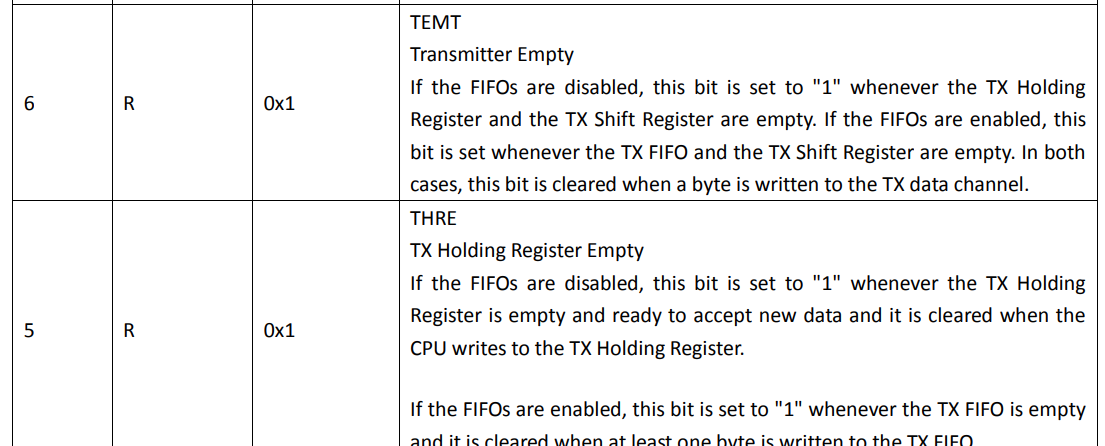
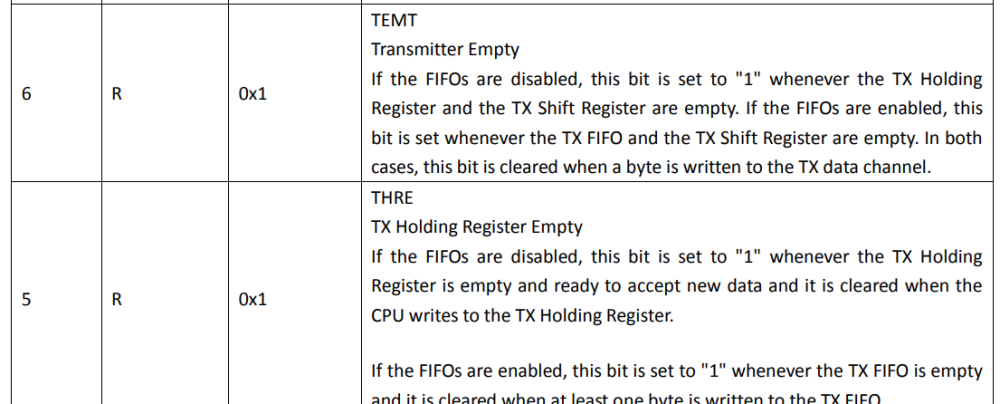
I have found, what is an old issue, first noted long ago in https://stackoverflow.com/questions/45813755/linux-8250-rs485-rts-troubleshooting The user has noted, what it possible misuse of TEMT\THRE IRQs. Looking at 6.12 kernel 8250 drivers, i have found it was changed in the part what was the topic in stackoverflow post. https://github.com/torvalds/linux/commit/b54f7a922d334014071ddaea313a045781024f4d I am novice linux user and have lack of understanding many things, including tty to phys architecture and it settings. Maybe im been able to try fix driver itself (have experience to write baremetal IRQ driver rs485 & uart drivers and modbus stack), but i have really big issues with linux modules building and etc. There are also another evidence about RTS\RS485 issues on 8250 in links below. And mention of some "RS485" state machine, "RS485 software emulation" what "may be buggy" in topic i cant find now.
-

Orange Pi 5 won’t boot from SSD after armbian-install
eselarm replied to Renoria's topic in Orange Pi 5
There a more important things to do (first). Like even creating a package for the OPI5 as a quick scan reveals there is none. So currently an option is to compile U-Boot yourself with added Btrfs support. And/or also do that on github and make pull request. Over time, more U-Boot will support Btrfs I guess, so how do you think people should spent their time. I did look into armbian-install but it is not according to my wishes/methods. It should work, but more work for me to revert/change than just use manual rsync and btrfs options as I want it. I have some backup/cloning scripting that fits Opensuse methods, not Debian. Your other option is to simply install/copy manually and maintain an extra boot/1st partition, FAT formatted. Several old installs do it like that and it is anyway you have to deal with for 'normal' UEFI computers. So that is why I do that. For simple/cheap/headless SBCs, just U-Boot and single partition is very much preferred I think, as that means less objects to maintain and also it allows seamless systemd-nspawn startup/run. That is very handy method of doing things with images. As with multiple partition you need losetup first and select/mount rootfs partition as well manually. I also use extra 1stFAT so it is easier to experiment and switch bootloader and various boot methods/files. Or build your own image with Armbian build, then 1 linux commandline, 'push-button', if you would select /dev/mmcblk0 as image target and have your buildhost running from NVME. Also note that there is the tool btrfs-convert, it works on various SBC images, if you also change/fix boot settings. For Armbian, I think only change is the rootfstype= line in armbianEnv.txt And what works for several UEFI machines is that you add the boot partitions at the end, so you can just shrink rootfs partition a bit, no complete recreate, that might save time when full 4TB HDD. It must have the correct type then so 0xEF00 (ESP), so Windows oriented users will easily get in trouble. Not sure if that also works for Linux only method, seems 0xEA00, but would expect that. Anyway, this is all fixing afterwards options, it of course won't play nice with Ext4 auto expand filesystem method in every SBC image nowadays (eating your SD-card, you never manage to undo). -
Sounds a bit like with My ROCK3A. Bought it last yer and with a SATA breakout board. That breakout board was a newer HW version with a but flatter and simpler (and cheaper of course) SATA connector, such that I could get a SATA cable connected as the MIPI DSI conector was in the way, just slightly too high. So for the 3 euros that it costed I thought, time to warm up the soldering iron and lift it a bit so a SATA cable fits. Radxa apologized and I think the idea was that I would get some new SATA thingy or so for free. Yeah right, trust is gone. That proved a second time as they did not take any further initiative. For example how do they think they can reach me (being at the at the other side of the world). Also now that combination is is just removed from the products page. Indeed they sell now own ASM1166 M.2 M-key modules, of course at a higher price that the generic ones on Aliexpress. No surprise form a Chinese a company, they just throw new boards on the market and hope someone will be their guinea-pig. Also your ROCK4C (non-plus) is not listed anymore. Also note it has no PCIE, so my guess is it uses some USB3 connection. I personally avoid it like a plague. Maybe it can save you in this case, maybe try to get a schematics of the PCB, then the whole thing might work with the HAT off and just GND+5V with own soldering/wiring. Else sell it befor it is too late. That is what also have advised a RPi5 + SATA HAT user who had trouble. As separate components, loss it not too big maybe. My ROCK3A+breakout board was 40 euros, great for replacing old PC for 1 SATA HDD. That those HATs are covering all GPIO, I know, that is why I never will buy a HAT again, also not a Raspberry I think who 'invented' it. I soldered extra wires on top. In your case I would solder the USB console cable on the underside, drop of hotglue and done. Faster than I can write this message. Or else look for a PUKE (Peripheral Under Kernel Environment module that is meant for debugging low-level U-Boot and kernel issues).
-
ping @chraac, do you have an idea?
-
That's surprising. All I knew so far was that modules need to be present, either built-in or as dynamically loaded modules. Do you have a reference for this anomaly?
-

Orange Pi 5 won’t boot from SSD after armbian-install
jimt replied to Renoria's topic in Orange Pi 5
Thanks! It would be helpful if armbian-install somehow checked that before offering the btrfs option. (This is just an interim solution until I figure out what went wrong with a recent Rock 5B upgrade that keeps it from booting and took many of my home services offline. So I will live with ext4 for now, but I thought I should report the problem.) -
 Hey. I have no idea whether this will work for the H313 but I got my H713 Projector rooted using the following method. I'm assuming you at least have the stock firmware, but if not, it seems you can grab it here: https://androidpctv.com/firmware-android-tv-box-h96-max-h313 I dislike Windows so I was irritated that PhoenixSuit only seemed to run well on that platform, and ImgRePacker wasn't great either but then I found this project on GitHub: https://github.com/uictorius/imagewty-tool I'm unsure how you'd do this on Windows and I assume you know of a way to flash your box with a custom img file, but this was my work flow: 1. Back up your original img somewhere safe. Don't play around with this file. 2. Grab the latest available version of Magisk from https://github.com/topjohnwu/Magisk/releases. You want the APK file. 3. Go to this Project on GitHub. CircleTeam provide a browser based method of doing this here: https://circlecashteam.github.io/MagiskPatcher/ 4. Using imagewty-tool you first want to grab your boot partition. Run this against your copy of your firmware img. Let's say it's called update.img: imagewty-tool extract update.img 5. This will extract a bunch of FEX files to a directory called update.img.dump. You want to find the file called "boot.fex" 6. Now copy that file and rename it to "boot.img". Go to the MagiskPatcher site. 7. Upload the "boot.img" file at "Upload boot image" and the Magisk APK at "Upload Magisk APK". 8. Select armeabi-v7a radio button, then check every box below except "Recovery Mode" and click "Patch". 9. After a minute or two, the program will download a new patched boot.img to your Downloads folder. 10. Let's say it's called "new-boot.img", you'll want to rename it as "boot.fex" and overwrite the original boot.fex file in the update.img.dump directory. 11. Run imagewty-tool again, but this time: imagewty-tool repack update.img.dump new-image.img The beauty of this is that repacking recalculates all V-file checksums automatically. 12. Flash new-image.img to your box whatever way you're used to doing it with PhoenixSuit or whatever. However, you're not done. 13. Hopefully the box boots up. Get to adb, grab the Magisk APK again and run: adb install Magisk*.apk Once installed, open the Magisk app up and it will say it needs to complete installation, so go ahead and allow that install. Select the Recommended radio button to install and then reboot. 14. Assuming all went well it should boot back up for you. Run this to check root: adb shell su whoami If all went well it should say "root" in your terminal rather than "shell". A dialogue will pop up on the Android screen asking to allow root privileges so go ahead and allow those.
 -

OrangePi Zero LTS ili9341 TFT LCD (and later OrangePi Zero 3)
robertoj replied to robertoj's topic in Allwinner sunxi
Check out the learning experience in this thread: https://forum.armbian.com/topic/27457-connecting-banana-pi-m2-zero-with-ili9341-display-over-spi-on-latest-armbian-image/#comment-162359 In an ssh session, do this: $ tail -f /var/log/Xorg.0.log And see what happens when the X11 server crashes - Yesterday
-
Ok, I got the serial output working. Oddly everything worked and the unit booted. 😕 So I go and put the Radxa Penta SATA HAT and boom back to the same issue. The HAT appears to be causing an issue. Activity light is on but in a continuous double blink. The NIC is also showing activity but I can not access or ping. Switch shows a link but no data. Sucks because of the Penta HAT, I am not able to connect the serial to USB cable. The HAT is covering the entire GPIO. https://radxa.com/products/accessories/penta-sata-hat Thought to myself. Ok, let's revert back to an older release (Bookworm). It has the same issue. It's not until I get to Bullseye that it works. Has me thinking. Am I that few who purchased the Rock Pi 4C non plus with their Penta SATA HAT?
-
 Armbian monitor https://paste.armbian.com/sakicoqowe
 -

Wake on lan (WOL) is not working on orange pi 5 plus
Deoptim replied to dma's topic in Orange Pi 5 Plus
Here are fix. -

Orange Pi 5 Max SD card booting issue, system normally starts from NVME SSD
not_a_duck replied to alarik's topic in Rockchip
actually did some more digging and i think this describes the same issue that i am seeing with these newer sd cards in uboot spl. https://lore.kernel.org/u-boot/20251031145951.535376-1-c.stoidner@phytec.de/ -
Orange Pi 5 Max SD card booting issue, system normally starts from NVME SSD
not_a_duck replied to alarik's topic in Rockchip
as far as i am understanding this is running off of the onboard spi-flash/eeprom on the orange pi board unless you're reflashing that on first boot U-Boot SPL board init U-Boot SPL 2017.09-orangepi (Aug 30 2024 - 22:09:16) i've also switched to using mainline uboot v2025.10 for my emmc and sd cards that i'm creating but previously had not been in a situation where i needed to update the spi-flash/eeprom for sd cards or emmc uboot proper to be able to be loaded. I was able to resolve my issue by building mainline uboot spl with a timeout in the mmc probing -
 T95 imin-EMCP-V1.0 Board
 -
Orange Pi 5 won’t boot from SSD after armbian-install
eselarm replied to Renoria's topic in Orange Pi 5
U-Boot SPL 2025.10_armbian-2025.10-Se50b-P24f2-Hae98-V38b0-Bbf55-R448a (Nov 19 2025 - 09:08:53 +0000) which is in that image, has no btrfs support I saw for example on my NanoPi-R6C using: U-Boot SPL 2026.01-rc2_armbian-2026.01-rc2-S365a-Pb445-He3cc-V062a-Bbf55-R448a (Dec 03 2025 - 04:31:42 +0000) that it has btrfs support, so can load kernel etc directly from the rootfs partition when it is btrfs formatted. You can first write a newer U-Boot in SPI-Flash, then it should work. -
Hi, how do you mount the share? It might be that systemd manages the mount in newer systems, then, to umount you have to simply systemctl stop your-share.mount You can check with: systemctl list-units --type=mount --all To see if the mount is systemd managed
-
Orange Pi 5 won’t boot from SSD after armbian-install
jimt replied to Renoria's topic in Orange Pi 5
``` ❯ sha256sum Armbian_25.11.1_Orangepi5*img 6cb1e6ed97dc41170db8406b056ecbf422f8801261e13b07da4dae3b45a81ab3 Armbian_25.11.1_Orangepi5_noble_vendor_6.1.115_minimal.img 5781fec6fa812fca1f99e79a42b0312bf4403a2a590dec84458dcfbabd28cd13 Armbian_25.11.1_Orangepi5_trixie_vendor_6.1.115_minimal.img ``` -
Continuing the tradition (1, 2) of micro-optimizations for single-board computers that come into my hands. This time I optimized or rather fixed the wake-up function via USB/WoL/WWoL on the Orange Pi 5 Plus. Also got the WiFi adapter RTW8852BE/RTW8852CE working (at least those are the ones I tested). I tested exclusively on the Vendor 6.1.x kernel since the main wake-up features via USB/PCIE/GPIO1-GPIO4 only work in it. I don't currently have the ability to test the new current kernel and I doubt that Power Management will work fully there. Armbian for Orange Pi 5 Plus from the official website, Vendor kernel (kernel 6.1.115-vendor-rk35xx), what does NOT work by default: 1. No WiFi modules that insert into the PCI-E M.2 socket E-Key work - fixed in dts below 2. Wake-up from USB (mouse/keyboard/even Bluetooth dongle) doesn't work - fixed in dts below 3. WoL via Ethernet (on two ports) - fixed in dts below I also conducted power consumption measurements in all these wake-up modes. Let's start with Ethernet ports (WoL won't work by default due to incomplete dts profile). You need to create an overlay file, links I've attached it to this message. To apply this overlay, you need to copy it somewhere on the single-board computer and execute the command: cd <path to rk3588-orangepi-5-plus-Wakeup-GPIO-RTC-USB-WoL-fixes.dts> sudo armbian-add-overlay rk3588-orangepi-5-plus-Wakeup-GPIO-RTC-USB-WoL-fixes.dts Reboot. (if it doesn't boot at all with it or something doesn't work, you can remove these changes from the /boot/overlay-user/ folder) Wake-up Timer Test: sudo sh -c "echo 0 > /sys/class/rtc/rtc0/wakealarm" sudo sh -c "echo `date '+%s' -d '+ 1 minutes'` > /sys/class/rtc/rtc0/wakealarm" sudo systemctl suspend (here we set wake-up in 1 minute from current time, you can choose seconds/minutes/hours and so on, maybe even days - haven't tested. Installing a battery on RTC is not necessary, Type-C power is sufficient) Power Consumption: Testing was performed on Imax B6 Evo / OWON HDS242S. Please note, power consumption of m.2 SSD, SD-card, eMMC is not accounted for here (ideally they should be powered off in sleep mode), but USB devices were not used, bare single-board computer was tested, each module will have its own consumption, especially USB-connected devices, add your values to the sleep mode consumption. Wake-up only via GPIO0 (this includes power button), RTC In this power-saving mode only the rk3588-orangepi-5-plus-Wakeup-GPIO0-RTC-only-fixes.dts profile is used, keep this in mind, it's not compatible with other dts, you need to choose only one option. I got these values: sudo shutdown -h now | 5.4V | 0.005W | 0.001A sudo systemctl suspend | 5.4V | 0.14W | 0.027A Wake-up via GPIO0, GPIO1-4, RTC, USB, WoL In this power-saving mode only the rk3588-orangepi-5-plus-Wakeup-GPIO-RTC-USB-WoL-fixes.dts profile is used, keep this in mind, it's not compatible with other dts, you need to choose only one option. sudo systemctl suspend | 5.4V | 0.25W | 0.046A RTL8125B (eth0 or eth1, can even be both): sudo ethtool -s eth0 wol g && sudo systemctl suspend | 5.4V | 0.33W | 0,061A RTW8852BE (external rtw8852be driver (rtw89 doesn't support WWoL for RTW8852BE in vendor 6.1 kernel)): sudo iw phy0 wowlan enable any && sudo systemctl suspend | 5.4V | 0.30W | 0,055A RTW8852CE (built-in rtw89 driver in the build): sudo iw phy0 wowlan enable magic-packet && sudo systemctl suspend | 5.4V | 0.27W | 0,051A (I want to note that the Ethernet ports on Orange Pi 5 Plus in WoL mode don't light up and don't show link activity, you can only find out if the link is working on the router or on the device to which the single-board computer is connected. In magic-packet standby mode the link switches to 10Mbit and for example on the router loses the assigned IP address, you can find out if the device is alive only by ARP scanning on the router itself or by the link light indication on the router itself. The same applies to WWoL (WiFi) - only on the router or device to which the single-board computer is connected can you check in active clients mode or ARP scan for the presence of MAC address) My Armbian build from the official website on Vendor 6.1 kernel where rtw89 (WiFi) modules are already compiled and pre-installed in the kernel has a peculiarity that this driver supports WWoL function only for RTW8852CE - this is a slightly different chip than the official proprietary WiFi module for Orange Pi 5 Plus which uses RTW8852BE. For WWoL to work on RTW8852BE you need to install a third-party driver, for example I recommend from this source. How to use WoL, WWoL: For wired network use ip and ethtool utilities, for wireless network iw. WoL over LAN WWoL over WiFi External Drivers: For RTW8852BE/RTW8852CE and others there are fairly recent drivers (at the time of writing this manual), here's a brief instruction on how to install them on Orange Pi 5 Plus. Issues: File: rk3588-orangepi-5-plus-Wakeup-GPIO-RTC-USB-WoL-fixes.dts File: rk3588-orangepi-5-plus-Wakeup-GPIO0-RTC-only-fixes.dts Original Link 4PDA
-
https://zuckerbude.org/armbian-using-kernel-config/
-
Once this is merged, more recent SoC code can be rebased on top:https://github.com/armbian/build/pull/9049
-
I am talking about hdmi audio. Analog audio works fine on both kernels. HDMI-Audio doesn't work in 6.16.8 kernel. I'll keep using v25.11.0-trunk.190 with kernel 6.15.4 for now since HDMI works there. I might experiment with those configs later, or perhaps it will get fixed in a future version. Thanks.