All Activity
- Past hour
-

Cannot run ARMbian on my tv box (TX10 PRO)
erebus041 replied to erebus041's topic in Allwinner CPU Boxes
use balena etcher or rufus, would work just fine! also you can use Hqnicolas have provided earlier, use a USB to TTL converter. works great if nothing works - Today
-
Cannot run ARMbian on my tv box (TX10 PRO)
erebus041 replied to erebus041's topic in Allwinner CPU Boxes
@Farhan Ishraq yeah sure! here you go: https://github.com/YuzukiHD/YuzukiChameleon although this image is a bit older, it's currently running debian bullseye i guess. if you need armbian, i would suggest the method that @Sadiq Ahmed applied -
Hello, I have installed the Armbian 26.2 minimal IOT image based on Debian 13 Trixie - with the 6.18.x kernel - and I noticed the USB2 port (the single, vertical port next to the Ethernet port) is not working. Is this a limitation of the mainstream kernel (6.18.x) - i.e. does this work only with the vendor kernel (6.1.x) ? NB: I upgraded to 6.19 using the 'edge' kernel, but I'm seeing the same behavior. Here's the armbianmonitor outpur - https://paste.armbian.com/raw/udefojuxuk
-
 After over five years of development and collaboration across the Open Source community, mainline Linux support for Rockchip RK3588's video capture hardware has finally landed. View the full article
 -
 @Sergioclr are you sure the board has secure boot enabled? You should install a USB-to-UART TTL device.
 -
 After compiling many (10+) images, I was not able to boot a single one through SD card and the "toothpick" technique. It is not my character, but I give up. I am grateful for your support and patience. Thank you. Sergioclr.
 - Yesterday
-
 @Jugo Slaven it seems you are running Android not Armbian. These forums are for Armbian Linux not Android. You should ask your question at a site that deals with Android.
 -

Rock 5C with 2.5G Router Hat gets hot with Armbian image.
Werner replied to JakobL's topic in Radxa Rock 5C
Providing logs with armbianmonitor -u helps with troubleshooting and significantly raises chances that issue gets addressed. -
 @SteeMan Firmware on my android box is for MXQ 4k 5g, older original version, and I can send you if you want the .img file of the firmware.The CPU of my android box is sun8iw7 Allwinner.When I power OFF the box I can't power on it anymore.
 -
Hi! The board gets unnormally hot with when i attach the 2.5G Router Hat. (Powered though the HAT) I tried vendor and edge kernel. Same result. Using the radxa image, its significantly cooler. First look through dts i cannot find any problem. Maybe someone has a better understanding? Thanks Jakob
-
The only thing I could manage to get information from was this: I had to rewrite the SPI-flash and now I see: Not sure if this helps: Btw, this is the output when I was using the official OrangePI Ubuntu distro:
-
Strangely I can't get any outcome from that command: Now I am confused if there is something else going on, however, the OrangePi official distro recognised the nvme disk.
-
You need the U-Boot source-code version; I at least cannot conclude on it; You can watch the start-up via serial console, then you will see. Or like this: root@rock3a:~# strings /dev/mtdblock0 | grep "U-Boot SPL 20" U-Boot SPL 2017.09-armbian (May 20 2024 - 00:46:51) I see you have 2 options: which U-Boot is used: mtdblock0 (the SPI-flash) or mmcblk0 (SD-card) ??
-
Hey @eselarm, Thanks for the quick answer. My goal is indeed having a more generic computer for server tasks. The version of the u-boot is: I have switched again to the orangepi5 6.18.10-current-rockchip64 kernel but still not showing nothing. Thank you.
-
Log shows nothing about PCIE when 6.19.0-edge-rockchip64, it does when 6.18.8-current-rockchip64 If you just upgraded the kernel via apt, then this might be the point where an older U-Boot is incompatible with newer kernel. This is the case for all Rockchip devices I have and not strange. It is like it is, so if you want edge or newest or even standard Debian sid/unstable/testing kernel, you will need to look at that in more detail. I have been spending a lot of time on it, it is simply what you want or need. If you want all RK3588 silicon HW support, so like video encoders, stick to vendor based U-Boot and kernel. I you want a generic computer that is good enough for server tasks and web-browsing etc, use mainline based U-Boot and kernel. Of course something else might be wrong, but reporting U-Boot version would be needed and helpful first I think.
-

Remote power button for Banana Pi M1
John Felstead replied to John Felstead's topic in Allwinner sunxi
Problem solved. Rather than using an electrical connection I overcame the issue mechanically. When the board was mounted in the box I drilled a hole directly opposite the switch and inserted an old self propelling biro which I cut down to the right length. I left the spting in place but removed the latching mechanism in the lid. Pressing the top of the biro activated the switch🤪 -
Hi everyone, I just installed Armbian on my OrangePi 5, but I can't get it to recognize the NVMe drive. I've tried the official OrangePi Ubuntu distro, and it detects the NVMe without any issues. However, when using Armbian, it simply doesn't show up. I'm not sure what to do at this point. I would really like to use Armbian, but it seems unable to detect the NVMe on this particular device. Interestingly, I have another OrangePi 5 Pro where I installed Armbian, and it recognizes the NVMe and works perfectly fine — but not on the standard OrangePi 5. Does anyone know how to fix this issue, or can you recommend a good alternative? Thank you in advance.
- Last week
-
@Sergioclr Try this one next. 159-add-x96-q-lpddr3-v1.3-defconfig.patch
-
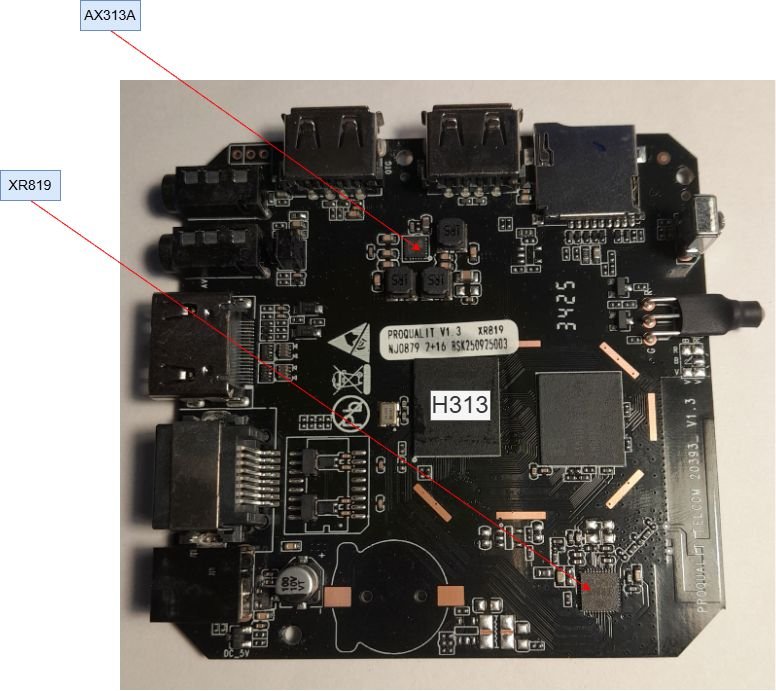
😳number of lines of code? My bad. Photo with details:
-
Looks like you are right. Did not want to modify uboot to make it understand f2fs , so i had to move /boot to ext4 and keep rest of / on f2fs. Now it boots. Thx for help.
-
 Hello, good afternoon. I'm using a translator, so I apologize if it's not clear. I have an Orange Pi 5 Plus SBC which I have Android installed on the m2 drive. I install Armbian on a microSD card. I don't remember what problem I was having, but I had to format the SPI Flash. After that, the Armbian version worked fine. Also, after formatting the SPI Flash, my microphone stopped working on Android (it works on Armbian). Could this be due to formatting the SPI Flash? Thank you.
 -
@Sergioclr can you find a AXP chip on your board? It’s safer to boot images with the same AXP chip. I haven’t bricked any of my boxes. Don’t use armbian-config’s write to emmc until you have a stable image.
-
@Sergioclryou are only adding one line of code.. so whatever it is just add one. 162 would be 163.
-
Update: I was able to compile the H98H example and write it to SD card (Armbian Imager). The SD firmware load promptly "bricked" the box! I reloaded the original (secure) image by means of PhoenixSuit software. I am considering building an image using sun50i-h313-x96q-ddr3-v5.1.dts but I don't know how to customize the "@@ -0,0 +1,162 @@" parameters. Could you help me? Thanks in advance.
-
@qq20739111 I'll add it soon. 6.18 might take awhile.