All Activity
- Past hour
-
which modules?
-
Where did you get the kernel source? I want to add some kernel modules to the config. Or is it vanilla 7.1 from Armbian?
- Today
-
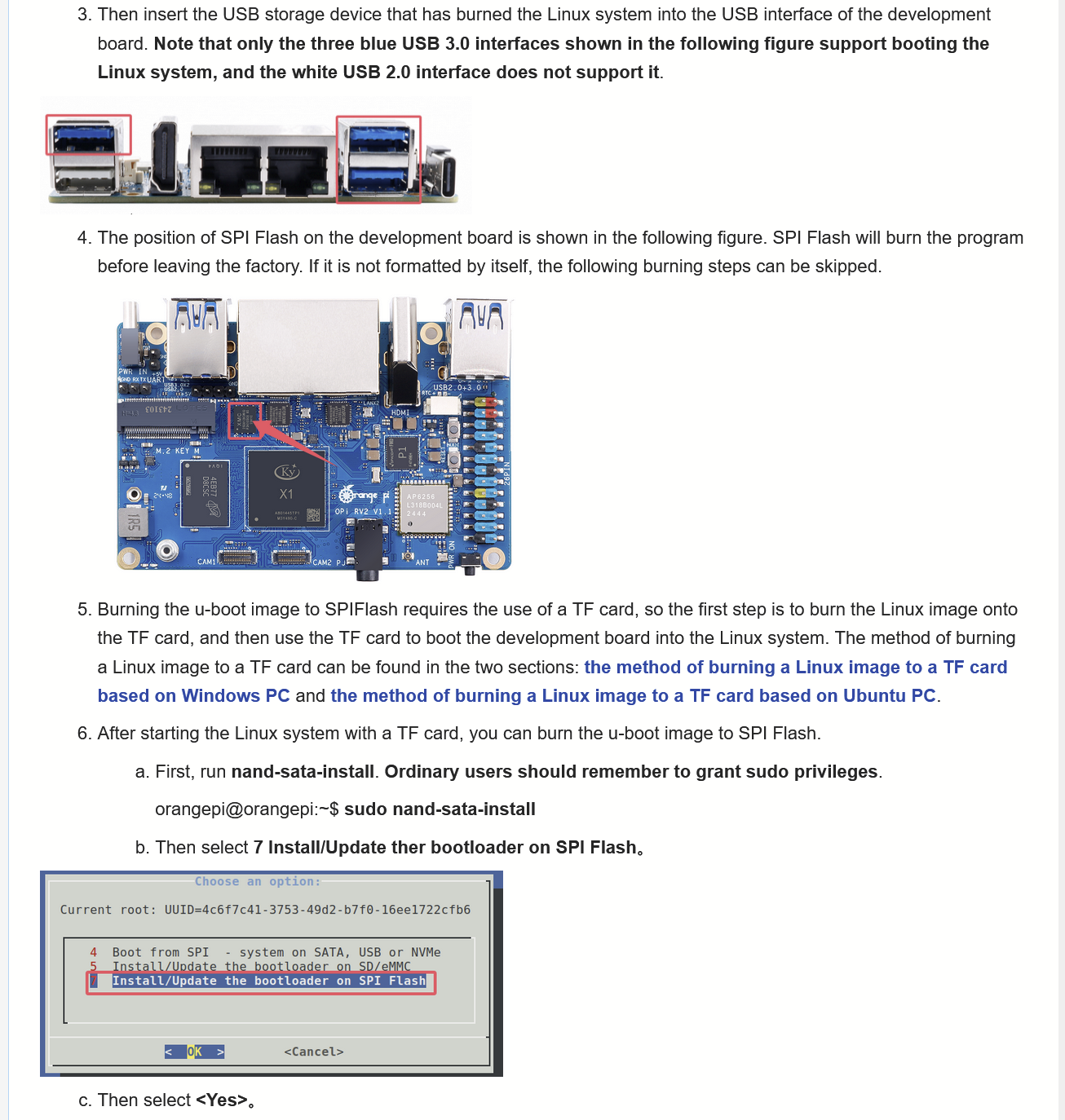
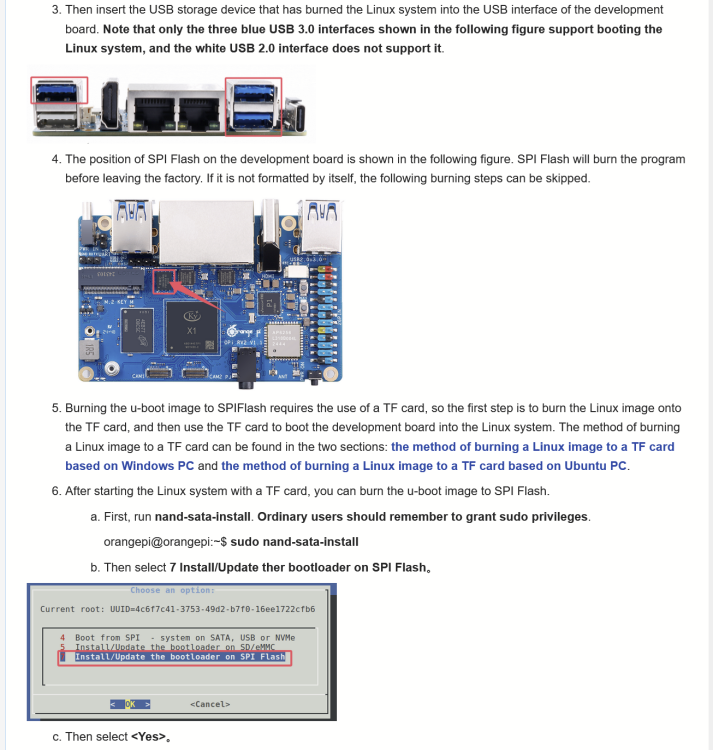
Ah right, the OrangePI RV2 WIKI page http://www.orangepi.org/orangepiwiki/index.php/Orange_Pi_RV2#Method_for_burning_Linux_images_to_SPIFlash.2BUSB_storage_devices says the RV2 can be booted from USB directly, via SPI flash. The WIKI is not very clear though - does RV2 come with the SPI pre-flashed? It kind of sounds like that from this YouTube video https://www.youtube.com/watch?v=YzajoWMJgKI which does not mention flashing the SPI at all. The WIKI does not say clearly, but it says, if you need to flash the SPI, then just boot Linux off MicroSD card. But it does not say which Linux. They must most likely mean their own Ubuntu distribution downloable on http://www.orangepi.org/html/hardWare/computerAndMicrocontrollers/service-and-support/Orange-Pi-RV2.html , right? Then do "sudo nand-sata-install" which is expected to exist, and it will install UBoot to the SPI flash chip. After this is done, when booting, UBoot will load from the SPI flash, and it will auto-detect that there is a bootable OS on an USB device, and just boot it, right? @sven-ola
-
Hi @armfan, you can simply change the append root=UUID=(some uuid) in /boot/extlinux/extlinux.conf to suit your needs.
-
What's right way for kernel updating on old installation of armbian (trixie) on 8k618-t? Will it be enough just to install .apk with new kernel?
-
 Hello community! I’ve been a lurker for a while and recently flashed the latest Armbian Jammy onto a spare NanoPi NEO I had lying around. I'm currently designing a headless DIY time-tracking kiosk for a small local workshop using an RC522 RFID reader via SPI. Reading the RFID tags and logging the raw Unix timestamps (punch-in/punch-out) to a local SQLite database was the easy part. Where I'm getting a bit stuck is the actual backend calculation logic. I need the system to accurately calculate the daily net working hours, which means automatically deducting mandatory statutory breaks (e.g., 30 mins after 6 hours of work) and tracking daily overtime. To ensure the math is strictly accurate and handles edge cases properly, I am trying to write a Python script that replicates the exact calculation logic used by standard tools like arbeitszeitrechnerprofi.de for the backend processing. Before I completely reinvent the wheel writing complex Python datetime scripts, has anyone here built a similar attendance or punch-clock project on Armbian? What’s the best way to handle this data processing locally? Would it be better to just use Node-RED for easier visual flow and logic management rather than a standalone Python daemon? Also, any tips on GPIO reliability for the RFID reader under the recent Armbian kernels would be highly appreciated. I plan to start wiring the prototype this weekend. Thanks in advance!
 -
To be honnest, try my image above... including fix for aic8800 Or try this one, compiled for Radxa Rock 2F - only uboot changed but not tested as I have no board...
-
@alexc I've already tried plug in/out the DP port, but it didn't work. Since Nick just updated the config, I'll give it a try with the new one.
-
to use it on Rock 2F I can just point it to the 2F device tree, right?
-
@sven-ola Hi Sven-Ola, thanks a lot for your response. About boot medium, can I easily put a /boot volume on the SD memory card and have it mount / from USB? If so do you have some cues for what I should change inside your Armbian image for it to do that. Regarding build my own PCI device drivers yes of course. Thanks a lot for providing the image!
-
 Need to a build a recipe for that, hopefully it will be supported as well (but let's hope mpv + ffmpeg combo works)
 -
@Curvy Android Try something like fdtoverlays /boot/dtb/spacemit/overlay/k1-uart9.dtbo, this should trigger some u-boot message like: [ 5.621] Retrieving file: /boot/dtb/spacemit/k1-orangepi-rv2.dtb [ 5.672] Retrieving file: /boot/dtb/spacemit/overlay/k1-uart9.dtbo HTH // Sven-Ola
-
@qq20739111 Sorry, I forgot to update the kernel config. Ethernet should work now. @humanus "DP works without replugging"
-
Hi @qq20739111, In the log, DP looks fine to me, maybe you can try plug in / out a few times? The display is not that stable to be honest. As for the ethernet, I think @Nick A didn't update the config so the driver is still not built into the kernel (https://github.com/NickAlilovic/build/blob/Radxa-mainline-WIP-a7s/config/kernel/linux-sun60iw2-edge.config). You can build by yourself (just enable CONFIG_AW_STMMAC_ETH)
-
Radxa Rock 2A Kernel version 7.1: link Radxa Rock 2A AIC_FIX_7.1: link Please also remember as it is experimental and all you do it is on your own risk
-
I'm trying to activate the UART9 overlay to enable an additional serial port. According to the Armbian documentation, I should create /boot/armbianEnv.txt and add overlays=uart9 to it. However, after multiple attempts, the serial boot log doesn't show any changes, as if the file isn't being read at all. Here's what I've tried so far: Created /boot/armbianEnv.txt with the following content: overlays=uart9 Tried different overlay_prefix settings (e.g., overlay_prefix=k1). Renamed the file to orangepiEnv.txt after seeing it referenced elsewhere. None of these changes seem to have any effect, the UART9 device doesn't appear in /dev/, and the boot log doesn't reflect the overlay being applied. Could someone point me in the right direction? What am I missing here? Once I get the UART9 overlay working, I'd also like to create a custom overlay to use a GPIO pin for PPS (Pulse Per Second) input. Any guidance on that would be greatly appreciated!
-
Hi @rm_, I tried my RV2 with current kernel and disabled bcmdhd. For reference, I have uploaded the image to https://privat-in.de under "Downloads". Prevented bcmdhd.ko from loading. There is no such load. I don't thing that waiting a couple of hours will change that. Also, I have zero IPI4 irqs, thus you may need to locate the interrupt source, e.g. with lspci and lsusb. Maybe you changed something in the kernel cfg, please compare attached cfg to your /proc/config.gz). HTH // Sven-Ola config.gz
-
 Just checking whether Ubuntu Resolute will be supported?
 -
@alexc @Nick A With the latest changes from you, incorporated by Nick, the 6.18 kernel. This is the boot log of the serial port: uart_log_20260512.md The blue LED is blinking normally, but there is no display output via the DP port on the dock, and the wired Ethernet isn't working either. I haven't tested the PCIe interface yet as I don't have the adapter module on hand.
-

Enable ethernet port on expansion board for OrangePi zero 2w
Werner replied to Golecom's topic in Allwinner sunxi
Try with this commit:https://github.com/armbian/build/commit/b880d98b07090b0b59bb3096c508e5123b224037 Seems like Micha had to cleanup my mess - Yesterday
-
@humanus That's something we might need to work on next. I only have a M.2 board but my Raspberry Pi is using it right now. Let me see if I can use it to test later. So PCIE definitely works on 5.15/6.6, right? Your log doesn't really say where it crashes. For the GPU, what's the GPU? I don't think we built the kernel with any PCIE GPU drivers enabled, so that might be a potential problem. @Wintermute The same thing goes to the SATA. It's possible your PCIE to SATA controller is not supported/enabled in the kernel config (This applies to any kernel version).
-
@meco works perfectly and passes stress-ng. Thanks!
-
@alexc With the latest changes from you, incorporated by Nick, the 6.18 kernel boots. But there's a problem with PCI-Express. I can't get anything to work. I tried a GPU and a USB 3.0 hub, connected via a powered flex-to-pcie-1x adapter. Both are detected and get power but don't work. When I do lspci, the hub appears (the GPU doesn't) and when I try `lspci -t`, I get a segmentation fault. So something is wrong. Here is the log: https://paste.armbian.eu/akilodanus.yaml
-
@alexc @humanus Here is the UART log get from the image for which I published the SHA256. UART_log.md
-
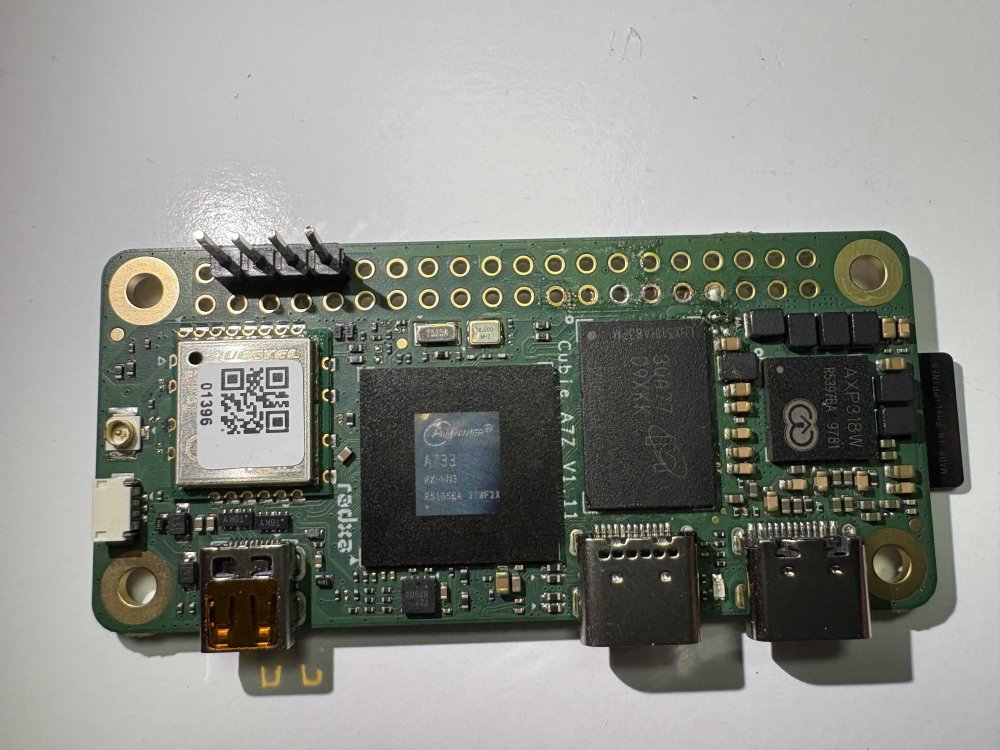
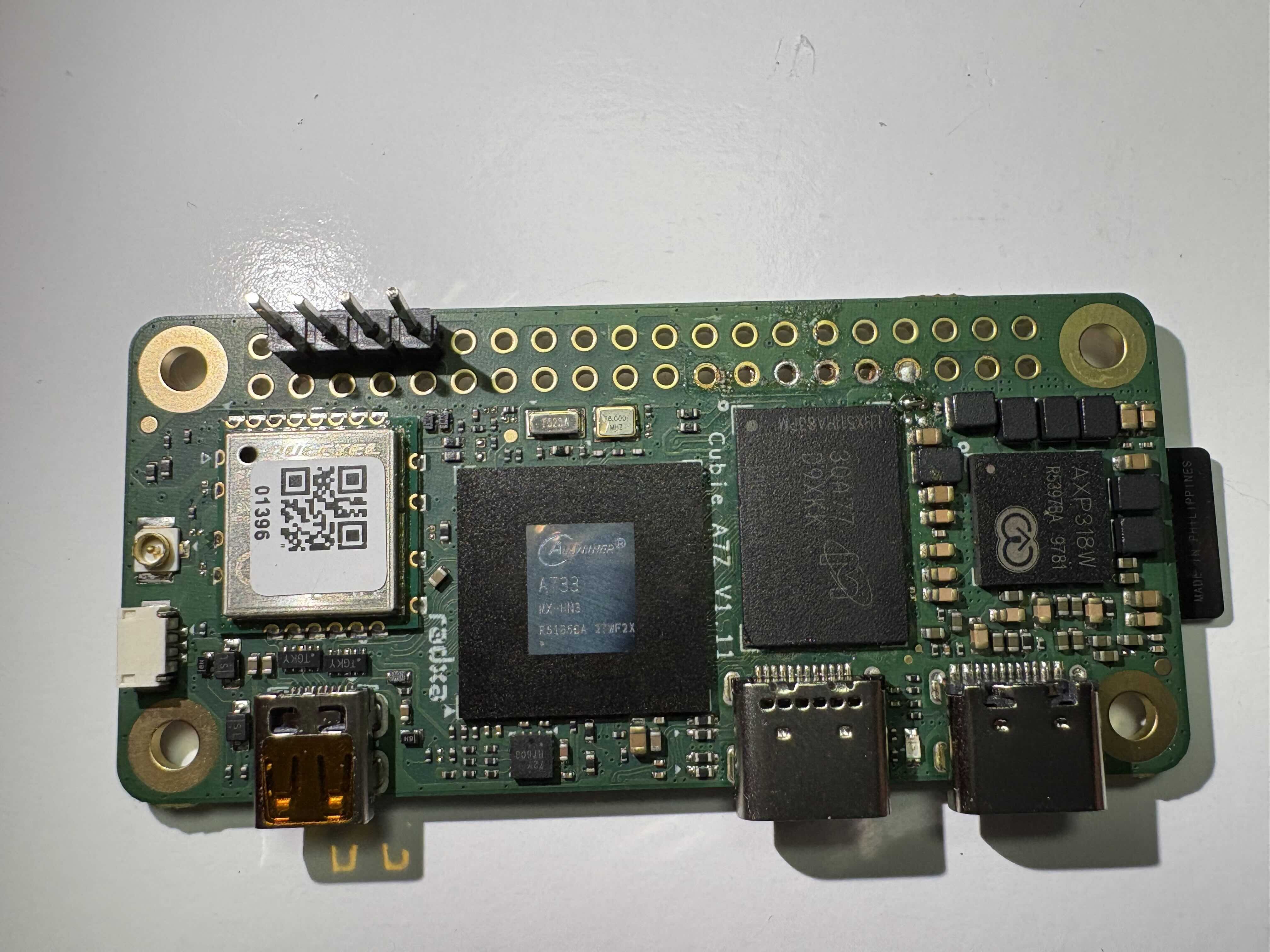
@Nick A Hi Nick, I'm using your image (Radxa-cubie-a7z-v0.6.4_trixie_vendor_6.6.98_xfce_desktop.img) on my Radxa Cubie A7Z, which I've DIY-modified to have 6GB of RAM. Micron D9XKK (MT53E1536M32D4DT-046 AAT:A) 6GB LPDDR4 chip. Unfortunately, it fails to boot. Here is the UART output below. Do you know how to fix this? Does the system need specific configuration to recognize the 6GB RAM? ...... [212]HELLO! BOOT0 is starting! [215]BOOT0 commit : {4721ad08} [218]board gpio withstand voltage auto mode [233]dram_para_total:0xf [235]vaild para:6 select dram para10 [mmc]: mmc driver ver 2025-10-16 17:10 [mmc]: Wrong media type 0x0 [mmc]: ***Try SD card 0*** [mmc]: HSSDR52/SDR25 4 bit [mmc]: 50000000 Hz [mmc]: 15279 MB [mmc]: ***SD/MMC 0 init OK!!!*** [273]DRAM BOOT DRIVE INFO: V0.601 [277]DRAM_VCC set to 1100 mv [280]DRAM CLK =1800 MHZ [282]DRAM Type =8 (8:LPDDR4,9:LPDDR5) [387]Training result is = 7 [390]DRAM Pstate 1 training, frequency is 1200 Mhz [503]Training result is = 7 [506]DRAM Pstate 2 training, frequency is 800 Mhz [716]Training result is = 7 [718]DRAM Pstate 3 training, frequency is 400 Mhz [3934]Training result is = 7 [3937]DRAM Pstate 0 training, frequency is 1800 Mhz [3945]Actual DRAM SIZE =8192 M [3948]DRAM SIZE =8192 MBytes, para1 = 311a, para2 = 20001001, dram_tpr13 = 6067 [3962]DRAM simple test OK. [3968]error:bad magic. [4032]error: dtb not found for scp [4036]mmc not para [4038]Jump to ATF: monitor_base = 0x48000000, uboot_base = 0x4a000000, optee_base = 0x0 NOTICE: BL31: OP-TEE 32bit detected NOTICE: BL31: U-BOOT 32bit detected NOTICE: BL31: dram size is 8589934592 bytes NOTICE: BL31: v2.5(debug):48e54578a NOTICE: BL31: Built : 14:13:06, Jul 2 2025 NOTICE: BL31: No DTB found. ERROR: Error initializing runtime service opteed_fast U-Boot 2018.07-17-boot-aw2501-g4c7078cfdf7-dirty (Apr 29 2026 - 10:03:59 +0000) Allwinner Technology [04.094]CPU: Allwinner Family [04.097]Model: Radxa Cubie A7A I2C: ready [04.160]DRAM: 8 GiB [04.169]Relocation Offset is: 75d89000 [04.223]secure enable bit: 0 [04.226]PMU: AXP8191 [04.228]PMU: AXP8191 VER_A FDT ERROR:fdt_get_regulator_name:get property handle twi-supply error:FDT_ERR_INTERNAL [04.240]bmu_axp515_probe pmic_bus_read fail [04.244][AXP8191] onoff status: 0x50 = 0x1, 0x51 = 0x0 [04.249][AXP8191] charge status: 0x4 = 0x0 [04.252]CPU=1014 MHz,PLL6=1200 Mhz,AHB=200 Mhz, APB1=24Mhz MBus=600Mhz [04.259]gic: sec monitor mode SPI ALL: ready [04.303]flash init start [04.305]workmode = 0,storage type = 1 [04.308][mmc]: mmc driver ver uboot2018:2024-10-18 9:01:00 -- uboot2018:2025-03-28 10:03:00 [04.317][mmc]: get sdc_type fail and use default host:tm1. [04.325][mmc]: can't find node "mmc0",will add new node [04.329][mmc]: fdt err returned <no error> [04.333][mmc]: Using default timing para [04.337][mmc]: SUNXI SDMMC Controller Version:0x50530 [04.355][mmc]: card_caps:0x3000000a [04.358][mmc]: host_caps:0x3000003f [04.362]sunxi flash init ok get value error [04.373]Loading Environment from SUNXI_FLASH... OK No ethernet found. [04.411]NOT support bridge yet [04.413]Warn: no find panel or bridge [04.515]drm hdmi get mode: 1920x1080@60Hz hdmi0@5520000: use force output detailed mode clock 148500 kHz, flags[5] H: 1920 2008 2052 2200 V: 1080 1084 1089 1125 bus_format: 0 clk_set_rate: <NULL> has NULL parent [04.620]suxni tcon hdmi set rate: 148500000Hz and get diff: -148500000Hz [04.692]the secure storage item0 copy0 magic is bad [04.704]the secure storage item0 copy1 magic is bad [04.709]usb burn from boot delay time 0 [04.715]usb prepare ok [04.924]usb sof ok [04.926]usb probe ok [04.928]usb setup ok set address 0x4 set address 0x4 ok [05.334]do_burn_from_boot usb : have no handshake skip update boot_param cann't get the boot_base from the env [05.346]update part info [05.351]battery temp is -1 [05.358]update bootcmd [05.366](not enough data: expected >= 8 cells, got 4 cells) Link up timeout Speed change timeout PCIe speed of Gen1 Override default fdtfile to allwinner/sun60i-a733-cubie-a7z.dtb [07.810]libfdt fdt_check_header(): FDT_ERR_BADMAGIC [07.816]libfdt fdt_path_offset() returned FDT_ERR_BADMAGIC [07.821][mmc]: get sunxi-mmc0 string failed [07.826]The storage not support sample function [07.832]## error: update_fdt_dram_para_from_bootpara : FDT_ERR_NOTFOUND ret 0 [07.842]chip id : 0x00005100 0x00004900 0x0000c418 0x00002294 [07.847]mac addr => 08:51:49:dc:b6:2c [07.851]chip id : 0x00005100 0x00004900 0x0000c418 0x00002294 [07.856]mac addr => 08:51:49:dc:b6:2d [07.860]/chosen/rng-seed node not exit [07.864]no battery, disabled battery functons [07.868]Could not find nodeoffset for bat_supply [07.872]update dts curr_device:0 Device: SUNXI SD/MMC Manufacturer ID: 1b OEM: 534d Name: 00000 Bus Speed: 50000000 Mode : SD High Speed (50MHz) Rd Block Len: 512 SD version 3.0 High Capacity: Yes Capacity: 14.9 GiB Bus Width: 4-bit Erase Group Size: 512 Bytes [ufs]info:Driver version 0.0.24 2024.12.30 16:00 [ufs]info:Cal words 0x60:val 0xae400000, 0x64:val 0x4f21885d [ufs]err:uic c 16,uic a 0,1,0 [ufs]err:e 80000010,0,0,0,0 [ufs]err:int s 0,400 [ufs]err:Device not present [ufs]err:wait device link startup failed [ufs]info:peer link startup timeout [ufs]info:Cal words 0x60:val 0xae400000, 0x64:val 0x4f21885d [ufs]err:uic c 16,uic a 0,1,0 [ufs]err:e 80000010,0,0,0,0 [ufs]err:int s 0,400 [ufs]err:Device not present [ufs]err:wait device link startup failed [ufs]info:peer link startup timeout [ufs]info:Cal words 0x60:val 0xae400000, 0x64:val 0x4f21885d [ufs]err:uic c 16,uic a 0,1,0 [ufs]err:e 80000010,0,0,0,0 [ufs]err:int s 0,400 [ufs]err:Device not present [ufs]err:wait device link startup failed [ufs]info:peer link startup timeout [ufs]info:Cal words 0x60:val 0xae400000, 0x64:val 0x4f21885d [ufs]err:uic c 16,uic a 0,1,0 [ufs]err:e 80000010,0,0,0,0 [ufs]err:int s 0,400 [ufs]err:Device not present [ufs]err:wait device link startup failed [ufs]info:peer link startup timeout [ufs]err:link startup failed -6 [ufs]err:ufshcd_probe() failed -6 fail to init ufs sunxi_flash - sunxi_flash sub-system Usage: sunxi_flash sunxi_flash init storage_type sunxi_flash read mem_addr part_name [size] sunxi_flash read_mtd mem_addr part_name [size] sunxi_flash write <mem_addr> <part_name> [size] sunxi_flash write <mem_addr> <part_name> [offset] [size] sunxi_flash write_mtd <mem_addr> <part_name> sunxi_flash boot0 force_dram_update_size <new_val> sunxi_flash boot0 force_dram_update_flag <new_val> Hit any key to stop autoboot: 0 starting USB... USB0: start sunxi USB-DRD... config usb clk ok sunxi USB-DRD init ok... USB EHCI 1.00 scanning bus 0 for devices... 1 USB Device(s) found USB1: start sunxi USB1-Host... config usb clk ok sunxi USB1-Host init ok... USB EHCI 1.00 scanning bus 1 for devices... 1 USB Device(s) found scanning usb for storage devices... 0 Storage Device(s) found Device 0: device type unknown ... is now current device ** Bad device usb 0 ** ** Bad device usb 0 ** mmc0 is current device Scanning mmc 0:1... Found U-Boot script /boot.scr 5210 bytes read in 5 ms (1017.6 KiB/s) ## Executing script at 4fc00000 subfdt=sun60i-a733-cubie-a7z.dtb U-boot loaded from SD Boot script loaded from mmc 377 bytes read in 3 ms (122.1 KiB/s) subfdt=sun60i-a733-cubie-a7z.dtb Load fdt: /dtb/allwinner/sun60i-a733-cubie-a7z.dtb 195011 bytes read in 17 ms (10.9 MiB/s) 24361472 bytes read in 1013 ms (22.9 MiB/s) 23892015 bytes read in 995 ms (22.9 MiB/s) [15.233]libfdt fdt_path_offset() returned FDT_ERR_BADMAGIC [15.242]The storage not support sample function ret 0 [15.349]mac addr => 08:51:49:dc:b6:2c [15.353]mac addr => 08:51:49:dc:b6:2d [15.358]no battery, disabled battery functons [15.365]update dts stop sunxi USB-DRD ok... stop sunxi USB1-Host ok... [15.391]Starting kernel ... [15.394]total: 15394 ms [15.396][mmc]: MMC Device 2 not found [15.400][mmc]: mmc 2 not find, so not exit NOTICE: [SCP] :wait arisc ready.... NOTICE: [SCP] :arisc version: [d463b9da43dc50320f21ba51c6c51afe2db20d83] NOTICE: [SCP] :arisc startup ready NOTICE: [SCP] :arisc startup notify message feedback NOTICE: [SCP] :sunxi-arisc driver is starting NOTICE: BL3-1: Next image address = 0x40200000 NOTICE: BL3-1: Next image spsr = 0x3c5