All Activity
- Past hour
-
Can't confirm, still the same thing. U-boot built 7 days ago (linux-u-boot-odroidm1-edge/sid,now 26.8.0-trunk.105 arm64) # uname -r 7.0.11-edge-rockchip64 # grep -a --null-data U-Boot /dev/mtd0ro U-Boot SPL 2026.01_armbian-2026.01-S127a-Pb401-H8652-Vab81-Bd0d2-R448a (May 31 2026 - 05:41:25 +0000) # grep -a --null-data U-Boot /dev/mmcblk1 U-Boot SPL 2026.01_armbian-2026.01-S127a-Pb401-H8652-Vab81-Bd0d2-R448a (May 31 2026 - 05:41:25 +0000) 100 Mbps link still performs much better by some unknown reason. Hmm. (I've already tested the cable, any other computer/laptop transmits the data just fine at full Gigabit speed)
-
I was running armbian on emmc on an X96Air 4GB/64GB 1GBit S905X3 box a while ago and then after a power down it bricked. No boot screen, no android (obviously) - it sent a HDMI signal, but nothing. Managed to recover it and get Android flashed on it again then Armbian again on SD then emmc. Just done "apt upgrade" to get things up to date. All went well, then a reboot, and..... bricked again. Nothing obvious, no issues. I'll go through the process again - Android -> armbian sd -> armbian emmc But is there a known issue with any boxes that just brick themselves? Any ways to avoid it? This box is particularly useful because of the USB3 port with Gbit ethernet and I want to make use of it. Previously when I'd been testing it it had been rock solid for a few months with good uptime and no issues - until the brick.
- Today
-
Please don't test it yet. I have a problem with my development environment. I will upload a new version once I've resolved it.
-
@alexc Had to take a couple days break while we wait for a ordered Oscilloscope and CH341 to arrive. Current focus is SPI-NOR which is the most dangerous part of this EDK2 port due to the vendor of the board not releasing it to the public. That doesn't stop us tinkerers from from physically pulling it from the on-board SPI-NOR, so holding back such a valuable piece of the puzzle serves what purpose? They released it for the Rockchip SoC so who knows. After the SPI-NOR is conquered I hope to get some runtime pixels on the screen. I say around that time the EDK2 will be more of a usable boot loader to start on the alpha release (compiled public release). Right now I can boot to a generic Ubuntu 26.04 with working ssh and uart so things are looking good. Working with Opus 4.8 has been surprisingly very productive. These models have got so much better, I find myself getting more sleep by using Openclaw HEARTBEAT.md to nudge Opus 4.8 every 30 minutes to autonomously work on the port in my absence My good guy has a full report of his work done and ready to review by lunchtime
-
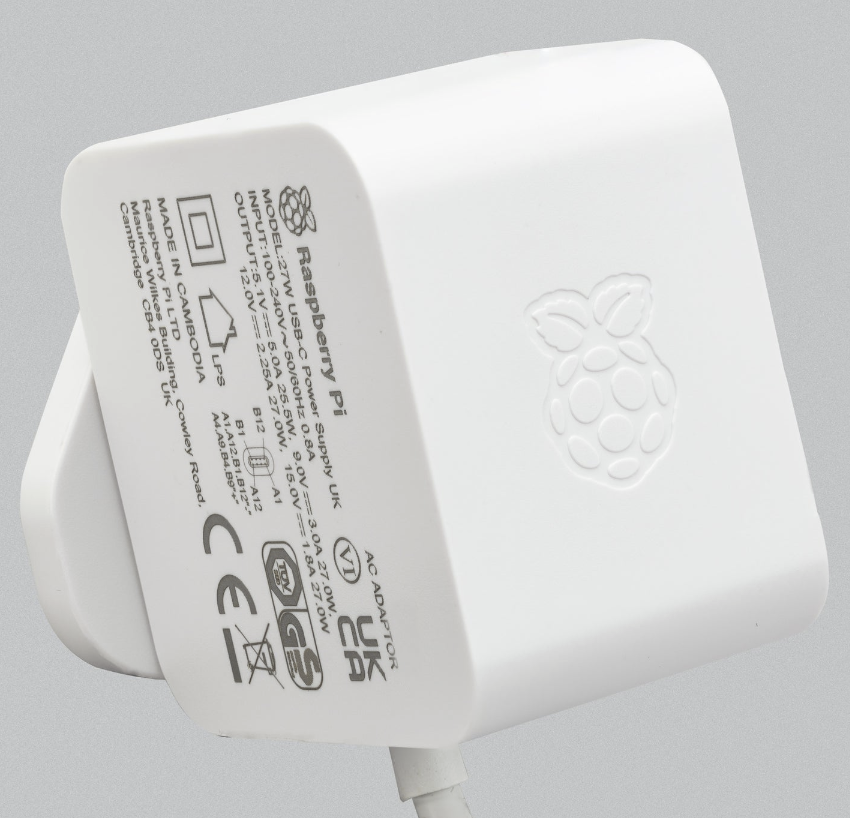
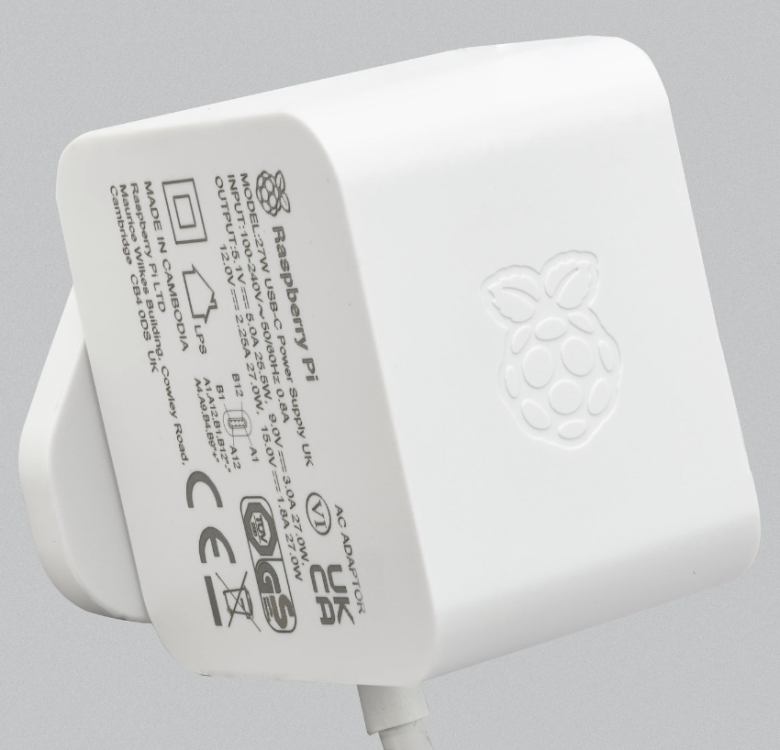
I could try one more thing: I could try a *third* USB-C power supply. However, there don't exist very many 5A@5V power supplies on the market. I would try a 3A@5V rated power supply. Have you guys had any problem with power supplies on the RV2? What power supply do you use? Would it be of any help that I buy a Raspberry Pi 5 power supply made by Raspberry Pi Ltd, that's rated 5.1V@5A? https://www.raspberrypi.com/products/27w-power-supply/ https://www.amazon.de/-/en/Official-Raspberry-Pi-USB-C-Supply-black/dp/B0CN3MRV16 Actually in this context is it a good thing to use a power supply rated 5.1V rather than 5.0V? Anyhow as far as the 3.3V supply on the RV2 is concerned, the voltage converter should treat 5.1V and 5.0V equally, it has a wide accepted voltage interval.
-
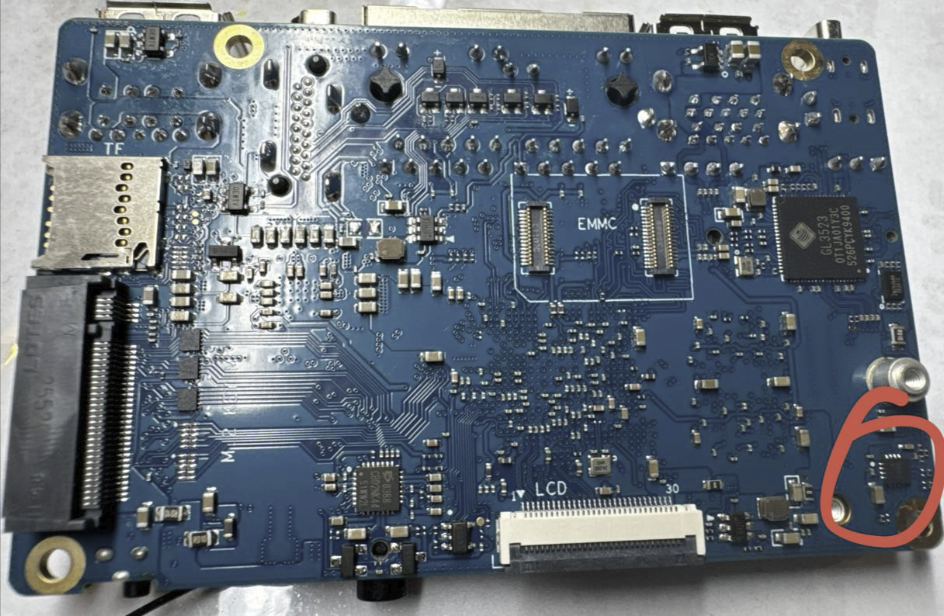
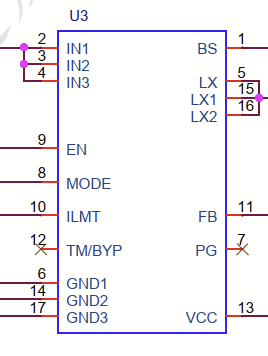
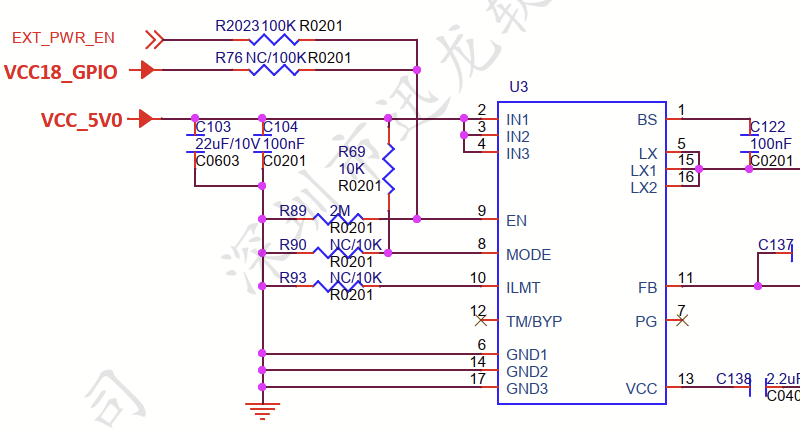
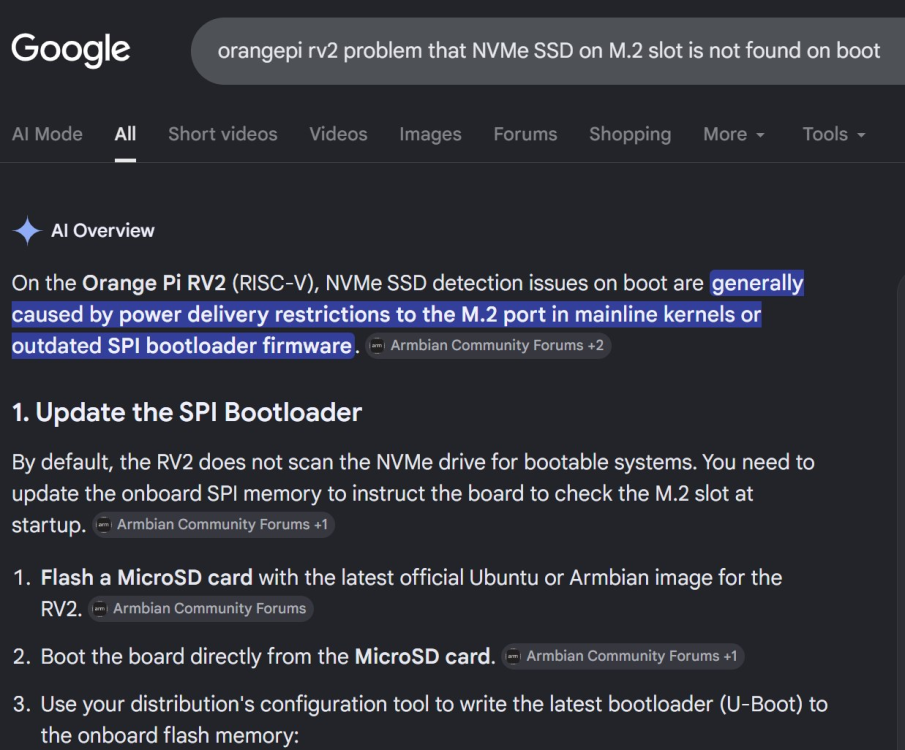
Hi all! Here follows the learning from circa 12 hours of trying to make Armbian with 7.1 and 6.18 kernel work. What worked and didn't work: 6.18 booted with 100% success rate from MicroSD. 7.1 did not boot at all for me from MicroSD. Debug log below. (Here the u-boot works, the kernel loads, but it fails around the point where it tries to mount the root filesystem.) 7.1 worked booted from NVMe SSD a few times, it started with some success rate there and then the success rate went to 0. The failures are in u-boot. 6.18 booted from NVMe SSD had a similar pattern as 7.1. So what caused me the most headache was that u-boot would not boot off the NVMe SSD. (Initially I had a few successes but the success rate went to 0.) It found the SSD, but said it can't find any partition. As for the PCIe networking card, I saw it work on both 7.1 and 6.18 images for a moment, but it did not work stably. Installing the "armbian-firmware" package didn't make a difference. I'd need to test this more though. Most of my time went to trying make the RV2 boot off the NVMe SSD. I wrote some detail thoughts and questions about u-boot's inability to boot off NVMe SSD below. Aside from any fixes you suggest, things to try that come to mind to me are: Wait for Linux 7.2 to be released, and then wait for an Armbian image with it. This is scheduled for August. Perhaps it just works a lot better as more RV2 functions have been mainlined, and it generally has been tested more by the community - Linux 7 is still so early. Try to boot the 7.1 kernel Armbian from SSD but with a /boot partition on a MicroSD card. Hardware setup To this RV2 was connected a Samsung 960 Pro 2TB in the 22x80mm M.2 slot (lower), and a RTL8127ATF SFP+ NIC, which was connected to the 22x30mm M.2 (upper) slot via an adapter. Both M.2/PCIe cards got 3.3V supply from the RV2 only. The M.2 to PCIe adapter has a 12V supply input, which was not used. This appeared to suffice for both cards because as you will see below the NIC's link LED did light up at one point. The power supply to the RV2 was a good 5V 5A power supply. I actually tried two different ones, and it did not affect the results. The RV2 feeds both M.2 connectors and the onboard WIFI from one 5V to 3.3V voltage converter, which appears to be a SY8286A. Its capacity is 6A, i.e. x 3.3V = 19.8W. The SSD should draw max 5W, and the NIC max 2W. Therefore I conclude that the power supply to both cards was fully adequate. (The said 5V to 3.3V converter is in on page 5 in the RV2's schematics @OPI RV2 V1_1_SCH_20250508(1).pdf" which is http://www.orangepi.org/html/hardWare/computerAndMicrocontrollers/service-and-support/Orange-Pi-RV2.html . Here it's only called U3, which has 17 PINs with specified names. Concluded it's SY8286A based on searching for a voltage converter with 17 PINs with matching names. It's 3x3mm and has 82% energy conversion efficiency meaning it may produce as much as 3.5W of heat. https://www.bulcomp-eng.com/datasheet/SY8286A (QFN20) - Datasheet 1.pdf ) U-boot fail when trying to boot 7.1 from NVMe SSD During the many hours I tested the RV2, I had the best success early in the testing: Early in the testing, I got the 7.1 kernel Armbian image to boot from the SSD circa 3-4 times. This was as quickly as on the first, second or third try, i.e. I try to boot and if it failed once or twice then at least on the third try it worked. On all other occasions, u-boot failed with the error "Couldn't find partition nvme na:1". What does "nvme na" even mean? At this stage I was booting from the u-boot on the SPI flash, that the RV2 came bundled with. This failure mode happened both before and after upgrading the SSD to the latest firmware. I tried to fix it by un-screwing and re-screwing the SSD in the M.2 slot to work around any potential issue with glap. I don't think that made any material difference. I thought what if there is an issue with the u-boot version, so I went through the u-boot SPI flashing process Sven-Ola pointed to using the "armbian-config" tool on the 6.18 kernel Armbian image. This only changed the look of the error message: Now instead u-boot printed "no nvme partition table available" once and then"** No partition table - nvme 0 **" "Couldn't find partition nvme 0:1" five times, and then left me in an u-boot prompt: From the u-boot prompt, I learned that the partitioning table is MBR and not GPT, because it says "DOS" partition type. After this, I tried "sysboot nvme 0:1 fat" which did boot into something, but I think it was actually to the MicroSD, because it behaved the same as when I try to boot the 7.1 kernel Armbian from MicroSD: it repeated "Begin: Running /scripts/local-block ... done." circa 20 times and then "Gave up waiting for root file system device." .. "ALERT! UUID=63ee7593-e111-4547-ac2f-6bdb8519ce11 does not exist. Dropping to a shell!". But, I'd need to re-test this more carefully to make any conclusion. Regarding this complaint that there would be no partition on the NVMe disk, I booted the RV2 from the 6.18 kernel Armbian on a MicroSD card, and there, "mount /dev/nvme0n1p1 /mnt" did work. Summary thoughts about u-boot's inability to boot from SSD + questions So to summarize, booting the OrangePI RV2 from a 2TB SSD worked a few times but eventually started having a 100% failure rate (circa 25 failures in a row), seeming to say it finds the NVMe disk but complains it can't find a partition, while we know that there was a partition. And these failures were in u-boot. Also since the failure was already in u-boot, the Linux kernel version doesn't matter. This made me think the error could be any of the following: Could it be that U-Boot has some incorrectness in its configuration for the power supply to the M.2 slots? However, I can't see the 5V to 3.3V voltage converter is software-configurable at all (see schematic above). Meanwhile the P1 PMIC is software-configurable. Could it be that the U-Boot has some incorrect configuration to the X1's PCI subsystem or PMIC configuration? Could there be a problem that U-Boot can't handle partitions that are almost 2TB in size? For safety, it could be a good idea to switch all these Armbian images to GPT partitioning table as DOS/MBR partition tables don't scale anyhow - 2TB is supposed to work, but people will like to boot the RV2 from 4TB+ SSD:s. Could there be a problem that U-Boot does not wait for appropriately long time for the SSD to initialize? Overall I found it a really peculiar issue that U-Boot says it finds the NVMe but appears to fail to read from it. @sven-ola Any idea? More tests and results re SSD For completeness, on the successfully booted system - that should be only 6.18 kernel booted from MicroSD - with time I did see some SSD failure reported: sven-ola suggested me to try connecting the SSD to the other M.2 slot instead, and that did not work any better. Maybe it worked worse. I could imagine that there was a situation with double bugs here, that the issue with the SSD inside Linux shows some issue with the PCIe drivers. For completeness, lspci -v shows this (on 6.18 booted from MicroSD): From inside this Linux, this simple test of the SSD works, and shows ~600M/sec. Having a look at this disk right now, I just saw something weird: I see /dev/nvme0n1 but no partitions - ls /dev/nvme0n0p* gives nothing. fdisk found no partitions (empty partition list printout). gdisk found three partitions but after 'fixing' the partition table. I'd need to look into this more. I have not done any changes to the SSD's partition table after the original flashing the disk with the Armbian image. Perhaps some bug some-where in this u-boot or Armbian caused the partition table to get overwritten, no idea? To show that the SSD can work, here is a cycle of re-flashing the 7.1 image and looking at its partition descriptors in Linux + fdisk's output + gdisk's output + trying to mount it. How the 7.1 kernel Armbian fails when trying to boot it from MicroSD For your reference, here is how the 7.1 kernel Armbian fails when I try to boot it from MicroSD. The failure rate is 100%, I did not get it to work a single time. @rm_ Thanks for the link to https://www.phoronix.com/news/SpacemiT-K1-K3-Linux-7.2 which links to https://lore.kernel.org/lkml/20260602070257-KYC5031219@kernel.org/ , which says "For boards of K1", "OrangePi RV2", "Enable eMMC/I2C/PCIe/PMIC/QSPI/USB". The meaning here is that the Linux 6.18 and also Linux 7.1 use special patched kernels, not just the mainline kernel. What's happening in Linux 7.2 is that more RV2 functionality moves in to the mainline kernel. This way, Sven-Ola is correct when he says that SD and NVME already work in Armbian edge 7.1.
-
 Hey Community, I've been running a few services on Armbian devices and recently reviewed options for handling automated email notifications. Using an SMTP Service Provider like iDealSMTP for server alerts, backup reports, and application notifications seems like a practical approach when reliable email delivery is important. For small ARM-based servers, having proper SMTP authentication, delivery tracking, and support for transactional emails can simplify administration without requiring a fully self-hosted mail server. Sharing this as a discussion topic for anyone using email notifications on their Armbian systems.
 -
@Jacob GeorgeThat's excellent progress, thanks for sharing! EDK2 support on the A733 would be a very welcome addition, and it's great to hear the port is moving along so quickly. One thing that would be especially valuable for the community is if some of the platform work could eventually be drafted as mainline kernel patches/drivers. That would save a lot of development effort and benefit everyone using these boards.There are already a few A733 patches in 7.x or in the queue. Looking forward to seeing the project reach the finish line.
- Yesterday
-
Another option is to wipe the U-Boot from the SD-card and just use the SD-card only, no USB-adaptor needed. Then the only U-Boot in the system is the one in SPI-flash. I have done that once on an SBC with no SPI-flash but eMMC where the bootloader is stored. And that also involves GPT partitions and so on, not independent like SPI-flash. But as Werner says, backup is easy. For old 32-bit Armbians, I made some function in my unattended backup scripting to do that, so that after a year(s) or so, I can restore to get exactly the same system (when SD-card gets bad/broken for example).
-
Hello, I am new to the conversation but I would like to add something I am working on. I am almost done the EDK2 port to A733, see: https://github.com/vehoelite/edk2-a733 I am actively getting further everyday. I have let A.I. take full credit (seems to make Opus 4.8 work better) but regardless I suspect the port to be finished within a week or up to a month if I hit a snag.
-
 Thanks for the guide - got my X96 Air back up and running after it died after running fine
 -
@rm_ No, SD and NVME are working with Armbian edge 7.1, while USB does not. root@orangepirv2:~# uname -a Linux orangepirv2 7.1.0-rc3-edge-spacemit #3 SMP PREEMPT_DYNAMIC Sun May 10 21:08:09 UTC 2026 riscv64 GNU/Linux root@orangepirv2:~# blkid /dev/nvme0n1p1: LABEL="armbi_root" UUID="fdbd4ab2-2238-4a62-a079-74ff0582c8d2" BLOCK_SIZE="4096" TYPE="ext4" PARTUUID="00406d4f-01" /dev/mmcblk0p1: LABEL="armbi_root" UUID="63ee7593-e111-4547-ac2f-6bdb8519ce11" BLOCK_SIZE="4096" TYPE="ext4" PARTUUID="9ebf8299-01" /dev/zram0: UUID="3be872bc-b408-46c3-8ec9-d27500adc1dd" TYPE="swap" /dev/zram1: LABEL="log2ram" UUID="bace3aba-15ea-4833-a7ad-f7d9e39aa0c5" BLOCK_SIZE="4096" TYPE="ext4" root@orangepirv2:~# lsusb root@orangepirv2:~# lspci 0001:00:00.0 PCI bridge: SpacemiT X60 PCIe 2.0 x2 Root Complex (rev 01) 0002:00:00.0 PCI bridge: SpacemiT X60 PCIe 2.0 x2 Root Complex (rev 01) 0002:01:00.0 Non-Volatile memory controller: Samsung Electronics Co Ltd NVMe SSD Controller PM9B1 (DRAM-less) (rev 02) Anyhow, thanks for the Phoronix link // Sven-Ola
-

Rupa X88 Pro 13 - RK3528 board with images
Joao Cordeiro replied to fedes_gl's topic in Rockchip CPU Boxes
@johlnx I will give it a try. The main reason i bought this board was to place it on my parrents house as a backup storage device. Thats why i wanted the 1 Gbps port. And i understand that i would never get 1Gbps lan -> disk transfer with encryption and such, but 100Mbps is 10 times less. I would be happy with 200Mbps or 300Mbps actual performance. without gigabit support its limited to 100Mbps 😕 And thanks for the reply on the github "The board lacks an external Gigabit PHY; the internal PHY supports only 4 lines, which limits the speed to 100 Mbps." I understand that its physicaly impossible. So im just saying "im sad" I can probably get more than 100Mbps using wifi -
For microSD card slot to even work at all, it is listed as a change that landed only in 7.2. https://www.phoronix.com/news/SpacemiT-K1-K3-Linux-7.2 This is why you get root filesystem UUID not found with 7.0-7.1
-
Sorry, forgot about that. Here are logs from a boot of Debian minimal with GNOME and updated packages: https://paste.armbian.com/eyaxadazow
-
https://github.com/ThomasKaiser/sbc-bench/blob/master/results/rca7s.txt here are my results with an old (November 2025) kernel
-
test with 1.5V CPU voltage, the SBC draws over two amps. You need a really good active heatsink. 7-Zip (r) 25.01 (arm64) : Igor Pavlov : Public domain : 2025-08-03 64-bit arm_v:8-A locale=en_US.UTF-8 Threads:8 OPEN_MAX:1024, ASM Compiler: ver:14.2.0 GCC 14.2.0 : UNALIGNED Linux : 6.6.98-vendor-sun60iw2 : #2 SMP PREEMPT Fri May 15 10:57:21 CEST 2026 : aarch64 PageSize:4KB hwcap:119FFB:CRC32:SHA1:SHA2:AES:ASIMD arm64 1T CPU Freq (MHz): 1267 2000 2000 2000 2000 2000 2000 4T CPU Freq (MHz): 366% 1621 367% 1631 8T CPU Freq (MHz): 742% 1561 746% 1580 RAM size: 5906 MB, # CPU hardware threads: 8 RAM usage: 1779 MB, # Benchmark threads: 8 Compressing | Decompressing Dict Speed Usage R/U Rating | Speed Usage R/U Rating KiB/s % MIPS MIPS | KiB/s % MIPS MIPS 22: 9894 757 1272 9625 | 226530 685 2821 19317 23: 9405 767 1249 9583 | 219768 687 2768 19010 24: 8867 766 1245 9535 | 213378 689 2717 18722 25: 8382 753 1271 9571 | 205891 692 2649 18320 ---------------------------------- | ------------------------------ Avr: 9137 761 1259 9578 | 216392 688 2739 18842 Tot: 724 1999 14210 And the same test with 1.32V, SBC draws 1.5 amps Last login: Fri Jun 5 11:11:21 2026 from 192.168.11.50 root@radxa-cubie-a7s:~# 7zr b 7-Zip (r) 25.01 (arm64) : Igor Pavlov : Public domain : 2025-08-03 64-bit arm_v:8-A locale=en_US.UTF-8 Threads:8 OPEN_MAX:1024, ASM Compiler: ver:14.2.0 GCC 14.2.0 : UNALIGNED Linux : 6.6.98-vendor-sun60iw2 : #2 SMP PREEMPT Fri May 15 10:57:21 CEST 2026 : aarch64 PageSize:4KB hwcap:119FFB:CRC32:SHA1:SHA2:AES:ASIMD arm64 1T CPU Freq (MHz): 1393 1682 2000 2000 2000 2000 2000 4T CPU Freq (MHz): 369% 1606 367% 1634 8T CPU Freq (MHz): 743% 1552 745% 1573 RAM size: 5906 MB, # CPU hardware threads: 8 RAM usage: 1779 MB, # Benchmark threads: 8 Compressing | Decompressing Dict Speed Usage R/U Rating | Speed Usage R/U Rating KiB/s % MIPS MIPS | KiB/s % MIPS MIPS 22: 9314 722 1254 9061 | 224321 686 2790 19128 23: 8943 752 1211 9113 | 217854 688 2739 18845 24: 8556 749 1228 9200 | 210699 688 2686 18487 25: 8216 754 1244 9382 | 202281 686 2623 17999 ---------------------------------- | ------------------------------ Avr: 8758 745 1234 9189 | 213789 687 2710 18615 Tot: 716 1972 13902 root@radxa-cubie-a7s:~#
-
I wanted to report a specific regression regarding CPU frequency scaling on the Radxa Cubie A7S and share the DTS workaround that fully restores complete functionality. The Regression Behavior November Kernel State: Using the kernel branch/commit built back in November (running Linux version 6.6.98-vendor-sun60iw2 #SMP PREEMPT Wed Nov 19 2025 ), CPU frequency scaling worked perfectly out of the box. All available frequencies scaled smoothly across both core clusters, and the benchmark results for my specific A7S board were fully aligned with Thomas Kaiser's provided optimization targets. May Kernel State: After updating to the recent kernel build (mid-May 2026), CPU frequency scaling completely broke under the stock DTB configuration. The core clusters refused to scale through their operational performance points properly. The Frequency Trick & DTS Fix The root cause was isolated to how cpufreq binds under the newer kernel configuration, specifically linked to the inclusion of CONFIG_CPUFREQ_DT_PLATDEV=y. To make the scaling work seamlessly on the latest May kernel, the underlying Device Tree needs a dedicated adjustment in the opp-table and driver mapping. By manually adapting the standard DTS bindings for the sun60iw2 platform to explicitly force correct platform-device scaling registration, all operational frequencies are now fully functional and stable again on the new kernel. Request for Review/Merge@Nick (or current DTB maintainer), cubie_a7s.zip could you please verify this behavior against the latest repository changes? If everything checks out on your end, please pull this DTS patch into the main Armbian sunxi tree so that the Cubie A7S doesn't remain locked to lower fallback states on fresh updates.Let me know if you need the raw diff -u dump of the modified .dts files attached! cubie_a7s.zip
-
Hi @armfan. From what I am able to extract from the flood of braindumps you have a non-working NVME with 2TB that is not working for some reason. If it really stops sometimes in the middle of u-boot::nvme::init then you may have some power issue with this NVME. For comparison: I placed my NVME in the lower m.2 and booted via MTD the u-boot armbian-installed from the "current" image downloadable from my site. See attached capture file. HTH // Sven-Ola nvme-lower-uboot-may-26-2026.cap
-
Well as you see, I am not Again, just use dd to grab a backup (dd if=/dev/mtdblock0 of=/somewhere/to/store/spi.backup)
-

HDMI audio and analog audio do not work on Opi5Plus
JFL replied to ずっと一人's topic in Orange Pi 5 Plus
Just an update. Both kernel-7.0.11-edge-rockchip64-26.8.0-trunk.94 and 6.18.34-current-rockchip64-26.8.0-trunk.94 both still NO analog audio output on Headphone Jack on Orange Pi 5-Plus Kernel-6.18.10-current-rockchip64-6.2.1 and 6.19.5-edge-rockchip64 both support analog audio output on Headphone Jack. By the way kernel-6.1.115-vendor-rk35xx also NO analog audio output. kernel-6.1.75-vendor-rk35xx support analog audio output. -
Thanks for your help Werner. I'm surprised that the SPI version of U-Boot would prevent an SD Card booting. Once the SPI U-Boot had failed to boot from NVME, USB, etc one would hope that the oPi5 delegated all responsibility to the SD Card, to minimize the risk of bricking. I'm a bit reluctant to wipe my SPI which currently works with NVME. As with SmoothCrimnal75 my SPI version of U-Boot will boot a 26.5 Armbian SD Card using a USB adapter, it only fails from the SD Card slot. So I can use the USB adapter for testing the new release. If I want to transfer it to the NVME, I suspect my current U-Boot SPI will work for that too.
-

Fail to boot any Armbian Images via SDcard
Michael Fischer replied to Skallwar's topic in Radxa Rock 5B
I had same issue. i was able to boot using UEFI spi by flashing https://github.com/edk2-porting/edk2-rk3588/releases the rock5b image from this github link. i used this specific armbian image, although it may work with others https://dl.armbian.com/rock-5b/Noble_current_minimal -
# Orange Pi Zero 3 (1.5GB) Random Crashes — Root Cause Found & Fixed (No Recompilation Required) **Board:** Orange Pi Zero 3 — 1.5GB LPDDR4 variant **SoC:** Allwinner H618 **OS:** Armbian Trixie **Kernels tested:** 6.6.75-legacy, 6.18.33-current, 6.16.8-edge **Status:** ✅ SOLVED — 72+ hours stable uptime confirmed --- ## The Problem My Orange Pi Zero 3 (1.5GB model) was randomly crashing every few hours under all three Armbian kernel branches. The symptoms were: - System freezes with no response (SSH drops, ping still works briefly) - Kernel oops logged: `kswapd0 → ext4_es_scan → paging request fault` - Random segfaults on normal binaries (`sudo`, `curl`, `apt`) - Corrupted library names in memory (e.g. `libGap-Jg.sK.0` instead of `libcrypto.so.3`) - `memtester` passed clean (2 loops, 1GB) - `badblocks` found zero bad blocks - `fsck` found no filesystem errors - Crashes happened even at full idle, with only ~200MB RAM in use The crashes occurred on **all three kernel branches** — legacy, current, and edge — ruling out a kernel-specific bug as the root cause. --- ## Investigation ### What we ruled out (in order) | Suspect | Test | Result | |---|---|---| | SD card physical failure | `badblocks -sv` | 0 bad blocks | | Filesystem corruption | `fsck -f` | Clean | | RAM hardware failure | `memtester 1G x2` | No errors | | eth-optimize.sh (ring buffer 1024, txqueuelen 10000) | Removed from crontab | Extended stability but didn't fix | | Kernel version | Tested 6.6.75, 6.18.33, 6.16.8 | All crashed | | DRAM size detection bug | `dmesg \| grep Memory:` | Consistently showed 1572864K (correct 1.5GB) | ### The kernel oops — the real clue ``` kernel: Unable to handle kernel paging request at virtual address 14ae620800000018 kernel: CPU: 0 PID: 56 Comm: kswapd0 kernel: Call trace: kernel: __es_tree_search.isra.0+0x20/0xa4 kernel: es_reclaim_extents+0x58/0xf0 kernel: ext4_es_scan+0xf0/0x29c kernel: do_shrink_slab+0x174/0x298 kernel: shrink_slab+0xb4/0x2f0 kernel: kswapd+0x18c/0x3b8 ``` The address `14ae620800000018` is in "address between user and kernel address ranges" — a classic corrupted/invalid pointer. This happens when the kernel accesses memory that physically doesn't exist or wraps around. ### DRAM address wraparound — the root cause The H618 1.5GB LPDDR4 variant has a known DRAM address wraparound issue, documented in the linux-sunxi community (notably by **ag123** in Armbian forums and **Jernej Skrabec's** u-boot size scan patches): > *"It is quite possible the addresses wrap around in the 1.5GB LPDDR4 DRAM chips and the 'test' for memory there returns a false positive."* In this specific case, the **size** is correctly detected as 1.5GB — but the **upper address region** (above 1GB physical) exhibits wraparound behavior. When the kernel accesses the upper ~512MB region (via page cache, kswapd reclaim, or slab allocation), writes to those addresses silently corrupt data in the lower region — because the addresses "wrap" back. This explains why: - `memtester` passes (it tests sequentially in a contiguous region, doesn't trigger wraparound patterns) - Size appears correct (1572864K = 1.5GB every boot) - Crashes are random in timing (depends on when page cache/kswapd reaches the upper region) - ALL kernels are affected (this is a u-boot/hardware level issue, not kernel-specific) --- ## The Fix ### Standard approach (requires u-boot recompilation) The proper fix is `CONFIG_DRAM_SUN50I_H616_TRIM_SIZE=y` in u-boot, or Jernej Skrabec's adjusted size scan procedure (columns-first scanning). This correctly detects and excludes the wraparound region, allowing full 1.5GB usage. ### Our approach — kernel `mem=` parameter (no recompilation needed) Since the wraparound occurs in the **upper address region**, we can simply tell the kernel to only use the safe lower 1GB: Edit `/boot/armbianEnv.txt` and add `mem=1024M` to `extraargs`: ```bash sudo nano /boot/armbianEnv.txt ``` Change: ``` extraargs=... existing params ... ``` To: ``` extraargs=mem=1024M ... existing params ... ``` Reboot and verify: ```bash cat /proc/cmdline | grep -o "mem=1024M" cat /proc/iomem | grep "System RAM" free -h ``` Expected output: ``` mem=1024M 40080000-7fffffff : System RAM total used free Mem: 974Mi ... ``` The `iomem` map confirms the kernel's physical RAM range is **exactly** `0x40080000–0x7fffffff` — stopping at the 1GB boundary. The upper wraparound region (`0x80000000` and above) is completely excluded from the kernel's memory map. ### Why this works The wraparound region begins at or above `0x80000000` (1GB physical offset). With `mem=1024M`: - Kernel allocator, page cache, slab, and all processes stay within `0x40000000–0x80000000` - `kswapd` never reclaims pages from the problematic upper region - The corrupted-pointer crash path is never triggered ### Tradeoffs vs. u-boot fix | | mem=1024M | u-boot TRIM fix | |---|---|---| | Requires recompilation | ❌ No | ✅ Yes | | RAM available | ~974MB | ~1.4GB | | Works on all kernels | ✅ Yes | ✅ Yes | | Fixes root cause | Workaround | Proper fix | For SDR servers, home automation, and similar light workloads where ~974MB is more than sufficient (our system uses ~130–200MB), this is a perfectly viable permanent solution. --- ## Results | Metric | Before fix | After fix | |---|---|---| | Uptime | 1–8 hours max | **72+ hours** (and counting) | | Kernel oops | Multiple per session | **Zero** | | Segfaults | Random, on any binary | **Zero** | | `sudo apt update` | Crashed frequently | Runs perfectly | | Memory corruption | Frequent bit-flips | **None observed** | System configuration at time of testing: - **Kernel:** 6.16.8-edge-sunxi64 - **Kernel param:** `mem=1024M` - **CPU governor:** ondemand - **Workload:** OpenWebRX+, SpyServer, RTL-TCP (x2), radiosonde_auto_rx, Xray proxy --- ## How to apply ```bash # Backup first sudo cp /boot/armbianEnv.txt /boot/armbianEnv.txt.bak # Add mem=1024M to extraargs sudo sed -i 's/^extraargs=/extraargs=mem=1024M /' /boot/armbianEnv.txt # Verify grep extraargs /boot/armbianEnv.txt # Reboot sudo reboot ``` After reboot, confirm: ```bash # Should show mem=1024M cat /proc/cmdline | grep -o "mem=1024M" # Should show ~974Mi total free -h # Should show System RAM ending at 0x7fffffff cat /proc/iomem | grep "System RAM" ``` --- ## References - ag123's analysis of 1.5GB wraparound: Armbian Community Forums - Jernej Skrabec's u-boot DRAM size scan fix: [linux-sunxi mailing list](https://www.mail-archive.com/u-boot@lists.denx.de/msg516769.html) - H618 LPDDR4 support patch: [u-boot mailing list](https://lore.kernel.org/all/20231111091000.26744-2-iuncuim@gmail.com/T/) - ag88's 1.5GB u-boot fix (alternative approach): GitHub --- ## Notes This fix was developed and tested on a **1.5GB LPDDR4** Orange Pi Zero 3. The 1GB, 2GB, and 4GB variants use different DRAM configurations and may not be affected by this specific issue. If you have a 1.5GB board and experience similar random crashes, try `mem=1024M` before spending time on kernel debugging or hardware replacement. It may save you days of investigation. **Tested and confirmed working by:** Özgür Çetinoğlu **Location:** Athens, Greece **Setup:** 24/7 SDR server (OpenWebRX+, radiosonde tracking) **Date:** June 2026
- Last week
-

Teclast T60 AI rooting + armbian possibility Allwinner A733
Nick A replied to Taz's topic in Allwinner CPU Boxes
@Taz the sources for that repository is a clone of my build. It’s a very basic attempt to build a 6.19 kernel. You are better off using my build. If you got 6.6 booting then 6.18 should work as well.