All Activity
- Past hour
-
NanoPi R76S is supposed to have PHC hardware timestamp support with both ethernet interfaces. Unfortunately ethtool -T returns no hardware support. Would be great if PHC could be enabled in this nice box.
-
It depends on how you have bricked it. Reflashing Android takes you back to a clean starting point.
-
Hello - Very new to this all and trying to learn my way around. I have an OPi4a which I was previously using for octoprint, etc. Was able to get it going using OrangePi's provided Ubuntu22.04 Jammy image, but am needing to reconfigure and was interested in armbian as the official images from OrangePi can be hard to access at times (site seems to intermittently go down / time out?), and from what I've seen there's very limited support from the manufacturer. Anyways - for the uninitiated, what is the status of the image for the 4a? Seeing the most recent post - does the backport being merged mean that it is possible to build from armbian main? Which target board should be selected? I am not seeing an option for the 4a, or any with the T527 chip. Alternatively, the most recent image I'm seeing is from @JuanEsf - to get this to work do I just need to use something like balena and flash from URL? Very new to all this, any help is appreciated.
-

Armbian for H313 X96-Q LPDDR3 TV-Box
Ngô Huỳnh Ngọc Khánh replied to sicxnull's topic in Allwinner CPU Boxes
The x96q-v5-1 image support aic8800 wifi chip without modify anything from dtb. Follow this https://github.com/LYU4662/aic8800-sdio-linux-1.0, the AIC8800 and alternate based on AIC8800 will work! -

Dec 25th image for Cubie a5e is not a bootable image
Werner replied to Meestor_X's topic in Allwinner sunxi
Alright, found something. @Meestor_X please try this one: https://testing.armbian.de/Armbian-unofficial_26.02.0-trunk_Radxa-cubie-a5e_trixie_edge_6.18.2_minimal.img.xz -
 Well, at this point, hard to say what's going on: I'm not sure what happened during my chroot sessions but it looks like / in now non crypted and the boot options were completely overridden by who know's what verbosity=1 bootlogo=false console=both extraargs=cma=256M overlay_prefix=rockchip-rk3588 fdtfile=rockchip/rk3588-rock-5-itx.dtb rootdev=UUID=92f542d4-5a03-424e-b953-e711111186dc rootfstype=ext4 usbstoragequirks=0x2537:0x1066:u,0x2537:0x1068:u And I can boot without having to luks decrypt. It is probably a side effect of what I mounted in the chroot (/run /sys, etc) but I did not know this was even possible and I would be interested in theories or possible explanations. Thanks to all of you, especially @IBV
 -
Will you please give the detail step?I flash "Armbian 25.11.2 trixie" ,but I can't find any useful dtbo file.
- Today
-
Dec 25th image for Cubie a5e is not a bootable image
Werner replied to Meestor_X's topic in Allwinner sunxi
--> (667) DEBUG: Partition table after write_uboot [ /dev/loop0 ] --> (667) COMMAND: sfdisk -l /dev/loop0 The primary GPT table is corrupt, but the backup appears OK, so that will be used. Disk /dev/loop0: 2.37 GiB, 2541748224 bytes, 4964352 sectors Units: sectors of 1 * 512 = 512 bytes Sector size (logical/physical): 512 bytes / 512 bytes I/O size (minimum/optimal): 512 bytes / 512 bytes Disklabel type: gpt Disk identifier: 62C4432A-F158-49BE-8F59-F5A5895C7057 Device Start End Sectors Size Type /dev/loop0p1 8192 1056767 1048576 512M Linux extended boot /dev/loop0p2 1056768 4962303 3905536 1.9G Linux root (ARM-64) This is what the image looks while still on loop dev just before detaching from. But for some reason its messed up right after. Don't know why...yet root@build:~/build/output/images# parted Armbian-unofficial_26.02.0-trunk_Radxa-cubie-a5e_trixie_edge_6.18.2_minimal.img u b p Error: /root/build/output/images/Armbian-unofficial_26.02.0-trunk_Radxa-cubie-a5e_trixie_edge_6.18.2_minimal.img: unrecognised disk label Model: (file) Disk /root/build/output/images/Armbian-unofficial_26.02.0-trunk_Radxa-cubie-a5e_trixie_edge_6.18.2_minimal.img: 2541748224B Sector size (logical/physical): 512B/512B Partition Table: unknown Disk Flags: -

Rock Pi S no CLK signal on SPI1
solaris3308 replied to Martin Petrašovský's topic in Radxa Rock Pi S
How can you active spi support?I burn " 25.11.2" image,but I can't find any overlay of spi ,uart or i2c. This is my system status: cat /etc/os-release PRETTY_NAME="Armbian 25.11.2 trixie" NAME="Debian GNU/Linux" VERSION_ID="13" VERSION="13 (trixie)" VERSION_CODENAME=trixie DEBIAN_VERSION_FULL=13.2 ID=debian HOME_URL="https://www.armbian.com" SUPPORT_URL="https://forum.armbian.com" BUG_REPORT_URL="https://www.armbian.com/bugs" ARMBIAN_PRETTY_NAME="Armbian 25.11.2 trixie" uname -a Linux Pi-s 6.12.58-current-rockchip64 #3 SMP PREEMPT Thu Nov 13 20:34:41 UTC 2025 aarch64 GNU/Linux ls /boot/dtb/rockchip/overlay/rk3308* /boot/dtb/rockchip/overlay/rk3308-b@1.3ghz.dtbo /boot/dtb/rockchip/overlay/rk3308-otg-host.dtbo /boot/dtb/rockchip/overlay/rk3308-bs@1.3ghz.dtbo /boot/dtb/rockchip/overlay/rk3308-s0-ext-antenna.dtbo /boot/dtb/rockchip/overlay/rk3308-bs.dtbo -

Dec 25th image for Cubie a5e is not a bootable image
Meestor_X replied to Meestor_X's topic in Allwinner sunxi
This is way too much work. Basically I just came here to say that prebuilt images of trunk 100 work, 130 and 150 don't. So... Just a PSA to let people know that they likely won't be able to use those prebuilt images. It's probably moot anyway as I expect there aren't any changes that fix the main issues. -

Dec 25th image for Cubie a5e is not a bootable image
eselarm replied to Meestor_X's topic in Allwinner sunxi
There is a separate boot partiton, it should be there. MACOS same as Windows might hide/block it as it is tagged as not normal filesystem (0x8300) but boot related (0xea00 or 0xef00) Linux has no issue with it. -
Dec 25th image for Cubie a5e is not a bootable image
Meestor_X replied to Meestor_X's topic in Allwinner sunxi
Found the method. A program called anylinuxfs will mount the EXT4 sd card on a Mac. However, even on the Trunk 100, I don't see armbianEnv.txt in /boot. Where do I find it?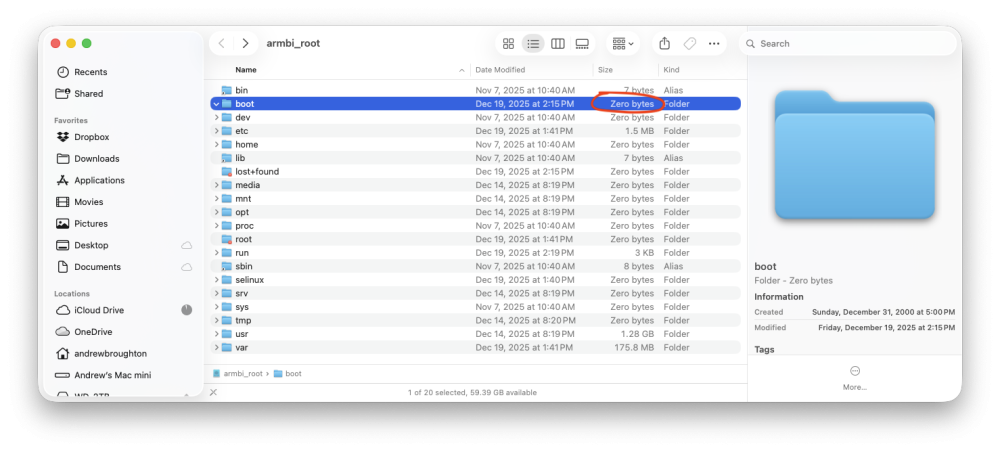
-
Dec 25th image for Cubie a5e is not a bootable image
eselarm replied to Meestor_X's topic in Allwinner sunxi
You could use the Cubie for it. The trunk.100 works you said, so you have a working Linux computer, can be operated via serial cable console. -
Dec 25th image for Cubie a5e is not a bootable image
Werner replied to Meestor_X's topic in Allwinner sunxi
I usually just re-plug the sdcard back into my laptop, the fs mounts automatically for me. Using Linux though, no clue about MacOS. -
Dec 25th image for Cubie a5e is not a bootable image
Meestor_X replied to Meestor_X's topic in Allwinner sunxi
I didn't know it was possible to edit a file within a boot image... I'm using MacOS, how would I do that? -
Dec 25th image for Cubie a5e is not a bootable image
Meestor_X replied to Meestor_X's topic in Allwinner sunxi
Fair enough. "WRITE the image" would probably be clearer. The image file is from the repository, I'm using Balena to WRITE the image (rather than MAKE) to the SD card. I'm sure you knew what I meant, but I agree that clarity is important. BTW - Where would I find the changelogs for these trunks? -
Dec 25th image for Cubie a5e is not a bootable image
Werner replied to Meestor_X's topic in Allwinner sunxi
Please set verbosity to 7 in armbianenv.txt to get a clue about what happens after "starting kernel..." data:image/gif;base64,R0lGODlhAQABAPABAP///wAAACH5BAEKAAAALAAAAAABAAEAAAICRAEAOw== Interesting. While this isn't an actual issue since the correct dt was loaded nevertheless it seems like BOOT FDT FILE Is set wrong -
Edit ArmbianEnv.txt when machine is unable to boot?
Werner replied to Myriade's topic in Rockchip CPU Boxes
moved to tvboxes -
Dec 25th image for Cubie a5e is not a bootable image
Meestor_X replied to Meestor_X's topic in Allwinner sunxi
---- Opened the serial port /dev/tty.PL2303G-USBtoUART8430 ---- U-Boot SPL 2026.01-rc4_armbian-2026.01-rc4-S0e0a-Peafc-H5aa4-Vd0f6-B4d1d-R448a (Dec 29 2025 - 03:26:30 +0000) DRAM: 2048 MiB Trying to boot from MMC1 NOTICE: BL31: v2.12.0(debug):armbian NOTICE: BL31: Built : 03:26:10, Dec 29 2025 NOTICE: BL31: Detected Allwinner A523 SoC (1890) NOTICE: BL31: Found U-Boot DTB at 0xa0ab9f8, model: Radxa Cubie A5E INFO: GICv3 without legacy support detected. INFO: ARM GICv3 driver initialized in EL3 INFO: Maximum SPI INTID supported: 287 INFO: Configuring SPC Controller INFO: BL31: Platform setup done INFO: BL31: Initializing runtime services INFO: BL31: cortex_a55: CPU workaround for erratum 1530923 was applied INFO: PSCI: Suspend is unavailable INFO: BL31: Preparing for EL3 exit to normal world INFO: Entry point address = 0x4a000000 INFO: SPSR = 0x3c9 ns16550_serial serial@2500000: pinctrl_select_state_full: uclass_get_device_by_phandle_id: err=-19 U-Boot 2026.01-rc4_armbian-2026.01-rc4-S0e0a-Peafc-H5aa4-Vd0f6-B4d1d-R448a (Dec 29 2025 - 03:26:30 +0000) Allwinner Technology CPU: Allwinner A523 (SUN55I) Model: Radxa Cubie A5E DRAM: 2 GiB sunxi_set_gate: (CLK#35) unhandled Core: 77 devices, 22 uclasses, devicetree: separate WDT: Not starting watchdog@2050000 MMC: mmc@4020000: 0 Loading Environment from FAT... Unable to read "uboot.env" from mmc0:1... In: serial@2500000 Out: serial@2500000 Err: serial@2500000 Net: eth0: ethernet@4500000 starting USB... sun4i_usb_phy phy@4100400: External vbus detected, not enabling our own vbus USB EHCI 1.00 USB OHCI 1.0 USB EHCI 1.00 USB OHCI 1.0 Bus usb@4101000: 1 USB Device(s) found Bus usb@4101400: 1 USB Device(s) found Bus usb@4200000: 1 USB Device(s) found Bus usb@4200400: 1 USB Device(s) found scanning usb for storage devices... 0 Storage Device(s) found Hit any key to stop autoboot: 0 switch to partitions #0, OK mmc0 is current device Scanning mmc 0:1... Found U-Boot script /boot.scr 4641 bytes read in 3 ms (1.5 MiB/s) ## Executing script at 4fc00000 U-boot loaded from SD Boot script loaded from mmc 190 bytes read in 2 ms (92.8 KiB/s) The file sun55i-a527-radxa-a5e.dtb was not found in the path /dtb/allwinner Load fdt: /dtb/allwinner/sun55i-a527-cubie-a5e.dtb 33947 bytes read in 6 ms (5.4 MiB/s) Working FDT set to 4fa00000 Failed to load '/dtb/overlay/sun55i-a527-fixup.scr' 15452067 bytes read in 642 ms (23 MiB/s) 31721984 bytes read in 1315 ms (23 MiB/s) Moving Image from 0x40080000 to 0x40200000, end=0x42130000 ## Loading init Ramdisk from Legacy Image at 4ff00000 ... Image Name: uInitrd Image Type: AArch64 Linux RAMDisk Image (gzip compressed) Data Size: 15452003 Bytes = 14.7 MiB Load Address: 00000000 Entry Point: 00000000 Verifying Checksum ... OK ## Flattened Device Tree blob at 4fa00000 Booting using the fdt blob at 0x4fa00000 Working FDT set to 4fa00000 Loading Ramdisk to 49143000, end 49fff763 ... OK Loading Device Tree to 00000000490d2000, end 0000000049142fff ... OK Working FDT set to 490d2000 Starting kernel ... Never goes any further. It doesn't get an IP so I can't SSH into it. The "heatbeat" LED does keep flashing, though... Comparing a the trunk 100 which DOES go on to the login prompt and finishes normally: ---- Opened the serial port /dev/tty.PL2303G-USBtoUART8430 ---- U-Boot SPL 2026.01-rc4_armbian-2026.01-rc4-Sd24f-P0000-He0b4-V52aa-Bbf55-R448a (Dec 19 2025 - 03:11:57 +0000) DRAM: 2048 MiB Trying to boot from MMC1 NOTICE: BL31: v2.12.0(debug):armbian NOTICE: BL31: Built : 03:11:45, Dec 19 2025 NOTICE: BL31: Detected Allwinner A523 SoC (1890) NOTICE: BL31: Found U-Boot DTB at 0xa0ab9f8, model: Radxa Cubie A5E INFO: GICv3 without legacy support detected. INFO: ARM GICv3 driver initialized in EL3 INFO: Maximum SPI INTID supported: 287 INFO: Configuring SPC Controller INFO: BL31: Platform setup done INFO: BL31: Initializing runtime services INFO: BL31: cortex_a55: CPU workaround for erratum 1530923 was applied INFO: PSCI: Suspend is unavailable INFO: BL31: Preparing for EL3 exit to normal world INFO: Entry point address = 0x4a000000 INFO: SPSR = 0x3c9 ns16550_serial serial@2500000: pinctrl_select_state_full: uclass_get_device_by_phandle_id: err=-19 U-Boot 2026.01-rc4_armbian-2026.01-rc4-Sd24f-P0000-He0b4-V52aa-Bbf55-R448a (Dec 19 2025 - 03:11:57 +0000) Allwinner Technology CPU: Allwinner A523 (SUN55I) Model: Radxa Cubie A5E DRAM: 2 GiB sunxi_set_gate: (CLK#35) unhandled Core: 77 devices, 22 uclasses, devicetree: separate WDT: Not starting watchdog@2050000 MMC: mmc@4020000: 0 Loading Environment from FAT... Unable to read "uboot.env" from mmc0:1... In: serial@2500000 Out: serial@2500000 Err: serial@2500000 Net: eth0: ethernet@4500000 starting USB... sun4i_usb_phy phy@4100400: External vbus detected, not enabling our own vbus USB EHCI 1.00 USB OHCI 1.0 USB EHCI 1.00 USB OHCI 1.0 Bus usb@4101000: 1 USB Device(s) found Bus usb@4101400: 1 USB Device(s) found Bus usb@4200000: 1 USB Device(s) found Bus usb@4200400: 1 USB Device(s) found scanning usb for storage devices... 0 Storage Device(s) found Hit any key to stop autoboot: 0 switch to partitions #0, OK mmc0 is current device Scanning mmc 0:1... Found U-Boot script /boot.scr 4641 bytes read in 2 ms (2.2 MiB/s) ## Executing script at 4fc00000 U-boot loaded from SD Boot script loaded from mmc 190 bytes read in 1 ms (185.5 KiB/s) The file sun55i-a527-radxa-a5e.dtb was not found in the path /dtb/allwinner Load fdt: /dtb/allwinner/sun55i-a527-cubie-a5e.dtb 17944 bytes read in 4 ms (4.3 MiB/s) Working FDT set to 4fa00000 Failed to load '/dtb/overlay/sun55i-a527-fixup.scr' 14716909 bytes read in 834 ms (16.8 MiB/s) 31918592 bytes read in 1323 ms (23 MiB/s) Moving Image from 0x40080000 to 0x40200000, end=0x42150000 ## Loading init Ramdisk from Legacy Image at 4ff00000 ... Image Name: uInitrd Image Type: AArch64 Linux RAMDisk Image (gzip compressed) Data Size: 14716845 Bytes = 14 MiB Load Address: 00000000 Entry Point: 00000000 Verifying Checksum ... OK ## Flattened Device Tree blob at 4fa00000 Booting using the fdt blob at 0x4fa00000 Working FDT set to 4fa00000 Loading Ramdisk to 491f7000, end 49ffffad ... OK Loading Device Tree to 000000004918a000, end 00000000491f6fff ... OK Working FDT set to 4918a000 Starting kernel ... Very little is different, except that the ftd is about twice the size... -
Post the UART log.
-
Hello. I recently got a vontar-dq08 working with armbian. I used someone's build for a x88pro, so I replaced the dtb with the one that came on my board. After editing the ArmbianEnv.txt and resetting, it did not boot. Idk if it's a typo on my end or the tree not working, but to make it boot I would just have to change ArmbianEnv.txt, but taking the sdcard out and plugging it in my computer I can't find the file in /boot How can I revert the ArmbianEnv.txt when my machine doesn't boot?
-
Succes, I lowlevel formatted my SD cart. Now i can install the CLI I think there was something not right The next thing to try is install a desktop image. And fix the overscan issue and then install to the emmc internal memory My internal menory is Sandisk SDINADF4-16G so i am hopefull. But when i brick the system, is it stil possible to boot from a SD card or must i try to flash a version of android first using a USB A to USB a cabble? Sorry I am not allowed to upload Image?
-
Dec 25th image for Cubie a5e is not a bootable image
eselarm replied to Meestor_X's topic in Allwinner sunxi
For you, 'make an image' means downloading a file from Armbian website and write it to an SD-card. For me, 'make an image' means using the Armbian build environment https://github.com/armbian/build to create an image yourself locally on your computer. This is what 'make an image' is. Already 2 people including myself showed that GPT is corrupted in the image file on the Armbian website. You can assume that the bootloader when run on the board itself also detects that, so it won't boot/proceed. So something goes wrong in the Armbian build infrastructure. However, that is what I assume. So up to you confirm by showing the logs of the bootloader. You need serial console cable for that, so you can copy and paste for sharing that log here on the forum. Other option, a step further ahead, is to make an image yourself. You need a Linux computer/environment for it. It also shows very detailed logs, share that. -
Dec 25th image for Cubie a5e is not a bootable image
Werner replied to Meestor_X's topic in Allwinner sunxi
https://paste.armbian.com/etukovewas -
Dec 25th image for Cubie a5e is not a bootable image
Werner replied to Meestor_X's topic in Allwinner sunxi
For once as stated don't use Balena. use Armbian imager or usbimager For the other write the image anyway as it is, try to boot and grab serial logs if there is an actual issue or not.