All Activity
- Past hour
-
I don't believe you did. As the install instructions linked to from the download page don't mention any of the things you tried (like armbian-config, armbian-install, nand-sata-install, etc). These are the instructions for the amlogic s9xx tv box builds (again these are linked from the download page): https://forum.armbian.com/topic/33676-installation-instructions-for-tv-boxes-with-amlogic-cpus These instructions tell you to run /root/install-aml.sh which is not what you said you did. Now a further note is that ophub is a fork of Armbian. They do not contribute to Armbian development, do not participate in these forums and use the Armbian name without permission. So if you choose to use their software, you will need to discuss their software on their forums as we can't help you at all with ophub software.
- Today
-
Hi, thank you for the quick reply. I did read the install instructions, but the thing is there was no install script. I downloaded the minimal iot image I think. I did try updating armbian-config but there was no options for install. And since I didn't find many tutorials on how-to-install, I used claude - sonnet 4.5 (I kinda trust it more than gpt 5, but it still hallucinates sometimes). I admit I don't really like relying on ai tools, but I really find them quite useful (and sometimes quite wrong). Anyway, I don't know if the image didn't include install script or maybe I accidentally removed it with apt autoremove (shouldn't be the case, since I only removed xfce and related components with apt autoremove). And I couldn't find it with apt search. I have now downloaded an image from https://github.com/ophub/amlogic-s9xxx-armbian/releases. It has quite a bigger footprint: ~750MB compressed, compared to ~300MB compressed I downloaded from this site (labeled minimal iot). I also have acquired a h96 air p2 firmware from the official h96 site. Will report how it works. I still would like to try to flash armbian to mmc after I hopefully get it booting from the usb. Do you know why I didn't have an install script in my image? I mean how does it work, can I maybe just download it from somewhere (for my exact box) or why isn't it added in apt? I will try to flash this other image downloaded from github to the usb and see if there is the install script.
-
You should have followed the install instructions on the download page: https://www.armbian.com/amlogic-s9xx-tv-box Given where you are now, you need to find an original android image, flash that to return the board to a clean state, and then follow those instructions. The amlogic s9xx TV box builds use the android bootloader to bootstrap the boot process which at this point you have overwritten part of.
-
Hi Chris, when I tried to install the headers on my pcduino3nano, there were two options: linux-headers-armmp (or equivalent for your board) and kernel-headers. This secong package name was incomplete, but apt suggested a list of possible matches for my system. Give that a try. Cheers, Gaetano.
-
Thanks Werner. Meanwhile I have tried a minimal image and did not plug the ethernet cable it, the Armbian initial boot script installed the drivers and connected seamlessly to wifi. No need for the marrownr external driver, so the headers problem is no longer a problem. Now I am keeping my fingers crossed that the OTG will work (it didn't work with Johang's latest images. So I created my own using hte armbian compilation script. It doesn't have Trixie for pcduino3nano, but bookworm should work. Cheers, Gaetano.
-
I would use systemd. Depending on what application you are talking about, a simple or oneshot service should do the trick. Read the first two examples in the manual: https://www.freedesktop.org/software/systemd/man/latest/systemd.service.html#Examples Assuming you mean an application started by the system and not your user, select the version that fits your situation, create/edit the file /etc/systemd/system/name_your_service.service with the contents needed, for example: [Unit] Description=Service to start "application" [Service] Type=simple ExecStart=/path/to/application [Install] WantedBy=multi-user.target Then enable the service and reboot. sudo systemctl enable name_your_service.service sudo reboot now You can use "systemctl status name_your_service.service" to see status, or "journalctl -u name_your_service.service" to see logs. You should obv change the name of the service from name_your_service to something fitting. If you want the application to run even earlier at boot, you can change multi-user.target to basic.target instead, but be mindful that if you do that and the application requires for example network to be available, you then also need to add "After=network-online.target". Instead, it's usually better to use "Before" and "After" variables and stay on multi-user.target. Please see manual in link above and https://www.freedesktop.org/software/systemd/man/latest/systemd.unit.html for more advanced usage.
-
Hello @JamesCL! I got the same error. You need to select at least one desktop package - error shows up with empty DESKTOP_APPGROUPS_SELECTED= Hello @Malay: That was on my todo list. I grabbed an eMMC from an old Odroid. It tried to boot if inserted. Thus boot sequence is: SD/TF, then eMMC, then MTD. So I booted with SD. eMMC showed up in /dev/mmcblk2. I started armbian-install, selected "Install on eMMC". Now it tries to boot that old Odroid image. So boot0, uboot, and SBI are there. Should work if you copy an image to /dev/mmcblk2. @All others: if that kernel thread for realtime-CPU (and HDMI audio) is active, the board always reports a load=2.0 or higher. This does not cause a very un-responsive Wayland-Gnome3-Desktop, this has other causes. Anyhow, this desires more investigation, since running a polling process to grab data from a realtime CPU does not sound right, there has to be an Interrupt or so, so I may again revert the reverted reversion (of the RPMSG kthread). Also I learned, that the Fedora project has an even larger esos.elf (rCPU firmware). I am curious what additional stuff may be in there 🤔 LG // Sven-Ola
-
Okay an update: Thank you @jock for the answer i've been looking for, I've managed to make use of the hardware acceleration (H.264) of my RK3229 on Android Auto (OpenAuto) but it's a complicated process i had to do. - I had to build my own aasdk and openauto from the git repository and test it as it is. running raw Open Auto showed the following issues: for openauto GUI it runs via linuxfb (trying to fix but still can't find a workaround) AndroidAuto stream decode was only running x264 (software decoding) [fixed tho] This has been fixed by doing a custom code for OpenAuto to utilize Kmssink (now works in 720p 30fps, going 60 adds a lot of latency but it's smooth!) Audio Not Working (i think can be fixed by pulse audio or just do direct hardware) [Patched: now uses RTAudio ALSA] Probably more since im only testing Audio Video as of right now. OpenAuto: RK3229 Armbian Github Repository if ever you want to try it!
-
Hello. I have easily managed to get armbian up and running of a usb stick, in fact everything worked perfect (hdmi, wifi, gbit ethernet, etc.). The tv box is h96-air-gbit (as the dtb is named), amlogic s905x3 soc, 32gb mmc, 4gb RAM, gigabit ethernet, 2xusb 2.0, 1xusb 3.0, sd card, hdmi, av port (reset button inside), spdif. The thing is, I wanted to benefit from the 32gb internal mmc storage, since I was running armbian from a 8gb usb stick (had a lot of those hanging around, and didn't want to buy a bigger one). I did notice the image I used had not armbian-install script, nor nand-sata-install. I did a manual install (snapshot copy) of my current system with the help of Claude.ai 1. step - create an setup another partition on the emmc (currently there were 2x 4M partitions - the bootloader I presume) sudo fdisk /dev/mmcblk1 sudo mkfs.ext4 -L ARMBIAN_ROOT /dev/mmcblk1p1 Note: Doing this seems enough reasonable to me (well, to my limited knowledge), no overwriting should have happened 2. step - snapshot copy the OS sudo mkdir -p /mnt/emmc sudo mount /dev/mmcblk1p1 /mnt/emmc sudo rsync -aAXv --exclude={"/dev/*","/proc/*","/sys/*","/tmp/*","/run/*","/mnt/*","/media/*","/lost+found"} / /mnt/emmc/ Note: This also seems alright, and the commands exited with no errors 3. step - update the extlinux.conf, the cmdline to point to the right UUID - the one from the emmc sudo blkid /dev/mmcblk1p1 sudo nano /mnt/emmc/boot/extlinux/extlinux.conf 4. step - just confirm everything is set, and shutdown, disconnect power and reconnect cat /mnt/emmc/boot/extlinux/extlinux.conf sync sudo umount /mnt/emmc Note: Everything seemed fine and correct. So after the whole process, I shut it down, removed the usb and booted. It didn't come online after a while, so I rebooted with hdmi connected (I did face some issues before, like unusally slow boot times in headless mode). It just never turned on. The logo was gone, so I figured something went quite wrong. Currently, the situation is the following: I reopened the board to connect uart for diagnostics. So The board without external storage (usb, sd card) doesn't boot, it does a certain sequence, but fails and just hangs (no reboot loop). If I have an external usb, the one which worked before (correct setup), it reboots in loop - it does try to boot from the usb, but fails. Chatgpt suggests that I probably overwrote some portions of the bootloader or firmware files on which armbian relied (some or most of the env vars are probably gone). Claude has a similar suggestion (FDT_BAD_MAGIC, get partition table from dts faild - the bootloader is messed up). I did try booting from usb and from sd - forcing multi boot (reset button), but that's definitely not the issue. The bootloader seems to be working up to a certain point - but booting from usb or sd produce the same error - last few lines of the log, right before the reboot (and it reboots indefinitely in loop): Device: SDIO Port B Manufacturer ID: fe OEM: 3456 Name: ASTCTran Speed: 50000000 Rd Block Len: 512 SD version 3.0 High Capacity: Yes Capacity: 7.3 GiB mmc clock: 40000000 Bus Width: 4-bit Device: SDIO Port B Manufacturer ID: fe OEM: 3456 Name: ASTCTran Speed: 50000000 Rd Block Len: 512 SD version 3.0 High Capacity: Yes Capacity: 7.3 GiB mmc clock: 40000000 Bus Width: 4-bit reading aml_autoscript 800 bytes read in 11 ms (70.3 KiB/s) ## Executing script at 01080000 ## Error: "bootfromsd" not defined get partition info failed !! reboot use default mode: normal bl31 reboot reason: 0xd bl31 reboot reason: 0x1 system cmd 1. Since, the aml_autoscript should definitely be working, the bootloader is the most probable issue. So, what Claude suggests is to flash s905x3 compatible u-boot. I managed to get the board in usb burn mode by mask rom (toothpick reset method didn't work). Currently I have the board plugged to pc (usb male to male) and uart connected (improvised RP2040 zero uart bridge). Please provide me with instructions and what to do. I soft bricked the board by following plausible instructions from ai, I don't want to hard brick it (I really liked it:) Also, I keep the board connected, since I don't know if I could reintroduce mask rom mode if turned off. Here is the complete log of one of the infinite reboots from the loop: SM1:BL:511f6b:81ca2f;FEAT:A0F83180:20282000;POC:F;RCY:0; EMMC:0; READ:0;0.0;CHK:0; bl2_stage_init 0x01 bl2_stage_init 0x81 hw id: 0x0001 - pwm id 0x00 bl2_stage_init 0xc0 bl2_stage_init 0x02 L0:00000000 L1:00000703 L2:00008067 L3:15000020 S1:00000000 B2:20282000 B1:a0f83180 TE: 146487 BL2 Built : 15:21:48, Aug 28 2019. g12a g1bf2b53 - luan.yuan@droid15-sz Board ID = 1 Set cpu clk to 24M Set clk81 to 24M Use GP1_pll as DSU clk. DSU clk: 1200 Mhz CPU clk: 1200 MHz Set clk81 to 166.6M fw parse done Load ddrfw from eMMC, src: 0x00060200, des: 0xf ffd0000, size: 0x0000c000, part: 0 Load ddrfw from eMMC, src: 0x00038200, des: 0xfffd0000, size: 0x00004000, part: 0 PIE I prepare done fastboot data load 00000000 emmc switch 1 ok ddr saved addr:00016000 Load ddr parameter from eMMC, src: 0x02c00000, des: 0xfffd0000, size: 0x00001000, part: 0 00000000 emmc switch 0 ok fastboot data verify verify result: 265 Cfg max: 5, cur: 1. Board id: 255. Force loop cfg DDR4 probe ddr clk to 912MHz Load ddrfw from eMMC, src: 0x00 014200, des: 0xfffd0000, size: 0x0000c000, part: 0 dmc_version 0001 Check phy result INFO : End of initialization INFO : End of read enable training INFO : End of fi ne write leveling INFO : ERROR : Training has failed! 1D training failed Cfg max: 5, cur: 2. Board id: 255. Force loop cfg DDR3 probe ddr clk to 792MHz Load ddrfw from eMMC, src: 0x0002c2 00, des: 0xfffd0000, size: 0x0000c000, part: 0 dmc_version 0001 Check phy result INFO : End of initialization INFO : End of read enable training INFO : End of fine wr ite leveling INFO : End of read dq deskew training INFO : End of MPR read delay center optimization INFO : End of Write leveling coarse delay INFO : End of write delay center optimization INFO : End of read delay center optimization INFO : End of max read latency training INFO : Td BL3X from eMMC, src: 0x00078200, des: 0x01768000, size: 0x000c8000, part: 0 BL33 CHK: 0xfffffff1 ADDR 01 7a1970 Load FIP HDR from eMMC, src: 0x00010200, des: 0x01700000, size: 0x00004000, part: 1 00000000 emmc switch 1 ok Load BL3X from eMMC, src: 0x00078200, des: 0x01768000, size: 0x000c8000, part: 1 bl2z: ptr: 05129330, size: 00001e40 0.0;M3 C HK:0;cm4_sp_mode 0 MVN_1=0x00000000 MVN_2=0x00000000 [Image: g12a_v1.1.3390-6ac5299 2019-09-26 14:09:46 luan.yuan@droid15-sz] OPS=0x10 ring efuse init 2b 0c 10 00 01 07 0e 00 00 0f 32 34 50 4d 50 50 [0.933 001 Inits done] secure task start! high task start! low task start! run into bl31 NOTICE: BL31: v1.3(release):4fc40b1 NOTICE: B L31: Built : 15:57:33, May 22 2019 NOTICE: BL31: G12A normal boot! NOTICE: BL31: BL33 decompress pass ERROR: Error initializing runtime service opteed_fast U-Boot 2015.01 (Jun 1 9 2020 - 20:04:27) DRAM: 3.8 GiBspi_post_bind(spifc): req_seq = 0 register usb cfg[0][1] = 00000000d7f3ec90 NAND: get_sys_clk_rate_mtd() 290, clock setting 200! NAND device id: 0 ff ff ff ff ff No NAND device found!!! nand init failed: -6 get_sys_clk_rate_mtd() 290, clock setting 200! NAND device id: 0 ff ff ff ff ff No NAND device found! !! nand init failed: -6 MMC: aml_privemmc/sd response timeout, cmd8, status=0x1ff2800 emmc/sd response timeout, cmd55, status=0x1ff2800 co-phase 0x3, tx-dly 0, clock 400000 co-phase 0x3, tx-dly 0, clock 40000000 aml_sd_retry_refix[983]:delay = 0x0,gadjust =0x162000 [mmc_startup] mmc refix success init_part() 282: PART_TYPE_DOS [mmc_init] mmc init success Amlogic multi-dtb tool Cannot find legal dtb! start dts,buffer=00000000d3e53620,dt_addr=00000000d3e53620 check_valid_dts: FDT_ERR_BADMAGIC get_partition_from_dts() 91: ret -9 get_partition_from_dts() 94: ret -9 get_ptbl_from_dtb()-272: get partition table from dts faild mmc_device_init()-1254: get partition table from dtb failed get_ptbl_rsv()-494: magic faild MPT, mmc_device_init()-1281: dtb&rsv are not exisIn: serial Out: s_verify_dtb_checksum()-3477: calc 0, store 0 update_dtb_info()-3585: cpy 1 is not val id _verify_dtb_checksum()-3477: calc 0, store 0 update_dtb_info()-3585: cpy 0 is not valid dtb_read()-3694: total valid _verify_dtb_checksum()-3477: calc 0, store 0 update_dtb _info()-3585: cpy 1 is not valid _verify_dtb_checksum()-3477: calc 0, store 0 update_dtb_info()-3585: cpy 0 is not valid dtb_read()-3694: total valid 0 emmc - EMMC sub system Usa ge: emmc dtb_read addr size emmc dtb_write addr size emmc erase dtb emmc erase key emmc fastboot_read addr size emmc fastboot_write addr size vpu: vpu_power_on vpu:[K M]Error:f[keymanage_dts_get_key_device]L100:/unify not parsed yet! [KM]Error:f[_get_km_ops_by_name]L248:key eth_exphy_para not know device 4 [KM]Error:f[key_unify_read]L312:key[eth_ exphy_para] no cfg in dts dwmac.f f3f0000 Waiting for PHY auto negotiation to complete. . . . done The Bes t Window is index 44 [KM]Error:f[keymanage_dts_get_key_device]L100:/unify not parsed yet! [KM]Error:f[_get_km_ops_by_name]L248:key eth_exphy_para not know device 4 [KM]E rror:f[key_unify_write]L279:key[eth_exphy_para] no cfg in dts libfdt fdt_check_header(): FDT_ERR_BADMAGIC No FDT memory address configured. Please configure the FDT address via "fdt addr <a ddress>" command. Aborting! dwmac.ff3f0000[KM]Error:f[keymanage_ta: erase the area which is uboot or data store erase partition <partition_name>: erase the area whi ch partition in u-boot store erase dtb store erase key store disprotect key store rom_protect on/off store scrub off|partition size scrub the area from offset and size store dtb i read/read/write addr <size> read/write dtb, size is optional store key read/write ad= 0 info->crc32 = 0 Magic is incorrect. boot-info is invalid. Resetting. save boo t-info info->magic = info->version_major = 1 info->version_minor = 0 info->slots[0].priority = 15 info->slots[0].tries_remaining = 7 info->slots[0].successful_boot = 0 info->slots[1].priority = 14 info->slots[1].tries_remaining = 7 info->slots[1].successful_boot = 0 info->crcion in u-boot store erase dtb store erase key store disprotect key st ore rom_protect on/off store scrub off|partition size scrub the area from offset and size store dtb iread/read/write addr <size> read /write dtb, size is optional store key read/write addr <size> read/write key, size is optional store ddr_parameter read/write addr <size> read/write ddr parameter[KM]Error:f[keymanage_dedid preferred_mode is <NULL>[0] hdr mode is 0 dv mode is ver:0 len: 0 hdr10+ mode is 0 [OSD]check dts: FDT_ERR_BADMAGIC, load default fb_addr parameters [OSD]set initrd_high: 0x3d800000 [OSD]fb_addr for logo: 0x3d800000 [OSD]check dts: FDT_ERR_BADMAGIC, load default fb_addr parameters [OSD]fb_addr for logo: 0x3d800000 [OSD]VPP_OFIFO_SIZE:0xfff01fff [CANVAS]canvas init [CANVAS]addr=0x3d800000 width=3840, height=2160 Cannot find dev. amot store erase dtb store erase key store disprotect key store rom_protect on/off store scrub off|partition size scrub the area from offset and size store dtb iread/read/write addr <size> read/write dtb, size is optional store key read/write addr <size> read/write key, size is optional store ddr_parameter read/write addr <size> read/write ddr parameter, size is o[KM]Error:f[keymanage_dnel error SARADC channel(2) is 0x3ff. saradc - saradc sub-system Usage: saradc saradc open <channel> - open a SARADC channel saradc close - close the SARADC saradc getval - get the value in current channel saradc test - test the SARADC by channel-7 saradc get_in_range <min> <max> - return 0 if current value in the range of current channel Command: bcb uboot-command Start ron_name>: erase the area which partition in u-boot store erase dtb store erase key store disprotect key store rom_protect on/off store scrub off|partition size scrub the area from offset and size store dtb iread/read/write addr <size> read/write dtb, size is optional store key read/write addr <size> read/write key, size is optional store ddr_parameter read/writeuboot-command Hit Enter or space or Ctrl+C key to stop autoboot -- : 0 Unknown command 'ddr_auto_fast_boot_check' - try 'help' pll tsensor avg: 0x1e95, u_efuse: 0x807a temp1: 25 ddr tsensor avg: 0x1eaf, u_efuse: 0x8076 temp2: 26 device cool done CONFIG_SYSTEM_AS_ROOT: systemroot system_mode: 1 Start read misc partition datas! Cannot find dev. amlmmc cmd <NULL> failed store - STORE sub-system Usage: store init flag store read name addr off|partition size read 'size' bytes starting at offset 'off' to/from memory address 'addr', skipping bad blocks. store write name addr off|partitiote addr <size> read/write key, size is optional store ddr_parameter read/write addr <size> read/write ddr parameter, size is optional store mbr addr update mbr/partition table by dtb [burnup]Err:store_read_ops,L84:cmd failed, ret=1, [store read misc 0xd3e4d090 0x0 0x820] failed to store read misc. info->magic = info->version_majosful_boot = 0 info->crc32 = -1075449479 Cannot find dev. amlmmc cmd <NULL> failed store - STORE sub-system Usage: store init flag store read name addr off|partition size read 'size' bytes starting at offset 'off' to/from memory address 'addr', skipping bad blocks. store write name addr off|partition size write 'size' bytes starting at offset 'off' to/frarameter read/write addr <size> read/write ddr parameter, size is optional store mbr addr update mbr/partition table by dtb [burnup]Err:store_write_ops,L148:cmd [store write misc 0xd3e4d090 0x0 0x820] failed active slot = 0 CONFIG_AVB2: null active_slot: normal Cannot find dev. amlmmc cmd <NULL> failed store - STORE sub-system Usage: store init flag store r on/off store scrub off|partition size scrub the area from offset and size store dtb iread/read/write addr <size> read/write dtb, size is optional store key read/write addr <size> read/write key, size is optional store ddr_parameter read/write addr <size> read/write ddr parameter, size is optional store mbr addr update mbr/partition table by dtb [burnup]Err:stornoSof sof timeout, reset usb phy tuning card in co-phase 0x2, tx-dly 0, clock 400000 co-phase 0x2, tx-dly 0, clock 400000 co-phase 0x2, tx-dly 0, clock 400000 co-phase 0x2, tx-dly 0, clock 400000 co-phase 0x2, tx-dly 0, clock 40000000 aml_sd_retry_refix[983]:delay = 0x0,gadjust =0x162000 [mmc_startup] mmc refix success init_part() 282: PART_TYPE_DOS [mmc_init] mmc init success Device: SDIO Port B Manufacturer ID: fe OEM: 3456 Name: ASTCTran Speed: 50000000 Rd Block Len: 512 SD version 3.0 High Capacity: Yes Capacity: 7.3 GiB mmc clock: 40000000 Bus Width: 4-bit Device: SDIO Port B Manufacturer ID: fe OEM: 3456 Name: ASTCTran Speed: 50000000 Rd Block Len: 512 SD version 3.0 High Capacity: Yes Capacity: 7.3 GiB mmc clock: 40000000 Bus Width: 4-bit reading aml_autoscript 800 bytes read in 11 ms (70.3 KiB/s) ## Executing script at 01080000 ## Error: "bootfromsd" not defined get partition info failed !! reboot use default mode: normal bl31 reboot reason: 0xd bl31 reboot reason: 0x1 system cmd 1.
-
Related answer: https://forum.armbian.com/topic/57601-missing-headers-for-618-kernel/#findComment-232075
-
Hi, this is my first post, my apologies, I could not find a matching topic category for this PCduino3 nano question/issue (no built-in wifi, I use a Roccar wifi dongle) I have successfully built the image using the armbian configuration script (bookworm current), the board boots and runs teslausb, however, I am unable to install the driver for my wifi dongle. The error when starting the install-driver.sh script is "your kernel headers are not properly installed". I tried apt install linux-headers-current-sunxi and kernel-headers-armmp, they install successfully but I still get the same error about the kernet headers not being properly installed. The drivers are for rtl88x2bu cloned from morrownr on github Any help would be appreciated Gaetano.
-
There are no header packages for each and every trunk version to save resources. Most simple solution is probably DIY an image with INSTALL_HEADERS=yes to have them shipped with the image.
-
Hello @sven-ola! Yesterday, everything built fine for me using your git orangepi-rv2 branch with the EDGE kernel. After making the changes, Today, when applying the latest fixes I got an error while compiling the image. I used this build config ./compile.sh CPUTHREADS=$(nproc) BOARD=orangepirv2 BRANCH=edge RELEASE=trixie KERNEL_CONFIGURE=no BUILD_DESKTOP=yes DESKTOP_APPGROUPS_SELECTED= DESKTOP_ENVIRONMENT_CONFIG_NAME=config BUILD_MINIMAL=no DESKTOP_ENVIRONMENT=xfce KERNEL_GIT=shallow The error log is like this [🌱] SHA1 of commit bfeeda1491b5366aa5798a86cf6f3621536b171c [ 'bfeeda1491b5366aa5798a86cf6f3621536b171c' ] [🌱] Reversioning package [ re-version 'armbian-zsh(deb)::1-SAbfee-B07a9-R448a' to '26.02.0-trunk' ] [🌱] artifact [ armbian-plymouth-theme :: armbian-plymouth-theme() ] [🌱] Reversioning package [ re-version 'armbian-plymouth-theme(deb)::1-B5bd9-R448a' to '26.02.0-trunk' ] [🌱] artifact [ armbian-bsp-cli :: armbian-bsp-cli() ] [🌱] Using extlinux, regular bootscripts ignored [ SRC_EXTLINUX=yes ] [🌱] Reversioning package [ re-version 'armbian-bsp-cli-orangepirv2-edge(deb-tar)::1-PC0cac-Vfcc4-Hba69-B8122-R756d' to '26.02.0-trunk' ] [🌱] artifact [ armbian-desktop :: armbian-desktop() ] [🌱] Getting ORAS manifest [ ORAS manifest from ghcr.io/armbian/os/armbian-trixie-desktop-xfce:1-Vce3b-B333f-R448a ] Error response from registry: failed to fetch the content of "ghcr.io/armbian/os/armbian-trixie-desktop-xfce:1-Vce3b-B333f-R448a": ghcr.io/armbian/os/armbian-trixie-desktop-xfce:1-Vce3b-B333f-R448a: not found [🌱] Artifact is not available in remote cache [ ghcr.io/armbian/os/armbian-trixie-desktop-xfce:1-Vce3b-B333f-R448a ] /root/orangepi-rv2/lib/functions/compilation/packages/armbian-desktop-deb.sh: line 25: AGGREGATED_PACKAGES_DESKTOP_COMMA: AGGREGATED_PACKAGES_DESKTOP_COMMA is not set [💥] Exiting with error 1 [ at /root/orangepi-rv2/lib/functions/compilation/packages/armbian-desktop-deb.sh:1 compile_armbian-desktop() --> lib/functions/compilation/packages/armbian-desktop-deb.sh:1 do_with_logging() --> lib/functions/logging/section-logging.sh:81 artifact_armbian-desktop_build_from_sources() --> lib/functions/artifacts/artifact-armbian-desktop.sh:71 artifact_build_from_sources() --> lib/functions/artifacts/artifacts-obtain.sh:34 obtain_complete_artifact() --> lib/functions/artifacts/artifacts-obtain.sh:280 build_artifact_for_image() --> lib/functions/artifacts/artifacts-obtain.sh:392 main_default_build_packages() --> lib/functions/main/build-packages.sh:102 full_build_packages_rootfs_and_image() --> lib/functions/main/default-build.sh:31 do_with_default_build() --> lib/functions/main/default-build.sh:42 cli_standard_build_run() --> lib/functions/cli/cli-build.sh:25 armbian_cli_run_command() --> lib/functions/cli/utils-cli.sh:136 cli_entrypoint() --> lib/functions/cli/entrypoint.sh:208 main() --> ./compile.sh:50 ] [💥] Cleaning up [ please wait for cleanups to finish ] [✨] Repeat Build Options [ ./compile.sh BOARD=orangepirv2 BRANCH=edge BUILD_DESKTOP=yes BUILD_MINIMAL=no CPUTHREADS=8 DESKTOP_APPGROUPS_SELECTED= DESKTOP_ENVIRONMENT=xfce DESKTOP_ENVIRONMENT_CONFIG_NAME=config KERNEL_CONFIGURE=no KERNEL_GIT=shallow RELEASE=trixie ] [🌿] ANSI log file built; inspect it by running: [ less -RS output/logs/log-build-436f72e6-3064-4b72-8a4a-64d579c2ea1f.log.ans ] Do I need to clear all previous build data? Or how can I fix this error? Thank you.
-
@jock I'll try this, if it works i'll share the result of how OpenAuto Works on the RK3229. I might also release a build specifically for it. Thanks!
-
Hi @sven-ola I downloaded this version, "Armbian-unofficial_26.02.0-trunk_Orangepirv2_trixie_current_6.6.99_minimal.img", and it's working on an SD card without problems... Is it possible for the OPI RV2 to boot from the eMMC with this image? Thanks.
-
Did you ever make progress on this project?
-
@Harleyyyu See this thread; hardware video decoding works fine with mainline kernel and does not need vendor MPP. Debian Trixie although has a "broken" mpv that won't work, better stay with Bookworm
- Yesterday
-
Already got answer from upstream programmer❣️ That kernel thread in RPMSG was removed due to excessive CPU usage. I got the impression that this is true: edge:desktop is nearly un-usable. Also they say: there is kernel 6.19 from upstream/upstream in the make. For now, I'm reverting HDMI audio (and all other rCPU funcs) for edge. LG // Sven-Ola
-
I'm awaiting delivery of a new extruder heater/nozzle and it seems the wifi is reluctant to connect. Previously, the wifi would not connect until a calibration had been performed and it will not calibrate due to the extruder heater failing. I did upload the Sovol SV06 Ace mainboard schmatic to the O.P. but it is for board version 1.1. Hopefully I can connect, ssh in and get the *dtb file once the nozzel is replaced. Then cross check the *.dtb with the schematic. The new board,v1.2, likely uses the same Broadcom BCM43430 Fn-Link FG89FTSM13-W3 chip that Sovol Kipper Screen v1.2 Orange Pi Plus 2E uses. It may also have an additional fan socket. For future reader/search hits, you actually have to use radxa linux upgrade_tool. It will be a couple of days before I can follow up. I found one issue with the wifi chip, it is not broadcom based. It is an Fn-Link manufactured knock-off of a realtek rtl8189FTV/rtl8189fs. The driver is not in the mainline linux kernel but needs to be built as a module using Realtek source code. Armbian example of building the module. Armbian forum search shows code has been orphaned by Realtek Fn-Link no longer manufacturers the chip. The original source has issues and updated source, from 3rd parties, can be found. I searched Arch Linux AUR and found luckfox-pico/rtl8189fs. My OP incorrectly lists the wifi as Broadcom but I can no longer edit it.
-
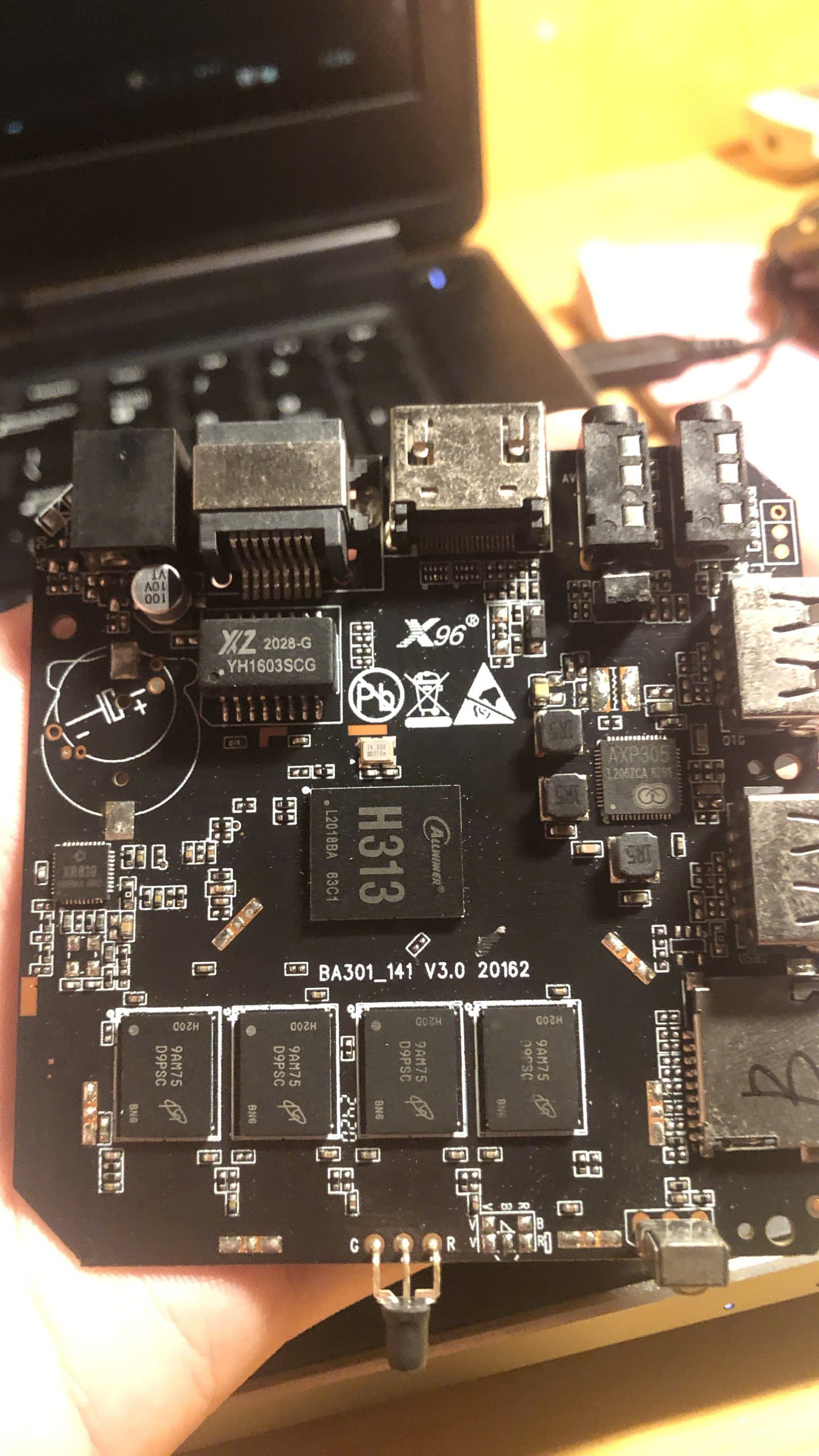
hello, i need some help with this box, i have tried a lot of image but only stayed red light or just blue light and shown nothing, my version using ddr3
-
Hi I installed Armbian_community_26.2.0-trunk.151_Odroidhc4_trixie_current_6.18.2_minimal.img Trying to build zfs-dkms I discovered that I was missing the linux-headers for this kernel version and there is no package containing it. At least apt-cache didn't find anything. Any idea where to find it? Thanks, Chris
-
Hello @JamesCL! The current image from https://privat-in.de/ should work. I will upload new images any minute now. However: if you only need Ethernet, Orange Pi R2S [1] is a better choice probably, b/c you got extra 2 times 2.5 gbit with that... Best // Sven-Ola [1] http://www.orangepi.org/html/hardWare/computerAndMicrocontrollers/service-and-support/Orange-Pi-R2S.html
-
Hello @Malay. Never mind - I' am not a native English speaker too. I have not tested the GUI intensively because my Goal is using this little board as a mini-server. Also, I think it's best getting the basics up before turning to the high-level GUI and media stuff. The "current" 6.6.99 kernel seems not to work with Wayland. You can switch to X11, change /etc/gdm3/custom.conf. The "edge" 6.18.7 is works with Wayland. Integrating GPU support is out of my focus currently, I am even unsure if this applies for Orange Pi RV2: https://sdk.spacemit.com/en/graphics/graphics_driver_framework/ ? HW Video decoding is another rabbit hole. The documentation is Chinese at best 🤪 LG + HTH // Sven-Ola
-
Thanks for your work, @sven-ola. I'm going to try your image. I only need Ethernet (no sound, no wireless, no Bluetooth, and definitely no HDMI). Cheers!
-
Hello, I just created this account! I just want to ask if the newer OS / Firmware has VPU + MPP support? I've been trying to build OpenAuto for the RK3229 and the only issue im having is the lack of h264 decoding (i only need h264, but it would be nice to have a full support) I'm using the latest trixie (minimal) with somewhat of a success, except for a laggy video decoding due to again lack of h264. I can't seem to find an older build with a kernel of 4.4.xxx that probably has the full GPU support with VPU + MPP working.