All Activity
- Past hour
-
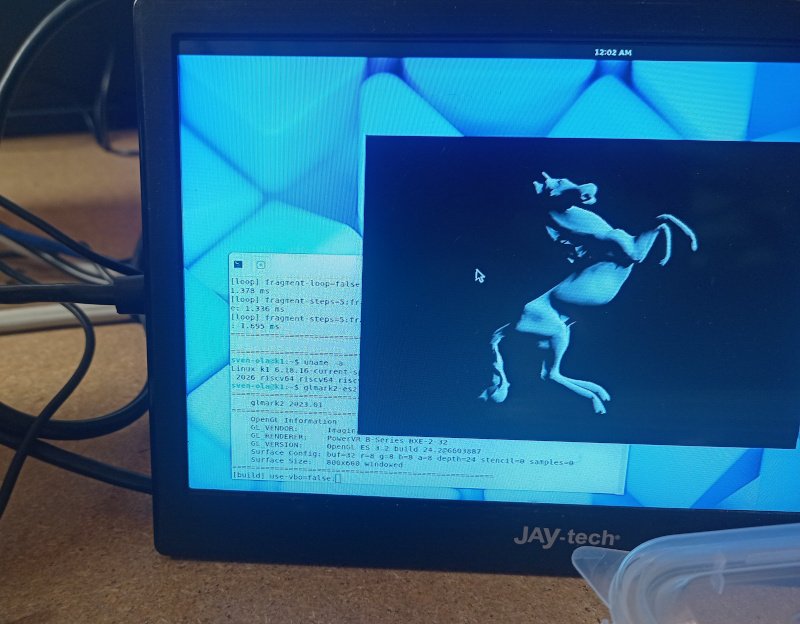
Found the "no Wayland on current kernel" (see new PR https://github.com/armbian/build/pull/9515). glmark2-es2-wayland still reports a 462 score on 800x600. Thus I updated and renamed the image mentioned in previous post with a current 6.18 kernel. You need to switch from 6.6 with /boot/switch-6.18.16-current script, anything else described in the post still is valid. @maxsub Alternatively install a M2(m)-to-M2(e) adapter in the larger bottom M.2 slot and use a NGFF Wifi card, for example RTL8822CE should run
- Today
-
 Thanks Werner. Could you please point to me where is best last download file reference for Orangepi5b plus ?
 -
In the meantime I brought up an access point server using the nightly armbian build. So far it is running solidly. The WiFi is underpowered, while the rest of the system seems stable.
-
Hello, all, I am trying to confirm the actual status of UART support on the Banana Pi BPI-R4. Does the hardware UART work reliably and appear as a character device (e.g., /dev/uart*) under Armbian Linux? Also, what is the maximum baud rate supported by this port? And one more question: Does Armbian support the Quectel EP06 modem (LTE, mini PCIe)? Thank you in advance, SY, Serge
-
Hello I am using: Linux nanopineo 6.12.74-current-sunxi #10 SMP Thu Feb 19 15:29:56 UTC 2026 armv7l GNU/Linux PRETTY_NAME="Armbian_community 26.2.0-trunk.464 trixie" NAME="Debian GNU/Linux" VERSION_ID="13" VERSION="13 (trixie)" VERSION_CODENAME=trixie DEBIAN_VERSION_FULL=13.3 ARMBIAN_PRETTY_NAME="Armbian_community 26.2.0-trunk.464 trixie" i am tring to bind spi1 to fbdev. Here are the configurations: /boot/armbianEnv.txt: /boot/overlay-user/spi1-st7789.dts: SPI1 is not generating any CLK or MOSI signals on the physical pins. Looking forward for any help Best regards, Genadi
-
Hi everyone, I'm very new to Armbian Linux. I'm about to acquire Orange Pi Zero 2W for my audio project. I have read some of the forum posts related to the SOC's native I2S, and I'd like to know if those problems mentioned in the posts have been resolved in the new kernel? Meaning that users don't have to write and compile their own device tree overlay and kernel mode driver? My project require a full duplex I2S with the CODEC as the master. Nothing fancy, just 2 channels in and 2 channels out. Hope someone can help clear the doubts so that I know for sure I will not be buying what I can not use. Thanks
-
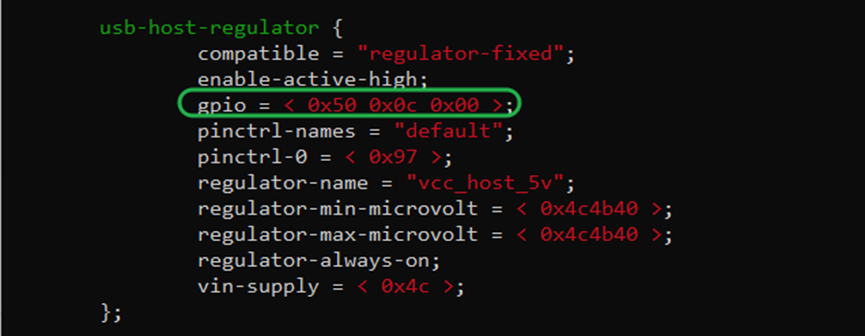
 I have dtb files used by manufacturers for compiling on the Android 5.1 system (OEM versions 2.17 and 2.19). It differs from boards like the firefly, for example: using a 100 Mbps network port, USB GPIO uses <0x50 0x0c 0x00>. Can anyone help with adapting this board? I want to compile it for armbian. 2.17.dtb 2.19.dtb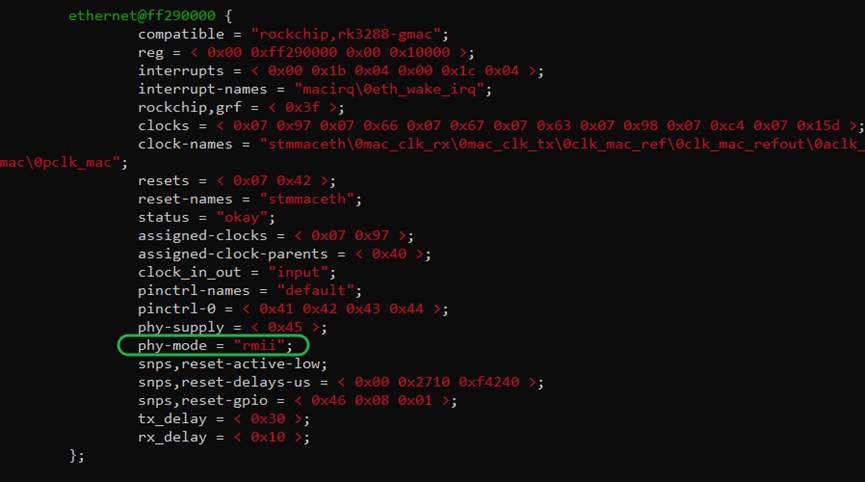
-

Gaming experience with Orange Pi 5 (RK3588) on Armbian
KhanhDTP replied to KhanhDTP's topic in Orange Pi 5
@xiboliyadongtu Did you try Hangover (which is Fex-emu)? https://github.com/AndreRH/hangover I saw someone had a problem with a similar online game with Box64 before. https://github.com/ptitSeb/box64/issues/3073#issuecomment-3689810679 - Yesterday
-
Greetings, i own a CB1, however i cannot get it to work well either. Perhaps we can help each other.
-

Install on amlogic tv box without working emmc
asoilole replied to Игорь Шаповалов's topic in Amlogic CPU Boxes
@hexdump I also have the exact constraints, I've detached eMMC from my HG680P. I've tried your u-boot using armbian and velvet's image tester, but boot of them failed to boot, and on UART I can't see anything. Any idea what should I try next ? Anyway, I managed to boot custom OpenWrt and I attached the scripts that I used to generate image run.sh insomwrt_with_vendor_u_boot.log -
@c0rnelius: Thanks for the info, I'll fiddle with the GPU in the meantime. @Cristian Apas: that hack above is necessary if you use the Xunlong Ubuntu userspace. They have replaced every hint on the OEM, which includes the GPU driver name. Hack not necessary if we simply use the Spacemit Bianbu Ubuntu userspace. I hacked an image together with this (see my site https://privat-in.de goto Downloads). It has a glmark2 score of 424 (not very fast). This is not for everybody. I compiled a standard OrangepiRv2 Armbian image with a legacy kernel and put in a Bianbu 3.01 minimal userspace as root. Details from my notes: # Image creation starts with Armbian-Orangepirv2_trixie_legacy_6.6.99_minimal.img Root from https://archive.spacemit.com/image/k1/version/bianbu/v3.0.1/ -> minimal.img -- Default LANG=zh_CN.UTF-8, change: dpkg-reconfigure locales -> en_US.UTF-8 Copy from Armbian: /etc/netplan/10-dhcp-all-interfaces.yaml, /etc/fstab, /boot/*, /lib/modules/*, /etc/modprobe.d/orangepirv2.conf /etc/modules-load.d/orangepirv2.conf Purge spacemit-flash-dtbs (and thereby remove linux-image-6.6.63*) Uploaded this image to https://privat-in.de/ (Downloads) First steps after flashing UART login as root / bianbu apt-get install parted parted /dev/mmcblk0 (or /dev/nvme0n1): resizepart 1 100% resize2fs /dev/mmcblk0p1 (or /dev/nvme0n1p1) apt-get install gnome-core glmark2-es2-wayland adduser a-new-user adduser a-new-user sudo Reboot and login Click on Terminal, run glmark2-es2-wayland Notes: other Spacemit K1 boards can run Bianbu without any changes, this is exclusively for OpiRV2. Expect oopses at every corner... You can install cinnamon-core and use that. Make sure to run cinnamon under gdm3 b/c starting via lightdm does not work well (e.g. menu open freezes). Also, KDE plasma only with screen artifacts and xfce4-wayland simply exits immediately. No other wayland DE tested...
-
@sven-ola https://lore.kernel.org/spacemit/20260310161853.3900605-1-gaohan@iscas.ac.cn/T/#t Sometime soon-ish I'll be doing another PR with early SD card and CPU freq scaling support. The above link should at least get you boot from eMMC or NVMe.
-
The question is: does the auto-generated version available for download with a legacy kernel include the hack to make the GPU work in Wayland, and if not, how should I compile it? Thanks
-

Gaming experience with Orange Pi 5 (RK3588) on Armbian
xiboliyadongtu replied to KhanhDTP's topic in Orange Pi 5
Many thanks for your efforts. I've attempted the panvk-mesa26 + protonge configuration and tried launching Black Desert Online via the UMU launcher, but the launcher crashes immediately. When using box64 + winestaging, the launcher does start, though it only displays a black screen. If you have time, could you kindly test Black Desert Online? I'd be most grateful! My system version is Armbian 26.2.1 noblevendor 6.1.115. My device is an Orange Pi 5 with 8GB RAM. Thank you very much! -

20USD 4GRAM RK3528 host (cheap dq08 tvbox)
zm112008 replied to fensoft's topic in Rockchip CPU Boxes
when using your fork, it worked https://github.com/fensoft/rk3528-tvbox -

How to use OrangePi 5 Plus's NPU for Image Generation?
usual user replied to Johson's topic in Beginners
I am currently at 7.0.0-rc1. I can upload my jump-start image so you can check if my kernel build works with your device. If you like what you see, it is only a 'prepare-jump-start ${target-mount-point}' away to install the kernel package alongside your existing system. I know about it, but since it is just another not mainline solution with another dependency mess, I am not particularly interested. -
20USD 4GRAM RK3528 host (cheap dq08 tvbox)
zm112008 replied to fensoft's topic in Rockchip CPU Boxes
Good afternoon, I can't compile the cores for this TV box. https://paste.armbian.com/ziyasupeka -
I agree with you. Neural network works well on NPU. I tried to load tiny llm model, but it's still too large for NPU. The bottleneck is the sram in NPU, not computing capacity. And I found an interesting project https://github.com/NotPunchnox/rkllama
-

Which armhf version should I choose?
Humboldt replied to Humboldt's topic in Software, Applications, Userspace
Thanks for the replies. But I've decided on Linux Mainline on ARM Chromebooks (Veyron): https://github.com/velvet-os/imagebuilder/releases/tag/251115-02 which at least works from the SD card. I'm still working on the installation. 😉 -
Oh damn, wish I would have read this before I tried to install (26.2 with vendor kernel build on the 9th) from SD to Nvme... How can I reflash MTD if I only have a MacBook available? Note to self and the next one hitting that wall: Going to maskrom mode kinda fixed it, after that I started again from a mSD and from that running ArmBian I flashed the same img to the Nvme on the board. Another reboot and it was started from the SSD 😉
-
This week’s Armbian development saw a wide range of improvements and fixes across the project’s build framework, kernel support, and device compatibility. Notable changes include the transition from POSIX to Bash syntax for enhanced script reliability, expanded support for new hardware such as the Norco-EMB-3531 board, and the addition of Vulkan and improved 3D package descriptions. Several device-specific updates were made, including kernel enhancements for sm8250, mainline support for SpacemiT, and fixes for wireless and HDMI functionality on various boards. The team also introduced new features like a cache manager modal in the imager and improved marking for container-based software. Multiple bug fixes addressed issues with OS image duplication, patch timestamps, and device quirks. Security was bolstered with hardened GitHub Actions, ensuring a more robust development pipeline. Changes(#9400 P1a) Replace POSIX [ ] with bash [[ ]] across build framework. by @iav in armbian/build#9462Add manual execution and daily cron schedule for MOTD generation. by @igorpecovnik in armbian/armbian.github.io#249Add norco-emb-3531 board and norco vendor image. by @retro98boy in armbian/armbian.github.io#244add Vulkan support and expand 3D package descriptions. by @igorpecovnik in armbian/build#9494Added config improvements and fixes to ayn odin2. by @Squishy123 in armbian/build#9316bump 7.0 to rc2. by @EvilOlaf in armbian/build#9475dwc2: explicitly force host mode for USB_DR_MODE_HOST. by @igorpecovnik in armbian/build#9486feat: add cache manager modal with per-image management. by @SuperKali in armbian/imager#109feat: mark container-based software in menu and docs. by @igorpecovnik in armbian/configng#761fix(gitignore): ignore pycache at all depths (#7863). by @iav in armbian/build#9490fix(images): adapt module to new armbian-images.json structure. by @igorpecovnik in armbian/configng#756fix(manage_zsh): abort shell change if zsh package install fails. by @ajorpheus in armbian/configng#759fix: resolve OS image list duplication when switching filters. by @SuperKali in armbian/imager#110Fix: SakuraPi RK3308B WLAN broken. by @TheSnowfield in armbian/build#9478i915: fix Dell XPS 13 7390 device ID in quirk patches. by @igorpecovnik in armbian/build#9485Improve sm8250 6.19 edge kernel. by @retro98boy in armbian/build#9434meson64: bump edge to 7.0-rc1. by @EvilOlaf in armbian/build#9459meson: freeze current kernel at 6.12.28 and fix HDMI PHY frequency limit. by @igorpecovnik in armbian/build#9465nanopi-zero2: enable mainline kernel support and PCIe for M.2 WiFi. by @rubycomm in armbian/build#9453OrangePi 3B: Add device tree overlays for OrangePi 3B with I2C, PWM, SPI support. by @kskshaf in armbian/build#9460OrangePi-RV2: Fix wireless access point mode by using the correct FW. by @sven-ola in armbian/build#9504orangepi5: rewrite uboot patches against v2026.04-rc3. by @EvilOlaf in armbian/build#9457patching: fix #9028 timestamp when multiple patches touch same file. by @iav in armbian/build#9489pkg_install/pkg_remove: properly propagate apt-get exit codes. by @igorpecovnik in armbian/configng#760Removed un-needed patch for SM8550-6.18; patch has already been updat…. by @Squishy123 in armbian/build#9487rk3568: add 51.2MHz PLL rate for HDMI. by @skorobkov in armbian/build#9477rock-5b-plus: add current kernel to build targets. by @igorpecovnik in armbian/build#9464rock-5t: add current kernel to build targets. by @igorpecovnik in armbian/build#9463Rockchip64 fix patches due to upstream changes in 6.19.6 and 6.18.16. by @EvilOlaf in armbian/build#9483rockchip: Disable specific patches in 6.19 series. by @igorpecovnik in armbian/build#9493rockchip: Enable Wireguard/TUN module in vendor kernel. by @vidplace7 in armbian/build#9492Spacemit legacy loadpatch. by @sven-ola in armbian/build#9496SpacemiT: Add linux-7.0.y "mainline" support. by @pyavitz in armbian/build#9458spacemit: remove old and unused patch set. by @sven-ola in armbian/build#9497unset QEMU_CPU for aml_image_packer. by @QwaSeeK in armbian/build#9417Update odroidxu4-current to 6.6.128. by @belegdol in armbian/build#9491[StepSecurity] ci: Harden GitHub Actions. by @step-security-bot in armbian/build#9356View the full article
-
Hi all, I kinda set myself in a corner: Last year in October I installed the UEFI image in SPI on my OrangePi5 Plus, then I installed the uefi armbian image on the Nvme ssd. I did all of that after a system failure during my 3 month absence from where I've got that OPi5 setup. As I couldn't get it back to work I went and tried with the Uefi Image... But it seems that this was a major mistake: I could never get my frigate container back to running as there's no NPU's detected! Just now I took the leap of faith and reinstalled uboot into the SPI and flashed a freshly loaded "Armbian_25.11.1_Orangepi5-plus_trixie_current_6.12.58_minimal.img.xz"... And still there's no NPU: I can't see a thing about a NPU: mircsicz@orangepi5-plus:~$ sudo dmesg|grep rocket mircsicz@orangepi5-plus:~$ sudo dmesg|grep NPU mircsicz@orangepi5-plus:~$ sudo dmesg|grep GPU mircsicz@orangepi5-plus:~$ sudo dmesg|grep gpu [ 6.133753] panthor fb000000.gpu: [drm] clock rate = 198000000 [ 6.136216] panthor fb000000.gpu: [drm] Mali-G610 id 0xa867 major 0x0 minor 0x0 status 0x5 [ 6.136222] panthor fb000000.gpu: [drm] Features: L2:0x7120306 Tiler:0x809 Mem:0x301 MMU:0x2830 AS:0xff [ 6.136226] panthor fb000000.gpu: [drm] shader_present=0x50005 l2_present=0x1 tiler_present=0x1 [ 6.160653] panthor fb000000.gpu: [drm] Firmware protected mode entry not be supported, ignoring [ 6.160711] panthor fb000000.gpu: [drm] Firmware git sha: 814b47b551159067b67a37c4e9adda458ad9d852 [ 6.160868] panthor fb000000.gpu: [drm] CSF FW using interface v1.1.0, Features 0x0 Instrumentation features 0x71 [ 6.161137] [drm] Initialized panthor 1.5.0 for fb000000.gpu on minor 1 mircsicz@orangepi5-plus:~$ uname -a Linux orangepi5-plus 6.18.0-rc6-edge-rockchip64 #1 SMP PREEMPT Sun Nov 16 22:25:38 UTC 2025 aarch64 GNU/Linux Nor with the npu-probe.sh script: # Auto-generated NPU detection record # Generated at: Mon Mar 9 07:32:45 PM EST 2026 [platform] comatible="xunlong,orangepi-5-plus,rockchip,rk3588," model="Xunlong Orange Pi 5 Plus," family="unknown" soc_id="unknown" arch="aarch64" kernel="6.18.0-rc6-edge-rockchip64" [modules] rknpu="" rocket="" [devices] no_detected_npu=1 devices_not_support=[ "/dev/dri/renderD128", # Driver: panthor ] [libraries] no_delegate=1 vendor_libs=[] So I came here hoping one of you guys will be able to gi'me a hint... After flashing a recent dev build of v26.2 with vendor Kernel to another SD I finally can see the NPU again: # Auto-generated NPU detection record # Generated at: Mon Mar 9 08:20:56 PM EST 2026 [platform] comatible="rockchip,rk3588-orangepi-5-plus,rockchip,rk3588," model="Orange Pi 5 Plus," family="unknown" soc_id="unknown" arch="aarch64" kernel="6.1.115-vendor-rk35xx" [modules] rknpu="/sys/module/rknpu" rocket="" [devices] npu_device="/dev/dri/renderD129" # Driver: RKNPU devices_not_support=[ "/dev/dri/renderD128", # Driver: rockchip-drm ] [libraries] no_delegate=1 vendor_libs=[] Also added my entry to the Github mentioned above 😉 So now I need to ask @usual user what specific kernel are you running? It seems to me that with the kernels available on the repo's only 6.1.115 allows me to use the NPU...
- Last week
-
 Update — Working fix available I've got eMMC detection working on my Radxa Zero 3W with Armbian Trixie (vendor kernel 6.1.115, SD card boot). The fix uses a device tree overlay to inject the missing voltage regulators, pinctrl references, and eMMC capabilities into the base DTB, combined with a small systemd service that rebinds the SDHCI driver to work around a deferred probe timing issue. After applying, the eMMC is detected as expected: mmc0: new HS200 MMC card at address 0001 mmcblk0: mmc0:0001 8GTF4R 7.28 GiB armbian-install works normally after that to migrate to eMMC boot. The rebind service is conditionally skipped when booting from eMMC so it doesn't interfere. I've attached a zip with all the files. The README.md inside has the full details — root cause analysis, what was tried and failed (including full DTB recompile), how the fix works, installation/verification/revert steps, and known limitations (the pinctrl phandle values are specific to this kernel build). I still working on a version that does not need the rebind service for sd cards. but for now you need the rebind on the sd card to get it to find the EMMC so you can install. emmc-fix.zip
 -
Update — eMMC now detected (workaround found) After significant debugging, I have identified and worked around the issue. Here's what I found: What the shipped DTB is missing for the eMMC controller (/mmc@fe310000): vmmc-supply / vqmmc-supply — voltage regulator references pinctrl-0 / pinctrl-names — pin muxing for the 8-bit eMMC data bus, clock, command, and data strobe lines cap-mmc-highspeed, mmc-hs200-1_8v, no-sd, no-sdio — eMMC capability flags Interestingly, the PMU IO domains (syscon@fdc20000/io-domains) are already correctly configured with vccio2 = 1.8V, and the pinctrl groups (emmc-bus8, emmc-clk, emmc-cmd, emmc-datastrobe) exist under /pinctrl/emmc/. The board-level wiring is all there in the DTB — it's just not connected to the eMMC controller node. Root cause: The Armbian Trixie vendor kernel (6.1.115) ships only rk3566-radxa-zero3.dtb (generic Zero 3), not the 3W-specific rk3566-radxa-zero-3w.dtb that the upstream Linux kernel has. The upstream DTS includes all of the above for the 3W model. Additional finding — deferred probe timing issue: Even after patching all missing properties via a device tree overlay, the eMMC still doesn't appear on first boot. The SDHCI driver (sdhci-dwcmshc) probes before the overlay's regulators are registered, receives dummy regulators instead of deferring, and initializes the controller without real power. A manual unbind/rebind of the driver after boot causes immediate detection: mmc0: new HS200 MMC card at address 0001 mmcblk0: mmc0:0001 8GTF4R 7.28 GiB I have a working fix (overlay + early-boot driver rebind) that I testing before publishing. The proper long-term solution would be for Armbian to ship the rk3566-radxa-zero-3w.dtb from the upstream kernel, or merge its board-level eMMC configuration into the existing rk3566-radxa-zero3.dtb.
-
Hi folks, I was looking to activate the NPU on my beagley-AI chip, running armbian, and I couldn't find how. This chip as a NPU (AM67A) on the SOC from TexasInstruments (https://api.pageplace.de/preview/DT0400.9783895766572_A50990365/preview-9783895766572_A50990365.pdf). The loading of the NPU seems to have failed: mesg | grep remoteproc [ 8.461511] k3-dsp-rproc 7e000000.dsp: configured DSP for remoteproc mode [ 8.461728] remoteproc remoteproc0: 7e000000.dsp is available [ 8.461868] k3-dsp-rproc 7e000000.dsp: register pm nitifiers in remoteproc mode [ 8.464448] k3-dsp-rproc 7e200000.dsp: configured DSP for remoteproc mode [ 8.465124] remoteproc remoteproc0: Direct firmware load for j722s-c71_0-fw failed with error -2 [ 8.465164] remoteproc remoteproc0: powering up 7e000000.dsp [ 8.465271] remoteproc remoteproc0: Direct firmware load for j722s-c71_0-fw failed with error -2 [ 8.465285] remoteproc remoteproc0: request_firmware failed: -2 [ 8.480524] remoteproc remoteproc1: 7e200000.dsp is available [ 8.480658] k3-dsp-rproc 7e200000.dsp: register pm nitifiers in remoteproc mode [ 8.482329] remoteproc remoteproc1: Direct firmware load for j722s-c71_1-fw failed with error -2 [ 8.482375] remoteproc remoteproc1: powering up 7e200000.dsp [ 8.482488] remoteproc remoteproc1: Direct firmware load for j722s-c71_1-fw failed with error -2 [ 8.482501] remoteproc remoteproc1: request_firmware failed: -2 [ 8.964763] platform 79000000.r5f: configured R5F for remoteproc mode [ 9.047514] remoteproc remoteproc2: 79000000.r5f is available [ 9.048055] remoteproc remoteproc2: Direct firmware load for j722s-mcu-r5f0_0-fw failed with error -2 [ 9.048099] remoteproc remoteproc2: powering up 79000000.r5f [ 9.048222] remoteproc remoteproc2: Direct firmware load for j722s-mcu-r5f0_0-fw failed with error -2 [ 9.048241] remoteproc remoteproc2: request_firmware failed: -2 [ 9.234391] remoteproc remoteproc3: 78000000.r5f is available [ 9.234578] remoteproc remoteproc3: attaching to 78000000.r5f [ 9.402138] remoteproc remoteproc3: remote processor 78000000.r5f is now attached [ 9.505240] platform 78400000.r5f: configured R5F for remoteproc mode [ 9.547946] remoteproc remoteproc4: 78400000.r5f is available [ 9.548359] remoteproc remoteproc4: Direct firmware load for j722s-main-r5f0_0-fw failed with error -2 [ 9.548400] remoteproc remoteproc4: powering up 78400000.r5f [ 9.548505] remoteproc remoteproc4: Direct firmware load for j722s-main-r5f0_0-fw failed with error -2 [ 9.548521] remoteproc remoteproc4: request_firmware failed: -2 [ 15.281722] Modules linked in: algif_aead rpmsg_ctrl rpmsg_char cc33xx mac80211 libarc4 snd_soc_simple_card cc33xx_sdio snd_soc_simple_card_utils crct10dif_ce panel_simple pci_endpoint_test e5010_jpeg_enc cpufreq_dt pvrsrvkm(O) pwm_fan at24 rti_wdt cfg80211 ti_k3_r5_remoteproc btti_uart bluetooth snd_soc_davinci_mcasp snd_soc_ti_udma wave5 rpi_panel_attiny_regulator snd_soc_ti_edma snd_soc_hdmi_codec snd_soc_ti_sdma videobuf2_dma_contig v4l2_mem2mem videobuf2_memops videobuf2_v4l2 videobuf2_common snd_soc_core snd_pcm_dmaengine tc358762 snd_pcm videodev ti_k3_dsp_remoteproc ti_k3_common mc snd_timer snd omap_mailbox optee_rng efi_pstore nfnetlink [ 15.285991] Modules linked in: algif_aead rpmsg_ctrl rpmsg_char cc33xx mac80211 libarc4 snd_soc_simple_card cc33xx_sdio snd_soc_simple_card_utils crct10dif_ce panel_simple pci_endpoint_test e5010_jpeg_enc cpufreq_dt pvrsrvkm(O) pwm_fan at24 rti_wdt cfg80211 ti_k3_r5_remoteproc btti_uart bluetooth snd_soc_davinci_mcasp snd_soc_ti_udma wave5 rpi_panel_attiny_regulator snd_soc_ti_edma snd_soc_hdmi_codec snd_soc_ti_sdma videobuf2_dma_contig v4l2_mem2mem videobuf2_memops videobuf2_v4l2 videobuf2_common snd_soc_core snd_pcm_dmaengine tc358762 snd_pcm videodev ti_k3_dsp_remoteproc ti_k3_common mc snd_timer snd omap_mailbox optee_rng efi_pstore nfnetlink The usual lspci doesn't contain much: lspci 00:00.0 PCI bridge: Texas Instruments Device b010 How should I proceed to make it work? Thanks!