All Activity
- Past hour
-
I didn't know g12 and sm1 were compatible enough for flashing - since I realized how easy it is to mess up by using the wrong soc type I grew very meticulous about everything - I just didn't want to brick my box. (after I soft bricked it already:) About the next step: how to run recovery? Could you please explain in more detail, or just point me in the right direction where to look? I mean, I'm really quite new to all of this, SoC linux installs etc, so I don't really understand a big portion of it. P.S. wifi and eth are also working
-
@user03 For sm1 devices use --soc=g12a Another option which is something I recently had to do with my BPI-CM4 "if I recall correctly, I've also done so on a tvbox i b0rked" is use pyamlboot. sudo pip3 install pyamlboot Short the board and run; sudo boot-g12.py u-boot.bin # if you have a functional u-boot binary This won't actually flash anything, "atleast it didn't in my case?" it will just force the unit to load that boot binary. From there you should be able to hit the SPACEBAR and check ur options using `print` and `help`. Should see options like usbboot, usb_update, etc. Not saying you should use one of these, but... You may be able to find one online or inside the Android img for ur unit. https://github.com/pyavitz/debian-image-builder/tree/feature/files/boot/uboot/ac2xx Anyway. At least you got it booting from USB. Next step would be running a recovery on it.
- Today
-
Thank you @c0rnelius for guidelines regarding the tools. I was able to successfully get the device in mask rom mode after dozens of unsuccessful attempts, it's been like hell. Anyway, once I managed to get it in mask rom mode, I checked the tools you mentioned - the thing is https://github.com/natinusala/linux-amlogic-toolkit uses https://github.com/Stane1983/aml-linux-usb-burn under the hood, it's more specialized for unpacking, modifying and repacking android images. Then the other tools available such as https://github.com/mluis/aml-flash-tool and https://github.com/PowderLinux/Amlogic-Flash-Tools-Backup don't seem to support my box. I looked at the flash scripts and the --soc options and saw this --soc=<m8|axg|gxl|txlx|g12a> My board is s905x3, which is sm1. This repo https://github.com/PowderLinux/Amlogic-Flash-Tools-Backup even lists s905x3 as supported, but when I opened the flash tool, the script had this soc value check if [[ "$soc" != "m8" ]] && [[ "$soc" != "gxl" ]] && [[ "$soc" != "axg" ]] && [[ "$soc" != "txlx" ]] && [[ "$soc" != "g12a" ]]; then echo "Soc type is invalid, should be either m8,gxl,axg,txlx,g12a" exit 1 fi I mean, seriously - the README explicitly states s905x3 boards are supported, and if you put --soc=sm1 the flash script will probably fail (I didn't dare run that). @SteeManRegarding the install.sh script which I couldn't find - I mentioned I used dd instead of balena-etcher. I tried to install balena-etcher, just to see if the usb would be different, but then I remembered why I didn't do it with balena in the first place - package conflicts (node vs node-lts) on arch, I'd have to uninstall node, and switch to lts version... It was just too much of a hassle, so I didn't install it. With dd, the usb is partitioned in armb_boot and armbi_root, and instead of a /boot folder, I had a partition. The armbi_root partition contains the linux filesystem, /etc, /boot, /lib etc. But I did find a /root directory in the armbi_root partition. And of course, it contains the install-aml.sh script. I thought since /boot was a partition in my case, /root was the armbi_root partition, and the /root dir is hidden and inaccessible to normal users. So, my apologies, I should have been more thorough, and look better and ask instead of asking AI carelessly - should have known it wasn't safe to just follow AI's instructions for installing to emmc, it's too specific and delicate, and AIs are usually too general. I guess it's a very good lesson, one that cost me hours of work and nerves. Thank you again for your patience and all the help you provided. And then I searched with AI, to see if any at all linux tools are available for my board - no results. ChatGPT told me there was an option to flash parts of the android image - without touching the bootloader. So I ended up using https://github.com/Stane1983/aml-linux-usb-burn, to unpack the android image and to flash something. ChatGPT showed me which files and in what order to flash them (going from lowest risk possible supposedly). I managed to flash the dtb successfully but that was it - after that I couldn't flash boot, and the board probably lost contact # dtb flash - successful [user03@arch unpack]$ ./../update partition _aml_dtb _aml_dtb.PARTITION normal file size is 0x10306 AmlUsbTplCmd = download store _aml_dtb normal 0x10306 rettemp = 1 buffer = download store _aml_dtb normal 0x10306 AmlUsbReadStatus retusb = 1 Downloading.... [update]Cost time 0Sec [update]Transfer size 0x10306B(0MB) AmlUsbBulkCmd[download get_status] [update]mwrite success # 1. attempt boot flash - fail [user03@arch unpack]$ ./../update partition boot boot.PARTITION normal file size is 0x98d800 AmlUsbTplCmd = download store boot normal 0x98d800 rettemp = 1 buffer = download store boot normal 0x98d800 AmlUsbReadStatus retusb = 1 Downloading.... [AmlLibUsb]:IOCTL_WRITE_MEDIA_Handler,value=1,index=ffff,len=32,ret=-110 error_msg=Connection timed out Write media command 112 failed AmlWriteMedia failed [update]Cost time 5Sec [update]Transfer size 0x70000B(0MB) ERR:write data to media failed # 2. attempt boot flash - fail [user03@arch unpack]$ ./../update partition boot boot.PARTITION normal file size is 0x98d800 AmlUsbTplCmd = download store boot normal 0x98d800 IOCTL_TPL_CMD_Handler ret=-110,tpl_cmd=download store boot normal 0x98d800 error_msg=Connection timed out rettemp = 0 buffer = download store boot normal 0x98d800 # 3. attempt boot flash - fail [user03@arch unpack]$ ./../update partition boot boot.PARTITION normal file size is 0x98d800 AmlUsbTplCmd = download store boot normal 0x98d800 rettemp = 1 buffer = download store boot normal 0x98d800 AmlUsbReadStatus retusb = 1 [update]ERR(L298):cmdret=[] # test if board available - fail [user03@arch tools]$ ./update identify 7 AmlUsbIdentifyHost IOCTL_IDENTIFY_HOST_Handler ret=-110 error_msg=Connection timed out ERR: get info from device failed So I unplugged it, and tried to boot it, just to see what's the status... amazing, I was shocked when I saw the line ## Booting Android Image at 0x01080000 ... It worked! I mean, of course it didn't boot any android, since I didn't really manage to flash it, but it managed to get to that point. So, I reflashed my usb stick (fresh armbian trixie) and enabled multi-boot with toothpick, and well, it does boot now to amrbian from usb - hdmi working, usbs working, ethernet and wifi not tested, but probably working (ethernet). So, I guess, as long as I have the usb inserted, it should successfully boot:) I call it a day Also, should I even try to run the install-aml.sh script now? I really wanted to use the 32gb emmc, instead of the 8gb usb. If it's not a good idea, then I'll just add another one in the other usb port (which I don't use anyway) and setup fstab rule to load it automatically to be used as additional storage.
-
Klipper Load Cell Documentation The kx711 is specifically referenced near the bottom of the documentation. It needs slow speeds and I believe has been incorporated into recent Klipper releases. I posted the file output on graphics, framebuffer and drm to @Torte github link. Also found an informative YouTube video on adding a Klipper Touch Screen, over serial, and configuring it. I'm adverse to tossing electronics into landfills - motivation to invest some time into a build for the Sovol boards and tolerate the mksclient propriatary blob. If the touch screen proves to be a show stopper, I think the makerbase MKS-SKIPR board, A supported USB wifi dongle and an HDMI touch screen could be used.
-
In the meantime, I fixed internal audio for "edge" (was: missing headphone GPIO). And also investigated around the esos.elf RTOS firmware. There's a license for that, which I added to my tree. The license basically says: use but do not infect with GPL: https://gitee.com/spacemit-buildroot/buildroot-ext/blob/k1-bl-v2.2.y/board/spacemit/k1/target_overlay/lib/firmware/LICENSE.spacemit_esos. Continuing on kthread issue. LG // Sven-Ola
-
What happens if your start armbian-resize-filesystem.service manually? IE "sudo systemctl start armbian-resize-filesystem.service" and then check the log for the service?
-
 You can create an extension including something like unset armbian_kernel_config__force_pa_va_48_bits_on_arm64
 -
 @Werner I re-checked all my patches and custom configurations and performed a clean rebuild. I found clear evidence in the logs that `CONFIG_ARM64_VA_BITS` is being explicitly overwritten during the build process: ### kernel_config_initialize.log --> (9) INFO: Configuring kernel [ linux-rk35xx-vendor ] --> (9) INFO: Using kernel config provided by user [ userpatches/linux-rk35xx-vendor.config ] --> (9) COMMAND: cp -pv /armbian/userpatches/linux-rk35xx-vendor.config /armbian/cache/sources/linux-kernel-worktree/6.1__rk35xx__arm64/.config '/armbian/userpatches/linux-rk35xx-vendor.config' -> '/armbian/cache/sources/linux-kernel-worktree/6.1__rk35xx__arm64/.config' --> (9) INFO: Considering available RAM for BTF build [ 13082 MiB ] --> (9) INFO: Enabling eBPF and BTF info [ for fully BTF & CO-RE enabled kernel ] --> (9) COMMAND: ./scripts/config --disable SECURITY_LOCKDOWN_LSM ... --> (10) COMMAND: ./scripts/config --enable ARM64_VA_BITS_48 ... --> (12) COMMAND: ./scripts/config --set-val ARM64_PA_BITS 48 --> (12) COMMAND: env -i CCACHE_BASEDIR="/armbian/cache/sources/linux-kernel-worktree/6.1__rk35xx__arm64" CCACHE_TEMPDIR="/armbian/.tmp/work-907ace63-1eb7-43dc-ac17-503d457007a8/ccache_tmp" PATH="/usr/bin:/armbian/cache/pip/base/bin:/armbian/.tmp/work-907ace63-1eb7-43dc-ac17-503d457007a8/bin:/usr/local/sbin:/usr/local/bin:/usr/sbin:/usr/bin:/sbin:/bin" PYTHONPATH="/armbian/cache/pip/base/lib/python3.12/site-packages:" DPKG_COLORS=always XZ_OPT='--threads=0' TERM='xterm-256color' COLUMNS='248' COLORFGBG='' CCACHE_DIR='/armbian/cache/ccache' make '-j6' 'ARCH=arm64' 'LOCALVERSION=-vendor-rk35xx' 'CROSS_COMPILE= aarch64-linux-gnu-' 'KCFLAGS=-fdiagnostics-color=always -Wno-error=misleading-indentation ' 'SOURCE_DATE_EPOCH=1768563629' 'KBUILD_BUILD_TIMESTAMP=Fri Jan 16 11:40:29 UTC 2026' 'KBUILD_BUILD_USER=build' 'KBUILD_BUILD_HOST=armbian' 'KGZIP=pigz' 'KBZIP2=pbzip2' olddefconfig HOSTCC scripts/basic/fixdep LEX scripts/kconfig/lexer.lex.c YACC scripts/kconfig/parser.tab.[ch] HOSTCC scripts/kconfig/lexer.lex.o HOSTCC scripts/kconfig/parser.tab.o HOSTLD scripts/kconfig/conf .config:2755:warning: override: reassigning to symbol ARM64_VA_BITS_39 .config:2789:warning: override: ARM64_VA_BITS_48 changes choice state # # configuration written to .config # --> (14) INFO: Kernel configuration [ linux-rk35xx-vendor ] I traced this behavior to the following function in `lib/functions/compilation/armbian-kernel.sh`: function armbian_kernel_config__force_pa_va_48_bits_on_arm64() { if [[ "${ARCH}" == "arm64" ]]; then opts_y+=("ARM64_VA_BITS_48") opts_val["ARM64_PA_BITS"]="48" fi } I manually modified this function (changing `48` to `39`), and the resulting kernel deb finally compiled with `CONFIG_ARM64_VA_BITS=39` successfully. Obviously, modifying the build framework source is not the proper solution. Is this enforcement intended for all arm64 builds? Is there a standard way to bypass this function?
 -
Nevermind, got the answer from here.
-
If you can get the unit in the proper state by shorting, you can flash an android img or custom one using this tool; https://github.com/natinusala/linux-amlogic-toolkit Other repos that you may find useful: https://github.com/mluis/aml-flash-tool https://github.com/Stane1983/aml-linux-usb-burn
-
Hi While I thiknk your approach should have worked, a quick search revealed that something similar is done for a different family. Perhaps try this way:https://github.com/armbian/build/blob/9aa6e1e29ec2d397bbe223bebaa93bd13ef79818/patch/kernel/archive/filogic-6.16/patches.armbian/0007-build.sh-add-additional-build-script-config-defconfi.patch#L1909
-
Description: Hello everyone, I am encountering an issue where kernel configuration changes do not take effect when building an image for the Rock 5B using the Armbian Build system. Environment: Board: Rock 5B Kernel: Vendor Release: Noble Build Mode: Mini Build Tag/Branch: v25.11 Specific Issue: To ensure compatibility with Redroid containers, I need to change the kernel's CONFIG_ARM64_VA_BITS from the default 48-bit to 39-bit. What I have tried: I have attempted the following three methods, but none have worked: Ran the kernel configuration tool to change CONFIG_ARM64_VA_BITS, then copied the generated .config to userpatches/linux-rk35xx-vendor.config. Took the default config/kernel/linux-rk35xx-vendor.config, manually modified/added CONFIG_ARM64_VA_BITS=39 and CONFIG_ARM64_VA_BITS_39=y, and copied it to userpatches/linux-rk35xx-vendor.config. Created a kernel source patch in userpatches targeting arch/arm64/configs/rockchip_linux_defconfig and arch/arm64/configs/defconfig to force CONFIG_ARM64_VA_BITS=39 and CONFIG_ARM64_VA_BITS_39=y. Result: Regardless of the method used, the final Armbian-generated kernel remains at VA_BITS=48. It seems my configuration changes are being overwritten or ignored during the build process. Request: Is there specific logic in the Vendor/RK3588 build configuration that forcibly locks VA_BITS? What is the correct way to modify this parameter for this specific board/kernel combination? Thanks for your help!
-
Hi, I've read on here that you can apparently switch to a stable edge branch through Armbian Config, but the closest I can find is 'switch to rolling packages repository' and 'distribution upgrade to rolling unstable'. Are either of these correct? I'm running the Ubuntu Noble 6.12 kernel, btw. Many thanks.
-
@Dangrain There is a paragraph Partecipation and debugging with the suggested operations to let other people help you in a proper way and perhaps improve support for your board in the mainline armbian codebase. You may want to go your own way, but then helping will be much harder.
-
@HarleyyyuI don't have that exact model of board, mine's a ZQ01-V1.3 for which the unbricking pins are in a different place (but don't worry I figured it out). The issue I'm facing right now is that my frankenstein'd image is in pieces, pieces from two different OSes and Isn't in a single .img file so I'm not sure how to write it using multitool. Any help sure is appreciated.
-
Please read my reply at https://github.com/torte71/InsideSovolKlipperScreen/issues/8#issuecomment-3796412735 In short: I think the screen on this device is a proprietary smart-device that can't be used as a standard display. Thus KlipperScreen (and any other X or Wayland app) will not be able to run.
-

Armbian for H313 X96-Q LPDDR3 TV-Box
Maurizio Finesso replied to sicxnull's topic in Allwinner CPU Boxes
I would like to say thank you very much to @sicxnull for the latest images of X96Q V5.1. They work really well and allow me to install HA as well as use it like a PC. You really did a great job! -
Interested myself in the 3W in general, and if I can find them anywhere. They have the proper chip for a zero form factor board to use with the Radxa 5C and 5A, and several other boards. So I've looked, but they seem to have been outdated by the better zero form factor boards... which also seem to have a specific chip type, and aren't really compatable with the other chips if you're trying to give yourself some headroom to run clusters or offload some processes. I don't know too much about too many things yet, but I know that I need to stick with 1 chip, like a GPU arcitecture, and I can't find the 3W anywhere for any type of reasonable price. I think I found a few for like $300, but the dream of using this stuff at the top end of what it can be used for is looking grim as I am having troubles finding some of these parts for this more developed chip style. I'm sure in due time, it will all be replaced by the new Radxa zero form factor, along with the Pi form factor which will probably gravitate to this new more powerful model. The Zero board has twice the specs aprox. as the old 3W, which means likley the next Radxa board is comming out swinging to start with 32GB of RAM, and then it'll be updated with 64GB. As they seem to do that... Start half mast, then bring out a new twice as powerful model. Hoping to get my first arm project going, and I wish I knew more about ARM in general before I started focusing on 1 chip style. Radxa is cool, and they are buff as can be, but as ARM evolves, the specificity of board type to the different things you have to do is a big big pain in the ass that makes this whole adventure more painful then it should be... Eventually I'm sure it'll all come together into a standard.... But by then, you can't be a pioneer in the tiny computer parts projects. Hope this thread evolves some. I know just seeing a title on 3W caught my eye, and it's on the top of the list. I'll be getting more involved with all of this in the days to come. If you can message me, feel free. I am pretty Armtarted, and would love any information I can get.
-

rk3308B Sovol SV06 Ace Klipper using mks skipr as a starting point
Nicholas Wakeford replied to shepper's topic in Rockchip
Hey shepper, this is great, I've been thinking of working on this myself but it looks like you have more practical experience. One of the issues I had run into with the OEM software packages was no support for wired ethernet, my preference is wired connections for my devices. Looks like there was no way to provide driver support for different manufacturers. Using Armbian would remedy this. One of the hurdles I have found online involves the probe sensing that Sovol has used with this specific printer. They created a custom function (kx711) for their toolhead, that supposedly hasn't been merged with the mainline klipper branch. Don't know how difficult it would be to implement. Maybe I'll try going down this rabbit hole. Now that I see someone else is giving this a go I feel more motivated to do something too. If I can help let me know. My printer is the SV06 Ace Plus. -
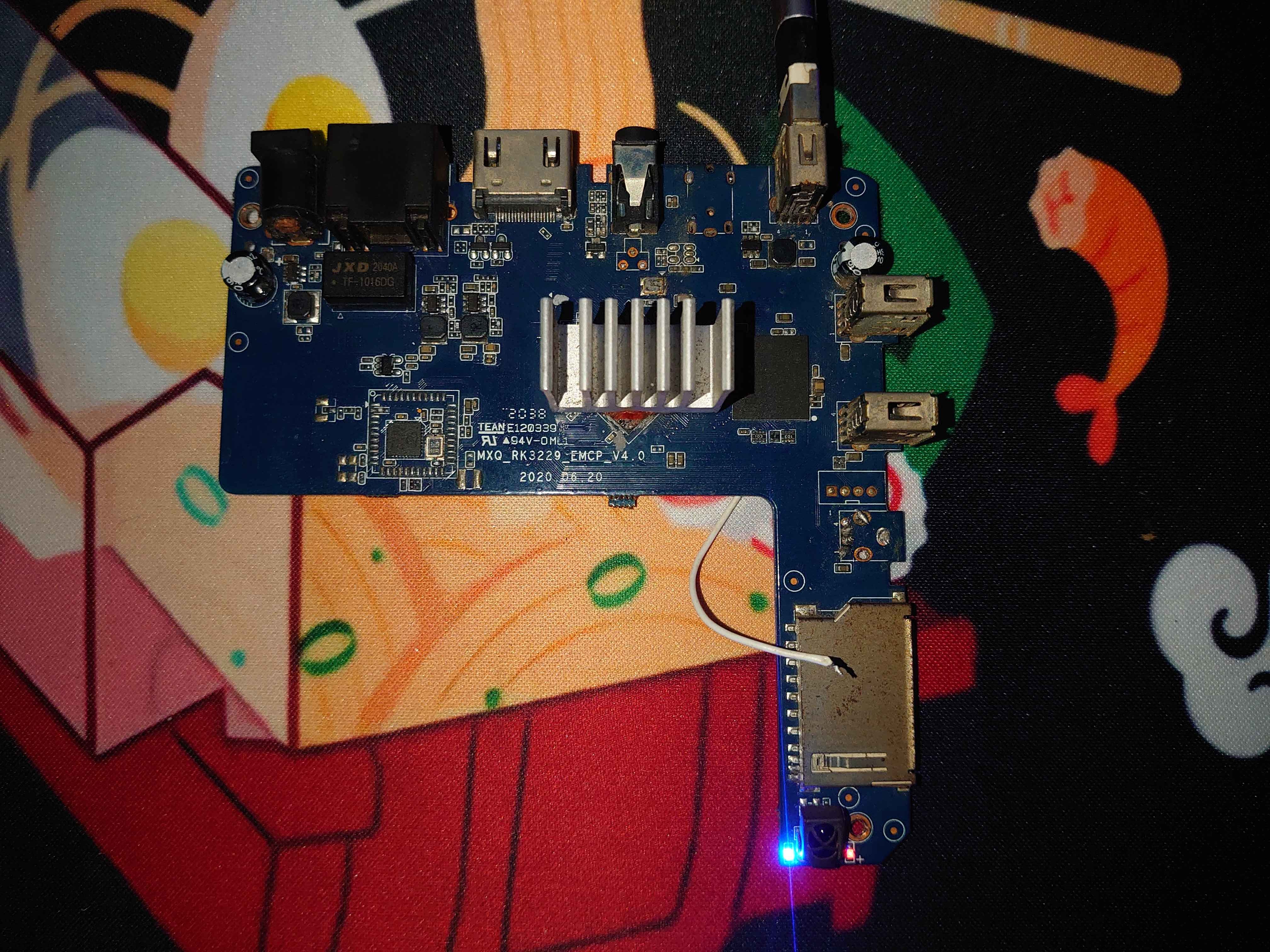
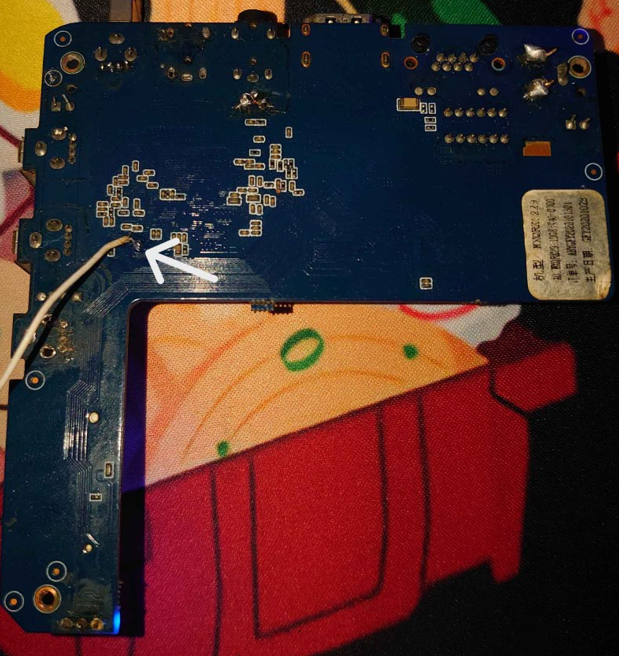
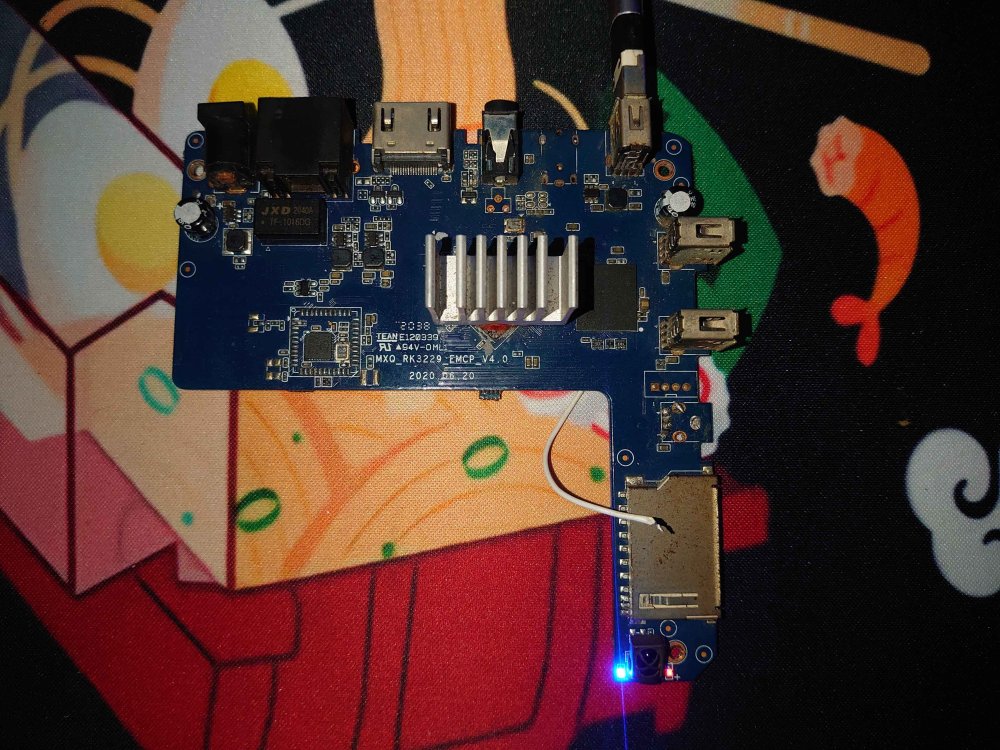
To anyone with and an mxq pro 4k v4.0 that has an eMCP memory module in it, If you ever you manage to soft brick your board to the point the maskrom button behind the AV port doesn't work here's the contact points for forcing it to enter maskrom mode. Note: After soldering to the pad indicated in the photo you can connect it to a 5V pad and do the same process and connect it to pc. Remove the connection once you detect that it entered maskrom mode (you might break the eMCP if you keep supplying 5V to it for a long time)
-
@Dangrain To flash in an eMCP board you can either use the Multiboot image or flash via rkdevtool in linux. eMCP is basically just emmc memory and ram packaged into one chip so the process is almost the same with emmc flash guide and Multiboot flash guide (sd card flash) PS: i have the same type of memory and almost manage to brick it (thankfully i managed to find the eMCP pads to force it to maskrom mode)
- Yesterday
-
Hey friends, I'm back. Well, good news. I got the box to boot from an SD card, specifically the 'Armbian_23.08.0-trunk_Rk322x-box_buster_edge_6.5.5_minimal.img' image, bad news I am not sure how to get it onto the eMCP and this is probably not the way you're supposed to boot armbian. I got the rk322x-box.dtb from the 'LibreELEC-RK322X.arm-11.0-nightly-20240218-d7324fb-rk322x.img' image (used by KanexMarcus in the comment here) and I had to add 'irqpoll' to extraargs in armbianEnv.txt, only after that did it boot. Ethernet works, wireless doesn't, using lsblk doesn't display the internal storage. Not sure what to do now, just figured I'd check in just to tell everyone what's going on and how I got it working.
-
Hello, I had a similar problem - unbootable Rock64 after kernel upgrade from 6.6.x to 6.12.x (error: Wrong Ramdisk Image Format). You can look in this thread djurny found a solution, that works for me. Maybe it will help.
-
I did establish a wifi connection and ssh sovol@IPaddress. Have the following: sovol@sovol:/$ ls -a -C . data lib opt run srv userdata .. dev lost+found packages sbin sys usr .resized etc media proc sdcard system var bin home mnt rockchip-test sha256sum.README tmp vendor boot info oem root sha256sum.txt udisk sovol@sovol:/$ uname -a Linux sovol 5.10.160 #54 SMP PREEMPT Mon Aug 5 22:22:56 CST 2024 aarch64 GNU/Linux Could not cd to root/ and tried to su using mks, makerbase, sovol and 1234 as root passwds. Edit: I can run root commands with sudo The boot/ directory only contained grub/, no hidden files and no *dtb. Edit: Regained wifi after changing channel ?congestion. I looked at the FCCid site and the photos submitted to the FCC show a Realtek rtk8189FTV chip. It looks like the Fn-Link chip was substituted perhaps due to Mainland/Taiwan tensions. Not sure the FCC knows about the chip substitution or if new wifi test data was generated. The wifi on this board is crippling in many ways, Crowsnest cam access saves me many trips up/down the stairs to check for print failures. Still, it does not look like Sovol will be providing any more firmware updates. The two that are available can only be installed by a wifi connection using OTA (Over The Air). Paranoia is high for wireless connections that you know nothing about. I'm wondering about replacing the mainboard with the mks-skipr and adding a wifi module with mainstream kernel support. May be a better path to MainStream klipper and reliable mainstream wifi. Edit: Was able to scp/pull the following files: config-5.10 gpio.txt ip_address.txt rockchip_config. Building my own image still may be an option but will need to deal with the wifi driver, a python script for crowsnest camera and the LED light. Edit: Armbian-mkspi has patches for rtl8189fs. Image building is doable - not sure if wifi will be improved but Mainline Klipper, a more recent kernel, packages with updates can be had on stock boards.
-
I just downloaded both images available on the download page (minimal and xfce desktop) and both images had the install-aml.sh script in the /root directory. As far as your current state, I only know of the windows amlogic tool as being the only available way to restore an android image. I know nothing about the Khadas tools you are trying to use, whether they will work on non-khadas boards, or if they can be used for what you are trying to do.