JFL
-
Posts
24 -
Joined
-
Last visited
Content Type
Forums
Store
Crowdfunding
Applications
Events
Raffles
Community Map
Everything posted by JFL
-
HDMI audio and analog audio do not work on Opi5Plus
JFL replied to ずっと一人's topic in Orange Pi 5 Plus
Hi, Is it appropriate to raise this at https://github.com/armbian/build/issues, since the Headphone Jack audio is available on older version of the kernels and not available in the latest kernels? Thanks for your guidance. -
HDMI audio and analog audio do not work on Opi5Plus
JFL replied to ずっと一人's topic in Orange Pi 5 Plus
Hi @Werner For your info, with kernel-6.19.5-edge-rockchip64 using dtb from kernel-7.0.0-rc5/rc6-edge-rockchip64, Headphone Jack audio/sound is available. Does this mean the device tree is not the culprit and it is related to the kernel? Have not tried not tried booting up kernel-6.18.10-current-rockchip64 with device tree from kernel-6.18.20-current-rockchip64. -
HDMI audio and analog audio do not work on Opi5Plus
JFL replied to ずっと一人's topic in Orange Pi 5 Plus
Just an update. Upgraded to linux-image-current-rockchip64-26.2.0-trunk.655 (6.18.20) not sure whether it included this But unfortunately with the new linux-image-current-rockchip64-26.2.0-trunk.655 kernel still no audio/sound output from the Headphone Jack (Analog).. Edit: Downgraded to or Install linux-image-current-rockchip64-26.2.1 (6.18.10), Headphone Jack has audio/sound output. -
HDMI audio and analog audio do not work on Opi5Plus
JFL replied to ずっと一人's topic in Orange Pi 5 Plus
I do not meant that the above causes the NO Analog Output issue. I don't think those patches were in the earlier kernekl 6.18.20-current=rockchip64-26.2.0-trunk.640 or the kernel-7.0.0-rc5-edge-rockchip64-26.2.0-trunk.626. These patches are added totay or yesterday. On the contrary, could the https://github.com/armbian/build/pull/9600 resolved the NO Analog Output issue on Opi5-Plus. -
HDMI audio and analog audio do not work on Opi5Plus
JFL replied to ずっと一人's topic in Orange Pi 5 Plus
Wonder the issue I am facing is related to this: https://github.com/armbian/build/pull/9600 -
HDMI audio and analog audio do not work on Opi5Plus
JFL replied to ずっと一人's topic in Orange Pi 5 Plus
The "Analog Audio" shows up on "gnome-control-center" but NO audio/sound output when selected.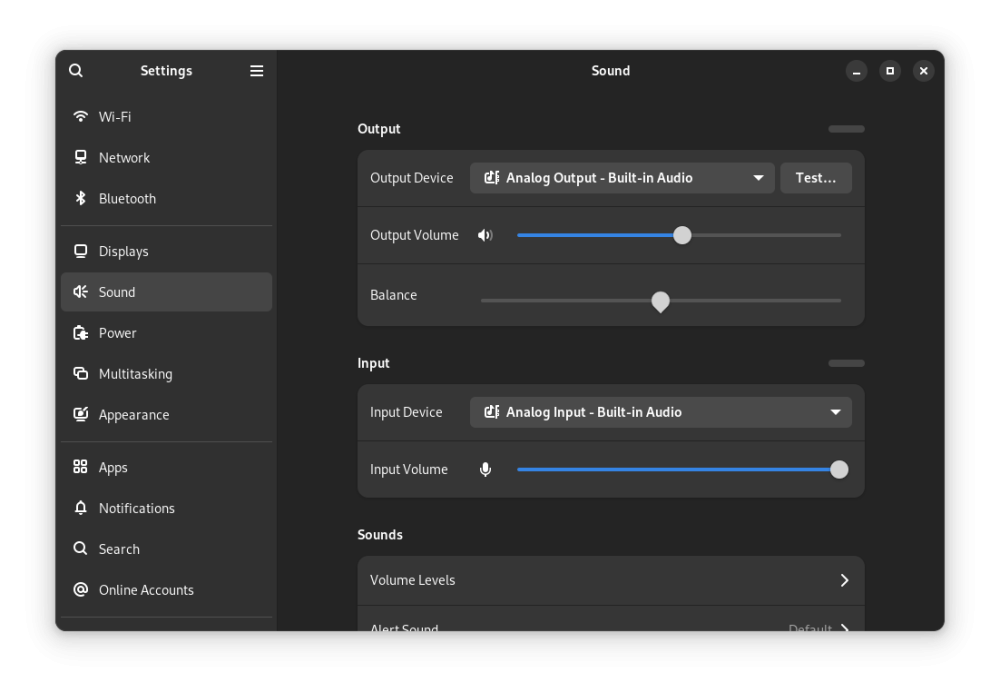
-
HDMI audio and analog audio do not work on Opi5Plus
JFL replied to ずっと一人's topic in Orange Pi 5 Plus
Am a greenhorn in linux so not sure I understand what to do. Do you mean, open a terminal and issue the above command? jfl@orangepi5-plus:~$ daicpu: simple-audio-card,cpu { sound-dai = <&i2s0_8ch>; system-clock-frequency = <12288000>; + system-clock-direction-out; }; bash: daicpu:: command not found bash: syntax error near unexpected token `;' bash: syntax error near unexpected token `12288000' bash: +: command not found bash: syntax error near unexpected token `}' jfl@orangepi5-plus:~$ Below is the armbianmonitor -u output. jfl@orangepi5-plus:~$ sudo armbianmonitor -u [sudo] password for jfl: Collecting info and sending to paste.armbian.com, wait... https://paste.armbian.com/zafupazubu Thanks you. -
HDMI audio and analog audio do not work on Opi5Plus
JFL replied to ずっと一人's topic in Orange Pi 5 Plus
Device Opi5-Plus Further info. With Kernel-6.18.20-current-rockchip64-26.2.0-trunk.640 headphone jack (analog) also does not have audio/sound output. With kernel-6.18.10-current-rockchip64-26.2.1 headphone jack (analog) has autio/sound output. -
HDMI audio and analog audio do not work on Opi5Plus
JFL replied to ずっと一人's topic in Orange Pi 5 Plus
Hi, Device: Opi5-Plus Upgrading from kernel-6.19.y-edge-rockchip64 to kernel-7.0.0-rc5-edge-rockchip64 resulted in Headphone Jack (Analog) Output with NO audio/sound output. Downgraded to kernel-6.19.5-edge-rockchip64 Headphone Jack (Analog) have audio/sound output again. Just checking whether another Opi5-Plus or RK3588 users experience the same issue with kernel-7.0.0-rc5-edge-rockchip64? -
Was running Ubuntu Noble and mpv-0.37 is from Noble-repo. On Trixie the mpv is version 0.40 (Debian Trixie repo) which somehow does not seem work with the ffmpeg-v4l2request. Are you running Trixie or Bookworn? Is your device Opi5-Plus or RK3588? So far on my Opi5-Plus no luck with 10Bit Hevc or any 10Bit video on mpv with mainline kernel.
-
Yes running on gnome-wayland session. jfl@orangepi5-plus:~$ apt list labwc Listing... Done labwc/noble 0.7.1-1build1 arm64
-
How you can help test upcoming Armbian 26.02 images?
JFL replied to Igor's topic in Advanced users - Development
Device: Orange Pi 5 Plus Image: Armbian_26.2.1_Orangepi5-plus_noble_current_6.18.8_kde-neon_desktop.img.xz Installation on SD Card without issue. Ethernet works WiFi (RTW89_8852BE): Works Bluetooth: Available but did not test pairing with bluetooth device Chromium_v144: vpu hardware acceleration working USB-3.0 & USB-2.0 Ports working PCIE-NVMe: Accessible HDMI Display: working HDMI-Audio: working Headphone Jack-Audio: Working (After using alsamixer to increase "output1" volume") Out of the box, konsole (terminal-emulator) and dolphin (file manager) not pre-installed. -
Just a feedback. Device: Orange Pi 5 Plus OS Image: Armbian_26.2.0-trunk.370_Orangepi5-plus_noble_current_6.18.8_gnome_desktop.img.xz media-player: mpv-.37.0-1ubuntu4 Following the gudide on the first page and added "profile=fast" (in order to have smooth 4K/60 playback) in /etc/mpv/mpv.conf. mpv-.37.0-1ubuntu4 playback 8bit 4K/60 h264 and h265 (hevc) video with vpu hardware accceleration. 10bit h265 or any vp9 and av1 video NO vpu hardware acceleration as far as I can tell. 10bit 4k/60 hevc video -- No vpu hw acceleration 4K/60 hevc -- with vpu hw acceleration. Error messages. Full HD av1 -- No vpu hw acceleration Full HD vp9 -- No vpu hw acceleration Edit: Chromium_v144 can play 8bit 4K/60 h264, h265 and av1 videos with vpu hw acceleration. No vpu hw acceleration with vp9 videos. If not mistaken the current kernel-6.18.8-current-rockchip64 or 6.19-rc8-edge-rockchip64 do not support vpu hw acceleration with vp9 codec.
-
You managed to build mpv with v4l2request for Debian Trixie that has vpu hardware acceleration? Care to share?
-
Hi @robertoj The stock mpv-0.40.0 from alarm-repo does not seem to support v4l2request so downloaded mpv-full-git with v4l2request from @junari (manjaro-arm user) https://drive.google.com/drive/folders/1hAr_PB52fIBcZOgtx2WoGghv63H1-JzB. Also downloaded the ffmpeg-v4l2request. Wtih the ffmpeg-v4l2request and mpv-full-git from @junari mpv vpu hardware acceleration works. Did not build/compile mpv-full-git (no experience in compliling/build packages in Linux) downloaded mpv-full-git. According to @jnuari, the mpv-full-git PKGBUILD: https://github.com/iuncuim/manjaro-h616/blob/main/mpv-v4l2request/PKGBUILD Hopefully you can modified this PKGBUILD to compile on Debian Trixie.
-
Not sure whether is specific to Opi5-Plus, on Arch Linux mpv-0.40.0 somehow also did not support --hwdec=v4l2request as such had to resort to the mpv-full-git which supports --hwdec=v4l2request. Debian-Trixie's repo mpv-0.40.0 also doesn't seems to support --hwdec=v4l2request.
-
Device: Opi5-Plus. Have the same issue on Debian-Trixie kernel-6.16.8-edge-rockchip64 mpv (0.40.0_ deos not support vpu hardware acceleration. mpv --hwdec=v4l2request-copy is too slow to decode 4K/60 video, very high dropped frames. mpv --hwdec=v4l2request '/media/jfl/writable/home/jfl/Videos/Two Steps From Hell - Unleashed-15ZqpVOjZEc.mp4' ● Video --vid=1 (h264 1920x1080 60 fps) [default] ● Audio --aid=1 --alang=eng (aac 2ch 44100 Hz 128 kbps) [default] AO: [pipewire] 44100Hz stereo 2ch floatp VO: [gpu] 1920x1080 yuv420p AV: 00:00:04 / 00:05:41 (1%) A-V: 0.000 Exiting... (Quit) The is a mpv-full-git version @junari had build for arch linux which support v4l2request. The PKGBUILD https://github.com/iuncuim/manjaro-h616/blob/main/mpv-v4l2request/PKGBUILD Don't have experience to compile or build packages for Linux. Experience Armbian users and developers might be able to build the mpv-full-git for Debian Trixie.
-
On orangepi-5-plus without RTC battery setting `CONFIG_RTC_DRV_HYM8563=y` will cause the CPU Loadaverage to be always greater than 1. The rockchip64 kernel currently use `CONFIG_RTC_DRV_HYM8563=m` and blacklist rtc_hym8563 resolved the high CPU loadaverage.
-
Device: Orange Pi 5 Plus DE: KDE-Neon Kernel: 6.1.115-vendor-rk35xx Last Friday, reported after updating KDE-Neon, it no longer boot up to KDE Plasma desktop successfully. After today's system update (using tty), reboot and it boot up successfully to KDE Plasma desktop.
-
Device: Orange-Pi-5-Plus Armbian-KDE-Neon After update this morning, KDE-Neon no longer boot up successfully to Plasma Desktop. Error "plasmashell" crash handle pop-up. Able to get into tty session by "ctrl+alt+F3" but not able to boot up successfully to KDE Plasma Desktop after the update/upgrade this morning.
-
Wayland not working with Desktop images with Armbian Linux v6.12 (KDE Neon)
JFL replied to Rui C's topic in Orange Pi 5 Plus
Device: Opi5-Plus Armbian Image: Armbian_25.5.1_Orangepi5-plus_noble_vendor_6.1.115_kde-neon_desktop.img.xz Upgraded successfully and reboot up with no issue on Wayland session. Operating System: Ubuntu 24.04 KDE Plasma Version: 6.4.3 KDE Frameworks Version: 6.17.0 Qt Version: 6.9.1 Kernel Version: 6.1.115-vendor-rk35xx (64-bit) Graphics Platform: Wayland Processors: 4 × ARM Cortex-A55, 4 × ARM Cortex-A76 Memory: 15.6 GiB of usable RAM Graphics Processor 1: Mali-G610 Graphics Processor 2: Mali-G610 Graphics Processor 3: llvmpipe Product Name: Orange Pi 5 Plus -
Hi, Tried this Opi5-Plus with kernel-6.15.2-edge-rockchip64 but mpv doesn't seems to have vpu hardware acceleration Does this repository works on RK3588 - Orange Pi 5 Plus Debian Trixie with mainline kernel 6.15.2-edge-rockchip64?
-
I meant "flashing U-Boot to the SPI". My EMMC is empty. EMMC do appear through "lsblk". Kernel "Linux orangepi5-plus 6.1.75-vendor-rk35xx"
-
Orangepi-5-plus-Gnome with kernel-6.1.75-vendor-rk35xx able to detect EMMC with "lsblk" (SPI loaded). $ lsblk NAME MAJ:MIN RM SIZE RO TYPE MOUNTPOINTS sda 8:0 1 3.6G 0 disk └─sda1 8:1 1 3.6G 0 part /media/jfl/5B21D34023086316 mtdblock0 31:0 0 16M 0 disk mmcblk1 179:0 0 57.6G 0 disk └─mmcblk1p1 179:1 0 57G 0 part /var/log.hdd / mmcblk0 179:32 0 233G 0 disk mmcblk0boot0 179:64 0 4M 1 disk mmcblk0boot1 179:96 0 4M 1 disk zram0 252:0 0 7.8G 0 disk [SWAP] zram1 252:1 0 50M 0 disk /var/log zram2 252:2 0 0B 0 disk nvme0n1 259:0 0 476.9G 0 disk ├─nvme0n1p1 259:1 0 512M 0 part └─nvme0n1p2 259:2 0 476.4G 0 part