Alex Ling
-
Posts
10 -
Joined
-
Last visited
-

Gaming experience with Orange Pi 5 (RK3588) on Armbian
Alex Ling replied to KhanhDTP's topic in Orange Pi 5
@KhanhDTP gpu clock is still limited to 850mhz with 7.0. I tried to port rockchip vendor kernel clock settings but no success yet. @chaitan3 The gpu can clock up to 1Ghz by hardware design but it is limited to 850mhz with mainline kernel. -
Gaming experience with Orange Pi 5 (RK3588) on Armbian
Alex Ling replied to KhanhDTP's topic in Orange Pi 5
@KhanhDTP BTW, I'm using the edge 7.0-rc3 kernel. Did you find the vendor 6.1 kernel is more stable? -
Gaming experience with Orange Pi 5 (RK3588) on Armbian
Alex Ling replied to KhanhDTP's topic in Orange Pi 5
@KhanhDTP Now Call of Duty 2 can be launched with dxvk 2.7.1 + mesaaco ppa.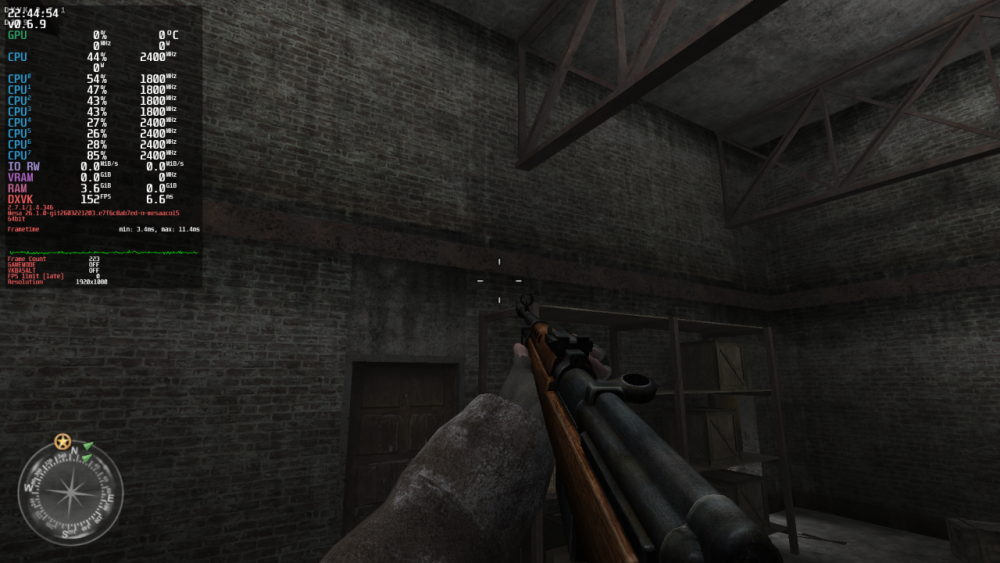
-
[Latest] Armbian Build HDMI Audio support Fix
Alex Ling replied to just_facking_about's topic in Radxa Dragon Q6A
After I added "snd-soc-wcd938x" to /etc/modules-load.d/modules.conf, the sound card can be detected as expected. -
Hi, Werner, thanks for replying. The problem is, when this happened, I cannot get wire or wireless connection. Neither can I login to the system using another pty. Odin2 is a gaming device thus there's no UART available. I tried to pass "console=tty0" to the kernel but I don't see any output on screen when it happened. Any suggestion to get more information? Thanks!
-
[Latest] Armbian Build HDMI Audio support Fix
Alex Ling replied to just_facking_about's topic in Radxa Dragon Q6A
I built a local armbian image from current main branch (26.05.0-trunk) and I found there's no sound card detected after boot. It shows "timer" only under /sys/class/sound/. I got following error in kernel log: [ 17.382126] platform sound: deferred probe pending: snd-sc8280xp: DP0 Playback: error getting cpu dai name [ 17.382140] platform 33c0000.pinctrl: deferred probe pending: qcom-sc7280-lpass-lpi-pinctrl: Failed to get clk 'core' It is using Linux 6.18.2-current-qcs6490. When I switched to the Radxa OS image, the audio output is OK. I attached kernel log, lsmod output and dump of the dtb. armbian_no_sound.log armbian_lsmod.txt dump.dts -
I tried to build a image from the current main branch (kernel: 6.18.20) and I found the problem is the same. I changed KERNELBRANCH to "tag:v6.18.18" from "branch:linux-6.18.y" and rebuild. It can boot to desktop as expected. It seems some change in the 6.18.19 kernel causes the problem
-
What happened? I used image https://github.com/armbian/community/releases/download/26.2.0-trunk.606/Armbian_community_26.2.0-trunk.606_Ayn-odin2_noble_current_6.18.19_gnome_desktop.img.xz and I found the device cannot boot into desktop. It stuck in the first boot wizard after message "Please use this account for your daily work from now on." How to reproduce? Download image from https://github.com/armbian/community/releases/download/26.2.0-trunk.606/Armbian_community_26.2.0-trunk.606_Ayn-odin2_noble_current_6.18.19_gnome_desktop.img.xz Flash it to TF card using Armbian Imager Insert the TF card to Odin2 device and power on Wait for it to boot to desktop Observation: It stuck in the first boot wizard after message "Please use this account for your daily work from now on."
-
Gaming experience with Orange Pi 5 (RK3588) on Armbian
Alex Ling replied to KhanhDTP's topic in Orange Pi 5
I tried Dragon Quest 11S with stripped dxvk 1.11. It failed because the panvk driver does not support Geometry Shader. There's an on-going MR https://gitlab.freedesktop.org/mesa/mesa/-/merge_requests/38401 to support it. -
Gaming experience with Orange Pi 5 (RK3588) on Armbian
Alex Ling replied to KhanhDTP's topic in Orange Pi 5
Thank you very much! Very useful information.