technik007_cz
-
Posts
221 -
Joined
-
Last visited
Content Type
Forums
Store
Crowdfunding
Applications
Events
Raffles
Community Map
Everything posted by technik007_cz
-
For that dts file must be changelog somewhere explaining changes. I decompiled both dts files but it is hard for me to decode changes in short time.
-
logs with verbosity=7 BOOTLOG-NOK.TXT BOOTLOG-OK.TXT
-
After inspecting the differences between those 2 bootlogs, it looks like it hangs up for some reason when trying to check the root filesystem for errors.
-
Bootlog with non-working and working dtb file. bootlog-OK.txt bootlog-NOK.txt
-
root@bpim2u:~# sudo dd if=/dev/mmcblk0 count=32k | strings | grep "U-Boot SPL" U-Boot SPL 2024.01_armbian-2024.01-S866c-P7738-Hadc5-Vc46c-B2eb2-R448a (Feb 20 2026 - 04:58:43 +0000)
-
I am getting closer to resolving this issue ... I took the latest image Armbian_community_26.2.0-trunk.732_Bananapim2ultra_noble_current_6.18.22_xfce_desktop.img.xz, flashed it, and it hung on Begin: Running /scripts/local-premount ... Scanning for Btrfs filesystems Removed microsd and replaced file sun8i-r40-bananapi-m2-ultra.dtb in /boot-dtb folder with file supplied with linux-image-6.1.24-sunxi kernel. And do you know what ? It successfully booted up after this change!
-
When I replaced 6.12.58-current-sunxi with armbian-utility to 6.6.16-current-sunxi It did not fully boot up again. Hopefully, replacing the whole content of /boot with the 6.1.24-sunxi kernel from the original image worked and brought m2u back to life. Also, the related modules folder was transferred. So it looks like it is a kernel problem.
-
Just doing upgrades 2nd time on the same image, and it upgraded u-boot and linux-image regardless of armbian-utility put them on hold... I will try to get the kernel from the original image, but if it fails due to the u-boot version difference, I will need to flash it 3rd time, and then I will prevent it from upgrades on these essential packages, like Back In Time.
-
Just found out after upgrading everything on Armbian_23.05.0-trunk_Bananapim2ultra_jammy_current_6.1.24.img.xz, there is no way back once it stops booting. Tried the lowest legacy kernel and also sunxi u-boot and legacy u-boot, everything in chroot, and no success. So I need to start again, reflash the image and prevent the kernel and u-boot upgrades via armbian-config. Is it everything after kernel 6.1.24 when it breaks? Actually, it should be after 6.1.37, which is part of another functional system image.
-
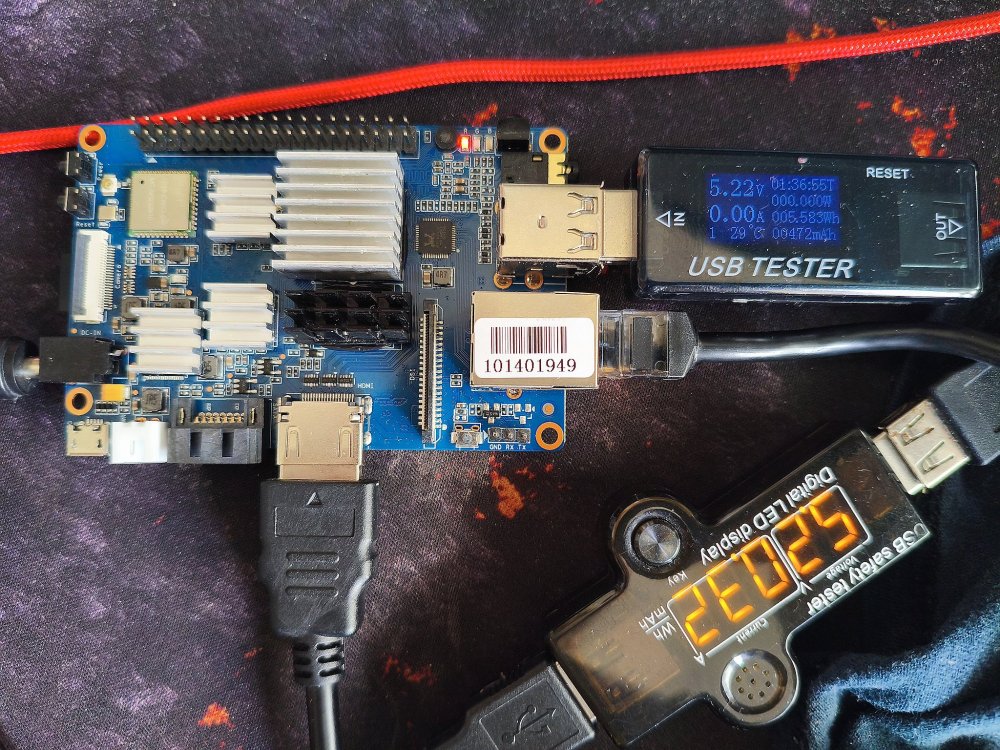
I is not looking like a powering issue, see the first pic.

-
I can confirm the situation with the latest Armbian Noble system image for M2U, which is Armbian_community_26.2.0-trunk.703_Bananapim2ultra_noble_current_6.18.21_xfce_desktop.img.xz. lead to the same result and it hangs at messages: Begin: Mounting root file system ... Begin: Running /scripts/local-top ... done. Begin: Running /scripts/local-premount ... Scanning for Btrfs filesystems For those which looking for a functional system, I found 2 : Armbian_23.05.0-trunk_Bananapim2ultra_jammy_current_6.1.24.img.xz Armbian_23.08.0-trunk_Bananapim2ultra_bookworm_current_6.1.37_xfce_desktop.img.xz However, if you upgrade the system on this image to the latest, it will result in an unbootable system again. So you need to prevent kernel and U-Boot from upgrades.
-
I just tested the latest Armbian distros, Armbian 26.2.0-trunk.493 XFCE and Armbian 26.2.0-trunk.493 Minimal / IOT, and none worked. Then I tried Radxa system images, rock-4se_bookworm_kde_r4.output_512.img.xz did not work. So I got confused because my Rock 4SE v 1.53 SBC worked a long time ago. Found backup of old boot image, which I used with the NVMe drive, because it could not boot on its own. And do you know what? Finally, I saw a picture on the screen with boot log information, which made me happy because it proved my SBC had not died. Then I started looking at some old system images for this board and found one which is booting, it is rock-4se_debian_bullseye_kde_b38.img.
-
Missing keys when running apt-update
technik007_cz replied to Luna the Deer's topic in Libre Renegade
Hi, I redownloaded the key and replaced it, and it works! -
Missing keys when running apt-update
technik007_cz replied to Luna the Deer's topic in Libre Renegade
Same issue there apt update Hit:1 http://deb.debian.org/debian trixie InRelease Hit:2 http://security.debian.org trixie-security InRelease Hit:3 http://deb.debian.org/debian trixie-updates InRelease Hit:4 http://deb.debian.org/debian trixie-backports InRelease Get:5 https://mirror.vinehost.net/armbian/apt trixie InRelease [39.4 kB] Err:5 https://mirror.vinehost.net/armbian/apt trixie InRelease Sub-process /usr/bin/sqv returned an error code (1), error message is: Signing key on DF00FAF1C577104B50BF1D0093D6889F9F0E78D5 is not bound: No binding signature at time 2026-02-26T23:23:28Z because: Policy rejected non-revocation signature (PositiveCertification) requiring second pre-image resistance because: SHA1 is not considered secure since 2026-02-01T00:00:00Z Missing key 8CFA83D13EB2181EEF5843E41EB30FAF236099FE, which is needed to verify signature. Fetched 39.4 kB in 4s (10.2 kB/s) All packages are up to date. Warning: An error occurred during the signature verification. The repository is not updated and the previous index files will be used. OpenPGP signature verification failed: https://mirror.vinehost.net/armbian/apt trixie InRelease: Sub-process /usr/bin/sqv returned an error code (1), error message is: Signing key on DF00FAF1C577104B50BF1D0093D6889F9F0E78D5 is not bound: No binding signature at time 2026-02-26T23:23:28Z because: Policy rejected non-revocation signature (PositiveCertification) requiring second pre-image resistance because: SHA1 is not considered secure since 2026-02-01T00:00:00Z Missing key 8CFA83D13EB2181EEF5843E41EB30FAF236099FE, which is needed to verify signature. Warning: Failed to fetch https://apt.armbian.com/dists/trixie/InRelease Sub-process /usr/bin/sqv returned an error code (1), error message is: Signing key on DF00FAF1C577104B50BF1D0093D6889F9F0E78D5 is not bound: No binding signature at time 2026-02-26T23:23:28Z because: Policy rejected non-revocation signature (PositiveCertification) requiring second pre-image resistance because: SHA1 is not considered secure since 2026-02-01T00:00:00Z Missing key 8CFA83D13EB2181EEF5843E41EB30FAF236099FE, which is needed to verify signature. Warning: Some index files failed to download. They have been ignored, or old ones used instead. -
I just run into this problem again but on different SBC. With new apt apgrade a new version of kernel came, initramfs complainend about "Invalid architecture" and failed to finish. I tried to fix it differently and it also worked. Removed armbian-bsp-cli-rock-4se-current, with this new attempt to do initramfs started and was completed without error. Then I installed armbian-bsp-cli-rock-4se-current again. Just bear in mind you need to know which armbian-bsp-cli you had previously installed because it could be also -edge , -vendor , etc.
-
Overlays not loading at boot - ROCKPRO64 on Armbian
technik007_cz replied to rookieone's topic in Beginners
I am suspicious that the SBC was overheating and that it was refusing to stay on 2GHz and rather dropped to a lower frequency of 1.8GHz. -
Overlays not loading at boot - ROCKPRO64 on Armbian
technik007_cz replied to rookieone's topic in Beginners
Merged content of overlay file into main dtb file; rebooted and whoa... I rockpro64 jumped to 2GHz. Overlay: /dts-v1/; / { compatible = "rockchip,rk3399"; fragment@0 { target-path = "/opp-table-0"; __overlay__ { opp06 { opp-hz = <0x00 0x5a1f4a00>; opp-microvolt = <0x124f80>; }; }; }; fragment@1 { target-path = "/opp-table-1"; __overlay__ { opp08 { opp-hz = <0x00 0x7829b800>; opp-microvolt = <0x13d620>; }; }; }; }; Commands required to edit the main dts file: sudo apt install -y device-tree-compiler mv rk3399-rockpro64.dtb rk3399-rockpro64.dtb.orig -v dtc -I dtb -O dts rk3399-rockpro64.dtb.orig -o rk3399-rockpro64.dts nano rk3399-rockpro64.dts dtc -I dts -O dtb rk3399-rockpro64.dts -o rk3399-rockpro64.dtb reboot -
Overlays not loading at boot - ROCKPRO64 on Armbian
technik007_cz replied to rookieone's topic in Beginners
I found the same issue on my RockPro64 running on Noble, kernel 6.6.63-current-rockchip64. I tried different kernels and gave armbian-config a chance to recreate the line in armbianEnv.txt related to overlays, but it did not improve. As a result of this problem, my board cannot go over 1800Mhz. But 2 different boards, Asus Tinkerboard-2S, with the same SoC, one Debian second Ubuntu runs on 2GHz fine. I will try to edit dts file to get what I want I think. -
Hi, I just want to remind you this topic is for Odroid C2 which does not have nothing in common with HC4. Also original question for this one is answered and tested working. It would be much better to open separate one with reference to this one but like I posted before this boards have in common just only "Odroid" and more likely low level changes needs more knowledge about certain hardware.
-
The firefox crashing is caused by special version firefox-esr using overlaid filesystem in /run/user/1000. After few cycles of turning it of/off it runs into state when it is unable to start. What helps is removing ~.mozilla folder and start again but it is quite annoying. So I installed version from snap and this one will hopefully works for me.
-
The only one working kernel is the lowest version of vendor-rk35xx. Other ones cause the Firefox web browser to crash.
-
I found a 1-month-old arch/arm64/boot/dts/rockchip/rk3588-nanopc-t6-lts.dts. It is looking promising. It is also part of dtb-6.11.0-edge-rockchip-rk3588 on armbian apt repo
-
On the LTS version of this board, there is no other chance than to run the vendor-rk35xx kernel if you want to see something on a screen. I noticed strange behaviour when this SBC was attached to a 2k QHD screen with the latest vendor kernel. Display size was limited to FullHD instead QHD and Firefox were crashing. When I switched from desktop to terminal I saw the top left corner of the QHD terminal cut to the size of FullHD which was quite a problem because I could not see what I was writing. Today I tried kernel downgrade from 6.1.75 to 6.1.43-vendor-rk35xx and now I can see QHD on QHD and the Firefox stopped crashing. Hopefully, they will patch the kernel soon. I saw some conversations about it recently.
-
I got it working again. Installed "current" kernel but the same issue was showing during an attempt to update initramfs. So I uninstalled initramfs-tools and did apt autoremove to remove package leftovers. Then I installed armbian-bsp-cli-pine64-current and I got strange response 'version <none>' but then everything started working included broken initramfs update. aptitude install armbian-bsp-cli-pine64-current W: Package initramfs-tools had been marked to reinstall, but the file for the current installed version <none> is not available The following NEW packages will be installed: armbian-bsp-cli-pine64-current busybox-initramfs{a} dracut-install{a} fping{a} initramfs-tools{a} initramfs-tools-bin{a} initramfs-tools-core{a} klibc-utils{a} libklibc{a}
-
I am experiencing same problem but on pine64. update-initramfs: Armbian: Converting to u-boot format: /boot/uInitrd-6.7.12-edge-sunxi64 Invalid architecture, supported are: alpha Alpha arc ARC arm ARM arm64 AArch64 avr32 AVR32 blackfin Blackfin ia64 IA64 invalid Invalid ARCH m68k M68K microblaze MicroBlaze mips MIPS mips64 MIPS 64 Bit nds32 NDS32 nios2 NIOS II or1k OpenRISC 1000 powerpc PowerPC riscv RISC-V s390 IBM S390 sandbox Sandbox sh SuperH sparc SPARC sparc64 SPARC 64 Bit x86 Intel x86 x86_64 AMD x86_64 xtensa Xtensa Error: Invalid architecture Usage: mkimage [-T type] -l image -l ==> list image header information -T ==> parse image file as 'type' -q ==> quiet mkimage [-x] -A arch -O os -T type -C comp -a addr -e ep -n name -d data_file[:data_file...] image -A ==> set architecture to 'arch' -O ==> set operating system to 'os' -T ==> set image type to 'type' -C ==> set compression type 'comp' -a ==> set load address to 'addr' (hex) -e ==> set entry point to 'ep' (hex) -n ==> set image name to 'name' -R ==> set second image name to 'name' -d ==> use image data from 'datafile' -x ==> set XIP (execute in place) -s ==> create an image with no data -v ==> verbose mkimage [-D dtc_options] [-f fit-image.its|-f auto|-f auto-conf|-F] [-b <dtb> [-b <dtb>]] [-E] [-B size] [-i <ramdisk.cpio.gz >] fit-image <dtb> file is used with -f auto, it may occur multiple times. -D => set all options for device tree compiler -f => input filename for FIT source -i => input filename for ramdisk file -E => place data outside of the FIT structure -B => align size in hex for FIT structure and header -b => append the device tree binary to the FIT -t => update the timestamp in the FIT Signing / verified boot options: [-k keydir] [-K dtb] [ -c <comment>] [-p addr] [-r] [-N engine] -k => set directory containing private keys -K => write public keys to this .dtb file -g => set key name hint -G => use this signing key (in lieu of -k) -c => add comment in signature node -F => re-sign existing FIT image -p => place external data at a static position -r => mark keys used as 'required' in dtb -N => openssl engine to use for signing -o => algorithm to use for signing mkimage -V ==> print version information and exit Use '-T list' to see a list of available image types Long options are available; read the man page for details run-parts: /etc/initramfs/post-update.d//99-uboot exited with return code 1 dpkg: error processing package initramfs-tools (--configure): installed initramfs-tools package post-installation script subprocess returned error exit status 1 Errors were encountered while processing: linux-image-current-sunxi64 initramfs-tools E: Sub-process /usr/bin/dpkg returned an error code (1