Search the Community
Showing results for tags 'documentation'.
Found 16 results
-
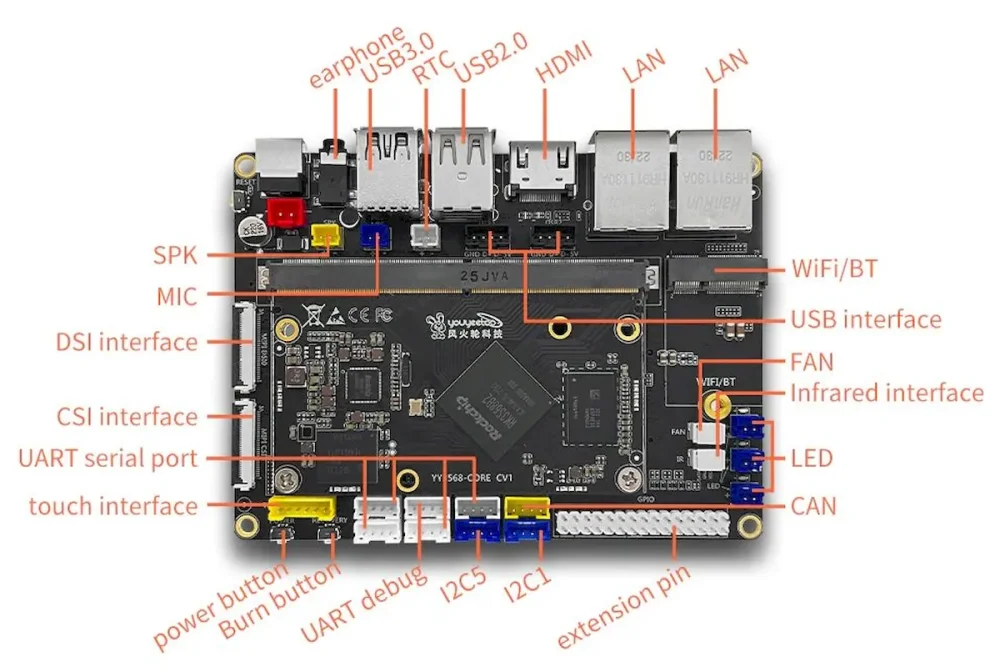
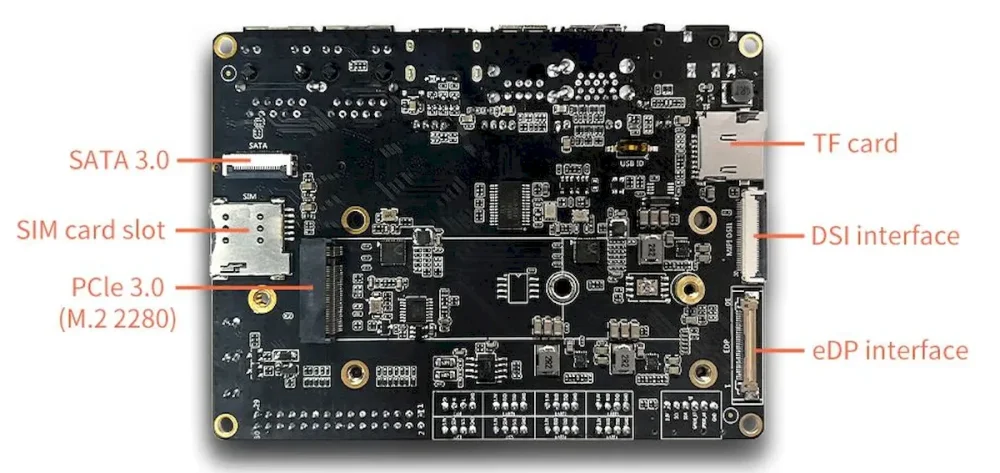
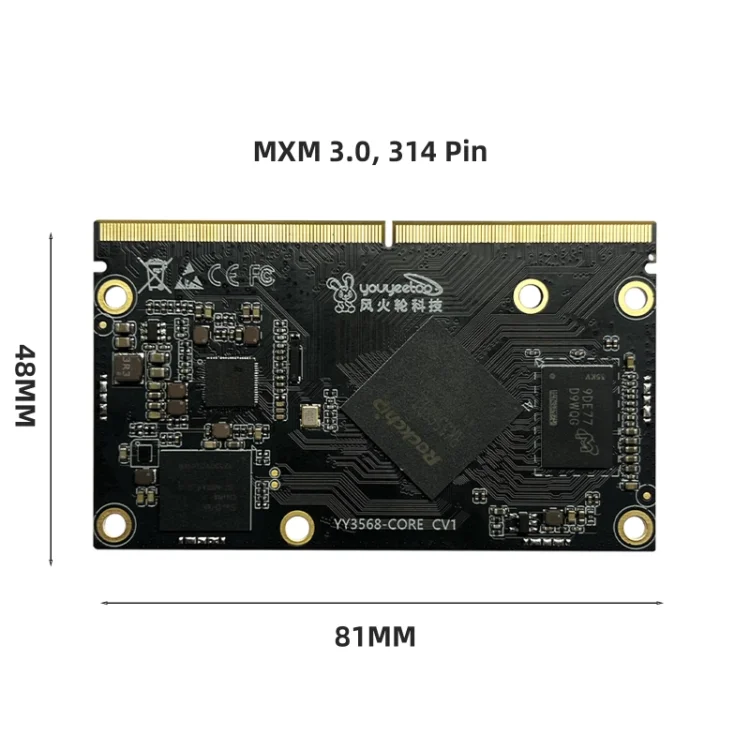
Here will be published all the tweaks for the Youyeetoo YY3568 board to enter the mainline with armbian. Official Images Unofficial images Kernel Vendor 6.1: https://github.com/armbian/linux-rockchip/commit/27a98750790114235c72e8420d45f44eff210461 Overlays: https://github.com/armbian/linux-rockchip/commit/18f066190842fc6bd509662a2d19588eb9f04612 Kernel Vendor 5.1: https://github.com/armbian/linux-rockchip/commit/b5964f997e2267802db0a965e66ec299b8a1f437
-
Per the title, I was able to extract an ftb file and convert it to dtb and dts file. I would like to use the community build framework and build Armbian for SV06 Ace. The initial plan was to base the new board/*csc files on other rk3308b boards; sakurapi and rock-s0 and then pull configuration values from the OEM dts file. I'm confused about the dts structure in Community builds and the proper locations for defconfig, dts and dtsi files. I've worked with the files in OpenWRT where they are rigidly structured - something that would be a monumental task for Armbian community builds. The OEM dts file does not use any includes/dtsi files. If successful, I would like to publish on github similiar to @Torte https://github.com/torte71/armbian-mksklipad50 Can someone point me to the relevant documentation for Armbian dts files?
-
Sorry in advance, but this is a bit of a dive. But, I haven't seen this fully captured and explained anywhere, and think this would be a useful thing to know for anyone who's doing arm64 development on a PC, which seems very relevant here ... I started pulling this thread when moving some software from Ubuntu Jammy to Noble, where the arm64 build process went from 20 mins to 50 mins. When I was done, it below to 15 min, and all I did was poke some flags for qemu's emulated CPU. The TL;DR version is that setting the environment variable QEMU_CPU to something like "cortex-a53" or "max,pauth-impdef=on" or even what I settled on, "max,pauth=off" saves massive amounts of time, and should be used anywhere you are running debootstrap, apt, or python in an emulated environment. However, you can't blindly set it everywhere because these flags are not defined for other architectures and will cause a hard stop when emulating PC or RISC-V. This has also shown up in the Armbian Build System. If you want to see this first hand, use the example here. Just save the following in test.sh: echo -n "testing... " for i in $(seq 2 10000); do is_prime=1 j=2 while ((j*j <= i)); do if (( i % j == 0)); then is_prime=0 break fi ((j++)) done if (( is_prime == 1 )); then echo $i > /dev/null fi done echo "done" And then run it in docker after ensuring a few things are installed ... ~ $ sudo apt install binfmt-support qemu-user-static ~ $ time docker run --rm -it --platform linux/arm64 -v .:/test ubuntu:noble /test/test.sh testing... done real 0m37.620s user 0m0.013s sys 0m0.022s ~ $ time docker run --rm -it --platform linux/arm64 -v .:/test ubuntu:jammy /test/test.sh testing... done real 0m4.700s user 0m0.011s sys 0m0.023s And we can wrestle that performance back by fiddling with QEMU flags ... ~ $ time docker run --rm -it --platform linux/arm64 -v .:/test --env QEMU_CPU=max,pauth=off ubuntu:noble /test/test.sh testing... done real 0m4.694s user 0m0.011s sys 0m0.024s So qemu bug? Not quite. The qemu emulator is a host application, and is the same both jammy and noble docker images, and I think the root cause was found here, and first appears in Ubuntu Lunar (23.10). The short version looks like gcc's stack protection logic wasn't operating as expected as the stack layout is a little different than it is on PC, a CVE was filed, and the "fix" is now stressing a slow code path in qemu. For the record, my heart goes out to "steev" and his slow, hours-per-bisect march to the answer. Pulling that thread a bit more, the QEMU Documentation has the following to say on the subject of arm64 pointer authentication: The qemu docs also suggest that the qemu impdef algorithm is the default, but I've not seen this on my version. It's possible this may be addressed in a much newer version of qemu, but that's not available in the Noble repos. It could be overridden via tonistiigi/binfmt (but I've not yet tested that). For what it's worth, it's not possible to just add a simple wrapper to qemu fix this either, as seen in this Github Example, and that's due to the Linux Kernel Binfmt Interface. The 'F' flag forces the kernel to store a handle to the specified emulator, and make it available in chroot and Docker contexts, and that doesn't help if it's only the wrapper it grabs and not the emulator binary. Similarly, it's not possible to pass additional flags via this interface, so without a change to the qemu binary, the QEMU_CPU environment variable may be the only way to work around this immediately. The other curious bit is what does QEMU_CPU=cortex-a53 enable to recover qemu speed? The answer is absolutely nothing. it just turns CPU features off. At a glance, I'm not sure if that something qemu is doing indirectly, or glibc conditionally enables at runtime. If anyone knows better than I here, please drop a comment. The curious can check can via: ~ $ docker run --rm -it --platform linux/arm64 ubuntu:noble cat /proc/cpuinfo processor : 0 model name : ARMv8 Processor rev 0 (v8l) BogoMIPS : 100.00 Features : fp asimd aes pmull sha1 sha2 crc32 atomics fphp asimdhp cpuid asimdrdm jscvt fcma lrcpc dcpop sha3 sm3 sm4 asimddp sha512 sve asimdfhm dit uscat ilrcpc flagm sb paca pacg dcpodp sve2 sveaes svepmull svebitperm svesha3 svesm4 flagm2 frint svei8mm svef32mm svef64mm svebf16 i8mm bf16 rng bti mte mte3 sme smei16i64 smef64f64 smei8i32 smef16f32 smeb16f32 smef32f32 smefa64 mops hbc CPU implementer : 0x00 CPU architecture: 8 CPU variant : 0x0 CPU part : 0x051 CPU revision : 0 ~ $ docker run --rm -it --platform linux/arm64 --env QEMU_CPU=cortex-a53 ubuntu:noble cat /proc/cpuinfo processor : 0 model name : ARMv8 Processor rev 4 (v8l) BogoMIPS : 100.00 Features : fp asimd aes pmull sha1 sha2 crc32 cpuid CPU implementer : 0x41 CPU architecture: 8 CPU variant : 0x0 CPU part : 0xd03 CPU revision : 4
-
This meeting will be @ 11am EST All who want to contribute to the Newsletter are welcome.
-
 I've downloaded the latest stable Release of the source code: https://github.com/armbian/build/releases/tag/v25.8.1 When doing a Build, when it allows you to select the kernel branch: [vendor, mainline, edge], the only edge available for selection is the bleeding edge (i.e. latest trunk version). I've downloaded the 25.8.1 source code, and that's the edge version I want to compile. How do you build an image with the latest (relatively) stable edge kernel, as available in Armbian-Config? (i.e. currently v6.16.1-edge at Armbian 25.8.1)? Update #1 When compiling the image with the edge kernel, it downloaded it from the internet and it took roughly an hour to build. When compiling an otherwise identical image with the Vendor kernel, it did not seem to download it from the internet (although I wasn't watching it closely), and it took roughly less than half the time to build the image. The reason I compiled an image with the Vendor kernel is because something broke in the last 24 hours on the internet-supplied edge kernel. It compiled 24 hours ago, a few hours ago it didn't. This wouldn't be an issue if it was compiling the most recent release of v6.16.1-edge (25.8.1), as per my intention, instead of the ultra-latest. I also made some discoveries about version number inconsistencies (independent of the kernel branch selected). Things are confused. In Release 25.8.1, the version is 25.11.0.trunk. In Release 25.5.1, the version is 25.08.0-trunk.
 -
This meeting is open to anyone currently contributing or interested in helping shape the newsletter going forward. Discussion Topics Strengthening the newsletter process and its impact Expanding our contributor base (authors, vendors, community voices) Improving the flow of raw content from developers Gathering better feedback from readers Ensuring the publishing process runs smoothly We're especially looking for: Fresh ideas to make the newsletter more useful and engaging A volunteer to take on reviewing and approving the first draft before publication 📅 Meeting Details Location: Discord –> Armbian Server -> Lounge Channel Duration: ~45 minutes Looking forward to seeing you there!
-
This meeting is open to anyone currently contributing or interested in helping shape the newsletter going forward. Discussion Topics Strengthening the newsletter process and its impact Expanding our contributor base (authors, vendors, community voices) Improving the flow of raw content from developers Gathering better feedback from readers Ensuring the publishing process runs smoothly We're especially looking for: Fresh ideas to make the newsletter more useful and engaging A volunteer to take on reviewing and approving the first draft before publication 📅 Meeting Details Location: Discord –> Armbian Server -> Lounge Channel Duration: ~45 minutes Looking forward to seeing you there!
-
Hello, My spare R4S is currently running the Rolling releases with Armbian Linux v6.12 Trixie image It seems /etc/resolved.conf got filled by at least /etc/systemd/resolved.conf [ global ] /etc/netplan/armbian.yaml [ per link/ ethernets: ] However I miss from which script the IPv6 nameservers are gathered and added as currently /etc/resolv.conf shows something like this and Iike to have just the ones from [ global ]: ( Please note I removed nameservers from the yaml file already ) # operation for /etc/resolv.conf. nameserver 127.0.0.1 nameserver ::1 nameserver fda8:5894:4e78:0:xxxx:xxxx:xxxx:xxxx # Too many DNS servers configured, the following entries may be ignored. nameserver 2001:1c00:2a02:ba00:xxxx:xxxx:xxxx:xxxx nameserver fda8:5894:4e78:0:xxxx:xxxx:xxxx:xxxx nameserver 2001:1c00:2a02:ba00:xxxx:xxxx:xxxx:xxxx search . Aiming for just the localhost nameservers in resolv.conf as unbound and pihole ( +wireguard ) will be running on the SBC only ... Hoping one can guide me as I could not find it from the Networking - Armbian Documentation TiA!
-
The page at https://docs.armbian.com/Process_Release-Model/ has a link entitled "Release Testing", but the link doesn't seem to go anywhere. Is there a document on the release testing process?
-
 I would like to change the image types at https://www.armbian.com/mks-klipad50/ so that Debian Server images ("full-cli-stable-debian") for current and edge kernels are built for this board. Optimal would be, if the "Desktop" and "Minimal/IOT" were omitted, so that only the Server images appear. Something similar is done for "aml-s9xx-box" here: https://github.com/armbian/os/blob/main/userpatches/targets-release-community-maintained.template#L57 So my approach for enabling Server images would be https://github.com/armbian/os/compare/main...torte71:armbian-os:main as PR. But I am not sure a) if adding boards directly to the "items:" property is intended at all (or if it is e.g. just an unwanted workaround) b) if my changes work at all: I don't see a way to test it first c) how to disable generation of Desktop and Minimal/IOT images (but that point is optional, esp. if the changes would become too big) Could someone please give me some tipps for that?
 -
The "Edit Device" wordpress template ("https://www.armbian.com/wp-admin/...") has some input fields that I would like to understand. I am trying to complete it for the MKS-Klipad50 (https://www.armbian.com/mks-klipad50). (It's a CSC board, not standard support - if that matters.) Following fields are unclear to me: "Compatible" What is the meaning and expected syntax? Is that something like devices using the same kernel, but different setup/devicetree files? "Expose kernels" / "How many kernels to expose?" Is this related to the "Kernels" table (see below), like how many rows to use? "Kernels" Is it required adding rows to have images automatically generated and appear as download links on the device page? Or are these options just required for additional non-standard images? Is it better to leave it empty? Could someone please shed some light on the meaning of these fields?
-
 Happy new year everyone, So I really do not like the stub-resolver in Debian/Armbian , and I do not like forwarding any DNS request to any 3rd party in general. After some searching I found this: https://www.turek.dev/posts/disable-systemd-resolved-cleanly/ . Since we are on Armbian we need also remove the 00-armbian-default-dns.conf which points to cloudflare's 1.0.0.1 . 1. We probably do not need this, but just in case someone does not have it. sudo mkdir -p /etc/systemd/resolved.conf.d/ 2. We set the DNS Stub Listener to no and remove the comment from the line if applicable: sudo sed -i '/DNSStubListener=/s/^#//;s/=.*/=no/' /etc/systemd/resolved.conf 3. We create the needed symlinks, if applicable. sudo ln -sf /run/systemd/resolve/resolv.conf /etc/resolv.conf 4. We remove the CloudFlare default DNS sudo rm /etc/systemd/resolved.conf.d/00-armbian-default-dns.conf 5. Then we restart the service: sudo systemctl restart systemd-resolved Now I get my router IP as DNS resolver, which is what I like: $ cat /etc/resolv.conf # This is /run/systemd/resolve/resolv.conf managed by man:systemd-resolved(8). # Do not edit. # # This file might be symlinked as /etc/resolv.conf. If you're looking at # /etc/resolv.conf and seeing this text, you have followed the symlink. # # This is a dynamic resolv.conf file for connecting local clients directly to # all known uplink DNS servers. This file lists all configured search domains. # # Third party programs should typically not access this file directly, but only # through the symlink at /etc/resolv.conf. To manage man:resolv.conf(5) in a # different way, replace this symlink by a static file or a different symlink. # # See man:systemd-resolved.service(8) for details about the supported modes of # operation for /etc/resolv.conf. nameserver 192.168.1.1 search lan $
 -
I downloaded and installed the Ubuntu noble image. Was this the correct one for my Raspberry Pi400 if I wanted the rolling release version? Thanks

-
untilDidier J. will be leading this meeting and sharing progress on the documentation tasks. Anyone interested in the documentation process and content can join this meeting!
-
How to I generate `.img` files? When I run `.compile` I end up with `.deb` files. I've been looking through the scripts but there are so many of them and I want to get to how to do this without having to use commands like: find . -name '*.sh' -print0 | xargs -0 grep compile_uboot | less for a long time. Thank you
-
 hi I've been using the flag compile.sh PREFER_DOCKER=no while building in a systemd-nspawn container: Building Armbian using Ubuntu (jammy) in a systemd-nspawn container This time I managed to make a complete successful build with my work arounds for loop devices in systemd nspawn. However, the flag PREFER_DOCKER=no Didn't seem to be documented in the build options https://docs.armbian.com/Developer-Guide_Build-Options/ can the documentation be updated to add PREFER_DOCKER=no flag (at least under 'advanced users') ? note that it isn't possible to run docker normally within systemd-nspawn or that it'd require all those workarounds such as patching and using the host docker server which defeats the purpose of using docker. rather systemd-nspawn is the container to at least decouple the build environment from the host os environment (which can be a different linux distribution, I'm doing so from OpenSuse https://www.opensuse.org/), with the unfortunate caveat that loop devices still requires a workaround.