All Activity
- Past hour
-
OK, so that went reasonably fast and produced the 4 kernel debs. The linux-libc-dev-edge-rockchip64 didn't install due to conflict with the (current/stable) linux-libc-dev package - I think this is expected - but the rest of the kernel packages have been succesfully installed and the dkms error seems resolved.
-
Eh, I can try the 7.0 rc package and see how they behave, as long as it's 6.19 or later is fine. Thanks for the pointers.
-
No. edge will give you 7.0-rc3 since it was bumped recently. You can try to revert this commit to get 6.19. No guarantee it works, nor any support will be given. https://github.com/armbian/build/pull/9445
-
If I'm building the .deb file manually, is there a way to build with kernel 6.19 for the OrangePi5 ? Can I use the edge branch (instead of current) for this ? While I don't mind waiting for the package to build, if I can build the bsp/kernel/headers for 6.19 I can give it a try. EDITED for formatting.
-
Yes, they seem to be missing in repo. As a quick fix I'd suggest to use the build framework to create yourself a set of deb files containing all necessary packages code { font-family: Consolas,"courier new"; color: crimson; background-color: rgba(0, 0, 0, 0.2); padding: 2px; font-size: 105%; } ./compile.sh BOARD=orangepi5 BRANCH=current kernel code { font-family: Consolas,"courier new"; color: crimson; background-color: rgba(0, 0, 0, 0.2); padding: 2px; font-size: 105%; } copy the packages from output/debs to your board and use dpkg to install them.
-
Hello, I have installed the minimal Trixie based image for Orange Pi5 (the image named Armbian_26.2.1_Orangepi5_trixie_current_6.18.8_minimal) and then attempted to build an out-of-tree kernel module. Having installed dkms and build-essentials, plus the kernel headers through armbian-config, I found the headers package hasn't been fully set-up, the build symlink in /lib/modules/<KVER> is missing and dkms complains that the kernel headers for the kernel are not installed. The kernel headers are installed though, but it looks like they're from a previous release (25.11.2 instead of 26.2.1). # dpkg -l | grep rockchip ii linux-dtb-current-rockchip64 26.2.1 arm64 Armbian Linux current DTBs in /boot/dtb-6.18.8-current-rockchip64 ii linux-headers-current-rockchip64 25.11.2 arm64 Armbian Linux current headers 6.12.58-current-rockchip64 ii linux-image-current-rockchip64 26.2.1 arm64 Armbian Linux current kernel image 6.18.8-current-rockchip64 It the headers package still pending packaging ? Shouldn't armbian-config provide an error in this case and not install the old kernel headers ? EDIT: armbianmonitor ouput - https://paste.armbian.com/oliyalebeq
- Today
-
 Hello everyone, I'm trying to locate a specific older Armbian build for an RK3318 TV box and hoping someone in the community might have it archived. I'm looking for: Version: Armbian 22.05.1 (or similar from that era) Kernel: Legacy 4.4.213 Base: Debian Buster Desktop: XFCE (or even a CLI version is fine) The original download link from users.armbian.com/balbes150/ is now a 404. I understand this is a very old "Community Maintained" build and that RK3318 support has moved to newer kernels . I'm specifically seeking this kernel version for a project. If anyone has this image file or a similar legacy build (kernel 4.4.x) for the RK3318 stashed away, could you please share it or point me to an alternative source? Any help would be greatly appreciated! Hardware: (e.g., H96 Max RK3318 - please specify your exact box model) Thank you
 - Yesterday
-
Thank you. R2S has a built in eMMC and USB. The only way to get a new image is to boot from USB but it seems like I have to manually load the image in u-boot. Is the u-boot script (boot.txt) for the build somewhere in GitHub?
-
Have you tried all of the gxm dtb files? Per the instructions (https://forum.armbian.com/topic/33676-installation-instructions-for-tv-boxes-with-amlogic-cpus)
-
@maxsub I was not even aware, that boot from USB is a thing. The RV2 boots from SD via extlinux, here is the relevant uboot output. HTH [ 3.458] Retrieving file: /boot/extlinux/extlinux.conf [ 3.490] 1: Armbian-unofficial [ 3.490] Retrieving file: /boot/uInitrd [ 4.772] Retrieving file: /boot/Image [ 5.767] append: root=UUID=c79489b6-9fea-4a53-a334-d91a0f30843a earlycon=sbi console=tty1 console=ttyS0,115200 logleve l=1 rw no_console_suspend consoleblank=0 fsck.fix=yes fsck.repair=yes net.ifnames=0 splash plymouth.ignore-serial-consol es [ 5.785] Retrieving file: /boot/dtb/spacemit/k1-orangepi-rv2.dtb [ 5.838] Uncompressing Kernel Image [ 6.218] Moving Image from 0x10000000 to 0x200000, end=2c90000 [ 6.245] ## Loading init Ramdisk from Legacy Image at 21000000 ... [ 6.248] Image Name: uInitrd [ 6.251] Image Type: RISC-V Linux RAMDisk Image (gzip compressed) [ 6.258] Data Size: 20347839 Bytes = 19.4 MiB [ 6.263] Load Address: 00000000 [ 6.266] Entry Point: 00000000 Verifying Checksum ... OK [ 6.363] ## Flattened Device Tree blob at 31000000 [ 6.365] Booting using the fdt blob at 0x31000000 [ 6.370] Loading Ramdisk to 7ca0b000, end 7dd72bbf ... OK [ 6.391] Loading Device Tree to 000000007c9eb000, end 000000007ca0a097 ... OK Starting kernel ...
-
i am trying to install armbian on a vorke z6 plus s912 amlogic box. As there is no S912 dtb, i tried using /dtb/amlogic/meson-gxm-t95z-plus.dtb with this iamge: Armbian_26.02.0_amlogic_s912-t95z-plus_trixie_6.18.15_server_2026.03.01.img.gz renamed u-boot-s905x-s912.bin to u-boot.ext After inserting and pressing the reset button, before applying power, i get into the recovery menu What dtb file or image can i use to get armbian running?
-

Boot errors on Orange Pi 3 LTS with Armbian 26.2.1 Minimal / IoT
Werner replied to yc yb's topic in Allwinner sunxi
Depends on the image you are using. The image for 3 LTS should work for the 3 LTS. The image for the 3 (without lts) will not. -
Without uart hard to tell.
-
I ran into a problem. Flashed the nightly build to the eMMC on the R2S and now it won’t boot from USB. I can see the usb drive in u-boot and kernel.img and dtb. What’s the default address to load the kernel and dtb on these boards? thank you.
-
I followed the instructions and have OpenGL ES 3 working now. I wasn't able to build Yamagi Quake 2 because of a version issue with one of the packages. I copied a build from the Muse Pi Pro and now I can run it at 1080p, and sometimes it even hits 60fps!
-
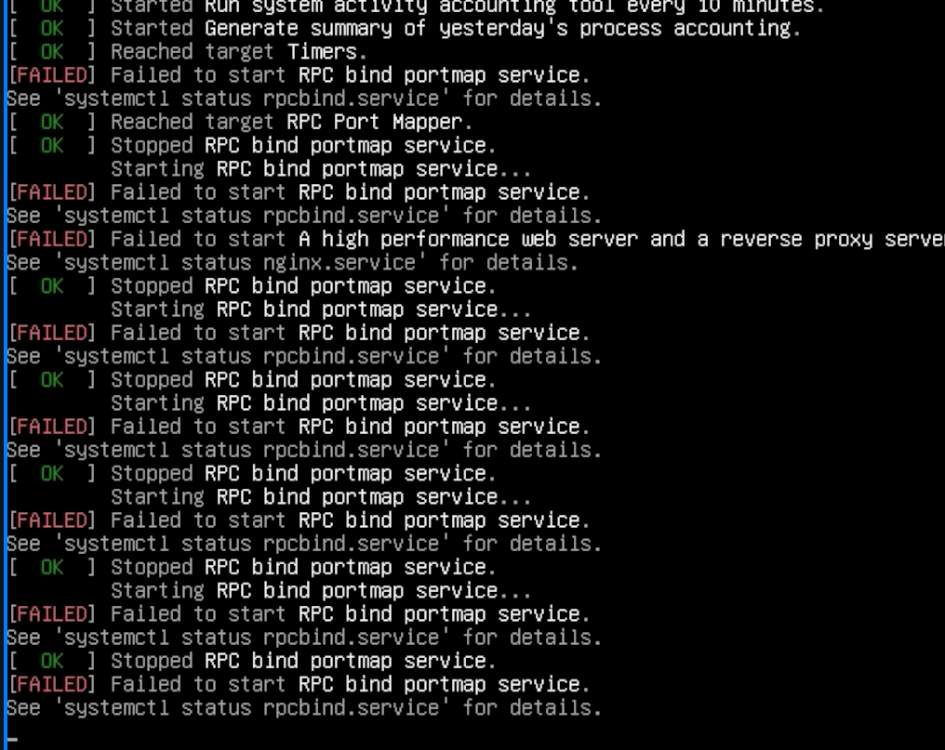
 Hello, I am trying to run Armbian on my Orange Pi 3 LTS. The official Orange Pi image works normally: Orangepi3-lts_3.0.8_debian_bullseye_server_linux5.16.17 However, when I flash the Armbian image: Armbian 26.2.1 Minimal / IoT I get several boot errors during startup: [FAILED] Failed to start Apply Kernel Variables. [FAILED] Failed to start Dispatcher daemon for systemd-networkd. [FAILED] Failed to start Helper to synchronize boot up for ifupdown. [DEPEND] Dependency failed for Raise network interfaces. The system continues booting, but these errors appear every time. Hardware: Board: Orange Pi 3 LTS Image: Armbian 26.2.1 Minimal / IoT Storage: TF card Questions: Are these errors expected on this board? Is there a configuration issue with network initialization? Is this image fully supported for Orange Pi 3 LTS? Thank you.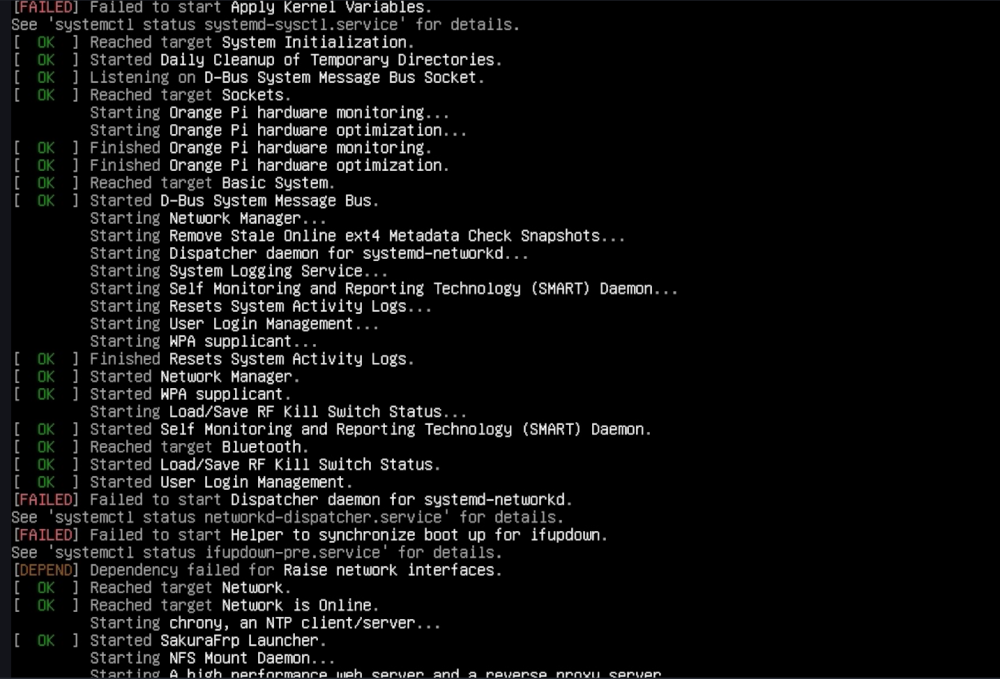
-

Gaming experience with Orange Pi 5 (RK3588) on Armbian
KhanhDTP replied to KhanhDTP's topic in Orange Pi 5
@xiboliyadongtu Then copy x64/d3d11.dll, x64/dxgi.dll files to the same folder as blackdesert64.exe and try to run it without the launcher. -
 Hi everyone, I'm facing an issue with Armbian installation on Rock 5B Plus. Hardware Board: Radxa ROCK 5B+ (RK3588) Storage: NVMe #1 (system): 256 GB, in M.2 slot 1 NVMe #2 (backup): 128 GB, in M.2 slot 2 Boot: MTD flash + NVMe Power supply: both POE+ HAT 25W and official power supply 30W Software Armbian: 25.11.2 Desktop ubuntu Kernel: 6.1.115-vendor-rk35xx Boot configured via armbian-install → “Boot from MTD Flash, system on NVMe” Initial install steps Wrote Armbian image to microSD and booted from SD. Used armbian-install to install: Boot from MTD Flash, system on NVMe #1 Powered off, removed SD, left only NVMe #1 installed. Board boots fine from SPI+NVMe #1: blue LED, OS comes up, Green LED, everything OK. Power off the board and plug NVME #2 (preformatted ext4 with gparted and empty, the disk works because I tried the procedure the other way around, using the second disk as the main one) Power on. Solid blue light, no OS, no HDMI output (I don't have UART) lsblk -f with microSD plugged: mtdblock0 mmcblk1 └─mmcblk1p1 ext4 1.0 armbi_root 2e67f233-22a9-46c9-90a7-8f0e0f2d3154 21.7G 22% /var/log.hdd / zram0 [SWAP] zram1 36M 16% /var/log zram2 nvme1n1 ├─nvme1n1p1 ext4 1.0 cacf66ca-ea9b-4dc4-b7b3-185f18e7c64f 100G 6% /mnt/main └─nvme1n1p2 ext4 1.0 data a7d6675c-3ca6-4a87-85cf-7d91856fd79c nvme0n1 └─nvme0n1p1 ext4 1.0 armbi_backup 5aadc790-715a-4f48-bbbc-ce4bfd2717bd 110.8G 0% /mnt/backup /boot/armbianEnv.txt looks correct verbosity=1 bootlogo=true console=both extraargs=cma=256M overlay_prefix=rockchip-rk3588 overlays=panthor-gpu fdtfile=rockchip/rk3588-rock-5b-plus.dtb rootdev=UUID=cacf66ca-ea9b-4dc4-b7b3-185f18e7c64f rootfstype=ext4 usbstoragequirks=0x2537:0x1066:u,0x2537:0x1068:u /etc/fstab looks correct # <file system> <mount point> <type> <options> <dump> <pass> tmpfs /tmp tmpfs defaults,nosuid 0 0 UUID=cacf66ca-ea9b-4dc4-b7b3-185f18e7c64f / ext4 defaults,noatime,commit=120,errors=remount-ro,x-gvfs-hide 0 1 UUID=5aadc790-715a-4f48-bbbc-ce4bfd2717bd /mnt/backup ext4 defaults,nofail 0 2 <--- also tried without this line I've also tried by "forcing" the mount of NMVE #2 by adding it to /etc/fstab of NVME #1 but nothing changes. Could you please help me understand if this is an issue related to my configuration or could be a bug? Thanks
 -

Gaming experience with Orange Pi 5 (RK3588) on Armbian
xiboliyadongtu replied to KhanhDTP's topic in Orange Pi 5
this game do have a file named blackdesert64.exe -
Gaming experience with Orange Pi 5 (RK3588) on Armbian
xiboliyadongtu replied to KhanhDTP's topic in Orange Pi 5
i just delete the default file named umu-defalut. and i try to start the launcher, but it still crash. Did i got right things? log -
Gaming experience with Orange Pi 5 (RK3588) on Armbian
xiboliyadongtu replied to KhanhDTP's topic in Orange Pi 5
This game cant start without the launcher, I will try these options -
Gaming experience with Orange Pi 5 (RK3588) on Armbian
KhanhDTP replied to KhanhDTP's topic in Orange Pi 5
@xiboliyadongtu Can this game be started without a launcher? Is there an executable file besides BlackDesertLauncher.exe (like BlackDesert.exe)? The BlackDesertLauncher.exe is definitely a 32-bit file. So, you might need to run it with GE-Proton10-32 in WoW64 mode. Delete the created GE-Proton10-32's prefix to make sure. Then start it again with envs If everything is right, you will see the Dxvk output log with something like below: -
Gaming experience with Orange Pi 5 (RK3588) on Armbian
xiboliyadongtu replied to KhanhDTP's topic in Orange Pi 5
i delete the previous 64-bit version of DXVK, copy the 32-bit version DXVK, and tried to luanch the game; the game dispalyed a logo and then disappeared. Maybe it have crashed. log-dxvk log-zink -
 In the world of TV boxes "identical looking" means nothing, as manufacturers build each batch with the lowest cost components available at the time. There are many cases where identical looking boxes even contain different cpus ( ie amlogic vs rockchip). My recommendation would be first to verify the markings on the boards (there is usually some sort of board identifying text on the board)to really see if they are the same under the hood.
 -
You aren't using Armbian. The balbes150 builds were a fork of Armbian and know one here would know what sources they were built with. So this question is really off topic for Armbian.