All Activity
- Past hour
-
picture seems broken/corrupted
- Today
-

DM_CRYPT module unavailable in initramfs after update to 6.1.115
IBV replied to David Zarebski's topic in Beginners
The error talks about dm-mod kernel module and not dm-crypt. Can you confirm that dm-mod exists in your initramfs? Just to eliminate this being the issue. -
Hi Guys, It seems that I can't boot latest Armbian image from SD-card - system always boots into "inintramfs". See the screenshot. SD-card is 100% working (all sectors tested). The image - 25.11.1_noble_6.12.58_gnome_desktop (downloaded from front page of OrangePi5). Checksum is OK. Please note - I've already tested 3 different prorgams for images: USB-imager, Rufus, Win32diskimager. Nothing helped))). I also re-wrote MTD flash (not sata) by "armbian-install" and got nothing (!) I use my main Armbian-server installed on nvme, but I would prefer to run SD-images as well... Unfortunately, as I see, this became very difficult task lately(((. P.S. I don't want to erase mtd0 and boot from SD as I will probably lose my perfectly working boot from nvme if SD-boot fails again. Not sure what to do... Any ideas? Thanks.
-
 @IBV good call but it looks good to me lsinitramfs -l boot/initrd.img-6.1.115-vendor-rk35xx | grep crypt drwx------ 2 root root 0 Dec 22 11:35 cryptroot -rw------- 1 root root 69 Dec 22 11:35 cryptroot/crypttab -rwxr-xr-x 1 root root 246 May 4 2025 scripts/local-block/cryptroot -rwxr-xr-x 1 root root 253 May 4 2025 scripts/local-bottom/cryptgnupg-sc -rwxr-xr-x 1 root root 449 May 4 2025 scripts/local-bottom/cryptopensc -rwxr-xr-x 1 root root 1038 May 4 2025 scripts/local-bottom/cryptroot -rwxr-xr-x 1 root root 757 May 4 2025 scripts/local-top/cryptopensc -rwxr-xr-x 1 root root 8150 May 4 2025 scripts/local-top/cryptroot -rwxr-xr-x 1 root root 5686 May 4 2025 usr/bin/cryptroot-unlock lrwxrwxrwx 1 root root 17 Dec 22 11:35 usr/lib/aarch64-linux-gnu/libcrypt.so.1 -> libcrypt.so.1.1.0 -rw-r--r-- 1 root root 198664 Jan 16 2025 usr/lib/aarch64-linux-gnu/libcrypt.so.1.1.0 -rw-r--r-- 1 root root 6302952 Nov 1 12:22 usr/lib/aarch64-linux-gnu/libcrypto.so.3 lrwxrwxrwx 1 root root 24 Dec 22 11:35 usr/lib/aarch64-linux-gnu/libcryptsetup.so.12 -> libcryptsetup.so.12.10.0 -rw-r--r-- 1 root root 603376 May 4 2025 usr/lib/aarch64-linux-gnu/libcryptsetup.so.12.10.0 lrwxrwxrwx 1 root root 20 Dec 22 11:35 usr/lib/aarch64-linux-gnu/libtomcrypt.so.1 -> libtomcrypt.so.1.0.1 -rw-r--r-- 1 root root 919496 Nov 1 2024 usr/lib/aarch64-linux-gnu/libtomcrypt.so.1.0.1 drwx------ 2 root root 0 Dec 22 11:35 usr/lib/cryptsetup -rwxr-xr-x 1 root root 67912 May 4 2025 usr/lib/cryptsetup/askpass -rw-r--r-- 1 root root 26980 May 4 2025 usr/lib/cryptsetup/functions drwxr-xr-x 2 root root 0 Dec 22 11:35 usr/lib/modules/6.1.115-vendor-rk35xx/kernel/arch/arm64/crypto -rw-r--r-- 1 root root 19928 Nov 25 15:18 usr/lib/modules/6.1.115-vendor-rk35xx/kernel/arch/arm64/crypto/chacha-neon.ko -rw-r--r-- 1 root root 17128 Nov 25 15:18 usr/lib/modules/6.1.115-vendor-rk35xx/kernel/arch/arm64/crypto/poly1305-neon.ko drwxr-xr-x 3 root root 0 Dec 22 11:35 usr/lib/modules/6.1.115-vendor-rk35xx/kernel/crypto drwxr-xr-x 2 root root 0 Dec 22 11:35 usr/lib/modules/6.1.115-vendor-rk35xx/kernel/crypto/async_tx -rw-r--r-- 1 root root 8424 Nov 25 15:18 usr/lib/modules/6.1.115-vendor-rk35xx/kernel/crypto/async_tx/async_memcpy.ko -rw-r--r-- 1 root root 16520 Nov 25 15:18 usr/lib/modules/6.1.115-vendor-rk35xx/kernel/crypto/async_tx/async_pq.ko -rw-r--r-- 1 root root 8768 Nov 25 15:18 usr/lib/modules/6.1.115-vendor-rk35xx/kernel/crypto/async_tx/async_raid6_recov.ko -rw-r--r-- 1 root root 11400 Nov 25 15:18 usr/lib/modules/6.1.115-vendor-rk35xx/kernel/crypto/async_tx/async_tx.ko -rw-r--r-- 1 root root 14616 Nov 25 15:18 usr/lib/modules/6.1.115-vendor-rk35xx/kernel/crypto/async_tx/async_xor.ko -rw-r--r-- 1 root root 15616 Nov 25 15:18 usr/lib/modules/6.1.115-vendor-rk35xx/kernel/crypto/authenc.ko -rw-r--r-- 1 root root 16792 Nov 25 15:18 usr/lib/modules/6.1.115-vendor-rk35xx/kernel/crypto/authencesn.ko -rw-r--r-- 1 root root 8592 Nov 25 15:18 usr/lib/modules/6.1.115-vendor-rk35xx/kernel/crypto/echainiv.ko -rw-r--r-- 1 root root 20176 Nov 25 15:18 usr/lib/modules/6.1.115-vendor-rk35xx/kernel/crypto/essiv.ko -rw-r--r-- 1 root root 9344 Nov 25 15:18 usr/lib/modules/6.1.115-vendor-rk35xx/kernel/crypto/md4.ko -rw-r--r-- 1 root root 8352 Nov 25 15:18 usr/lib/modules/6.1.115-vendor-rk35xx/kernel/crypto/michael_mic.ko -rw-r--r-- 1 root root 9352 Nov 25 15:18 usr/lib/modules/6.1.115-vendor-rk35xx/kernel/crypto/seqiv.ko -rw-r--r-- 1 root root 84336 Nov 25 15:18 usr/lib/modules/6.1.115-vendor-rk35xx/kernel/drivers/md/dm-crypt.ko drwxr-xr-x 2 root root 0 Dec 22 11:35 usr/lib/modules/6.1.115-vendor-rk35xx/kernel/lib/crypto -rw-r--r-- 1 root root 5272 Nov 25 15:18 usr/lib/modules/6.1.115-vendor-rk35xx/kernel/lib/crypto/libchacha.ko -rwxr-xr-x 1 root root 288448 May 4 2025 usr/sbin/cryptsetup
 -
DM_CRYPT module unavailable in initramfs after update to 6.1.115
IBV replied to David Zarebski's topic in Beginners
did you check if this module is in the initramfs with lsinitramfs ? Just asking, I saw you looked for the libraries but not for the module. -
 Duplicate
 -

Efforts to develop firmware for H96 MAX V56 RK3566 8G/64G
secondstar replied to Hqnicolas's topic in Rockchip CPU Boxes
Could anyone advise the simple example on how to play media files using hardware decoding on VPU? I use actual version of Armbian with Edge kernel user@h96-tvbox-3566:~$ uname -a Linux h96-tvbox-3566 6.18.0-rc7-edge-rockchip64 #1 SMP PREEMPT Sun Nov 23 22:53:16 UTC 2025 aarch64 aarch64 aarch64 GNU/Linux and seems that rkvdec is available user@h96-tvbox-3566:~$ v4l2-ctl --list-devices rockchip,rk3328-vpu-dec (platform:fdea0000.video-codec): /dev/video2 /dev/media1 rockchip,rk3568-vepu-enc (platform:fdee0000.video-codec): /dev/video3 /dev/media2 rockchip-rga (platform:rga): /dev/video1 rkvdec (platform:rkvdec): /dev/video0 /dev/media0 then I've installed MPV player from Armbian repository using apt command, but it seems that it doesn't support hardware decoding. I tried to use different hwdec options (rkvdec, rga, rkmpp, hantro....) but got "Unsupported hwdec" each time. user@h96-tvbox-3566:~$ mpv -hwdec=rkvdec --vo=gpu big_buck_bunny_1080p_h264.mov (+) Video --vid=1 (*) (h264 1920x1080 24.000fps) (+) Audio --aid=1 --alang=eng (*) (aac 6ch 48000Hz) Unsupported hwdec: rkvdec AO: [pulse] 48000Hz 5.1 6ch float VO: [gpu] 1920x1080 yuv420p Exiting... (Quit) -
Thanks for the info about the versioning logic. What I'm trying to achieve is simply to be able to unlock my root partition (Cf explanation in my first post), what I could not do anymore after upgrading to 6.1.115. I do not remember choosing a rolling release distro, used for almost a year until this kernel update broke everything. My update to trixie was simply motivated by the hypothesis that, because of the kernel update, some incompatibility with cryptsetup (resp. dropbear, initramfs.....) might have occurred and could explain this abrupt behavior change. Obviously, it did not but keep in mind that the problem is anterior to any of the changes I realized in the userspace. In a nutshell, my initial problem remains and I still do not get why. Again: the kernel seems compiled with the proper option initramfs points to the proper libraries. Is dm_mod kernel module loaded? cannot use device rootfs name invalid or still in use IYO, is it really a matter of kernel module availability? cryptsetup-initramfs and dropbear-initramfs are available, to my knowledge, UUID are stable entities cat etc/crypttab rootfs UUID=7afe59bd-ca3d-4618-ae75-f2e9b417eb71 none initramfs,luks So I just don't get it. I also just try 6.12 but rollback because my system did not even boot despite of the proper symlinks in the boot partition
-
I think I've found it here.
-
DM_CRYPT module unavailable in initramfs after update to 6.1.115
Werner replied to David Zarebski's topic in Beginners
I am confused as well by getting a clue what you are trying to do Kernel and userspace are independent in Armbian. You can use any userspace (Ubuntu Jammy, Noble, Resolute, Debian Bookworm, Trixie, Forky, Sid) with any kernel package. Latter is always the same. Rockchip RK3588 is a bit special in terms of kernel versions. Let me give you brief overview. 6.1.y is a based on Rockchip BSP kernel which is close to feature-complete but a bit outdated. 6.12.y which is currently our current branch and was the latest mainline LTS kernel until a few days ago. However at the time this was released a bare minimum of drivers were merged into this version 6.18.y (or soon 6.19-rcX) is edge and has a lot more hw features merged into but still isn't feature-complete. Collabora is working on that like crazy. Userspace upgrades are neither tested nor supported by Armbian. Not because we don't want but because we don't have resources to test all kinds of scenarios for dist-upgrades. -
So, I chrooted in the system, updated it, used the trixie repos, fixed the NIC issues using a udev rule (aka the unlikely hypothesis) and regenerated the boot image with update-initramfs -u lsinitramfs /boot/initrd.img-6.1.115-vendor-rk35xx | grep cryptsetup usr/lib/aarch64-linux-gnu/libcryptsetup.so.12 usr/lib/aarch64-linux-gnu/libcryptsetup.so.12.10.0 usr/lib/cryptsetup usr/lib/cryptsetup/askpass usr/lib/cryptsetup/functions usr/sbin/cryptsetup I'm now certain that the module is loaded with the proper version but the problem remains. What is going on? Also why, after pointing my apt sources to trixie repos + update and with a kernel v 6.1 (<6.12 current trixie kernel version), does armbian complaining about my system being under Debian forky. I find those multiple layers of versioning pretty confusing.
-
moved. Has nothing to do with opi4a. Remove heatsink to get an idea which SoC hides beneath
-
This is not an Armbian image. It looks like an image provided by Xunlong. We do not mirror 3rd party images. For older Armbian images try https://fi.mirror.armbian.de/oldarchive/
-
 Hi everyone, I am working on a project to use the Orange Pi Zero 2W as a USB UVC (Webcam) gadget via ConfigFS. I am currently using a newer image with Kernel 6.12/6.1, but I am facing critical issues. Specifically, I am getting 'Permission Denied' errors when trying to write to resolution parameters (like hHeight/wHeight), and even after bypassing that, I encounter 'Device or resource busy' errors when binding the UDC. Based on my research, these UVC functions were much more stable on the Legacy 5.10 kernel. However, I cannot find any official Debian Bullseye/Bookworm images for the Zero 2W that still use the 5.10 kernel, as most archives have been updated to 6.1+. Does anyone have a working link or a mirror for an image like: Orangepizero2w_1.0.0_debian_bullseye_server_linux5.10.110.7z? Any help or directions to a reliable archive would be greatly appreciated. Thank you!
 -
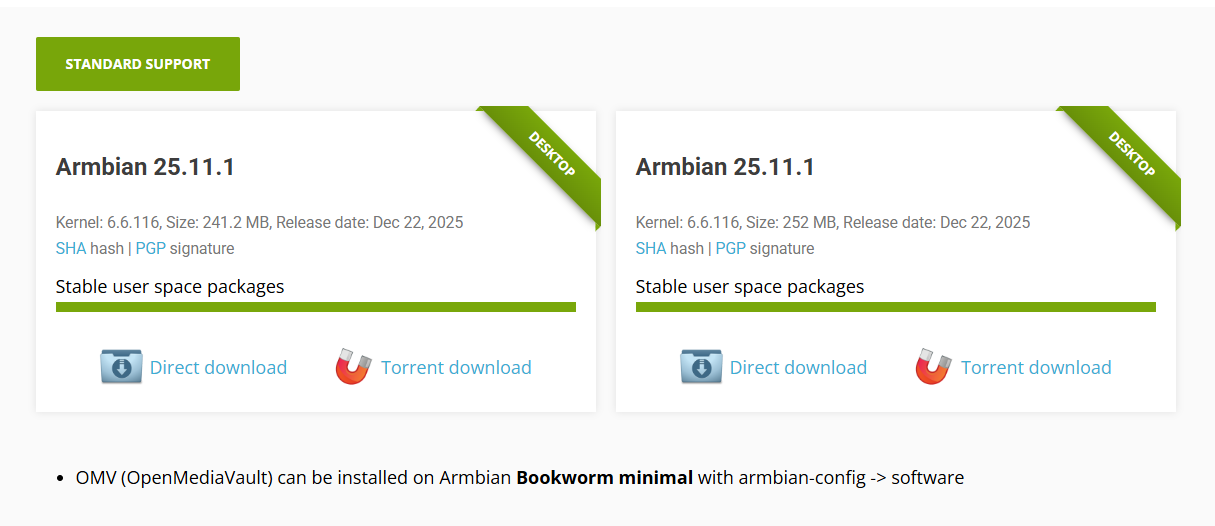
I'm wanting to install the latest CLI or minimal image for my Helios4 and am on the Helios4 Armbian page. Unless I'm missing something, there appears to only be two variations, but both are labelled as "Desktop" images.. In addition, in the below screenshot you can see a footnote indicating that to install OMV I will need a Bookworm minimal image - which is what I want to do. Am I missing something? Thanks
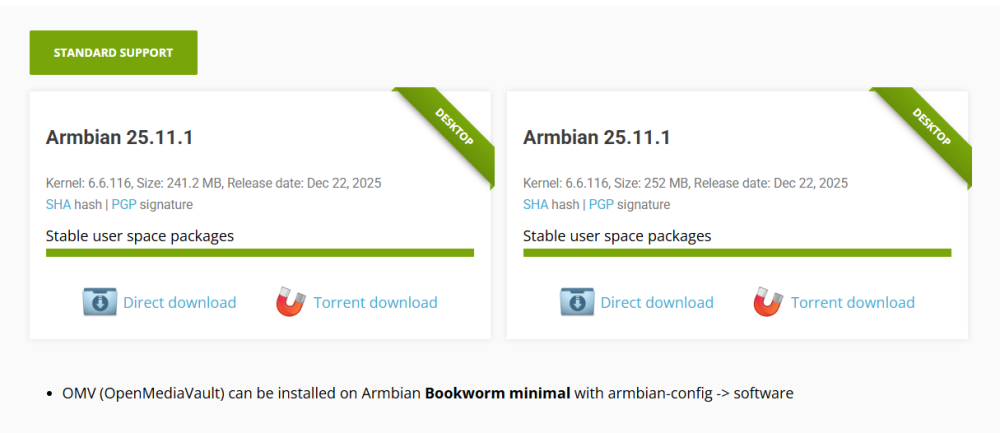
-
Please help. We bought a board on AliExpress, but no one provided any documentation. And I can't ask the seller for it. Can anyone share any information? It's very difficult to figure out which pin goes where without documentation on the circuit diagrams. But given my situation, I set up two Ethernet interfaces. I haven't tested them at full capacity, but I can ping from both networks... myd lt527m 16e2d 180 e sx Thanks a lot.
.thumb.jpg.3986375e17838b2593d69f2363643e22.jpg)
-
That's great. Thanks for sharing.
-
@PH Ph bootloader -> /dev/block/mmcblk0p1 Maybe this is the boot.bin we are looking for? Try extracting it with Android_boot_image_editor.
-
Hi @Nick A, I think I'm doing something wrong, but here goes. cat /proc/partitions major minor #blocks name 1 0 8192 ram0 1 1 8192 ram1 1 2 8192 ram2 1 3 8192 ram3 1 4 8192 ram4 1 5 8192 ram5 1 6 8192 ram6 1 7 8192 ram7 1 8 8192 ram8 1 9 8192 ram9 1 10 8192 ram10 1 11 8192 ram11 1 12 8192 ram12 1 13 8192 ram13 1 14 8192 ram14 1 15 8192 ram15 254 0 745120 zram0 179 0 31166976 mmcblk0 179 1 32768 mmcblk0p1 179 2 16384 mmcblk0p2 179 3 32768 mmcblk0p3 179 4 2097152 mmcblk0p4 179 5 16384 mmcblk0p5 179 6 32768 mmcblk0p6 179 7 911360 mmcblk0p7 179 8 16384 mmcblk0p8 179 9 16384 mmcblk0p9 179 10 16384 mmcblk0p10 179 11 16384 mmcblk0p11 179 12 16384 mmcblk0p12 179 13 512 mmcblk0p13 179 14 15872 mmcblk0p14 179 15 16384 mmcblk0p15 259 0 16384 mmcblk0p16 259 1 27858432 mmcblk0p17 253 0 1241204 dm-0 253 1 146376 dm-1 253 2 113948 dm-2 ls -al /dev/block/platform/soc/sdc0/by-name/ total 0 drwxr-xr-x 2 root root 380 1969-12-31 21:00 . drwxr-xr-x 3 root root 420 1969-12-31 21:00 .. lrwxrwxrwx 1 root root 21 1969-12-31 21:00 Reserve0 -> /dev/block/mmcblk0p16 lrwxrwxrwx 1 root root 21 1969-12-31 21:00 UDISK -> /dev/block/mmcblk0p17 lrwxrwxrwx 1 root root 20 1969-12-31 21:00 boot -> /dev/block/mmcblk0p3 lrwxrwxrwx 1 root root 20 1969-12-31 21:00 bootloader -> /dev/block/mmcblk0p1 lrwxrwxrwx 1 root root 20 1969-12-31 21:00 cache -> /dev/block/mmcblk0p7 lrwxrwxrwx 1 root root 21 1969-12-31 21:00 empty -> /dev/block/mmcblk0p14 lrwxrwxrwx 1 root root 20 1969-12-31 21:00 env -> /dev/block/mmcblk0p2 lrwxrwxrwx 1 root root 21 1969-12-31 21:00 frp -> /dev/block/mmcblk0p13 lrwxrwxrwx 1 root root 21 1969-12-31 21:00 media_data -> /dev/block/mmcblk0p15 lrwxrwxrwx 1 root root 21 1969-12-31 21:00 metadata -> /dev/block/mmcblk0p11 lrwxrwxrwx 1 root root 20 1969-12-31 21:00 misc -> /dev/block/mmcblk0p5 lrwxrwxrwx 1 root root 21 1969-12-31 21:00 private -> /dev/block/mmcblk0p12 lrwxrwxrwx 1 root root 20 1969-12-31 21:00 recovery -> /dev/block/mmcblk0p6 lrwxrwxrwx 1 root root 20 1969-12-31 21:00 super -> /dev/block/mmcblk0p4 lrwxrwxrwx 1 root root 20 1969-12-31 21:00 vbmeta -> /dev/block/mmcblk0p8 lrwxrwxrwx 1 root root 20 1969-12-31 21:00 vbmeta_system -> /dev/block/mmcblk0p9 lrwxrwxrwx 1 root root 21 1969-12-31 21:00 vbmeta_vendor -> /dev/block/mmcblk0p10 I couldn't open vendor.img boot.img i do.However, I couldn't find the dts file, only fstab, initd, and a few other empty folders. I posted the images below on 4shared. boot = boot.img vbmeta_vendor = vendor.img boot.img (32.0MB) Image type: Boot image Header version: 2 Command line arguments: selinux=1 androidboot.selinux=permissive androidboot.dtbo_idx=0,1,2 buildvariant=userdebug files avp folder s-gsi.avbpubkeyq-gsi.avbpubkeyr-gsi.avbpubkey fstab.sun50iw9p1 initrd.gz If you can check, I would appreciate it; I await further instructions. !off I tried mounting the partitions by inserting the burned SD card into the PC, but it's not possible to mount them. Except for a few... The SD card made by Phoenixcard is quite interesting. Could it be that the scheme on the SD card is not the same as when installed in the internal memory? The Udisk partition, for example. It's like shared memory, expanding all remaining space on both the memory card and the datauser partition. Similar to using a formatted SD card as internal memory on cell phones with that option.
-
Thank you ill go look
-

Efforts to develop firmware for H96 MAX V56 RK3566 4G/32G
WINEDS replied to Hqnicolas's topic in Rockchip CPU Boxes
See my recent posts in the 64gb thread. You'll need to build an image with MAE0621A-02C support. The same thread will also give you dinner hints for to make the WiFi work with aic8800. -
Thank you all guys. I tried another way, and finally successfuly boot from NVMe. For others whoever might have this situation, I leave a note here. Get the official Radxa OS for rock (5c|5c lite). Get the vendor Armbian for rock (5c|5c lite). Make a sd card with Radxa image. Plug sd card into PC(not Rock 5c), and copy Armbian img file(ex. Armbian_25.11.1_Rock-5c_trixie_vendor_6.1.115_minimal.img) to the sd card(to /home/radxa or wherever). Boot Rock 5C(lite) with the sd card. Login to Radxa OS, run rsetup and set overlay with SPI boot loader. Reboot. run rsetup again, and update the SPI Bootloader. There are 2 bootloader options, rock 5c and rock 5c SPI bootloader, and I chose SPI bootloader. Then, dd Armbian Image to NVMe device. There's a Instructions. (dd if=Armbian_xxx.img of=/dev/nvme0n1 bs=1M status=progress) Power off, remove SD card and Power On! You can boot from NVMe!
- Yesterday
-
yeah, this is quite helpful, although the best solution is to wait at least until 6.19. But now I can see that the board was not abandoned, which I was a bit worried about. It seems to be a nice entry-level option and compatibility of both boards with rpi5 HATs due to the exposed PCIe is a great feature. I found the A53 cores quite speedy on Rock 2F and also not to produce much heat. That's why I might have been a bit impatient (I want to be able to use the pcie with mainline fixes).
-
Hey! Got it up and running - I have an Armbian SD card image based on the source trees found on https://github.com/orangepi-xunlong. Since I am a newbie to Armbian, please accept my apologies for beginner errors. Here's what I currently got on my UART: root@orangepirv2:~# uname -a Linux orangepirv2 6.6.63-current-ky #1 SMP PREEMPT Tue Mar 18 02:29:27 UTC 2025 riscv64 GNU/Linux root@orangepirv2:~# cat /etc/os-release PRETTY_NAME="Armbian-unofficial 26.02.0-trunk trixie" NAME="Debian GNU/Linux" VERSION_ID="13" VERSION="13 (trixie)" VERSION_CODENAME=trixie DEBIAN_VERSION_FULL=13.2 ID=debian HOME_URL="https://www.armbian.com/" SUPPORT_URL="https://forum.armbian.com" BUG_REPORT_URL="https://www.armbian.com/bugs" ARMBIAN_PRETTY_NAME="Armbian-unofficial 26.02.0-trunk trixie" This is not ready for prime time now. Needs a bit cleanup b/c I pulled in binaries and private project stuff not meant for armbian-build. Currently resides in this fork https://github.com/sven-ola/armbian-build/tree/orangepi-rv2. If you want to give it a try: it's compile.sh opirv2 after checkout. I've also managed to boot from the top 2230 M.2 SSD but this is also handmade (I'm pretty sure there is a script in here that copies the SD card boot blobs to SPI flash, will try before doing the MR). Best // Sven-Ola
-
The rock-5b SPI uBoot compile config suggested by Werner is for the mainline uBoot and it didn't work with the uBoot on rock-5c although I thought it might. I tried to build you an unsupported image using the uBoot config from rock-5b, but unfortunately the build failed. Rock 5b is heavily hacked for uBoot to use a hybrid mainline uBoot with bits of Rockchip stuff. The function pre_config_uboot_target__rock5b_patch_uboot_dtsi_for_ums() won't work because the rock-5c dtsi doesn't have the same stuff, but this won't matter for vendor build. I will spend a bit of time trying to get it to build with all of the relevant rock-5b conf mods, but that is about the limit of what I can do because I don't have an NVME hat or a SPI flash module or the lite version of the radxa rock 5c or experience with the SPI subsystem. The NVME hat may not have the same device tree overlay as the built in NVME on the rock-5a. There is no reason to believe that the rock-5a-spi-nor-flash device tree overlay for the rock-5a will work correctly for the rock-5c. However you seem to indicate that the SPI module and NVME is working/accessible using the vendor kernel. This does not mean that they will work with uBoot. This may be relevant https://forum.armbian.com/topic/47090-radxa-rock5c-pentahat-and-emmc Building Armbian yourself is pretty easy if you want to experiment with current and edge mainline kernels. https://docs.armbian.com/Developer-Guide_Overview/



.jpg.45cdb6d9a3130265972767f4e08094c0.jpg)