All Activity
- Past hour
-

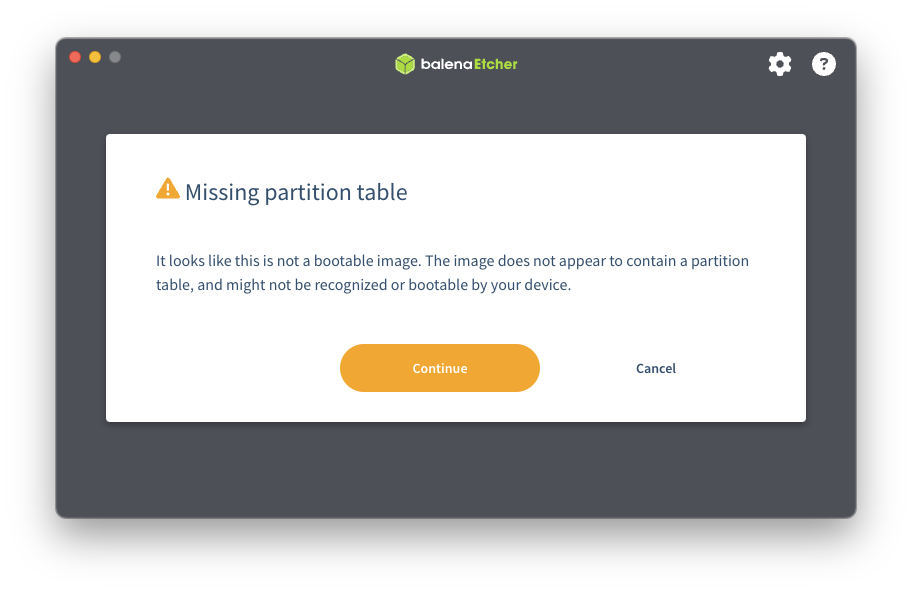
Dec 25th image for Cubie a5e is not a bootable image
Werner replied to Meestor_X's topic in Allwinner sunxi
Balenaetcher is known to cause trouble. Use USBimager or Armbian imager https://docs.armbian.com/User-Guide_Getting-Started/ -
I was working with OpenHD when it was taken down by GitHub. There's something we should be concerned about here in the rockchip section of armbian? Original Post: https://github.com/github/dmca/blob/master/2025/12/2025-12-18-ffmpeg.md Identify only the specific file URLs within the repository that is infringing: https://github.com/rockchip-linux/mpp/blob/develop/mpp/codec/dec/av1/av1d_codec.h https://github.com/rockchip-linux/mpp/blob/develop/mpp/codec/dec/av1/av1d_cbs.c https://github.com/rockchip-linux/mpp/blob/develop/mpp/codec/dec/av1/av1d_cbs.h https://github.com/rockchip-linux/mpp/blob/develop/mpp/codec/dec/av1/av1d_parser2_syntax.c https://github.com/rockchip-linux/mpp/blob/develop/mpp/codec/dec/h265/h265d_codec.h https://github.com/rockchip-linux/mpp/blob/develop/mpp/codec/dec/h265/h265d_parser.c https://github.com/rockchip-linux/mpp/blob/develop/mpp/codec/dec/h265/h265d_ps.c https://github.com/rockchip-linux/mpp/blob/develop/mpp/codec/dec/vp9/vp9d_codec.h https://github.com/rockchip-linux/mpp/blob/develop/mpp/codec/dec/vp9/vp9d_parser.c https://github.com/rockchip-linux/mpp/blob/develop/mpp/codec/dec/vp9/vp9data.h https://github.com/rockchip-linux/mpp/blob/develop/mpp/codec/dec/vp9/vpx_rac.c https://github.com/rockchip-linux/mpp/blob/develop/mpp/codec/dec/vp9/vpx_rac.h
-
I believe I'm having a similar issue. I'm running the Renegade Rockchip Libre Computer ROC-RK3328-CC-V1.3-8 and I've tried 6.12.32-current-rockchip64 as Debian IOT Minimal and as the Ubuntu Server versions from https://www.armbian.com/renegade/. Unfortunately the onboard ethernet phy is not working but I can use a USB ethernet just fine. I'm not super sure where to start troubleshooting other than a binary search for the version that broke things. If more info is needed from my setup I'm happy to post, let me know.
-
I do not see something clearly wrong, but likely is is a newer U-Boot, maybe something wrong there; version in SD-card you can show with: dd if=/dev/mmcblk0 count=32k status=none | strings | grep "U-Boot SPL"
- Today
-
Ooops, you are right I meant /boot/armbianEnv.txt, I edited the topic to correct. The output of armbianmonitor -u can be found here: https://paste.armbian.com/foyunagisu What should I look for?
-

Dec 25th image for Cubie a5e is not a bootable image
Meestor_X replied to Meestor_X's topic in Allwinner sunxi
-
I think it must be /boot/armbianEnv.txt Besides that, I never had this issue with my 5 NanoPi-NEO boards, originally Armbian Buster, always in-place upgraded. Also 1 now tested with kernel 6.18, now issues. So I think you maybe need to look at what U-Boot you use, what kernel is it and logs ( all via armbianmonitor -u )
-
Hi All, I have a couple of H3 based boards (Orange Pi Zero and FriendlyArm NanoPi Duo 2). With all of them I have the same issue: command like "reboot" turn the board off instead of rebooting. The workaround is to add following line in /boot/armbianEnv.txt extraargs=reboot=warm Running latest image on all of the boards.
-
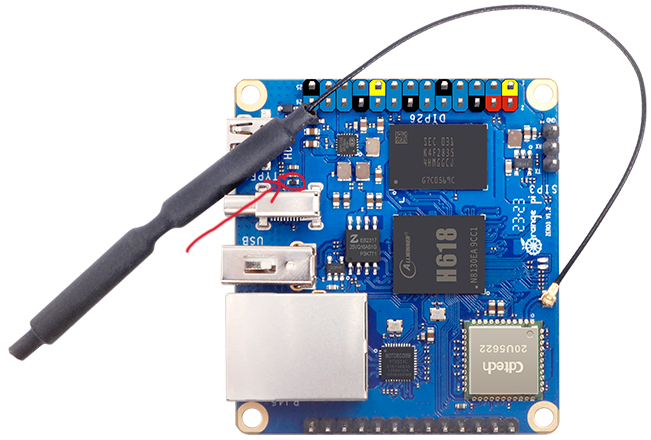
This is totally offtopic from the thread, but looking for people who have the device to identify. I have an orange pi zero 3, 2GB variant. I absent mindedly plugged a 12VDC power supply. And I obviously fried the marked SMD. Can anyone help me with the part number? I am figuring out a way to revive the board.
-
That the Helios64 SW/firmware did sequencing of 3.5inch HDD spin-up is indeed a good method to limit the maximum current draw. I do not know how power architecture is done in Helios64, but w.r.t. 3.5inch disks, so the 12V power need, you might avoid letting the current of the 12V flow through the SBC/motherboard. It is not needed, there might be connectors, still it is not needed. Even for traditional x86 PCs, 12V (and 5V as well) comes straight from the PSU, that is 100-1000W or so usually. The 12V also does not need to be exactly 12V, I feed a 4TB WD HDD from a 12V car battery in the field, is solar powered and 10 years old or so. Due to battery wear out, it sees a voltage of 10.5-14 Volts or so. No problem. 5V for SBC and some other small stuff is via a 3A DC/DC module. A car battery (72Ah or so) should have no issue with spinning up a handfull of 3.5inch HDDs simultaneously. The PCIe-to-SATA chips support hotplug, so you could use some P-MOSFETs or so to have GPIO-controlled powerswitch, but is of course electronics circuit design and soldering etc. Also maybe think if you need all that 5 HDDs (and at the same time) and with a RK3588 SoCo that can go as low as 1.5Watt idle. 5 spinning disks is 20W or so.
-

install bookworm 6.6.63 on x96q pro+ h728
San Dich Huu replied to hamidreza h's topic in Allwinner CPU Boxes
@Nick A, @MeJune Luckly. On this thread: https://forum.manjaro.org/t/allwinner-h728-a523-a527-t527-initial-support-thread/173654/2 He working for a year to make the linux working stable on this box. This mean kernel, dtb, ... can be replace on armbian build. I super need new image for web-service hosting purpose. Hope all function working. -
How did I miss that? Well that settles it... Thanks
-
install bookworm 6.6.63 on x96q pro+ h728
San Dich Huu replied to hamidreza h's topic in Allwinner CPU Boxes
@MeJune I tried but screen is black. But, but the box working. You can plug the network cable and connect with ssh. Limit: Clock of CPU is locked, cannot rise to max speed. Screen is black, USB may be not working, audio buggy, Wifi not working. But you can use it as file server/dns ... -

Need help with video decode acceleration on NanoPi R6S
eselarm replied to Blind55's topic in NanoPi R6S/R6C
My NanoPi-R6C came with FriendlyWRT pre-installed (OpenWRT variant) and I bought it 2 years ago partly also because I had a Samsumg 970 Evo NVME that needed a computer wrapped around it. I do not use images, instead root-filesystems (Btrfs). I Initially kept the FriendlyElec U-Boot, with all rest on NVME. Now still use the same principle, but EDK2-UEFI v1.1 as bootloader in eMMC and Armbian Trixie or Opensuse Tumbleweed with Armbian kernel and grub-efi. With latest u-boot (2026 rc2) I get no HDMI audio. I thought it was a power/reset issue, but also later tested again with complete un-powering first, but then also no HDMI audio. It might simply be a latency issue. Both older U-Boot and even much older FriendlyElec U-Boot as well as EDK2-UEFI initialize HDMI before the kernel and do simple 1080p60, so you also see the kernel being loaded, before KMS (re)-inits the HDMI. EDK2-UEFI has GUI for its settings, so no surprise it works there. For Jellyfin, I currently use a ROCK5B Armbian Trixie with Armbian vendor 6.1.115 kernel (also EDK2-UEFI bootloader). There were some issue with Jellyfin strreaming/transcoding, also on N100, I currently don't know why/what. The jellyfin-ffmpeg via CLI works great though, so about 5x realtime transcoding HEVC->H264. But Firefox on N100 or x5-Z8350 uses HEVC HW decoder, so no real need to do transcoding for me. LibreElec a month ago or so on NanoPi-R6C temporary booted from SD-card did do HW decoding OK, except for VP9 it was artifacts, not usable actually. So there is unfortunately no easy 1-size-fits-all currenlty. You can scan the forum, there are people who took unfinished patches and use very latest unstable Debian stuff, then things might work same as for x86. -
How to add private package to image?
Werner replied to Tim Zhang's topic in Advanced users - Development
Easiest approach is the customize-image.sh script in userpatches/. https://docs.armbian.com/Developer-Guide_User-Configurations/#user-provided-image-customization-script -
I want to add a private package with C source code in custom image. Extensions maybe are one approach— are there any other more standard practices?
-
 Finally, build successful on Ubuntu Noble.😃
 -
Oh and i missed one thing, the Helios64's board is nano itx (120x120), the on from radxa you want to use as replacement is mini itx (170x170)
-
Dec 25th image for Cubie a5e is not a bootable image
Werner replied to Meestor_X's topic in Allwinner sunxi
Provide logs -
moved to feedback
-

BPI M4 Zero 2G EMMC 8G H618 MCP2515
Netcrusher replied to Александр Архангельский's topic in Banana Pi M4 Zero
This spi-mcp251x.dts made me use can0 with SEENGREAT Dual-CH Can Hat on latest Armbian v25.11.2 for BananaPi BPI-M4-Zero running Armbian Linux 6.12.58-current-sunxi64: /* * Device tree overlay for mcp2517/18 @ can0 on SPI1.0 (BananaPi Zero M4) / Works with SEENGREAT Dual-CH Can Hat (can0 only) */ /dts-v1/; /plugin/; / { compatible = "allwinner,sun50i-h616"; fragment@0 { target-path = "/"; __overlay__ { can0_osc_fixed: can0_osc_fixed { compatible = "fixed-clock"; #clock-cells = <0>; clock-frequency = <16000000>; }; }; }; fragment@1 { target = <&pio>; __overlay__ { can0_pin_irq: can0_pin_irq { pins = "PC2"; /* Pin 22 on BananaPi BPI-M4-Zero */ function = "irq"; bias-pull-up; }; }; }; fragment@2 { target = <&spi1>; /* Use SPI1 */ __overlay__ { #address-cells = <1>; #size-cells = <0>; mcp2518fd@1 { compatible = "microchip,mcp2515"; reg = <0>; /* Use SPIx.0 */ pinctrl-names = "default"; pinctrl-0 = <&can0_pin_irq>; spi-max-frequency = <10000000>; interrupt-parent = <&pio>; interrupts = <2 2 0x08>; /* PC2 IRQ_TYPE_LEVEL_LOW */ clocks = <&can0_osc_fixed>; status = "okay"; }; }; }; }; Create file: sudo nano /boot/dtb/spi-mcp251x.dts Add overlay: sudo armbian-add-overlay /boot/dtb/spi-mcp251x.dts Edit armbianEnv.txt: overlays=bananapi-m4-pi-5-6-i2c0 bananapi-m4-sdio-wifi-bt bananapi-m4-spi1-cs0-spidev spi-mcp251x param_spidev_spi_bus=1 dtparam=spi=on param_i2c_arm_baudrate=10000 I did not try to get can1 to work since I don't need it at the moment. I hope it helps. Have fun! -
I’ve been testing Armbian on an Amlogic-based TV box, and wanted to share a short user experience. The device originally runs Android, but thanks to the Amlogic S9xx platform, it can boot Armbian from an SD card without touching the internal firmware. In my case, the system booted reliably and was usable for basic tasks like SSH access, light services, and general Linux testing. Ethernet and USB worked out of the box, while Wi-Fi and power management still required some manual tweaks, which seems common for community-supported TV boxes. For reference, the hardware I used belongs to the category of Amlogic TV boxes that are widely available on the market. These devices are not officially supported by Armbian, but they can still be interesting low-cost platforms for learning, testing, or small home projects. I’m curious if others here have experience with Armbian on similar Amlogic TV boxes, and which SoCs or configurations worked best for you.
-

Booting Armbian without EMMC
Kevin Putra Satrianto replied to Kevin Putra Satrianto's topic in Amlogic CPU Boxes
I see. Is this a hardware enforced security feature of sort? Because according to: https://docs.u-boot.org/en/latest/board/amlogic/boot-flow.html, the s905x2 can read the bootloader from sd card no matter the configuration. Only the order differs. I'm now trying to compile u-boot down from BL2 up to BL33 using this closest match of a board. It has a ddr4 memory while mine is ddr3l, but as shown in the doc it also includes ddr3 firmwares so I *hope* this will work. https://docs.u-boot.org/en/latest/board/amlogic/sei510.html However, if I'm talkin nonsense please let me know. This is my first dive into u-boot or bootloaders in general. -

Need help with video decode acceleration on NanoPi R6S
Blind55 replied to Blind55's topic in NanoPi R6S/R6C
@eselarm, thank you for your thoughts. So, just for clarification: for the Jellyfin server, do you use the FriendlyElec (the vendor distro)? Or one of the 6.1 Armbian images? With the Ubuntu rolling release I can stream in a browser with software decoding ok (although I am not getting sound rn). I will work some more on it and report back. -
Wow, thank you for this comprehensive answer. It will probably take me about as much time as until 6.19 is released to try and understand it 😂 Why does this say archlinux? And also, where to get these "idbloader.img" and "u-boot.itb" files from? The console is ttyS0, it works.