All Activity
- Today
-
Hi, is it still working now?
-
moved
-
@sicxnull This might be the patch that fixed it. It's in mainline u-boot now. I would use a newer u-boot. https://lists.denx.de/pipermail/u-boot/2025-March/582900.html
-

Gaming experience with Orange Pi 5 (RK3588) on Armbian
KhanhDTP replied to KhanhDTP's topic in Orange Pi 5
Armbian 25.11.2 Noble XFCE (BSP Kernel: 6.1.115) + PanVk - mesa 26.0 (https://launchpad.net/~ernstp/+archive/ubuntu/mesaaco) + Box64 arm64 v0.4.1 ed9827920 (https://ryanfortner.github.io/box64-debs/) + ge-proton10-29 (https://github.com/GloriousEggroll/proton-ge-custom/releases/tag/GE-Proton10-29) (GE-proton is more likely to be segment fault-proof than other wine-proton versions) + dgVoodoo2 (https://github.com/dege-diosg/dgVoodoo2/releases) + DXVK-stripped v2.5.3 30~40fps@720p (low settings) (Some minor flickering bug, but still playable) box64 environment variables: DmC - Devil May Cry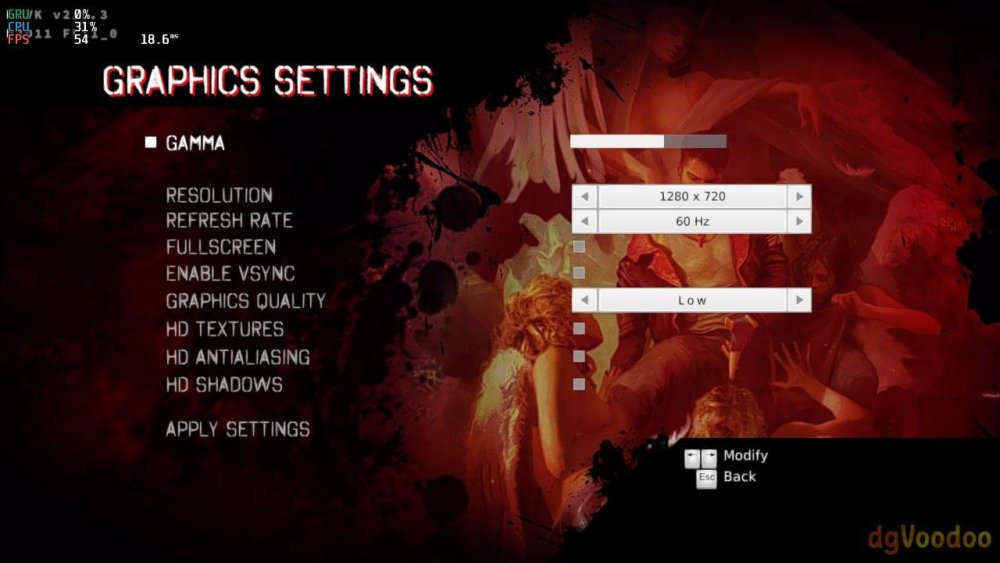
.thumb.jpg.1c4db9d3fbabb8ff7fb8e9d29a3afd1a.jpg)
.thumb.jpg.49f481db41febd0fcca0afd7811c9fef.jpg)
-
Gaming experience with Orange Pi 5 (RK3588) on Armbian
KhanhDTP replied to KhanhDTP's topic in Orange Pi 5
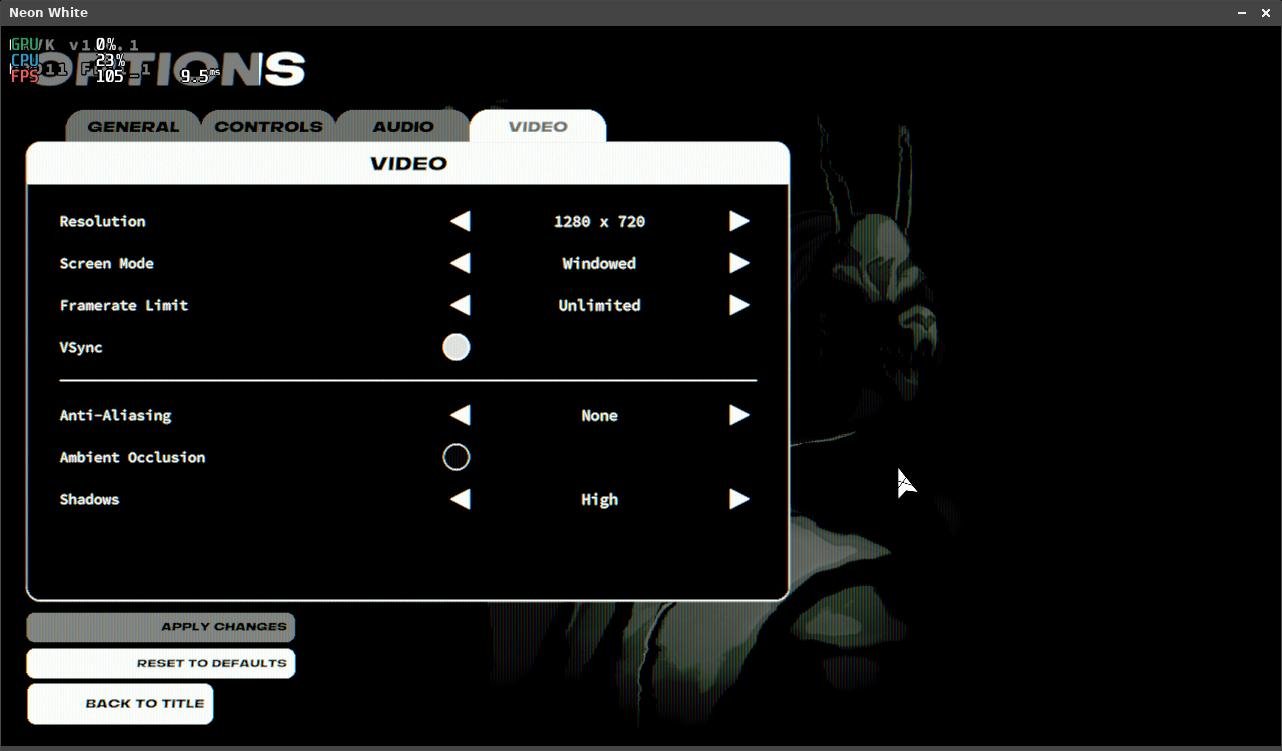
Armbian 25.11.2 Noble XFCE (BSP Kernel: 6.1.115) + PanVk - mesa 26.0 (https://launchpad.net/~ernstp/+archive/ubuntu/mesaaco) + Box64 arm64 v0.4.1 ed9827920 (https://ryanfortner.github.io/box64-debs/) + proton-10.0-4-amd64-wow64 (https://github.com/Kron4ek/Wine-Builds/releases/download/proton-10.0-4/wine-proton-10.0-4-amd64-wow64.tar.xz) + DXVK-stripped v1.6.1 50~60fps@720p (no AA, no AO, high Shadows) box64 environment variables: Neon White
-
https://github.com/sicXnull/armbian-build/commit/347ffdb2e4ceb301140270fb106c2d0807151122
- Yesterday
-
@sicxnull I would need to look at your sources. Not sure if it's a dts or u-boot patch fix.
-
Hey I have recently installed Armbian specifically the Intel/AMD image for my Dell 3100 2-in-1 chromebook. It runs fanominally but the headphone jack doesn't detect my headphones correctly but yet my bluetooth ones work without a problem. Anyone have a idea of whats going wrong?
-

to get 32768 clk from GPIO1 D4 on RK3328
robertoj replied to emresensoy's topic in Advanced users - Development
Linux is not a real time operating system Realtime OSes have a 1 ms accuracy You need an arduino dedicated only to make your square wave -
Hey @Nick A any idea which patch you're applying that fixes the EMMC boot?
-

Amlogic s905x (s912) Print Server is Not Working
SteeMan replied to Aufa Aji's topic in Software, Applications, Userspace
Moved to userspace forum -
Just use dd (on linux) or balea etcher (windows/mac) to write the armbian image to an sdcard.
-
 v25.8 rolling for aml-s9xx-box running Armbian Linux 6.12.35-current-meson64 Printer is Canon G2770 I suspect its a driver problem since gutenprint does not have the exact same model (I chose Pixma G2000 Driver in CUPS "Add Printer" menu) #When Adding Printer d [20/Feb/2026:03:19:36 +0700] [CGI] Finished \"{default_name=Canon_G2070_series\", out=0xffffb9ff1520... d [20/Feb/2026:03:19:36 +0700] [CGI] \"{printer_uri_supported}\" at 367... d [20/Feb/2026:03:19:36 +0700] [CGI] \"{$org.cups.sid}\" at 452... D [20/Feb/2026:03:19:36 +0700] [CGI] Regular expression \".*Clean.*\" d [20/Feb/2026:03:19:36 +0700] [CGI] Starting \"{printer_commands~.*Clean.*\" at 639, result=0... d [20/Feb/2026:03:19:36 +0700] [CGI] Skip first part... d [20/Feb/2026:03:19:36 +0700] [CGI] Starting at file position 639... d [20/Feb/2026:03:19:36 +0700] [CGI] Returning at file position 700 on character \':\'... d [20/Feb/2026:03:19:36 +0700] [CGI] Output second part... d [20/Feb/2026:03:19:36 +0700] [CGI] Starting at file position 700... d [20/Feb/2026:03:19:36 +0700] [CGI] Returning at file position 701 on character \'}\'... d [20/Feb/2026:03:19:36 +0700] [CGI] Finished \"{printer_commands~.*Clean.*\", out=0xffffb9ff1520... D [20/Feb/2026:03:19:36 +0700] [CGI] Regular expression \".*PrintSelfTestPage.*\" d [20/Feb/2026:03:19:36 +0700] [CGI] Starting \"{printer_commands~.*PrintSelfTestPage.*\" at 742, result=0... d [20/Feb/2026:03:19:36 +0700] [CGI] Skip first part... d [20/Feb/2026:03:19:36 +0700] [CGI] Starting at file position 742... d [20/Feb/2026:03:19:36 +0700] [CGI] Returning at file position 809 on character \':\'... d [20/Feb/2026:03:19:36 +0700] [CGI] Output second part... d [20/Feb/2026:03:19:36 +0700] [CGI] Starting at file position 809... d [20/Feb/2026:03:19:36 +0700] [CGI] Returning at file position 810 on character \'}\'... d [20/Feb/2026:03:19:36 +0700] [CGI] Finished \"{printer_commands~.*PrintSelfTestPage.*\", out=0xffffb9ff1520... d [20/Feb/2026:03:19:36 +0700] [CGI] Starting \"{printer_state=5\" at 828, result=0... d [20/Feb/2026:03:19:36 +0700] [CGI] Skip first part... d [20/Feb/2026:03:19:36 +0700] [CGI] Starting at file position 828... d [20/Feb/2026:03:19:36 +0700] [CGI] Returning at file position 882 on character \':\'... d [20/Feb/2026:03:19:36 +0700] [CGI] Output second part... d [20/Feb/2026:03:19:36 +0700] [CGI] Starting at file position 882... d [20/Feb/2026:03:19:36 +0700] [CGI] Returning at file position 934 on character \'}\'... d [20/Feb/2026:03:19:36 +0700] [CGI] Finished \"{printer_state=5\", out=0xffffb9ff1520... d [20/Feb/2026:03:19:36 +0700] [Client 31] cupsdReadClient: error=0, used=0, state=HTTP_STATE_WAITING, data_encoding=HTTP_ENCODING_LENGTH, data_remaining=0,> D [20/Feb/2026:03:19:36 +0700] [Client 31] POST / HTTP/1.1 D [20/Feb/2026:03:19:36 +0700] cupsdSetBusyState: newbusy="Active clients and dirty files", busy="Active clients and dirty files" D [20/Feb/2026:03:19:36 +0700] [Client 31] Read: status=200, state=6 d [20/Feb/2026:03:19:36 +0700] cupsdFindBest: uri="/", limit=10... d [20/Feb/2026:03:19:36 +0700] cupsdFindBest: Location /admin/log(10) Limit 7f d [20/Feb/2026:03:19:36 +0700] cupsdFindBest: Location /admin/conf(11) Limit 7f d [20/Feb/2026:03:19:36 +0700] cupsdFindBest: Location /admin(6) Limit 7f d [20/Feb/2026:03:19:36 +0700] cupsdFindBest: Location /(1) Limit 7f d [20/Feb/2026:03:19:36 +0700] cupsdFindBest: best=/ d [20/Feb/2026:03:19:36 +0700] [Client 31] con->uri="/", con->best=0xaaaac8741170(/) D [20/Feb/2026:03:19:36 +0700] [Client 31] No authentication data provided. d [20/Feb/2026:03:19:36 +0700] cupsdIsAuthorized: con->uri="/", con->best=0xaaaac8741170(/) d [20/Feb/2026:03:19:36 +0700] cupsdIsAuthorized: level=CUPSD_AUTH_ANON, type=None, satisfy=CUPSD_AUTH_SATISFY_ALL, num_names=0 d [20/Feb/2026:03:19:36 +0700] cupsdIsAuthorized: auth=CUPSD_AUTH_ALLOW... D [20/Feb/2026:03:19:36 +0700] [Client 31] 2.0 Get-Jobs 3 d [20/Feb/2026:03:19:36 +0700] cupsdProcessIPPRequest(0xaaaac88b11c0[31]): operation_id=000a(Get-Jobs) #When Trying to Print Test Page d [20/Feb/2026:03:21:19 +0700] [Job 10] Gutenprint: Reading 14874 4699 d [20/Feb/2026:03:21:19 +0700] [Job 10] Gutenprint: Tossing right 0 (0) + 9 d [20/Feb/2026:03:21:19 +0700] cupsdDeleteTemporaryPrinters: Removing unused temporary printers d [20/Feb/2026:03:21:19 +0700] select_timeout: JobHistoryUpdate=1771607348 d [20/Feb/2026:03:21:19 +0700] [Job 10] Gutenprint: Reading 14874 4700 d [20/Feb/2026:03:21:19 +0700] cupsdDeleteTemporaryPrinters: Removing unused temporary printers d [20/Feb/2026:03:21:19 +0700] select_timeout: JobHistoryUpdate=1771607348 d [20/Feb/2026:03:21:19 +0700] [Job 10] Gutenprint: Tossing right 0 (0) + 9 d [20/Feb/2026:03:21:19 +0700] [Job 10] Gutenprint: Tossing right 0 (0) + 9 D [20/Feb/2026:03:21:19 +0700] [Job 10] Printing page 1, 67% D [20/Feb/2026:03:21:19 +0700] cupsdMarkDirty(---J-) D [20/Feb/2026:03:21:19 +0700] cupsdSetBusyState: newbusy="Printing jobs and dirty files", busy="Printing jobs and dirty files" D [20/Feb/2026:03:21:19 +0700] [Job 10] Set job-printer-state-message to "Printing page 1, 67%", current level=INFO D [20/Feb/2026:03:21:19 +0700] [Job 10] ATTR: job-media-progress=67 d [20/Feb/2026:03:21:19 +0700] cupsdAddEvent(event=job-progress, dest=0xaaaac8751a40(Canon_G2070_series), job=0xaaaac888e2e0(10), text="Printing page %d, %d> D [20/Feb/2026:03:21:19 +0700] Discarding unused job-progress event... d [20/Feb/2026:03:21:19 +0700] cupsdAddEvent(event=job-progress, dest=0xaaaac8751a40(Canon_G2070_series), job=0xaaaac888e2e0(10), text="%s", ...) D [20/Feb/2026:03:21:19 +0700] Discarding unused job-progress event... d [20/Feb/2026:03:21:19 +0700] cupsdAddEvent(event=printer-state-changed, dest=0xaaaac8751a40(Canon_G2070_series), job=(nil)(0), text="Printer \"%s\" state > D [20/Feb/2026:03:21:19 +0700] Discarding unused printer-state-changed event... d [20/Feb/2026:03:21:19 +0700] cupsdDeleteTemporaryPrinters: Removing unused temporary printers d [20/Feb/2026:03:21:19 +0700] select_timeout: JobHistoryUpdate=1771607348 d [20/Feb/2026:03:21:19 +0700] [Job 10] Gutenprint: Reading 14874 4702 d [20/Feb/2026:03:21:19 +0700] cupsdDeleteTemporaryPrinters: Removing unused temporary printers d [20/Feb/2026:03:21:19 +0700] select_timeout: JobHistoryUpdate=1771607348 d [20/Feb/2026:03:21:19 +0700] [Job 10] Gutenprint: Tossing right 0 (0) + 9 d [20/Feb/2026:03:21:19 +0700] cupsdDeleteTemporaryPrinters: Removing unused temporary printers d [20/Feb/2026:03:21:19 +0700] select_timeout: JobHistoryUpdate=1771607348 d [20/Feb/2026:03:21:19 +0700] [Job 10] Gutenprint: Reading 14874 4703 d [20/Feb/2026:03:21:19 +0700] cupsdDeleteTemporaryPrinters: Removing unused temporary printers d [20/Feb/2026:03:21:19 +0700] select_timeout: JobHistoryUpdate=1771607348 d [20/Feb/2026:03:21:19 +0700] [Job 10] Gutenprint: Tossing right 0 (0) + 9 d [20/Feb/2026:03:21:19 +0700] cupsdDeleteTemporaryPrinters: Removing unused temporary printers d [20/Feb/2026:03:21:19 +0700] select_timeout: JobHistoryUpdate=1771607348 d [20/Feb/2026:03:21:19 +0700] [Job 10] Gutenprint: Reading 14874 4704 d [20/Feb/2026:03:21:19 +0700] [Job 10] Gutenprint: Tossing right 0 (0) + 9 d [20/Feb/2026:03:21:19 +0700] cupsdDeleteTemporaryPrinters: Removing unused temporary printers d [20/Feb/2026:03:21:19 +0700] select_timeout: JobHistoryUpdate=1771607348 d [20/Feb/2026:03:21:19 +0700] [Job 10] Gutenprint: Reading 14874 4705 d [20/Feb/2026:03:21:19 +0700] cupsdDeleteTemporaryPrinters: Removing unused temporary printers d [20/Feb/2026:03:21:19 +0700] select_timeout: JobHistoryUpdate=1771607348 d [20/Feb/2026:03:21:19 +0700] [Job 10] Gutenprint: Tossing right 0 (0) + 9 d [20/Feb/2026:03:21:19 +0700] cupsdDeleteTemporaryPrinters: Removing unused temporary printers d [20/Feb/2026:03:21:19 +0700] select_timeout: JobHistoryUpdate=1771607348 d [20/Feb/2026:03:21:19 +0700] [Job 10] Gutenprint: Reading 14874 4706 d [20/Feb/2026:03:21:19 +0700] cupsdDeleteTemporaryPrinters: Removing unused temporary printers
 -
 Weston 15.0 has arrived, bringing a brand new Lua-based shell for fully customizable window management, an experimental Vulkan renderer, and a host of improvements to color handling, media playback, and display performance. View the full article
 -
@MeJune You can check out my work starting with the 'Add warpme kernel 6.17' commit here: https://github.com/NickAlilovic/build/commits/v20251014/ I’m using warpme patches from his minimyth2 repo, though I’ve modified them to ensure they apply correctly. I also used my own patches for Transpeed, as his implementation differs from mine. u-boot: https://github.com/warpme/minimyth2/tree/master/script/bootloaders/u-boot-aw/files https://github.com/warpme/minimyth2/blob/master/script/bootloaders/u-boot-aw/Makefile kernel: https://github.com/warpme/minimyth2/tree/master/script/kernel/linux-6.19/files https://github.com/warpme/minimyth2/blob/master/script/kernel/linux-6.19/Makefile An easier way to do this is to create a board config and use the official Armbian patch set. While Transpeed is already mainlined, the implementation is incomplete. You will still need a patch to include your missing Transpeed DTS nodes. If you are happy with 6.17, then use this build: https://github.com/NickAlilovic/build/commits/v20251014/ This build generates a kernel .deb package in output/debs. You can use it to upgrade your existing Armbian installation. I haven't tried this myself, so I make no promises that it will work; please ensure you have a backup before proceeding. Backing Up the SD Card (from another PC) The most reliable way to back up an SD card is to create a full disk image on a separate computer. sudo dd if=/dev/sdX of=armbian_backup.img bs=1M status=progress If your system is running on eMMC, you can back it up to an external USB or SD card using built-in Armbian tools. Using armbian-ddbr: Many Armbian builds include this utility specifically for eMMC backup/restore. Boot Armbian from an external SD card (so the eMMC is not in use). Run the command: sudo armbian-ddbr. Select the backup option to create a compressed image of your internal storage. Using armbian-config: Some versions offer a "Backup" or "Clone" option under the System or Maintenance menus
-
i recently purchased an orange pi 5 plus 16gb with the wifi / bt card, the aluminum wifi case, fan and 1tb ssd. when i go to the official website i see different images there none of which seem to work 100%. i mean i was able to get each up and running but what i noticed is that the graphical drivers would not load. i saw a youtube video claiming armbian has the right driver support for the mali 610 gpu. can someone assist me getting this to work? im big into emulation gaming and right now it doesnt even have Vulkan support i crave. someone help thanks
-
@Nick A You previously taught how to build an image for Transpeed 8k618-t. If I want to replace the default version kernel with a newer kernel. Could I tell you if there's a way to create one?
-
 Boot with serial attached and see if the DRAM is being properly detected. If not this patch would appear to solve the issue. https://lore.kernel.org/linux-sunxi/2813637.mvXUDI8C0e@jernej-laptop/T/#t
 -
 You should pipe the output from a serial console cable to another computer where you store it. Make sure kernel cmdline loglevel=7 AFAIR the OPI5+ can only use 5V as input supply power. Your 100W PSU might be a standard spec one so it does only deliver 3A at 5V. This might be a perfect 5.000V, but an extra cable in between will drop that a bit and the risk is then that short higher power drap will either make the 5V goo too low and/or the PSU will cut the power because more than 3A drawn during a short peak. You will need to look at powering first. Usually 5V only SBC's can be powered via other input then the USB-C input. You need to read the instruction for your OPI5+, and also OPi5, those might be different. OPI5+ and also OPi5 should transcode at more or less the same speed, large amount of memory does not really matter as it is just HW processing blocks doing the work in a rather limited memory space. You should do a manual CLI jellyfin-ffmpeg based transcode, see /var/log/jellyfin how commandline arguments for that specific video look like (and simplify it, output to 1 file instead of chunks m3u8). And or search this forum, I at least have posted examples for check/test earlier. You might also try to reproduce it with a publiclicy know video, look for big buck bunny test vids or so.
 -
Nanopi neo air stucks on "Starting kernel..." after some random power losses (2-50) during loading I think it's because of corruption of armbianEnv.txt. Normal UART logs: UART Logs with stucking on "Starting kernel" U-Boot SPL 2024.01_armbian-202ns16550_serial serial@1c28000: p024.01-S866c-P7738-Hadc5-Vefe9-B2eb2-R448a (Feb 06 2026 - 03:49:45 +0000) Allwinner Technology 0) Model: FriendlyARM NanoPi NEent from FAT... Unable to use mmc 1:1... ial Err: serial Net: No ethernet found. starting USB... No working controllers found 1(part 0) is current device Scacr 5475 bytes read in 2 ms (2.6 MiB/s) ## Executing script at 43100000 U-boot loaded from eMMC or secondary SD MMC: no card present * ** Failed to load '/boot/armbianEnv.txt' Load fdt: /boot/dtb/sun8i-h3-nan13293004 bytes read in 419 ms (30.3 MiB/s) 10014752 bytes read in 317 ms (30.1 MiB/s) ion 43400000 ... Image Name: uInitrd Image Type: ARM Linux RAMDisk Image (gzip compressed) Data Size: 13292940 Bytes = 12.7 MiB Load Address: 00000000 Entry Point: 00000000 Verifying Checksum ... OK ## Flattened Device Tree bloing Ramdisk to 49352000, end 49fOK Loading Device Tree to 49 Starting kernel ... U-Boot SPL 2024.01_armbian-2024.01-S866c-P7738-Hadc5-Vefe9-B2eDRAM: 512 MiB Trying to boot frns16550_serial serial@1c28000: p CPU: Allwinner H3 (SUN8I 168Core: 64 devices, 16 uclasses, mmc@1c0f000: 0, mmc@1c10000: 2, mmc@1c11000: 1 Loading Environment from FAT... In: serial,usbkbd Out: serial Err: serial Autoboot in 1 seconds, press <Space> to stop switch to partitions #0, OK mmc1(part 0) is current device Sca/s) ## Executing script at 4310dary SD MMC: no card present ** Bad device specification mmc 0Failed to load '/boot/armbianEnv.txt' Load fdt: /boot/dtb/sun8i-h3-nanopi-neo-air.dtb 13293004 bytes read in 433 ms (29.3 MiB/s) it Ramdisk from Legacy Image at 43400000 ... Image Name: uux RAMDisk Image (gzip compressed) Data Size: 13292940 Bytes = 12.7 MiB Load Address: 00000000 Entry Point: 0000b at 43000000 Booting using the fdt blob at 0x43000000 Working Ramdisk to 49352000, end 49fff58c ... 2e0000, end 49351fff ... OK Worns16550_serial serial@1c28000: p19 U-Boot 2024.01_armbian-22eb2-R448a (Feb 06 2026 - 03:49:45 +0000) Allwinner Technology O Air DRAM: 512 MiB ent from FAT... switch to partitions #0, OK mmc1(part 0) is current device Scanning mmc 1:1... Found U-Boot script /boot/boot.scr /s) ## Executing script at 43100000 U-boot loaded from eMMC or secondary SD MMC: no card present ** Bad device specification mmc 0 ** Failed to load '/boot/armbianEnv.txt' 13293004 bytes read in 447 ms (2ing Ramdisk to 49352000, end 49f ing USB... No working controlleAutoboot in 1 seconds, press <Space> to stop switch to partitions #0, OK mmc1(part 0) is current device Sca0000 * Bad device specification mmc 0 ** Failed to load '/boot/armbianEnv.txt' Load fdt: /boot/dtb/sun8i-h3-nanopi-neo-air.dtb 13293004 bytes read in 433 ms (29.3 MiB/s) OK ## Flattened Device Tree blob at 43000000 Booting using ing FDT set to 43000000 Loading Ramdisk to 49352000, end 49fff58c ... OK Loading Device Tree to 492e0000, end 49351fff ... OK Working FDT set to 492e0000 Starting kernel ... I builded armbian image with compile.sh BOARD=nanopiair BRANCH=legacy RELEASE=bookworm BUILD_MINIMAL=no BUILD_DESKTOP=no KERNEL_CONFIGURE=no CLEAN_LEVEL="make,debs,cache" OVERLAYS="analog-codec i2c0 i2c1 i2c2 usbhost2 usbhost3" COMPRESS_OUTPUTIMAGE=sha,gz WIREGUARD=yes NAMESERVER=8.8.8.8 DOCKER_ARMBIAN_BASE_IMAGE="ubuntu:jammy" for Nanopi Neo Air. Image is flashed to eMMC. Is any way to solve it?
- Last week
-
 I am running Ubuntu 24.04 Noble (Armbian Linux 6.1.115-vendor-rk35xx) and no additional packages affecting VPU performance have been installed; everything is stock. Jellyfin is running in Docker, and transcoding works perfectly, except for some movies. I tried to play a 4K video in Chrome (native HEVC support), set the bitrate to 40mbps, and the video played normally at a transcoding speed of about 3x, but after a while, Orange Pi crashed. In Firefox inside neko (where there is no hardware acceleration and HEVC), the crash happened even faster, after ~2 seconds of playback. The crash happens as if the board loses power: journalctl is not saved, nothing is visible via ssh. I use a 100W Baseus GaN Pro Desktop Power Strip (model CCGAN100-1ACE) and the Orange Pi is the only device connected to it. I also have a 100W cable that shows the current consumption in watts. During transcoding, it showed 10, and then the board hard rebooted again, so I don't think this is related to power issues. Before that, I used Ubuntu 24.04 from Joshua Riek, and there was a problem with the Mali driver crashing under heavy load or simply after a while. A similar hard reboot also occurred if the driver was “too slow” to crash. Here is Jellyfin's video info: ffprobe: I also have a 4 GB model of Orange Pi 5 (not B), and there were no problems with transcoding this video; it was just slow due to the small amount of RAM. I don't even know where to start. What should I do to at least understand the cause of this issue?
 -
Hi Gaetano, I'd be suprised if Buster did work with such a newer kernel. dwc2 is Pi specific and will not work on Allwinner/Sunxi hardware. The OTG usb controller is completely different, please see the wiki: https://linux-sunxi.org/USB_OTG_Controller_Register_Guide Overlays will only load overlays found in /boot/dtb/overlay/ while user defined ones exist in /boot/overlay-user/ As expected otg is the default mode, firstly those warnings are normal when decompiling the dtb back dts as not everything gets translated back. For small modifications you can use sudo armbian-add-overlay which compiles the overlay and places it within /boot/overlay-user This problem seems to occur every now and again in some kernel releases, please refer to here: for a solution. I would refer back to the board schematic before adjusting the dts. On the Pcduino2 and Pcduino3, the OTG micro USB passes through a small resistor rather than a fuse so causes a slight voltage drop. Just make sure that you have a good quality lead that ensures the board gets 5V but slightly over is better. sudo armbianmonitor -m Stop monitoring using [ctrl]-[c] Time CPU load %cpu %sys %usr %nice %io %irq Tcpu PMIC DC-IN C.St. 22:19:42 960 MHz 0.39 14% 9% 5% 0% 0% 0% 33.7 °C 30.2 °C 5.34V 0/6^C Best of luck Ryzer
-
I see there is a "UART" on the front board image, but I guess it does not work for you. Check the sorroundings for possibile missing resistors, sometimes they remove some small SMD resistors to make the UART non-functional. Also note that you must use an adapter that is capable of 1.5Mbps; not all of them can reach such baud rates (AFAIR pl2303 can't, but CH301 should work)
-
 Some logs that might help in resolving: cat /proc/asound/card0/eld* monitor_name SONY AVAMP connection_type HDMI eld_version [0x2] CEA-861D or below edid_version [0x3] CEA-861-B, C or D manufacture_id 0xd94d product_id 0x9301 port_id 0x0 support_hdcp 0 support_ai 1 audio_sync_delay 0 speakers [0x5f] FL/FR LFE FC RL/RR RC RLC/RRC sad_count 12 sad0_coding_type [0xc] MLP (Dolby TrueHD) sad0_channels 2 sad0_rates [0x1ec0] 44100 48000 88200 96000 176400 192000 sad1_coding_type [0xc] MLP (Dolby TrueHD) sad1_channels 6 sad1_rates [0x1ec0] 44100 48000 88200 96000 176400 192000 sad2_coding_type [0xc] MLP (Dolby TrueHD) sad2_channels 8 sad2_rates [0x6c0] 44100 48000 88200 96000 sad3_coding_type [0xb] DTS-HD sad3_channels 2 sad3_rates [0x1ec0] 44100 48000 88200 96000 176400 192000 sad4_coding_type [0xb] DTS-HD sad4_channels 6 sad4_rates [0x1ec0] 44100 48000 88200 96000 176400 192000 sad5_coding_type [0xb] DTS-HD sad5_channels 8 sad5_rates [0x6c0] 44100 48000 88200 96000 sad6_coding_type [0x1] LPCM sad6_channels 2 sad6_rates [0x1ee0] 32000 44100 48000 88200 96000 176400 192000 sad6_bits [0xe] 16 20 24 sad7_coding_type [0x1] LPCM sad7_channels 6 sad7_rates [0x1ee0] 32000 44100 48000 88200 96000 176400 192000 sad7_bits [0xe] 16 20 24 sad8_coding_type [0x1] LPCM sad8_channels 8 sad8_rates [0x1ee0] 32000 44100 48000 88200 96000 176400 192000 sad8_bits [0xe] 16 20 24 sad9_coding_type [0x2] AC-3 sad9_channels 6 sad9_rates [0xe0] 32000 44100 48000 sad9_max_bitrate 680000 sad10_coding_type [0x7] DTS sad10_channels 6 sad10_rates [0x6e0] 32000 44100 48000 88200 96000 sad10_max_bitrate 1536000 sad11_coding_type [0xa] E-AC-3/DD+ (Dolby Digital Plus) sad11_channels 8 sad11_rates [0xc0] 44100 48000 dmesg | grep -i hdmi [ 0.024452] /vop@fdd90000: Fixed dependency cycle(s) with /hdmi@fde80000 [ 0.024468] /hdmi@fde80000: Fixed dependency cycle(s) with /vop@fdd90000 [ 0.030657] /hdmi@fde80000: Fixed dependency cycle(s) with /hdmi-con [ 0.030674] /hdmi-con: Fixed dependency cycle(s) with /hdmi@fde80000 [ 1.328504] dwhdmiqp-rockchip fde80000.hdmi: registered DesignWare HDMI QP I2C bus driver [ 1.329303] rockchip-drm display-subsystem: bound fde80000.hdmi (ops rockchip_drm_fini [rockchipdrm]) [77523.181767] hdmi-audio-codec hdmi-audio-codec.4.auto: HDMI: Unknown ELD version 0 [77523.184450] hdmi-audio-codec hdmi-audio-codec.4.auto: ASoC error (-19): at snd_soc_dai_prepare() on i2s-hifi [77529.747875] hdmi-audio-codec hdmi-audio-codec.4.auto: HDMI: Unknown ELD version 0 [77529.749599] hdmi-audio-codec hdmi-audio-codec.4.auto: ASoC error (-19): at snd_soc_dai_prepare() on i2s-hifi [84820.893274] hdmi-audio-codec hdmi-audio-codec.4.auto: HDMI: Unknown ELD version 0 [84947.092875] dwhdmiqp-rockchip fde80000.hdmi: registered DesignWare HDMI QP I2C bus driver [84947.100550] rockchip-drm display-subsystem: bound fde80000.hdmi (ops rockchip_drm_fini [rockchipdrm])
 -
Collabora is excited to see Monado at the heart of the new OpenXR runtime for Android XR, a major milestone for Open Source XR interoperability. View the full article



.jpg.284d312d756ba353709bcef1d67b2bc2.jpg)
.jpg.29090d2b043437443ac14abcb74d8f39.jpg)