All Activity
- Past hour
-
 What hardware do you have? What exactly is in the M.2 slot?
 -

Gaming experience with Orange Pi 5 (RK3588) on Armbian
KhanhDTP replied to KhanhDTP's topic in Orange Pi 5
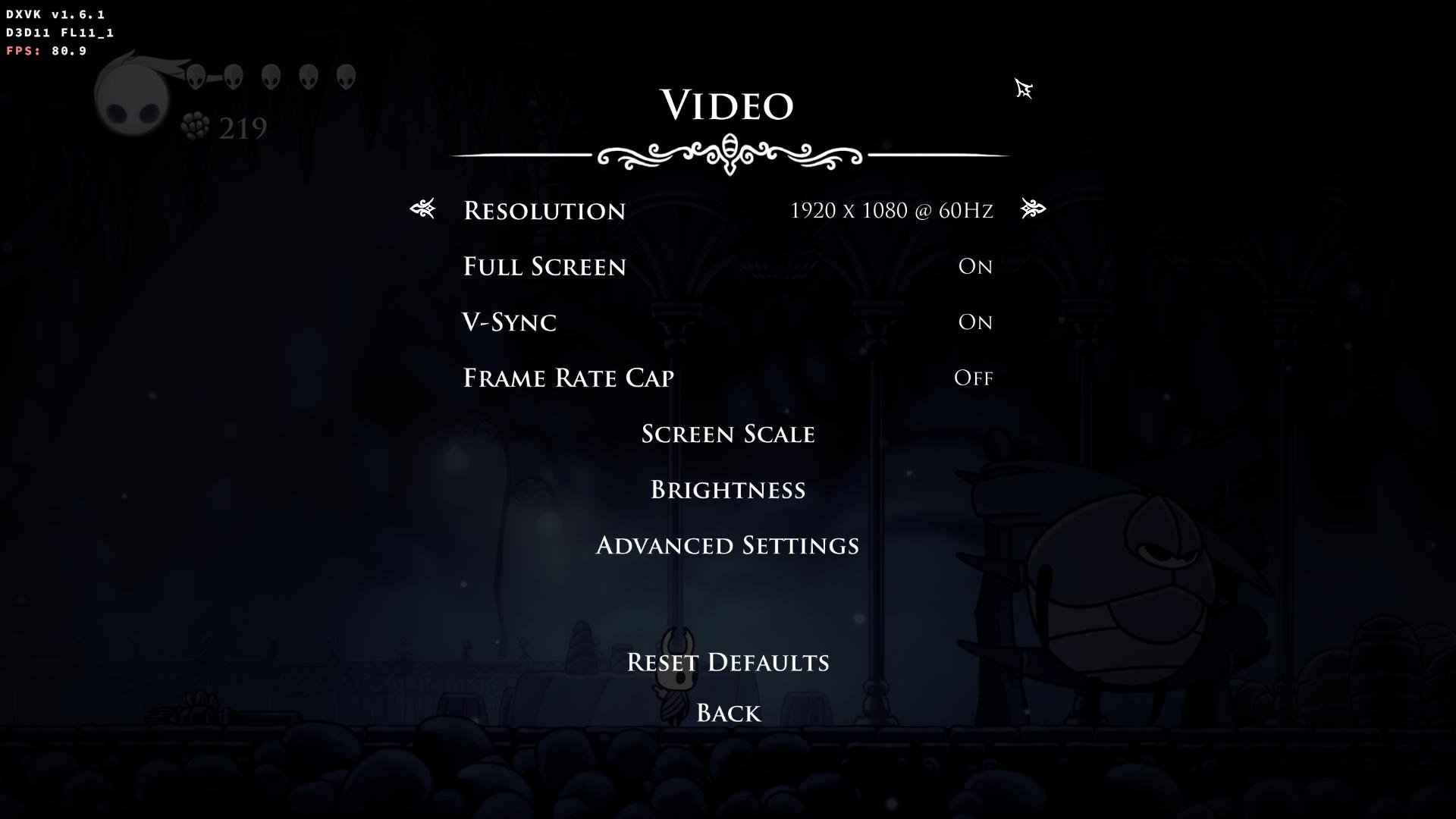
Armbian 25.11.2 Noble XFCE (BSP Kernel: 6.1.115) + PanVk - mesa 26.0 (https://launchpad.net/~ernstp/+archive/ubuntu/mesaaco) + Box64 arm64 v0.4.1 ed9827920 (https://ryanfortner.github.io/box64-debs/) + proton-10.0-4-amd64-wow64 (https://github.com/Kron4ek/Wine-Builds/releases/download/proton-10.0-4/wine-proton-10.0-4-amd64-wow64.tar.xz) + DXVK-stripped v1.6.1 >=60fps@1080p (medium/high settings) box64 environment variables: Hollow Knight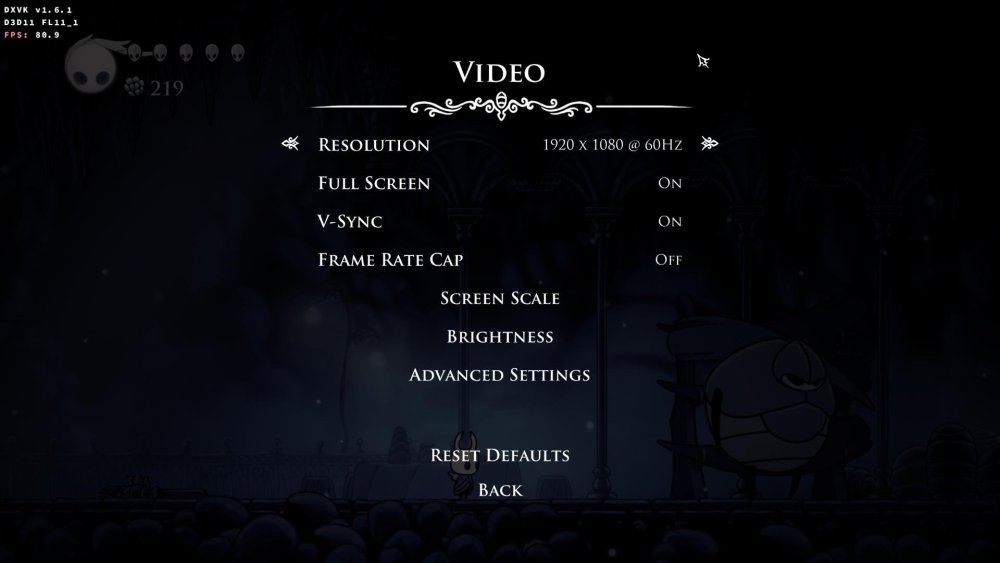
.thumb.jpg.ec671d62d8d5d9be0ed53bcf33bc5b3a.jpg)
- Today
-
Gaming experience with Orange Pi 5 (RK3588) on Armbian
KhanhDTP replied to KhanhDTP's topic in Orange Pi 5
Armbian 25.11.2 Noble XFCE (BSP Kernel: 6.1.115) + PanVk - mesa 26.0 (https://launchpad.net/~ernstp/+archive/ubuntu/mesaaco) + Box64 arm64 v0.4.1 ed9827920 (https://ryanfortner.github.io/box64-debs/) + ge-proton10-29 (https://github.com/GloriousEggroll/proton-ge-custom/releases/tag/GE-Proton10-29) (GE-proton is more likely to be segment fault-proof than other wine-proton versions) + dgVoodoo2 (https://github.com/dege-diosg/dgVoodoo2/releases) + DXVK-stripped v2.4.1 ~40fps@720p (medium settings, no AA) box64 environment variables: Fallout New Vegas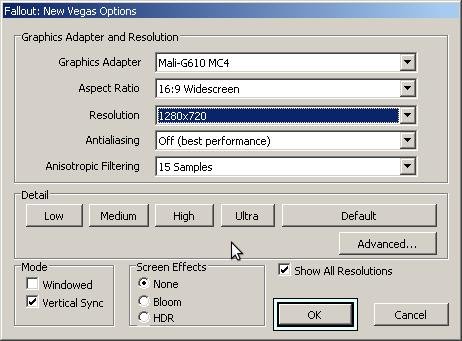
.thumb.jpg.7ded6e0df281a95b18d3cf842bdf6a1b.jpg)
.thumb.jpg.bd1ac014bd6d3828906c34e391ae73ff.jpg)
-
Gaming experience with Orange Pi 5 (RK3588) on Armbian
KhanhDTP replied to KhanhDTP's topic in Orange Pi 5
Armbian 25.11.2 Noble XFCE (BSP Kernel: 6.1.115) + PanVk - mesa 26.0 (https://launchpad.net/~ernstp/+archive/ubuntu/mesaaco) + Box64 arm64 v0.4.1 ed9827920 (https://ryanfortner.github.io/box64-debs/) + ge-proton10-29 (https://github.com/GloriousEggroll/proton-ge-custom/releases/tag/GE-Proton10-29) (GE-proton is more likely to be segment fault-proof than other wine-proton versions) + dgVoodoo2 (https://github.com/dege-diosg/dgVoodoo2/releases) + DXVK-stripped v2.4.1 40~60fps@720p (medium settings, no AA) box64 environment variables: Fallout 3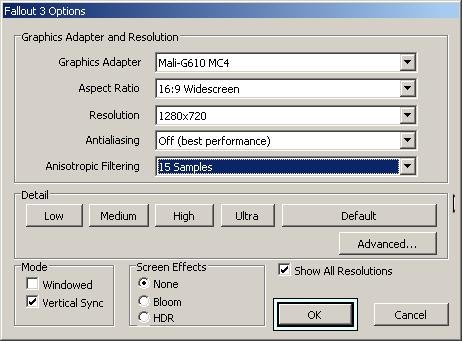
.thumb.jpg.57e04c4b6dbb8d6271b99077a4b45a4a.jpg)
.thumb.jpg.b13da15ad1663c58c1dcdaf905a525e1.jpg)
-
 Is this guide still relevant? Armbian-config has a completely different menu now
 -

Help in installing Armbian On an andoid tv box with amologic chip
SteeMan replied to KOUSA's topic in Amlogic CPU Boxes
You are not using Armbian. Ophub is a fork of Armbian. They do not contribute to Armbian development nor do they participate in these forums. You need to go to ophub to ask this question, as no one here can help you. -
Starting kernel... after power losses Nanopi Neo Air
eselarm replied to whiteblaine's topic in Allwinner sunxi
What is in armbianEnv.txt then? Anyway you need to load and edit it such that you make sure loglevel=7 Then there will be more text after Starting kernel ... You also seem to have a power and/or reliability problem w.r.t. cables as characters are missing in your debug log text. -
High chance this uses some proprietary hardware for 3.5mm audio jack. It has been like that for decades and you probably need to find some firmware blob somewhere maybe. I have also a similar situation, most part s of the computer work fine with Debian Trixie etc, but it took ages to get sound working and still buggy, endless beep or crash occasionally. If you are lucky is it maybe only a mute setting or so, use aumix etc to look what is going on. Not something Armbian specific I guess, but up to you to figure out. Then also mention various versions, what BIOS/UEFI version the computer is loaded with, what Armbian kernel and also specific image release (if it is an unmodified image writer based installation).
-
 I recently got this tv box emulator thing but i now emulate games on my laptop for convineince. I decide to download armbian on the tv box so that i can set up pi-hole for network wide ad blocking. Ive tried multiple times but i cant see to get it working. Cpu: Amologic S905L Ram:2 gig DDr3 ive been downloading this version https://github.com/ophub/amlogic-s9xxx-armbian/releases/download/Armbian_jammy_arm64_server_2026.02/Armbian_26.02.0_amlogic_s905l_jammy_6.1.161_server_2026.02.02.img.gz been using this dtb meson-gxl-s905x-p212.dtb been using this u bootfile named: u-boot-s905x-s912 To reboot the system there is no button in the AV port and the box refuses to download any apk or app for terminal emulator, Developer tools are not available,threfore i prefer to do it through the update method. the file structure Ive been following these instructions from gemini https://gemini.google.com/share/1e335432197f https://gemini.google.com/share/0a6ce8a19d0c Please ask me if you need more info I also asked in reddit btw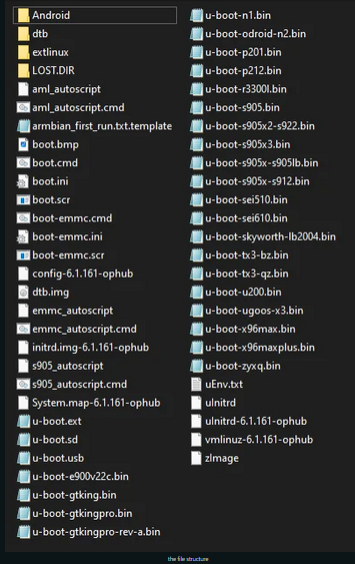
-
Hi, is it still working now?
-
moved
-
@sicxnull This might be the patch that fixed it. It's in mainline u-boot now. I would use a newer u-boot. https://lists.denx.de/pipermail/u-boot/2025-March/582900.html
-
Gaming experience with Orange Pi 5 (RK3588) on Armbian
KhanhDTP replied to KhanhDTP's topic in Orange Pi 5
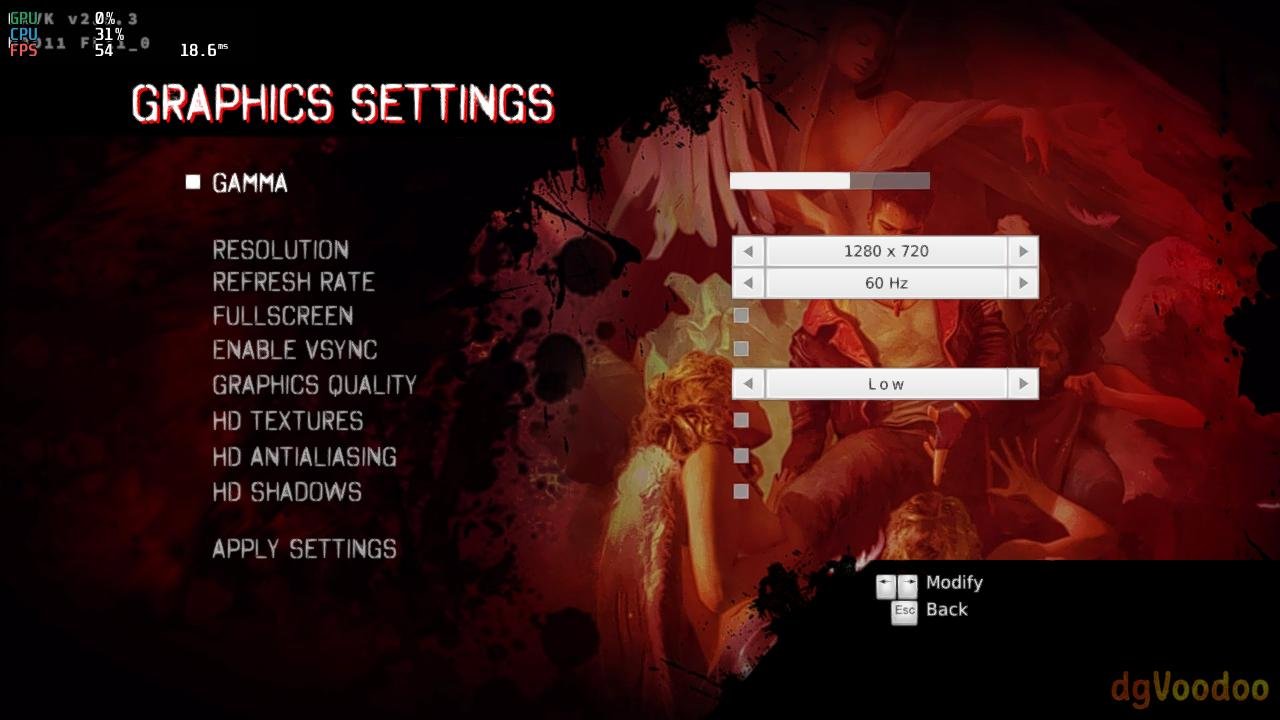
Armbian 25.11.2 Noble XFCE (BSP Kernel: 6.1.115) + PanVk - mesa 26.0 (https://launchpad.net/~ernstp/+archive/ubuntu/mesaaco) + Box64 arm64 v0.4.1 ed9827920 (https://ryanfortner.github.io/box64-debs/) + ge-proton10-29 (https://github.com/GloriousEggroll/proton-ge-custom/releases/tag/GE-Proton10-29) (GE-proton is more likely to be segment fault-proof than other wine-proton versions) + dgVoodoo2 (https://github.com/dege-diosg/dgVoodoo2/releases) + DXVK-stripped v2.5.3 30~40fps@720p (low settings) (Some minor flickering bug, but still playable) box64 environment variables: DmC - Devil May Cry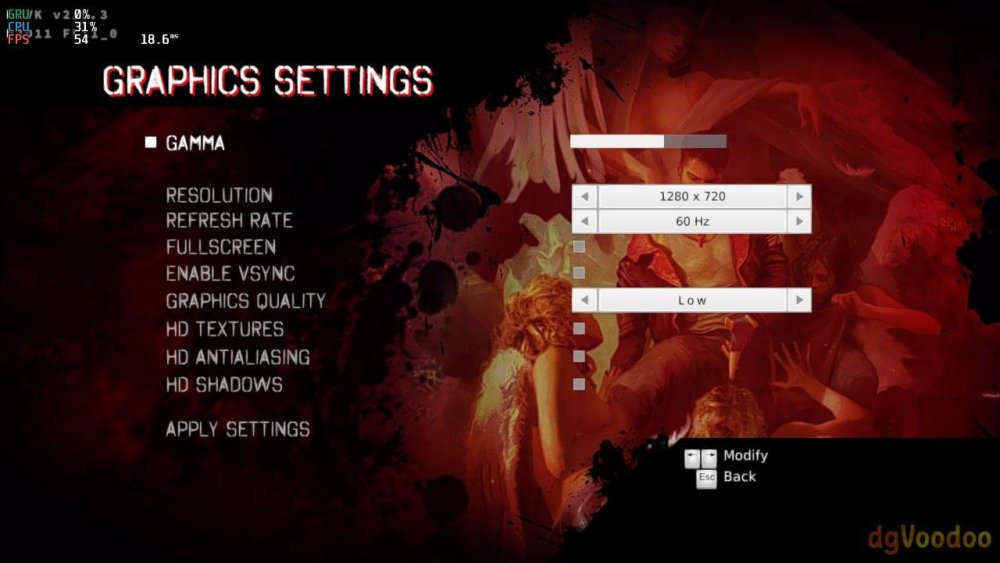
.thumb.jpg.1c4db9d3fbabb8ff7fb8e9d29a3afd1a.jpg)
.thumb.jpg.49f481db41febd0fcca0afd7811c9fef.jpg)
-
Gaming experience with Orange Pi 5 (RK3588) on Armbian
KhanhDTP replied to KhanhDTP's topic in Orange Pi 5
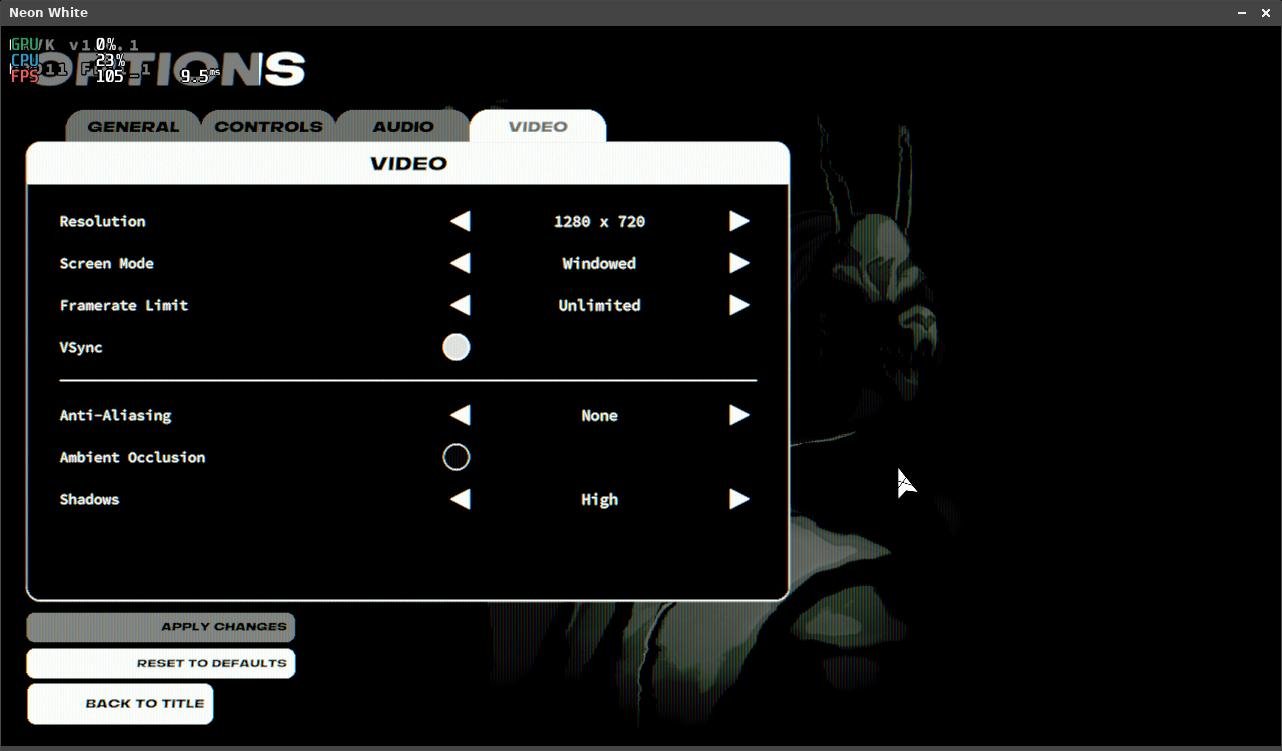
Armbian 25.11.2 Noble XFCE (BSP Kernel: 6.1.115) + PanVk - mesa 26.0 (https://launchpad.net/~ernstp/+archive/ubuntu/mesaaco) + Box64 arm64 v0.4.1 ed9827920 (https://ryanfortner.github.io/box64-debs/) + proton-10.0-4-amd64-wow64 (https://github.com/Kron4ek/Wine-Builds/releases/download/proton-10.0-4/wine-proton-10.0-4-amd64-wow64.tar.xz) + DXVK-stripped v1.6.1 50~60fps@720p (no AA, no AO, high Shadows) box64 environment variables: Neon White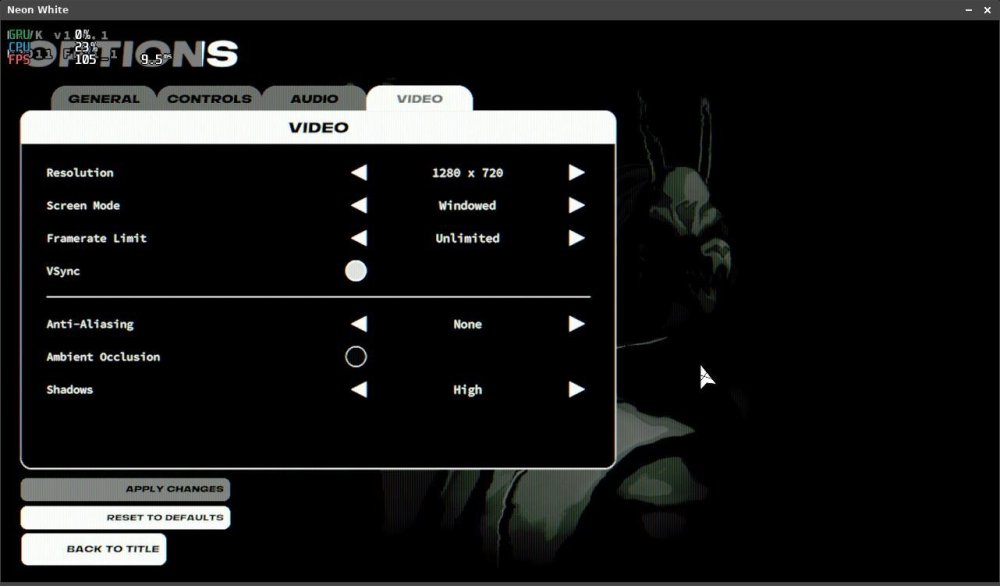
-
https://github.com/sicXnull/armbian-build/commit/347ffdb2e4ceb301140270fb106c2d0807151122
- Yesterday
-
@sicxnull I would need to look at your sources. Not sure if it's a dts or u-boot patch fix.
-
Hey I have recently installed Armbian specifically the Intel/AMD image for my Dell 3100 2-in-1 chromebook. It runs fanominally but the headphone jack doesn't detect my headphones correctly but yet my bluetooth ones work without a problem. Anyone have a idea of whats going wrong?
-

to get 32768 clk from GPIO1 D4 on RK3328
robertoj replied to emresensoy's topic in Advanced users - Development
Linux is not a real time operating system Realtime OSes have a 1 ms accuracy You need an arduino dedicated only to make your square wave -
Hey @Nick A any idea which patch you're applying that fixes the EMMC boot?
-
Amlogic s905x (s912) Print Server is Not Working
SteeMan replied to Aufa Aji's topic in Software, Applications, Userspace
Moved to userspace forum -
Just use dd (on linux) or balea etcher (windows/mac) to write the armbian image to an sdcard.
-
 v25.8 rolling for aml-s9xx-box running Armbian Linux 6.12.35-current-meson64 Printer is Canon G2770 I suspect its a driver problem since gutenprint does not have the exact same model (I chose Pixma G2000 Driver in CUPS "Add Printer" menu) #When Adding Printer d [20/Feb/2026:03:19:36 +0700] [CGI] Finished \"{default_name=Canon_G2070_series\", out=0xffffb9ff1520... d [20/Feb/2026:03:19:36 +0700] [CGI] \"{printer_uri_supported}\" at 367... d [20/Feb/2026:03:19:36 +0700] [CGI] \"{$org.cups.sid}\" at 452... D [20/Feb/2026:03:19:36 +0700] [CGI] Regular expression \".*Clean.*\" d [20/Feb/2026:03:19:36 +0700] [CGI] Starting \"{printer_commands~.*Clean.*\" at 639, result=0... d [20/Feb/2026:03:19:36 +0700] [CGI] Skip first part... d [20/Feb/2026:03:19:36 +0700] [CGI] Starting at file position 639... d [20/Feb/2026:03:19:36 +0700] [CGI] Returning at file position 700 on character \':\'... d [20/Feb/2026:03:19:36 +0700] [CGI] Output second part... d [20/Feb/2026:03:19:36 +0700] [CGI] Starting at file position 700... d [20/Feb/2026:03:19:36 +0700] [CGI] Returning at file position 701 on character \'}\'... d [20/Feb/2026:03:19:36 +0700] [CGI] Finished \"{printer_commands~.*Clean.*\", out=0xffffb9ff1520... D [20/Feb/2026:03:19:36 +0700] [CGI] Regular expression \".*PrintSelfTestPage.*\" d [20/Feb/2026:03:19:36 +0700] [CGI] Starting \"{printer_commands~.*PrintSelfTestPage.*\" at 742, result=0... d [20/Feb/2026:03:19:36 +0700] [CGI] Skip first part... d [20/Feb/2026:03:19:36 +0700] [CGI] Starting at file position 742... d [20/Feb/2026:03:19:36 +0700] [CGI] Returning at file position 809 on character \':\'... d [20/Feb/2026:03:19:36 +0700] [CGI] Output second part... d [20/Feb/2026:03:19:36 +0700] [CGI] Starting at file position 809... d [20/Feb/2026:03:19:36 +0700] [CGI] Returning at file position 810 on character \'}\'... d [20/Feb/2026:03:19:36 +0700] [CGI] Finished \"{printer_commands~.*PrintSelfTestPage.*\", out=0xffffb9ff1520... d [20/Feb/2026:03:19:36 +0700] [CGI] Starting \"{printer_state=5\" at 828, result=0... d [20/Feb/2026:03:19:36 +0700] [CGI] Skip first part... d [20/Feb/2026:03:19:36 +0700] [CGI] Starting at file position 828... d [20/Feb/2026:03:19:36 +0700] [CGI] Returning at file position 882 on character \':\'... d [20/Feb/2026:03:19:36 +0700] [CGI] Output second part... d [20/Feb/2026:03:19:36 +0700] [CGI] Starting at file position 882... d [20/Feb/2026:03:19:36 +0700] [CGI] Returning at file position 934 on character \'}\'... d [20/Feb/2026:03:19:36 +0700] [CGI] Finished \"{printer_state=5\", out=0xffffb9ff1520... d [20/Feb/2026:03:19:36 +0700] [Client 31] cupsdReadClient: error=0, used=0, state=HTTP_STATE_WAITING, data_encoding=HTTP_ENCODING_LENGTH, data_remaining=0,> D [20/Feb/2026:03:19:36 +0700] [Client 31] POST / HTTP/1.1 D [20/Feb/2026:03:19:36 +0700] cupsdSetBusyState: newbusy="Active clients and dirty files", busy="Active clients and dirty files" D [20/Feb/2026:03:19:36 +0700] [Client 31] Read: status=200, state=6 d [20/Feb/2026:03:19:36 +0700] cupsdFindBest: uri="/", limit=10... d [20/Feb/2026:03:19:36 +0700] cupsdFindBest: Location /admin/log(10) Limit 7f d [20/Feb/2026:03:19:36 +0700] cupsdFindBest: Location /admin/conf(11) Limit 7f d [20/Feb/2026:03:19:36 +0700] cupsdFindBest: Location /admin(6) Limit 7f d [20/Feb/2026:03:19:36 +0700] cupsdFindBest: Location /(1) Limit 7f d [20/Feb/2026:03:19:36 +0700] cupsdFindBest: best=/ d [20/Feb/2026:03:19:36 +0700] [Client 31] con->uri="/", con->best=0xaaaac8741170(/) D [20/Feb/2026:03:19:36 +0700] [Client 31] No authentication data provided. d [20/Feb/2026:03:19:36 +0700] cupsdIsAuthorized: con->uri="/", con->best=0xaaaac8741170(/) d [20/Feb/2026:03:19:36 +0700] cupsdIsAuthorized: level=CUPSD_AUTH_ANON, type=None, satisfy=CUPSD_AUTH_SATISFY_ALL, num_names=0 d [20/Feb/2026:03:19:36 +0700] cupsdIsAuthorized: auth=CUPSD_AUTH_ALLOW... D [20/Feb/2026:03:19:36 +0700] [Client 31] 2.0 Get-Jobs 3 d [20/Feb/2026:03:19:36 +0700] cupsdProcessIPPRequest(0xaaaac88b11c0[31]): operation_id=000a(Get-Jobs) #When Trying to Print Test Page d [20/Feb/2026:03:21:19 +0700] [Job 10] Gutenprint: Reading 14874 4699 d [20/Feb/2026:03:21:19 +0700] [Job 10] Gutenprint: Tossing right 0 (0) + 9 d [20/Feb/2026:03:21:19 +0700] cupsdDeleteTemporaryPrinters: Removing unused temporary printers d [20/Feb/2026:03:21:19 +0700] select_timeout: JobHistoryUpdate=1771607348 d [20/Feb/2026:03:21:19 +0700] [Job 10] Gutenprint: Reading 14874 4700 d [20/Feb/2026:03:21:19 +0700] cupsdDeleteTemporaryPrinters: Removing unused temporary printers d [20/Feb/2026:03:21:19 +0700] select_timeout: JobHistoryUpdate=1771607348 d [20/Feb/2026:03:21:19 +0700] [Job 10] Gutenprint: Tossing right 0 (0) + 9 d [20/Feb/2026:03:21:19 +0700] [Job 10] Gutenprint: Tossing right 0 (0) + 9 D [20/Feb/2026:03:21:19 +0700] [Job 10] Printing page 1, 67% D [20/Feb/2026:03:21:19 +0700] cupsdMarkDirty(---J-) D [20/Feb/2026:03:21:19 +0700] cupsdSetBusyState: newbusy="Printing jobs and dirty files", busy="Printing jobs and dirty files" D [20/Feb/2026:03:21:19 +0700] [Job 10] Set job-printer-state-message to "Printing page 1, 67%", current level=INFO D [20/Feb/2026:03:21:19 +0700] [Job 10] ATTR: job-media-progress=67 d [20/Feb/2026:03:21:19 +0700] cupsdAddEvent(event=job-progress, dest=0xaaaac8751a40(Canon_G2070_series), job=0xaaaac888e2e0(10), text="Printing page %d, %d> D [20/Feb/2026:03:21:19 +0700] Discarding unused job-progress event... d [20/Feb/2026:03:21:19 +0700] cupsdAddEvent(event=job-progress, dest=0xaaaac8751a40(Canon_G2070_series), job=0xaaaac888e2e0(10), text="%s", ...) D [20/Feb/2026:03:21:19 +0700] Discarding unused job-progress event... d [20/Feb/2026:03:21:19 +0700] cupsdAddEvent(event=printer-state-changed, dest=0xaaaac8751a40(Canon_G2070_series), job=(nil)(0), text="Printer \"%s\" state > D [20/Feb/2026:03:21:19 +0700] Discarding unused printer-state-changed event... d [20/Feb/2026:03:21:19 +0700] cupsdDeleteTemporaryPrinters: Removing unused temporary printers d [20/Feb/2026:03:21:19 +0700] select_timeout: JobHistoryUpdate=1771607348 d [20/Feb/2026:03:21:19 +0700] [Job 10] Gutenprint: Reading 14874 4702 d [20/Feb/2026:03:21:19 +0700] cupsdDeleteTemporaryPrinters: Removing unused temporary printers d [20/Feb/2026:03:21:19 +0700] select_timeout: JobHistoryUpdate=1771607348 d [20/Feb/2026:03:21:19 +0700] [Job 10] Gutenprint: Tossing right 0 (0) + 9 d [20/Feb/2026:03:21:19 +0700] cupsdDeleteTemporaryPrinters: Removing unused temporary printers d [20/Feb/2026:03:21:19 +0700] select_timeout: JobHistoryUpdate=1771607348 d [20/Feb/2026:03:21:19 +0700] [Job 10] Gutenprint: Reading 14874 4703 d [20/Feb/2026:03:21:19 +0700] cupsdDeleteTemporaryPrinters: Removing unused temporary printers d [20/Feb/2026:03:21:19 +0700] select_timeout: JobHistoryUpdate=1771607348 d [20/Feb/2026:03:21:19 +0700] [Job 10] Gutenprint: Tossing right 0 (0) + 9 d [20/Feb/2026:03:21:19 +0700] cupsdDeleteTemporaryPrinters: Removing unused temporary printers d [20/Feb/2026:03:21:19 +0700] select_timeout: JobHistoryUpdate=1771607348 d [20/Feb/2026:03:21:19 +0700] [Job 10] Gutenprint: Reading 14874 4704 d [20/Feb/2026:03:21:19 +0700] [Job 10] Gutenprint: Tossing right 0 (0) + 9 d [20/Feb/2026:03:21:19 +0700] cupsdDeleteTemporaryPrinters: Removing unused temporary printers d [20/Feb/2026:03:21:19 +0700] select_timeout: JobHistoryUpdate=1771607348 d [20/Feb/2026:03:21:19 +0700] [Job 10] Gutenprint: Reading 14874 4705 d [20/Feb/2026:03:21:19 +0700] cupsdDeleteTemporaryPrinters: Removing unused temporary printers d [20/Feb/2026:03:21:19 +0700] select_timeout: JobHistoryUpdate=1771607348 d [20/Feb/2026:03:21:19 +0700] [Job 10] Gutenprint: Tossing right 0 (0) + 9 d [20/Feb/2026:03:21:19 +0700] cupsdDeleteTemporaryPrinters: Removing unused temporary printers d [20/Feb/2026:03:21:19 +0700] select_timeout: JobHistoryUpdate=1771607348 d [20/Feb/2026:03:21:19 +0700] [Job 10] Gutenprint: Reading 14874 4706 d [20/Feb/2026:03:21:19 +0700] cupsdDeleteTemporaryPrinters: Removing unused temporary printers
 -
 Weston 15.0 has arrived, bringing a brand new Lua-based shell for fully customizable window management, an experimental Vulkan renderer, and a host of improvements to color handling, media playback, and display performance. View the full article
 -
@MeJune You can check out my work starting with the 'Add warpme kernel 6.17' commit here: https://github.com/NickAlilovic/build/commits/v20251014/ I’m using warpme patches from his minimyth2 repo, though I’ve modified them to ensure they apply correctly. I also used my own patches for Transpeed, as his implementation differs from mine. u-boot: https://github.com/warpme/minimyth2/tree/master/script/bootloaders/u-boot-aw/files https://github.com/warpme/minimyth2/blob/master/script/bootloaders/u-boot-aw/Makefile kernel: https://github.com/warpme/minimyth2/tree/master/script/kernel/linux-6.19/files https://github.com/warpme/minimyth2/blob/master/script/kernel/linux-6.19/Makefile An easier way to do this is to create a board config and use the official Armbian patch set. While Transpeed is already mainlined, the implementation is incomplete. You will still need a patch to include your missing Transpeed DTS nodes. If you are happy with 6.17, then use this build: https://github.com/NickAlilovic/build/commits/v20251014/ This build generates a kernel .deb package in output/debs. You can use it to upgrade your existing Armbian installation. I haven't tried this myself, so I make no promises that it will work; please ensure you have a backup before proceeding. Backing Up the SD Card (from another PC) The most reliable way to back up an SD card is to create a full disk image on a separate computer. sudo dd if=/dev/sdX of=armbian_backup.img bs=1M status=progress If your system is running on eMMC, you can back it up to an external USB or SD card using built-in Armbian tools. Using armbian-ddbr: Many Armbian builds include this utility specifically for eMMC backup/restore. Boot Armbian from an external SD card (so the eMMC is not in use). Run the command: sudo armbian-ddbr. Select the backup option to create a compressed image of your internal storage. Using armbian-config: Some versions offer a "Backup" or "Clone" option under the System or Maintenance menus
-
i recently purchased an orange pi 5 plus 16gb with the wifi / bt card, the aluminum wifi case, fan and 1tb ssd. when i go to the official website i see different images there none of which seem to work 100%. i mean i was able to get each up and running but what i noticed is that the graphical drivers would not load. i saw a youtube video claiming armbian has the right driver support for the mali 610 gpu. can someone assist me getting this to work? im big into emulation gaming and right now it doesnt even have Vulkan support i crave. someone help thanks
.jpg.be6533a41e18728de9755cadb15784c2.jpg)
.jpg.a7a6d8ce77b06030b64a05bd475456f8.jpg)
.jpg.328179377d68b8ad8e269fb550b0f90a.jpg)
.jpg.20b9d0f0d5ad4184b15b18a5226f43f5.jpg)
.jpg.2b43a914bb91a02f46f33f865d3c216f.jpg)



.jpg.284d312d756ba353709bcef1d67b2bc2.jpg)
.jpg.29090d2b043437443ac14abcb74d8f39.jpg)