All Activity
- Past hour
-

Super console cube X3 seems can't boot.
gnutux landia replied to gnutux landia's topic in Amlogic CPU Boxes
Now appear this on terminal.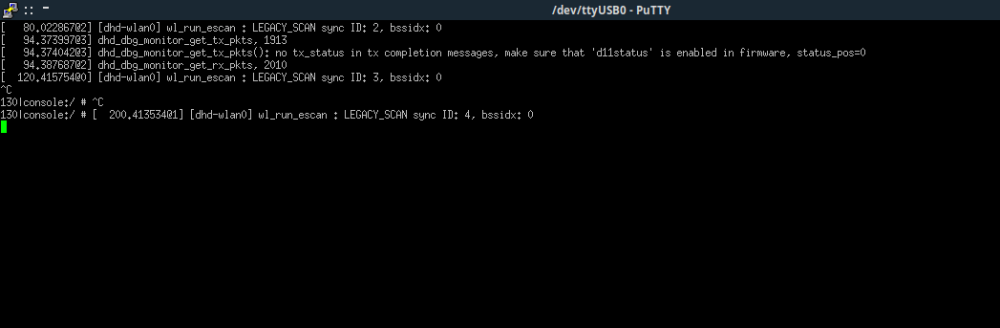
-
Super console cube X3 seems can't boot.
gnutux landia replied to gnutux landia's topic in Amlogic CPU Boxes
I improvise a solder points and connect cables to tx, rx, ground, where tx goes to rx and rx goes to tx, but the result is the same, putty terminal only has a blinking cursor. -
Thanks for the comments. Still no joy. I tried another SD card with etcher and then switched over to armbian imager. Same result: with putty you can connect through ssh, set "root" as username and then the "1234" is not accepted anymore. That also with another ssh client (not putty) and the Win11 built in one. Both ssh clients mention the low security of the sha1 systemin armbian and accept the override.
-
Thank you: I've downloaded both images. Both images boot, work, and seems to grab the correct updates.
- Today
-

Super console cube X3 seems can't boot.
SteeMan replied to gnutux landia's topic in Amlogic CPU Boxes
I don't know what pins you are connecting to on the board as your video doesn't show that. But if I had to guess the three pads labeled gnd,rx,tx just above what you are connecting to is what you want to be connecting to. -
 Can you repeat your amrbian OS version, Linux, and hardware? I can't give a confident advice for you, but have you tried: * extraargs=cma=256M in armbianEnv.txt * turn off compositor, if using xfce (others have suggested it, and I found it unnecessary) In mpv, turn on verbosity by adding -v to the command. Then while it is running, close it and copy all the mpv text in a text editor. Search for the words h264, ffmpeg, v4l2, hardware, software
 -
Super console cube X3 seems can't boot.
gnutux landia replied to gnutux landia's topic in Amlogic CPU Boxes
Here you have a video of connection. I already rewrite the sd-card image Armbian_community_26.2.0-trunk.357_Aml-s9xx-box_noble_current_6.18.7_xfce_desktop.img , try putty ssh but I have only a black screen when connect to ttyusb0 Test value speed 9600, 115200, 230400. S905X3 -
@jock The schematic is maybe was a wrong example (I just search for rk3399 schematic, and take the first) in this case Leez P710, but I also look at the RK3399_Design_Guide and find a interesting point, UART2 based on the sd card pins!!! I already read a bit regarding the ddrbin_tool.py (which is part of the rkbin), which one could be used to manipulate the rockchip boot loader, but until now I not really understood how this work, then I find this in the Rockpi4 schematic I became enlightened. In the ddrbin_tool_user_guide is the following: * UART info uart id: uart number. 0 for uart0, 1 for uart1, 2 for uart2..., 0xf will disable uart. uart iomux: uart iomux info, 0 for uartn_m0, 1 for uartn_m1, 2 for uartn_m2...(like uart2_m0, uart2_m1,uart2_m2), or 1 for uartn_a, 2 for uartn_b, 3 for uartn_c.(like uar2a, uart2b, uart2c). uart baudrate: uart baudrate should be 115200 or 1500000. I still don't understanding what the iomux (io multiplexing) is, but in theory if I change the uart iomux parameter to 1 then this should means that UART2A is used, which is SD card D0,D1 pins. (Similar concept I see in Amlogic SoCs. ) So I read out the ddrbin parameters from rk3399_ddr_800MHz_v1.27.bin ./tools/ddrbin_tool.py RK3399 -g ddrbin_param.txt ./bin/rk33/rk3399_ddr_800MHz_v1.27.bin then I change the UART parameters in the file ddrbin_param.txt like this: uart id=2 uart iomux=1 uart baudrate=115200 then I write the parameters back ./tools/ddrbin_tool.py RK3399 ddrbin_param.txt ./bin/rk33/rk3399_ddr_800MHz_v1.27.bin Then I build a new loader based on the rk3399_ddr_800MHz_v1.27.bin ./tools/boot_merger ./RKBOOT/RK3399MINIALL_1.27.ini Content of the ./RKBOOT/RK3399MINIALL_1.27.ini [CHIP_NAME] NAME=RK330C [VERSION] MAJOR=1 MINOR=30 [CODE471_OPTION] NUM=1 Path1=bin/rk33/rk3399_ddr_800MHz_v1.27.bin Sleep=1 [CODE472_OPTION] NUM=1 Path1=bin/rk33/rk3399_usbplug_v1.26.bin [LOADER_OPTION] NUM=2 LOADER1=FlashData LOADER2=FlashBoot FlashData=bin/rk33/rk3399_ddr_800MHz_v1.27.bin FlashBoot=bin/rk33/rk3399_miniloader_v1.26.bin [OUTPUT] PATH=rk3399_loader_v1.27.126.bin The result was uploaded in the emmc rkdeveloptool db rk3399_loader_v1.27.126.bin rkdeveloptool ul rk3399_loader_v1.27.126.bin the I connected my microsd sniffer and after some praying I reset the device ... Then the magic is happened 🤩 DDR Version 1.27 20211018 In channel 0 CS = 0 MR0=0x18 MR4=0x1 MR5=0x1 MR8=0x10 MR12=0x72 MR14=0x72 MR18=0x0 MR19=0x0 MR24=0x8 MR25=0x0 channel 1 CS = 0 MR0=0x18 MR4=0x1 MR5=0x1 MR8=0x10 MR12=0x72 MR14=0x72 MR18=0x0 MR19=0x0 MR24=0x8 MR25=0x0 channel 0 training pass! channel 1 training pass! change freq to 416MHz 0,1 Channel 0: LPDDR4,416MHz Bus Width=32 Col=10 Bank=8 Row=16 CS=1 Die Bus-Width=16 Size=2048MB Channel 1: LPDDR4,416MHz Bus Width=32 Col=10 Bank=8 Row=16 CS=1 Die Bus-Width=16 Size=2048MB 256B stride channel 0 CS = 0 MR0=0x18 MR4=0x1 MR5=0x1 MR8=0x10 MR12=0x72 MR14=0x72 MR18=0x0 MR19=0x0 MR24=0x8 MR25=0x0 channel 1 CS = 0 MR0=0x18 MR4=0x1 MR5=0x1 MR8=0x10 MR12=0x72 MR14=0x72 MR18=0x0 MR19=0x0 MR24=0x8 MR25=0x0 channel 0 training pass! channel 1 training pass! channel 0, cs 0, advanced training done channel 1, cs 0, advanced training done change freq to 856MHz 1,0 ch 0 ddrconfig = 0x101, ddrsize = 0x40 ch 1 ddrconfig = 0x101, ddrsize = 0x40 pmugrf_os_reg[2] = 0x32C1F2C1, stride = 0xD ddr_set_rate to 328MHZ ddr_set_rate to 666MHZ ddr_set_rate to 416MHZ, ctl_index 0 ddr_set_rate to 856MHZ, ctl_index 1 support 416 856 328 666 MHz, current 856MHz OUT Boot1 Release Time: May 29 2020 17:36:36, version: 1.26 CPUId = 0x0 ChipType = 0x10, 645 SdmmcInit=2 0 BootCa Yes, is working, I have debug output 😁 this is maybe not the best solution but I could start working running Armbian on this device. The key point was: So thanks again the advise.



-
 https://github.com/chewitt/linux/commit/d39e2d1a2027e05de26af5bac575e99dedf7ce74
 -
I don't have a working board to add yet. I followed the documentation on creating a ~/build/config/boards/sv06ace.csc file but got lost about how to bring in the rk-kernel.dts values into the build. I started a new https://forum.armbian.com/topic/58141-rk3308b-build-using-sysfirmwareftb-on-sovol-sv06-ace/ since the question could apply to other 3D printer boards.
-
 I’m using an Orange Pi 3B running Armbian Trixie Minimal as a headless SBC. It has been working fine for a couple of months, but after a recent reboot, it failed to connect to the network. After connecting an HDMI cable to troubleshoot, I realized the system is no longer auto logging in; it gets stuck at the login screen. Once I log in manually, I found that the wired network (Ethernet) isn't working at all, though wireless is functioning fine. I even tried flashing the latest image from the website, but the issues persist. To summarize, I have two main problems: - Wired connection (Ethernet) is not working. - The system no longer auto-logs in after booting. Has anyone else encountered this with the recent Trixie builds?
 -
Per the title, I was able to extract an ftb file and convert it to dtb and dts file. I would like to use the community build framework and build Armbian for SV06 Ace. The initial plan was to base the new board/*csc files on other rk3308b boards; sakurapi and rock-s0 and then pull configuration values from the OEM dts file. I'm confused about the dts structure in Community builds and the proper locations for defconfig, dts and dtsi files. I've worked with the files in OpenWRT where they are rigidly structured - something that would be a monumental task for Armbian community builds. The OEM dts file does not use any includes/dtsi files. If successful, I would like to publish on github similiar to @Torte https://github.com/torte71/armbian-mksklipad50 Can someone point me to the relevant documentation for Armbian dts files?
-
If you installed the Armbian 25.11.1 Edge Image the earlier post fixed the HDMI audio issue. However, if you upgrade with the command sudo apt update && sudo apt upgrade you will break both HDMI audio and WiFi. Here is the new fix: 1. The Wi-Fi Fix (Rebuild DKMS) Since the kernel updated, we just need to force the system to recompile the missing Wi-Fi driver for the new kernel version. Run this command in your terminal: Bash sudo dpkg-reconfigure aic8800-usb-dkms Wait a minute or two for it to finish compiling. Your Wi-Fi will be restored upon your next reboot. 2. The HDMI Audio Fix (Restore Qualcomm Configs) The HDMI audio broke because the system is now missing the Use Case Manager (UCM) profiles for the QCS6490 chip. We need to pull the newest configurations directly from the ALSA project repository and put them in the right folders. Run these commands one by one: Bash # Install the base UCM configurations sudo apt install -y alsa-ucm-conf # Download the latest master branch configs to your temporary folder cd /tmp curl -sL "https://github.com/alsa-project/alsa-ucm-conf/archive/refs/heads/master.tar.gz" | tar xz # Copy the specific Qualcomm configs and dependencies to your system sudo cp -r alsa-ucm-conf-master/ucm2/Qualcomm/qcs6490 /usr/share/alsa/ucm2/Qualcomm/ sudo cp -r alsa-ucm-conf-master/ucm2/conf.d/qcs6490 /usr/share/alsa/ucm2/conf.d/ sudo cp -r alsa-ucm-conf-master/ucm2/lib /usr/share/alsa/ucm2/ sudo cp -r alsa-ucm-conf-master/ucm2/codecs /usr/share/alsa/ucm2/ # Restart your audio server to apply the changes systemctl --user restart pulseaudio Once you've run those, give your board a quick sudo reboot.
-
Concerns before trying to boot Armbian from SD card on GS King-X
SteeMan replied to marfalk's topic in Amlogic CPU Boxes
poweroff doesn't work on any of my boxes either. Does reboot work correctly for you? It does on my boxes, and I usually issue a reboot and then time a power disconnect when the drives have spun down and before they restart. -
Super console cube X3 seems can't boot.
gnutux landia replied to gnutux landia's topic in Amlogic CPU Boxes
Change the dp dm and gave this. sudo dmesg | grep tty [ 0.471034] console [tty0] enabled [ 633.797008] usb 1-1.4.1.3: cp210x converter now attached to ttyUSB0 [ 1159.103497] cp210x ttyUSB0: cp210x converter now disconnected from ttyUSB0 [ 2713.702725] usb 1-1.4.1.2: cp210x converter now attached to ttyUSB0 [ 3812.350749] cp210x ttyUSB0: usb_serial_generic_read_bulk_callback - urb stopped: -32 [ 3812.351220] cp210x ttyUSB0: usb_serial_generic_read_bulk_callback - urb stopped: -32 [ 3812.447580] cp210x ttyUSB0: failed set request 0x12 status: -19 [ 3812.447593] cp210x ttyUSB0: failed set request 0x0 status: -19 [ 3812.447923] cp210x ttyUSB0: cp210x converter now disconnected from ttyUSB0 [ 4077.235990] usb 1-1.4.1.2: cp210x converter now attached to ttyUSB0 [ 4098.361943] cp210x ttyUSB0: cp210x converter now disconnected from ttyUSB0 [ 5224.734896] usb 1-1.4.1.3: cp210x converter now attached to ttyUSB0 [ 5248.927091] cp210x ttyUSB0: cp210x converter now disconnected from ttyUSB0 [ 5250.665687] usb 1-1.4.1.3: cp210x converter now attached to ttyUSB0 [ 5600.550201] cp210x ttyUSB0: usb_serial_generic_read_bulk_callback - urb stopped: -32 [ 5600.550539] cp210x ttyUSB0: usb_serial_generic_read_bulk_callback - urb stopped: -32 [ 5601.154463] cp210x ttyUSB0: failed set request 0x12 status: -19 [ 5601.154476] cp210x ttyUSB0: failed set request 0x0 status: -19 [ 5601.154818] cp210x ttyUSB0: cp210x converter now disconnected from ttyUSB0 [ 5725.698091] usb 1-1.4.1.3: cp210x converter now attached to ttyUSB0 GNU/Linux When pass → sudo screen /dev/ttyUSB0 115200 Only has cursor blinking. -
Super console cube X3 seems can't boot.
SteeMan replied to gnutux landia's topic in Amlogic CPU Boxes
Only a guess, but the first thing I would look at is how this is connected to your t box as it seems to not be connecting correctly. Maybe some pictures of your connection points? -

[Latest] Armbian Build HDMI Audio support Fix
rsbuffalo replied to just_facking_about's topic in Radxa Dragon Q6A
If you installed the Armbian 25.11.1 Edge Image the earlier post fixed the HDMI audio issue. However, if you upgrade with the command sudo apt update && sudo apt upgrade you will break both HDMI audio and WiFi. Here is the new fix: 1. The Wi-Fi Fix (Rebuild DKMS) Since the kernel updated, we just need to force the system to recompile the missing Wi-Fi driver for the new kernel version. Run this command in your terminal: Bash sudo dpkg-reconfigure aic8800-usb-dkms Wait a minute or two for it to finish compiling. Your Wi-Fi will be restored upon your next reboot. 2. The HDMI Audio Fix (Restore Qualcomm Configs) The HDMI audio broke because the system is now missing the Use Case Manager (UCM) profiles for the QCS6490 chip. We need to pull the newest configurations directly from the ALSA project repository and put them in the right folders. Run these commands one by one: Bash # Install the base UCM configurations sudo apt install -y alsa-ucm-conf # Download the latest master branch configs to your temporary folder cd /tmp curl -sL "https://github.com/alsa-project/alsa-ucm-conf/archive/refs/heads/master.tar.gz" | tar xz # Copy the specific Qualcomm configs and dependencies to your system sudo cp -r alsa-ucm-conf-master/ucm2/Qualcomm/qcs6490 /usr/share/alsa/ucm2/Qualcomm/ sudo cp -r alsa-ucm-conf-master/ucm2/conf.d/qcs6490 /usr/share/alsa/ucm2/conf.d/ sudo cp -r alsa-ucm-conf-master/ucm2/lib /usr/share/alsa/ucm2/ sudo cp -r alsa-ucm-conf-master/ucm2/codecs /usr/share/alsa/ucm2/ # Restart your audio server to apply the changes systemctl --user restart pulseaudio Once you've run those, give your board a quick sudo reboot. -

Concerns before trying to boot Armbian from SD card on GS King-X
marfalk replied to marfalk's topic in Amlogic CPU Boxes
Thank you again for your reply. I am facing an issue though. When i try to shut down the device (either by issuing the poweroff comand or picking the "Exit" on screen menu item), the shut down process does not complete. I can see the dots spinning on the screen for about 5-10 seconds, but then they freeze and the device stays on... The only way to shut it down is to disconnect the device from the power supply, but, because of that, of course the hard drive can not reach the sleep mode as I can hear it is still spinning. Can I try something to solve this and have a clean power off? -
Super console cube X3 seems can't boot.
gnutux landia replied to gnutux landia's topic in Amlogic CPU Boxes
Any idea about this → sudo dmesg | grep tty [ 0.471034] console [tty0] enabled [ 633.797008] usb 1-1.4.1.3: cp210x converter now attached to ttyUSB0 [ 1159.103497] cp210x ttyUSB0: cp210x converter now disconnected from ttyUSB0 [ 2713.702725] usb 1-1.4.1.2: cp210x converter now attached to ttyUSB0 [ 3812.350749] cp210x ttyUSB0: usb_serial_generic_read_bulk_callback - urb stopped: -32 [ 3812.351220] cp210x ttyUSB0: usb_serial_generic_read_bulk_callback - urb stopped: -32 [ 3812.447580] cp210x ttyUSB0: failed set request 0x12 status: -19 [ 3812.447593] cp210x ttyUSB0: failed set request 0x0 status: -19 [ 3812.447923] cp210x ttyUSB0: cp210x converter now disconnected from ttyUSB0 [ 4077.235990] usb 1-1.4.1.2: cp210x converter now attached to ttyUSB0 [ 4098.361943] cp210x ttyUSB0: cp210x converter now disconnected from ttyUSB0 GNU/Linux sudo screen /dev/ttyUSB0 115200. [screen is terminating] -

Efforts to develop firmware for X96 X6 RK3566 (8G/64G)
Chris4arm replied to loi xin's topic in Rockchip CPU Boxes
Sorry for the late reply to your request. I still have the image; let me know where to upload it if you're still interested. -
Hi, eselarm. i did not have time to delete the topic. Somehow it started working. Thank you for your time.
-
https://github.com/armbian/linux-rockchip/pull/448 Was able to reproduce this issue and get it fixed.
-
in the root of the rootfs do: find . -name platform_install.sh find . -name u-boot-sunxi-with-spl.bin essentially construct correct dd arguments somethings else might be wrong though, so make sure you have a serial console/debug able with loglevel=7
-
@shexplorer I am in the same situation with my x88pro13 box not booting and I do not manage to go in Maskrom mode. Any progress on your side ?
-
Hello everyone, I am new to Armbian and need some help. I tried to install Armbian 26.2.0-trunk (https://www.armbian.com/nanopi-neo/#collapse-widget-5-0-0-0) on a NanoPi NEO Core SBC. I used Armbian Imager and wrote the latest official image (the only one available) to the SD card. After writing the image, I see only one partition on the SD card named armbi_root. When I insert the card into the device and power it on, nothing happens — there are no boot messages or logs. I think the image is missing a bootloader. So my questions are: 1) If I’m right that the bootloader is missing, how can I add a bootloader to the image? 2) How can I apply OverlayFS to this setup? 3) Do you have a link to a good article or tutorial on these topics? Thanks in advance!