All Activity
- Past hour
-

networking in bpi-m5 with new 26.03.1 release.
gene1934 replied to gene1934's topic in Software, Applications, Userspace
In this local network, there is only one name to address configured in dd-wrt. dnsmasq The only true dns server is at my ISP and its been that way here since RH5.0 in 1998. I have NO M$ experience in my personal history, coming into modern computing by way of a TRS-80 Color computer running os-9, to amigados, about 10 of them as I drug WDTV-5 into the computer age when I became the Chief Engineer in 1984, but I started computing in 1978 at KRCR-12 in Redding Kalipornia. Writing a utility to prepare an automatic station break machines tapes for air that ran on an RCA-1802 and 4k os static ram that cost $400 back then. But lets get back on topic. What I want for outside names NOT in /etc/hosts: the query gets passed to the router at 192.168.71,1:53 where dnsmasq checks to see if its in its cache, and failing that, fwds the query to the dns server at my ISP for resolution. That address is not known on my side of the router. This typically adds about 1.5ms to the ping time. And nowhere in that chain fails this sequence EXCEPT this new install on a bananapi-m5. And I don't have to screw around maintaining a separate dns server of any kind. That is several times the amount of monkey business of cp-ing a common hosts file around is. But you want to insist on a dns server behind every RJ-45 jack in the house. I don't understand the Why? This is simple, quick and bulletproof until somebody decides to fix a perceived security hole, WHICH DOES NOT EXIST IF the router is reflashed with dd-wrt. I have not been touched since finding out about it in yr 1999-2000. Including a decade of running my own web page right here on this machine, stopped only because the spiders refused to honor my robots.txt. So I was paying bandwidth penalties of $150 or more a month on an SS income with my upload bandwidth filled by the robots from mj12. Whoever the hell they are. M$ spiders were in there too. People interested in my stuff couldn't get a word in edgewise. So please tell me where in the resolv.conf area what to edit to make it work, cuz I'll do it and a chattr +i on it to make it permanent. But the fix for debian bookworm, didn't fix this. - Today
-
 @thanh_tan This looks like an AI-generated adaptation of my Radxa Cubie A7Z Armbian build. The Orange Pi 4 Pro uses the same Allwinner A733, so the family config is shared, but Radxa's BSP isn't directly compatible with the Orange Pi 4 Pro without board-specific modifications. Looking at the repo, it's very early stage — The write_uboot_platform() function is just a stub that does nothing, and it's relying on whatever bootloader is already on the SD card. I wouldn't expect it to actually boot on real hardware in its current state.
 -
bellow the conclusion of 4 days of investigations and it works create dts file in tmp directory root@bananapim5:/home/gerard# cat meson-sm1-bananapi-m5-i2c0.dts /dts-v1/; /plugin/; / { compatible = "amlogic,meson-sm1"; fragment@0 { target-path = "/soc/bus@ffd00000/i2c@1d000"; __overlay__ { status = "okay"; clock-frequency = <100000>; pinctrl-names = "default"; pinctrl-0 = <&i2c2_pins>; }; }; fragment@1 { target-path = "/soc/bus@ff600000/bus@34400/pinctrl@40"; __overlay__ { i2c2_pins: i2c2_pins { mux { groups = "i2c2_sda_x", "i2c2_sck_x"; function = "i2c2"; bias-disable; drive-strength-microamp = <3000>; }; }; }; }; fragment@2 { target-path = "/soc/bus@ffd00000/i2c@1d000"; __overlay__ { #address-cells = <1>; #size-cells = <0>; rtc@68 { compatible = "maxim,ds3231"; reg = <0x68>; }; }; }; }; compile the dts on a tmp directory root@bananapim5:/home/gerard# dtc -@ -I dts -O dtb -o meson-sm1-bananapi-m5-i2c0.dtbo meson-sm1-bananapi-m5-i2c0.dts Copy the output to the /boot environnement root@bananapim5:/home/gerard# cp meson-sm1-bananapi-m5-i2c0.dtbo /boot/dtb-6.18.15-current-meson64/amlogic/overlay/meson-sm1-bananapi-m5-i2c0.dtbo modify the boot file /boot/armbianEnv.txt to setup the overlay root@bananapim5:/home/gerard# cat /boot/armbianEnv.txt verbosity=1 console=both overlay_prefix=meson fdtfile=amlogic/meson-sm1-bananapi-m5.dtb rootdev=UUID=d5516764-cadb-4a54-9453-6c500b56656c rootfstype=btrfs overlays=sm1-bananapi-m5-i2c0 usbstoragequirks=0x2537:0x1066:u,0x2537:0x1068:u root@bananapim5:/home/gerard# then a bad surprise the utility hwclock was not in the distro get the package util-linux-extra_2.39.3-9ubuntu6.3_arm64.deb and install it root@bananapim5:/home/gerard# wget http://launchpadlibrarian.net/801453777/util-linux-extra_2.39.3-9ubuntu6.3_arm64.deb --2026-04-03 10:46:26-- http://launchpadlibrarian.net/801453777/util-linux-extra_2.39.3-9ubuntu6.3_arm64.deb Resolving launchpadlibrarian.net (launchpadlibrarian.net)... 2620:2d:4000:1009::3b8, 2620:2d:4000:1009::13e, 185.125.189.229, ... Connecting to launchpadlibrarian.net (launchpadlibrarian.net)|2620:2d:4000:1009::3b8|:80... connected. HTTP request sent, awaiting response... 200 OK Length: 122602 (120K) [application/x-debian-package] Saving to: ‘util-linux-extra_2.39.3-9ubuntu6.3_arm64.deb’ util-linux-extra_2.39.3-9ubuntu6.3_arm64.deb 100%[=========================================================================================================================================>] 119.73K --.-KB/s in 0.05s 2026-04-03 10:46:26 (2.42 MB/s) - ‘util-linux-extra_2.39.3-9ubuntu6.3_arm64.deb’ saved [122602/122602] root@bananapim5:/home/gerard# dpkg -i util-linux-extra_2.39.3-9ubuntu6.3_arm64.deb Selecting previously unselected package util-linux-extra. (Reading database ... 25343 files and directories currently installed.) Preparing to unpack util-linux-extra_2.39.3-9ubuntu6.3_arm64.deb ... Unpacking util-linux-extra (2.39.3-9ubuntu6.3) ... Setting up util-linux-extra (2.39.3-9ubuntu6.3) ... Processing triggers for man-db (2.12.0-4build2) ... root@bananapim5:/home/gerard# you can reboot the module for rtc is download automaticly no need load any module boot and hwclock command to test with the version and build used on my bpi m5 v26.2.1 for Banana Pi M5 running Armbian Linux 6.18.15-current-meson64 Packages: Ubuntu stable (noble) IPv4: (LAN) 192.168.1.243 IPv6: xxxxxxx Performance: Load: 19% Uptime: 1m Memory usage: 7% of 3.67G CPU temp: 41°C Usage of /: 5% of 14G Tips: Flash Armbian from macOS, Windows, and Linux https://tinyurl.com/mryujx5u Commands: Configuration: armbian-config Monitoring : htop Last login: Fri Apr 3 09:54:29 2026 from 192.168.1.101 root@bananapim5:~# hwclock -r -f /dev/rtc1 2026-04-03 11:15:15.211101+02:00 root@bananapim5:~# root@bananapim5:~# Story not finished I try to integrate rtc1 as a fallback to ntp and chrony unfortunatly i was not able to install chrony on this distro (the last one avalaible for m5) so I try apt update and apt upgrade surprise upgrade downgrade from 6.18.15 to 6.18.10 the system but install util-linux-extra and allow chrony installation After that I create the necessary service to boot with rtc1 then start chrony and update system clock with ntp or rtc1 depending of availablility of internet root@bananapim5:/etc/systemd/system# cat sync-* ds3231-rtc.service [Unit] Description=Synchronize RTC1 with system or NTP fallback After=chronyd.service [Service] Type=oneshot ExecStart=/usr/rtc/sync-rtc1.sh [Unit] Description=Run RTC1 sync every hour [Timer] OnBootSec=5min OnUnitActiveSec=5min Unit=sync-rtc1.service [Install] WantedBy=timers.target [Unit] Description=Synchronize system time from DS3231 RTC DefaultDependencies=no Before=sysinit.target [Service] Type=oneshot ExecStart=/sbin/hwclock -s -f /dev/rtc1 RemainAfterExit=yes [Install] WantedBy=sysinit.target root@bananapim5:/etc/systemd/system# cat /usr/rtc/sync-rtc1.sh #!/bin/bash # sync-rtc1.sh # Synchronisation RTC1 <-> système avec logging # Vérifie si Chrony a des sources NTP actives NTP_OK=$(chronyc tracking | grep 'Reference ID' | grep -v '0.0.0.0') if [ -n "$NTP_OK" ]; then # Chrony OK, mettre RTC1 à jour depuis l’heure système hwclock -w -f /dev/rtc1 logger -t sync-rtc1 "NTP actif : mise à jour RTC1 depuis l'heure système" else # NTP indisponible, remettre l’heure système depuis RTC1 hwclock -s -f /dev/rtc1 logger -t sync-rtc1 "NTP indisponible : mise à jour de l'heure système depuis RTC1" fi root@bananapim5:/etc/systemd/system# end of story. log of the result 2026-04-03T13:24:30.009238+02:00 bananapim5 sync-rtc1: NTP indisponible : mise à jour de l'heure système depuis RTC1 2026-04-03T13:24:30.013803+02:00 bananapim5 systemd[1]: sync-rtc1.service: Deactivated successfully. 2026-04-03T13:24:30.014705+02:00 bananapim5 systemd[1]: Finished sync-rtc1.service - Synchronize RTC1 with system or NTP fallback. 2026-04-03T13:29:35.005855+02:00 bananapim5 systemd[1]: Starting sync-rtc1.service - Synchronize RTC1 with system or NTP fallback... 2026-04-03T13:29:36.001355+02:00 bananapim5 systemd-resolved[1433]: Clock change detected. Flushing caches. 2026-04-03T13:29:36.010529+02:00 bananapim5 sync-rtc1: NTP indisponible : mise à jour de l'heure système depuis RTC1 2026-04-03T13:29:36.016160+02:00 bananapim5 systemd[1]: sync-rtc1.service: Deactivated successfully. 2026-04-03T13:29:36.016473+02:00 bananapim5 systemd[1]: Finished sync-rtc1.service - Synchronize RTC1 with system or NTP fallback. 2026-04-03T13:30:01.478054+02:00 bananapim5 CRON[2521]: (root) CMD (/usr/lib/armbian/armbian-truncate-logs) 2026-04-03T13:34:44.331407+02:00 bananapim5 systemd[1]: Starting sync-rtc1.service - Synchronize RTC1 with system or NTP fallback... 2026-04-03T13:34:45.001445+02:00 bananapim5 systemd-resolved[1433]: Clock change detected. Flushing caches. 2026-04-03T13:34:45.010331+02:00 bananapim5 sync-rtc1: NTP indisponible : mise à jour de l'heure système depuis RTC1 2026-04-03T13:34:45.015243+02:00 bananapim5 systemd[1]: sync-rtc1.service: Deactivated successfully. 2026-04-03T13:34:45.016212+02:00 bananapim5 systemd[1]: Finished sync-rtc1.service - Synchronize RTC1 with system or NTP fallback. 2026-04-03T13:36:55.097288+02:00 bananapim5 chronyd[1725]: chronyd exiting 2026-04-03T13:36:55.098535+02:00 bananapim5 systemd[1]: Stopping chrony.service - chrony, an NTP client/server... 2026-04-03T13:36:55.106444+02:00 bananapim5 systemd[1]: chrony.service: Deactivated successfully. 2026-04-03T13:36:55.107444+02:00 bananapim5 systemd[1]: Stopped chrony.service - chrony, an NTP client/server. 2026-04-03T13:36:55.130493+02:00 bananapim5 systemd[1]: Starting chrony.service - chrony, an NTP client/server... 2026-04-03T13:36:55.296466+02:00 bananapim5 chronyd[2559]: chronyd version 4.5 starting (+CMDMON +NTP +REFCLOCK +RTC +PRIVDROP +SCFILTER +SIGND +ASYNCDNS +NTS +SECHASH +IPV6 -DEBUG) 2026-04-03T13:36:55.297080+02:00 bananapim5 chronyd[2559]: Loaded 0 symmetric keys 2026-04-03T13:36:55.298281+02:00 bananapim5 chronyd[2559]: Frequency -22.284 +/- 4.769 ppm read from /var/lib/chrony/chrony.drift 2026-04-03T13:36:55.298541+02:00 bananapim5 chronyd[2559]: Using right/UTC timezone to obtain leap second data 2026-04-03T13:36:55.302159+02:00 bananapim5 chronyd[2559]: Loaded seccomp filter (level 1) 2026-04-03T13:36:55.308879+02:00 bananapim5 systemd[1]: Started chrony.service - chrony, an NTP client/server. 2026-04-03T13:37:00.601703+02:00 bananapim5 chronyd[2559]: Selected source 2620:2d:4000:1::41 (ntp.ubuntu.com) 2026-04-03T13:37:00.602025+02:00 bananapim5 chronyd[2559]: System clock TAI offset set to 37 seconds 2026-04-03T13:37:01.826456+02:00 bananapim5 chronyd[2559]: Selected source 2001:41d0:2:c837::123 (2.ubuntu.pool.ntp.org) 2026-04-03T13:40:11.651555+02:00 bananapim5 systemd[1]: Starting sync-rtc1.service - Synchronize RTC1 with system or NTP fallback... 2026-04-03T13:40:12.008233+02:00 bananapim5 sync-rtc1: NTP actif : mise à jour RTC1 depuis l'heure système 2026-04-03T13:40:12.011630+02:00 bananapim5 systemd[1]: sync-rtc1.service: Deactivated successfully. 2026-04-03T13:40:12.012299+02:00 bananapim5 systemd[1]: Finished sync-rtc1.service - Synchronize RTC1 with system or NTP fallback. 2026-04-03T13:45:01.529270+02:00 bananapim5 CRON[2593]: (root) CMD (/usr/lib/armbian/armbian-truncate-logs) 2026-04-03T13:45:12.987841+02:00 bananapim5 systemd[1]: Starting sync-rtc1.service - Synchronize RTC1 with system or NTP fallback... 2026-04-03T13:45:14.008414+02:00 bananapim5 sync-rtc1: NTP actif : mise à jour RTC1 depuis l'heure système 2026-04-03T13:45:14.012561+02:00 bananapim5 systemd[1]: sync-rtc1.service: Deactivated successfully. 2026-04-03T13:45:14.012904+02:00 bananapim5 systemd[1]: Finished sync-rtc1.service - Synchronize RTC1 with system or NTP fallback. 2026-04-03T13:45:14.013548+02:00 bananapim5 systemd[1]: sync-rtc1.service: Consumed 1.028s CPU time. 2026-04-03T13:45:37.968500+02:00 bananapim5 chronyd[2559]: Selected source 2620:2d:4000:1::40 (ntp.ubuntu.com) root@bananapim5:/etc/systemd/system#
-

networking in bpi-m5 with new 26.03.1 release.
bedna replied to gene1934's topic in Software, Applications, Userspace
That is supposed to be using network manager, again, see documentation Your question was about networking. How to configure your raid is a completely different question and has nothing to do with network. Since both systemd-networkd AND network manager (and you also mention dnsmasq) is enabled, you have most likely done changes to the system way outside of what you should. If you claim the image you downloaded CAME with all that installed and enabled by default, I would suggest you provide proof of that and then report back as a bug. As for your general network setup, I gave you my opinion earlier: Not on every specific device if there is a local dns server available on the network. Then it's normally done on the local dns itself by first checking local configs (like /etc/hosts) and if not available, resolve using online dns servers and then send the response to the device. And the dhcp server is obv configured to point to the local dns server. That way the configs gets propagated via the dhcp lease to all devices on the network. -
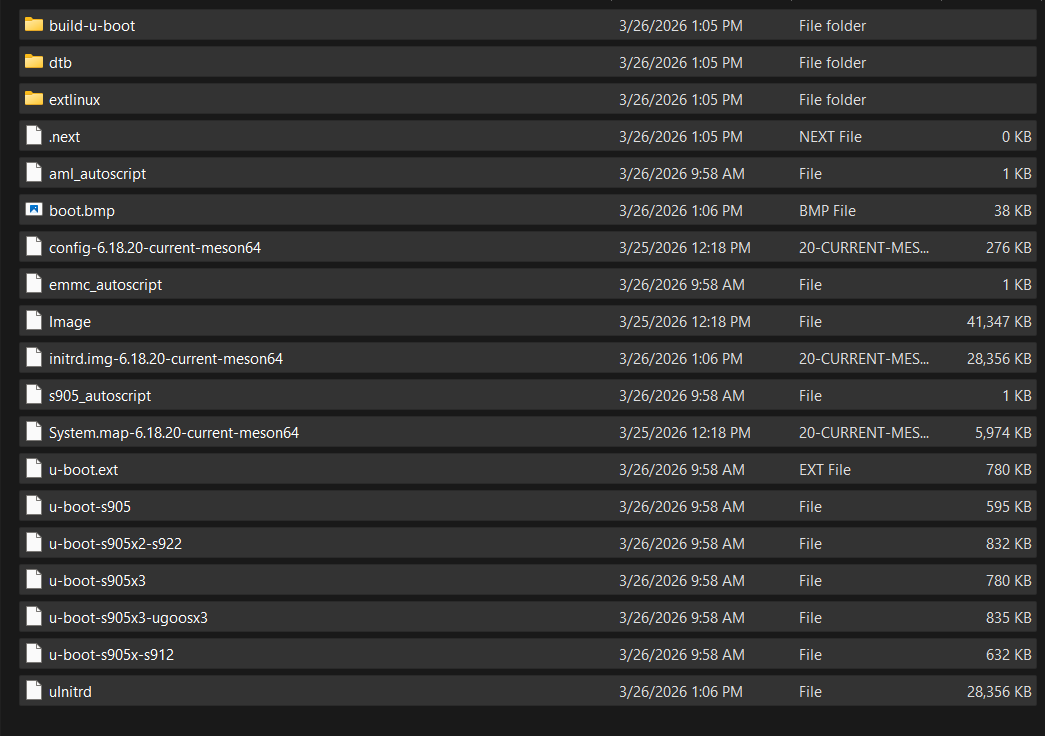
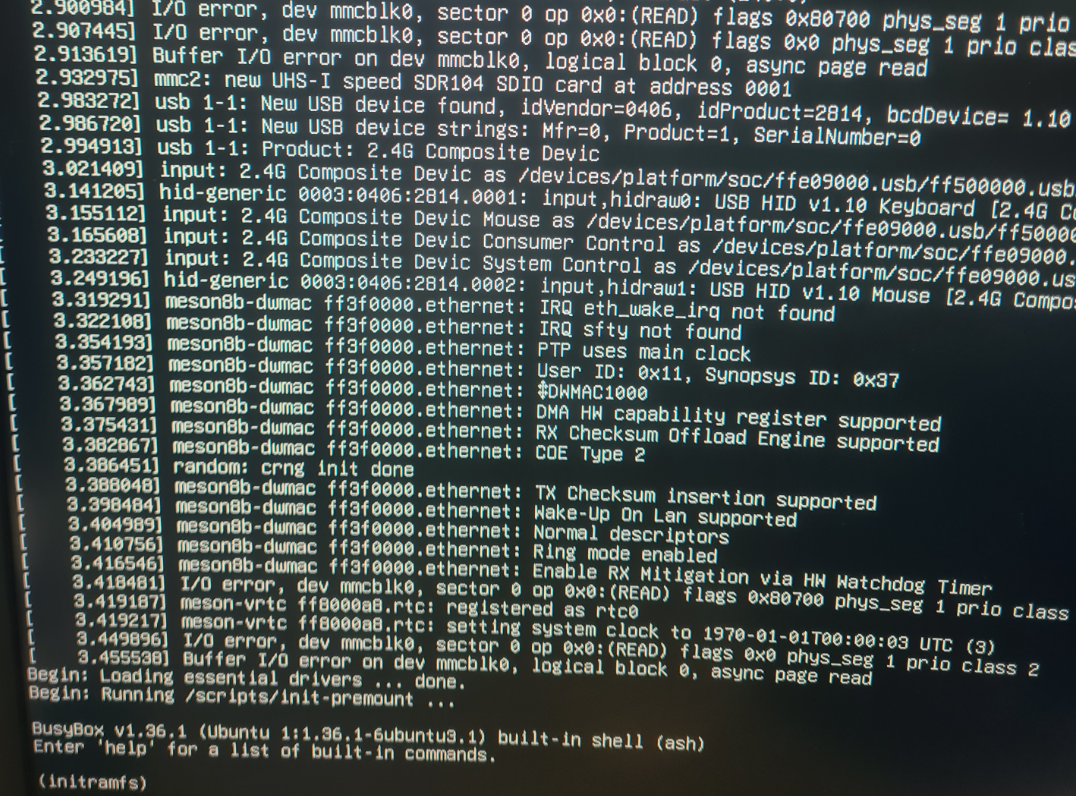
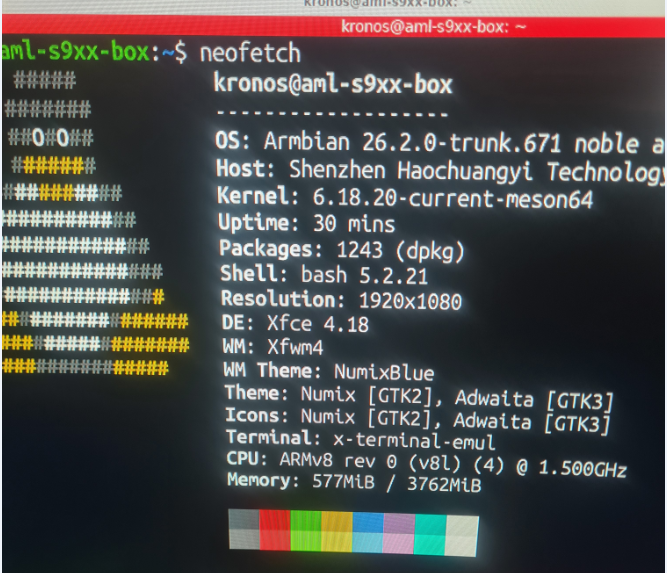
i will get that information for you.Sorry i did not give it sooner Box: H96 model x3 cpu-s905x3 rom 64gb the config file is kernel /Image initrd /uInitrd fdt /dtb/amlogic/meson-sm1-h96-max.dtb append root=UUID=54072e2a-0ddf-4b60-930c-f13cc5fc51b1 rootflags=data=writeback console=ttyAML0,115200n8 console=tty0 rw no_console_suspend consoleblank=0 fsck.fix=yes fsck.repair=yes net.ifnames=0 splash plymouth.ignore-serial-consoles I will post a neofetch of the usb flash that armibian works from on the same box strange enough when i take the sd card out the port on the box and place it in a usb card reader then boot armbian boots up ok and works(except the wifi) WHen i place the sd card back into the slot i get no errors but get stuck on initram
-
 I see someone has a patch into Armbian build for Orange Pi 4 Pro, is there anybody tried it? https://github.com/jonas5/orangepi-4pro-armbian
 -
networking in bpi-m5 with new 26.03.1 release.
gene1934 replied to gene1934's topic in Software, Applications, Userspace
the xfce4 desktop version, specficallly: Armbian_26.2.1_Bananapim5_noble_current_6.18.15_xfce_desktop.img after unpacking the xz version. The previous version that needed 430 some updates also had the mdadm stuff preloaded and had no trouble recovering the /raid6 once I had created the mount point with a mkdir /raid6. this one fails on all counts so, no entries other than control in /dev/mapper. So I'm assuming the first thing I need to install once networking is working is mdadm. But without an external network I'm locked out of everything else. Very frustrating. gene@amanda:~$ ls /dev/sd* /dev/sda /dev/sdb /dev/sdc /dev/sdd /dev/sdd2 /dev/sde1 /dev/sdf1 /dev/sdg1 /dev/sda1 /dev/sdb1 /dev/sdc1 /dev/sdd1 /dev/sde /dev/sdf /dev/sdg So all the drives are there but not recognized as the raid6. The odd /dev/sdd is probably the 1T 2.5" lappy drive I put in for a faster /swap and had plans for its use as a scratchpad drive for amanda's use but is essentially just 50G of swap now. So what do I edit to fix the network ??? -
It may be better to do this with an overlay, as a kernel update will wipe out any changes you make. If you're not seeing anything on any of the I2C buses, I'd first check your wiring. You should have 4 wires, SCL, SDA, GND, and either +3.3V or +5V (depending). Next, I'd check for similar boards to your M5. A quick search suggests it's an Amlogic S905X3, which is the same Meson SM1 CPU as the ODroid C4. And there's a pair of ODroid C4's overlays to enable I2C, and they're doing more than setting the status to "okay". May be worth a try? - meson-sm1-odroid-c4-i2c0.dtbo - meson-sm1-odroid-c4-i2c1.dtbo Failing that, I'd check to see if there's anything useful in the Banana Pi forums or documentation on how to enable those I2C buses. I'm afraid some of the Amlogic documentation may be somewhat limited.
- Yesterday
-
networking in bpi-m5 with new 26.03.1 release.
bedna replied to gene1934's topic in Software, Applications, Userspace
If you want to use network manager you have to make sure systemd is not overriding your configs, ie disable relevant systemd services. To me, it sounds easier to just use what is installed default, in this case systemd and use networkctl to interact. But it should be irrelevant. If you configure your dhcp server and dns server correctly, both systemd and network manager should pick up correct config in default config state so you should not even have to interact with either of them. (I started assuming you are using a minimal image, therefore systemd as default. You haven't disclosed what version you use, just something 26.3) -
networking in bpi-m5 with new 26.03.1 release.
gene1934 replied to gene1934's topic in Software, Applications, Userspace
NetworkManager is how I have been trying of configure end0 but it won't run by itself, ONLY when armbian-config runs it as a client. IDK if I can copy/paste its show me output. -
networking in bpi-m5 with new 26.03.1 release.
bedna replied to gene1934's topic in Software, Applications, Userspace
Either the config on the device is wrong, there is supposed to be a dns ON the device or the dhcp server is handing out wrong dns to the device. Not on every specific device if there is a local dns server available on the network. Then it's normally done on the local dns itself by first checking local configs (like /etc/hosts) and if not available, resolve using online dns servers and then send the response to the device. And the dhcp server is obv configured to point to the local dns server. That way the configs gets propagated via the dhcp lease to all devices on the network. Edit As far as I know, network manager is default on armbian (correct me if I'm wrong) and that should have edited your /etc/resolv.conf. So since it's not, you have made changes outside of default config somehow. Could be that the specific release and device you use does not utilize network manager. But since you have not disclosed that info, hard to know. But it looks like you use systemd-resolved so you should check how that works. Edit2 I was wrong about network manager, see https://docs.armbian.com/User-Guide_Networking/ -
networking in bpi-m5 with new 26.03.1 release.
gene1934 replied to gene1934's topic in Software, Applications, Userspace
gene@amanda:~$ resolvectl status Global Protocols: -LLMNR -mDNS -DNSOverTLS DNSSEC=no/unsupported resolv.conf mode: stub Link 2 (end0) Current Scopes: DNS Protocols: +DefaultRoute -LLMNR -mDNS -DNSOverTLS DNSSEC=no/unsupported Current DNS Server: 192.168.71.0 DNS Servers: 192.168.71.0 -
networking in bpi-m5 with new 26.03.1 release.
gene1934 replied to gene1934's topic in Software, Applications, Userspace
untouched and wrong as can be: # # This file might be symlinked as /etc/resolv.conf. If you're looking at # /etc/resolv.conf and seeing this text, you have followed the symlink. # # This is a dynamic resolv.conf file for connecting local clients to the # internal DNS stub resolver of systemd-resolved. This file lists all # configured search domains. # # Run "resolvectl status" to see details about the uplink DNS servers # currently in use. # # Third party programs should typically not access this file directly, but only # through the symlink at /etc/resolv.conf. To manage man:resolv.conf(5) in a # different way, replace this symlink by a static file or a different symlink. # # See man:systemd-resolved.service(8) for details about the supported modes of # operation for /etc/resolv.conf. nameserver 127.0.0.53 options edns0 trust-ad search . Damn, doesn't anyone use /etc/hosts for small home networks anymore? Toss in that you don't install ANY manpages so us users are running blind 99% of the time. Thanks bedna. -
networking in bpi-m5 with new 26.03.1 release.
bedna replied to gene1934's topic in Software, Applications, Userspace
I repeat, what is in your /etc/resolv.conf? -
networking in bpi-m5 with new 26.03.1 release.
gene1934 replied to gene1934's topic in Software, Applications, Userspace
the router reflashed with a recent dd-wrt runs dnsmasq, which caches the ISP. If that fails it query's the ISP's server, which works fine for the other 7 machines here. -
networking in bpi-m5 with new 26.03.1 release.
bedna replied to gene1934's topic in Software, Applications, Userspace
What's in your /etc/resolv.conf? And what do you mean with "dhcp isn't working"? Is 192.168.71.2 not the correct ip? Where is your dhcp? Your router? -
networking in bpi-m5 with new 26.03.1 release.
gene1934 replied to gene1934's topic in Software, Applications, Userspace
no wireless is configured except the BT mouse, which works fine. -
This system has been running for several months months as a backup server with a nobel release about a year old, maybe some older, using two usb3 7 port hubs because 1 hub could not handle the current draw of 5 TSMC 4T SSD's using startech usb3.1 cables to connect 5 if them in a /raid6 configuration for an 11.1 Tb drive. But I decided to do an as sudo -i, "apt update" and was advised that would update about 430 files so I figured I'd do an apt update -y, then and apt --purge autoremove". Unforch it went into lala land while making a new initrd. After about 20 minutes I did a powerdown to be greeted by a repeating loop indicating there was no network. So I dl'd & wrote the month old 26.03 release. Which after getting chrony to work using my own local ntpsec, finally got the correct time and I'm able to login both directions using ssh me@machine assigned address, but no outside my local net addresses are found, dhcp isn't working. It is supposed to first query /etc/hosts wich does work, but if that doesn't resolve the name in dnsmasq, the router then query's the dns server at my ISP, which works for the rest of my 8 machines here, but does Not work for the 26.03 just released a month ago. ip a reports: 1: lo: <LOOPBACK,UP,LOWER_UP> mtu 65536 qdisc noqueue state UNKNOWN group default qlen 1000 link/loopback 00:00:00:00:00:00 brd 00:00:00:00:00:00 inet 127.0.0.1/8 scope host lo valid_lft forever preferred_lft forever inet6 ::1/128 scope host noprefixroute valid_lft forever preferred_lft forever 2: end0: <BROADCAST,MULTICAST,UP,LOWER_UP> mtu 1500 qdisc mq state UP group default qlen 1000 link/ether be:63:9c:35:dd:4f brd ff:ff:ff:ff:ff:ff inet 192.168.71.2/24 brd 192.168.71.255 scope global noprefixroute end0 valid_lft forever preferred_lft forever inet6 fe80::bc63:9cff:fe35:dd4f/64 scope link valid_lft forever preferred_lft forever ip r reports: 192.168.71.0/24 dev end0 proto kernel scope link src 192.168.71.2 metric 100 gene@amanda:~$ A ping -c1 yahoo.com kills enough time its several seconds before it reports "network is unreachable" Can you see whats wrong, or give me the newer tracing tools to find the error? Thank you.
-
Oh I see now. I've had problems using root=/dev/sdX. I would try to use UUIDs which you should be able to query with blkid. But I doubt that is going to fix the above. I suspect the drivers needed to boot from NVME are probably not being loaded. That could mean they are not being compiled (either built in or as modules) OR if built as modules they are not being included in your initramfs. Actually...I don't see that you are loading an initramfs. Again, I'm not familiar with armbian but many distros rely on an initramfs to provide needed drivers for early userspace. I have one device with a NVME and one without. Booting from either MMC or NVME does work with the right config/initramfs. I would include your full u-boot config and all kernel boot messages. You can attach them instead of putting in the body of the post. There may be other subtle/cryptic warnings that indicate a driver is missing.
-
Sorry if i wasn't clear - that's two separate boot profiles... one with a USB drive plugged in, but just left it in after `bubt'ing. The real drive I'm trying to boot from is the SATA nVME 2280 (M+B Key). Once i take the USB drive out, no SDA devices are identified by the kernel. The 6.12.x kernel is on the 2280 drive (SATA/SCSI)... basically `uboot' is able to ext4load the kernel, but once the kernel drops in, it must not be initializing scsi/SATA support, only USB support. Thus, it can't find rootfs, because it hasn't initialized it... but i'm not sure why it hasn't initialized support. All the discussions / AI results suggest it's either a power issue -- which doesn't make sense if it *booted* from the drive itself already?! -- or a device tree issue. I don't know enough about device trees to know, but the above snippet looked like it had support. I reflashed/updated the NVMe via armbian-imager -- looks like a monthly release update, but no change. Are you booting from the emmc or USB then? You're not using the internal SATA/NVMe 2280 connector for boot? Presumably i COULD put root/boot fs on the emmc, but i like to have the fallback option if something goes wrong. This is what i did with my old one -- a DreamPlug, where i just have an SD Card drive everything. If i screw something up, I just take the SD Card out, and it boots off the good-but-old emmc.
-
@KV1 nice! So I think the kernel is saying it can "see" /dev/sda1 but that whatever filesystem you've got on that partition it does not recognize and could not mount after trying fat, ext4, and xfs. Are you sure /dev/sda1 has been formatted/imaged correctly? That looks like it's a USB thumb drive, right? If so, I would plug it into another working host and check that it is properly formatted and does indeed contain the intended root file system you'd like to boot. Where is /boot? /dev/mmcblk0p1?
-
 Collabora presents "Bringing BitNet to ExecuTorch via Vulkan" at PyTorch Conference Europe in Paris (April 7-8) and attends ICLR in Rio de Janeiro (April 23-27). Connect with our team to discuss machine learning and open source innovation! View the full article
 -
Here is an example of an overlay for adding an RTC to the radxa zero /dts-v1/; /plugin/; / { compatible = "radxa,zero", "amlogic,g12a"; fragment@0 { target-path = "/"; __overlay__ { aliases { rtc0 = &rtc; }; }; }; fragment@1 { target = <&i2c3>; __overlay__ { #address-cells = <1>; #size-cells = <0>; rtc: rtc@68 { compatible = "dallas,ds1307"; reg = <0x68>; wakeup-source; }; }; }; __overrides__ { rtc = <0>,"+0"; addr = <&rtc>, "reg:0"; }; }; Key bits here: * aliases (some of these AML units have vrtc on rtc0, so it may need to be set to rtc1) * i2c# (this should be obvious) * compatible string * wakeup-source The i2c-dev module must be force loaded in some cases. If it isn't hard coded into the kernel, you can add it to /etc/modules
-
Open source projects like ours operate with very limited resources, and infrastructure such as mirrors is maintained on a best-effort basis. We’re aware that things are not always perfect, but addressing this properly requires dedicated maintainers - something we never had. If you’d like to help improve the situation, we’d genuinely welcome someone stepping in to take ownership of this part of the infrastructure. Improving scripts to make this information correct and other things that are missing ... Perhaps contanting mirror owner would already be a solution. I understand - but our mirror system isn’t a standard Debian-style setup. The “empty mirrors” you’re seeing are a cosmetic problem. Only status isn’t automatically pruned yet, so entries can remain listed after they’re no longer active. This does not affect users: traffic is routed through apt.armbian.com and dl.armbian.com, which only serve from working mirrors. What’s missing is automation to keep the public listing in sync - not mirror functionality itself. One of those https://actions.armbian.com/?repo=armbian.github.io needs further development. Our rsync server works: rsync -av rsync://rsync.armbian.com/dl/ I have no clue as this mirror is not under our direct control. Edit: I sent email to administrator of AARNet.
-
You need to provide a lot more information. Lets start with logs/screenshots of what you are experiencing. What Box, what uboot, what dtb are you using? What armbian image are you using?