All Activity
- Past hour
-

The microphone (on Android) does not work after installing Armbian?
KAHrel replied to KAHrel's topic in Orange Pi 5 Plus
I apologize again, as I am using a translator. Hello, good evening. I had forgotten to reply. To rule out any problems, I decided to reinstall everything from scratch. I reinstalled Android 12 (microphone works). I installed Armbian (microphone works). The problem starts when I want to use my eMMC unit. Armbian doesn't detect it, and I read that I have to delete the SPI Flash. After deleting it, it detects it, but my Android system stops working. In the end, I ended up going back to a Linux distribution other than Armbian. - Today
-
@qq20739111 The compilation was successful, but ollama was unable to call NPU
- Yesterday
-
Hi @xuyitao, My repository is focused on moving toward a usable mainline kernel. As of this week, there are no longer any dependencies on BSP NPU drivers. I plan to remove those, along with the BSP GPU drivers, to avoid any potential confusion. Could you take a look at the mainline etnaviv driver? Hopefully it meets your needs.
-

H96 Max RK3528 - Cannot boot Armbian from TF/SD card
0KTAV1US replied to 0KTAV1US's topic in Rockchip CPU Boxes
I had some success, I start it via pxe + nfs, some systemd services are not starting, I think I can also prepare the correct USB image, it will be interesting, thanks everyone 😃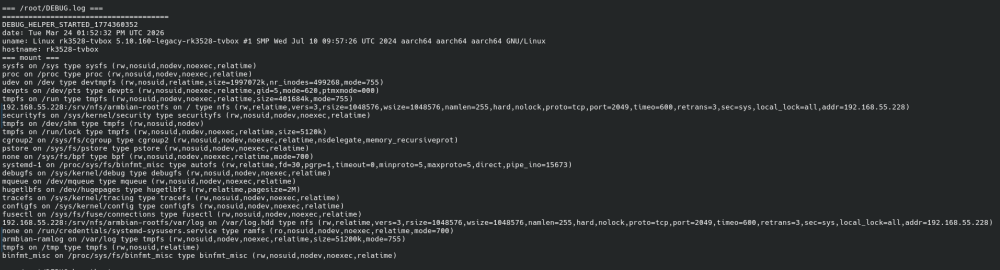
-

NAS kit w/ NEO LTS: RTC not surviving reboots
Makda Mujji replied to Makda Mujji's topic in Allwinner sunxi
Starting from Trixie, some paths have changed. Here is the complete walkthrough for the process: Install necessary tools (i2c-tools and hwclock are not present by default in Armbian trixie): sudo apt install i2c-tools util-linux-extra Edit armbianEnv.txt: sudo nano /boot/armbianEnv.txt Append i2c0 to the line that says overlays=...: overlays=... i2c0 ("..." denotes some overlays already written, do not delete them). Reboot (compulsory to load i2c module): sudo reboot now Inquire availability of module rtc-ds1307 in the kernel (present in trixie): sudo modinfo rtc-ds1307 If it returns some description, the module is present. If not, then install its driver from GitHub. Open modules file: sudo nano /etc/modules Add line rtc-ds1307 in it. Save and close. Run the following command: sudo i2cdetect -y 0 It should return 68 in the grid: 0 1 2 3 4 5 6 7 8 9 a b c d e f 00: -- -- -- -- -- -- -- -- 10: -- -- -- -- -- -- -- -- -- -- -- -- -- -- -- -- 20: -- -- -- -- -- -- -- -- -- -- -- -- -- -- -- -- 30: -- -- -- -- -- -- -- -- -- -- -- -- -- -- -- -- 40: -- -- -- -- -- -- -- -- -- -- -- -- -- -- -- -- 50: -- -- -- -- -- -- -- -- -- -- -- -- -- -- -- -- 60: -- -- -- -- -- -- -- -- 68 -- -- -- -- -- -- -- 70: -- -- -- -- -- -- -- -- Then add module to start up: sudo modprobe rtc-ds1307 sudo echo ds1307 0x68 > /sys/class/i2c-dev/i2c-0/device/new_device The DS1307 should now be available at /dev/rtc1, which you can check: sudo ls /dev/ | grep rtc Initialize rtc1 (once) sudo hwclock --rtc /dev/rtc1 --systohc Create a new file rtc_ds1307.sh: sudo nano /usr/local/bin/rtc_ds1307.sh Add following lines in it: #!/bin/bash echo "Creating entry for rtc_1307 service" | systemd-cat -p info sudo echo ds1307 0x68 > /sys/class/i2c-dev/i2c-0/device/new_device echo "Done" | systemd-cat -p info echo "Symlinking /dev/rtc1 to /dev/rtc" | systemd-cat -p info sudo ln -f -s /dev/rtc1 /dev/rtc echo "Done" echo "Syncing RTC time to system time" | systemd-cat -p info sudo hwclock --hctosys --noadjfile --utc -f /dev/rtc1 echo "Done" Save and exit. Make this file executable: sudo chmod +x /usr/local/bin/rtc_ds1307.sh Create a systemd service to run this script at startup: sudo nano /etc/systemd/system/rtc_ds1307.service Add following lines in it: [Unit] Description=Synchronize system clock to RTC Requires=systemd-modules-load.service After=systemd-modules-load.service ConditionPathExists=/sys/class/i2c-dev [Service] Type=oneshot RemainAfterExit=yes ExecStart=/usr/local/bin/rtc_ds1307.sh [Install] WantedBy=multi-user.target Save and exit. Enable the service: sudo chmod 644 /etc/systemd/system/rtc_ds1307.service sudo systemctl enable rtc_ds1307.service Reboot and check system date time by running: timedatectl -
 @Sergioclr output of USB-to-TTL converter. sudo dmesg
 -
Is there an armbian with home-assistant installed?
-
 So I'm fairly new to Armbian (although I have already managed to successfully create a custom build with most of what I need). Sadly, I've very much hit a blocker. I really need to use linux-tools/perf on an RK3588 board with a vendor kernel (I'm using the Mali OpenCL, and the ARM packages are mostly locked) and I need to do some performance tuning. I cannot figure out how to get these tools deployed. 1. There are no linux-tools packages build -- which is fair enough, I'm probably in a minority. Some parts of the tools directories are culled during a cleaning process for the headers, I can see that 2. I am happy to copy over the kernel source and build on the device, but this is a patched vendor kernel. Can I just rsync across `cache/sources/linux-kernel-worktree`? Is that the patched kernel source tree? 3. There are some old allusions in the forums to using armbian-config to get sources -- I'm guessing that's long deprecated 4. Would it be appropriate at some point to create a .deb for the actual kernel sources, just in case -- or even, ideally, the linux-tools packages themselves? I am very happy to invest effort into helping make this happen, but I am starting from cold into this fairly complex build infrastructure, so any help or pointers I'd be extremely grateful.
 -
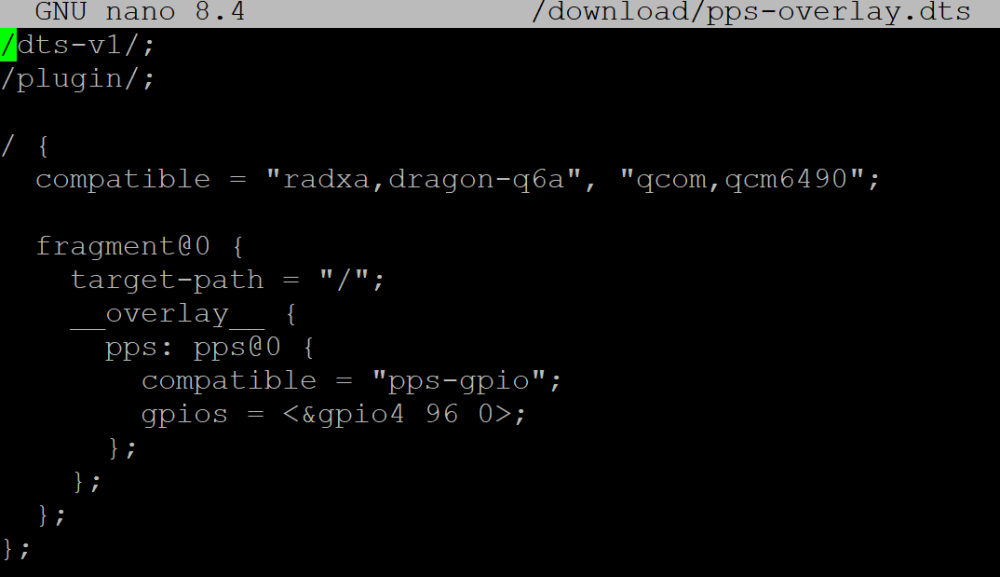
How to install Armbian on an eMMC module? Simply using Armbian Imager with the image file doesn't work—the system won't boot. The official Radxa OS boots fine from the same eMMC module.
-
 Newbie question: how can I do that (boot logs)? 🤔
 -
 Hello everyone, I bought an H96 Max M9 TV box. I mainly use it for YouTube and watching movies, but later I wanted to use it for gaming, including emulators and modern community-made ports. This TV box, with its 8GB of RAM, has a lot of potential, but it is being wasted due to a common issue: the file manager. The problem is not the file explorer apps you install—I’ve tried them all—but the system’s storage manager (Android’s SAF), which seems to be poorly implemented or limited by the firmware. This causes issues such as: Selecting folders in PPSSPP (memory stick) Access for emulators like Dolphin Emulator Installing game ports that should run perfectly on this TV box, but cannot be installed due to bugs in the system file manager To be honest, I’m not very knowledgeable about these topics, but if anyone has experienced this or knows a possible solution and can share the information, I would really appreciate it in advance.
 -
@Sergioclr Can you post your boot logs? both android and armbian. Try this. phy-supply = <®_dldo1>; /* Try reg_dldo1 if aldo1 (1.8V) fails */
-
Hi, trying to build custom image, from your repo. Building from branch mxq-pro couldn't get to booting from emmc, but your provided firmware does fine, what am i missing there?
-
H96 Max RK3528 - Cannot boot Armbian from TF/SD card
0KTAV1US replied to 0KTAV1US's topic in Rockchip CPU Boxes
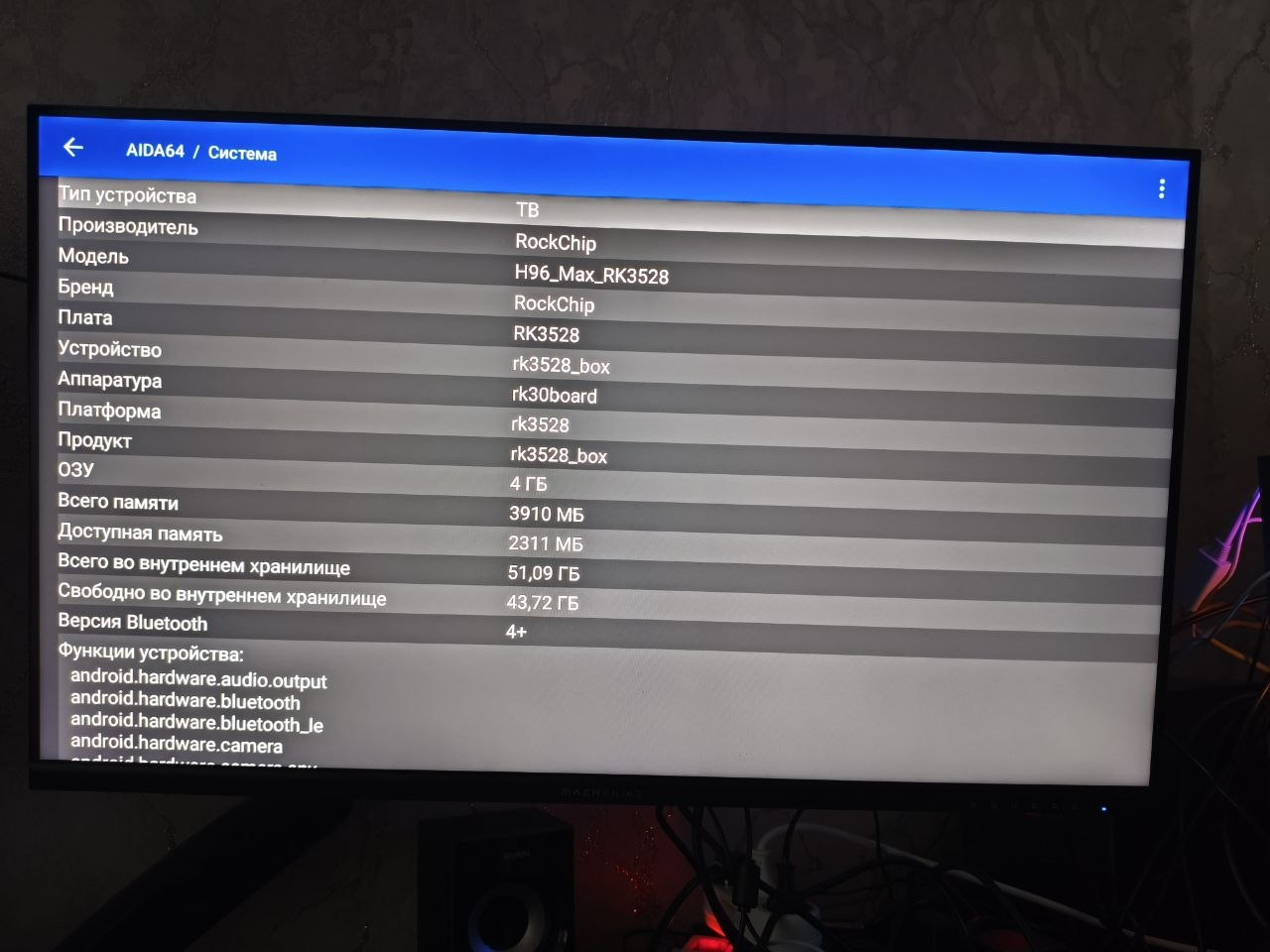
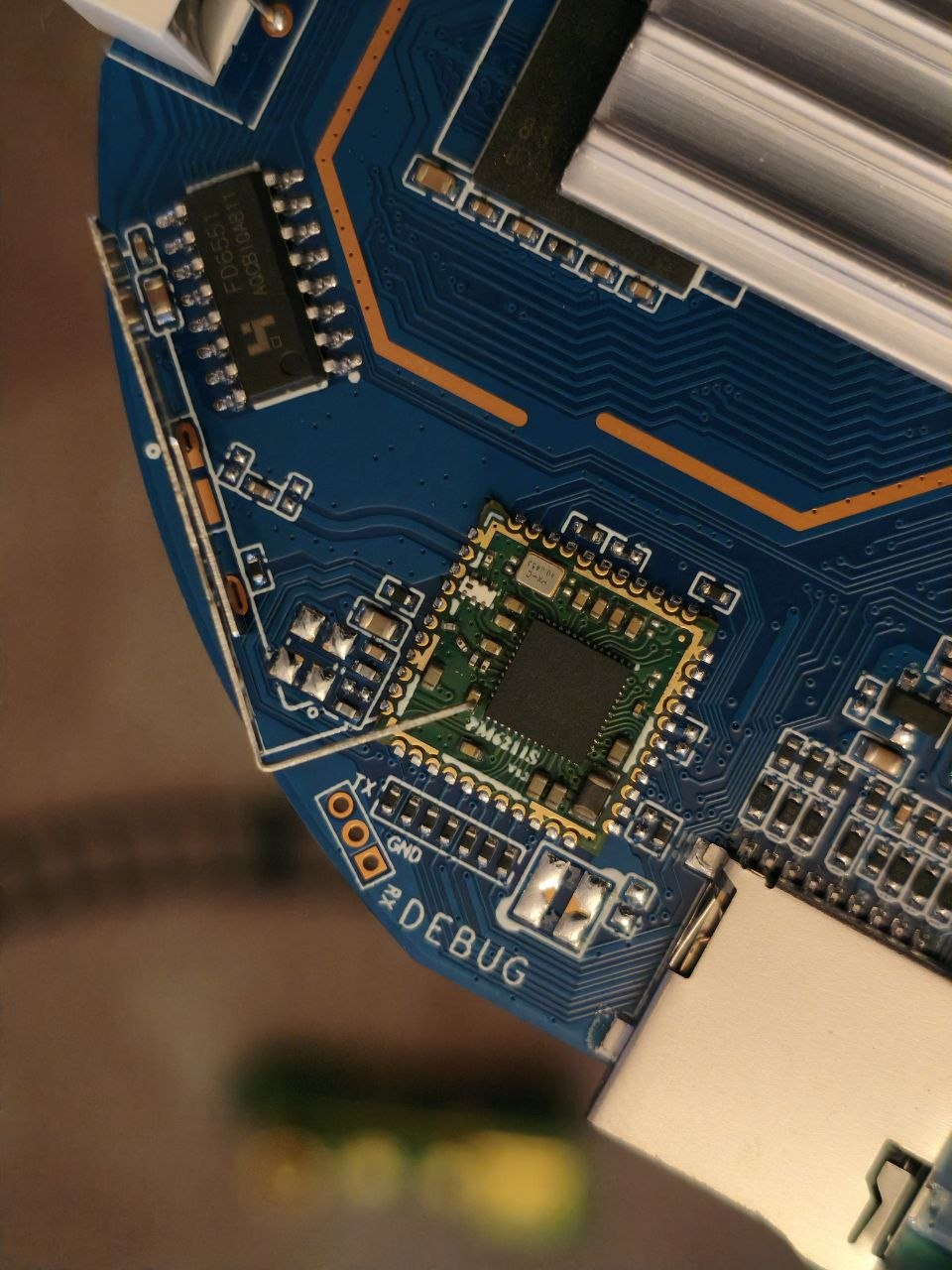
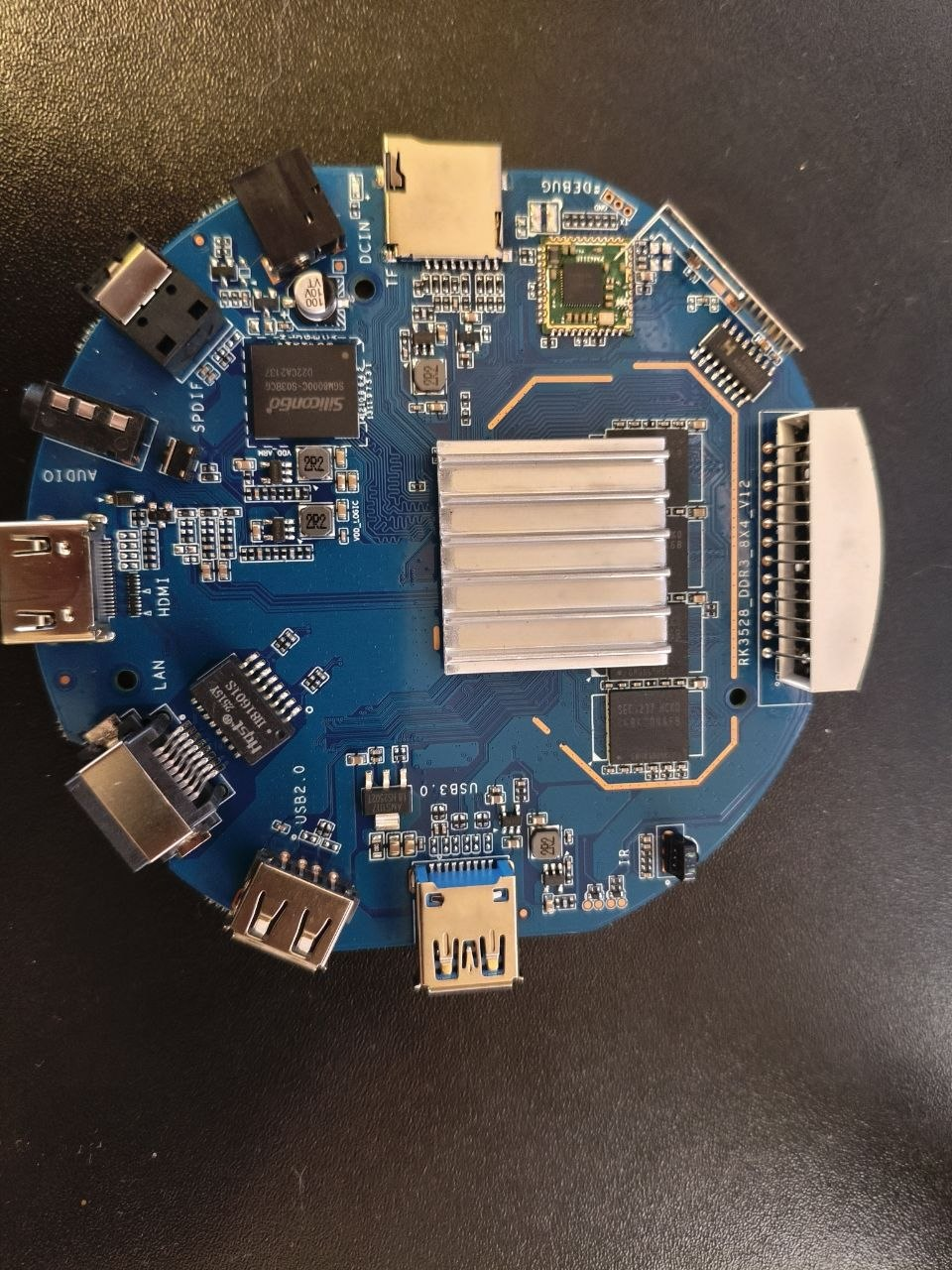
@jock Please help. Worst TV-box PCB I've ever seen in my life. Hardware: H96 Max "8K Ultra HD" (round case) PCB: RK3528_DDR3_8X4_V12 SoC: Rockchip RK3528 4GB DDR3 (8x Samsung K4B4G0446B) 64GB eMMC Samsung KLMCG2KETM WiFi: SKYWB8800 / SG-WB800E (AIC8800) Android 13, kernel 5.10.157, build RZX.V01.20240924.1740 I have TWO boards (same PCB revision, same markings). Both have DEBUG pads clearly labeled TX / GND / RX. UART completely silent in all combinations. Tried two different adapters: FTDI FT232 (ID 0403:6001) Silicon Labs CP2102 (ID 10c4:ea60) Both show up in dmesg fine, /dev/ttyUSB0 created, picocom opens. When powering device on — silence or garbage at all baud rates (115200, 230400, 460800, 921600, 1000000, 1152000, 1500000, 2000000, 3000000). Soldering done by a professional, crossover connection: adapter TX → board RX adapter RX → board TX GND ↔ GND VCC NOT connected (device powered separately) Loopback test on adapters works — adapters are OK. Devices are alive — Android boots normally, AIDA64 shows everything fine. Tested on both boards with both adapters — silence everywhere. Only garbage appears when physically jiggling wires (clearly body static, not device signal). My hypotheses: Vendor disabled UART output in stock loader/TPL for boot speed TX/RX pads repurposed as GPIO (LED / IR / etc.) DEBUG pads are actually NOT UART but JTAG/something else UART works but on some non-standard baud rate In fensoft U-Boot defconfig (https://github.com/fensoft/rk3528-tvbox) I see: CONFIG_BAUDRATE=1500000 CONFIG_DEBUG_UART_BASE=0xff9f0000 CONFIG_DEBUG_UART_CLOCK=24000000 Meaning fensoft uses this UART on similar boards. Why doesn't mine work? Background: spent 3 days trying to PXE boot Armbian. U-Boot (Ilya's + fensoft) works, TFTP/NFS works, kernel loads, initrd loads, DTB loads. But after booti the kernel dies instantly, so I need UART to see panic message. Tried many DTBs: evb1-ddr4, evb2-ddr3, android-native, nanopi-zero2, armsom-sige1, vontar-dq08, even stock Android DTB extracted from boot.img — all silent. Anyone experienced this on H96 Max RK3528 DDR3? Any way to force UART enable via some fastboot/adb command on Android before reboot? Attaching photos: PCB with RK3528_DDR3_8X4_V12 marking Close-up of DEBUG pads with soldered wires SG-WB800E WiFi module Thanks in advance for anyone who reads this!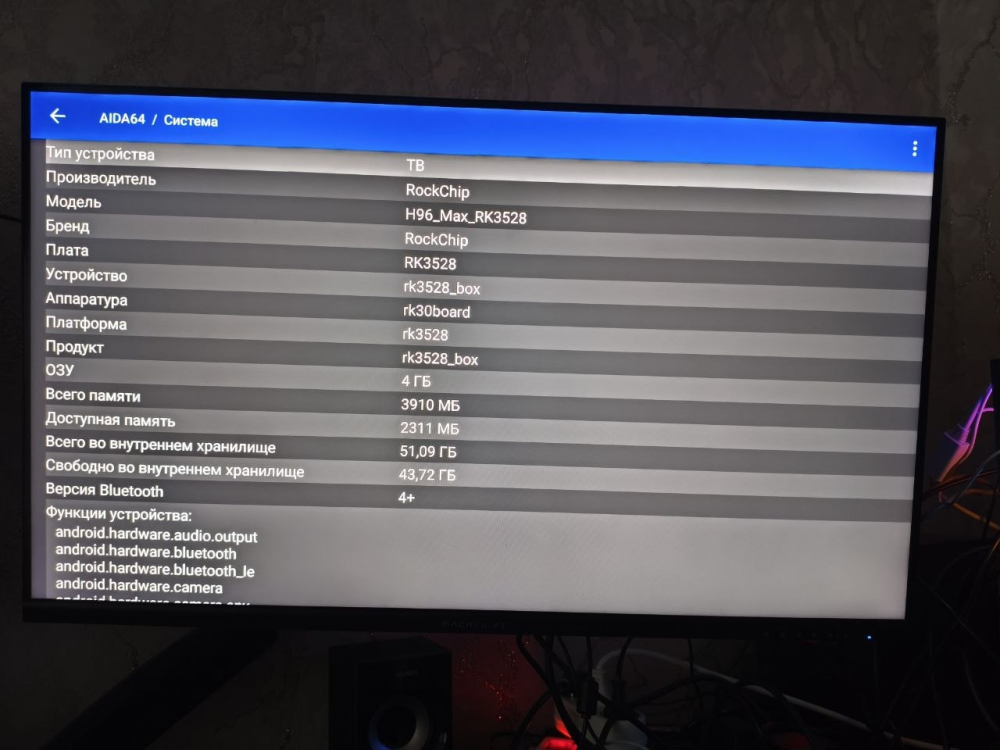
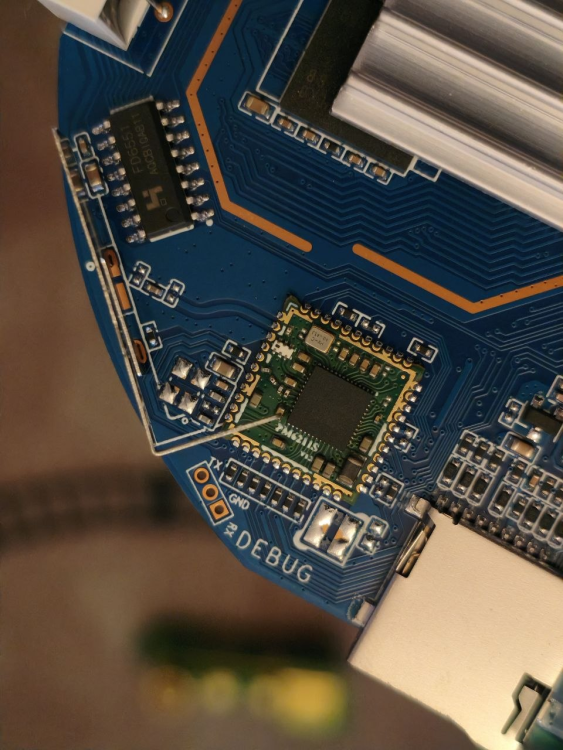
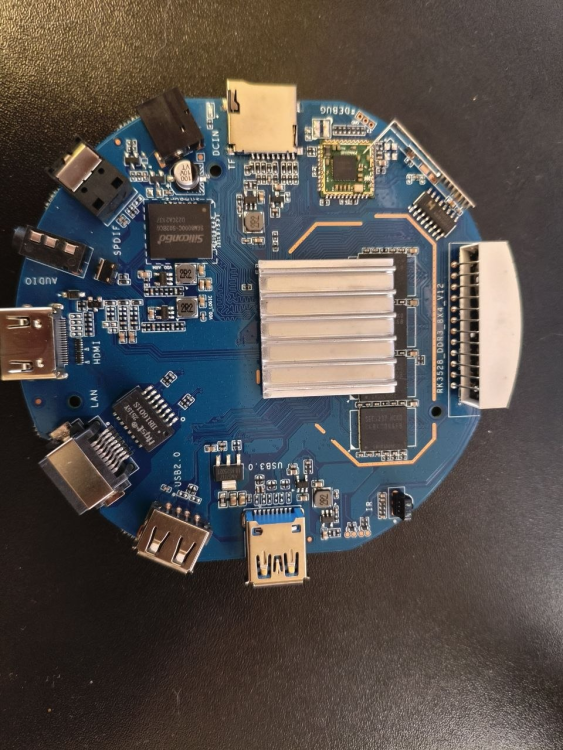
-
Help needed (previous update): What should be edited is this file? sudo pico arch/arm64/boot/dts/allwinner/sun50i-h313-x96q-lpddr3.dts Thanks in advance.
-
@xuyitao Did your build pass? Can the NPU handle Ollama?
-

USB 3.0 port does not show connected device.
jarda9 jarda9 replied to jarda9 jarda9's topic in Rockchip
As a workaround I installed Armbian_community_26.2.0-trunk.732_Orangepi3b_trixie_vendor_6.1.115_minimal .img.xz and USB is OK, anyway ethernet is functional. -

20USD 4GRAM RK3528 host (cheap dq08 tvbox)
sr4armbian replied to fensoft's topic in Rockchip CPU Boxes
@fensoft I am using your current image 3.0.0_r2 in H96 Max M1 with USB Hub + USB to Ethernet adapter successfully. Its really energy efficient solution which can run 24 x 7 without costing much. However I am trying to set this up on a dq08 box with 4 GB/64 GB Model. I am able to install dq08_ha_supervised_3.0.0_r2.zip without any issue. However due to recent support changes from the application, I am unable to continue further with the setup. I tried to install docker version to set this up but getting error "invalid argument: in-kernel BTF is malformed (1 line(s) omitted)". Not seeing much on this error in the interwebs but there are suggestions that this could be due to old kernels/. Is there a way we can update this kernel and OS to Armbian Trixie or will it brick the dq08? Have you got a chance to look at the updated installer image? -
same here: RADXA 4SE
-
https://github.com/alexcaoys/allwinner-bspThere are numerous issues with the NPU driver code in the repository, with almost all header files incorrectly set to "<>", resulting in compile time dependencies that cannot be found. I initially wanted to try modifying the makefile, but I found that the header file settings were very confusing, including mixing<>and "", incorrect header file paths, and a series of other problems. In the end, I gave up modifying the makefile and instead relied entirely on relative paths to locate header files, almost all of which needed to be modified. However, it is reassuring that the repository has no other issues except for the header file error of the NPU code. Of course, it may be necessary to add a ** sunxi-autogen. h ** file to the include directory The following is the NPU section that I have modified, completely by replacing and modifying the directory ../ npu.7z
-

How to install correct linux-headers?
Werner replied to Stanislav Chizhik's topic in Software, Applications, Userspace
Okay so then we have some issues here This is clearly wrong since these packages come from upstream Debian and cannot/will not work with Armbian kernels. This shall be reported here: https://github.com/armbian/configng/ Then you were lucky some working headers were present https://docs.armbian.com/Developer-Guide_Build-Preparation/ Or in very short: git clone the repo ./compile.sh BOARD=rockpi-4bplus BRANCH=current kernel Check output/debs for your packages Install via dpkg -i on the target board -
 Thanks, @Werner! I believe I can do it once I find clear instructions. There's still a lot I don't understand—where all needed things are. I'd appreciate it if you could just provide a link that could point me in the right direction. Meanwhile, yesterday I somehow managed to install the headers using apt-get install linux-headers-current-rockchip64 . At least, for now, this allowed me to build the packages that needed the headers. It seems like this might be a bit of a dirty trick (no?). So, I'd still like to do it right.
 - Last week
-
H96 Max RK3528 - Cannot boot Armbian from TF/SD card
0KTAV1US replied to 0KTAV1US's topic in Rockchip CPU Boxes
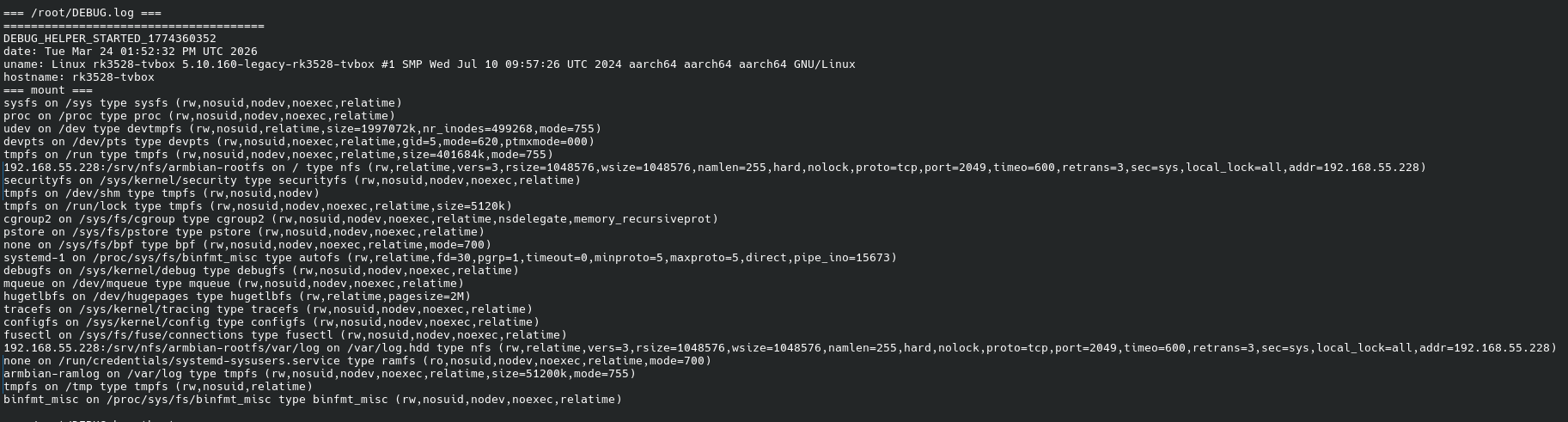
I've been working on getting Armbian running on an H96 Max RK3528 TV-box (board marking RK3528_DDR3_8X4_V12) with 4GB DDR3 and 64GB eMMC running stock Android 13. I'm building on Ilya Kurdyukov's work (github.com/ilyakurdyukov/rk3528-tvbox) and have made significant progress, but I've hit a wall and need guidance. WHAT WORKS 1. Flashed custom U-Boot (2017.09 Rockchip with Ilya's patches + my custom patches for USB host activation and USB-first boot) via rkdeveloptool. 2. Added patches to enable USB host in U-Boot DTS: &u2phy_host, &usb_host0_ehci, &usb_host0_ohci all set to status = "okay"; &usbdrd_dwc3 set to dr_mode = "host", status = "okay". 3. Modified distro_bootcmd so boot_targets = "usb0 mmc1 mtd2 mtd1 mtd0 pxe dhcp" — network boot is attempted before Android fallback. 4. Built Armbian image with BOARD=rk3528-tvbox, BRANCH=legacy, RELEASE=jammy, xfce desktop. 5. TF-slot does not work (box hangs when microSD inserted in TF slot, likely BootROM SD-boot disabled via OTP as @jock mentioned in other RK3528 threads). 6. USB card reader with microSD works in U-Boot — I see "U-Boot.armv8" DHCP client on my Mikrotik router at IP 192.168.55.114. 7. Set up PXE boot infrastructure: dnsmasq TFTP server on 192.168.55.228, NFS rootfs export on same server (/srv/nfs/armbian-rootfs), Mikrotik DHCP configured with next-server and boot-filename options. 8. U-Boot successfully downloads via TFTP: pxelinux.cfg/01-c6-33-00-3f-cb-3c (PXE config by MAC), Image (kernel, 34 MB), and dtb/rockchip/rk3528-android.dtb (extracted from stock Android boot.img, compatible: "rockchip,rk3528-evb2-ddr3-v10", "rockchip,rk3528"). WHAT DOES NOT WORK After TFTP downloads complete, the kernel appears to never start: — HDMI shows only grey screen (U-Boot logo from Ilya's gray_square_logo patch). — No kernel DHCP request on network (would indicate IP_PNP starting). — No NFS activity (nfsstat -s shows calls = 0). — No ARP responses from the box — only Mikrotik ARP requests to .114 appear in tcpdump. — Eventually Android fallback loads (boot_android runs after distro_bootcmd fails). EVIDENCE — NETWORK TRACES dnsmasq log confirms successful TFTP downloads: Apr 24 01:33:38 dnsmasq-tftp: sent /srv/tftp/pxelinux.cfg/01-c6-33-00-3f-cb-3c to 192.168.55.114 Apr 24 01:33:45 dnsmasq-tftp: sent /srv/tftp/Image to 192.168.55.114 Apr 24 01:33:45 dnsmasq-tftp: sent /srv/tftp/dtb/rockchip/rk3528-android.dtb to 192.168.55.114 Then complete silence from the box. tcpdump — U-Boot DHCP + TFTP sequence (this part works): 00:45:24.375253 IP 0.0.0.0.68 > 255.255.255.255.67: BOOTP/DHCP, Request from c6:33:00:3f:cb:3c, length 300 DHCP-Message: Discover, ARCH=22, Vendor-Class: "U-Boot.armv8" 00:45:24.878890 IP 0.0.0.0.68 > 255.255.255.255.67: BOOTP/DHCP, Request from c6:33:00:3f:cb:3c DHCP-Message: Request, Server-ID: 192.168.55.1, Requested-IP: 192.168.55.114, Vendor-Class: "U-Boot.armv8" 00:45:24.942243 IP 192.168.55.114.1583 > 192.168.55.228.69: TFTP, RRQ "pxelinux.cfg/01-c6-33-00-3f-cb-3c" octet timeout 5 blksize 1468 00:45:25.005127 IP 192.168.55.114.1646 > 192.168.55.228.69: TFTP, RRQ "uInitrd" octet timeout 5 blksize 1468 00:45:28.349357 IP 192.168.55.114.1918 > 192.168.55.228.69: TFTP, RRQ "Image" octet timeout 5 blksize 1468 00:45:35.412847 IP 192.168.55.114.2837 > 192.168.55.228.69: TFTP, RRQ "dtb/rockchip/rk3528-evb2-ddr3-v10.dtb" octet timeout 5 blksize 1468 All files transfer successfully (observed via TFTP ACK packets). tcpdump — after booti, everything goes silent. The only traffic about the box is Mikrotik's ARP probes: 00:55:19.283404 ARP, Request who-has 192.168.55.114 tell 192.168.55.1 00:55:20.296683 ARP, Request who-has 192.168.55.114 tell 192.168.55.1 00:55:21.346711 ARP, Request who-has 192.168.55.114 tell 192.168.55.1 00:55:23.441524 ARP, Request who-has 192.168.55.114 tell 192.168.55.1 ... continues for minutes with no response from the box ... The box does not respond to any ARP, does not send new DHCP, does not contact NFS (port 2049 or 111). It is as if the kernel never actually starts — or it starts but hangs so early that no network driver comes up. NFS server stats — zero kernel activity: $ sudo nfsstat -s Server rpc stats: calls badcalls badfmt badauth badclnt 0 0 0 0 0 Confirms the kernel never reached NFS root mounting. WHAT I HAVE TRIED Tested multiple combinations, all fail the same way: — 3 different DTBs: rk3528-evb1-ddr4-v10.dtb, rk3528-evb2-ddr3-v10.dtb, and the extracted Android DTB (which matches exactly: "Rockchip RK3528 EVB2 DDR3 V10 Board"). — 4 console configs: console=tty0, console=tty1, console=ttyFIQ0,1500000, and combinations. — With and without initrd (both uInitrd and no initrd). — USB card reader with microSD for rootfs (UUID-based mount). — NFS rootfs (CONFIG_ROOT_NFS=y confirmed in kernel config). — Various bootargs: earlycon=uart8250,mmio32,0xff9f0000, ignore_loglevel, panic=10, rootdelay=5. Current PXE config (last attempt): default linux timeout 10 label linux kernel Image fdt dtb/rockchip/rk3528-android.dtb append root=/dev/nfs nfsroot=192.168.55.228:/srv/nfs/armbian-rootfs,vers=3,tcp,nolock,rsize=32768,wsize=32768 rw ip=dhcp console=ttyFIQ0,1500000 console=tty1 earlycon=uart8250,mmio32,0xff9f0000 loglevel=8 ignore_loglevel panic=10 rootdelay=5 FILE VALIDATION All files check out: Image: Linux kernel ARM64 boot executable Image, little-endian, 4K pages ARM64 magic "ARMd" at offset 0x38 confirmed. DTB: Device Tree Blob version 17, correct compatible string. Kernel: CONFIG_NFS_FS=y, CONFIG_NFS_V3=y, CONFIG_ROOT_NFS=y, CONFIG_IP_PNP=y, CONFIG_IP_PNP_DHCP=y — all built-in. THE DIAGNOSTIC ROADBLOCK — UART I cannot use UART for debugging. My board has DEBUG pins marked (TX/RX/GND/VCC near the WiFi module) but UART output is pure garbage at every standard rate (115200, 460800, 921600, 1500000). I suspect either: the DEBUG pins are poorly soldered on this unit, the UART configuration is different from what Ilya documented, or the pins are actually for a different UART or purpose entirely. Without readable UART, I am completely blind to what happens after U-Boot's booti command — whether the kernel panics, hangs on early init, or starts silently. MY QUESTIONS 1. Is PXE/TFTP network boot actually expected to work on this U-Boot 2017.09 from Rockchip? The bootcmd_pxe in this U-Boot is: run boot_net_usb_start; dhcp; if pxe get; then pxe boot; fi Has anyone successfully booted Armbian this way on RK3528? 2. Is there a known issue where Ilya's U-Boot + Armbian kernel don't hand off properly? Is there a specific bootm/booti command format required that PXE might not follow? 3. Could the issue be that the Armbian kernel expects specific arguments (like androidboot.* or bootloader-specific init params) that my PXE append line does not provide? 4. Are there any known-working examples of Armbian RK3528 TV-box boot that do NOT rely on on-device storage (microSD/USB flash)? 5. Given that U-Boot runs and gets DHCP fine, all files transfer via TFTP fine, file formats are correct, but the kernel is silent after booti — is this a known class of problem with a known solution besides UART? BOARD DETAILS Model: H96 Max RK3528 (board RK3528_DDR3_8X4_V12) SoC: Rockchip RK3528 RAM: 4GB DDR3 (8x Samsung K4B4G0446B) eMMC: Samsung KLMCG2KETM-B041 64GB WiFi: SKYWB8800 (AIC8800) Stock: Android 13 (RZX.V01.20240924) MAC: C6:33:00:3F:CB:3C I'm happy to run any diagnostic commands or provide additional info. Thank you for any guidance. -
Thanks, I compiled one myself too, and it works fine. I actually thought Nick A said A7S support was only added in 6.18. I also built a desktop version for A7S, but the GUI doesn't seem to start or work properly.
-
Aiee! Installed my old "Noble" image. Updating will remove kernel 6.18.18 and install 6.6.99 and also has the error in the firmware package as decribed above by @VBB. Also, that funny "cli.github.com/packages" repo does not work. While that kernel downgrade is probably caused by linux-image-current-spacemit moved from 6.6.99 to 6.18.x recently (and the Armbian repos are out of date somehow) that firmware package should update without any errors. Will need time to sort this out. Anyhow, the "Noble" image works with GPU-activated Gnome desktop as long as you do not update (downgrade)...